


A
licenseA
qualityC
maintenanceMakes Claude a real operator for Adobe Premiere Pro 2025, providing 59 tools to control projects, timelines, media, exports, and even create cinematic intros with beat detection and style presets.
59
MIT

Provides tools for AI voiceover generation using the ElevenLabs API, including voice selection, speech synthesis, and voice-to-caption generation directly within Premiere Pro.
Includes specialized tools for creating TikTok-style captions and graphic elements within Premiere Pro sequences.
Enables exporting video sequences to the Final Cut Pro XML format to facilitate project interchange between different editing platforms.
Click on "Deploy Server".
Wait a few minutes for the server to deploy. Once ready, it will show a "Started" state.
In the chat, type @ followed by the MCP server name and your instructions, e.g., "@Premiere Pro MCP Server Generate TikTok style captions for the active sequence."
That's it! The server will respond to your query, and you can continue using it as needed.
Here is a step-by-step guide with screenshots.
Control Adobe Premiere Pro from Claude/Codex using the Model Context Protocol. 170+ tools for editing, effects, captions, export, and more.
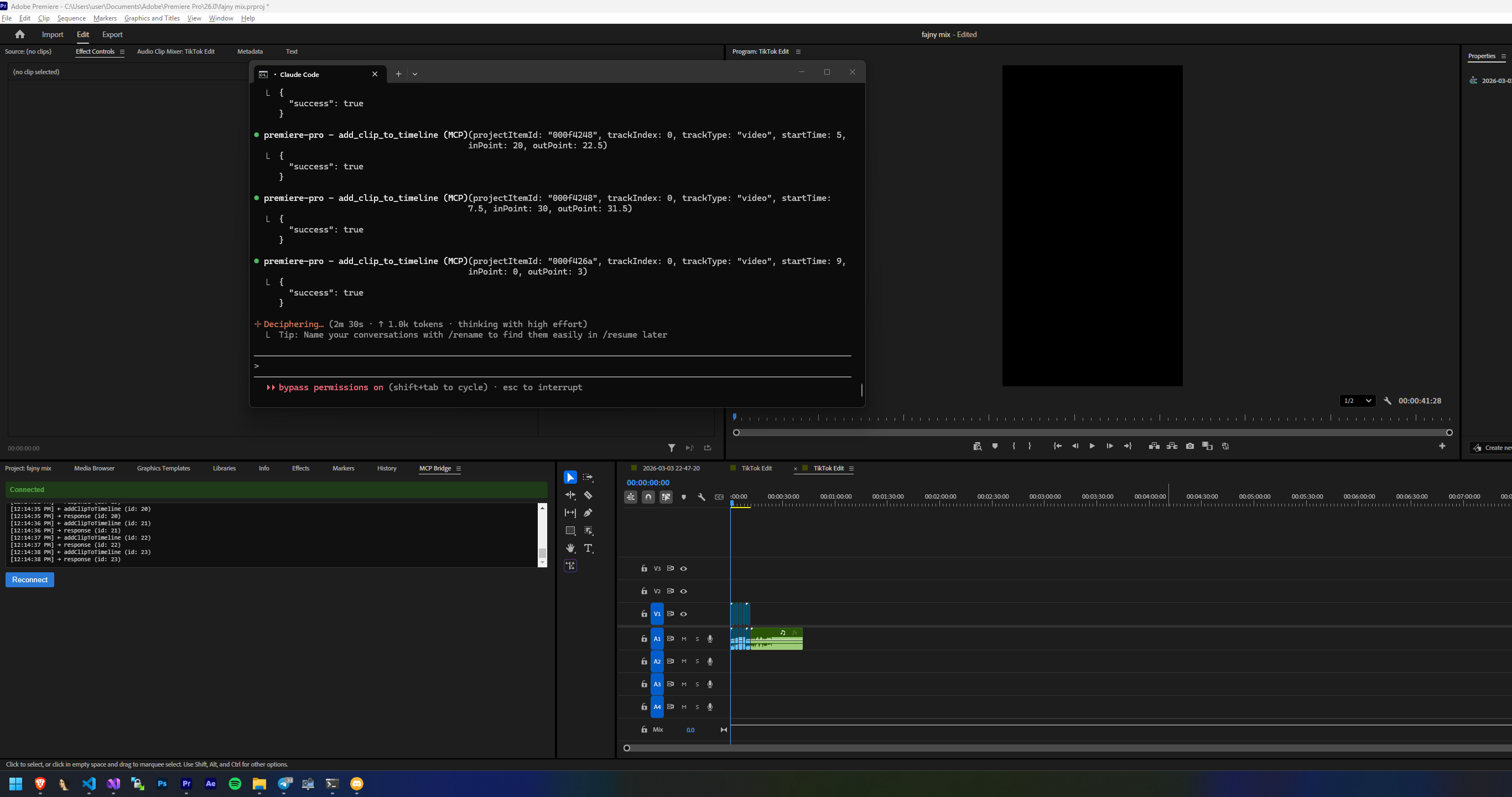
LLM ←→ MCP Server (Node.js) ←→ WebSocket ←→ CEP Panel ←→ ExtendScript ←→ Premiere ProRelated MCP server: Premiere Pro MCP Server
Adobe Premiere Pro 2023+ (tested on 2026)
Node.js 18+
Claude Desktop/Code or Codex
Windows
git clone https://github.com/antipaster/Adobe-Premiere-Pro-MCP.git
cd Adobe-Premiere-Pro-MCP
install.bat
The installer will:
Enable unsigned CEP extensions (debug mode)
Symlink the CEP panel into Premiere Pro's extensions folder
Install dependencies and build
Configure Claude Desktop and Claude Code or Codex
Open Premiere Pro
Go to Window > Extensions > MCP Bridge
The panel should show "Connected"
Start Claude/Codex and use Premiere Pro tools
Copy config.example.json to config.json and edit:
{
  "port": 8097,
  "elevenlabs": {
    "api_key": "your-elevenlabs-api-key",
    "default_voice_id": "21m00Tcm4TlvDq8ikWAM",
    "default_model": "eleven_multilingual_v2"
  }
}
Setting | Description | Default |
| WebSocket port for CEP bridge |
|
| ElevenLabs API key for AI voiceover |
|
| Default voice (Rachel) |
|
| TTS model |
|
open_project save_project close_project import_media create_bin find_project_items get_project_info get_project_items create_proxy attach_proxy toggle_proxy_mode create_sub_clip relink_media refresh_media import_ae_comps import_sequences flush_cache delete_project_items consolidate_duplicates set_project_settings set_project_item_in_out clear_project_item_in_out rename_project_item get_project_item_info get_project_item_type_info set_override_frame_rate set_override_pixel_aspect_ratio move_project_item
create_sequence create_sequence_from_clip clone_sequence delete_sequence set_active_sequence get_active_sequence get_sequences get_sequence_settings add_tracks remove_track rename_track get_track_info set_track_locked set_track_muted create_subsequence nest_clips auto_reframe_sequence scene_edit_detection set_sequence_in_out clear_sequence_in_out get_work_area set_work_area deselect_all
add_clip_to_timeline overwrite_clip_to_timeline remove_clip move_clip_to_track set_clip_position set_clip_in_out set_clip_speed razor_clip razor_all_tracks ripple_delete enable_disable_clip set_timeline_clip_label rename_clip link_clips unlink_clip duplicate_clip freeze_frame slip_clip slide_clip get_clip_info get_clip_speed get_selection select_clips set_scale_to_frame_size
apply_effect remove_effect get_clip_effects set_effect_enabled get_effect_property set_effect_property get_video_effects_list get_audio_effects_list apply_transition remove_transition get_video_transitions_list get_audio_transitions_list set_default_transition add_keyframe remove_keyframe get_keyframes set_keyframe_interpolation get_clip_transform set_clip_transform
add_marker get_markers remove_marker clear_all_markers update_marker add_clip_marker get_clip_markers add_project_item_marker
set_clip_volume get_clip_volume set_track_volume set_track_pan solo_track get_audio_channel_mapping set_audio_channel_mapping apply_audio_crossfade add_audio_keyframe set_clip_mute
export_sequence export_direct export_frame export_aaf export_omf export_edl export_final_cut_xml export_captions get_encoder_presets
add_text_graphic add_tiktok_caption add_caption_sequence style_text_graphic get_available_mogrts import_mogrt add_mogrt_to_timeline get_mogrt_properties set_mogrt_property add_color_matte add_black_video add_bars_and_tone add_caption_track get_caption_tracks get_captions add_caption update_caption remove_caption
elevenlabs_list_voices elevenlabs_generate_speech elevenlabs_generate_captions_voice
play stop step_forward step_backward go_to_start go_to_end go_to_next_edit go_to_previous_edit go_to_in_point go_to_out_point set_playhead get_playhead set_workspace open_in_source_monitor get_source_monitor_clip set_source_in_out execute_extendscript execute_qe_script get_app_version undo redo get_connection_status
get_clip_metadata set_clip_metadata get_file_metadata get_xmp_metadata set_xmp_metadata get_clip_color_space set_clip_description set_project_item_label set_label_defaults set_scale_to_frame_size
premiere-pro-mcp/
├── src/                    # MCP server (TypeScript)
│   ├── server.ts           # Entry point
│   ├── bridge.ts           # WebSocket bridge to CEP
│   ├── config.ts           # Config loader
│   └── tools/              # 14 tool modules
│       ├── index.ts
│       ├── project.ts      # Project management
│       ├── sequence.ts     # Sequence operations
│       ├── timeline.ts     # Timeline editing
│       ├── effects.ts      # Effects & transitions
│       ├── markers.ts      # Markers
│       ├── audio.ts        # Audio controls
│       ├── export.ts       # Export & render
│       ├── metadata.ts     # Metadata & XMP
│       ├── captions.ts     # Captions & subtitles
│       ├── graphics.ts     # Graphics, MOGRTs, text
│       ├── playback.ts     # Playback & navigation
│       ├── scripting.ts    # Raw ExtendScript & QE
│       ├── ai.ts           # ElevenLabs TTS
│       └── connection.ts   # Connection status
├── cep/                    # CEP extension (runs inside Premiere)
│   ├── CSXS/manifest.xml   # Extension manifest
│   ├── index.html          # Panel UI
│   ├── js/
│   │   ├── CSInterface.js  # Adobe CSInterface v11
│   │   └── main.js         # WebSocket client + JSX loader
│   └── jsx/                # ExtendScript modules
│       ├── premiere.jsx    # Entry point
│       ├── utils.jsx       # Shared helpers
│       ├── project.jsx     # Project functions
│       ├── sequence.jsx    # Sequence functions
│       ├── timeline.jsx    # Timeline functions
│       ├── effects.jsx     # Effects functions
│       ├── markers.jsx     # Marker functions
│       ├── audio.jsx       # Audio functions
│       ├── export.jsx      # Export functions
│       ├── metadata.jsx    # Metadata functions
│       ├── captions.jsx    # Caption functions
│       ├── graphics.jsx    # Graphics functions
│       └── playback.jsx    # Playback functions
├── config.json             # Configuration
├── install.bat             # Auto-installer
├── package.json
└── tsconfig.jsonMIT
Add an adjustment layer to a video track
Inputs: duration (required), startTime (required), trackIndex (required), name.
Add an audio volume keyframe to a clip at a specific time
Inputs: time (required), volumeDb (required), clipIndex (required), trackIndex (required).
Add color bars and tone to the timeline
Inputs: duration (required), startTime (required), trackIndex (required).
Add black video (slug) to the timeline
Inputs: duration (required), startTime (required), trackIndex (required).
Add a caption/subtitle segment to a caption track
Inputs: text (required), endTime (required), startTime (required), trackIndex.
Add multiple timed text captions in sequence — perfect for word-by-word TikTok-style captions, lyrics sync, or subtitle-like overlays. Each caption has its own text, start time, and duration.
Inputs: captions (required), trackIndex (required), scale, template, +2 more.
Add a new caption/subtitle track to the active sequence
Inputs: format.
Add a marker to a specific clip on the timeline
Inputs: time (required), clipIndex (required), trackType (required), trackIndex (required), +3 more.
Add a project item (clip) to the timeline via insert edit
Inputs: startTime (required), trackIndex (required), projectItemId (required), inPoint, +2 more.
Add a color matte (solid color) to the timeline
Inputs: duration (required), startTime (required), trackIndex (required), name, +1 more.
Add a keyframe to an effect property at a specific time
Inputs: time (required), value (required), clipIndex (required), trackType (required), +3 more.
Add a marker to the active sequence
Inputs: time (required), url, name, color, +4 more.
Add a Motion Graphics Template (.mogrt) to the timeline
Inputs: duration (required), mogrtPath (required), startTime (required), trackIndex (required).
Add a marker to a project item (source clip, not timeline)
Inputs: time (required), nodeId (required), name, color, +1 more.
Add a text graphic (Essential Graphics) to the timeline
Inputs: text (required), duration (required), startTime (required), trackIndex (required), +6 more.
Add a TikTok-style text caption to the timeline. Uses built-in Premiere Pro title MOGRTs. Great for adding big bold text overlays, word highlights, or captions.
Inputs: text (required), duration (required), startTime (required), trackIndex (required), +4 more.
Add new video or audio tracks to the active sequence
Inputs: position, audioTracks, videoTracks.
Add a universal counting leader to the timeline
Inputs: startTime (required), trackIndex (required).
Apply an audio crossfade between two adjacent clips
Inputs: clipIndex (required), trackIndex (required), type, duration.
Apply a video or audio effect to a clip on the timeline
Inputs: clipIndex (required), trackType (required), effectName (required), trackIndex (required).
Apply a video or audio transition between two adjacent clips or at a clip edge
Inputs: clipIndex (required), trackType (required), trackIndex (required), transitionName (required), +2 more.
Attach existing proxy media to a project item
Inputs: nodeId (required), proxyPath (required).
Auto-reframe the active sequence to a new aspect ratio (AI-powered reframing)
Inputs: numerator (required), denominator (required), newName, motionPreset, +1 more.
Remove all markers from the active sequence
Inputs: no named parameters.
Clear in/out points on a project item
Inputs: nodeId (required).
Clear in and out points on the active sequence
Inputs: no named parameters.
Duplicate an existing sequence
Inputs: newName, sequenceName.
Close the current project (with optional save)
Inputs: save.
Consolidate duplicate media in the project
Inputs: no named parameters.
Create a new bin (folder) in the project panel
Inputs: name (required), parentBinPath.
Create proxy media for a project item
Inputs: nodeId (required), presetPath (required).
Create a new sequence
Inputs: name (required), presetPath.
Create a new sequence matching a clip's settings (resolution, frame rate, etc.)
Inputs: nodeId (required).
Create a sub-clip from a project item with specific in/out points
Inputs: name (required), nodeId (required), inPoint (required), outPoint (required), +1 more.
Create a subsequence from the in/out range of the active sequence
Inputs: ignoreTrackTargeting.
Delete project items from the project panel
Inputs: nodeIds (required).
Delete a sequence from the project
Inputs: sequenceId (required).
Deselect all clips on the timeline
Inputs: no named parameters.
Duplicate a clip on the timeline
Inputs: clipIndex (required), trackType (required), targetTime (required), trackIndex (required), +1 more.
Generate AI voiceover for multiple caption texts. Creates individual audio files for each caption and optionally places them on the timeline at the correct times.
Inputs: captions (required), speed, model_id, voice_id, +2 more.
Generate speech audio from text using ElevenLabs AI. Saves the audio file and optionally imports it into Premiere Pro and places it on the timeline. Requires ELEVENLABS_API_KEY environment variable.
Inputs: text (required), speed, style, filename, +8 more.
List available ElevenLabs voices. Requires ELEVENLABS_API_KEY environment variable.
Inputs: no named parameters.
Enable or disable a clip on the timeline
Inputs: enabled (required), clipIndex (required), trackType (required), trackIndex (required).
Execute arbitrary ExtendScript code in Premiere Pro. Use for operations not covered by other tools. Returns the result as JSON.
Inputs: script (required).
Execute ExtendScript code using the QE (Quantum Engine) DOM. Enables access to internal Premiere functions not in the public API.
Inputs: script (required).
Export the active sequence as an AAF file (for Pro Tools, etc.)
Inputs: outputPath (required), sampleRate, mixdownAudio, bitsPerSample, +1 more.
Export captions to a file (SRT, SCC, MCC, etc.)
Inputs: outputPath (required), format, trackIndex.
Export/render the active sequence directly (synchronous, blocks Premiere until done - use for short sequences)
Inputs: outputPath (required), presetPath (required).
Export the active sequence as an EDL file
Inputs: outputPath (required), trackIndex.
Export the active sequence as Final Cut Pro XML
Inputs: outputPath (required).
Export a single frame as an image (JPEG, PNG, TIFF, etc.)
Inputs: outputPath (required), time, format.
Export the active sequence as an OMF file
Inputs: outputPath (required), sampleRate, bitsPerSample, handleDuration.
Export/render the active sequence via Adobe Media Encoder
Inputs: outputPath (required), presetPath (required), endTime, useInOut, +1 more.
Search project items by name pattern
Inputs: query (required), type.
Flush the media cache (useful to free disk space or resolve cache issues)
Inputs: no named parameters.
Apply a freeze frame (hold frame) at a specific point in a clip
Inputs: time (required), duration (required), clipIndex (required), trackType (required), +1 more.
Get detailed info about the currently active sequence (tracks, position, settings)
Inputs: no named parameters.
Get the Premiere Pro application version and build info
Inputs: no named parameters.
Get the audio channel mapping of a project item
Inputs: nodeId (required).
Get a list of all available audio effects in Premiere Pro
Inputs: no named parameters.
Get a list of all available audio transitions/crossfades
Inputs: no named parameters.
List the built-in MOGRT text templates available for captions and titles
Inputs: no named parameters.
Get all caption segments from a caption track
Inputs: trackIndex.
Get all caption/subtitle tracks on the active sequence
Inputs: no named parameters.
Get the color space information of a project item
Inputs: nodeId (required).
List all effects (components) applied to a clip, with their properties
Inputs: clipIndex (required), trackType (required), trackIndex (required).
Get detailed information about a specific clip on the timeline (effects, properties, linked clips, etc.)
Inputs: clipIndex (required), trackType (required), trackIndex (required).
Get all markers on a specific clip
Inputs: clipIndex (required), trackType (required), trackIndex (required).
Get all metadata (XMP) properties of a project item
Inputs: nodeId (required).
Get the playback speed and reverse status of a clip
Inputs: clipIndex (required), trackType (required), trackIndex (required).
Get the current motion/transform properties of a video clip
Inputs: clipIndex (required), trackIndex (required).
Get the current audio volume (gain) of a clip
Inputs: clipIndex (required), trackIndex (required).
Check if Premiere Pro is connected to the MCP bridge
Inputs: no named parameters.
Get the current value of a specific effect property
Inputs: clipIndex (required), trackType (required), trackIndex (required), effectIndex (required), +1 more.
List available Adobe Media Encoder presets for export
Inputs: no named parameters.
Get technical file metadata (codec, resolution, frame rate, duration, file size, etc.)
Inputs: nodeId (required).
Get all keyframes for a specific effect property
Inputs: clipIndex (required), trackType (required), trackIndex (required), effectIndex (required), +1 more.
Get all markers on the active sequence
Inputs: no named parameters.
Get the editable properties of a Motion Graphics clip on the timeline
Inputs: clipIndex (required), trackIndex (required).
Get the current playhead position
Inputs: no named parameters.
Get information about the currently open Premiere Pro project (name, path, sequences count, items count, scratch disk paths)
Inputs: no named parameters.
Get detailed info about a specific project item (duration, frame rate, codec, dimensions, media path, etc.)
Inputs: nodeId (required).
List all items (clips, bins, sequences) in the project panel
Inputs: binPath, recursive.
Check if a project item is an adjustment layer, sequence, merged clip, or multicam clip
Inputs: nodeId (required).
Get all currently selected clips on the timeline
Inputs: no named parameters.
List all sequences in the current project with their properties
Inputs: no named parameters.
Get detailed settings of the active sequence (frame rate, resolution, pixel aspect ratio, field type, etc.)
Inputs: no named parameters.
Get info about the clip currently loaded in the Source Monitor
Inputs: no named parameters.
Get all clips on the active sequence timeline with their properties
Inputs: trackType, trackIndex.
Get detailed info about a specific track (name, locked, muted, clips count, target status)
Inputs: trackType (required), trackIndex (required).
Get a list of all available video effects in Premiere Pro
Inputs: no named parameters.
Get a list of all available video transitions
Inputs: no named parameters.
Get the work area bar in/out points of the active sequence
Inputs: no named parameters.
Get the raw XMP metadata XML of a project item
Inputs: nodeId (required).
Move the playhead to the end of the sequence
Inputs: no named parameters.
Move the playhead to the sequence in point
Inputs: no named parameters.
Move the playhead to the next edit point (cut) on the timeline
Inputs: no named parameters.
Move the playhead to the sequence out point
Inputs: no named parameters.
Move the playhead to the previous edit point (cut) on the timeline
Inputs: no named parameters.
Move the playhead to the start of the sequence
Inputs: no named parameters.
Import After Effects compositions into the project
Inputs: aepPath (required), compNames, targetBinPath.
Import captions from an SRT, SCC, or MCC file
Inputs: filePath (required).
Import media files into the project
Inputs: filePaths (required), targetBinPath, importAsNumberedStills.
Import a Motion Graphics Template (.mogrt) file into the project
Inputs: mogrtPath (required).
Import sequences from another Premiere Pro project
Inputs: projectPath (required), sequenceIds.
Link video and audio clips together
Inputs: audioClipIndex (required), videoClipIndex (required), audioTrackIndex (required), videoTrackIndex (required).
Move a clip to a different track
Inputs: clipIndex (required), trackType (required), sourceTrackIndex (required), targetTrackIndex (required).
Move a project item to a different bin
Inputs: nodeId (required), targetBinPath (required).
Nest selected clips into a new nested sequence
Inputs: trackType (required), trackIndex (required), clipIndices (required), nestedSequenceName.
Open a project item in the Source Monitor
Inputs: nodeId (required).
Open an existing Premiere Pro project
Inputs: path (required).
Add a clip to the timeline via overwrite edit (replaces existing content)
Inputs: startTime (required), trackIndex (required), projectItemId (required), inPoint, +2 more.
Start playback of the active sequence
Inputs: speed.
Split all clips on all tracks at a specific time (like pressing C at playhead)
Inputs: time (required).
Split/razor a clip at a specific time
Inputs: time (required), trackType (required), trackIndex (required).
Redo the last undone action
Inputs: no named parameters.
Refresh/relink media for a project item (useful after media files are updated on disk)
Inputs: nodeId (required).
Relink a project item to a different media file on disk
Inputs: nodeId (required), newPath (required).
Remove a caption segment
Inputs: trackIndex (required), captionIndex (required).
Remove a clip from the timeline (lift edit)
Inputs: clipIndex (required), trackType (required), trackIndex (required), ripple.
Remove an effect from a clip
Inputs: clipIndex (required), trackType (required), trackIndex (required), effectIndex (required).
Remove a keyframe from an effect property
Inputs: clipIndex (required), trackType (required), trackIndex (required), effectIndex (required), +2 more.
Remove a specific marker from the active sequence by index
Inputs: markerIndex (required).
Remove a track from the active sequence
Inputs: trackType (required), trackIndex (required).
Remove a transition from a clip edge
Inputs: position (required), clipIndex (required), trackType (required), trackIndex (required).
Rename a clip on the timeline
Inputs: newName (required), clipIndex (required), trackType (required), trackIndex (required).
Rename a project item (clip, bin, sequence)
Inputs: nodeId (required), newName (required).
Rename a track
Inputs: name (required), trackType (required), trackIndex (required).
Render preview files for the active sequence (or a range)
Inputs: endTime, startTime.
Ripple delete a clip (remove and close the gap)
Inputs: clipIndex (required), trackType (required), trackIndex (required).
Save the current Premiere Pro project
Inputs: no named parameters.
Save the current project to a new location
Inputs: path (required).
Detect scene changes/cuts in selected clips and optionally apply cuts, create markers, or create subclips
Inputs: action (required), sensitivity, applyCutsToLinkedAudio.
Select specific clips on the timeline (for use with other operations)
Inputs: clips (required).
Set a sequence as the active/open sequence by name or index
Inputs: sequenceName, sequenceIndex.
Set the audio channel mapping for a project item (mono, stereo, 5.1, etc.)
Inputs: nodeId (required), channelType (required).
Set the description/notes for a project item
Inputs: nodeId (required), description (required).
Trim a clip by setting its source in/out points
Inputs: clipIndex (required), trackType (required), trackIndex (required), inPoint, +1 more.
Set a metadata (XMP) property on a project item
Inputs: value (required), nodeId (required), property (required).
Mute or unmute a specific audio clip
Inputs: muted (required), clipIndex (required), trackIndex (required).
Move a clip to a new position on the timeline
Inputs: clipIndex (required), trackType (required), trackIndex (required), endTime, +1 more.
Change the speed/duration of a clip (speed ramp, slow-mo, etc.)
Inputs: speed (required), clipIndex (required), trackType (required), trackIndex (required), +3 more.
Set the motion/transform properties of a video clip (position, scale, rotation, opacity, anchor point)
Inputs: clipIndex (required), trackIndex (required), scaleX, scaleY, +7 more.
Set the audio volume (gain) of a clip in decibels
Inputs: volumeDb (required), clipIndex (required), trackIndex (required).
Set the default video or audio transition
Inputs: transitionName (required), transitionType (required), duration.
Enable or disable (bypass) an effect on a clip
Inputs: enabled (required), clipIndex (required), trackType (required), trackIndex (required), +1 more.
Set a property value on an effect applied to a clip
Inputs: value (required), clipIndex (required), trackType (required), trackIndex (required), +2 more.
Set the interpolation type for a keyframe (linear, bezier, hold, etc.)
Inputs: clipIndex (required), trackType (required), trackIndex (required), effectIndex (required), +3 more.
Get the current zoom level and visible range of the timeline
Inputs: no named parameters.
Set an editable property on a Motion Graphics clip (text, colors, etc.)
Inputs: value (required), clipIndex (required), trackIndex (required), propertyName (required).
Override the interpreted frame rate of a project item
Inputs: nodeId (required), frameRate (required).
Override the pixel aspect ratio of a project item
Inputs: nodeId (required), numerator (required), denominator (required).
Set the playhead (CTI) position on the active sequence
Inputs: time (required).
Set in and out points on a project item (source clip)
Inputs: nodeId (required), inPoint (required), outPoint (required).
Set the label color on a project item
Inputs: nodeId (required), colorIndex (required).
Modify project settings (scratch disks, etc.)
Inputs: gpuRenderer, scratchDiskPath.
Enable 'Scale to Frame Size' on a project item
Inputs: nodeId (required).
Set in and out points on the active sequence (for export range, etc.)
Inputs: inPoint, outPoint.
Set in and out points on the clip in the Source Monitor
Inputs: inPoint, outPoint.
Set the label color of a clip on the timeline
Inputs: clipIndex (required), trackType (required), colorIndex (required), trackIndex (required).
Lock or unlock a track
Inputs: locked (required), trackType (required), trackIndex (required).
Mute or unmute a track
Inputs: muted (required), trackType (required), trackIndex (required).
Set the pan position of an audio track
Inputs: pan (required), trackIndex (required).
Set the volume level of an entire audio track
Inputs: volumeDb (required), trackIndex (required).
Set the work area bar in/out points on the active sequence
Inputs: inPoint, outPoint.
Switch to a specific workspace layout
Inputs: workspaceName (required).
Set raw XMP metadata XML on a project item
Inputs: nodeId (required), xmpXml (required).
Slide a clip (move it between adjacent clips, adjusting their in/out points)
Inputs: clipIndex (required), trackType (required), trackIndex (required), offsetSeconds (required).
Slip a clip (change its source in/out without moving it on the timeline)
Inputs: clipIndex (required), trackType (required), trackIndex (required), offsetSeconds (required).
Solo or unsolo an audio track
Inputs: solo (required), trackIndex (required).
Step backward by a number of frames
Inputs: frames.
Step forward by a number of frames
Inputs: frames.
Stop playback of the active sequence
Inputs: no named parameters.
Modify the text, position, scale, and opacity of an existing text/graphic clip on the timeline
Inputs: clipIndex (required), trackIndex (required), text, scale, +3 more.
Toggle between proxy and full-resolution media globally
Inputs: enable (required).
Start automatic speech-to-text transcription of the active sequence (Premiere Pro 2021+)
Inputs: no named parameters.
Undo the last action in Premiere Pro
Inputs: no named parameters.
Unlink a clip from its linked audio/video counterpart
Inputs: clipIndex (required), trackType (required), trackIndex (required).
Update the text or timing of an existing caption segment
Inputs: trackIndex (required), captionIndex (required), text, endTime, +1 more.
Update properties of an existing marker
Inputs: markerIndex (required), name, color, comment, +1 more.
Recent tool additions, removals, and schema changes observed during successful MCP inspections.
Loading tool schema changelog…
Scored across 180 tools
Most tools are context-specific, but with 180 tools there is meaningful overlap: export_sequence vs export_direct, several text/caption/MOGRT insertion tools, and multiple in/out setters across project items, source monitor, sequences, and work areas. Descriptions usually clarify the intended context, but an agent can still hesitate among several plausible choices.
The surface is overwhelmingly snake_case and mostly follows a verb_noun pattern (get_clip_info, add_marker, remove_effect). There are minor deviations like razor_clip, slip_clip, play, stop, and go_to_* forms, but the convention remains readable and predictable overall.
180 tools is far beyond a manageable set for a single MCP server and creates severe discoverability and selection overhead. Even for a complex domain like video editing, this should be decomposed into smaller focused servers or heavily consolidated.
The surface is extremely comprehensive for Premiere Pro: project/media management, sequences, timeline editing, effects, audio, markers, captions, MOGRTs, export formats, playback, metadata, proxies, and an ExtendScript escape hatch are all covered. There are few obvious lifecycle gaps for core editing workflows.
The agentic video editor for ChatGPT and Claude. Ask in your chat and it cuts, captions, adds music, titles and motion graphics on a real timeline you can open and adjust.
Video editing skills, motion design prompts and studio concepts for creators who edit with Claude.
Edit your own videos by chatting in Claude or ChatGPT: cut, caption, add music and export.
AI video editor for agents and humans: timeline, captions, color, audio and generation as MCP tools.