
erp-report-engine
# erp-report-engine
<!-- mcp-name: io.github.gulmezeren2-byte/erp-report-engine -->
> The numbers for Monday's meeting are already sitting in your ERP's database. So who's still writing the report?
**A read-only, self-verifying data layer for the SQL database behind your ERP — weekly reports *and* a guarded MCP server for AI agents. Every query provably read-only: measured against 28 attacks, not promised in prose.**
[](https://github.com/gulmezeren2-byte/erp-report-engine/actions/workflows/ci.yml)
[](https://github.com/gulmezeren2-byte/erp-report-engine/blob/main/requirements.txt)
[](https://github.com/gulmezeren2-byte/erp-report-engine/blob/main/LICENSE)
🇹🇷 Türkçesi: [README.tr.md](https://github.com/gulmezeren2-byte/erp-report-engine/blob/main/README.tr.md)
One scheduled `run` executes **9 audited SELECT statements** and delivers a self-contained HTML report: four KPIs against an 8-week baseline, findings with named drivers, a data-quality gate, and row counts reconciled against the source. No BI license, no agent installed on the ERP server, and **no writes — enforced in four layers (lexical, parse-tree, a side-effecting-function guard, and a read-only session), not promised in prose**.
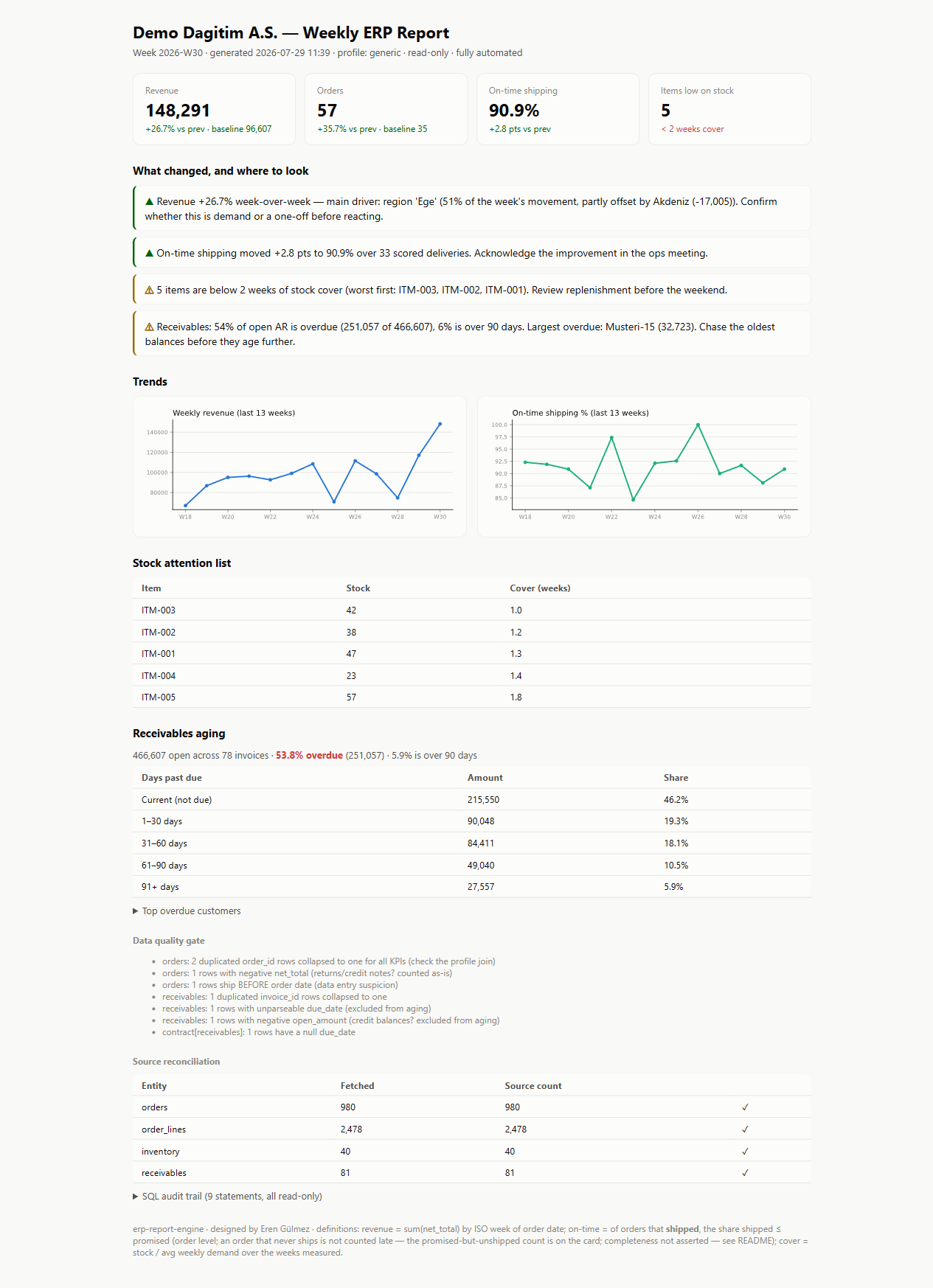
*This exact report was produced by one command against the bundled demo database — including the three data-quality problems deliberately seeded into it, all caught by the gate.*
**The same guarded engine talks to AI agents, too.** `erp-report-engine mcp` exposes the ERP to an agent through *canonical entities* (`orders`, never `LG_001_01_ORFICHE`) behind the same read-only guard — the layer the MCP ecosystem keeps getting wrong. The reference PostgreSQL MCP server's read-only mode was walked out of with `COMMIT; DROP SCHEMA public CASCADE;` and [archived](https://github.com/modelcontextprotocol/servers-archived/tree/HEAD/src/postgres); Supabase's MCP became the textbook ["lethal trifecta"](https://simonwillison.net/2025/Jul/6/supabase-mcp-lethal-trifecta/). Here the guard checks the **functions a statement calls**, not just its shape — and you don't have to take the adjective's word for it:
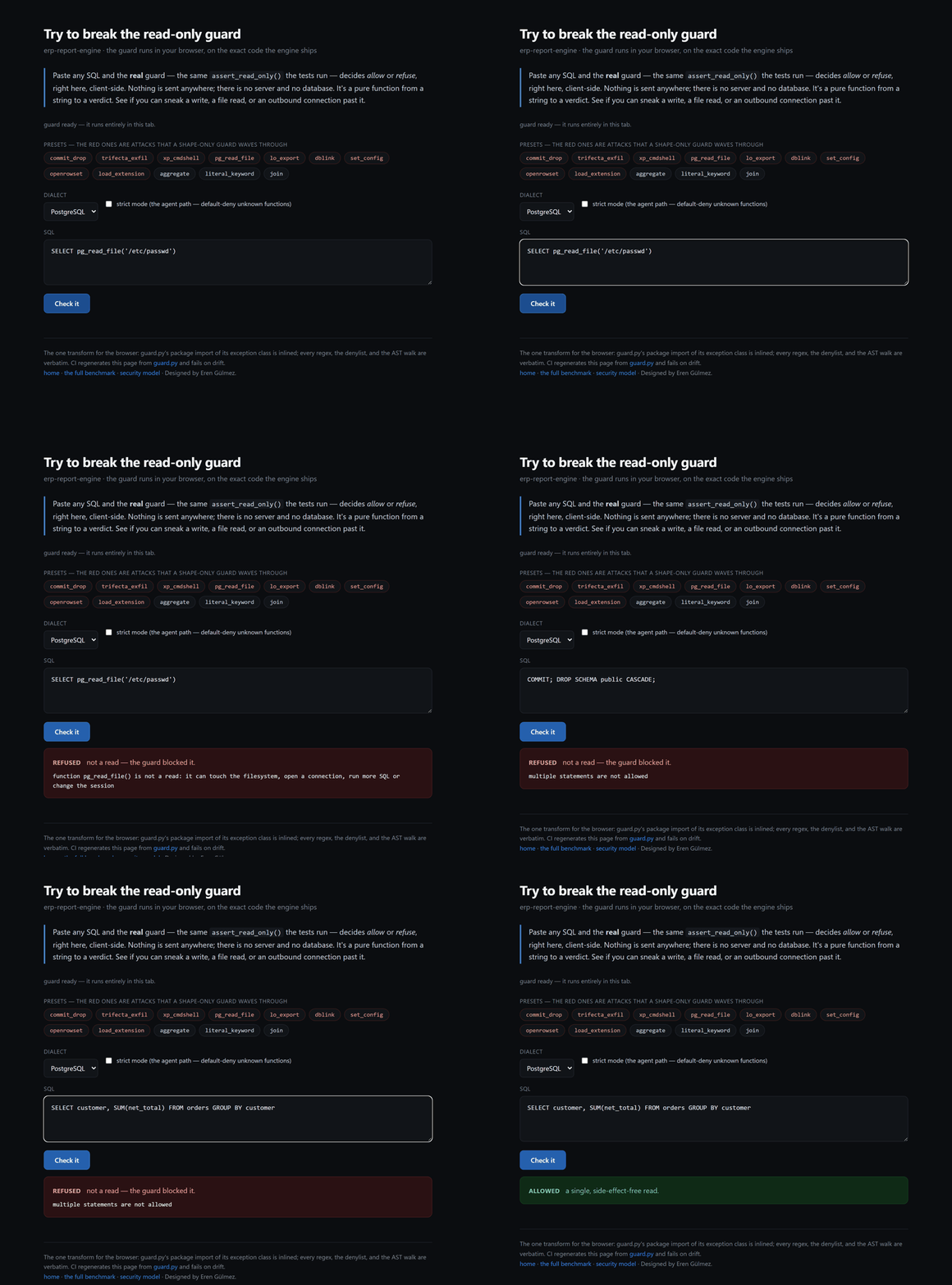
**▶ [Run the 28-attack trust benchmark](https://gulmezeren2-byte.github.io/erp-report-engine/trust.html)** · **[break the guard yourself, in your browser](https://gulmezeren2-byte.github.io/erp-report-engine/playground.html)** (the real `guard.py`, via Pyodide, nothing sent anywhere).
[](https://gulmezeren2-byte.github.io/erp-report-engine/playground.html)
*The exact `guard.py` the tests run, executing in the browser — a file read and the read-only-transaction escape refused, a real aggregate allowed. [Paste your own attack →](https://gulmezeren2-byte.github.io/erp-report-engine/playground.html)*
## 60-second demo (no ERP required)
```bash
# install (pipx or uv keep it isolated; plain pip works too)
pipx install erp-report-engine # or: uv tool install erp-report-engine
# from source instead: pip install .
erp-report-engine init-demo # builds demo.db + config.demo.yaml here
erp-report-engine run -c config.demo.yaml
```
Every command is also available as `python -m erp_report_engine …`. Add a database driver with the extras: `pipx install "erp-report-engine[mssql]"` (Logo Tiger / Netsis / Mikro — SQL Server) or `[postgres]`.
**Prefer Docker?** `docker build -t erp-report-engine .` then `docker run --rm -v "$PWD:/work" erp-report-engine run -c config.demo.yaml`. SQLite and PostgreSQL work out of the box; for MSSQL add Microsoft's ODBC driver (see the [`Dockerfile`](https://github.com/gulmezeren2-byte/erp-report-engine/blob/main/Dockerfile)). Publishing to PyPI is a GitHub Release away — [`publish.yml`](https://github.com/gulmezeren2-byte/erp-report-engine/blob/main/.github/workflows/publish.yml) builds and uploads via [Trusted Publishing](https://docs.pypi.org/trusted-publishers/) (OIDC, no stored token), and CI already builds the wheel and asserts every bundled profile ships.
Open `reports/erp_report_<week>.html`. You'll see the engine catch a revenue spike and attribute it to one region, flag a two-point on-time decline, list items below two weeks of stock cover — and confess every duplicate and negative row it found on the way.
**▶ See a live sample report: [gulmezeren2-byte.github.io/erp-report-engine](https://gulmezeren2-byte.github.io/erp-report-engine/)** (also committed at [`docs/sample-report.html`](https://github.com/gulmezeren2-byte/erp-report-engine/blob/main/docs/sample-report.html)).
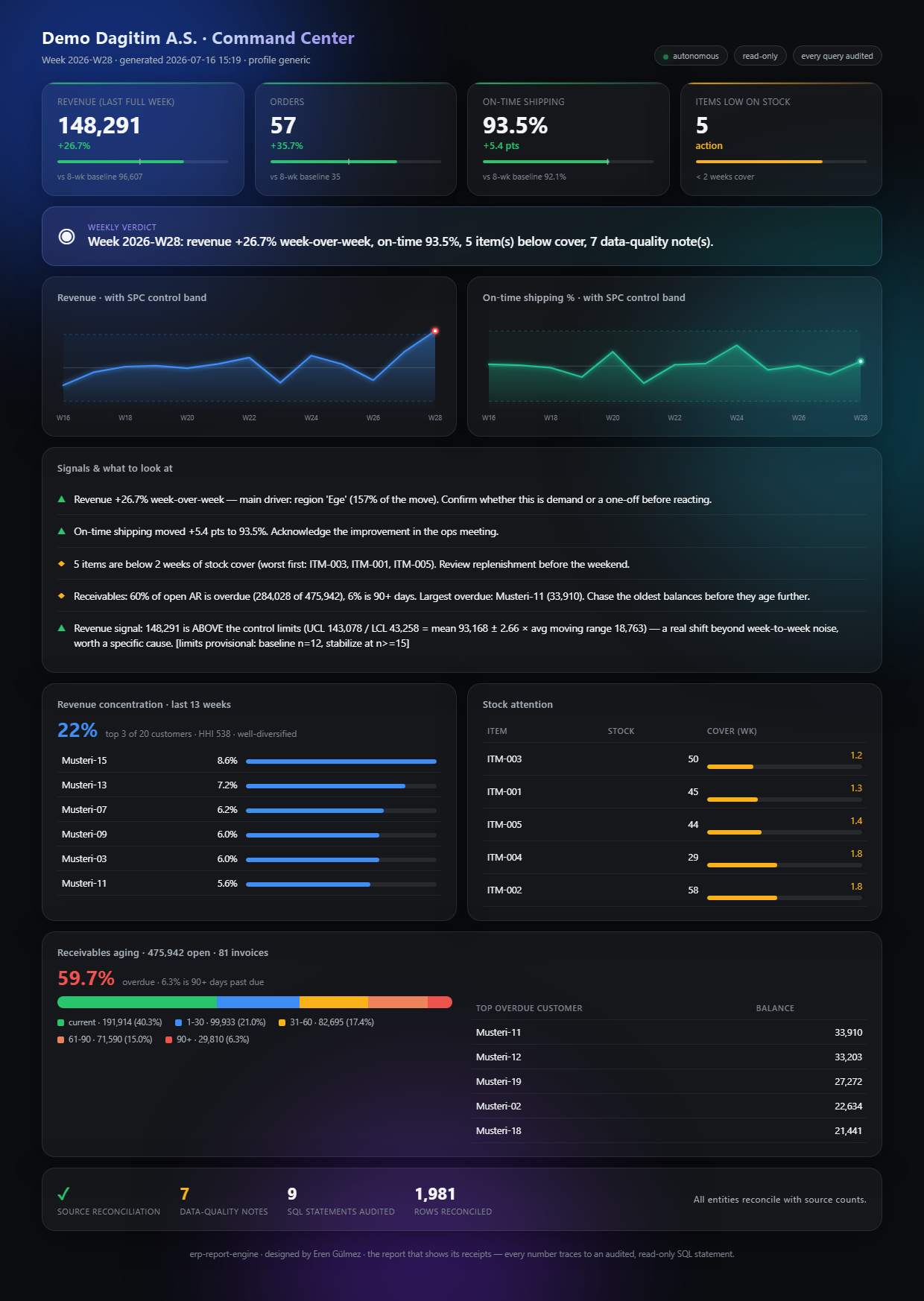
Or run `run --dashboard` for the premium **Command Center** — a dark, modern, self-contained dashboard with animated KPIs and glowing SPC control-band charts (**[live](https://gulmezeren2-byte.github.io/erp-report-engine/dashboard.html)**):
## What one run produces
| Section | What it answers |
|---|---|
| KPI cards | Revenue, orders, on-time %, low-stock count — each vs last week **and** vs an 8-week baseline |
| Findings | *"Revenue +6.5% week-over-week — main driver: region 'Ege' (54% of the week's movement, partly offset by Marmara (−14,697))"* — driver named, the segment pulling the other way named too, action suggested |
| Signals (SPC) | *"Revenue signal: 148,291 is ABOVE the control limits (UCL 143,078 = mean 93,168 ± 2.66 × avg moving range 18,763, baseline n=25 weeks)"* — a genuine shift, separated from week-to-week noise, with the arithmetic and its sample size shown |
| Trends | 13 full weeks of revenue and on-time %, inline SVG (no external assets) |
| Stock attention list | Items below the cover threshold, worst first |
| Data-quality gate | Duplicate IDs, unparseable dates, negative totals, ship-before-order rows |
| Source reconciliation | Rows fetched vs an independent `COUNT(*)` of the same query — ✓ or MISMATCH |
| SQL audit trail | Every statement executed, with parameters, row counts and timings |
| Run-state memory | *"Revenue has declined 3 consecutive weeks"* — context beyond the lookback window |
## How it works
```mermaid
flowchart LR
DB[("ERP database<br/>MSSQL · PostgreSQL · SQLite")]
PROF["Semantic profile<br/>(YAML contract)"]
GUARD["safe_read<br/>read-only guard + audit"]
GATE["Data-quality gate<br/>+ source reconciliation"]
KPI["KPI engine<br/>ISO weeks, 8-wk baseline"]
INS["Insight rules<br/>driver attribution"]
HTML["Self-contained<br/>HTML report"]
STATE[("state.db<br/>run memory")]
PROF --> GUARD
DB --> GUARD --> GATE --> KPI --> INS --> HTML
STATE --- HTML
GATE --> PBI["Power BI Command Center<br/>(TMDL + PBIR, code-authored)"]
```
The layer that makes this portable is the **semantic profile**: a versioned YAML contract that maps one ERP's cryptic schema to three canonical entities — `orders`, `order_lines`, `inventory` — plus an **optional `receivables`** entity (open AR, for aging) that a profile maps when the ledger is reachable and everything downstream skips gracefully when it isn't. The engine only ever sees canonical columns. Swap the profile, keep the report.
## The security model
Pointing software at a production ERP database is a trust decision. This engine treats it that way — the guarantees are enforced in code and covered by tests:
Read-only is enforced in **four layers**, so no single mistake makes the engine capable of writing:
| Layer | Enforced by |
|---|---|
| Lexical guard | Single statement, `SELECT`/`WITH` head, no comments (`--`, `/*`, `#`), no write/DDL keyword, no write-escalating lock hint (`TABLOCKX`, `UPDLOCK`, `XLOCK`). Scanned with string literals blanked, so `SELECT 'please delete this note'` is a read, not a threat |
| Parse-tree guard | `sqlglot` parses the statement — and **must succeed**, or the query is refused: a guard that can't read a query can't vouch for it. It must be a single read query whose AST holds no `INSERT`/`UPDATE`/`DELETE`/`CREATE`/`DROP`/`ALTER`/`MERGE`/`EXEC`/`INTO` node (catches writes hidden inside CTEs) |
| Function guard | **Plenty of pure-looking `SELECT`s are not reads.** `pg_read_file`, `lo_export` (which *writes* a file), `dblink` (which dials out), `OPENROWSET`, `LOAD_FILE`, `load_extension` (arbitrary code), `query_to_xml` (arbitrary SQL), `set_config` (switches off the session backstop), `SLEEP`/`BENCHMARK` (denial of service) — all refused, by AST **and** lexically, because `OPENROWSET` is precisely what `sqlglot` cannot parse |
| Read-only session | PostgreSQL `default_transaction_read_only=on`, SQLite `PRAGMA query_only`, MySQL `SET SESSION TRANSACTION READ ONLY` + `max_execution_time`, and a per-statement timeout everywhere |
**Ad-hoc SQL — the agent path — is stricter still.** `query` and `guarded_query` run in strict mode, which default-denies *every function the guard cannot name*: `sqlglot`'s function registry is the allowlist, since it knows the portable analytic functions and nothing that reads a file or opens a socket. All four bundled profiles pass it — they call no unrecognised function at all.
**And the layer that isn't ours.** MSSQL has no session-level read-only switch, so run the engine under a **least-privilege, read-only login** (`db_datareader` on MSSQL, a `SELECT`-only grant on PostgreSQL — ideally a read replica). The guard is defence in depth; the grant is the layer that holds if the guard has a hole. It has had one before: these function bypasses were found by auditing this repo, and are now pinned in [`tests/test_guard.py`](https://github.com/gulmezeren2-byte/erp-report-engine/blob/main/tests/test_guard.py) by name, per dialect.
**Don't take my word for it — measure it.** The guard ships with a reproducible trust benchmark: 28 well-formed-SQL attacks across four dialects that a shape-only guard waves through, every one refused, plus the legitimate reads that must still pass. The number is computed from a live guard run, not asserted in prose, and CI enforces it on every commit.
And "28/28" only means something next to what a weaker guard scores on the *same* 28. So the benchmark runs the corpus through the shortcuts real tools actually ship — a starts-with-`SELECT` head check and a write-keyword blocklist — and shows the gap: they refuse **6** and **9** of the 28, and the keyword scan even blocks a legitimate read whose text contains the word "delete", while this guard refuses all 28 and blocks none. A test pins that it strictly beats every such shortcut.
```bash
erp-report-engine trust-benchmark
# this guard 28/28 attacks refused · 8/8 reads allowed
# starts-with-SELECT 6/28 · 8/8 (waves 22 through)
# write-keyword blocklist 9/28 · 7/8 (leaky AND breaks a real read)
```
**▶ See the results: [the trust benchmark](https://gulmezeren2-byte.github.io/erp-report-engine/trust.html)** — every case, its severity, and what it actually does. Or **[break it yourself](https://gulmezeren2-byte.github.io/erp-report-engine/playground.html)**: paste SQL into the real guard, running in your browser (no install, nothing sent anywhere — it's the exact `guard.py` the tests run, via Pyodide).
Want just the guard for your *own* MCP server or DB tool? It's extracted as a standalone package: **[`readonly-sql-guard`](https://github.com/gulmezeren2-byte/readonly-sql-guard)** (`pip install readonly-sql-guard`) — one function, `re` + `sqlglot` only.
Same idea one layer up: **[`ossie-guard`](https://github.com/gulmezeren2-byte/ossie-guard)** lints [Apache Ossie](https://github.com/apache/ossie) semantic models for metrics whose dialects silently disagree (`SUM` on one warehouse, `AVG` on another) and for expressions that are not pure, reproducible reads — reporting to GitHub code scanning as SARIF.
Further reading: **[why "read-only-in-prose" is not read-only](https://gulmezeren2-byte.github.io/erp-report-engine/case-study.html)** (the two famous MCP database failures and the class of attack behind them) · **[read-only database access for AI agents, compared](https://gulmezeren2-byte.github.io/erp-report-engine/comparison.html)** (transactions vs roles vs statement guards vs semantic layers — honest about where each wins).
Plus: profile variables are identifier-safe (`^[A-Za-z0-9_]{1,16}$`, so `"001; DROP TABLE x"` raises before any connection), secrets never live in config files (the loader refuses embedded credentials in any spelling — `password`, `passwd`, `pwd`, `sslpassword`, ODBC `PWD=` — use `url_env`), every executed statement ships in the report's audit trail, and a row cap (default 500k) bounds any single query.
The test suite throws a battery of injection attempts at the guard — multi-statement, comment smuggling in three syntaxes, transaction-control splices (`ROLLBACK`/`COMMIT`), `SELECT INTO`, lock hints, and a `DELETE` hidden inside a CTE — and expects every one to raise. See [SECURITY.md](https://github.com/gulmezeren2-byte/erp-report-engine/blob/main/SECURITY.md).
## Connect your own ERP
1. Put the connection URL in an environment variable (never in the file):
```bash
# Windows (System Properties → Environment Variables, or:)
setx ERP_DB_URL "mssql+pyodbc://readonly_user:***@SERVER/LOGODB?driver=ODBC+Driver+17+for+SQL+Server"
```
2. Copy `config.example.yaml` → `config.yaml`:
```yaml
connection:
url_env: ERP_DB_URL # the engine reads the URL from this env var
profile: logo_tiger # a bundled profile name, or a path to your own YAML
profile_vars:
firm_no: "001" # identifier-safe values only, validated
period_no: "01"
report:
company_alias: "Company" # display name — use an alias if you prefer
lookback_weeks: 13
low_cover_weeks: 2.0
limits:
row_cap: 500000
query_timeout_s: 60
```
3. Dry-run it — `validate` connects, checks the profile contract and reconciles counts, **touches nothing else**:
```bash
python -m erp_report_engine validate -c config.yaml
python -m erp_report_engine run -c config.yaml
```
### Included profiles
Profiles ship inside the package and are referenced by name (`generic`, `logo_tiger`) — no `profiles/` folder needs to exist next to your config.
- **`generic`** — the canonical schema; also the template for writing your own.
- **`logo_tiger`** — Logo Tiger / GO on MSSQL: `LG_{firm}_{period}_ORFICHE` order headers joined to `CLCARD` customers, `ORFLINE` lines, `STINVTOT` stock totals, `TRCODE = 2` sales filter, and **optional receivables aging** from `PAYTRANS` (installment `TOTAL − PAID`, `MODULENR = 4`). Logo schemas vary by release — the profile carries field notes on exactly what to verify against **your** version before trusting it.
- **`netsis`** — Logo Netsis 3 on MSSQL (database-per-company): `TBLSIPAMAS`/`TBLSIPATRA` sales orders (`FTIRSIP = '6'`), `TBLCASABIT` customers, `TBLSTOKPH` stock totals, and **optional receivables aging** from `TBLCAHAR` (with the open-item vs. running-balance caveat called out inline — the honest weak point). Field-mapped from real production integrations, with the weak points (order status, delivery dates, AR closing method) flagged inline to verify against your install.
- **`mikro`** — Mikro ERP (Mikro Yazılım, Fly/Jump/V16–V17) on MSSQL: `SIPARISLER` (`sip_` prefix, line-level) sales orders, `CARI_HESAPLAR` customers, `STOK_HAREKETLERI` on-hand (`sth_tip` in/out), and **optional receivables aging** from `CARI_HESAP_HAREKETLERI` (`cha_vade` due date). The honest weak points — the `sip_tip` sales filter, VAT-inclusiveness of the total, no ship date on the order, and a pure running-balance AR ledger with no open-item flag — are flagged inline to verify against your version.
Together, Logo Tiger, Netsis, and Mikro cover most of the Turkish SME ERP market (all MSSQL). Writing a profile for another ERP (SAP B1, Odoo, a custom system) means writing **three SELECT statements** that output the canonical columns — either a standalone YAML you point `profile:` at, or a file dropped into `erp_report_engine/profiles/` to ship it bundled. That's the whole contract — and `validate` tells you immediately whether you got it right.
## Make it autonomous
The engine is a single idempotent command, so any scheduler works:
```powershell
# Windows Task Scheduler — every Monday 07:00
schtasks /create /tn "erp-weekly-report" /sc weekly /d MON /st 07:00 ^
/tr "cmd /c cd /d C:\erp-report-engine && python -m erp_report_engine run -c config.yaml"
```
```bash
# cron — every Monday 07:00
0 7 * * 1 cd /opt/erp-report-engine && python -m erp_report_engine run -c config.yaml
```
Each run appends to `state.db`, which is how the report can say *"third consecutive weekly decline"* — memory across runs, without re-querying history from the ERP.
**Exit codes** let the scheduler branch on *why* a run failed: `0` success · `2` config error · `3` database/connection error · `4` contract error (profile schema wrong or source counts don't reconcile) · `5` data-quality failure under `--strict` · `1` anything unexpected. The machine-readable result goes to stdout (`… run -c config.yaml | jq`); logs go to stderr, optionally also to a JSON-lines file with `--log-file run.jsonl`. Run `validate --strict` in CI to fail the pipeline when the numbers don't reconcile.
**An optional AI summary that can't lie.** `run --narrate` adds an LLM executive summary — but honest *by construction*: the model is fed **only** the audited aggregates (KPIs, findings, aging/concentration — never a raw row), and the report prints the exact payload it saw, so anyone can verify what it was given. No key configured → the flag no-ops and the report is unchanged. Any OpenAI-compatible endpoint works, including a **local, keyless** model (Ollama / LM Studio). Most tools bolt on hallucination checks *after* generation; here the model simply never sees anything it could leak or over-claim from.
**Delivery is built in.** `run --send` emails the report (SMTP), posts a summary to Slack or Teams (Power Automate Workflows), and pings a [healthchecks.io](https://healthchecks.io) dead-man's-switch on success *or* failure — so a silent cron is detectable. Every secret comes from an environment variable; a channel that fails is logged, never fatal. Configure it in a `delivery:` block (see `config.example.yaml`). For a full hands-off pipeline, the `power_automate` channel posts an Adaptive Card to Teams **and** archives the HTML report to SharePoint/OneDrive — an importable flow and step-by-step guide live in **[automation/POWER-AUTOMATE.md](https://github.com/gulmezeren2-byte/erp-report-engine/blob/main/automation/POWER-AUTOMATE.md)**. The report writes itself *and* delivers itself — the feature most BI tools charge for.
## The Power BI Command Center
The engine also feeds an interactive Power BI layer — and there is no `.pbix` binary in this repo. The entire artifact is a **PBIP project authored as code**: the semantic model in TMDL (star schema, 28 documented DAX measures — including **SVG micro-chart measures** that draw a per-customer sparkline and a per-item cover bar straight from DAX, and a **receivables-aging** fact + measures — a *Time Shift* calculation group on a gapless week ordinal, and a field parameter), the report in PBIR (5 pages / 30 visuals, generated from compact specs by a script), and a **dark futuristic theme validated against Microsoft's official theme schema**.
```bash
# a demo export already ships in powerbi/data — just open the project:
# powerbi/ERP Command Center.pbip (Power BI Desktop)
# to feed it your own ERP (writes to gitignored powerbi/data.local by default):
erp-report-engine export-powerbi -c config.yaml
```
The signature is the **Trust page**: source reconciliation, the data-quality gate and the full SQL audit trail rendered as visuals — the dashboard shows its receipts. Alert thresholds are the same ones as `insights.py`, re-derived in DAX: one definition, two surfaces. Field bindings are validated against the TMDL model by `pbir-cli` before the project ever meets Desktop. Full guide: [powerbi/README.md](https://github.com/gulmezeren2-byte/erp-report-engine/blob/main/powerbi/README.md).
## Ask your ERP through an agent — the guarded MCP server
An AI agent connecting to an ERP is a trust problem nobody has solved well: every existing "ERP MCP" is a REST wrapper that leans on the ERP's own permissions, and every database MCP hands the agent raw tables. This engine ships the combination that doesn't exist elsewhere — a [Model Context Protocol](https://modelcontextprotocol.io) server where the agent talks to **canonical entities** (`orders`, never `LG_001_01_ORFICHE`), through the **same read-only guard and audit trail** as the report — in strict mode, which default-denies every function the guard cannot name, with every data result framed as untrusted input.
```bash
pipx install "erp-report-engine[mcp]"
erp-report-engine mcp -c config.yaml # stdio server
```
Six tools, all funneled through the guarded path:
| Tool | What the agent gets |
|---|---|
| `describe_model` | the canonical **semantic layer** — each entity's grain, and each column's type + what it *means* (e.g. `actual_ship_date` is NULL until shipment, so a late unshipped order isn't counted against on-time), plus runnable example queries. Meaning, not just names — which is what keeps an agent on the accurate side of text-to-SQL. No raw ERP table names |
| `weekly_report` | the full KPI briefing — findings, data-quality gate, reconciliation, SQL audit trail |
| `reconcile` | fetched rows vs an independent `COUNT(*)` per entity, with a trust verdict |
| `aging` | receivables aging — open balances by days-past-due bucket, overdue %, and the customers who owe the most overdue (aggregates only) |
| `check_query` | whether a SQL statement would pass the guard — *without running it* |
| `query` | run a read-only `SELECT`/`WITH`, capped and audited; rows returned as **untrusted data** |
The canonical model is also published as a **machine-readable contract** — [`model.json`](https://gulmezeren2-byte.github.io/erp-report-engine/model.json), or `erp-report-engine schema` — so a tool can read the entities, column types, meanings, and example queries *without* connecting. CI regenerates it from the code and fails on drift, so the contract can't say more than the engine holds.
A first-party **[agent skill pack](https://github.com/gulmezeren2-byte/erp-report-engine/tree/main/skills)** (`erp-safe-query`, `explain-kpi-move`, `write-erp-profile`) teaches an agent to work *with* this grain — dry-run before querying, aggregate instead of dumping rows, cite audited numbers, and never treat ERP text as a command.
**Try it in one line, no ERP, no config** — serve the guarded MCP over the bundled demo database:
```bash
erp-report-engine mcp --demo # or: docker run --rm -i erp-report-engine
```
Then point Claude Desktop (or any MCP client) at it:
```json
{ "mcpServers": { "erp": { "command": "erp-report-engine", "args": ["mcp", "-c", "C:\\path\\config.yaml"] } } }
```
**Or install it as a Claude Code plugin** — the guarded MCP server, the safe-query skills, and zero-setup `/trust-benchmark` and `/erp-schema` commands, in two lines:
```
/plugin marketplace add gulmezeren2-byte/erp-report-engine
/plugin install erp-report-engine
```
The server launches via `uvx` (no manual install), reading `erp-config.yaml` from your project. The skills and the benchmark/schema commands work immediately, before you wire a database. (Details: [`.claude-plugin/`](https://github.com/gulmezeren2-byte/erp-report-engine/tree/main/.claude-plugin).)
The agent **cannot write**: the guard rejects anything but a single read query calling only functions it recognises, the session is read-only, and — per the 2025 MCP data-exfiltration incidents — every returned value carries a note that rows are data, not instructions. It is, as far as we can find, the first SQL-level-guarded ERP MCP server, and the first for Logo Tiger. It's listed in [awesome-turkish-mcp](https://github.com/gulmezeren2-byte/awesome-turkish-mcp), a curated map of MCP servers for Turkish data and domains.
## What this does NOT do
Honesty over marketing — you should know the edges before pointing it at production:
- **On-time here is OTIF-lite.** It scores order-level `shipped ≤ promised`. True OTIF needs line-level receipt data most ERP order tables don't carry — so the report says "on-time shipping", not "OTIF", and the footer says why.
- **On-time only scores orders that shipped — and that direction is dangerous.** An order that is late *and still unshipped* has no `actual_ship_date`, so it is in neither the numerator nor the denominator, and never costs the metric a point. Taken to its end, **on-time % rises as fulfilment collapses**: the worst orders leave the sample. The engine cannot fix that with the data an order table carries, so it counts what the percentage can't see — *"N orders were promised this week and have not shipped"* — on the card and as its own finding. Read the two together or don't read the percentage.
- **On-time moves are not called on thin samples.** Two deliveries going 1-of-2 to 2-of-2 *is* "+50 points", and reporting that with a straight face is how a report loses the room. Below five scored deliveries the move is shown and explicitly not called.
- **Findings are pointers, not verdicts.** "Driver: region Ege, 111% of the move" tells you where to look first. It does not tell you *why* — that's the analyst's job (yours).
- **The Logo Tiger profile is a field mapping, not a certified integration.** Logo schemas differ by version and localization; the profile's field notes list what to verify.
- **The current partial week is never plotted.** Trends end at the last completed ISO week, because a Monday-morning "crash" that's really a two-day week is how dashboards lose trust.
- **It's a weekly briefing, not a BI platform.** No drill-down, no real-time, no user management. It does one job: the Monday report writes itself, with receipts.
## Design decisions
**Why rule-based findings instead of an LLM?** Determinism. The same database state always produces the same report, it runs air-gapped next to the ERP, and a number in the report can always be traced to a SQL statement in the audit trail. Nothing is generated that can't be re-derived.
**Why a self-contained HTML file?** Zero infrastructure. Inline SVG charts, inline CSS, no CDN, no tracking — it renders in Outlook's browser preview, on a phone, from a file share, ten years from now.
**Why reconcile row counts?** Because "the DataFrame has 494 rows" and "the source query returns 494 rows" are different claims. An unattended system must audit its own inputs — every entity is re-counted with an independent `COUNT(*)` and any mismatch is flagged in red before anyone trusts a KPI.
## Tests
```bash
pip install pytest && python -m pytest tests/ -v
```
The suite covers the read-only guard (a battery of injection attempts), profile contracts, the calendar core (unit + property-based), render escaping, the honesty fixes, CLI exit codes, the MCP tools, SPC signals, delivery routing, and a full end-to-end run plus Power BI PBIP integrity (exporter keys, gapless week ordinals, visual-overlap detection, every visual field exists in the model). CI additionally runs `ruff` and fails on PBIR generator drift, on Python 3.10–3.13.
## Roadmap
Shipped: the guarded MCP server + a first-party agent skill pack, an optional **LLM narrative layer** (aggregates-only, honest by construction), the SPC/XmR anomaly layer, native delivery (SMTP/Slack/Teams/healthchecks) + a Power Automate pipeline, declarative profile contracts, **three real Turkish-ERP profiles** (Logo Tiger, Netsis, Mikro) — each with optional **receivables aging (cari yaşlandırma)** — revenue-concentration analysis (top-3 share + HHI), DAX SVG micro-charts, and a schema-validated dark Power BI theme. Next:
- `pip install erp-report-engine` on PyPI + a Docker image
- More ERP profiles (SAP Business One, Odoo, a generic ODBC template)
- Exact FIFO open-item aging for the running-balance ledgers (Netsis / Mikro), so receivables aging is precise without open-item matching configured
## Part of the measurement-honesty series
Tools that tell you the truth about your operation, by [Eren Gülmez](https://github.com/gulmezeren2-byte):
- [otif-analytics](https://github.com/gulmezeren2-byte/otif-analytics) — the 5-step metric ladder from "98% reported" to "59% OTIF"
- [forecast-accuracy-lab](https://github.com/gulmezeren2-byte/forecast-accuracy-lab) — WMAPE vs MAPE, and why zero-dropping flatters your forecast
- [opsaudit](https://github.com/gulmezeren2-byte/opsaudit) — ops metrics CLI with a non-removable honesty block
- [auto-report-pipeline](https://github.com/gulmezeren2-byte/auto-report-pipeline) — this engine's CSV-fed little sibling
- [forecast-autoresearch](https://github.com/gulmezeren2-byte/forecast-autoresearch) — an agent improving a forecast against a sealed holdout
## License
[MIT](https://github.com/gulmezeren2-byte/erp-report-engine/blob/main/LICENSE) © Eren Gülmez
TDQS
Scored across 6 tools
Each tool targets a distinct action: describe_model provides metadata, weekly_report generates a KPI briefing, reconcile verifies counts, aging produces a specific receivables report, check_query validates SQL, and query runs read-only queries. There is no overlap in purpose.
Tool names follow inconsistent patterns: describe_model and check_query use verb_noun, weekly_report and aging are nouns, while reconcile and query are bare verbs. The lack of a uniform convention makes it less predictable which names are actions versus report objects.
Six tools is well-scoped for an ERP report engine, covering schema discovery, query execution, validation, reconciliation, and two standard reports without unnecessary bloat or thinness.
The server covers metadata, generic querying, SQL validation, data reconciliation, and two specific report types. While additional standard ERP reports could be included, the generic query tool provides a path to access any data, so the surface is fairly complete.