
PDF Reader MCP
README.md
<div align="center">
# 📄 @sylphx/pdf-reader-mcp
> Production-ready PDF processing server for AI agents
[](https://www.npmjs.com/package/@sylphx/pdf-reader-mcp)
[](https://opensource.org/licenses/MIT)
[](https://github.com/SylphxAI/pdf-reader-mcp/actions/workflows/ci.yml)
[](https://codecov.io/gh/SylphxAI/pdf-reader-mcp)
[](https://pdf-reader-msu3esos4-sylphx.vercel.app)
[](https://www.typescriptlang.org/)
[](https://www.npmjs.com/package/@sylphx/pdf-reader-mcp)
**5-10x faster parallel processing** • **Y-coordinate content ordering** • **94%+ test coverage** • **103 tests passing**
<a href="https://mseep.ai/app/SylphxAI-pdf-reader-mcp">
<img src="https://mseep.net/pr/SylphxAI-pdf-reader-mcp-badge.png" alt="Security Validated" width="200"/>
</a>
</div>
---
## 🚀 Overview
PDF Reader MCP is a **production-ready** Model Context Protocol server that empowers AI agents with **enterprise-grade PDF processing capabilities**. Extract text, images, and metadata with unmatched performance and reliability.
**The Problem:**
```typescript
// Traditional PDF processing
- Sequential page processing (slow)
- No natural content ordering
- Complex path handling
- Poor error isolation
```
**The Solution:**
```typescript
// PDF Reader MCP
- 5-10x faster parallel processing ⚡
- Y-coordinate based ordering 📐
- Flexible path support (absolute/relative) 🎯
- Per-page error resilience 🛡️
- 94%+ test coverage ✅
```
**Result: Production-ready PDF processing that scales.**
---
## ⚡ Key Features
### Performance
- 🚀 **5-10x faster** than sequential with automatic parallelization
- ⚡ **12,933 ops/sec** error handling, 5,575 ops/sec text extraction
- 💨 **Process 50-page PDFs** in seconds with multi-core utilization
- 📦 **Lightweight** with minimal dependencies
### Developer Experience
- 🎯 **Path Flexibility** - Absolute & relative paths, Windows/Unix support (v1.3.0)
- 🖼️ **Smart Ordering** - Y-coordinate based content preserves document layout
- 🛡️ **Type Safe** - Full TypeScript with strict mode enabled
- 📚 **Battle-tested** - 103 tests, 94%+ coverage, 98%+ function coverage
- 🎨 **Simple API** - Single tool handles all operations elegantly
---
## 📊 Performance Benchmarks
Real-world performance from production testing:
| Operation | Ops/sec | Performance | Use Case |
|-----------|---------|-------------|----------|
| **Error handling** | 12,933 | ⚡⚡⚡⚡⚡ | Validation & safety |
| **Extract full text** | 5,575 | ⚡⚡⚡⚡ | Document analysis |
| **Extract page** | 5,329 | ⚡⚡⚡⚡ | Single page ops |
| **Multiple pages** | 5,242 | ⚡⚡⚡⚡ | Batch processing |
| **Metadata only** | 4,912 | ⚡⚡⚡ | Quick inspection |
### Parallel Processing Speedup
| Document | Sequential | Parallel | Speedup |
|----------|-----------|----------|---------|
| **10-page PDF** | ~2s | ~0.3s | **5-8x faster** |
| **50-page PDF** | ~10s | ~1s | **10x faster** |
| **100+ pages** | ~20s | ~2s | **Linear scaling** with CPU cores |
*Benchmarks vary based on PDF complexity and system resources.*
---
## 📦 Installation
### Claude Code
```bash
claude mcp add pdf-reader -- npx @sylphx/pdf-reader-mcp
```
### Claude Desktop
Add to `claude_desktop_config.json`:
```json
{
"mcpServers": {
"pdf-reader": {
"command": "npx",
"args": ["@sylphx/pdf-reader-mcp"]
}
}
}
```
<details>
<summary><strong>📍 Config file locations</strong></summary>
- **macOS**: `~/Library/Application Support/Claude/claude_desktop_config.json`
- **Windows**: `%APPDATA%\Claude\claude_desktop_config.json`
- **Linux**: `~/.config/Claude/claude_desktop_config.json`
</details>
### VS Code
```bash
code --add-mcp '{"name":"pdf-reader","command":"npx","args":["@sylphx/pdf-reader-mcp"]}'
```
### Cursor
1. Open **Settings** → **MCP** → **Add new MCP Server**
2. Select **Command** type
3. Enter: `npx @sylphx/pdf-reader-mcp`
### Windsurf
Add to your Windsurf MCP config:
```json
{
"mcpServers": {
"pdf-reader": {
"command": "npx",
"args": ["@sylphx/pdf-reader-mcp"]
}
}
}
```
### Cline
Add to Cline's MCP settings:
```json
{
"mcpServers": {
"pdf-reader": {
"command": "npx",
"args": ["@sylphx/pdf-reader-mcp"]
}
}
}
```
### Warp
1. Go to **Settings** → **AI** → **Manage MCP Servers** → **Add**
2. Command: `npx`, Args: `@sylphx/pdf-reader-mcp`
### Smithery (One-click)
```bash
npx -y @smithery/cli install @sylphx/pdf-reader-mcp --client claude
```
### Manual Installation
```bash
# Quick start - zero installation
npx @sylphx/pdf-reader-mcp
# Or install globally
npm install -g @sylphx/pdf-reader-mcp
```
---
## 🎯 Quick Start
### Basic Usage
```json
{
"sources": [{
"path": "documents/report.pdf"
}],
"include_full_text": true,
"include_metadata": true,
"include_page_count": true
}
```
**Result:**
- ✅ Full text content extracted
- ✅ PDF metadata (author, title, dates)
- ✅ Total page count
- ✅ Structural sharing - unchanged parts preserved
### Extract Specific Pages
```json
{
"sources": [{
"path": "documents/manual.pdf",
"pages": "1-5,10,15-20"
}],
"include_full_text": true
}
```
### Absolute Paths (v1.3.0+)
```json
// Windows - Both formats work!
{
"sources": [{
"path": "C:\\Users\\John\\Documents\\report.pdf"
}],
"include_full_text": true
}
// Unix/Mac
{
"sources": [{
"path": "/home/user/documents/contract.pdf"
}],
"include_full_text": true
}
```
**No more** `"Absolute paths are not allowed"` **errors!**
### Extract Images with Natural Ordering
```json
{
"sources": [{
"path": "presentation.pdf",
"pages": [1, 2, 3]
}],
"include_images": true,
"include_full_text": true
}
```
**Response includes:**
- Text and images in **exact document order** (Y-coordinate sorted)
- Base64-encoded images with metadata (width, height, format)
- Natural reading flow preserved for AI comprehension
### Batch Processing
```json
{
"sources": [
{ "path": "C:\\Reports\\Q1.pdf", "pages": "1-10" },
{ "path": "/home/user/Q2.pdf", "pages": "1-10" },
{ "url": "https://example.com/Q3.pdf" }
],
"include_full_text": true
}
```
⚡ **All PDFs processed in parallel automatically!**
---
## ✨ Features
### Core Capabilities
- ✅ **Text Extraction** - Full document or specific pages with intelligent parsing
- ✅ **Image Extraction** - Base64-encoded with complete metadata (width, height, format)
- ✅ **Content Ordering** - Y-coordinate based layout preservation for natural reading flow
- ✅ **Metadata Extraction** - Author, title, creation date, and custom properties
- ✅ **Page Counting** - Fast enumeration without loading full content
- ✅ **Dual Sources** - Local files (absolute or relative paths) and HTTP/HTTPS URLs
- ✅ **Batch Processing** - Multiple PDFs processed concurrently
### Advanced Features
- ⚡ **5-10x Performance** - Parallel page processing with Promise.all
- 🎯 **Smart Pagination** - Extract ranges like "1-5,10-15,20"
- 🖼️ **Multi-Format Images** - RGB, RGBA, Grayscale with automatic detection
- 🛡️ **Path Flexibility** - Windows, Unix, and relative paths all supported (v1.3.0)
- 🔍 **Error Resilience** - Per-page error isolation with detailed messages
- 📏 **Large File Support** - Efficient streaming and memory management
- 📝 **Type Safe** - Full TypeScript with strict mode enabled
---
## 🆕 What's New in v1.3.0
### 🎉 Absolute Paths Now Supported!
```json
// ✅ Windows
{ "path": "C:\\Users\\John\\Documents\\report.pdf" }
{ "path": "C:/Users/John/Documents/report.pdf" }
// ✅ Unix/Mac
{ "path": "/home/john/documents/report.pdf" }
{ "path": "/Users/john/Documents/report.pdf" }
// ✅ Relative (still works)
{ "path": "documents/report.pdf" }
```
**Other Improvements:**
- 🐛 Fixed Zod validation error handling
- 📦 Updated all dependencies to latest versions
- ✅ 103 tests passing, 94%+ coverage maintained
<details>
<summary><strong>📋 View Full Changelog</strong></summary>
<br/>
**v1.2.0 - Content Ordering**
- Y-coordinate based text and image ordering
- Natural reading flow for AI models
- Intelligent line grouping
**v1.1.0 - Image Extraction & Performance**
- Base64-encoded image extraction
- 10x speedup with parallel processing
- Comprehensive test coverage (94%+)
[View Full Changelog →](./CHANGELOG.md)
</details>
---
## 📖 API Reference
### `read_pdf` Tool
The single tool that handles all PDF operations.
#### Parameters
| Parameter | Type | Description | Default |
|-----------|------|-------------|---------|
| `sources` | Array | List of PDF sources to process | Required |
| `include_full_text` | boolean | Extract full text content | `false` |
| `include_metadata` | boolean | Extract PDF metadata | `true` |
| `include_page_count` | boolean | Include total page count | `true` |
| `include_images` | boolean | Extract embedded images | `false` |
#### Source Object
```typescript
{
path?: string; // Local file path (absolute or relative)
url?: string; // HTTP/HTTPS URL to PDF
pages?: string | number[]; // Pages to extract: "1-5,10" or [1,2,3]
}
```
#### Examples
**Metadata only (fast):**
```json
{
"sources": [{ "path": "large.pdf" }],
"include_metadata": true,
"include_page_count": true,
"include_full_text": false
}
```
**From URL:**
```json
{
"sources": [{
"url": "https://arxiv.org/pdf/2301.00001.pdf"
}],
"include_full_text": true
}
```
**Page ranges:**
```json
{
"sources": [{
"path": "manual.pdf",
"pages": "1-5,10-15,20" // Pages 1,2,3,4,5,10,11,12,13,14,15,20
}]
}
```
---
## 🔧 Advanced Usage
<details>
<summary><strong>📐 Y-Coordinate Content Ordering</strong></summary>
<br/>
Content is returned in natural reading order based on Y-coordinates:
```
Document Layout:
┌─────────────────────┐
│ [Title] Y:100 │
│ [Image] Y:150 │
│ [Text] Y:400 │
│ [Photo A] Y:500 │
│ [Photo B] Y:550 │
└─────────────────────┘
Response Order:
[
{ type: "text", text: "Title..." },
{ type: "image", data: "..." },
{ type: "text", text: "..." },
{ type: "image", data: "..." },
{ type: "image", data: "..." }
]
```
**Benefits:**
- AI understands spatial relationships
- Natural document comprehension
- Perfect for vision-enabled models
- Automatic multi-line text grouping
</details>
<details>
<summary><strong>🖼️ Image Extraction</strong></summary>
<br/>
**Enable extraction:**
```json
{
"sources": [{ "path": "manual.pdf" }],
"include_images": true
}
```
**Response format:**
```json
{
"images": [{
"page": 1,
"index": 0,
"width": 1920,
"height": 1080,
"format": "rgb",
"data": "base64-encoded-png..."
}]
}
```
**Supported formats:** RGB, RGBA, Grayscale
**Auto-detected:** JPEG, PNG, and other embedded formats
</details>
<details>
<summary><strong>📂 Path Configuration</strong></summary>
<br/>
**Absolute paths** (v1.3.0+) - Direct file access:
```json
{ "path": "C:\\Users\\John\\file.pdf" }
{ "path": "/home/user/file.pdf" }
```
**Relative paths** - Workspace files:
```json
{ "path": "docs/report.pdf" }
{ "path": "./2024/Q1.pdf" }
```
**Configure working directory:**
```json
{
"mcpServers": {
"pdf-reader-mcp": {
"command": "npx",
"args": ["@sylphx/pdf-reader-mcp"],
"cwd": "/path/to/documents"
}
}
}
```
</details>
<details>
<summary><strong>📊 Large PDF Strategies</strong></summary>
<br/>
**Strategy 1: Page ranges**
```json
{ "sources": [{ "path": "big.pdf", "pages": "1-20" }] }
```
**Strategy 2: Progressive loading**
```json
// Step 1: Get page count
{ "sources": [{ "path": "big.pdf" }], "include_full_text": false }
// Step 2: Extract sections
{ "sources": [{ "path": "big.pdf", "pages": "50-75" }] }
```
**Strategy 3: Parallel batching**
```json
{
"sources": [
{ "path": "big.pdf", "pages": "1-50" },
{ "path": "big.pdf", "pages": "51-100" }
]
}
```
</details>
---
## 🔧 Troubleshooting
### "Absolute paths are not allowed"
**Solution:** Upgrade to v1.3.0+
```bash
npm update @sylphx/pdf-reader-mcp
```
Restart your MCP client completely.
---
### "File not found"
**Causes:**
- File doesn't exist at path
- Wrong working directory
- Permission issues
**Solutions:**
Use absolute path:
```json
{ "path": "C:\\Full\\Path\\file.pdf" }
```
Or configure `cwd`:
```json
{
"pdf-reader-mcp": {
"command": "npx",
"args": ["@sylphx/pdf-reader-mcp"],
"cwd": "/path/to/docs"
}
}
```
---
### "No tools showing up"
**Solution:**
```bash
npm cache clean --force
rm -rf node_modules package-lock.json
npm install @sylphx/pdf-reader-mcp@latest
```
Restart MCP client completely.
---
## 🌐 HTTP Transport (Remote Access)
By default, PDF Reader MCP uses stdio transport for local use. You can also run it as an HTTP server for remote access from multiple machines.
### Quick Start
```bash
# Run as HTTP server on port 8080
MCP_TRANSPORT=http npx @sylphx/pdf-reader-mcp
```
### Environment Variables
| Variable | Default | Description |
|----------|---------|-------------|
| `MCP_TRANSPORT` | `stdio` | Transport type: `stdio` or `http` |
| `MCP_HTTP_PORT` | `8080` | HTTP server port |
| `MCP_HTTP_HOST` | `0.0.0.0` | HTTP server hostname |
| `MCP_API_KEY` | - | Optional API key for authentication |
### Docker Deployment
```dockerfile
FROM oven/bun:1
WORKDIR /app
RUN bun add @sylphx/pdf-reader-mcp
ENV MCP_TRANSPORT=http
ENV MCP_HTTP_PORT=8080
EXPOSE 8080
CMD ["bun", "node_modules/@sylphx/pdf-reader-mcp/dist/index.js"]
```
### MCP Client Configuration (HTTP)
```json
{
"servers": {
"pdf-reader": {
"type": "http",
"url": "https://your-server.com/mcp",
"headers": {
"X-API-Key": "your-api-key"
}
}
}
}
```
### Endpoints
| Endpoint | Method | Description |
|----------|--------|-------------|
| `/mcp` | POST | JSON-RPC endpoint |
| `/mcp/health` | GET | Health check |
---
## 🏗️ Architecture
### Tech Stack
| Component | Technology |
|:----------|:-----------|
| **Runtime** | Node.js 22+ ESM |
| **PDF Engine** | PDF.js (Mozilla) |
| **Validation** | Zod + JSON Schema |
| **Protocol** | MCP SDK |
| **Language** | TypeScript (strict) |
| **Testing** | Vitest (103 tests) |
| **Quality** | Biome (50x faster) |
| **CI/CD** | GitHub Actions |
### Design Principles
- 🔒 **Security First** - Flexible paths with secure defaults
- 🎯 **Simple Interface** - One tool, all operations
- ⚡ **Performance** - Parallel processing, efficient memory
- 🛡️ **Reliability** - Per-page isolation, detailed errors
- 🧪 **Quality** - 94%+ coverage, strict TypeScript
- 📝 **Type Safety** - No `any` types, strict mode
- 🔄 **Backward Compatible** - Smooth upgrades always
---
## 🧪 Development
<details>
<summary><strong>Setup & Scripts</strong></summary>
<br/>
**Prerequisites:**
- Node.js >= 22.0.0
- pnpm (recommended) or npm
**Setup:**
```bash
git clone https://github.com/SylphxAI/pdf-reader-mcp.git
cd pdf-reader-mcp
pnpm install && pnpm build
```
**Scripts:**
```bash
pnpm run build # Build TypeScript
pnpm run test # Run 103 tests
pnpm run test:cov # Coverage (94%+)
pnpm run check # Lint + format
pnpm run check:fix # Auto-fix
pnpm run benchmark # Performance tests
```
**Quality:**
- ✅ 103 tests
- ✅ 94%+ coverage
- ✅ 98%+ function coverage
- ✅ Zero lint errors
- ✅ Strict TypeScript
</details>
<details>
<summary><strong>Contributing</strong></summary>
<br/>
**Quick Start:**
1. Fork repository
2. Create branch: `git checkout -b feature/awesome`
3. Make changes: `pnpm test`
4. Format: `pnpm run check:fix`
5. Commit: Use [Conventional Commits](https://www.conventionalcommits.org/)
6. Open PR
**Commit Format:**
```
feat(images): add WebP support
fix(paths): handle UNC paths
docs(readme): update examples
```
See [CONTRIBUTING.md](./CONTRIBUTING.md)
</details>
---
## 📚 Documentation
- 📖 [Full Docs](https://SylphxAI.github.io/pdf-reader-mcp/) - Complete guides
- 🚀 [Getting Started](./docs/guide/getting-started.md) - Quick start
- 📘 [API Reference](./docs/api/README.md) - Detailed API
- 🏗️ [Design](./docs/design/index.md) - Architecture
- ⚡ [Performance](./docs/performance/index.md) - Benchmarks
- 🔍 [Comparison](./docs/comparison/index.md) - vs. alternatives
---
## 🗺️ Roadmap
**✅ Completed**
- [x] Image extraction (v1.1.0)
- [x] 5-10x parallel speedup (v1.1.0)
- [x] Y-coordinate ordering (v1.2.0)
- [x] Absolute paths (v1.3.0)
- [x] 94%+ test coverage (v1.3.0)
**🚀 Next**
- [ ] OCR for scanned PDFs
- [ ] Annotation extraction
- [ ] Form field extraction
- [ ] Table detection
- [ ] 100+ MB streaming
- [ ] Advanced caching
- [ ] PDF generation
Vote at [Discussions](https://github.com/SylphxAI/pdf-reader-mcp/discussions)
---
## 🏆 Recognition
**Featured on:**
- [Smithery](https://smithery.ai/server/@sylphx/pdf-reader-mcp) - MCP directory
- [Glama](https://glama.ai/mcp/servers/@sylphx/pdf-reader-mcp) - AI marketplace
- [MseeP.ai](https://mseep.ai/app/SylphxAI-pdf-reader-mcp) - Security validated
**Trusted worldwide** • **Enterprise adoption** • **Battle-tested**
---
## 🤝 Support
[](https://github.com/SylphxAI/pdf-reader-mcp/issues)
[](https://discord.gg/sylphx)
- 🐛 [Bug Reports](https://github.com/SylphxAI/pdf-reader-mcp/issues)
- 💬 [Discussions](https://github.com/SylphxAI/pdf-reader-mcp/discussions)
- 📖 [Documentation](https://SylphxAI.github.io/pdf-reader-mcp/)
- 📧 [Email](mailto:hi@sylphx.com)
**Show Your Support:**
⭐ Star • 👀 Watch • 🐛 Report bugs • 💡 Suggest features • 🔀 Contribute
---
## 📊 Stats




**103 Tests** • **94%+ Coverage** • **Production Ready**
---
## 📄 License
MIT © [Sylphx](https://sylphx.com)
---
## 🙏 Credits
Built with:
- [PDF.js](https://mozilla.github.io/pdf.js/) - Mozilla PDF engine
- [Bun](https://bun.sh) - Fast JavaScript runtime
Special thanks to the open source community ❤️
## Powered by Sylphx
This project uses the following [@sylphx](https://github.com/SylphxAI) packages:
- [@sylphx/mcp-server-sdk](https://github.com/SylphxAI/mcp-server-sdk) - MCP server framework
- [@sylphx/vex](https://github.com/SylphxAI/vex) - Schema validation
- [@sylphx/biome-config](https://github.com/SylphxAI/biome-config) - Biome configuration
- [@sylphx/tsconfig](https://github.com/SylphxAI/tsconfig) - TypeScript configuration
- [@sylphx/bump](https://github.com/SylphxAI/bump) - Version management
- [@sylphx/doctor](https://github.com/SylphxAI/doctor) - Project health checker
---
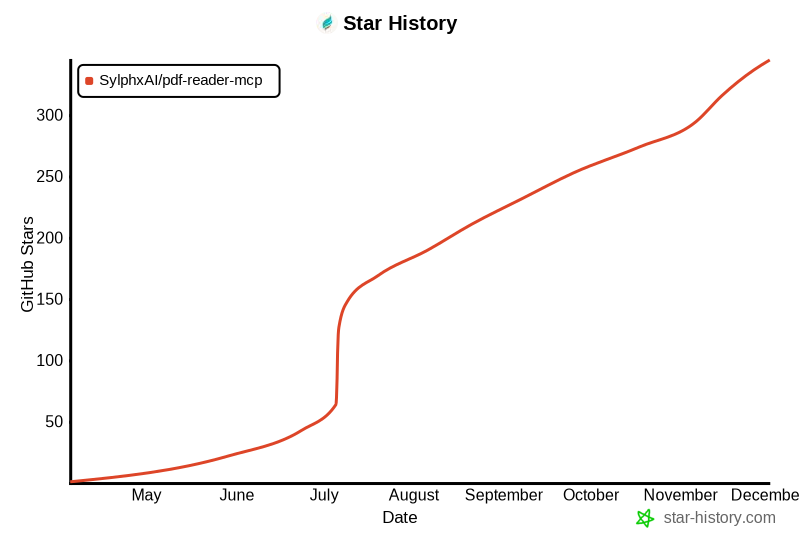
## Star History
[](https://star-history.com/#SylphxAI/pdf-reader-mcp&Date)
---
<div align="center">
<sub>Built with ❤️ by <a href="https://github.com/SylphxAI">Sylphx</a></sub>
</div>
This server cannot be deployed
Maintenance
ActivityInactive
ResponsivenessNo recent community issues