
A
licenseNot graded
qualityD
maintenanceAn MCP server that provides tools for reading, writing, and editing files on the local filesystem.
1,606
Apache 2.0

Shows integration with GitHub for repository status tracking via badges and workflow actions.
Uses Shields.io for generating status badges displaying release information, build status, commit activity, and license information.
Click on "Deploy Server".
Wait a few minutes for the server to deploy. Once ready, it will show a "Started" state.
In the chat, type @ followed by the MCP server name and your instructions, e.g., "@Yourware MCP upload my project directory to showcase it"
That's it! The server will respond to your query, and you can continue using it as needed.
Here is a step-by-step guide with screenshots.
MCP server to upload your project to yourware. Support single file or directory.
Visit on yourware: https://v9gfmmif5s.app.yourware.so/

Related MCP server: rustypaste-mcp-server
You need to login to yourware
Then you can create a new API key, and set the YOURWARE_API_KEY environment variable. Don't worry, you chat with LLM to create and store the API key.
You can use the following configuration for cline/cursor/windsurf...
{
  "mcpServers": {
    "yourware-mcp": {
      "command": "uvx",
      "args": ["yourware-mcp@latest", "stdio"],
      "env": {}
    }
  }
}In cursor settings -> features -> MCP Servers, Add a new MCP Server, name it yourware-mcp and set the command to uvx yourware-mcp@latest stdio
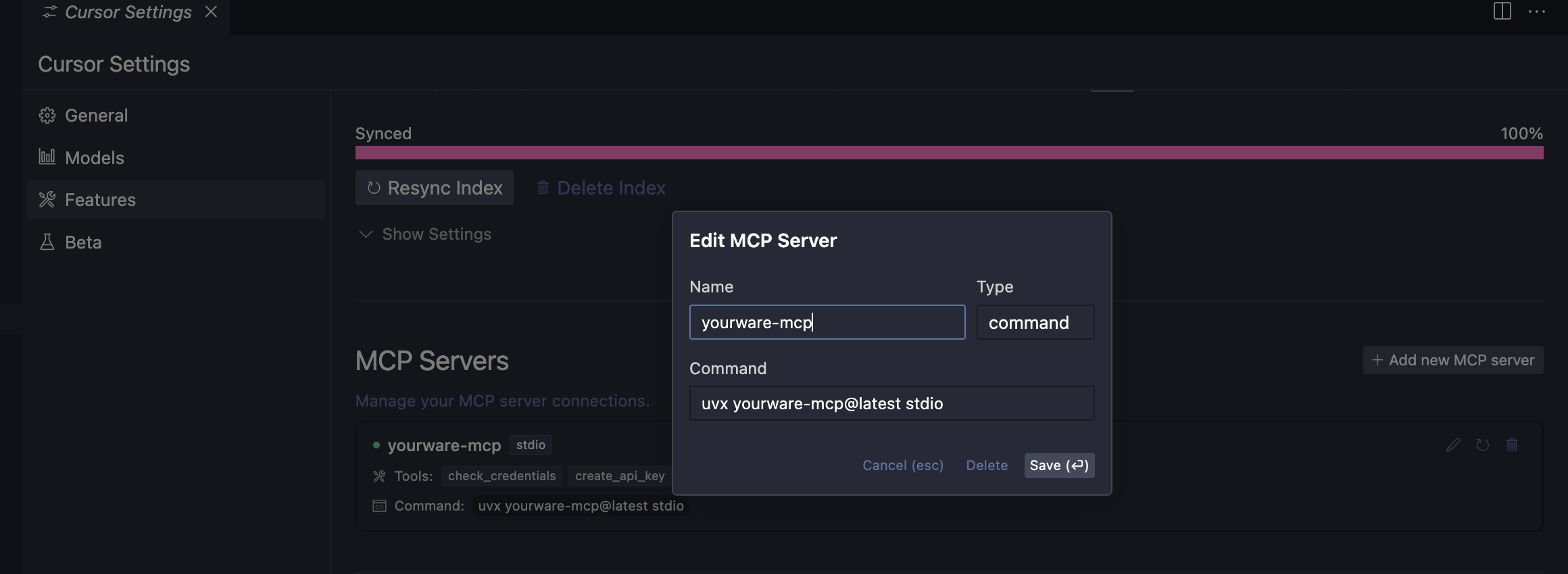
claude mcp add yourware-mcp -s user -- uvx yourware-mcp@latest stdioYOURWARE_API_KEY for the API key, you can also let llm config it for you.
Check your yourware credentials exists and are valid.
| Name | Required | Description | Default |
|---|---|---|---|
No parameters | |||
Does the description disclose side effects, auth requirements, rate limits, or destructive behavior?
No annotations are provided, so the description must fully disclose behavior. It states it checks existence and validity, but does not mention any side effects, required permissions, or what happens on failure (e.g., throws exception or returns false).
Agents need to know what a tool does to the world before calling it. Descriptions should go beyond structured annotations to explain consequences.
Is the description appropriately sized, front-loaded, and free of redundancy?
The description is a single concise sentence with no unnecessary words. The typo ('your yourware') is minor but keeps it just short of a 5.
Shorter descriptions cost fewer tokens and are easier for agents to parse. Every sentence should earn its place.
Given the tool's complexity, does the description cover enough for an agent to succeed on first attempt?
Given the tool's simplicity (no parameters, no output schema), the description covers the basic purpose. However, it lacks details on return behavior (e.g., success indicator) and error cases, which a credential check tool should convey.
Complex tools with many parameters or behaviors need more documentation. Simple tools need less. This dimension scales expectations accordingly.
Does the description clarify parameter syntax, constraints, interactions, or defaults beyond what the schema provides?
There are no parameters (0 params, 100% schema coverage). The description does not need to add parameter info; baseline 4 applies as no parameters exist.
Input schemas describe structure but not intent. Descriptions should explain non-obvious parameter relationships and valid value ranges.
Does the description clearly state what the tool does and how it differs from similar tools?
The description clearly states it checks credentials existence and validity, with a specific verb and resource. It distinguishes from sibling tools that create API keys or upload projects. Minor typo ('your yourware') slightly detracts but does not obscure meaning.
Agents choose between tools based on descriptions. A clear purpose with a specific verb and resource helps agents select the right tool.
Does the description explain when to use this tool, when not to, or what alternatives exist?
The description implies this tool is for verifying credentials before other operations, but provides no explicit guidance on when to use vs. alternatives, nor any exclusion criteria.
Agents often have multiple tools that could apply. Explicit usage guidance like "use X instead of Y when Z" prevents misuse.
Create a new yourware API key. This will automatically be stored in /root/.yourware/credentials.json. Use this tool if current credentials are invalid
| Name | Required | Description | Default |
|---|---|---|---|
| api_key | No |
Does the description disclose side effects, auth requirements, rate limits, or destructive behavior?
Discloses that the key is automatically stored in /root/.yourware/credentials.json, but lacks details on behavior when key already exists, overwrite policy, or required permissions. No annotations to compensate.
Agents need to know what a tool does to the world before calling it. Descriptions should go beyond structured annotations to explain consequences.
Is the description appropriately sized, front-loaded, and free of redundancy?
Two concise sentences with no fluff: first states action and storage, second gives usage guidance. Well-structured and front-loaded.
Shorter descriptions cost fewer tokens and are easier for agents to parse. Every sentence should earn its place.
Given the tool's complexity, does the description cover enough for an agent to succeed on first attempt?
Provides core purpose and storage location, but lacks information on output, error handling, and parameter behavior. For a simple tool with no output schema, more detail would be beneficial.
Complex tools with many parameters or behaviors need more documentation. Simple tools need less. This dimension scales expectations accordingly.
Does the description clarify parameter syntax, constraints, interactions, or defaults beyond what the schema provides?
The sole parameter (api_key, optional) is not explained; description does not clarify what happens when a key is provided vs when it is null (e.g., generation vs setting). Schema coverage is 0%, so description should cover this.
Input schemas describe structure but not intent. Descriptions should explain non-obvious parameter relationships and valid value ranges.
Does the description clearly state what the tool does and how it differs from similar tools?
The description clearly states it creates a new yourware API key, with a specific verb and resource. It distinguishes from sibling tools (check_credentials, upload_project) which have different purposes.
Agents choose between tools based on descriptions. A clear purpose with a specific verb and resource helps agents select the right tool.
Does the description explain when to use this tool, when not to, or what alternatives exist?
Provides a clear condition for use ('if current credentials are invalid'), but does not explicitly mention when not to use or suggest an alternative tool like check_credentials for verification.
Agents often have multiple tools that could apply. Explicit usage guidance like "use X instead of Y when Z" prevents misuse.
Upload a file or directory to yourware, might be a dist/out directory or a single html file. Use absolute path if possible. For multiple files, you should move them to a directory first, then use this tool to upload the directory
| Name | Required | Description | Default |
|---|---|---|---|
| file_path | Yes | ||
| cwd | No |
Does the description disclose side effects, auth requirements, rate limits, or destructive behavior?
No annotations provided, and description does not disclose behavioral traits such as authentication requirements, whether uploads overwrite existing files, or what the return value indicates. Only basic upload operation described.
Agents need to know what a tool does to the world before calling it. Descriptions should go beyond structured annotations to explain consequences.
Is the description appropriately sized, front-loaded, and free of redundancy?
Two sentences, no redundant words. Information is front-loaded: purpose first, then usage tips. Highly efficient.
Shorter descriptions cost fewer tokens and are easier for agents to parse. Every sentence should earn its place.
Given the tool's complexity, does the description cover enough for an agent to succeed on first attempt?
Adequate for a simple upload tool with 2 parameters and no output schema. Covers main use case and preparation, but lacks any mention of return values or error behavior.
Complex tools with many parameters or behaviors need more documentation. Simple tools need less. This dimension scales expectations accordingly.
Does the description clarify parameter syntax, constraints, interactions, or defaults beyond what the schema provides?
Schema coverage is 0%, so baseline is 4. Description adds guidance for 'file_path' (use absolute path) but does not explain 'cwd' parameter. Partial compensation leaves a gap.
Input schemas describe structure but not intent. Descriptions should explain non-obvious parameter relationships and valid value ranges.
Does the description clearly state what the tool does and how it differs from similar tools?
Description clearly states it uploads a file or directory to yourware, with examples like dist/out or single HTML file. Siblings are unrelated (check_credentials, create_api_key), so no confusion.
Agents choose between tools based on descriptions. A clear purpose with a specific verb and resource helps agents select the right tool.
Does the description explain when to use this tool, when not to, or what alternatives exist?
Explicitly advises to use absolute paths and to bundle multiple files into a directory before uploading. Lacks explicit 'when not to use', but the guidance is helpful for correct usage.
Agents often have multiple tools that could apply. Explicit usage guidance like "use X instead of Y when Z" prevents misuse.
Recent tool additions, removals, and schema changes observed during successful MCP inspections.
check_credentialscreate_api_keyupload_projectScored across 3 tools
Each tool has a clearly distinct purpose: checking credentials, creating an API key, and uploading a project. There is no overlap or ambiguity between them.
All tool names follow a consistent verb_noun pattern in snake_case (check_credentials, create_api_key, upload_project), making them predictable and easy to understand.
With 3 tools, the server is lean but covers the essential credential and upload operations for Yourware. A slightly larger set might be expected, but the count is still reasonable and focused.
The tool surface covers credential management and uploading, but lacks operations like listing, updating, or deleting projects. This leaves notable gaps that agents may encounter.
A MCP server built for developers enabling Git based project management with project and personal…
Create, deploy, and operate MCP servers directly from your GitHub repositories.
MCP Server for JFrog, providing tools for development and artifact management.