
A
licenseNot graded
qualityD
maintenanceAn MCP server that provides tools for reading, writing, and editing files on the local filesystem.
1,603
Apache 2.0

Shows integration with GitHub for repository status tracking via badges and workflow actions.
Uses Shields.io for generating status badges displaying release information, build status, commit activity, and license information.
Click on "Deploy Server".
Wait a few minutes for the server to deploy. Once ready, it will show a "Started" state.
In the chat, type @ followed by the MCP server name and your instructions, e.g., "@Yourware MCP upload my project directory to showcase it"
That's it! The server will respond to your query, and you can continue using it as needed.
Here is a step-by-step guide with screenshots.
MCP server to upload your project to yourware. Support single file or directory.
Visit on yourware: https://v9gfmmif5s.app.yourware.so/

Related MCP server: rustypaste-mcp-server
You need to login to yourware
Then you can create a new API key, and set the YOURWARE_API_KEY environment variable. Don't worry, you chat with LLM to create and store the API key.
You can use the following configuration for cline/cursor/windsurf...
{
  "mcpServers": {
    "yourware-mcp": {
      "command": "uvx",
      "args": ["yourware-mcp@latest", "stdio"],
      "env": {}
    }
  }
}In cursor settings -> features -> MCP Servers, Add a new MCP Server, name it yourware-mcp and set the command to uvx yourware-mcp@latest stdio
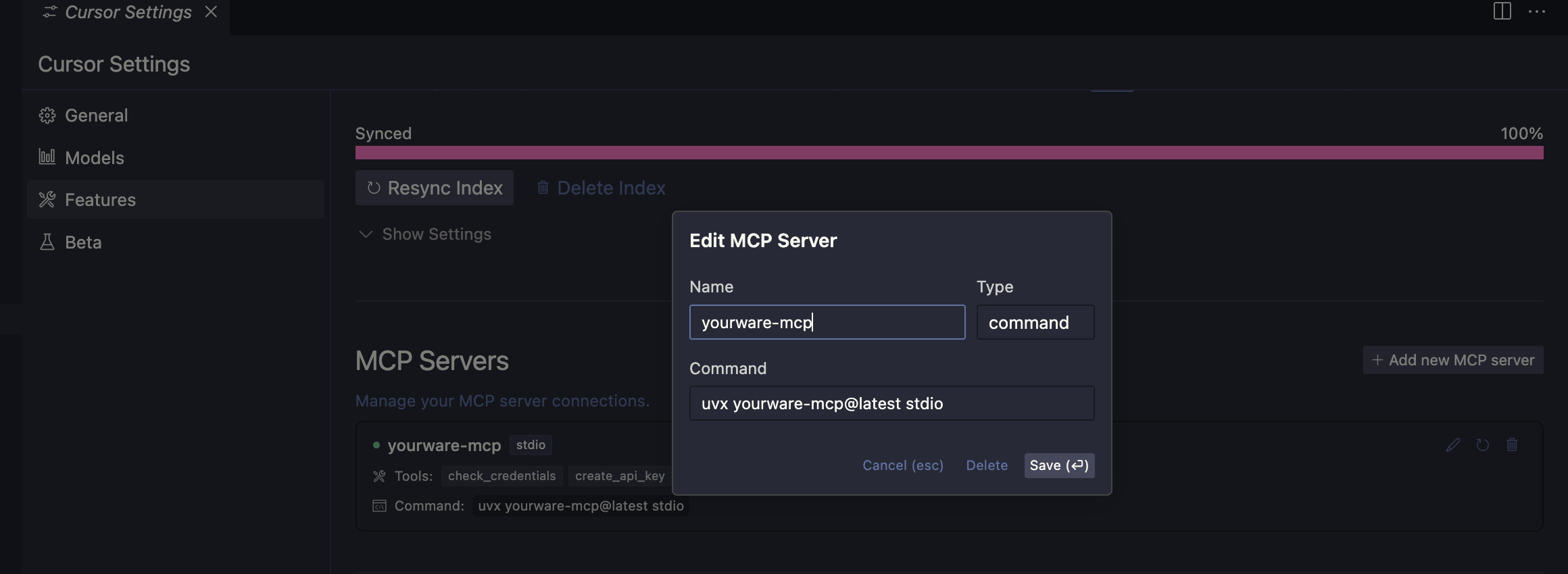
claude mcp add yourware-mcp -s user -- uvx yourware-mcp@latest stdioYOURWARE_API_KEY for the API key, you can also let llm config it for you.
Check your yourware credentials exists and are valid.
Inputs: no named parameters.
Create a new yourware API key. This will automatically be stored in /root/.yourware/credentials.json. Use this tool if current credentials are invalid
Inputs: api_key.
Upload a file or directory to yourware, might be a dist/out directory or a single html file. Use absolute path if possible. For multiple files, you should move them to a directory first, then use this tool to upload the directory
Inputs: file_path (required), cwd.
Recent tool additions, removals, and schema changes observed during successful MCP inspections.
Loading tool schema changelog…
Scored across 3 tools
Each tool has a clearly distinct purpose: checking credentials, creating an API key, and uploading a project. There is no overlap or ambiguity between them.
All tool names follow a consistent verb_noun pattern in snake_case (check_credentials, create_api_key, upload_project), making them predictable and easy to understand.
With 3 tools, the server is lean but covers the essential credential and upload operations for Yourware. A slightly larger set might be expected, but the count is still reasonable and focused.
The tool surface covers credential management and uploading, but lacks operations like listing, updating, or deleting projects. This leaves notable gaps that agents may encounter.
A MCP server built for developers enabling Git based project management with project and personal…
Create, deploy, and operate MCP servers directly from your GitHub repositories.
MCP server that lets your AI assistant build and deploy apps, hosting each one at a live URL.
MCP Server for JFrog, providing tools for development and artifact management.