
Uses Markdown as the primary storage and data format for task entities, providing tools to create, retrieve, and edit task content through Markdown files.
The web viewer supports rendering Mermaid diagrams within task descriptions for visualizing workflows and architectural decisions.
Utilizes YAML frontmatter within task files to manage structured metadata, including status, IDs, relationships, and custom attributes.
Click on "Install Server".
Wait a few minutes for the server to deploy. Once ready, it will show a "Started" state.
In the chat, type
@followed by the MCP server name and your instructions, e.g., "@Backlog MCP Serverlist all open tasks"
That's it! The server will respond to your query, and you can continue using it as needed.
Here is a step-by-step guide with screenshots.
backlog-mcp
A task backlog MCP server for LLM agents. Works with any MCP client — Claude, Kiro, Cursor, Codex, etc.
Agents create tasks, track progress, attach artifacts, and search across everything. Humans get a real-time web viewer to see what agents are doing.
Quick start: Tell your LLM:
Add backlog-mcp to .mcp.json and use it to track tasks
What's Inside
This is a monorepo with 4 packages:
Package | npm | What it does |
MCP server, HTTP API, CLI | ||
Reactive web component framework (zero deps) | ||
— | Web UI built on the framework | |
— | Shared entity types and ID utilities |
Installation
Add to your MCP config (.mcp.json or your MCP client config):
{
  "mcpServers": {
    "backlog": {
      "command": "npx",
      "args": ["-y", "backlog-mcp"]
    }
  }
}
Web Viewer
Open http://localhost:3030 — always available when the server is running.
Features:
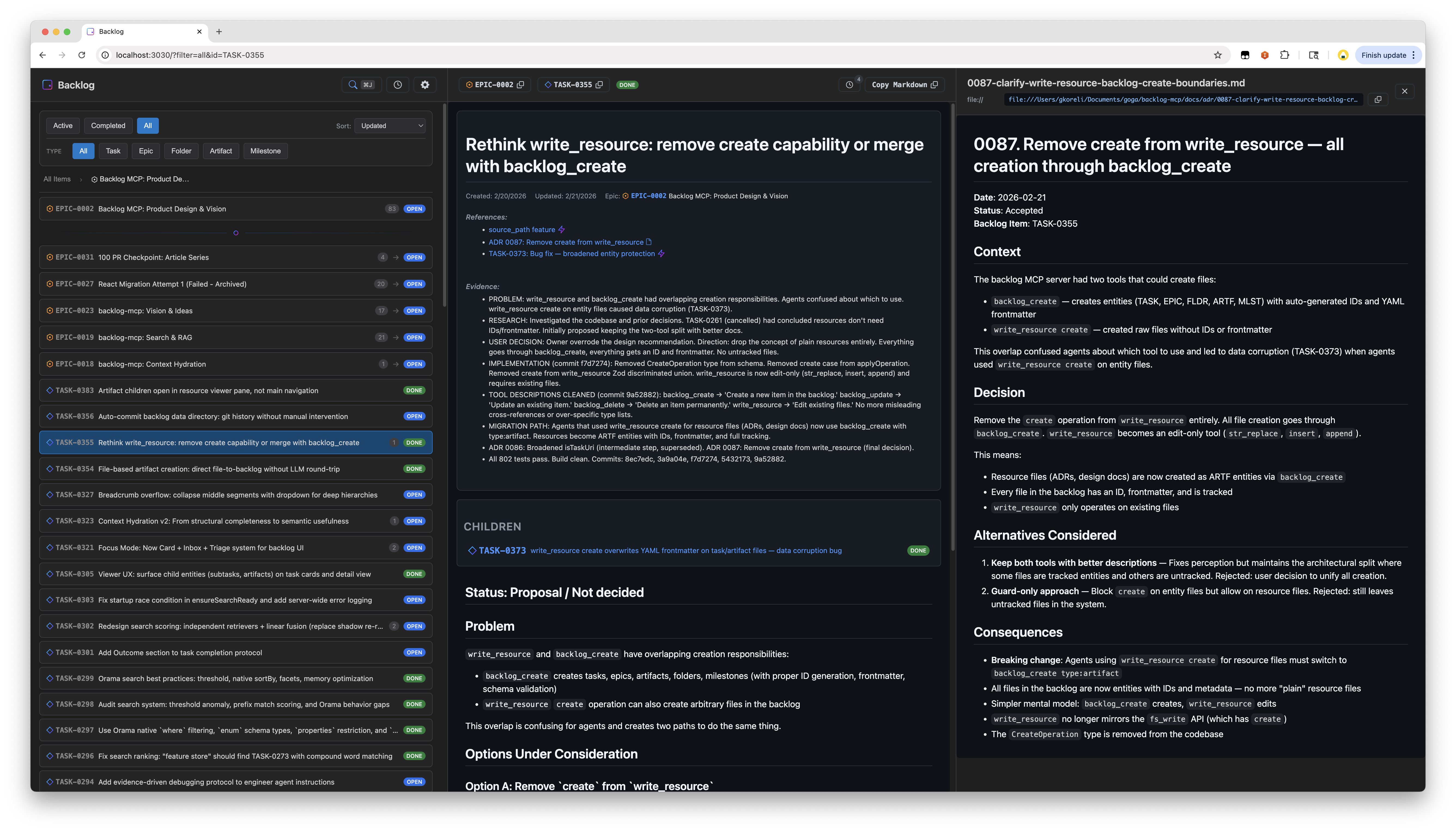
Split pane layout with task list and detail view
Spotlight search with hybrid text + semantic matching
Real-time updates via SSE
Activity timeline
Filter by status, type, epic
GitHub-style markdown rendering with Mermaid diagrams
URL state persistence
Entity Types
5 entity types, all stored as markdown files with YAML frontmatter:
Type | Prefix | Purpose |
Task |
| Work items |
Epic |
| Groups of related tasks |
Folder |
| Organizational containers |
Artifact |
| Attached outputs (research, designs, logs) |
Milestone |
| Time-bound targets with due dates |
Status values: open, in_progress, blocked, done, cancelled
Example task file:
---
id: TASK-0001
title: Fix authentication flow
status: open
epic_id: EPIC-0002
parent_id: FLDR-0001
references:
  - url: https://github.com/org/repo/issues/123
    title: Related issue
evidence:
  - Fixed in PR #45
---

The authentication flow has an issue where...
MCP Tools
backlog_list
backlog_list                              # Active tasks (open, in_progress, blocked)
backlog_list status=["done"]              # Completed tasks
backlog_list type="epic"                  # Only epics
backlog_list epic_id="EPIC-0002"          # Tasks in an epic
backlog_list parent_id="FLDR-0001"        # Items in a folder
backlog_list query="authentication"       # Search across all fields
backlog_list counts=true                  # Include counts by status/type
backlog_list limit=50                     # Limit results
backlog_get
backlog_get id="TASK-0001"                # Single item
backlog_get id=["TASK-0001","EPIC-0002"]  # Batch get
backlog_create
backlog_create title="Fix bug"
backlog_create title="Fix bug" description="Details..." epic_id="EPIC-0002"
backlog_create title="Q1 Goals" type="epic"
backlog_create title="Research notes" type="artifact" parent_id="TASK-0001"
backlog_create title="v2.0 Release" type="milestone" due_date="2026-03-01"
backlog_create title="Fix bug" source_path="/path/to/spec.md"  # Read description from file
backlog_update
backlog_update id="TASK-0001" status="done"
backlog_update id="TASK-0001" status="blocked" blocked_reason=["Waiting on API"]
backlog_update id="TASK-0001" evidence=["Fixed in PR #45"]
backlog_update id="TASK-0001" parent_id="FLDR-0001"
backlog_update id="MLST-0001" due_date="2026-04-01"
backlog_delete
backlog_delete id="TASK-0001" # Permanent deletebacklog_search
Full-text + semantic hybrid search with relevance scoring:
backlog_search query="authentication bug"
backlog_search query="design decisions" types=["artifact"]
backlog_search query="blocked tasks" status=["blocked"] limit=10
backlog_search query="framework" sort="recent"
backlog_search query="search ranking" include_content=true
backlog_context
Get rich context for a task — parent epic, siblings, children, cross-references, reverse references, recent activity, and semantically related items:
backlog_context task_id="TASK-0001"
backlog_context task_id="TASK-0001" depth=2          # Grandparent/grandchildren
backlog_context query="search ranking improvements"   # Find by description
backlog_context task_id="TASK-0001" include_related=false  # Skip semantic search
write_resource
Edit task content or create standalone resource files:
# Edit task body (use str_replace, not create — protects frontmatter)
write_resource uri="mcp://backlog/tasks/TASK-0001.md" \
  operation={type: "str_replace", old_str: "old text", new_str: "new text"}

# Create standalone resource
write_resource uri="mcp://backlog/resources/notes.md" \
  operation={type: "create", file_text: "# Notes\n\nContent here"}

# Append to resource
write_resource uri="mcp://backlog/resources/log.md" \
  operation={type: "append", new_str: "New entry"}
How It Works
Running npx -y backlog-mcp (the default MCP config) does the following:
Starts a persistent HTTP server as a detached background process — serves both the MCP endpoint (
/mcp) and the web viewer (/) on port 3030Bridges stdio to it — your MCP client communicates via stdio, which gets forwarded to the HTTP server via
mcp-remoteAuto-updates:
npx -yalways pulls the latest published version. If the running server is an older version, it's automatically shut down and restarted with the new oneResilient recovery: If the bridge loses connection, a supervisor restarts it with exponential backoff (up to 10 retries). Connection errors like
ECONNREFUSEDare detected and handled automatically
The HTTP server persists across agent sessions — multiple MCP clients can share it. The web viewer is always available at http://localhost:3030.
CLI
All commands via npx:
npx backlog-mcp                # Start stdio bridge + auto-spawn HTTP server (default)
npx backlog-mcp status         # Check server status
npx backlog-mcp stop           # Stop the server
npx backlog-mcp version        # Show version
npx backlog-mcp serve          # Run HTTP server in foreground (optional, see below)
Sample outputs:
$ npx backlog-mcp status
Server is running on port 3030
Version: 0.44.0
Data directory: /Users/you/.backlog
Task count: 451
Uptime: 3515s
Viewer: http://localhost:3030/
MCP endpoint: http://localhost:3030/mcp

$ npx backlog-mcp stop
Stopping server on port 3030...
Server stopped

$ npx backlog-mcp status
Server is not running
The CLI exists for humans to inspect and manage the background server that agents use. Since the default mode spawns a detached process, you need status to check it and stop to shut it down.
serve runs the HTTP server in the foreground instead of detached — useful for debugging, Docker containers, or running without an MCP client. In normal usage you never need it; the default command handles everything.
Configuration
BACKLOG_DATA_DIR=~/.backlog    # Where to store tasks (default: data/tasks/)
BACKLOG_VIEWER_PORT=3030       # HTTP server port
Create a .env file for local development — see .env.example.
Development
git clone https://github.com/gkoreli/backlog-mcp.git
cd backlog-mcp
pnpm install
pnpm build          # Build all packages
pnpm test           # Run all tests (802 across 3 packages)
pnpm dev            # Server + viewer with hot reload
Architecture
packages/
├── server/       # MCP server, search, context hydration, storage
├── framework/    # @nisli/core — signals, templates, DI, lifecycle
├── viewer/       # 18 web components built on the framework
└── shared/       # Entity types, ID utilities
docs/
├── adr/              # 91 architecture decision records
└── framework-adr/    # 19 framework-specific ADRs
110 ADRs document every significant design decision. See docs/adr/README.md for the full index.
License
MIT
