
F
licenseNot graded
qualityF
maintenanceA standalone server enabling Snyk security scanning through the Model Context Protocol, with support for repository and project analysis, token verification, and CLI integration.
15
-

The MCP SBOM Server is a tool that scans container images using Trivy to generate Software Bill of Materials (SBOMs) in both SPDX JSON and CycloneDX formats.
Container Image Scanning: Executes Trivy scans on specified container images
Multiple SBOM Formats: Supports both SPDX JSON and CycloneDX standards
MCP Integration: Operates as a server adhering to the Model Context Protocol (MCP)
Compatibility: Works with Python 3.12 and MCP 1.6
Debugging: Provides tools for debugging via MCP Inspector
Requirements: Needs uv, trivy, and Node.js for installation/execution
Windows Support: Includes guidance for Windows systems
Performs container and application vulnerability scanning using Trivy and produces a Software Bill of Materials (SBOM) in CycloneDX format.
Click on "Deploy Server".
Wait a few minutes for the server to deploy. Once ready, it will show a "Started" state.
In the chat, type @ followed by the MCP server name and your instructions, e.g., "@MCP SBOM Server scan my Dockerfile for vulnerabilities and generate an SBOM"
That's it! The server will respond to your query, and you can continue using it as needed.
Here is a step-by-step guide with screenshots.


MCP server to perform a Trivy scan and produce an SBOM in CycloneDX format.
Install the following.
Related MCP server: MCP NVD Server
"mcpServers": {
        "mcp-sbom": {
            "command": "uv",
            "args": [
                "--directory",
                "/path/to/mcp-sbom",
                "run",
                "mcp-sbom"
            ]
        }
}This project employsuv.
Synchronize dependencies and update the lockfile.
uv syncUse MCP Inspector.
Launch the MCP Inspector as follows:
npx @modelcontextprotocol/inspector uv --directory /path/to/mcp-sbom run mcp-sbom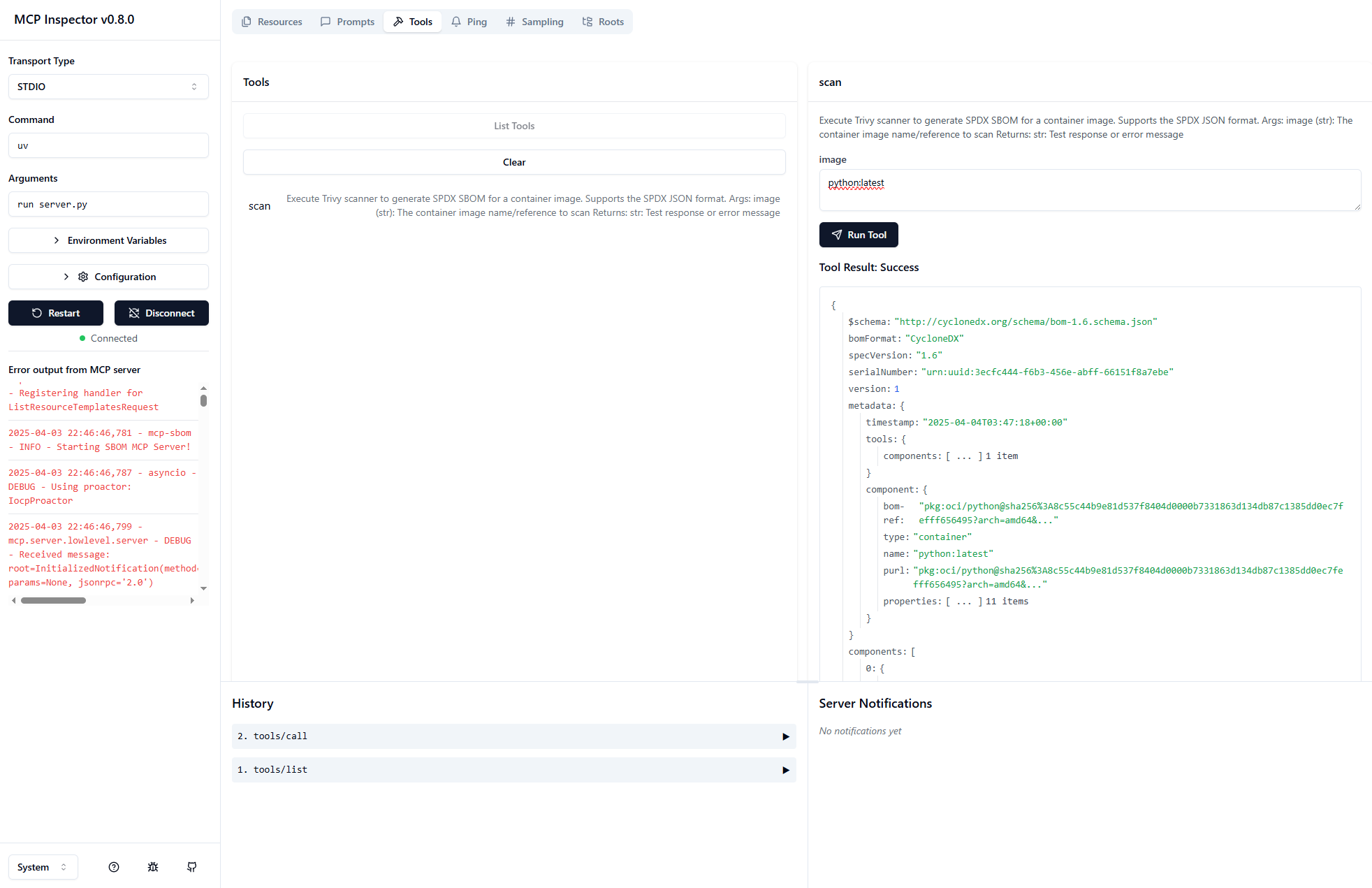
When running on Windows, use paths of the style:
C:/Users/gkh/src/mcp-sbom-server/src/mcp_sbomExecute Trivy scanner to generate SPDX SBOM for a container image.
Supports the SPDX JSON format.
Args:
image (str): The container image name/reference to scan
Returns:
str: Test response or error message
| Name | Required | Description | Default |
|---|---|---|---|
| image | Yes |
Does the description disclose side effects, auth requirements, rate limits, or destructive behavior?
With no annotations provided, the description carries the full burden of behavioral disclosure. It mentions the tool 'Supports the SPDX JSON format' and returns a 'Test response or error message,' but lacks critical details such as execution time, network dependencies, authentication needs, rate limits, or error handling. This leaves significant gaps in understanding the tool's operational behavior.
Agents need to know what a tool does to the world before calling it. Descriptions should go beyond structured annotations to explain consequences.
Is the description appropriately sized, front-loaded, and free of redundancy?
The description is well-structured and concise, with three sentences that efficiently cover purpose, format support, parameters, and returns. Each sentence adds value without redundancy. Minor improvements could include bullet points or clearer separation, but overall it is appropriately sized and front-loaded.
Shorter descriptions cost fewer tokens and are easier for agents to parse. Every sentence should earn its place.
Given the tool's complexity, does the description cover enough for an agent to succeed on first attempt?
Given the tool's complexity (scanning container images) and lack of annotations or output schema, the description is incomplete. It fails to explain key aspects like what an SPDX SBOM entails, how results are structured, potential side effects (e.g., network calls), or error scenarios. The return statement 'Test response or error message' is vague and unhelpful for an agent.
Complex tools with many parameters or behaviors need more documentation. Simple tools need less. This dimension scales expectations accordingly.
Does the description clarify parameter syntax, constraints, interactions, or defaults beyond what the schema provides?
The schema description coverage is 0%, so the description must compensate. It includes an 'Args' section that documents the single parameter 'image' as 'The container image name/reference to scan,' adding meaningful context beyond the bare schema. However, it does not elaborate on format specifics (e.g., Docker tags, registry URLs) or constraints, limiting its utility.
Input schemas describe structure but not intent. Descriptions should explain non-obvious parameter relationships and valid value ranges.
Does the description clearly state what the tool does and how it differs from similar tools?
The description clearly states the tool's purpose: 'Execute Trivy scanner to generate SPDX SBOM for a container image.' It specifies the verb ('execute'), resource ('Trivy scanner'), and output format ('SPDX SBOM'). However, with no sibling tools mentioned, it cannot demonstrate differentiation from alternatives, preventing a perfect score.
Agents choose between tools based on descriptions. A clear purpose with a specific verb and resource helps agents select the right tool.
Does the description explain when to use this tool, when not to, or what alternatives exist?
The description provides minimal usage guidance, only stating that it 'Supports the SPDX JSON format.' It does not specify when to use this tool versus other scanning methods, prerequisites, or exclusions. Without explicit context or alternatives, the guidance is insufficient for informed tool selection.
Agents often have multiple tools that could apply. Explicit usage guidance like "use X instead of Y when Z" prevents misuse.
Recent tool additions, removals, and schema changes observed during successful MCP inspections.
scanScored across 1 tool
With only one tool, there is no possibility of confusion or overlap between tools. The single 'scan' tool has a clearly defined purpose of generating SPDX SBOMs for container images using Trivy scanner.
With a single tool, naming consistency is inherently perfect. The tool name 'scan' follows a clear verb-based naming pattern that accurately describes its function without any conflicting naming conventions to compare against.
A single tool for an SBOM server feels insufficient for the apparent domain scope. While scanning is a core function, SBOM management typically involves additional operations like listing, retrieving, comparing, or validating SBOMs. The server appears to have significant functional gaps beyond the basic scan capability.
The tool surface is severely incomplete for an SBOM server. While scanning is essential, there are obvious gaps in the lifecycle: no tools for retrieving stored SBOMs, comparing different SBOM versions, validating SBOM formats, or managing SBOM metadata. This limited surface will likely cause agent failures when trying to perform comprehensive SBOM workflows.
A Model Context Protocol server for Wix AI tools
Model Context Protocol server for the Apideck Unified API. Connect any MCP-compatible agent framework to 100+ accounting systems, HRIS platforms, file storage providers, and more through one integration. More information https://www.apideck.com/mcp-server
Generate SBOMs, scan vulnerabilities, and analyze dependencies from local projects or Git repos.
Scans remote MCP servers for protocol, security, and TLS issues; exposes scan tools via MCP.