
loci-mcp
<div align="center">
<picture>
<source media="(prefers-color-scheme: dark)" srcset="https://raw.githubusercontent.com/gked/loci/main/docs/images/monogram-dark.svg">
<img src="https://raw.githubusercontent.com/gked/loci/main/docs/images/monogram-light.svg" alt="Loci" width="96" height="96">
</picture>
<br/>
<br/>
<br/>
[](https://github.com/gked/loci/actions/workflows/test.yml)





<br/>
</div>
# Loci
**A personal knowledge graph that you own.** Loci keeps your notes, articles,
books, tasks, people, and conversations as plain Markdown files in a folder
that you choose. Your AI agent reads and writes these files through an MCP
server. A local web app shows them as a graph.
**The problem.** Your knowledge is in many apps. The apps do not link to each
other. Your AI assistant keeps its memory on the vendor's servers, in the
vendor's format. When you search, you find only the note that you already
remember.
**What Loci does.**
- **Keeps everything in one place, as files.** Each item is one Markdown file
with YAML frontmatter. You can open, `grep`, and commit the files with no
other software. If you delete Loci, the files stay.
- **Links items with typed relations.** Each item has a stable 8-character ID,
a type (`article`, `task`, `entity`, …), and typed links to other items
(`is-based-on`, `contradicts`, `supersedes`, …). Links use IDs, so a rename
does not break them.
- **Holds your agent to your vocabulary.** The types, fields, and relations
are in versioned registries. Loci rejects an unknown type or relation on
write. Your agent reads the registries before it writes.
- **Points at files. It does not move them.** An item can record where a file
is: on your disk, in Google Drive, at a URL, in Gmail, and more.
- **Records each change.** Loci keeps a history of every write, also of edits
that you make by hand.
**Who it is for.** You use an AI agent every day (Claude Code is fully
supported). You want one place for what you read, write, and decide, in a
format that no platform owns.
Ask questions that a folder cannot answer: *what do I know about stoicism?*
returns the books, the reading logs, the notes, the people, and the links
between them.
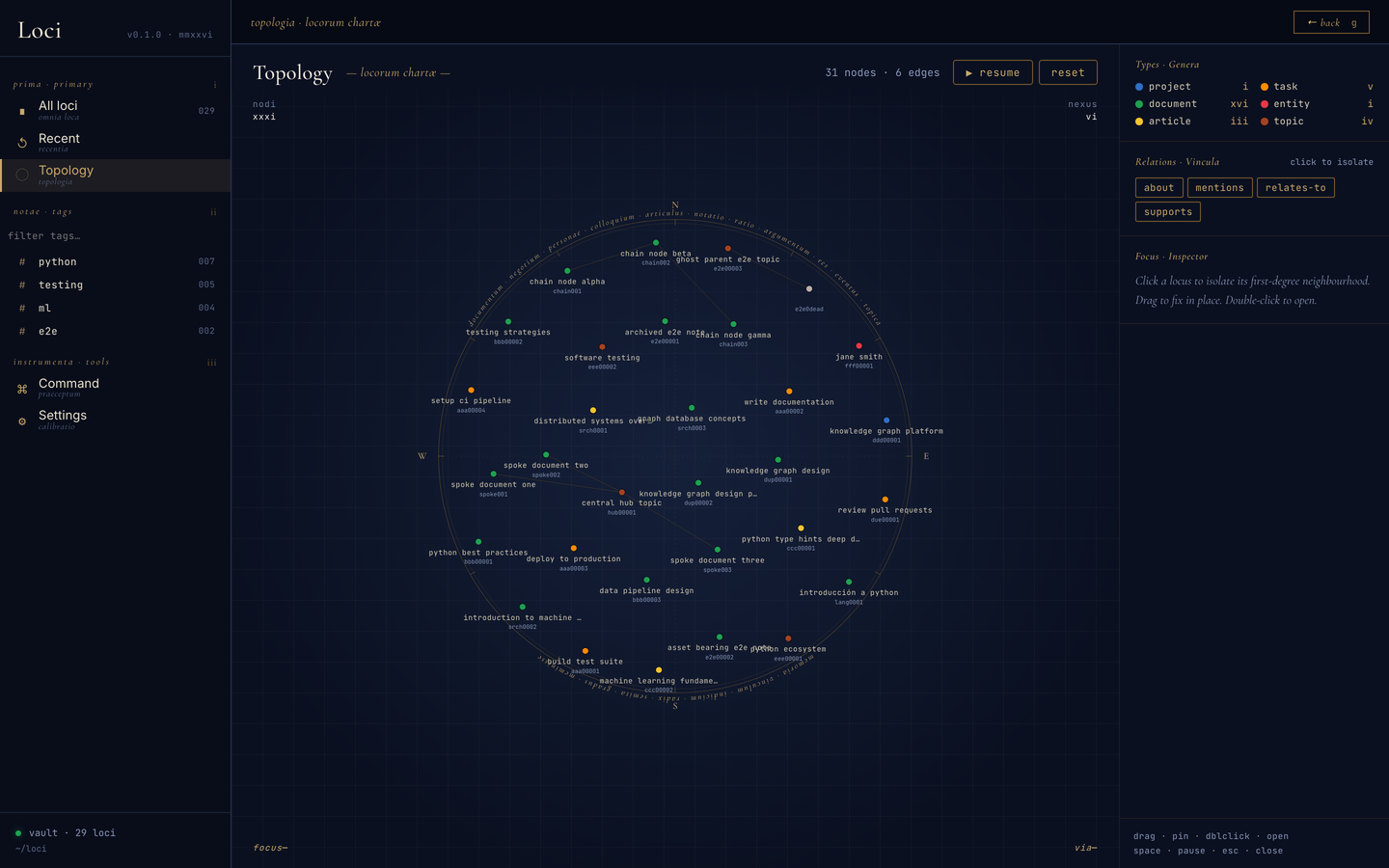
**Status.** Work in progress, and a personal project. The author uses the
core every day. Some parts are not finished.
[Status and roadmap](https://github.com/gked/loci/blob/main/docs/roadmap.md)
tells you which parts.
---
## Quick start
**Requirements:** Python 3.13+ and [uv](https://docs.astral.sh/uv/). The
author uses Loci on macOS. CI runs on Linux. Windows is not tested.
**1. Install from PyPI**
```bash
uv tool install loci-vault
```
> **The PyPI package is `loci-vault`, not `loci`.** The name `loci` on PyPI is an
> unrelated project. Do not run `uv tool install loci` or `pip install loci`.
> What you install is `loci-vault`; the commands it gives you are `loci` and
> `loci-mcp`.
**2. Connect it to Claude Code**
```bash
loci skills
claude mcp add --scope user loci loci-mcp
```
The first command installs the skills into `~/.claude/skills/`. The second
command registers the MCP server. For other agents, see
[Agent support](#agent-support).
**3. Choose a vault folder**
Restart Claude Code. Then tell it where the vault must be:
```
Point Loci at ~/loci/vault
```
Use a folder that is one level inside a folder of its own, as in this example.
Loci puts two more folders next to the vault: `assets/` (files that you add)
and `loci-stage/` (an inbox for batch import). With `~/loci/vault`, all three
are in `~/loci/`. With `~/vault`, they go directly into your home folder.
**4. Use it**
```
Save this article to my loci vault: https://example.com/post
What does my loci vault know about stoicism?
```
To browse the vault, start the web app:
```bash
loci # opens on http://127.0.0.1:8765
```
| Command | What it is |
|---|---|
| `loci` | The web UI and its HTTP backend. Change the address with `--host` / `--port` (or `LOCI_UI_HOST` / `LOCI_UI_PORT`). It stops with an error if you did not do step 3. |
| `loci-mcp` | The stdio MCP server. Your agent starts it. Do not start it yourself. |
For upgrades, a checkout install, and sync, see
[docs/setup.md](https://github.com/gked/loci/blob/main/docs/setup.md).
---
## Agent support
Loci is a standard MCP server. Any agent that supports MCP can use it.
| Agent | Status |
|---|---|
| Claude Code | Fully supported and tested. The steps above install everything. |
| Claude Desktop (macOS) | Supported. The checkout setup (`uv run setup.py`) registers it. |
| Codex and other MCP clients | Expected to work. Not tested. Do the steps below. |
For an agent other than Claude Code:
1. Register the MCP server with your agent. For Codex:
`codex mcp add loci -- loci-mcp`. For other agents, see their MCP
documentation. The command to start is `loci-mcp`.
2. If your agent supports skills (`SKILL.md` folders), install the skills into
its skills folder: `loci skills --dir <folder>`. For Codex, the folder is
usually `~/.codex/skills`.
3. If your agent does not support skills, add this line to its instructions:
"Before you save to or read from Loci, call the `read_skill` tool of the
`loci` MCP server and follow the result."
**Your data and the model.** The vault stays on your machine. When your agent
reads a note to answer you, the agent sends that note to its model provider,
as with any other file that the agent reads.
---
## Documentation
**Use Loci**
| | |
|---|---|
| [The problem](https://github.com/gked/loci/blob/main/docs/problem.md) | Why Loci exists, and why a Markdown folder or a PKM app alone is not sufficient |
| [Setup](https://github.com/gked/loci/blob/main/docs/setup.md) | Install from PyPI, a release wheel, or a checkout. Upgrade. Sync and backup |
| [Examples](https://github.com/gked/loci/blob/main/docs/examples.md) | One prompt for each task: save, find, update, extend the ontology |
| [Using Loci](https://github.com/gked/loci/blob/main/docs/usage.md) | The mental model, saving, querying, the web UI, and the vault layout |
| [The ontology](https://github.com/gked/loci/blob/main/docs/ontology.md) | Types, relations, schemes, and how the registries are versioned |
| [Status and roadmap](https://github.com/gked/loci/blob/main/docs/roadmap.md) | What is stable, what is partial, what is next |
**Work on Loci**
| | |
|---|---|
| [CONTRIBUTING](https://github.com/gked/loci/blob/main/CONTRIBUTING.md) | Licence, CLA, and the rules for a pull request |
| [Development](https://github.com/gked/loci/blob/main/docs/development.md) | Repo layout, daily commands, releases |
| [Testing](https://github.com/gked/loci/blob/main/docs/testing.md) | The unit suite and the browser e2e suite |
**Reference**
| | |
|---|---|
| [File saving](https://github.com/gked/loci/blob/main/docs/file-saving.md) | How a file on disk becomes a vault node |
| [Execution flows](https://github.com/gked/loci/blob/main/docs/execution-flows.md) | What each install and upgrade path does, step by step |
| [Diagrams](https://github.com/gked/loci/blob/main/docs/diagrams.md) | Components and data flow |
---
## Licence
[PolyForm Noncommercial 1.0.0](https://github.com/gked/loci/blob/main/LICENSE).
Noncommercial use is free: personal use, research, teaching, and charities,
including changes and redistribution. **Commercial use needs a separate
licence.** To get one, open an issue.
Loci is source-available, not open source. The licence covers this software,
not the notes that you write with it. Your vault is yours.
## Contributing
Read [CONTRIBUTING.md](https://github.com/gked/loci/blob/main/CONTRIBUTING.md).
Each pull request needs a signed
[Contributor Licence Agreement](https://github.com/gked/loci/blob/main/CLA.md).
You sign one time, and you keep your copyright.
---
## About the name
***Loci*** /ˈloʊsaɪ/ (LOH-sy, or LOH-kee as a Roman said it) is Latin for
"places," the plural of *locus*. The name comes from the method of loci: a
classical memory technique. You put each thing that you want to remember in a
place that you know well, such as a room or a road. To remember it, you walk
back through that place. Loci gives your digital life the same kind of space:
each item has a fixed place, and you find it by its links and its path.
TDQS
Scored across 39 tools
Most tools target a distinct resource+action (write/read/patch/delete/search on vault nodes, separate versioning, inbox, ontology, and asset tools). A few boundaries blur: search_vault vs find_nodes vs resolve_mentions all retrieve nodes, and define_type competes with write_meta(file="ontology-user") which is also described as the way to register a user type. Descriptions do help sort these out, but the registration overlap is a real source of misselection.
Nearly everything is snake_case verb_noun (write_vault, read_meta, scan_inbox, define_relation, execute_inbox_file_batch). The only wrinkle is inconsistent retrieval verbs — query_*, find_*, search_vault, get_inbox_plan, list_vault, read_vault — so similar read operations don't share a prefix. Still very readable and predictable overall.
39 tools is heavy for a single server and sits in the top band of the rubric. The domain is genuinely broad (vault CRUD, git-style history, ontology extension, assets, staged inbox, skills), so most tools earn their place, but several could be folded together (find_nodes/search_vault, define_type/write_meta).
Coverage is unusually thorough: full node lifecycle plus versioning/restore, filtered and keyword retrieval, graph queries, ontology/relation extension, asset registration, and a staged-inbox workflow. Minor gaps remain — search_vault only matches title and summary (no body full-text search), and there is no rename/move or delete operation for user-defined types/relations beyond overwriting ontology-user.