
Context7 MCP
by geobio
README.md
# Context7 MCP - Up-to-date Code Docs For Any Prompt
[](https://context7.com) [](https://smithery.ai/server/@upstash/context7-mcp) [<img alt="Install in VS Code (npx)" src="https://img.shields.io/badge/VS_Code-VS_Code?style=flat-square&label=Install%20Context7%20MCP&color=0098FF">](https://insiders.vscode.dev/redirect?url=vscode%3Amcp%2Finstall%3F%7B%22name%22%3A%22context7%22%2C%22command%22%3A%22npx%22%2C%22args%22%3A%5B%22-y%22%2C%22%40upstash%2Fcontext7-mcp%40latest%22%5D%7D)
[](./docs/README.zh-CN.md) [](./docs/README.ko.md) [](./docs/README.es.md) [](./docs/README.fr.md) [-purple)](./docs/README.pt-BR.md) [](./docs/README.it.md) [](./docs/README.id-ID.md) [](./docs/README.de.md) [](./docs/README.ru.md) [](./docs/README.tr.md) [](./docs/README.ar.md)
## ❌ Without Context7
LLMs rely on outdated or generic information about the libraries you use. You get:
- ❌ Code examples are outdated and based on year-old training data
- ❌ Hallucinated APIs don't even exist
- ❌ Generic answers for old package versions
## ✅ With Context7
Context7 MCP pulls up-to-date, version-specific documentation and code examples straight from the source — and places them directly into your prompt.
Add `use context7` to your prompt in Cursor:
```txt
Create a basic Next.js project with app router. use context7
```
```txt
Create a script to delete the rows where the city is "" given PostgreSQL credentials. use context7
```
Context7 fetches up-to-date code examples and documentation right into your LLM's context.
- 1️⃣ Write your prompt naturally
- 2️⃣ Tell the LLM to `use context7`
- 3️⃣ Get working code answers
No tab-switching, no hallucinated APIs that don't exist, no outdated code generations.
## 🛠️ Getting Started
### Requirements
- Node.js >= v18.0.0
- Cursor, Windsurf, Claude Desktop or another MCP Client
### Installing via Smithery
To install Context7 MCP Server for any client automatically via [Smithery](https://smithery.ai/server/@upstash/context7-mcp):
```bash
npx -y @smithery/cli@latest install @upstash/context7-mcp --client <CLIENT_NAME> --key <YOUR_SMITHERY_KEY>
```
You can find your Smithery key in the [Smithery.ai webpage](https://smithery.ai/server/@upstash/context7-mcp).
### Install in Cursor
Go to: `Settings` -> `Cursor Settings` -> `MCP` -> `Add new global MCP server`
Pasting the following configuration into your Cursor `~/.cursor/mcp.json` file is the recommended approach. You may also install in a specific project by creating `.cursor/mcp.json` in your project folder. See [Cursor MCP docs](https://docs.cursor.com/context/model-context-protocol) for more info.
#### Cursor Remote Server Connection
```json
{
"mcpServers": {
"context7": {
"url": "https://mcp.context7.com/mcp"
}
}
}
```
#### Cursor Local Server Connection
```json
{
"mcpServers": {
"context7": {
"command": "npx",
"args": ["-y", "@upstash/context7-mcp"]
}
}
}
```
<details>
<summary>Alternative: Use Bun</summary>
```json
{
"mcpServers": {
"context7": {
"command": "bunx",
"args": ["-y", "@upstash/context7-mcp"]
}
}
}
```
</details>
<details>
<summary>Alternative: Use Deno</summary>
```json
{
"mcpServers": {
"context7": {
"command": "deno",
"args": ["run", "--allow-env", "--allow-net", "npm:@upstash/context7-mcp"]
}
}
}
```
</details>
### Install in Windsurf
Add this to your Windsurf MCP config file. See [Windsurf MCP docs](https://docs.windsurf.com/windsurf/mcp) for more info.
#### Windsurf Remote Server Connection
```json
{
"mcpServers": {
"context7": {
"serverUrl": "https://mcp.context7.com/sse"
}
}
}
```
#### Windsurf Local Server Connection
```json
{
"mcpServers": {
"context7": {
"command": "npx",
"args": ["-y", "@upstash/context7-mcp"]
}
}
}
```
### Install in VS Code
[<img alt="Install in VS Code (npx)" src="https://img.shields.io/badge/VS_Code-VS_Code?style=flat-square&label=Install%20Context7%20MCP&color=0098FF">](https://insiders.vscode.dev/redirect?url=vscode%3Amcp%2Finstall%3F%7B%22name%22%3A%22context7%22%2C%22command%22%3A%22npx%22%2C%22args%22%3A%5B%22-y%22%2C%22%40upstash%2Fcontext7-mcp%40latest%22%5D%7D)
[<img alt="Install in VS Code Insiders (npx)" src="https://img.shields.io/badge/VS_Code_Insiders-VS_Code_Insiders?style=flat-square&label=Install%20Context7%20MCP&color=24bfa5">](https://insiders.vscode.dev/redirect?url=vscode-insiders%3Amcp%2Finstall%3F%7B%22name%22%3A%22context7%22%2C%22command%22%3A%22npx%22%2C%22args%22%3A%5B%22-y%22%2C%22%40upstash%2Fcontext7-mcp%40latest%22%5D%7D)
Add this to your VS Code MCP config file. See [VS Code MCP docs](https://code.visualstudio.com/docs/copilot/chat/mcp-servers) for more info.
#### VS Code Remote Server Connection
```json
{
"mcpServers": {
"context7": {
"type": "http",
"url": "https://mcp.context7.com/mcp"
}
}
}
```
#### VS Code Local Server Connection
```json
{
"servers": {
"Context7": {
"type": "stdio",
"command": "npx",
"args": ["-y", "@upstash/context7-mcp"]
}
}
}
```
### Install in Zed
It can be installed via [Zed Extensions](https://zed.dev/extensions?query=Context7) or you can add this to your Zed `settings.json`. See [Zed Context Server docs](https://zed.dev/docs/assistant/context-servers) for more info.
```json
{
"context_servers": {
"Context7": {
"command": {
"path": "npx",
"args": ["-y", "@upstash/context7-mcp"]
},
"settings": {}
}
}
}
```
### Install in Claude Code
Run this command. See [Claude Code MCP docs](https://docs.anthropic.com/en/docs/agents-and-tools/claude-code/tutorials#set-up-model-context-protocol-mcp) for more info.
#### Claude Code Remote Server Connection
```sh
claude mcp add --transport sse context7 https://mcp.context7.com/sse
```
#### Claude Code Local Server Connection
```sh
claude mcp add context7 -- npx -y @upstash/context7-mcp
```
### Install in Claude Desktop
Add this to your Claude Desktop `claude_desktop_config.json` file. See [Claude Desktop MCP docs](https://modelcontextprotocol.io/quickstart/user) for more info.
```json
{
"mcpServers": {
"Context7": {
"command": "npx",
"args": ["-y", "@upstash/context7-mcp"]
}
}
}
```
### Install in BoltAI
Open the "Settings" page of the app, navigate to "Plugins," and enter the following JSON:
```json
{
"mcpServers": {
"context7": {
"command": "npx",
"args": ["-y", "@upstash/context7-mcp"]
}
}
}
```
Once saved, enter in the chat `get-library-docs` followed by your Context7 documentation ID (e.g., `get-library-docs /nuxt/ui`). More information is available on [BoltAI's Documentation site](https://docs.boltai.com/docs/plugins/mcp-servers). For BoltAI on iOS, [see this guide](https://docs.boltai.com/docs/boltai-mobile/mcp-servers).
### Using Docker
If you prefer to run the MCP server in a Docker container:
1. **Build the Docker Image:**
First, create a `Dockerfile` in the project root (or anywhere you prefer):
<details>
<summary>Click to see Dockerfile content</summary>
```Dockerfile
FROM node:18-alpine
WORKDIR /app
# Install the latest version globally
RUN npm install -g @upstash/context7-mcp
# Expose default port if needed (optional, depends on MCP client interaction)
# EXPOSE 3000
# Default command to run the server
CMD ["context7-mcp"]
```
</details>
Then, build the image using a tag (e.g., `context7-mcp`). **Make sure Docker Desktop (or the Docker daemon) is running.** Run the following command in the same directory where you saved the `Dockerfile`:
```bash
docker build -t context7-mcp .
```
2. **Configure Your MCP Client:**
Update your MCP client's configuration to use the Docker command.
*Example for a cline_mcp_settings.json:*
```json
{
"mcpServers": {
"Сontext7": {
"autoApprove": [],
"disabled": false,
"timeout": 60,
"command": "docker",
"args": ["run", "-i", "--rm", "context7-mcp"],
"transportType": "stdio"
}
}
}
```
*Note: This is an example configuration. Please refer to the specific examples for your MCP client (like Cursor, VS Code, etc.) earlier in this README to adapt the structure (e.g., `mcpServers` vs `servers`). Also, ensure the image name in `args` matches the tag used during the `docker build` command.*
### Install in Windows
The configuration on Windows is slightly different compared to Linux or macOS (*`Cline` is used in the example*). The same principle applies to other editors; refer to the configuration of `command` and `args`.
```json
{
"mcpServers": {
"github.com/upstash/context7-mcp": {
"command": "cmd",
"args": [
"/c",
"npx",
"-y",
"@upstash/context7-mcp"
],
"disabled": false,
"autoApprove": []
}
}
}
```
### Environment Variables
The Context7 MCP server supports the following environment variables:
- `DEFAULT_MINIMUM_TOKENS`: Set the minimum token count for documentation retrieval (default: 10000)
Example configuration with environment variables:
```json
{
"mcpServers": {
"context7": {
"command": "npx",
"args": ["-y", "@upstash/context7-mcp"],
"env": {
"DEFAULT_MINIMUM_TOKENS": "6000"
}
}
}
}
```
### Available Tools
Context7 MCP provides the following tools that LLMs can use:
- `resolve-library-id`: Resolves a general library name into a Context7-compatible library ID.
- `libraryName` (required): The name of the library to search for
- `get-library-docs`: Fetches documentation for a library using a Context7-compatible library ID.
- `context7CompatibleLibraryID` (required): Exact Context7-compatible library ID (e.g., `/mongodb/docs`, `/vercel/next.js`)
- `topic` (optional): Focus the docs on a specific topic (e.g., "routing", "hooks")
- `tokens` (optional, default 10000): Max number of tokens to return. Values less than the configured `DEFAULT_MINIMUM_TOKENS` value or the default value of 10000 are automatically increased to that value.
## Development
Clone the project and install dependencies:
```bash
bun i
```
Build:
```bash
bun run build
```
### Local Configuration Example
```json
{
"mcpServers": {
"context7": {
"command": "npx",
"args": ["tsx", "/path/to/folder/context7-mcp/src/index.ts"]
}
}
}
```
### Testing with MCP Inspector
```bash
npx -y @modelcontextprotocol/inspector npx @upstash/context7-mcp
```
## Troubleshooting
### Module Not Found Errors
If you encounter `ERR_MODULE_NOT_FOUND`, try using `bunx` instead of `npx`:
```json
{
"mcpServers": {
"context7": {
"command": "bunx",
"args": ["-y", "@upstash/context7-mcp"]
}
}
}
```
This often resolves module resolution issues in environments where `npx` doesn't properly install or resolve packages.
### ESM Resolution Issues
For errors like `Error: Cannot find module 'uriTemplate.js'`, try the `--experimental-vm-modules` flag:
```json
{
"mcpServers": {
"context7": {
"command": "npx",
"args": [
"-y",
"--node-options=--experimental-vm-modules",
"@upstash/context7-mcp"
]
}
}
}
```
### TLS/Certificate Issues
Use the `--experimental-fetch` flag to bypass TLS-related problems:
```json
{
"mcpServers": {
"context7": {
"command": "npx",
"args": [
"-y",
"--node-options=--experimental-fetch",
"@upstash/context7-mcp"
]
}
}
}
```
### General MCP Client Errors
1. Try adding `@latest` to the package name
2. Use `bunx` as an alternative to `npx`
3. Consider using `deno` as another alternative
4. Ensure you're using Node.js v18 or higher for native fetch support
## Disclaimer
Context7 projects are community-contributed and while we strive to maintain high quality, we cannot guarantee the accuracy, completeness, or security of all library documentation. Projects listed in Context7 are developed and maintained by their respective owners, not by Context7. If you encounter any suspicious, inappropriate, or potentially harmful content, please use the "Report" button on the project page to notify us immediately. We take all reports seriously and will review flagged content promptly to maintain the integrity and safety of our platform. By using Context7, you acknowledge that you do so at your own discretion and risk.
## Connect with Us
Stay updated and join our community:
- 📢 Follow us on [X](https://x.com/contextai) for the latest news and updates
- 🌐 Visit our [Website](https://context7.com)
- 💬 Join our [Discord Community](https://upstash.com/discord)
## Context7 In Media
- [Better Stack: "Free Tool Makes Cursor 10x Smarter"](https://youtu.be/52FC3qObp9E)
- [Cole Medin: "This is Hands Down the BEST MCP Server for AI Coding Assistants"](https://www.youtube.com/watch?v=G7gK8H6u7Rs)
- [Income Stream Surfers: "Context7 + SequentialThinking MCPs: Is This AGI?"](https://www.youtube.com/watch?v=-ggvzyLpK6o)
- [Julian Goldie SEO: "Context7: New MCP AI Agent Update"](https://www.youtube.com/watch?v=CTZm6fBYisc)
- [JeredBlu: "Context 7 MCP: Get Documentation Instantly + VS Code Setup"](https://www.youtube.com/watch?v=-ls0D-rtET4)
- [Income Stream Surfers: "Context7: The New MCP Server That Will CHANGE AI Coding"](https://www.youtube.com/watch?v=PS-2Azb-C3M)
- [AICodeKing: "Context7 + Cline & RooCode: This MCP Server Makes CLINE 100X MORE EFFECTIVE!"](https://www.youtube.com/watch?v=qZfENAPMnyo)
- [Sean Kochel: "5 MCP Servers For Vibe Coding Glory (Just Plug-In & Go)"](https://www.youtube.com/watch?v=LqTQi8qexJM)
## Star History
[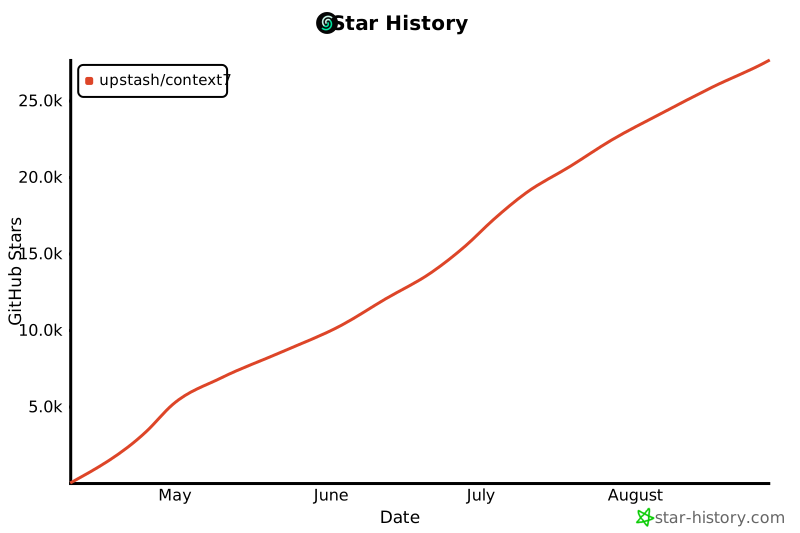](https://www.star-history.com/#upstash/context7&Date)
## License
MIT
This server cannot be deployed
Maintenance
ActivityInactive
ResponsivenessNo issues