
mcp-server-fanqie
# 番茄小说 MCP 服务器
<p align="center">
<img src="https://p3-reading-sign.fqnovelpic.com/tos-cn-i-1yzifmftcy/20c327fd5455431ea1d9f1e8989f20aa~tplv-s85hriknmn-jpeg-v1:300:0.jpeg?lk3s=6668da9f&x-expires=1771087684&x-signature=QWHr%2BEOeew%2FMPaY1z2Ul8U0MIsM%3D" alt="番茄小说" width="300" />
</p>
<p align="center">
<a href="https://github.com/fysh1010/mcp-server-fanqie/blob/main/LICENSE"><img src="https://img.shields.io/github/license/fysh1010/mcp-server-fanqie?color=rgb(25%2C%20121%2C%20255)" alt="The MIT License"></a>
<a href="https://github.com/fysh1010/mcp-server-fanqie/network/members"><img src="https://img.shields.io/github/forks/fysh1010/mcp-server-fanqie?color=green" alt="Forks"></a>
<a href="https://github.com/fysh1010/mcp-server-fanqie/stargazers"><img src="https://img.shields.io/github/stars/fysh1010/mcp-server-fanqie?style=flat-square&color=rgb(25%2C%20121%2C%20255)" alt="Stars"></a>
<a href="https://www.npmjs.com/package/@fysh925/mcp-server-fanqie"><img src="https://img.shields.io/npm/v/@fysh925/mcp-server-fanqie?color=red" alt="npm version"></a>
</p>
一个为番茄小说(FanQie Novel)提供 MCP(Model Context Protocol)服务的工具,支持将番茄小说的书籍、目录、章节内容等数据提供给支持 MCP 协议的大语言模型客户端,如 Claude Desktop、Cursor。
## ✨ 功能特点
- 🔍 **搜索功能** - 支持搜索小说、听书、漫画、短剧
- 📖 **书籍信息** - 获取书籍详情、完整目录、简化目录
- 📄 **内容获取** - 获取章节内容,支持多种内容类型
- 💬 **评论功能** - 获取书籍评论,支持分页
- 📱 **设备管理** - 支持 Android 和 iOS 设备池管理
- 🎯 **多平台支持** - 支持获取 iOS 平台特定内容
## 🛠️ 主要工具
### 1. search_books - 搜索书籍
搜索番茄小说平台上的书籍、听书、漫画或短剧。
**参数:**
- `key` (必需): 搜索关键词
- `tab_type` (可选): 内容类型
- `3` - 小说(默认)
- `2` - 听书
- `8` - 漫画
- `11` - 短剧
- `offset` (可选): 分页偏移量,默认为 0
**示例:**
```
搜索"修仙"关键词的小说
搜索"历史"关键词的漫画
```
### 2. get_book_detail - 获取书籍详情
获取指定书籍的详细信息,包括书名、作者、简介、封面等元数据。
**参数:**
- `book_id` (必需): 书籍 ID
**返回信息:**
- 书名、作者、译者
- 简介、封面
- 分类、标签
- 字数、评分等
### 3. get_book_directory - 获取书籍完整目录
获取书籍的完整章节目录列表,包括所有卷和章节信息。
**参数:**
- `book_id` (必需): 书籍 ID
**返回信息:**
- 所有卷的标题和 ID
- 每卷下的章节列表
- 章节标题和 ID
### 4. get_simple_directory - 获取简化目录
获取书籍的简化目录信息,仅包含章节标题和 ID。
**参数:**
- `book_id` (必需): 书籍 ID
**用途:**
- 快速获取章节列表
- 用于批量获取章节内容
### 5. get_chapter_content - 获取章节内容(简单接口)
获取指定章节的文本内容。
**参数:**
- `item_id` (必需): 章节 ID
**返回:**
- 章节文本内容
### 6. get_content - 获取内容(统一接口)
统一的内容获取接口,支持多种内容类型。
**参数:**
- `tab` (必需): 内容类型
- `novel` - 小说章节
- `audiobook` - 有声书音频
- `short drama` - 短剧视频
- `comic` - 漫画图片
- `batch` - 批量获取多个章节
- `download` - 下载整本小说
- `item_id` (可选): 单个章节/视频/漫画 ID(小说、听书、短剧、漫画时必需)
- `item_ids` (可选): 多个章节 ID,逗号分隔(批量时必需)
- `book_id` (可选): 书籍 ID(批量、下载时必需)
- `show_html` (可选): 漫画是否返回 HTML 格式(0 或 1,默认 0)
- `tone_id` (可选): 有声书音色 ID(听书时使用,默认 0)
- `async` (可选): 漫画异步模式(0 或 1,默认 1,建议为 1 以获得更快响应)
**使用场景:**
- 获取单个小说章节:`tab=novel, item_id=章节ID`
- 获取有声书音频:`tab=audiobook, item_id=章节ID`
- 获取漫画图片:`tab=comic, item_id=章节ID`
- 批量获取章节:`tab=batch, item_ids=章节ID1,章节ID2, book_id=书籍ID`
- 下载整本小说:`tab=download, book_id=书籍ID`
### 7. get_comments - 获取评论
获取书籍、章节或其他内容的评论列表,支持分页。
**参数:**
- `book_id` (必需): 书籍 ID
- `count` (可选): 每页数量,默认 20
- `offset` (可选): 偏移量,默认 0
### 8. get_device_pool_status - 获取设备池状态
查看设备池的整体状态,包括所有注册设备。
**用途:**
- 检查可用设备
- 监控设备健康状态
### 9. register_device - 注册设备
注册新的设备到设备池。
**参数:**
- `platform` (可选): 平台类型
- `android`(默认)
- `ios`
### 10. get_device_status - 获取设备状态
查看指定平台的设备状态。
**参数:**
- `platform` (可选): 平台类型
- `android`(默认)
- `ios`
### 11. get_raw_content - 获取原始内容
获取未处理的原始章节内容,包含完整的响应数据(HTML 格式、作者的话等)。
**参数:**
- `item_id` (必需): 章节 ID
**用途:**
- 需要原始 HTML 结构或完整字段时使用
### 12. get_ios_content - 获取 iOS 内容
使用 iOS 平台接口(8402 算法签名)获取章节内容。
**参数:**
- `item_id` (必需): 章节 ID
> ⚠️ 该接口依赖 iOS 设备池,上游服务可能临时不可用。
### 13. register_ios_device - 注册 iOS 设备
注册新的 iOS 设备到设备池。
**参数:** 无
> ⚠️ 该接口依赖上游 iOS 服务,可能临时不可用。
### 14. get_manga_progress - 查询漫画下载进度
根据任务 ID 查询漫画下载任务的进度。
**参数:**
- `task_id` (必需): 任务 ID(由漫画内容接口返回)
## 📦 安装与使用
> ✅ 本仓库**已包含编译产物 `build/`**,克隆或导入后**无需自己编译即可直接运行**。
### 先决条件
- Node.js 16.x 或更高版本(仅运行的话不需要装 TypeScript)
---
### 🚀 方式一:用 npx 一键配置(推荐,魔搭托管 / 本地客户端通用)
包已发布到 npm(`@fysh925/mcp-server-fanqie`),**任何支持 MCP 的平台都用下面这一段配置**——魔搭社区「可托管部署」、Claude Desktop、Cursor、Cherry Studio 全都适用:
```json
{
"mcpServers": {
"fanqie-novel": {
"command": "npx",
"args": ["-y", "@fysh925/mcp-server-fanqie"]
}
}
}
```
- **魔搭社区**:创建 MCP 服务 → 选「可托管部署」→ 配置里粘贴上面这段。魔搭云端会用 npx 自动从 npm 拉起服务,**无需你自己的服务器,也无需下载代码**。
- **本地客户端**(Claude Desktop / Cursor / Cherry Studio):把上面这段填进对应配置文件即可。
> ✅ **为什么用 npx**:魔搭等平台的「可托管部署」需要从公共仓库(npm)拉起服务。npx 会自动下载并运行最新版 `@fysh925/mcp-server-fanqie`,这是云端托管最省心、最可靠的方式。如果填本地路径(`node build/index.js`),魔搭云端没有你的仓库文件,会部署失败并退化成「仅本地可用」。
部署后确认:能看到 **14 个工具**、调用 `search_books` 搜书能正常返回 —— 即成功。
各客户端配置文件位置:
- **Claude Desktop**:`claude_desktop_config.json`
- **Cursor**:`~/.cursor/mcp.json` 或项目内 `.cursor/mcp.json`
- **Cherry Studio**:设置 → MCP 服务器 → 编辑 JSON
> 改完配置后需**完全退出并重启客户端**才生效(刷新无效)。
---
### 💻 方式二:用本地源码运行(不想用 npx 时)
仓库已含编译产物 `build/`,克隆后即可运行,无需编译:
```bash
git clone https://github.com/fysh1010/mcp-server-fanqie.git
```
配置里用 `node` + 你克隆后的**实际绝对路径**:
```json
{
"mcpServers": {
"fanqie-novel": {
"command": "node",
"args": ["/你的克隆路径/mcp-server-fanqie/build/index.js"]
}
}
}
```
- Windows 示例(反斜杠必须**双写** `\\`):`"args": ["C:\\Users\\你的用户名\\mcp-server-fanqie\\build\\index.js"]`
- macOS / Linux 示例:`"args": ["/Users/你的用户名/mcp-server-fanqie/build/index.js"]`
> ⚠️ 本地绝对路径只适用于本机客户端,**不要**填到魔搭等云平台(云端没有这个路径)。云平台请用方式一的 npx。
---
### 🔧 方式三:从源码自行编译(仅当你改了 `src/` 源码时)
```bash
git clone https://github.com/fysh1010/mcp-server-fanqie.git
cd mcp-server-fanqie
npm install
npm run build # 重新生成 build/
```
> 改完源码记得 `npm run build` 重新编译,并把 `src/` 和 `build/` 一起提交,否则托管平台运行的还是旧版本。
---
### ⚙️ 自定义 API 地址(可选)
服务默认使用内置接口地址 `http://101.35.133.34:5000`。若该地址日后变更,可通过环境变量 `FANQIE_API_BASE` 覆盖,无需改代码:
```json
{
"mcpServers": {
"fanqie-novel": {
"command": "npx",
"args": ["-y", "@fysh925/mcp-server-fanqie"],
"env": {
"FANQIE_API_BASE": "http://新的接口地址:端口"
}
}
}
}
```
也可在项目根目录创建 `.env` 文件:`FANQIE_API_BASE=http://101.35.133.34:5000`
## 🎯 使用示例
### 示例 1:搜索小说
**用户:**
```
帮我搜索关于修仙的小说
```
**LLM 调用:**
```
search_books(key="修仙", tab_type=3, offset=0)
```
**返回结果:**
```json
{
"keyword": "修仙",
"tab_type": 3,
"offset": 0,
"results": [
{
"book_id": "7233628636023098407",
"book_name": "修罗武神",
"author": "善良的蜜蜂",
"cover": "...",
"abstract": "...",
"total_words": 1000000
}
// ... 更多搜索结果
]
}
```
### 示例 2:获取书籍详情
**用户:**
```
帮我查看《修罗武神》的详细信息
```
**LLM 调用:**
```
get_book_detail(book_id="7233628636023098407")
```
**返回结果:**
```json
{
"book_id": "7233628636023098407",
"detail": {
"book_name": "修罗武神",
"author": "善良的蜜蜂",
"abstract": "一个关于修仙的故事...",
"cover": "...",
"total_words": 1000000,
"rating": 8.5,
"category": "玄幻"
}
}
```
### 示例 3:获取书籍目录
**用户:**
```
帮我获取《修罗武神》的目录
```
**LLM 调用:**
```
get_book_directory(book_id="7233628636023098407")
```
**返回结果:**
```json
{
"book_id": "7233628636023098407",
"directory": {
"volume_1": {
"volume_id": "xxx",
"volume_title": "第一卷",
"chapters": [
{"chapter_id": "xxx", "chapter_title": "第一章"},
{"chapter_id": "xxx", "chapter_title": "第二章"}
]
}
}
}
```
### 示例 4:阅读章节内容
**用户:**
```
我想读《修罗武神》的第一章
```
**LLM 调用:**
```
get_chapter_content(item_id="7233628684760910863")
```
**返回结果:**
```json
{
"item_id": "7233628684760910863",
"content": "第一章的内容..."
}
```
### 示例 5:批量获取章节
**用户:**
```
帮我获取《修罗武神》前 5 章的内容
```
**LLM 调用:**
```
get_content(tab="batch", item_ids="章节ID1,章节ID2,章节ID3,章节ID4,章节ID5", book_id="7233628636023098407")
```
### 示例 6:获取评论
**用户:**
```
《修罗武神》有什么热门评论?
```
**LLM 调用:**
```
get_comments(book_id="7233628636023098407", count=10, offset=0)
```
## 🔧 开发
### 构建项目
```bash
git clone https://github.com/fysh1010/mcp-server-fanqie.git
cd mcp-server-fanqie
npm install
npm run build
```
### 运行服务器
```bash
npm run start
```
### 运行测试
```bash
npm test
```
### 使用 MCP Inspector 测试
```bash
npm run inspector
```
## 📁 项目结构
```
mcp-server-fanqie/
├── src/
│ ├── FanQieApi.ts # 番茄小说 API 封装类
│ ├── fontDecrypt.ts # 字体解密模块(备用)
│ └── index.ts # MCP 服务器主入口
├── build/ # 编译产物(已纳入版本控制,可直接运行)
├── package.json # 项目配置
├── tsconfig.json # TypeScript 配置
├── .gitignore # Git 忽略文件
└── README.md # 说明文档
```
## 🔗 相关链接
- [番茄小说官网](https://fanqienovel.com/)
- [番茄小说 API 文档](http://101.35.133.34:5000/docs)
- [本项目 npm 包](https://www.npmjs.com/package/@fysh925/mcp-server-fanqie)
- [本项目 GitHub 仓库](https://github.com/fysh1010/mcp-server-fanqie)
- [MCP 协议规范](https://modelcontextprotocol.io/)
## 📝 更新日志
### v0.1.2 (2026-06-13)
- 📄 补全 LICENSE 文件(MIT)
- 🏷️ 完善 package.json 元数据(author / repository / homepage / bugs / keywords / engines)
- ⭐ README 加入 Star History 星标曲线图
### v0.1.1 (2026-06-13)
- 📦 已发布到 npm:`@fysh925/mcp-server-fanqie`,可用 `npx -y @fysh925/mcp-server-fanqie` 一键部署到魔搭等平台
- 🔧 更新 API 接口地址(原地址已失效)至 `http://101.35.133.34:5000`
- ⚙️ 支持通过环境变量 `FANQIE_API_BASE` 自定义 API 地址,接口变更时无需改动代码
- ✨ `get_content` 新增 `download` 整本下载类型及 `async` 漫画异步模式参数
- ➕ 补全 4 个此前未暴露的工具(接口文档共 14 个,现已全部封装为 MCP 工具):
- `get_raw_content` - 获取原始内容
- `get_ios_content` - 获取 iOS 内容
- `register_ios_device` - 注册 iOS 设备
- `get_manga_progress` - 查询漫画下载进度
### v0.1.0 (2025-01-16)
- 🎉 首次发布
- ✅ 实现搜索功能
- ✅ 实现书籍信息获取
- ✅ 实现目录和章节内容获取
- ✅ 实现评论功能
- ✅ 实现设备管理功能
- ✅ 支持 iOS 平台特定内容获取
## 🤝 贡献
欢迎提交 Issue 和 Pull Request!
## 📄 许可证
[MIT License](LICENSE)
## 🙏 致谢
本项目基于 [番茄小说 API](http://101.35.133.34:5000) 开发
- [MCP SDK](https://github.com/modelcontextprotocol/typescript-sdk)
- 项目结构参考了社区中其他 MCP 服务器的开发实践
## ⭐ Star History
如果这个项目对你有帮助,欢迎点个 Star 支持一下!
[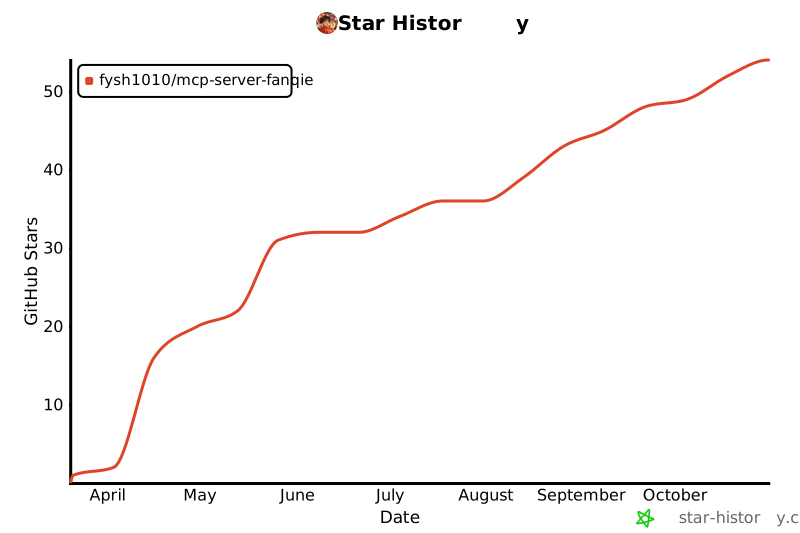](https://star-history.com/#fysh1010/mcp-server-fanqie&Date)
---
**注意:** 本项目仅供学习和研究使用,请遵守番茄小说的使用条款和 API 使用规范。TDQS
Scored across 14 tools
Multiple tools have overlapping purposes: get_chapter_content, get_ios_content, get_raw_content, and get_content all retrieve chapter content, making it unclear which to use. Similarly, get_book_directory and get_simple_directory serve the same function with different verbosity. Device registration and status tools are unrelated to the core content domain, adding confusion.
Most tools follow a 'get_X' or 'register_X' verb_noun pattern, but there are minor deviations such as 'search_books' and 'get_simple_directory' (adjective between verb and noun). The naming is mostly consistent and predictable.
With 14 tools, the count is well within the typical 3-15 range for a focused server. Each tool serves a clear purpose in the domain of book content retrieval and device management, though some redundancy exists.
The tool surface covers basic read operations (search, get details, get directory, get content, get comments) for books, audiobooks, manga, etc. However, there are no tools for creating, updating, or deleting content, nor for user authentication or advanced search filtering. The device management tools seem out of place for a content-focused server.