Eventfinda MCP
Click on "Install Server".
Wait a few minutes for the server to deploy. Once ready, it will show a "Started" state.
In the chat, type
@followed by the MCP server name and your instructions, e.g., "@Eventfinda MCPfind free events in Wellington this weekend"
That's it! The server will respond to your query, and you can continue using it as needed.
Here is a step-by-step guide with screenshots.
Eventfinda MCP
This plugin provides access to event data from the Eventfinda API. It allows AI agents to search for events by location and retrieve detailed information including event descriptions, dates, addresses, and ticket information.
Features
Example prompt to an AI with:
Find me events happening in Wellington this week.
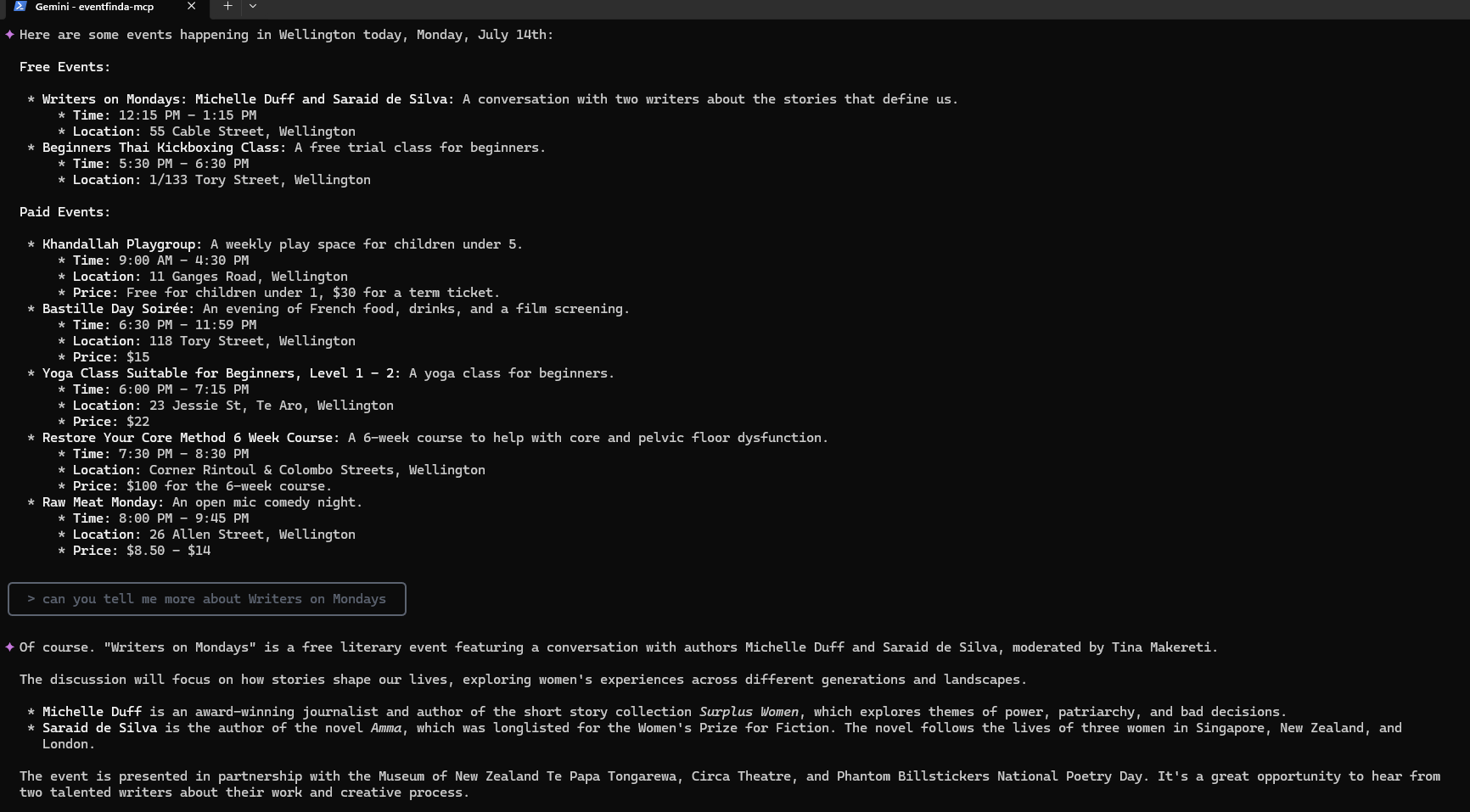
Search for events by location
Get detailed event information including:
Event title and description
Event URL
Date and time information
Address/location details
Ticket availability and pricing
Free event identification
Related MCP server: SeatGeek MCP Server
Setup
Basic Configuration
Apply API username and password from https://www.eventfinda.co.nz/api/v2/index
To use with Claude Desktop / Cursor / cline, ensure your configuration matches:
{
"mcpServers": {
"youtube-transcript": {
"command": "npx",
"args": ["-y", "@gabriel3615/eventfinda-mcp"],
"env": {
"EVENTFINDA_USERNAME": "USERNAME",
"EVENTFINDA_PASSWORD": "PASSWORD"
}
}
}
}Prerequisites
Node.js (v14 or higher)
Eventfinda API credentials
Environment Configuration
Create a .env file in the root directory with your Eventfinda API credentials:
EVENTFINDA_USERNAME=your_api_username
EVENTFINDA_PASSWORD=your_api_passwordInstallation
npm installUsage
Starting the MCP
npm startThis starts the MCP server using stdio transport, making it available to AI agents.
Accessing the Plugin in an AI Agent
Example prompt to an AI agent with access to this plugin:
Find me free events happening in Auckland this week.API Tools
list_events
Lists events within the next week for a specified location.
Parameters:
location: String - The location to search for events in (e.g., "Auckland", "Wellington")
Response Example:
[
{
"id": 123456,
"title": "Summer Music Festival",
"description": "A weekend of live music performances...",
"url": "https://www.eventfinda.co.nz/2023/summer-music-festival/auckland",
"datetime_start": "2023-11-25T15:00:00",
"datetime_end": "2023-11-25T22:00:00",
"address": "123 Main Street, Auckland CBD, Auckland",
"is_free": false,
"ticket_info": [
{
"name": "General Admission",
"price": "25.00",
"currency": "NZD"
}
]
},
{
"id": 123457,
"title": "Community Art Exhibition",
"description": "Local artists showcase their work...",
"url": "https://www.eventfinda.co.nz/2023/community-art-exhibition/auckland",
"datetime_start": "2023-11-26T10:00:00",
"datetime_end": "2023-11-26T16:00:00",
"address": "Auckland Art Gallery, Auckland CBD",
"is_free": true,
"ticket_info": "Free event"
}
]Development
Running in Development Mode
npm run inspectTesting the API
You can test the API using the included HTTP request files in the requests directory:
requests/auth-request.httpEventfinda API Reference
This plugin uses the Eventfinda API v2. For more information, visit: https://www.eventfinda.co.nz/api/v2/index
License
MIT
Available Tools
1 toollist_eventsB
List all events within this week for a given location.
| Name | Required | Description | Default |
|---|---|---|---|
| location | Yes | The location to search for events in. |
TDQS
Does the description disclose side effects, auth requirements, rate limits, or destructive behavior?
No annotations are provided, so the description carries full burden. It states 'List all events,' implying a read-only operation, but doesn't disclose behavioral traits like pagination, rate limits, authentication needs, error handling, or what 'all events' entails (e.g., completeness guarantees). It adds minimal context beyond the basic action.
Agents need to know what a tool does to the world before calling it. Descriptions should go beyond structured annotations to explain consequences.
Is the description appropriately sized, front-loaded, and free of redundancy?
The description is a single, efficient sentence that front-loads the purpose ('List all events') and specifies constraints ('within this week for a given location'). There is zero waste, and every word earns its place, making it highly concise and well-structured.
Shorter descriptions cost fewer tokens and are easier for agents to parse. Every sentence should earn its place.
Given the tool's complexity, does the description cover enough for an agent to succeed on first attempt?
Given no annotations, no output schema, and a simple single-parameter tool, the description is adequate but has gaps. It covers the basic what and scope but lacks details on behavior, output format, or error cases. For a read operation with low complexity, it's minimally viable but not fully complete.
Complex tools with many parameters or behaviors need more documentation. Simple tools need less. This dimension scales expectations accordingly.
Does the description clarify parameter syntax, constraints, interactions, or defaults beyond what the schema provides?
Schema description coverage is 100%, with the parameter 'location' fully documented in the schema. The description adds no additional meaning about the parameter beyond implying it's used to filter events. Since the schema does the heavy lifting, the baseline score of 3 is appropriate.
Input schemas describe structure but not intent. Descriptions should explain non-obvious parameter relationships and valid value ranges.
Does the description clearly state what the tool does and how it differs from similar tools?
The description clearly states the action ('List all events') and resource ('events'), specifying scope ('within this week for a given location'). It's specific about time frame and location filtering. However, with no sibling tools mentioned, it cannot demonstrate differentiation from alternatives, preventing a perfect score.
Agents choose between tools based on descriptions. A clear purpose with a specific verb and resource helps agents select the right tool.
Does the description explain when to use this tool, when not to, or what alternatives exist?
The description implies usage context by stating 'within this week for a given location,' suggesting it's for current-week events at specific locations. However, it lacks explicit guidance on when not to use this tool or alternatives, and no prerequisites are mentioned. With no sibling tools, it cannot provide comparative guidance.
Agents often have multiple tools that could apply. Explicit usage guidance like "use X instead of Y when Z" prevents misuse.
Tool Schema Changelog
Recent tool additions, removals, and schema changes observed during successful MCP inspections. Dates show when Glama detected each change.
1 tool update
v1.0.0- Changed
list_events2 fields changed- added
Input schema / $schemaAdded value: +"http://json-schema.org/draft-07/schema#" - added
Input schema / additionalPropertiesAdded value: +false
1 tool update
- First observed
list_events
TDQS
With only one tool, there is no possibility of ambiguity or overlap between tools, as there are no other tools to compare it to. The tool's purpose is clearly defined and distinct by default.
The single tool follows a consistent verb_noun pattern (list_events), and with no other tools, there is no inconsistency in naming conventions. The naming is straightforward and predictable.
A single tool is too few for a server named 'Eventfinda MCP', which implies a broader scope for event discovery and management. This minimal toolset likely leaves significant gaps in functionality, such as searching, filtering, or accessing event details beyond this week.
The tool surface is severely incomplete for an event-finding domain. It only lists events for this week in a given location, missing essential operations like searching events by date range, category, or keyword, getting event details, or managing user interactions.
Maintenance
Resources
Unclaimed servers have limited discoverability.
Looking for Admin?
If you are the server author, to access and configure the admin panel.
Related MCP Connectors
Find public EventMatey events that organisers have approved for AI discovery.
Booking gateway for AI agents — discover events, movies & hotels, hand off to partner checkout.
Run in-person events from your AI: create events, manage tickets, attendees, broadcasts.
Pay-per-use tool marketplace for AI agents. Search, price-check, and call APIs via MCP.
Related MCP Servers
- AlicenseNot gradedqualityDmaintenanceIntegrates with the Eventbrite API to provide AI-assisted event management capabilities for viewing events, tracking attendees, and generating analytics reports.53MIT
- AlicenseAqualityDmaintenanceEnables users to search for events, performers, and venues through the SeatGeek API. Provides event recommendations, detailed venue seating information, and performer discovery capabilities for ticketed entertainment events.43MIT
- AlicenseAqualityCmaintenanceEnables AI assistants to search, filter, and analyze Microsoft events (conferences, workshops, webinars) using the Microsoft Events API.42MIT
- AlicenseNot gradedqualityCmaintenanceWraps PredictHQ Events API to enable AI agents to query global event data through natural language, part of Pipeworx gateway.16MIT
Latest Blog Posts
- Who's Calling? MCP Hosts Are an Identity Blind Spot (And the Spec Knows It)By Om-Shree-0709 on .mcpAgent IdentityOAuth 2.1
- Your AI Chatbot Just Exposed Your CEO's Salary to an InternBy Om-Shree-0709 on .Agent IdentityMCP SecurityOAuth Delegation
- Why MCP Servers Need Execution Sandboxing (And Why Your Current Stack Isn't Enough)By Om-Shree-0709 on .Agentic AiPrompt InjectionWebAssembly
MCP directory API
We provide all the information about MCP servers via our MCP API.
curl -X GET 'https://glama.ai/api/mcp/v1/servers/flying3615/eventfinda-mcp'
If you have feedback or need assistance with the MCP directory API, please join our Discord server