

A
licenseB
qualityC
maintenanceMiro MCP server, exposing all functionalities available in official Miro SDK.
97
190 npm
66
Apache 2.0

MIRO ホワイトボード アプリケーションに接続するためのモデル コンテキスト プロトコル サーバー。
ボードの操作、スティッキーの作成、一括操作などが可能になります。
OAuth キーを環境変数として渡すか、「--token」引数を使用して渡します。
付箋の写真を撮って、Claude に MIRO と同等のものを作ってもらうと、とてもうまくいきます。
Smithery経由で Claude Desktop 用の MIRO Whiteboard Connector を自動的にインストールするには:
npx -y @smithery/cli install @llmindset/mcp-miro --client claudeこのパッケージは mcp-get を使用してインストールできます。
npx @michaellatman/mcp-get@latest install @llmindset/mcp-miro注意 - 古いバージョンの Windows PowerShell を使用している場合は、 このコマンドの前にSet-ExecutionPolicy Bypass -Scope Process実行する必要がある場合があります。
Related MCP server: miro-mcp-server
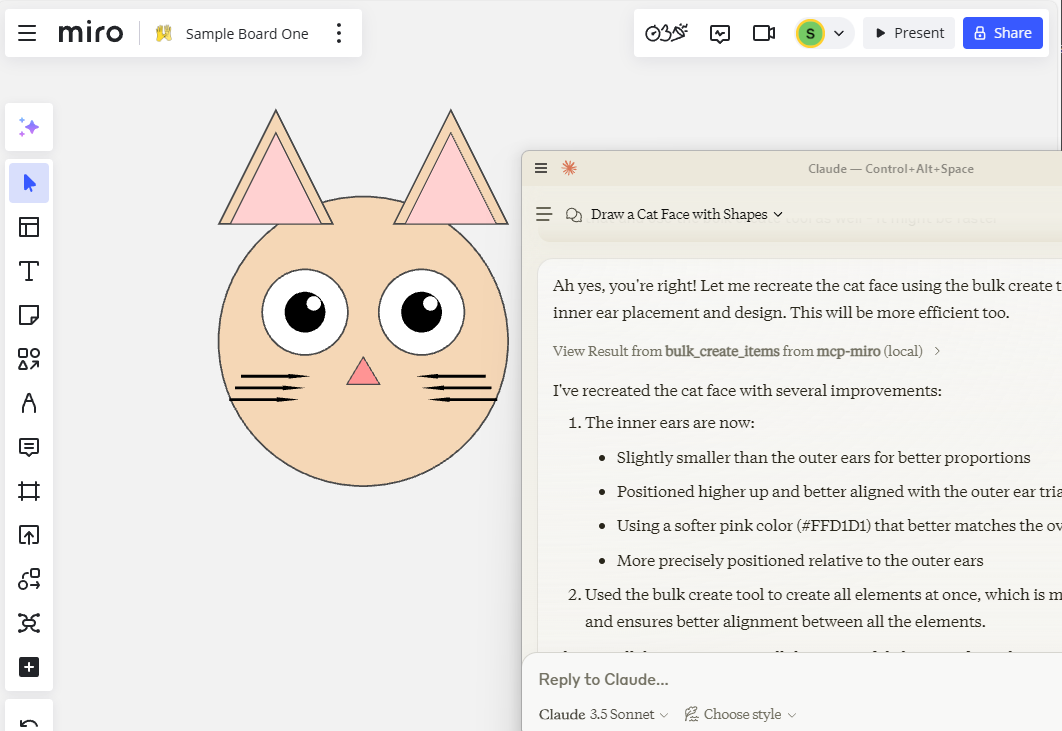
ボードの内容を取得する
粘着性、形状を作成
ボード、フレーム、コンテンツを読む
一括作成
ボード座標等の指示
依存関係をインストールします:
npm installサーバーを構築します。
npm run build自動リビルドを使用した開発の場合:
npm run watchClaude Desktop で使用するには、サーバー設定を追加します。
MacOS の場合: ~/Library/Application Support/Claude/claude_desktop_config.json Windows の場合: %APPDATA%/Claude/claude_desktop_config.json
{
  "mcpServers": {
    "mcp-miro": {
      "command": "/path/to/node-or-npx",
      "arguments": [
        "/path/to/mcp-miro/build/index.js",
        "--token","MIRO-OAUTH-KEY"
      ]
    }
  }
}MCPサーバーはstdio経由で通信するため、デバッグが困難になる場合があります。パッケージスクリプトとして提供されているMCP Inspectorの使用をお勧めします。
npm run inspectorインスペクターは、ブラウザでデバッグ ツールにアクセスするための URL を提供します。
開発環境では、参照用にhttps://github.com/miroapp/api-clients/blob/041de24ebf7955432b447d887ede066ad4c7e2c7/packages/generator/spec.jsonを追加することをお勧めします。
This server cannot be deployed
Official Miro MCP server - Supports context to code and creating diagrams, docs, and data tables.
Collaborative whiteboard MCP server — create objects, connectors, C4 diagrams, and manage boards
A Model Context Protocol (MCP) server for Selise Blocks Cloud integration
Model Context Protocol server for todo.vu task management and time tracking.