Binance MCP Server
The Binance MCP Server enables AI assistants to interact with Binance cryptocurrency exchange APIs for market data analysis, account management, and trading operations.
Market Data Retrieval:
Get current prices for any trading pair (e.g., BTCUSDT, ETHUSDT)
View order book depth with configurable limits
Retrieve K-line/candlestick data with 15 time intervals (1m to 1M) for technical analysis
Check 24-hour price statistics including volume, price changes, and high/low
Account Management:
View account information, balances, and account status
Monitor current open orders for specific or all trading pairs
Access historical order records with configurable limits
Trading Operations:
Place market and limit orders (buy/sell)
Cancel specific orders by ID
Cancel all open orders for a trading pair
Environment Support:
Testnet mode for safe development and testing with virtual funds
Mainnet mode for live trading with real cryptocurrency
Built-in warnings for mainnet operations and secure API key management through environment variables
Provides seamless access to Binance exchange API functionality, including real-time market data (prices, order books, candlestick data), account management (balances, orders), and trading operations (placing and canceling orders).
Click on "Install Server".
Wait a few minutes for the server to deploy. Once ready, it will show a "Started" state.
In the chat, type
@followed by the MCP server name and your instructions, e.g., "@Binance MCP Serverget the current price of Bitcoin"
That's it! The server will respond to your query, and you can continue using it as needed.
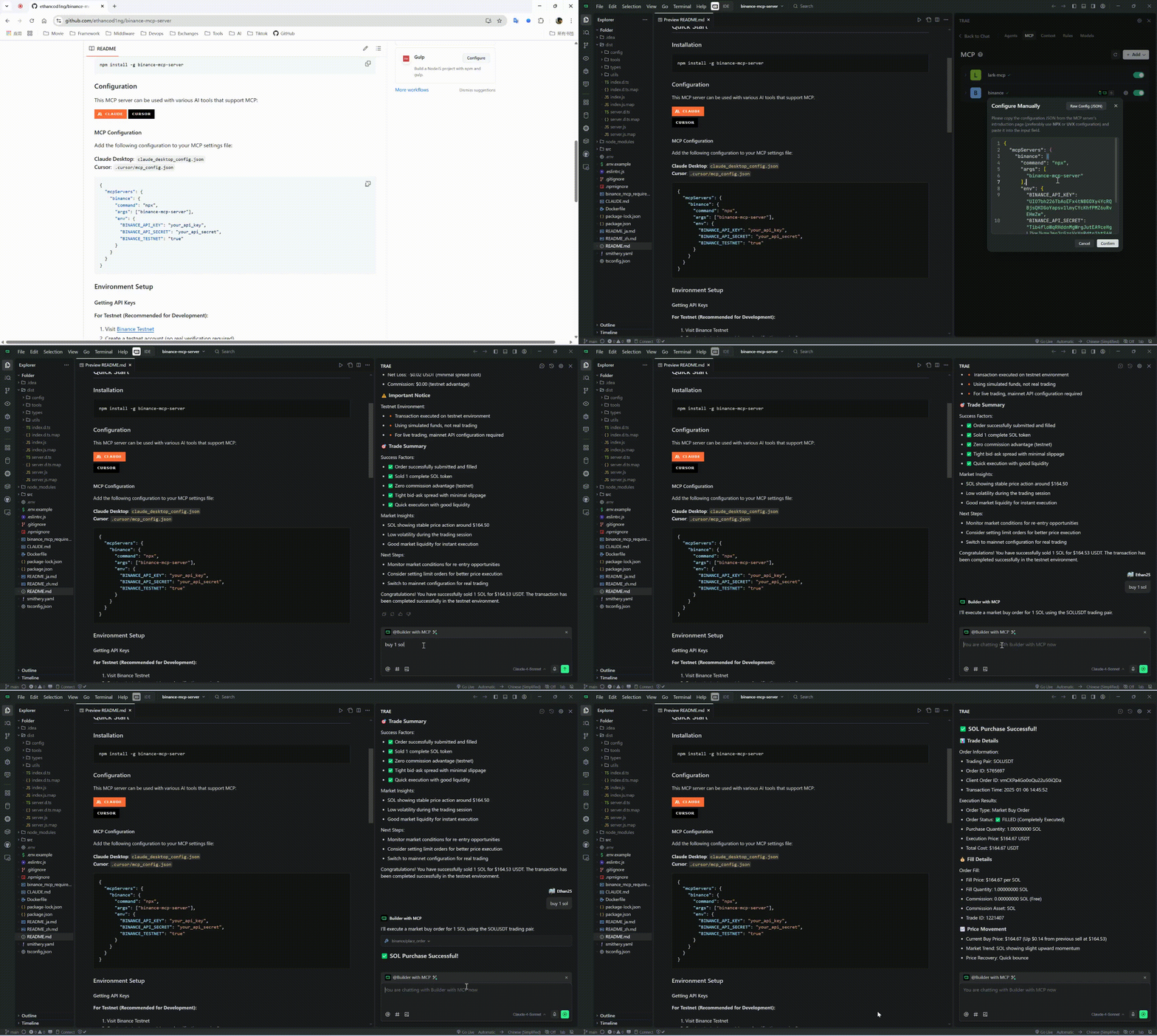
Here is a step-by-step guide with screenshots.
Binance MCP Server
Multi-language Documentation
A Model Context Protocol (MCP) server that provides Claude Code with Binance exchange API functionality.
Quick Start
📹 Video Tutorial
Watch our comprehensive MCP usage tutorial to get started quickly:

Installation
npm install -g binance-mcp-serverConfiguration
This MCP server can be used with various AI tools that support MCP:
MCP Configuration
Add the following configuration to your MCP settings file:
{
"mcpServers": {
"binance": {
"command": "npx",
"args": ["binance-mcp-server"],
"env": {
"BINANCE_API_KEY": "your_api_key",
"BINANCE_API_SECRET": "your_api_secret",
"BINANCE_TESTNET": "false"
}
}
}
}Note: Set
BINANCE_TESTNETto"true"if you want to use the Binance testnet for development and testing.
One-Click Setup with Claude Code
claude mcp add binance --env BINANCE_API_KEY=YOUR_API_KEY --env BINANCE_API_SECRET=YOUR_API_SECRET --env BINANCE_TESTNET=false -- npx -y binance-mcp-serverEnvironment Setup
Getting API Keys
For Testnet (Recommended for Development):
Visit Binance Testnet
Create a testnet account (no real verification required)
Go to API Management in your testnet account
Create a new API key with trading permissions
Note: Testnet uses virtual funds - completely safe for testing
For Mainnet (Production):
Create a verified account on Binance
Complete KYC verification
Go to API Management in your account settings
Create a new API key with required permissions
⚠️ Warning: Mainnet uses real money - be very careful!
Configuration
Create .env file:
BINANCE_API_KEY=your_api_key_here
BINANCE_API_SECRET=your_api_secret_here
BINANCE_TESTNET=true # Set to false for mainnet (REAL money)Related MCP server: Claude Code MCP
Available Tools
Market Data
get_price- Get current price for trading pairget_orderbook- Get order book depth dataget_klines- Get K-line/candlestick dataget_24hr_ticker- Get 24-hour price statistics
Account
get_account_info- Get account information and balancesget_open_orders- Get current open ordersget_order_history- Get historical orders
Trading (Mainnet & Testnet)
place_order- Place a new order (supports both mainnet and testnet)cancel_order- Cancel specific order (supports both mainnet and testnet)cancel_all_orders- Cancel all open orders (supports both mainnet and testnet)
Usage Examples
Ask Claude to:
"Get the current price of Bitcoin"
"Show me the order book for ETHUSDT"
"Check my account balance"
"Place a limit buy order for 0.001 BTC at $50,000"
Security
⚠️ Important:
Set
BINANCE_TESTNET=truefor safe testing with virtual fundsSet
BINANCE_TESTNET=falseor omit for mainnet trading with REAL moneyMainnet trading will display warnings before executing orders
Development
npm run build # Compile TypeScript
npm run dev # Development mode
npm run lint # Run lintingResources
Unclaimed servers have limited discoverability.
Looking for Admin?
If you are the server author, to access and configure the admin panel.
Latest Blog Posts
MCP directory API
We provide all the information about MCP servers via our MCP API.
curl -X GET 'https://glama.ai/api/mcp/v1/servers/ethancod1ng/binance-mcp-server'
If you have feedback or need assistance with the MCP directory API, please join our Discord server