
cc-tap
<!-- mcp-name: io.github.es617/cc-tap -->
# cc-tap
[](https://modelcontextprotocol.io)
[](https://opensource.org/licenses/MIT)
[](https://www.python.org/downloads/)
Experimental MCP server that lets Claude Desktop see into and interact with Claude Code [Remote Control](https://code.claude.com/docs/en/remote-control) sessions.
> **Example:** Ask Claude Desktop *"what's my Code session working on?"* and get a real answer.
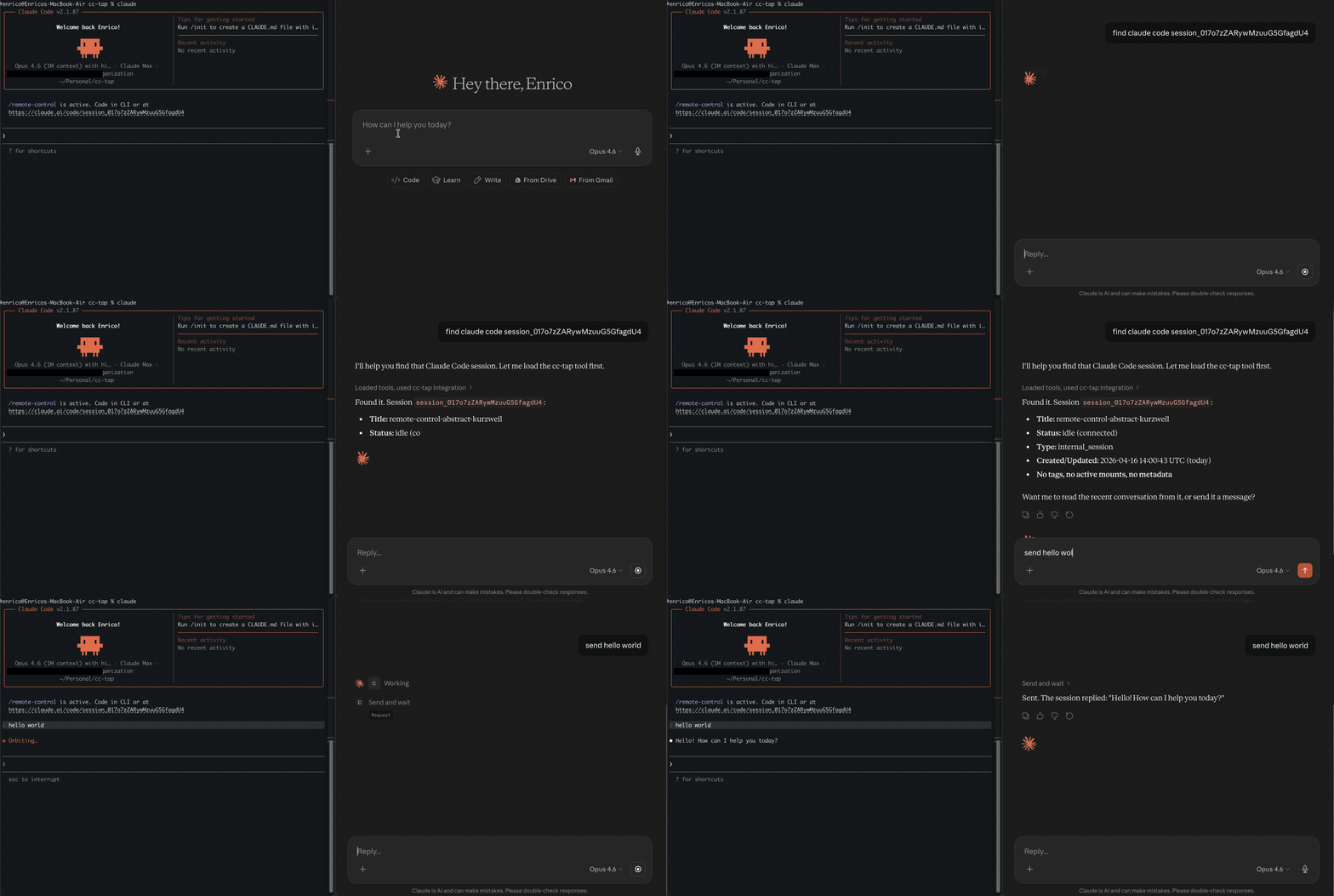
## Why this exists
Claude Desktop and Claude Code are separate worlds. Both build up rich context on your project, but neither can see what the other is doing. A design idea on Desktop that should drive an implementation in Code, or an implementation detail in Code that the Desktop conversation needs; both require you to copy-paste between windows and re-explain context that already exists.
Claude Code's [Remote Control](https://code.claude.com/docs/en/remote-control) lets you drive a session from another device, but that's still you driving the same session. cc-tap is for the other axis: letting a different agent (Claude Desktop, or another Claude Code instance) read and interact with a running CC session through MCP.
## Who is this for
- Developers who use both Claude Desktop and Claude Code
- Anyone who wants to monitor or interact with CC sessions programmatically
- Multi-agent workflows where one Claude instance needs to coordinate with another
## Quickstart
```bash
pip install cc-tap
```
Requires an active Claude Code login (`claude /login`) and [Remote Control](https://code.claude.com/docs/en/remote-control) enabled.
### Claude Code
```bash
claude mcp add cc-tap -- cc_tap
```
### Claude Desktop
Add to `claude_desktop_config.json`:
```json
{
"mcpServers": {
"cc-tap": {
"command": "cc_tap",
"args": []
}
}
}
```
## Tools
| Tool | Description |
|------|-------------|
| `list_sessions` | List all CC sessions (optionally filter by status) |
| `get_session_info` | Get details about a specific session |
| `read_session` | Read recent conversation from a session |
| `get_session_events` | Get raw events, optionally filtered by type |
| `send_message` | Send a message to a CC session (fire and forget) |
| `send_and_wait` | Send a message and wait for the full response |
## How it works
cc-tap reads your Claude Code OAuth credentials (from macOS Keychain or `~/.claude/.credentials.json`) and talks to the same API that Claude Code's [Remote Control](https://code.claude.com/docs/en/remote-control) web UI uses. No additional authentication needed.
Sessions are accessed via HTTP polling (~1.5s latency). Messages you send appear in the target CC session as if typed by the user.
## Limitations
- **Tool approval** — the session runtime only picks up approvals via WebSocket (behind Cloudflare bot protection). You can see pending tool requests via `send_and_wait`, but must approve them in the CC terminal or claude.ai/code web UI.
- **Not real-time** — uses HTTP polling, not WebSocket streaming. ~1.5s latency.
- **Undocumented API** — uses internal Anthropic endpoints that may change without notice.
- **Local only** — reads credentials from the local machine. Can't be deployed as a remote service.
## Protocol
See [PROTOCOL.md](https://github.com/es617/cc-tap/blob/main/PROTOCOL.md) for the reverse-engineered Claude Code Remote session API documentation.
## Development
```bash
git clone https://github.com/es617/cc-tap.git
cd cc-tap
pip install -e ".[dev,test]"
pre-commit install
pytest
```
## Disclaimer
This project is an **experimental research tool** for personal and educational use. It interacts with undocumented, internal Anthropic APIs that are not part of any public or supported API surface. These endpoints may change, break, or be removed at any time without notice.
This project is **not affiliated with, endorsed by, or supported by Anthropic**. Use it at your own risk. The authors assume no responsibility for any consequences of using this tool, including but not limited to account restrictions, data loss, or service disruption.
By using this tool you acknowledge that you are responsible for compliance with Anthropic's [Terms of Service](https://www.anthropic.com/terms) and [Acceptable Use Policy](https://www.anthropic.com/aup).
## License
[MIT](https://github.com/es617/cc-tap/blob/main/LICENSE)
TDQS
Scored across 6 tools
Tools are generally distinct: get_session_info, list_sessions, and send_message/send_and_wait have clear purposes. However, get_session_events and read_session both retrieve session content, with descriptions that partially overlap (events vs conversation), which could cause minor confusion.
All tools use a consistent verb_noun pattern in snake_case, such as get_session_info, list_sessions, send_message. The naming is predictable and follows a clear convention.
With 6 tools, the server is well-scoped for managing Claude Code sessions. The count covers essential operations without being excessive, though a tool for archiving or deleting sessions might be expected.
The tool set covers listing, reading, and sending to sessions, but lacks tools for lifecycle management like creating, archiving, or closing sessions. This leaves some gaps for full session management.