
postgres-schema-mcp
# postgres-schema-mcp
An MCP server that gives an AI agent read-only access to a PostgreSQL database. Browse the schema,
follow foreign keys, search columns across hundreds of tables, run capped SELECTs, and export an
offline data dictionary.
**Writes are rejected, and there are tests that prove it.**
It runs over stdio for one developer and over authenticated HTTP for a team.
```
npx postgres-schema-mcp
```
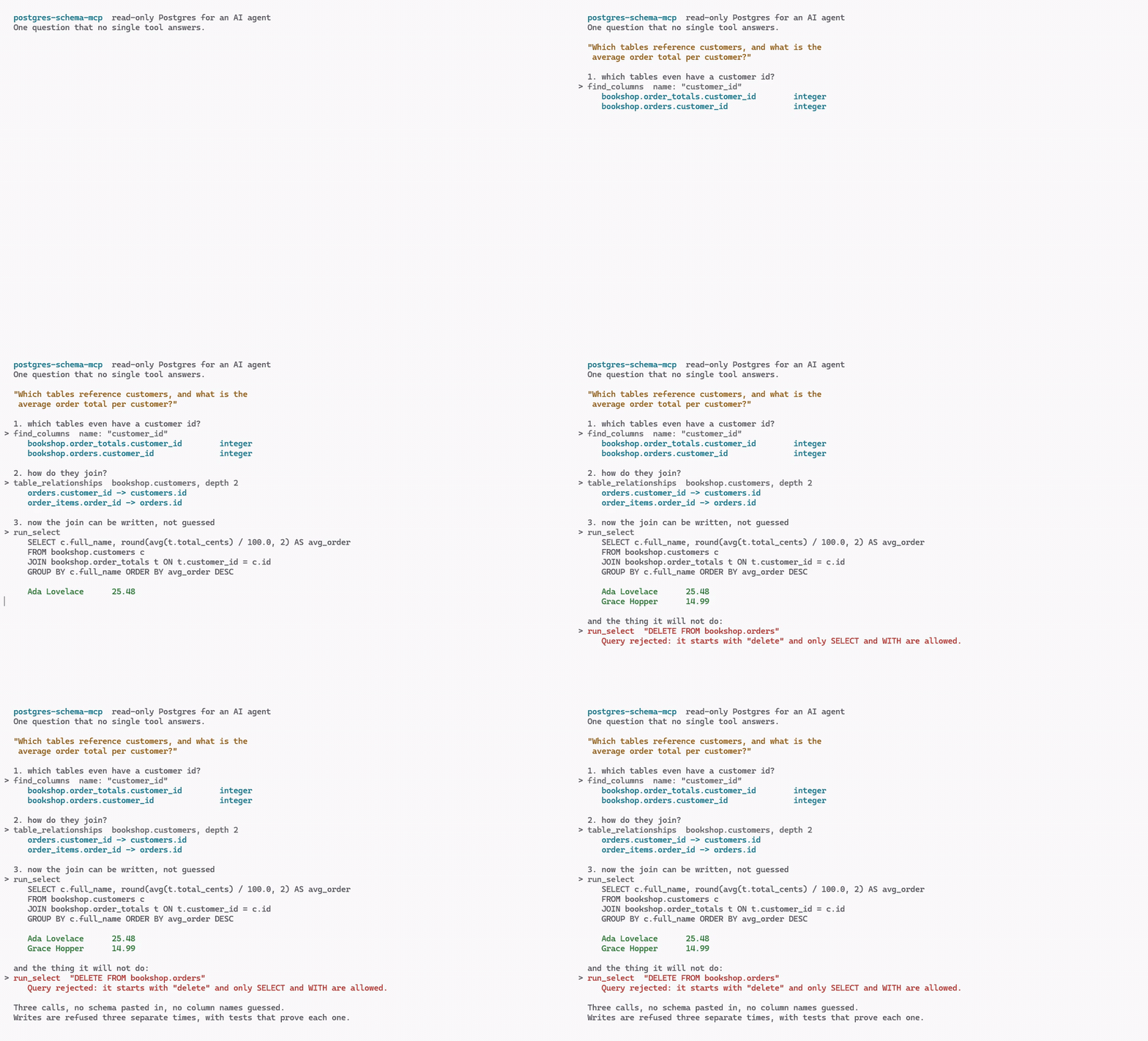
Three calls to answer a question no single tool answers: find the join column, follow the keys,
then write the query. No schema pasted into the prompt and no column names guessed. The last few
seconds are the part that matters more than the answer.
Nothing in that recording is staged. It is
[`scripts/demo.mjs`](https://github.com/eric-patton/postgres-schema-mcp/blob/main/scripts/demo.mjs), a real MCP client driving the real server against the
sample database below, and [`scripts/record-demo.ps1`](https://github.com/eric-patton/postgres-schema-mcp/blob/main/scripts/record-demo.ps1) re-records it.
Both are committed so the GIF cannot quietly start showing something that is no longer true.
## Why this one
Most database MCP servers hand an agent a connection and hope. This one assumes the agent will
eventually be asked to do something destructive, by a confused user or a poisoned document, and is
built so that the attempt fails three separate times.
The three layers are independent, and each is enough on its own:
1. **The query is parsed** and refused unless it is a single `SELECT` or `WITH`. Stacked
statements, DDL, DML, `SELECT INTO`, data-modifying CTEs, `DO` blocks and functions that execute
SQL passed as text are all refused. Thirty hostile statements are asserted rejected in
[`test/injection.test.ts`](https://github.com/eric-patton/postgres-schema-mcp/blob/main/test/injection.test.ts).
2. **Every query runs inside `BEGIN READ ONLY`** with a statement timeout and an
idle-in-transaction timeout, and the transaction is always rolled back, never committed.
3. **The role you connect as holds `SELECT` and nothing else.** The `GRANT` statements are below.
The test suite proves layers 2 and 3 separately rather than together. One test connects as a
**superuser** and confirms a write is still refused, which can only be the read-only transaction
doing it. Another connects as the least-privileged role and confirms a sequence advance is refused
there too, which the keyword parser never sees.
**There is no `READ_ONLY=false` escape hatch.** Setting `READ_ONLY`, `PGSM_READ_ONLY`,
`ALLOW_WRITES` or `PGSM_ALLOW_WRITES` to anything at all makes the server refuse to start, with a
message saying the switch does not exist. If you need writes, use a different server.
## Install
### Claude Code
```
claude mcp add postgres-schema \
--env DATABASE_URL=postgres://mcp_reader:PASSWORD@localhost:5432/yourdb \
-- npx -y postgres-schema-mcp
```
### Claude Desktop, Cursor, and anything else taking JSON
```json
{
"mcpServers": {
"postgres-schema": {
"command": "npx",
"args": ["-y", "postgres-schema-mcp"],
"env": {
"DATABASE_URL": "postgres://mcp_reader:PASSWORD@localhost:5432/yourdb"
}
}
}
}
```
### As a desktop bundle
Clients that install a single file rather than run `npx` can use the `.mcpb` bundle from the
[releases page](https://github.com/eric-patton/postgres-schema-mcp/releases). It carries its own
dependencies, so there is no install step, and it prompts for the connection string rather than
having it pasted into a config file. Build one yourself with `npm run bundle`.
## Set up the role first
Do not point this at a superuser. Create a role that can only read, and let the database enforce
what the server also enforces:
```sql
CREATE ROLE mcp_reader LOGIN PASSWORD 'a long random password';
GRANT CONNECT ON DATABASE yourdb TO mcp_reader;
GRANT USAGE ON SCHEMA public TO mcp_reader;
GRANT SELECT ON ALL TABLES IN SCHEMA public TO mcp_reader;
-- So tables created later are readable too, without another grant.
ALTER DEFAULT PRIVILEGES IN SCHEMA public GRANT SELECT ON TABLES TO mcp_reader;
```
Grant nothing else. No `INSERT`, no `USAGE` on sequences, no `EXECUTE` on functions you have not
read. If a column holds something the agent should never see, do not grant `SELECT` on the table
and expose a view instead: the redaction described below matches column *names*, which is a
convenience, not a boundary.
## The tools
| Tool | What it does |
| --- | --- |
| `list_schemas` | Schemas with a count of what each holds. Start here. |
| `list_tables` | Tables and views in one schema, largest first, with estimated rows and on-disk size |
| `describe_table` | Columns, types, nullability, defaults, keys, indexes, constraints and comments |
| `find_columns` | Search column names, and optionally types, across every schema |
| `table_relationships` | Follow foreign keys in both directions, N hops deep |
| `sample_rows` | The first N rows of a table, redacted and capped |
| `run_select` | One read-only query, with the guard, the timeout and the caps |
| `explain_query` | The plan for a query. `ANALYZE` is off by default and opt-in |
| `export_data_dictionary` | Write a Markdown data dictionary to a file |
`find_columns` is the one that matters in a large database. Nobody browses a thousand tables, but
everybody knows they are looking for something called `customer_id`.
`export_data_dictionary` is the one that changes how the server is used. Once the file exists, an
agent working on that codebase can read the schema from disk with no connection and no credentials,
which is the common case for someone writing a migration on a laptop that cannot reach production.
It is also the only tool here that writes anything anywhere, and it only writes to the path you
give it, which must end in `.md`.
## Configuration
| Variable | Default | What it does |
| --- | --- | --- |
| `DATABASE_URL` | required | Connection string. Point it at the read-only role. |
| `PGSM_MAX_ROWS` | `200` | Row cap on every result |
| `PGSM_MAX_BYTES` | `100000` | Size cap on every result, which is the one that protects the agent's context |
| `PGSM_STATEMENT_TIMEOUT_MS` | `10000` | Per-statement timeout |
| `PGSM_IDLE_TX_TIMEOUT_MS` | `15000` | Idle-in-transaction timeout |
| `PGSM_MAX_POOL` | `4` | Connection pool size |
| `PGSM_ALLOWED_SCHEMAS` | all | Comma-separated allowlist. Everything else becomes invisible. |
| `PGSM_REDACT_PATTERN` | see below | Regular expression matched against column names |
Both caps report when they bite. A truncated result says so in words, because an agent that
silently receives half a result will reason confidently about the wrong answer.
### Redaction
Columns whose **name** matches `PGSM_REDACT_PATTERN` come back as `[redacted]` from `sample_rows`
and `run_select` alike. The default covers `password`, `secret`, `token`, `ssn`, `credit_card`,
`api_key`, `private_key` and similar.
Be clear about what this is: it matches the name, not the value, so it will not notice a password
stored in a column called `notes`. It is a guard against the ordinary mistake, not a classifier.
The boundary is the `GRANT`.
## HTTP mode, for a team
```
PGSM_TOKENS_FILE=./tokens.json PGSM_HTTP_PORT=3000 npx postgres-schema-mcp-http
```
Every request needs `Authorization: Bearer <token>`. There is no unauthenticated HTTP mode, and
the server will not start without at least one token.
```json
[
{
"name": "analytics",
"token": "generate with: openssl rand -hex 32",
"schemas": ["public", "reporting"],
"tools": ["list_schemas", "list_tables", "describe_table", "find_columns", "run_select"]
}
]
```
`schemas` and `tools` are both optional; omitting one means "everything the server exposes".
A token can only ever be **more** restricted than the server it talks to, never less.
Scope is enforced by absence. A tool outside a token's scope is never registered on that session,
so it does not appear in `tools/list` and calling it returns "unknown tool" rather than
"forbidden". A refusal that says "forbidden" confirms the tool exists, and a token holder should
not be able to map the rest of the server by reading the shape of its refusals. Every
authentication failure returns the same 401 body for the same reason.
Tokens are compared by SHA-256 digest in constant time, and every configured token is checked even
after one matches, so response time does not depend on a token's position in the list.
**Put TLS and a reverse proxy in front of this.** It binds to `127.0.0.1` unless you set
`PGSM_HTTP_HOST`, and that default is deliberate.
## Try it without a database of your own
```
docker compose -f examples/demo/docker-compose.yml up -d
DATABASE_URL='postgres://mcp_reader:demo_password_not_for_production@localhost:55432/bookshop' \
npx postgres-schema-mcp
```
That starts PostgreSQL with a small bookshop schema: five tables, a view, a four-level foreign key
chain, comments, and a `password_hash` column so redaction is visible in real output. It is
written for this repository, so there is no licence question about redistributing it. The container
keeps its data in `tmpfs` and forgets everything when it stops.
[Pagila](https://github.com/devrimgunduz/pagila) and
[Chinook](https://github.com/lerocha/chinook-database) both work fine too if you want something
larger.
A question worth asking it, because no single tool answers it:
> Which tables reference the customers table, and what is the average order total per customer?
The agent has to chain `find_columns`, `table_relationships` and `run_select` to get there.
## Development
```
npm install
docker compose -f examples/demo/docker-compose.yml up -d
npm run build # the protocol tests spawn dist/index.js, so build first
npm test
npm run bundle # optional: builds the .mcpb into bundle/
```
182 tests. The integration suites skip themselves when no database is reachable, so `npm test`
works on a laptop without Docker; CI asserts they did not skip, because a silent skip there would
look exactly like a pass.
| File | What it covers |
| --- | --- |
| [`test/injection.test.ts`](https://github.com/eric-patton/postgres-schema-mcp/blob/main/test/injection.test.ts) | Thirty hostile statements, each refused, grouped by technique |
| [`test/guard.test.ts`](https://github.com/eric-patton/postgres-schema-mcp/blob/main/test/guard.test.ts) | The queries that must be **allowed**, several containing the words the guard looks for |
| [`test/safety.test.ts`](https://github.com/eric-patton/postgres-schema-mcp/blob/main/test/safety.test.ts) | Redaction and the row and byte caps |
| [`test/tokens.test.ts`](https://github.com/eric-patton/postgres-schema-mcp/blob/main/test/tokens.test.ts) | Token parsing, scope, and the write-mode switch that does not exist |
| [`test/cli.test.ts`](https://github.com/eric-patton/postgres-schema-mcp/blob/main/test/cli.test.ts) | `--help` and `--version` on both binaries, run with a deliberately empty environment |
| [`test/protocol.test.ts`](https://github.com/eric-patton/postgres-schema-mcp/blob/main/test/protocol.test.ts) | A real MCP handshake over stdio against a real PostgreSQL, every tool |
| [`test/auth.test.ts`](https://github.com/eric-patton/postgres-schema-mcp/blob/main/test/auth.test.ts) | HTTP transport: valid, missing, wrong and out-of-scope tokens |
`guard.test.ts` is there because a filter that refuses everything passes all thirty hostile cases
and is useless. It asserts that `SELECT 'drop table users'`, a column named `updated_at`, and a
`LIKE` pattern containing `; DROP TABLE` all still work.
## Licence
MIT. See [LICENSE](https://github.com/eric-patton/postgres-schema-mcp/blob/main/LICENSE).
TDQS
Scored across 9 tools
Each tool has a clearly distinct purpose: schema discovery, table listing, detailed table description, column search, relationship traversal, data preview, query execution, query planning, and documentation export. There is no practical overlap; even sample_rows and run_select differ in that one is a convenience for previewing a table and the other is for arbitrary read-only queries.
Eight of nine tools follow a clear verb_noun snake_case pattern (list_schemas, describe_table, run_select, etc.), making the set predictable. The single exception is table_relationships, which uses a noun_noun form, creating a minor inconsistency without causing confusion.
Nine tools is well-scoped for a PostgreSQL schema and querying server. Each tool fills a distinct role in the workflow from schema discovery to query tuning, and none feel redundant or bolted on.
The tool surface covers the full read-only lifecycle: schema/table discovery, column search, relationship mapping, data sampling, safe SELECT execution, query planning, and exporting a data dictionary. There are no obvious dead ends for an agent exploring or querying a database, and the explicit lack of write mode is a deliberate boundary rather than a gap.