
applemusic-mcp
by epheterson
README.md
# applemusic-mcp
[](https://github.com/epheterson/applemusic-mcp/releases)
[](LICENSE)
[]()
[](https://www.python.org/downloads/)
[](https://pepy.tech/project/applemusic-mcp)
[](https://modelcontextprotocol.io/)
MCP server for Apple Music. It gives any [MCP client](https://modelcontextprotocol.io/clients) (Claude, Cursor, Cline, Windsurf) control of your playlists, library, catalog, discovery, playback, and the Up Next queue. Runs on macOS, Windows, and Linux.
**A Mac or an Apple Music subscription is all you need.**
*"Create a playlist called Road Trip and fill it with upbeat 90s alternative."* · *"Play my workout playlist on shuffle, and queue up Bohemian Rhapsody next."* · *"What have I been listening to lately, and what's topping the charts?"*
## Choose how much it can reach
You decide what this server may touch, in your MCP client's config. The assistant can't change it, and tools that need more than you allowed aren't offered to it at all.
| `--level` | It can reach | Good for |
|---|---|---|
| `music` | Only the Music app on your Mac. No network, no browser. | Your library, playlists, playback, ratings, AirPlay |
| `api` | + Apple's music service over the internet | Searching and adding from the full catalog, recommendations, Windows and Linux |
| `web` | + a Safari or Chrome web player | The Up Next queue, and playback off the Mac |
| `full` | Everything, including clicking inside the Music app | Every feature, nothing to decide |
| `--allow-ui` (with any level) | + clicking inside the Music app (macOS Accessibility) | Playing catalog songs with no sign-in |
Start with `music` and move up when you want a feature that needs more. Leaving `--level` off is the same as `full` for now, as before 0.21.
For a Mac app with a guided setup instead of a terminal command, consider the community fork [secure-applemusic-mcp-for-osx](https://github.com/jaminben/secure-applemusic-mcp-for-osx).
## Features
What each engine can do, and the level that turns it on. `✓` supported, `✗` not possible there, `—` not applicable.
|Capability|Music.app (macOS) · `music`|Apple Music API (any OS) · `api`|Web player (Safari / Chrome) · `web`|
|---|:---:|:---:|:---:|
|**Catalog search / browse**|✓|✓ (+ tokenless resolve)|—|
|Recommendations / charts / suggestions|✗|✓|—|
|**Library search / browse**|✓|✓|—|
|Genre search|✓|✗|—|
|Recently played / added|✓|✓|—|
|**Add catalog → library**|✓|✓|✓ (in-page POST)|
|Remove from library|✓|✓|—|
|Love / dislike|✓|✓|—|
|**1–5 star ratings**|✓|✗|✗|
|Favorites list|✓|✗|✗|
|**Playlist** create / add / remove / rename|✓|✓|—|
|Playlist copy|✓|✗|—|
|Playlist delete|✓|✓ (web token)|—|
|Folders: single level + move in/out|✓|✓|—|
|Folders: nested paths / tree / `path`|✓|✗|✗|
|**Playback**: play song / album / playlist / URL|✓|—|✓|
|Controls: pause / stop / next / prev / seek|✓|—|✓|
|Settings: volume / shuffle / repeat|✓|—|✓|
|now_playing|✓|—|✓|
|**Up Next queue**: view / next / last / remove / jump / clear / autoplay|✗|—|✓|
|Reveal in app|✓|—|✓ (navigates page)|
|AirPlay device select|✓|✗|✗|
|Library snapshot / integrity|✓|✗|✗|
|**Works with no Apple account**|✓|✗|✗|
|**Cross-platform (Win/Linux)**|✗|✓|✓|
Music.app's catalog search and catalog play click inside the app, so at a set level they also need `--allow-ui`. Playback and the queue in a web player need a desktop session: Safari on a Mac (nothing to install) or Google Chrome elsewhere. How the engines are picked and overridden: [configuration](https://github.com/epheterson/applemusic-mcp/blob/main/docs/configuration.md).
## Setup
**Requirements:** Python 3.10+, plus a Mac or an Apple Music subscription. On a Mac nothing else is needed. The Chrome web player (Windows, Linux, or opt-in on a Mac) needs [Google Chrome](https://www.google.com/chrome/).
**Claude Code**, one line:
```bash
claude mcp add "Apple Music" -- uvx applemusic-mcp serve --level music
```
**Claude Desktop / Cursor / Cline / Windsurf**, install once, then add the config block:
```bash
pipx install applemusic-mcp # or: pip install applemusic-mcp
playwright install chromium # the Chrome web player: Windows/Linux, or a Mac with the [browser] extra
```
```json
{
"mcpServers": {
"Apple Music": {
"command": "applemusic-mcp",
"args": ["serve", "--level", "music"]
}
}
}
```
Change `music` to `api` or `web` to [unlock more](#choose-how-much-it-can-reach); on Windows or Linux start at `api`, since `music` needs a Mac. Config file locations, the Chrome web player on a Mac, and source installs: [configuration](https://github.com/epheterson/applemusic-mcp/blob/main/docs/configuration.md).
Restart your client and try *"List my Apple Music playlists"* or *"Play my favorites."* On macOS the local library and playback work immediately. To add catalog music or run on any OS, sign in.
### Sign in
Needed for `api` and `web`. Your password never touches this tool, and sign-in persists.
```bash
applemusic-mcp login # Mac: reads your signed-in Safari. Windows/Linux: opens Chrome
applemusic-mcp status # verify
```
On a Mac, sign in at [music.apple.com](https://music.apple.com) in Safari first and turn on Safari's **Develop → Allow JavaScript from Apple Events** once; `login` tells you exactly what's missing. For bulk work (playlist imports, library migrations), use your own Apple developer token to avoid the shared rate limit. Details, the Chrome and developer-token paths, and which API each write uses: [signing in](https://github.com/epheterson/applemusic-mcp/blob/main/docs/sign-in.md).
## Tools
Seven action-based tools keep the MCP context small. Each takes an `action` and routes to the right engine.
| Tool | Actions |
|---|---|
| `playlist` | list, folders, tracks, search, create, add, copy, move, remove, delete, rename, path (playlists and folders) |
| `library` | search, add, browse, favorites, recently_played, recently_added, rate, remove, snapshot |
| `catalog` | search, resolve, album_tracks, album_details, song_details, artist_details, genres, suggestions |
| `discover` | recommendations, heavy_rotation, charts, top_songs, similar_artists, personal_station, song_station |
| `playback` | play (track / album / playlist / URL), control, now_playing, settings, reveal, airplay |
| `queue` | list, set, play_next, play_last, remove, jump, clear, autoplay (Up Next — Safari on macOS, Chrome elsewhere; `engine=` to pick) |
| `config` | status, signin, logout, reset, set-pref, audit-log, clear-audit-log, list-storefronts |
Batching, importing playlists, dry runs, export formats and storefronts: [usage patterns](https://github.com/epheterson/applemusic-mcp/blob/main/docs/usage.md).
## CLI
```bash
applemusic-mcp serve --level music # run the MCP server (your client calls this)
applemusic-mcp login # web sign-in (macOS: Safari; Windows/Linux: Chrome)
applemusic-mcp login --chrome # use the Chrome web player on a Mac
applemusic-mcp login --dev # your own Apple developer token (.p8)
applemusic-mcp logout # sign out (switch accounts)
applemusic-mcp status # auth status and permission level
applemusic-mcp reset --force # wipe credentials (keeps your .p8 key file)
applemusic-mcp reset --all --force # full uninstall: also removes the .p8, profile, and cache
```
## Good to know
- **Playing catalog songs in Music.app needs `--allow-ui`, an unlocked screen and Accessibility permission.** It clicks Play inside the app. Songs already in your library don't need any of this. Or, at `--level web`, set `mode="safari"` to play in Safari instead.
- **Safari playback needs one real click to start.** The first time you play in a freshly-opened or reloaded Safari tab, the browser requires a genuine click before it will start audio (a standard autoplay rule — we don't fake it). Click ▶ once in the Apple Music tab, then play/pause/next all work hands-free. If a play command reports the queue is ready but the track sits at 0:00, that's this — give the tab one click.
- **Brand-new playlists take a moment** to be addable over the API (cloud propagation). Existing ones are immediate.
- **If catalog actions start failing**, re-run `applemusic-mcp login`. A handful of user playlists silently revert AppleScript edits ([known Music.app bug](https://www.macscripter.net/t/add-current-track-from-apple-music-to-playlist/72058)); the server detects and surfaces the rollback.
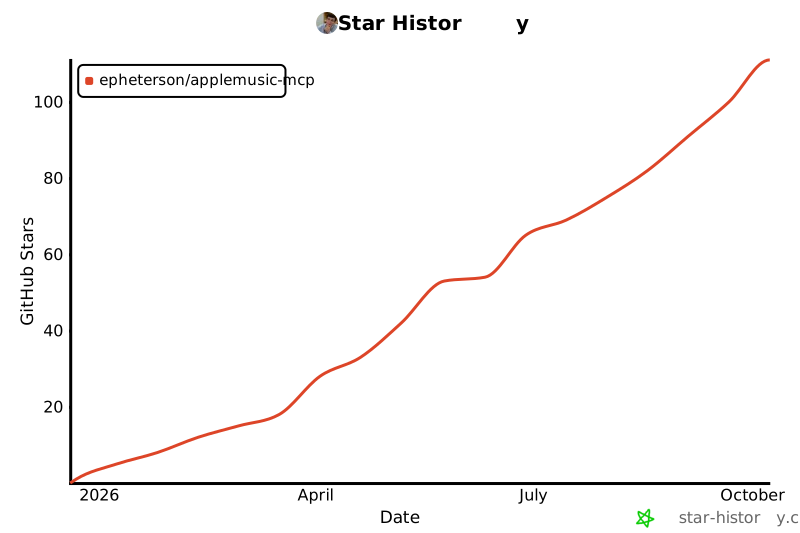
## Star History
[](https://star-history.com/#epheterson/applemusic-mcp&Date)
---
## License
MIT · *Unofficial community project — not affiliated with or endorsed by Apple. Uses your own Apple Music account for personal use; follow Apple's terms.*
<!-- Identifier for the official MCP Registry (PyPI ownership check). -->
mcp-name: io.github.epheterson/applemusic-mcp
## Credits
[FastMCP](https://github.com/jlowin/fastmcp) · [Apple MusicKit](https://developer.apple.com/documentation/applemusicapi) · [Model Context Protocol](https://modelcontextprotocol.io/)
---
Built with ❤️ in California by [@epheterson](https://github.com/epheterson) and [Claude Code](https://claude.com/claude-code).
This server cannot be deployed
Maintenance
ActivityMaintained
ResponsivenessResponsive