
OpenVerify MCP
by eneelkant
README.md
# MailSure — Free Online Email Validation & MCP
**MailSure** helps you check email addresses before you send campaigns, clean lists, or build AI workflows.
It looks at **syntax**, **domain DNS/MX**, **disposable domains**, **free providers**, and **role-based** addresses (like `admin@` / `info@`). Results are structured and honest: a “valid domain” means the domain looks mail-capable — **not** that a specific inbox exists or that you own the address.
| | |
|---|---|
| **Live site** | [eneelkant.github.io/email-validation-tool](https://eneelkant.github.io/email-validation-tool/) |
| **Source** | [github.com/eneelkant/email-validation-tool](https://github.com/eneelkant/email-validation-tool) |
| **License** | [GPL-3.0](LICENSE) |
Open-source and free to use. Env variable names still start with `OPENVERIFY_*` for compatibility; the product name is **MailSure**.
---
## Try online free
**Website:** [https://eneelkant.github.io/email-validation-tool/](https://eneelkant.github.io/email-validation-tool/)
### Steps
1. Open the live site link above.
2. Paste a single email, or upload a small CSV (browser bulk is capped in the UI — currently **50 unique emails** and **2 MiB** per file).
3. Review the structured result (status, confidence, reason codes, disposable / free-provider flags, and more).
4. Download results CSV when you use bulk.
No account is required on the public site. This project does **not** publish invented daily quotas. Hosting capacity and rate limits can vary with whoever runs the backend; if verify is unavailable, the site shows a clear banner and **never invents** results.
### Important disclaimer
MailSure does **not** prove:
- that mail will land in an inbox, or
- that you (or anyone) **own** the address.
Use it for list hygiene and risk signals — not as legal or deliverability proof.
---
## What can MailSure do?
Verified capabilities from this repository:
- **Syntax checks** — RFC-aware, including internationalized domains (IDN/punycode)
- **DNS / MX / A / AAAA** — domain looks mail-capable; timeouts are temporary, not “invalid”
- **Disposable detection** — local dataset (not downloaded on every request)
- **Free-provider detection** — curated list (Gmail, Outlook, Yahoo, …); free providers are never marked disposable
- **Role-based locals** — e.g. `admin@`, `info@` (configurable)
- **Bulk CSV** — browser batches on the site; larger streaming jobs via MCP `verify_csv`
- **MCP tools** — 9 tools over local STDIO and remote Streamable HTTP (`POST /mcp`)
- **Optional website API** — `POST /api/verify` and `POST /api/verify/batch` when enabled
- **Optional SMTP / catch-all** — **off by default**; never sends mail; does **not** always confirm a mailbox even when enabled
What it does **not** claim: “SMTP always confirms the inbox,” paid API credits, or ownership of an address.
---
## How MCP works
[MCP](https://modelcontextprotocol.io/) (Model Context Protocol) lets an AI assistant call MailSure tools instead of guessing about emails.
```mermaid
flowchart LR
U[You] --> A[AI assistant]
A --> M[MailSure MCP]
M --> V[Validation engine]
V --> R[Structured result]
R --> A
A --> U
```
1. You ask your AI to check an email or list.
2. The AI calls a MailSure MCP tool (for example `verify_email`).
3. MailSure runs the same validation engine used by the website API.
4. A structured JSON result comes back for the AI to explain.
### Deeper picture (optional)
[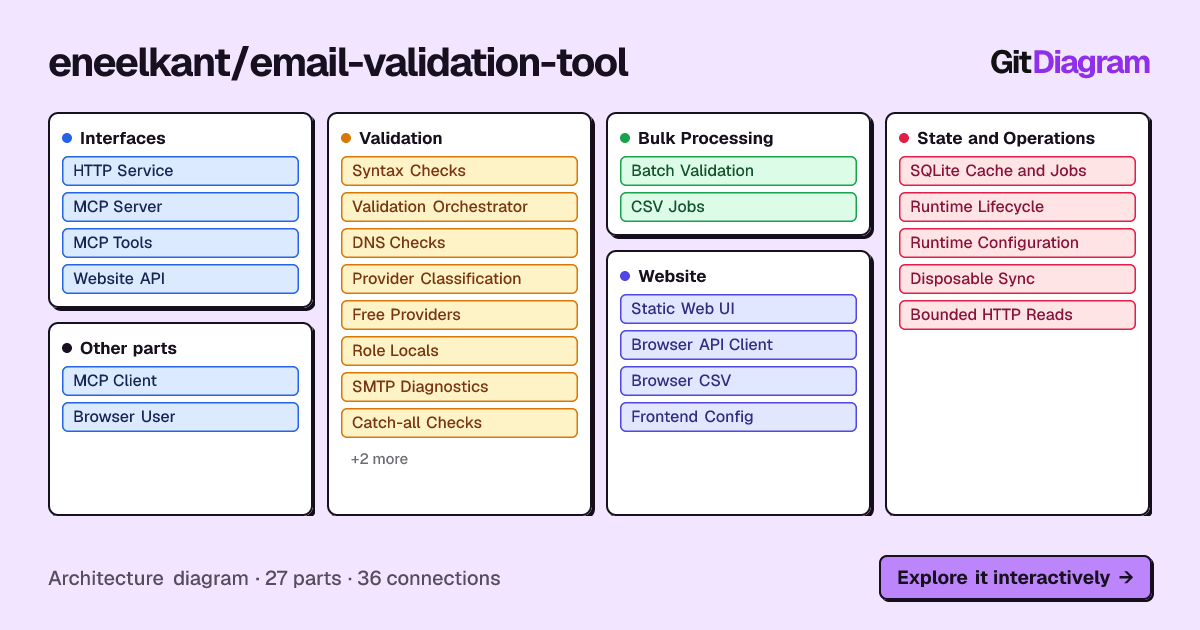](https://gitdiagram.com/eneelkant/email-validation-tool?utm_source=readme&utm_medium=picture)
Interfaces → validation → storage, as implemented in this repo:
- **Interfaces:** MCP (STDIO / Streamable HTTP), optional website API, static Pages UI
- **Validation:** syntax → DNS → disposable / free-provider / role → optional SMTP/catch-all
- **Jobs:** batch + streaming CSV with SQLite caches and job status
Full layout: [docs/architecture.md](docs/architecture.md).
---
## Connect to AI
MailSure speaks MCP. Point a compatible client at a **local** STDIO process, or at a **remote** HTTPS `…/mcp` endpoint you operate (with a strong bearer token).
> Client UIs change often. Configs below match **this repo’s examples** plus **current official docs**. Always re-check the linked docs if a UI label moved. Do not invent OAuth URLs, API keys, or hosted MCP endpoints that are not yours.
After cloning, build once so `dist/index.js` exists:
```bash
npm install
npm run build
```
### Cursor
**Verified:** project file [`.cursor/mcp.json`](.cursor/mcp.json) (server alias `mailsure`). Official docs: [Cursor MCP](https://cursor.com/docs/mcp).
1. Open this repo in Cursor (or copy the config into `~/.cursor/mcp.json` for all projects).
2. Prefer an absolute path if Cursor’s working directory is not the repo root.
3. Restart Cursor / reload MCP, then ask Agent to verify an email.
Copy-ready (from the repo example):
```json
{
"mcpServers": {
"mailsure": {
"command": "node",
"args": ["dist/index.js", "--transport", "stdio"],
"env": {
"OPENVERIFY_TRANSPORT": "stdio",
"OPENVERIFY_LOG_LEVEL": "info",
"OPENVERIFY_SMTP_ENABLED": "false"
}
}
}
}
```
Remote HTTP is also supported in Cursor via a `url` entry (and optional `headers`) — use your real `https://…/mcp` origin only.
### Gemini
#### Gemini CLI (verified in-repo)
**Verified:** [`.gemini/settings.json`](.gemini/settings.json). Official docs: [Gemini CLI MCP servers](https://geminicli.com/docs/tools/mcp-server/).
```json
{
"mcpServers": {
"mailsure": {
"command": "node",
"args": ["dist/index.js", "--transport", "stdio"],
"env": {
"OPENVERIFY_TRANSPORT": "stdio",
"OPENVERIFY_LOG_LEVEL": "info",
"OPENVERIFY_SMTP_ENABLED": "false"
}
}
}
}
```
Run Gemini CLI from the project directory (or set absolute paths / `cwd` so `dist/index.js` resolves).
#### Gemini Apps (gemini.google.com)
Google documents **custom Connected Apps** that accept an MCP server **URL** for eligible users (personal Google Account, 18+, US, English, Keep Activity on). Official help: [Connect & manage custom apps for Gemini Apps](https://support.google.com/gemini/answer/17209137).
- Requires a **public HTTPS** MailSure MCP endpoint you operate (`…/mcp`), not the local STDIO command above.
- If the Connected Apps UI is missing for your account/region, use **Gemini CLI** instead — that path is what this repo ships and tests against.
### ChatGPT
ChatGPT has **two different** surfaces. Do not mix them up.
#### 1) ChatGPT conversation (Plugins / custom MCP)
OpenAI documents adding a **custom MCP server as a plugin** in ChatGPT on the web: [Add custom MCP server](https://developers.openai.com/api/docs/guides/custom-mcp-server).
High-level steps (labels may vary):
1. Host MailSure over **HTTPS** with Streamable HTTP (`POST /mcp`). See [`examples/chatgpt-remote.md`](examples/chatgpt-remote.md).
2. In ChatGPT → Plugins → **Add custom MCP server**.
3. Enter your real Server URL, e.g. `https://YOUR-HOST/mcp` (never invent a host).
4. Configure authentication per OpenAI’s current options (OAuth / none / mixed). MailSure’s non-loopback HTTP transport **requires** `OPENVERIFY_HTTP_AUTH_TOKEN` (Bearer). Use whatever auth/header fields the ChatGPT UI exposes for fixed credentials; if the UI cannot send a Bearer token to your server, use the **developer** path below or keep the endpoint private.
This path is **remote MCP only** — ChatGPT conversation plugins do not start your local `node dist/index.js` STDIO process.
#### 2) ChatGPT developer connectors (Responses API)
For apps you build, OpenAI’s Responses API can call a remote MCP server with `type: "mcp"` and `server_url` (or a Secure MCP Tunnel). Official guide: [MCP servers (tools / connectors)](https://developers.openai.com/api/docs/guides/tools-connectors-mcp).
Illustrative shape (replace with **your** HTTPS origin and token; do not invent hosts):
```bash
curl https://api.openai.com/v1/responses \
-H "Content-Type: application/json" \
-H "Authorization: Bearer $OPENAI_API_KEY" \
-d '{
"model": "gpt-5.2",
"tools": [
{
"type": "mcp",
"server_label": "mailsure",
"server_description": "MailSure email validation MCP",
"server_url": "https://YOUR-HOST/mcp",
"headers": {
"Authorization": "Bearer YOUR_OPENVERIFY_HTTP_AUTH_TOKEN"
},
"require_approval": "always"
}
],
"input": "Use MailSure verify_email on alice@example.com and summarize overall_status."
}'
```
Use a model ID your OpenAI account actually supports. Prefer `require_approval` until you trust the deployment.
### Claude
#### Claude Desktop (local STDIO) — verified in-repo
**Verified example:** [`examples/claude-desktop-config.json`](examples/claude-desktop-config.json). Official help: [Local MCP on Claude Desktop](https://support.claude.com/en/articles/10949351-getting-started-with-local-mcp-servers-on-claude-desktop).
1. Build the project (`npm run build`).
2. Claude Desktop → **Settings → Developer → Edit Config** (`claude_desktop_config.json`).
3. Merge the `mailsure` server block; replace the path with your absolute clone path.
4. Fully quit and reopen Claude Desktop.
```json
{
"mcpServers": {
"mailsure": {
"command": "node",
"args": [
"/ABSOLUTE/PATH/TO/email-validation-tool/dist/index.js",
"--transport",
"stdio"
],
"env": {
"OPENVERIFY_TRANSPORT": "stdio",
"OPENVERIFY_LOG_LEVEL": "info",
"OPENVERIFY_SMTP_ENABLED": "false"
}
}
}
}
```
#### Claude on the web (claude.ai) — remote connectors only
claude.ai does **not** run local STDIO MCP the way Desktop does. Use a **custom remote connector** with a public HTTPS MCP URL. Official help: [Custom connectors using remote MCP](https://support.claude.com/en/articles/11175166-get-started-with-custom-connectors-using-remote-mcp).
1. Deploy MailSure HTTP behind HTTPS with a bearer token.
2. Customize → Connectors → **Add custom connector**.
3. Paste `https://YOUR-HOST/mcp`.
4. Under **Request headers**, add your Bearer token if you are not using OAuth (MailSure uses fixed Bearer auth, not a MailSure OAuth login).
Remote connectors are reached from Anthropic’s cloud — private/VPN-only hosts will not work without network allowlisting.
---
## Example prompts
These match the **real** MCP tool names registered in [`src/mcp/tools.ts`](src/mcp/tools.ts):
| Goal | Example prompt |
|------|----------------|
| Single address | `Use MailSure verify_email on alice@example.com and explain overall_status and reason_codes.` |
| Small list | `Call verify_emails_batch on alice@example.com, bob@tempmail.example, and info@acme.com. Summarize disposable vs free-provider vs role-based.` |
| Domain only | `Use check_domain on example.com and tell me if MX looks mail-capable.` |
| CSV job | `Start verify_csv on ./data/my-list.csv with wait false, then poll get_validation_job until it finishes.` |
| Cancel | `Cancel the validation job with cancel_validation_job and job_id <uuid>.` |
| Stats | `Call get_statistics and summarize cache and disposable list metadata.` |
| Hygiene | `Clear the validation cache with clear_cache, then re-check the same email with skip_cache true.` |
Remember: even a clean `valid_domain` result is **not** inbox or ownership proof.
---
## Install / self-host (short)
**Requirements:** Node.js **22+**. Optional: Docker.
### Local MCP (STDIO)
```bash
git clone https://github.com/eneelkant/email-validation-tool.git
cd email-validation-tool
npm install
npm run build
node dist/index.js --transport stdio
```
Equivalent scripts: `npm run start:stdio`.
### Local HTTP (MCP + optional website API)
```bash
cp .env.example .env
# Loopback (default): token optional
# Non-loopback (0.0.0.0): OPENVERIFY_HTTP_AUTH_TOKEN is mandatory
npm run build
node dist/index.js --transport http
```
Useful endpoints when HTTP is up:
| Endpoint | Purpose |
|----------|---------|
| `POST /mcp` | Streamable HTTP MCP |
| `GET /health`, `/ready`, `/version` | Liveness (no secrets) |
| `POST /api/verify`, `POST /api/verify/batch` | Website API (only if `OPENVERIFY_WEBSITE_API_ENABLED=true`) |
### Docker
```bash
echo 'OPENVERIFY_HTTP_AUTH_TOKEN=change-me-to-a-long-random-value' >> .env
docker compose up --build
```
Compose fails closed if the token is missing (container binds `0.0.0.0`).
### Render / operator hosting
Blueprint: [`render.yaml`](render.yaml). Steps: [docs/render-deploy.md](docs/render-deploy.md). Use only the HTTPS origin your host assigns — never invent one.
More detail: [docs/mcp-client-setup.md](docs/mcp-client-setup.md), [docs/mailsure-website.md](docs/mailsure-website.md).
---
## Privacy & limitations
Accurate to this implementation:
- **No paid verification APIs** are required for core checks.
- **No outbound email** is sent. Optional SMTP probes (off by default) use RCPT-style checks only when enabled.
- **Emails are redacted in logs by default** (`OPENVERIFY_LOG_EMAILS=false`).
- **CSV jobs** stay on paths you configure; website bulk CSV is parsed in the browser and sent as email batches to the verify API — admin MCP tools are **not** exposed on the public website API.
- **Disposable list** is a local snapshot; refresh via `update_disposable_domains` / `npm run update:disposable` or the daily automation PR — not fetched per validation.
- **SQLite** caches and job metadata may be ephemeral on free-tier / serverless hosts.
- **`valid_domain` ≠ mailbox verified.** DNS timeouts → temporary error, not invalid.
- Even with SMTP or optional Reacher enabled, greylisting, catch-alls, and anti-abuse policies can make results inconclusive.
Full notes: [docs/validation-limitations.md](docs/validation-limitations.md), [SECURITY.md](SECURITY.md).
---
## Links & contribution
| Resource | Link |
|----------|------|
| Live site | https://eneelkant.github.io/email-validation-tool/ |
| Repository | https://github.com/eneelkant/email-validation-tool |
| MCP client setup | [docs/mcp-client-setup.md](docs/mcp-client-setup.md) |
| Validation statuses | [docs/validation-statuses.md](docs/validation-statuses.md) |
| Validation limitations | [docs/validation-limitations.md](docs/validation-limitations.md) |
| Security policy | [SECURITY.md](SECURITY.md) |
| Contributing | [CONTRIBUTING.md](CONTRIBUTING.md) |
| Changelog | [CHANGELOG.md](CHANGELOG.md) |
| License | [LICENSE](LICENSE) (GPL-3.0) |
### Develop
```bash
npm install
npm run typecheck
npm test
npm run build
```
Issues and PRs welcome. Prefer small, focused changes — and please do not claim mailbox deliverability from DNS/MX alone.
This server cannot be deployed
Maintenance
ActivityMaintained
ResponsivenessNo recent community issues