
mesh2cad
# mesh2cad
mesh2cad converts an STL mesh of a simple mechanical part into editable parametric CAD: STEP, CadQuery, OpenSCAD, and FreeCAD scripts. It is also an MCP server.
[](https://github.com/emirmrkaljevic/mesh2cad/actions/workflows/ci.yml)
[](https://pypi.org/project/mesh2cad/)
[](https://glama.ai/mcp/servers/emirmrkaljevic/mesh2cad)
<p align="center"><a href="https://skintoscan.com/#packages"><img src=".github/assets/skintoscan-support.svg" width="684" alt="Support my open-source work: get a SkinToScan pack"></a><br><sub>If you find this useful, you can support me by getting a SkinToScan pack, my other project. It's a one-time purchase that directly funds my open-source work.</sub></p>
<p align="center"><a href="https://skintoscan.com/checkout/?add-to-cart=138"><img src=".github/assets/skintoscan-pack-1.svg" width="220" alt="Buy Single Picture Check, €4.49"></a> <a href="https://skintoscan.com/checkout/?add-to-cart=139"><img src=".github/assets/skintoscan-pack-5.svg" width="220" alt="Buy 5 Picture Pack, €19.99 (popular)"></a> <a href="https://skintoscan.com/checkout/?add-to-cart=140"><img src=".github/assets/skintoscan-pack-15.svg" width="220" alt="Buy 15 Picture Pack, €54.99"></a></p>
OBJ and PLY meshes work the same way. The fit runs on your machine. Nothing is uploaded.
A STEP file is the solid. When the fit is exact, a hole is one cylindrical face, not a ring of triangles. A script is for changing a dimension and rebuilding. CadQuery is Python. OpenSCAD is the text the Customizer on Thingiverse and Printables edits. The FreeCAD file is a macro. All three use the same names, so `hole_1_d` is the same hole in each of them.
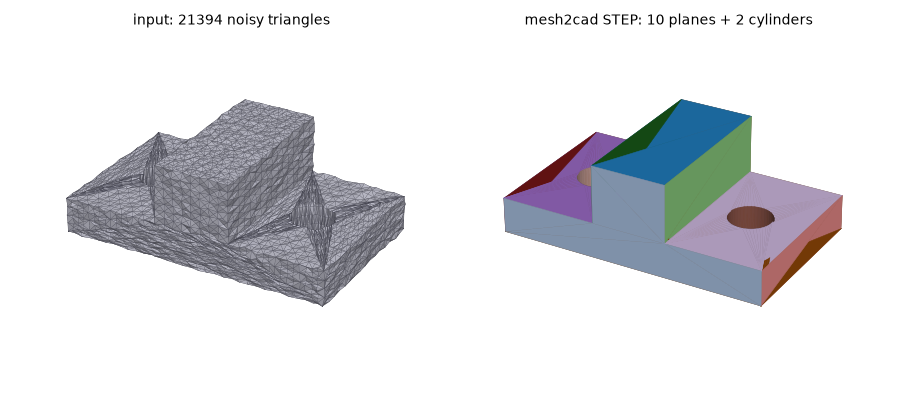
*Left: a 21k-triangle mesh with 0.1 mm noise. Right: the STEP file mesh2cad writes, 10 planes and 2 cylinders, max deviation 0.05 mm from the true part.*
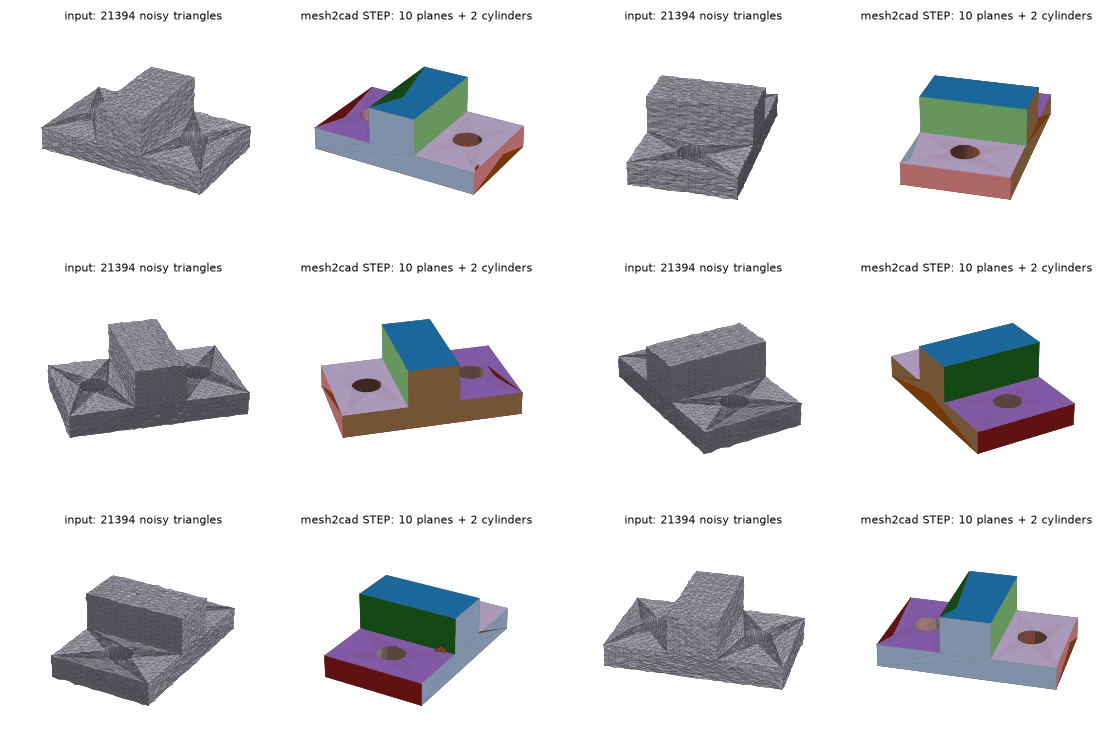
Four printer parts, with the STEP files and the generated scripts, are in the [example gallery](https://huggingface.co/spaces/mesh2cad/mesh2cad).
Hackaday wrote about it: [Mesh2Cad Automates Re-Modelling](https://hackaday.com/2026/11/19/mesh2cad-automates-re-modelling/).
## Install
```
pip install mesh2cad
```
Python 3.10 or newer. That install is the command line tool and STEP export. OpenCascade comes in with the package (`cadquery-ocp`).
`pip install "mesh2cad[mcp]"` adds the server. `pip install "mesh2cad[cadquery]"` lets mesh2cad run a generated `.py` and check it before the file is written. OpenSCAD and FreeCAD are separate programs, not pip packages. Without `openscad` on `PATH`, a `.scad` file is still written and the command says it was not verified. A `.FCMacro` is written only when a check passes. What happens when `freecadcmd` is missing is in [Install](docs/install.md).
## Quick start
```
mesh2cad convert plate.stl --cadquery plate.py
mesh2cad edit plate.py --set hole_grid_1_d=8 --in-place -o plate.step
```
The first command writes `plate.py`. Diameters, thicknesses, and positions are names at the top of the file. A four-hole grid is `hole_grid_1_d`. The second sets that diameter to 8 mm, rewrites the script, and writes `plate.step`. Every other byte of the file stays as it was.
`mesh2cad edit bracket.py --set base_x=+2` adds 2 mm to the current length. A leading `+` or `-` is a change from the current number, not how you set a negative value. `mesh2cad params bracket.py` prints each name, its value, and the unit when there is one.
A STEP file on its own is `mesh2cad convert part.stl -o part.step`. Add `--report report.md` for the numbers: Hausdorff and RMS deviation, volume error, face types, and the method (`exact`, `faceted-hybrid`, or `faceted`). Open that STEP file in FreeCAD, Fusion, Onshape, or another CAD tool and select a face.
If the part is outside what a script can express, or the rebuilt solid misses the check, the script is not written and the command exits with code 2. The reason is printed. The same convert can write `.scad` and `.FCMacro`. Flags are in the [CLI reference](docs/cli.md). What the scripts contain is in [CadQuery](docs/cadquery.md), [OpenSCAD](docs/openscad.md), and [FreeCAD](docs/freecad.md). The edit rules are in [Parameters](docs/parameters.md).
## What it handles
It is meant for simple mechanical parts: plates, brackets, and boxes with holes, bolt circles, slots, bosses (including on an extruded outline), countersunk and counterbored holes on that outline, and fillets. A Z extrusion can also carry one radius on every vertical corner of the outline. It fits planes, cylinders, spheres, cones, and constant-radius rounds, and writes those as faces you can select.
It does not recover organic or sculpted shapes, scans, or free-form surfaces. When a fit is poor it does not invent a surface. STEP output falls back to a faceted solid that is still valid, and the report names that fallback. A script is held to a tighter check: deviation at most max(4 times the tolerance, 0.1 mm), and volume error at most 1%. Miss that, and the script is refused.
Six Original Prusa i3 MK3S printed parts in the test set come back as exact STEP, and all six also as a script. The measurements, including the small belt-profile patches that stay faceted, are in [Real parts](docs/real-parts.md). Synthetic noise tests are in [Benchmarks](docs/benchmarks.md). The fitted-surface list, the parameter names, and the refusals are in [Limits](docs/limits.md) (v0.31.0). The pipeline is in [How it works](docs/how-it-works.md).
## MCP
```
pip install "mesh2cad[mcp]"
mesh2cad mcp
```
That starts the server on stdio. Point a client at it like this:
```json
{ "mcpServers": { "mesh2cad": { "command": "mesh2cad", "args": ["mcp"] } } }
```
The tools are `convert`, `analyze`, `report`, `to_cadquery`, `to_openscad`, `to_freecad`, `list_params`, and `edit_params`. Arguments, return values, and the directory listings are in [MCP](docs/mcp.md).
## Docs
- [Install: extras, OpenSCAD and FreeCAD](docs/install.md)
- [CLI reference: every command and flag](docs/cli.md)
- [CadQuery scripts: parameters and the check](docs/cadquery.md)
- [OpenSCAD scripts](docs/openscad.md)
- [FreeCAD macros](docs/freecad.md)
- [Editing a parameter: `params` and `edit`](docs/parameters.md)
- [MCP server: tools and arguments](docs/mcp.md)
- [How it works: the fitting pipeline](docs/how-it-works.md)
- [Limits: what is fitted and what is refused](docs/limits.md)
- [Benchmarks: synthetic noise tests](docs/benchmarks.md)
- [Real parts: Prusa printer parts](docs/real-parts.md)
- [Development: tests and demo images](docs/development.md)
- [Changelog](CHANGELOG.md)
- [Project site with an overview and FAQ](https://emirmrkaljevic.github.io/mesh2cad/)
A mesh that converts badly can go in a [GitHub issue](https://github.com/emirmrkaljevic/mesh2cad/issues/new/choose). There is a template for an STL that fails.
## License
MIT. See [LICENSE](LICENSE).
<!-- mcp-name: io.github.emirmrkaljevic/mesh2cad -->
TDQS
Scored across 8 tools
The core operations are clearly distinct: analyze (surface report only), convert (mesh→STEP B-rep), the three to_* tools (parametric script generation), and edit_params/list_params operate on already-generated scripts. The three to_* backends are explicitly described as producing 'same parts as to_cadquery', so the boundary is the backend, which is unambiguous. Minor overlap: 'report' and the fidelity report returned by 'convert' both cover the same conversion assessment, and a user could be unsure which to call first.
Three conventions coexist: bare verbs (analyze, convert, report), to_noun backend variants (to_cadquery, to_openscad, to_freecad), and verb_noun parameter tools (edit_params, list_params). Each group is internally consistent and readable, but the set as a whole mixes patterns rather than following one verb_noun scheme.
Eight tools is well-scoped for a mesh-to-CAD conversion server: one analysis, one direct conversion, three backend script writers, two parameter tools, and one report. No tool appears redundant given the multi-backend design.
The surface covers the full lifecycle: analyze the mesh, convert directly, generate editable scripts in three backends, list and edit parameters, and report fidelity. Minor gaps remain—there is no tool to validate or re-check an existing STEP/script against the mesh outside edit_params, and no batch/multi-part operation—but core workflows are fully covered.