
resume-resume
by eidos-agi
README.md
<p align="center">
<img src="https://raw.githubusercontent.com/eidos-agi/resume-resume/master/assets/logo.png" alt="resume-resume" width="480"/>
</p>
# resume-resume
**New free tool we're dropping.**
| | |
|---|---|
| | |
| **Resume** | Find old programming sessions in plain English and pick up where you left off. |
| **Dirty Repos** | See every repo with uncommitted changes across your entire machine — your standing to-do list. Scored by file count and recency. |
| **Crash Recovery** | `boot_up` finds interrupted sessions AND scans all repos for dirty git state. Ready-to-paste resume commands. |
| **Prioritize** | Auto-ranks sessions and repos by urgency — dirty files don't age out, recent active work surfaces first. |
| **Speed** | Paste a chat back to life in **~6 ms** — indexed full-text search across your entire history (see below). Plus parallel git scans across 50+ repos. |
| **Cost Savings** | Uses Haiku to summarize past context once, then caches permanently — searching thousands of sessions costs nothing after first run. |
| **Merge** | Merge multiple old chats together, pulling context across sessions into a single conversation — **including across tools**: bridge Codex research into a Claude Code session and vice versa. |
---
## Paste a dead chat back to life — in milliseconds
Your session crashed; the terminal still shows the tail of it. Copy any chunk of that text, run `cr`, paste. It finds the exact chat that text came from and reopens it — no session id, no scrolling a list. Indexed full-text search across your whole history, and unlike `grep`/`rg` it **ranks and verifies** the match — so it opens the *right* chat (0% wrong in testing), not the first hit.
<p align="center">
<img src="https://raw.githubusercontent.com/eidos-agi/resume-resume/master/assets/perf.png" alt="query latency — 6 ms indexed vs 5.5 s brute-force scan" width="760"/>
</p>
---
## MCP Server
Add it to Claude Code and every session on your machine can search, read, and merge your full session history — in plain English. Indexes **both Claude Code and Codex CLI** sessions, so one query reaches across both tools.
```bash
pip install resume-resume
claude mcp add resume-resume -- resume-resume-mcp
```
Or manually in your MCP config:
```json
{
"mcpServers": {
"resume-resume": {
"command": "resume-resume-mcp"
}
}
}
```
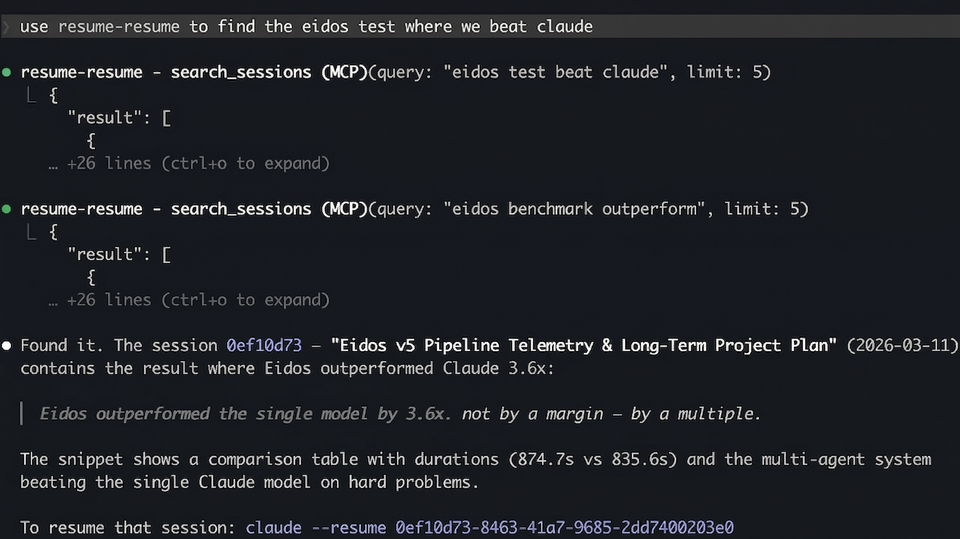
We built **Eidos**, a multi-agent AI system. In [our benchmark](https://github.com/eidos-agi/cockpit-eidos), Eidos outperformed **Claude Opus 4.6** by **3.6x** in both accuracy and speed on complex tasks with 15+ reasoning chains. Below, we use Claude Resume to pick up where we left off across multiple sessions.
### Finding the benchmark where Eidos beat Claude Opus 4.6
> *"use resume-resume to find the eidos test where we beat claude"*
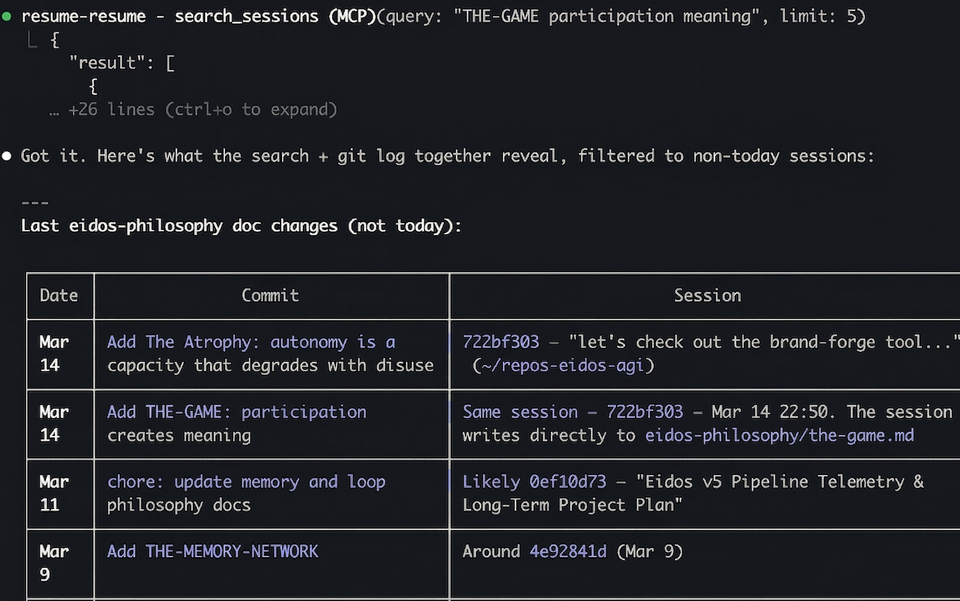
### Searching for a past session in plain English
> *"use resume-resume to find the latest chats about eidos philosophy docs"*
### Merging multiple past sessions into this chat
> *"use claude resume to merge march 14th conversations and Eidos v5 Pipeline Telemetry convo from march 11th into this chat"*
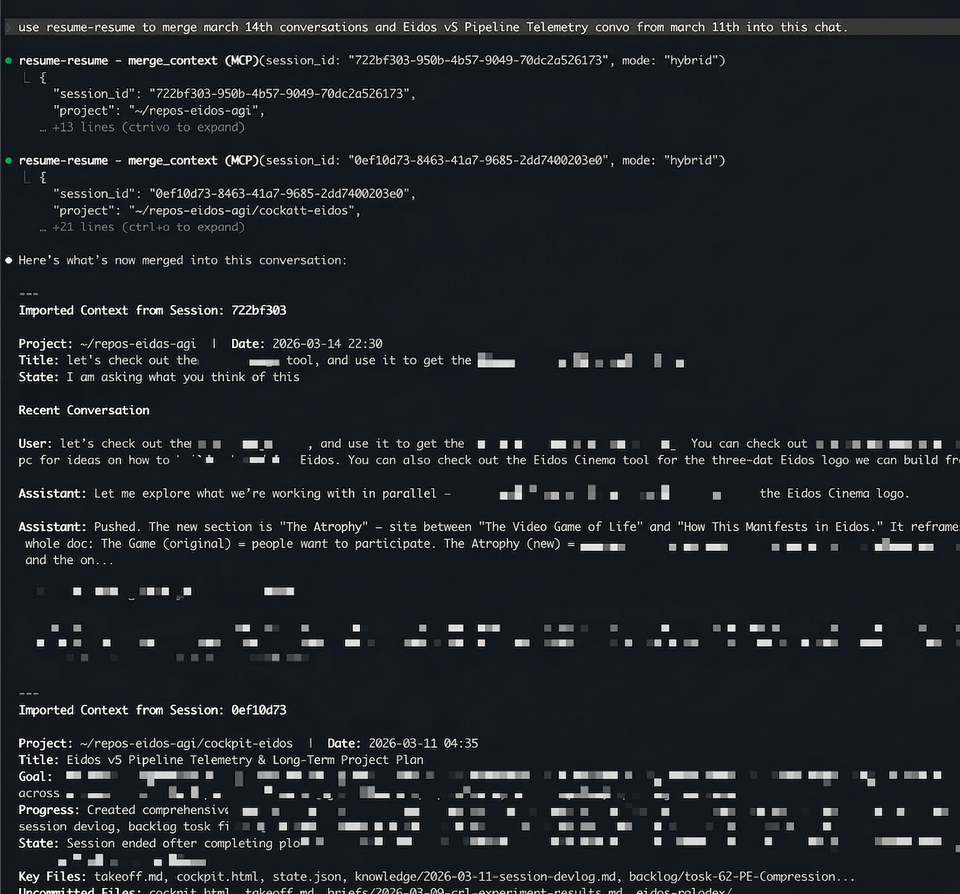
Two sessions — one about eidos-philosophy doc changes (Mar 14) and one with a full 28-task strategic plan (Mar 11) — merged into the current conversation with a single command.
### MCP Tools
| Tool | What it does |
|------|-------------|
| `boot_up(hours)` | Crash recovery — finds interrupted sessions + scans all repos for dirty git state. Scores by urgency (session recency + dirty file count + dirty file recency). Includes ready-to-paste `resume_cmd` for each result. |
| `dirty_repos()` | Standing inventory of every repo with uncommitted changes. No time window — only shrinks by committing. Sorted by urgency score. |
| `search_sessions(query)` | Full-text search across 5,000+ sessions in ~3s, ranked by BM25 |
| `recent_sessions(hours)` | List recently active sessions |
| `read_session(id, keyword)` | Read actual messages from a session, with optional keyword filter |
| `session_summary(id)` | AI summary — cached instantly, generated in ~15s if not |
| `merge_context(id, mode)` | Import context from another session (`summary`, `messages`, or `hybrid`) |
| `session_timeline(id)` | Structured milestone timeline — file edits, commits, instructions |
| `session_thread(id)` | Follow continuation links across a multi-session thread |
| `resume_in_terminal(id)` | Open a session in a new terminal window (iTerm2 or Terminal.app) |
| `session_insights(section)` | Deep analytics across all sessions — patterns, personality, predictions |
| `session_xray(id)` | Single-session breakdown — duration, tokens, tool counts, branches |
---
## How to Resume
Three ways, fastest first.
### 1. Paste box — just run `cr`
Run `cr` with no arguments and it shows a paste box **before** the session list. Paste anything and press Enter:
```
📋 Paste a resume command, session id, or chat text — or press Enter for the list:
›
```
| What you paste | What happens |
|---|---|
| A resume command (`cd … && claude --resume <id>`) | Extracts the id, resolves the cwd, launches |
| A bare session id | Same — finds the project, launches |
| **Raw chat text** — anything you copied off the screen of a dead session | Full-text-scans every session, finds the one that text came from, opens it |
| Nothing (just Enter) | Falls through to the normal session list |
The third one is the point: your session crashed, the terminal still shows the last thing on screen, you copy a chunk of it, run `cr`, paste. It finds the chat and reopens it — no id, no hunting.
### 2. Paste a command directly as an argument
`claude --resume <id>` fails if you're in the wrong directory. `cr` fixes that — auto-discovers the project, ensures the right flags, and launches.
```bash
cr claude --resume ddf7fc98-6c93-40c8-9444-503d8a716dbf
cr claude --resume ddf7fc98-6c93-40c8-9444-503d8a716dbf --model opus --chrome
cr ddf7fc98-6c93-40c8-9444-503d8a716dbf
```
It parses the id out of whatever you pasted, searches `~/.claude/projects/*/` for the owning project, resolves the encoded directory back to a real path, adds `--dangerously-skip-permissions` / `--enable-auto-mode` if missing, shows a proof dialog, then `cd`s and `exec`s into Claude. No more "No conversation found" from the wrong folder.
### 3. The TUI list
`cr` after a blank paste, or `cr 24` / `cr --all` — see [TUI](#tui) below.
> Paste-to-resume parses `claude --resume` lines and Claude Code session text, so it's Claude Code only. Resuming a Codex session works through the MCP `resume_in_terminal` tool and the TUI/cards, which emit `codex resume <uuid>` and cd to the session's recorded cwd.
### How paste-to-find works
Finding the right chat from a messy paste isn't one trick — it's a small retrieval **pipeline**. The index makes it *fast*; the normalize + score + gate stages make it *correct*. FTS alone would only get candidates quickly.
| stage | technique | what it buys |
|---|---|---|
| **Capture** | bracketed-paste detection (`ESC[200~`), ANSI/control stripping, stdin burst-drain | survives a real terminal paste — multi-line, wrapped, with escape codes |
| **Route** | regex extraction of a UUID / `rollout-` id vs free text | a pasted command or id opens directly; chat text goes to search |
| **Normalize** | lowercase + reduce every non-alphanumeric run to one space (both paste and index) | tolerance — matches through `**markdown**`, em-dashes (—), smart/escaped quotes, and terminal line-wrapping |
| **Retrieve** | SQLite **FTS5**: a consecutive phrase from the paste, falling back to OR of the longest distinctive words | the fast candidate set — ms, not a full-corpus scan (the *speed*) |
| **Score** | **in-order n-gram coverage**: fraction of the paste's 5-word chunks present verbatim in a candidate | ranking + verification (the *precision* — and the 0% wrong-chat property) |
| **Gate** | threshold **0.25**, calibrated from a 180-trial precision/recall sweep | open only on confidence; otherwise fall through to the list, never misfire |
| **Exclude** | drop the launching session via `CLAUDE_CODE_SESSION_ID` | never reopen the chat you're sitting in |
| **Maintain** | mtime-delta **incremental refresh** + external-content FTS5 + sync triggers | first run builds; after that only changed sessions re-index, so queries stay ms |
The summary/BM25 index (`search_sessions`) holds only titles + summaries, so pasted *transcript* text isn't findable there — this is a separate full-text index over normalized session bodies.
**Measured results** (180-trial calibration + adversarial batch, driven through [emux](https://github.com/eidos-agi/emux)/tmux):
| Input | Result |
|---|---|
| Verbatim text from a past session | **100%** found (35/35 clean snippets) |
| Realistic terminal paste (UI chrome, wrapping, a truncated first line) | **86%** auto-open the right chat |
| Wrong chat opened | **0%** — never; in-order matching can't false-positive |
| Decoys (shuffled vocab, unrelated text) | **0 false positives** — scores max out at 0.00 |
| When unsure | Falls through to the list — safe by design, never a misfire |
**Speed** — indexed query (FTS lookup + coverage scoring): **p50 6 ms** at 166 MB, **94 ms** at 3 GB. The first run builds the index (~10 s); after that, incremental refresh re-indexes only changed sessions, so queries stay in the millisecond range. A brute-force scan without an index is ~5.5 s/query and grows linearly with corpus size — the chart at the top is that gap.
---
## TUI
For when your machine died and you just need to get back to work.
```bash
pip install resume-resume
resume-resume # last 4 hours
cr 24 # last 24 hours
cr --all # everything
```
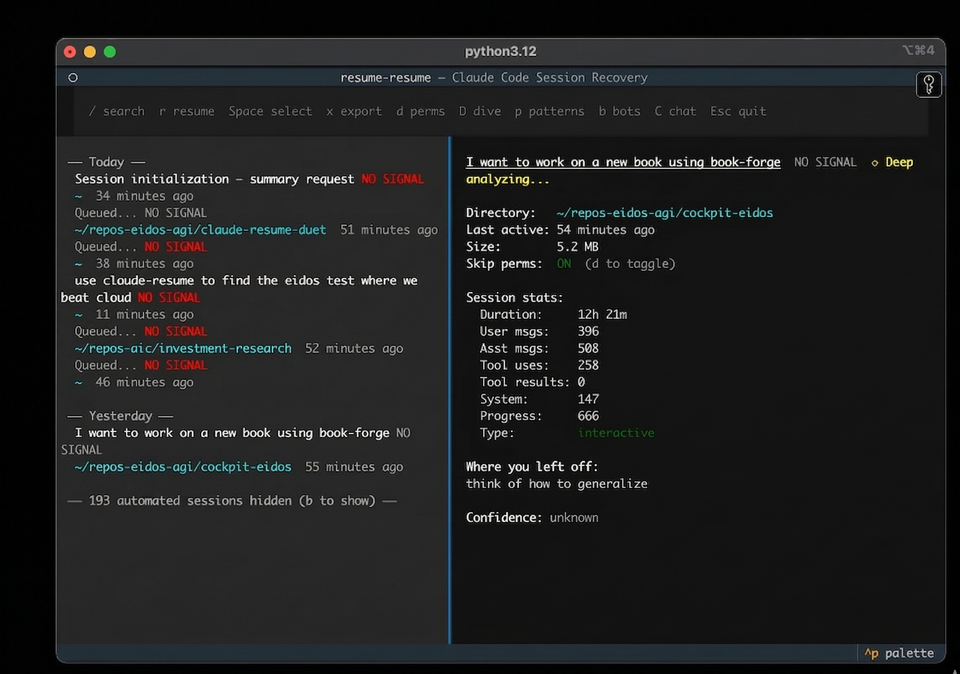
| Key | Action |
|-----|--------|
| `↑` `↓` | Navigate sessions |
| `r` | Resume directly — exec into the session |
| `Enter` | Copy resume command to clipboard |
| `Space` | Select for multi-resume (opens all in iTerm tabs) |
| `x` | Export context briefing as markdown |
| `/` | Search across all session content |
| `D` | Deep dive summary |
| `p` | Analyze prompting patterns |
| `b` | Toggle automated/bot sessions |
Requires Python 3.11+ and [Claude Code](https://docs.anthropic.com/en/docs/claude-code).
---
## How It Works
1. Scans `~/.claude/projects/` (Claude Code) and `~/.codex/sessions/` (Codex CLI) for JSONL session files
2. Scans all project directories for dirty git state (parallel `git status --porcelain`)
3. Scores sessions by urgency: session recency (2h half-life) + repo dirty urgency (file count + dirty file recency)
4. Dirty repos bypass age filters — uncommitted work doesn't age out
5. Summarizes via `claude -p` with Haiku, cached permanently after first run
6. Classifies sessions as human or automated using a gradient boosting model trained on 3,800 sessions — bot sessions hidden by default
7. Surfaces bookmark data (lifecycle badges, next actions, blockers) when present
8. Reports negative space — how many repos were scanned, how many were clean vs dirty
Run `/bookmark` inside any Claude Code session to capture lifecycle state (`done`, `paused`, `blocked`, `handoff`) before closing. An auto-bookmark Stop hook captures minimal state when you don't.
---
## Related
- [claude-session-commons](https://github.com/eidos-agi/claude-session-commons) — Shared session parsing, caching, and classification used by this repo and others
- [resume-resume-duet](https://github.com/eidos-agi/resume-resume-duet) — Web UI companion with session browser and `resume-resume://` URL scheme handler
## License
MIT
This server cannot be deployed
Maintenance
ActivityInactive
ResponsivenessLimited data