
A
licenseA
qualityD
maintenanceA Model Context Protocol (MCP) server that wraps the dbt CLI tool, enabling AI coding agents to interact with dbt projects through standardized MCP tools. Developed by Mammoth Growth.
9
18
MIT

This dbt MCP server lets AI agents query dbt Semantic Layer data, inspect dbt project metadata, and run dbt CLI commands.
List and query metrics with grouping, ordering, filters, and limits.
Fetch dimensions and entities for specified metrics.
List all or mart models and get model details or parent dependencies.
Run dbt commands including build, compile, docs, list, parse, run, and test.
Execute SQL against the database via show with an optional limit.
Provides tools to interact with dbt, including executing dbt CLI commands (build, compile, run, test), accessing Semantic Layer for metric querying, and using Discovery API to explore models and their relationships in a dbt project.
Click on "Deploy Server".
Wait a few minutes for the server to deploy. Once ready, it will show a "Started" state.
In the chat, type @ followed by the MCP server name and your instructions, e.g., "@dbt-mcp show me the lineage for the customer_orders model"
That's it! The server will respond to your query, and you can continue using it as needed.
Here is a step-by-step guide with screenshots.
This MCP (Model Context Protocol) server provides various tools to interact with dbt. You can use this MCP server to provide AI agents with context of your project in dbt Core, dbt Fusion, and dbt Platform.
Read our documentation here to learn more. This blog post provides more details for what is possible with the dbt MCP server.
We publish an experimental Model Context Protocol Bundle (dbt-mcp.mcpb) with each release so that MCPB-aware clients can import this server without additional setup. Download the bundle from the latest release assets and follow Anthropic's mcpb CLI docs to install or inspect it.
Related MCP server: dbt-docs-mcp
If you have comments or questions, create a GitHub Issue or join us in the community Slack in the #tools-dbt-mcp channel.
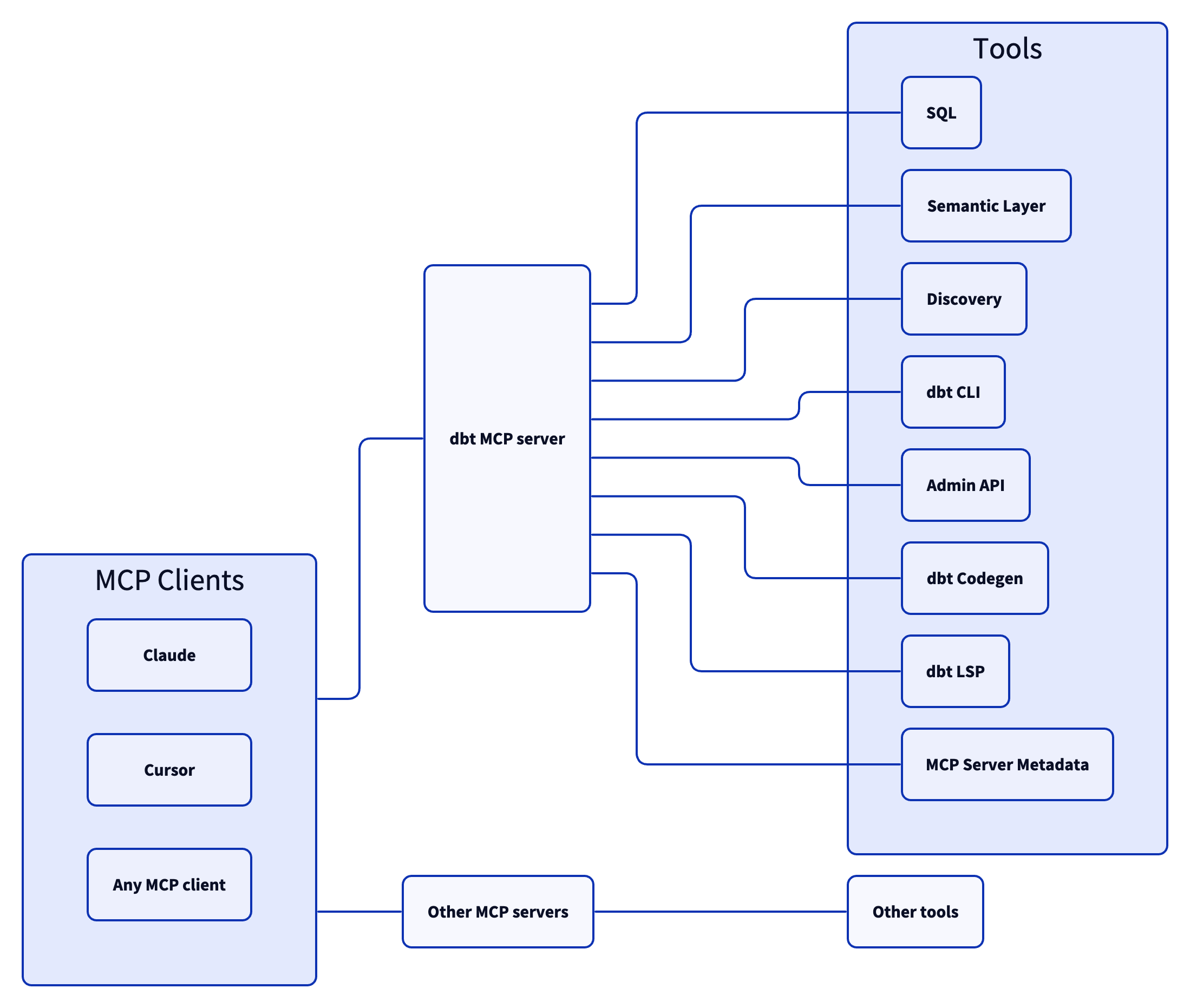
The dbt MCP server architecture allows for your agent to connect to a variety of tools.
Tools for executing and generating SQL on dbt Platform infrastructure.
execute_sql: Executes SQL on dbt Platform infrastructure with Semantic Layer support.
text_to_sql: Generates SQL from natural language using project context.
To learn more about the dbt Semantic Layer, click here.
get_dimension_values: Gets distinct values for a dimension; option to scope to specific metrics.
get_dimensions: Gets dimensions for specified metrics.
get_entities: Gets entities for specified metrics.
get_metrics_compiled_sql: Returns compiled SQL for metrics without executing the query.
list_metrics: Retrieves all defined metrics.
list_saved_queries: Retrieves all saved queries.
query_metrics: Executes metric queries with filtering and grouping options.
To learn more about the dbt Discovery API, click here.
get_all_macros: Retrieves macros; option to filter by package or return package names only.
get_all_models: Retrieves name and description of all models.
get_all_sources: Gets all sources with freshness status; option to filter by source name.
get_exposure_details: (deprecated — use get_node_details instead)
get_exposures: Gets all exposures (downstream dashboards, apps, or analyses).
get_lineage: Gets a bounded lineage graph with type, depth, and direction filtering.
get_macro_details: (deprecated — use get_node_details instead)
get_mart_models: Retrieves all mart models.
get_model_children: (deprecated — use get_lineage instead)
get_model_details: (deprecated — use get_node_details instead)
get_model_health: Gets health signals: run status, test results, and upstream source freshness.
get_model_parents: (deprecated — use get_lineage instead)
get_model_performance: Gets execution history for a model; option to include test results.
get_node_details: Gets full details for any dbt resource type (model, source, exposure, test, seed, snapshot, macro, semantic_model).
get_related_models: Finds similar models using semantic search.
get_seed_details: (deprecated — use get_node_details instead)
get_semantic_model_details: (deprecated — use get_node_details instead)
get_snapshot_details: (deprecated — use get_node_details instead)
get_source_details: (deprecated — use get_node_details instead)
get_test_details: (deprecated — use get_node_details instead)
search: [Alpha] Searches for resources across the dbt project (not generally available).
search_public_mesh_models: Finds public dbt Mesh models across projects and confirms producer identity so you can build a verified cross-project ref (multi-project configurations only).
Allowing your client to utilize dbt commands through the MCP tooling could modify your data models, sources, and warehouse objects. Proceed only if you trust the client and understand the potential impact.
build: Executes models, tests, snapshots, and seeds in DAG order.
clone: Clones selected nodes from the specified state to the target schema(s).
compile: Generates executable SQL from models/tests/analyses; useful for validating Jinja logic.
docs: Generates documentation for the dbt project.
get_lineage_dev: Retrieves lineage from local manifest.json with type and depth filtering.
get_node_details_dev: Retrieves node details from local manifest.json (models, seeds, snapshots, sources).
list: Lists resources in the dbt project by type with selector support.
parse: Parses and validates project files for syntax correctness.
run: Executes models to materialize them in the database.
show: Executes SQL against the database and returns results.
test: Runs tests to validate data and model integrity.
To learn more about the dbt Administrative API, click here.
cancel_job_run: Cancels a running job.
get_job_details: Gets job configuration including triggers, schedule, and dbt commands.
get_job_run_artifacts: Downloads a specific artifact from a job run; large artifacts return a guidance message to retry with a jq_filter; supports jq filtering for targeted extraction.
get_job_run_details: Gets run details including status, timing, steps, and artifacts.
get_job_run_error: Gets error and/or warning details for a job run; option to include or show warnings only.
list_job_run_artifacts: Lists available artifacts from a job run.
list_jobs: Lists jobs in a dbt Platform account; option to filter by project or environment.
list_jobs_runs: Lists job runs; option to filter by job, status, or order by field.
list_projects: Lists all projects in the dbt Platform account.
retry_job_run: Retries a failed job run.
trigger_job_run: Triggers a job run; option to override git branch, schema, or other settings.
These tools help automate boilerplate code generation for dbt project files.
generate_model_yaml: Generates model YAML with columns; option to inherit upstream descriptions.
generate_source: Generates source YAML by introspecting database schemas; option to include columns.
generate_staging_model: Generates staging model SQL from a source table.
A set of tools that leverage the Fusion engine for advanced SQL compilation and column-level lineage analysis.
fusion.compile_sql: Compiles SQL in project context via dbt Platform.
fusion.get_column_lineage: Traces column-level lineage via dbt Platform.
get_column_lineage: Traces column-level lineage locally (requires dbt-lsp via dbt Labs VSCE).
Tools for searching and fetching content from the official dbt documentation at docs.getdbt.com.
get_product_doc_pages: Fetches the full Markdown content of one or more docs.getdbt.com pages by path or URL.
search_product_docs: Searches docs.getdbt.com for pages matching a query; returns titles, URLs, and descriptions ranked by relevance. Use get_product_doc_pages to fetch full content.
These tools provide information about the MCP server itself.
get_mcp_server_branch: Returns the current git branch of the running dbt MCP server.
get_mcp_server_version: Returns the current version of the dbt MCP server.
Commonly, you will connect the dbt MCP server to an agent product like Claude or Cursor. However, if you are interested in creating your own agent, check out the examples directory for how to get started.
Dependencies are pinned to specific versions and are not updated automatically. Only security-related dependency updates are submitted via automated pull requests.
Read CONTRIBUTING.md for instructions on how to get involved!
See tool inputs and resolved context for selector declarations and context mapper contracts.
The dbt build command will:
run models
test tests
snapshot snapshots
seed seeds
In DAG order.
Inputs: no named parameters.
dbt compile generates executable SQL from source model, test, and analysis files.
The compile command is useful for visually inspecting the compiled output of model files. This is useful for validating complex jinja logic or macro usage.
Inputs: no named parameters.
The docs command is responsible for generating your project's documentation website.
Inputs: no named parameters.
Get the name and description of all dbt models in the environment.
Inputs: no named parameters.
Dimensions are the attributes, features, or characteristics that describe or categorize data.
Inputs: metrics (required).
Entities are real-world concepts in a business such as customers, transactions, and ad campaigns. Analysis is often focused around specific entities, such as customer churn or annual recurring revenue modeling.
Inputs: metrics (required).
Get the name and description of all mart models in the environment. A mart model is part of the presentation layer of the dbt project. It's where cleaned, transformed data is organized for consumption by end-users, like analysts, dashboards, or business tools.
Inputs: no named parameters.
Inputs: model_name (required).
Get the parents of a specific dbt model.
Inputs: model_name (required).
List the resources in the your dbt project.
Inputs: no named parameters.
List all metrics from the dbt Semantic Layer.
If the user is asking a data-related or business-related question, this tool should be used as a first step to get a list of metrics that can be used with other tools to answer the question.
Examples:
"What are the top 5 products by revenue?"
"How many users did we have last month?"
Inputs: no named parameters.
The dbt parse command parses and validates the contents of your dbt project. If your project contains Jinja or YAML syntax errors, the command will fail.
It will also produce an artifact with detailed timing information, which is useful to understand parsing times for large projects.
Inputs: no named parameters.
This tool allows ordering and grouping by dimensions and entities. To use this tool, you must first know about specific metrics, dimensions and entities to provide. You can call the list_metrics, get_dimensions, and get_entities tools to get information about which metrics, dimensions, and entities to use.
When using the order_by parameter, you must ensure that the dimension or
entity also appears in the group_by parameter. When fulfilling a lookback
query, prefer using order_by and limit instead of using the where parameter.
A lookback query requires that the order_by parameter includes a descending
order for a time dimension.
The where parameter should be database agnostic SQL syntax, however dimensions
and entity are referenced differently. For categorical dimensions,
use {{ Dimension('<name>') }} and for time dimensions add the grain
like {{ TimeDimension('<name>', '<grain>') }}. For entities,
use {{ Entity('<name>') }}. When referencing dates in the where
parameter, only use the format yyyy-mm-dd.
Don't call this tool if the user's question cannot be answered with the provided metrics, dimensions, and entities. Instead, clarify what metrics, dimensions, and entities are available and suggest a new question that can be answered and is approximately the same as the user's question.
For queries that may return large amounts of data, it's recommended to use a two-step approach:
First make a query with a small limit to verify the results are what you expect
Then make a follow-up query without a limit (or with a larger limit) to get the full dataset
Inputs: metrics (required), group_by, limit, order_by, +1 more.
dbt run executes compiled sql model files against the current target database. dbt connects to the target database and runs the relevant SQL required to materialize all data models using the specified materialization strategies. Models are run in the order defined by the dependency graph generated during compilation.
Inputs: no named parameters.
dbt show executes an arbitrary SQL statement against the database and returns the results. It is useful for debugging and inspecting data in your dbt project. Use the limit argument in place of a SQL LIMIT clause
Inputs: sql_query (required), limit.
dbt test runs data tests defined on models, sources, snapshots, and seeds and unit tests defined on SQL models.
Inputs: no named parameters.
Recent tool additions, removals, and schema changes observed during successful MCP inspections.
v1.0.0buildcompiledocsget_all_modelsget_dimensionsget_entitiesget_mart_modelsget_model_detailsget_model_parentslistlist_metricsparsequery_metricsrunshowtestScored across 16 tools
Most tools have distinct purposes, but there is some overlap between 'build' and 'run' (both execute models), and 'compile' and 'parse' (both involve processing project files). Descriptions help clarify differences, but an agent might still confuse these pairs in certain contexts.
Naming is inconsistent with mixed patterns: some use verb_noun (e.g., 'get_all_models', 'list_metrics'), others use single verbs (e.g., 'build', 'run', 'compile'), and some are noun-based (e.g., 'docs'). This lack of a uniform convention makes the set harder to navigate and predict.
With 16 tools, the count is reasonable for a dbt server covering core operations, project management, and semantic layer queries. It's slightly on the higher side but well within an acceptable range for the domain's complexity.
The tool set comprehensively covers dbt functionality: core commands (build, run, test), project inspection (compile, parse, list), model details retrieval, and full semantic layer operations (list_metrics, query_metrics with supporting tools). No obvious gaps exist for typical dbt workflows.
An MCP server for search and retrieval over a local LanceDB database
MCP server for interacting with the Supabase platform
Model Context Protocol server for the Apideck Unified API. Connect any MCP-compatible agent framework to 100+ accounting systems, HRIS platforms, file storage providers, and more through one integration. More information https://www.apideck.com/mcp-server
A Model Context Protocol server for Wix AI tools