
PentQuiver MCP Server
by edglz
README.md
<div align="center">
<img src="https://raw.githubusercontent.com/edglz/pentquiver/main/docs/logo.png" alt="PentQuiver" width="160">
# PentQuiver
**A blazing-fast, cross-platform command library and cheat-sheet launcher for pentesters - TUI, CLI, HTTP API and MCP server in one.**
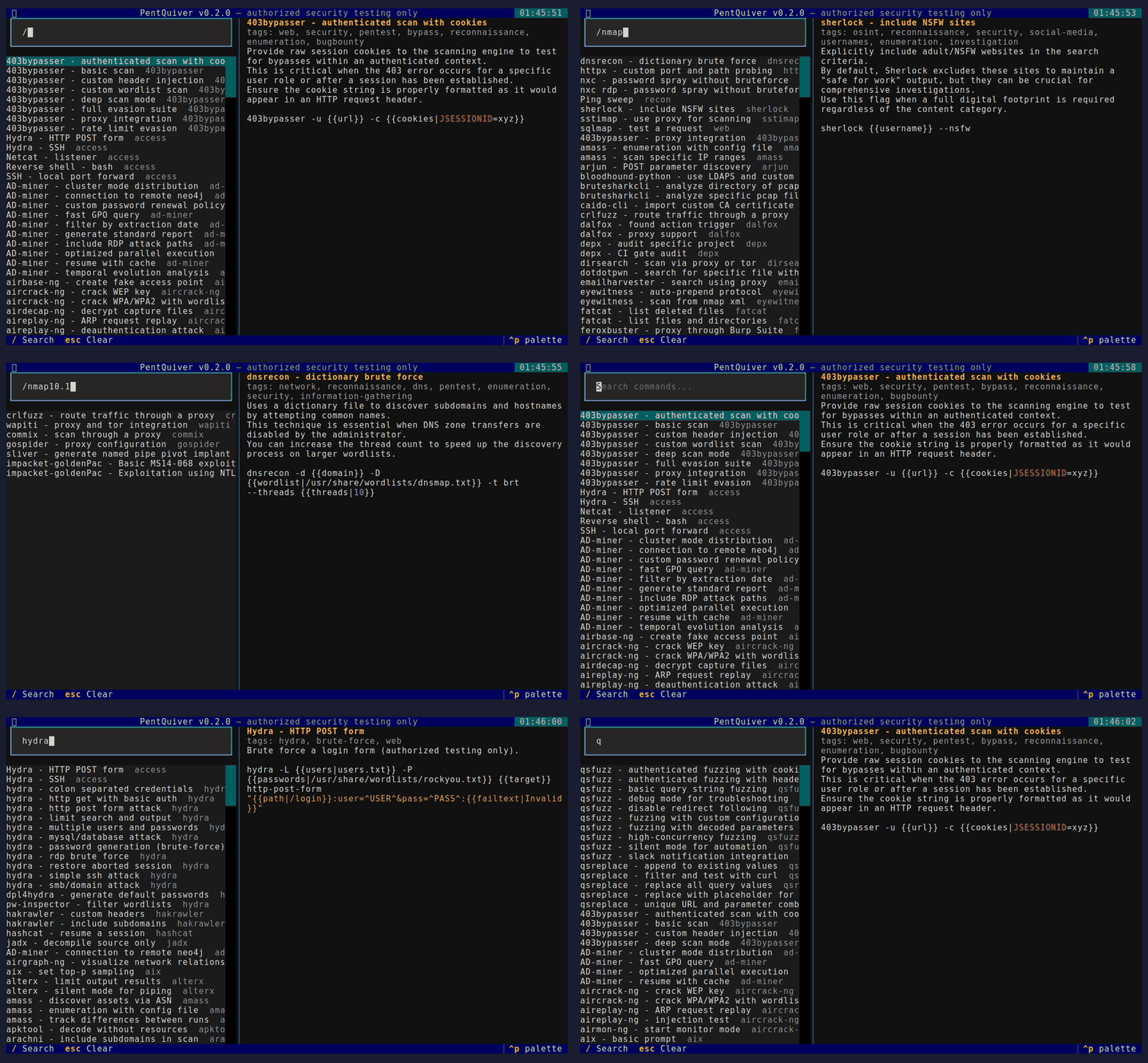
Search 2,800+ security commands, fill in the arguments, and copy or run them - from your terminal, your scripts, or your AI assistant.
[](https://pypi.org/project/pentquiver/)
[](https://pypi.org/project/pentquiver/)
[](LICENSE)
[](https://textual.textualize.io/)
[](https://buymeacoffee.com/edggdev)
</div>
---
## Legal notice / Aviso legal
PentQuiver is a command launcher intended **solely** for **authorized** security
testing, CTF competitions and education.
> **You are fully responsible for how you use this tool.** The author accepts
> **no responsibility** and assumes **no liability** for any misuse, damage, or
> illegal activity carried out with it. Only test systems that you own or for
> which you have **explicit written permission**.
>
> *El autor no se hace responsable del uso que se le de a esta herramienta.*
This notice is also shown every time the TUI starts and must be accepted first.
---
## Features
- **Fuzzy search** across 2,800+ commands / 240+ tools (recon, web, Active
Directory, credential access, post-exploitation, forensics and more).
- **Argument templates** - `{{arg}}` and `{{arg|default}}` with a live preview.
- **Four interfaces, one core:** interactive **TUI**, scriptable **CLI**, an
**HTTP API**, and an **MCP server** so AI assistants can query your library.
- **Hexagonal architecture** (ports and adapters) - clean, testable, extensible.
- **Cross-platform** - Linux, macOS, Windows, WSL. Pure Python, no OS-specific
build constraints.
- **Simple YAML cheat-sheets** - bring your own, or use the bundled collection.
## Install
```bash
pip install pentquiver # TUI + CLI
pip install "pentquiver[api]" # + HTTP API (FastAPI/uvicorn)
pip install "pentquiver[mcp]" # + MCP server
pip install "pentquiver[all]" # everything
```
On Linux, clipboard copy needs `xclip` or `xsel` (`sudo apt install -y xclip`).
## Usage
```bash
pentquiver # launch the TUI (default)
pentquiver list nmap # print matching commands (id + name)
pentquiver show nmap/nmap-aggressive-scan
pentquiver api --port 8000 # serve the HTTP API
pentquiver mcp # serve the MCP server over stdio
pentquiver --info # project, author and support info
pentquiver --upgrade # update to the latest release via pip
pentquiver --version
```
### TUI keys
| Key | Action |
|-----|--------|
| `/` | focus search, `Up`/`Down` move, `Enter` open then fill args then Copy/Run |
| `c` | quick-copy the raw template, `Esc` clear / back |
| `u` | upgrade to the latest release, `q` quit |
### CLI

### HTTP API
```bash
pentquiver api # http://127.0.0.1:8000 (interactive docs at /docs)
curl 'localhost:8000/commands?q=nmap&limit=5'
curl -X POST localhost:8000/commands/nmap/nmap-aggressive-scan/resolve \
-H 'content-type: application/json' -d '{"values":{"target":"10.0.0.0/24"}}'
```

### MCP (AI assistants)
Run it **without installing** using [uv](https://docs.astral.sh/uv/) - the
server is fetched and cached on first use:
```json
{
"mcpServers": {
"pentquiver": {
"command": "uvx",
"args": ["--from", "pentquiver[mcp]", "pentquiver", "mcp"]
}
}
}
```
Or, if it is already installed (`pip install "pentquiver[mcp]"`):
```json
{ "mcpServers": { "pentquiver": { "command": "pentquiver", "args": ["mcp"] } } }
```
Tools exposed: `search_commands`, `list_sources`, `get_command`,
`get_arguments`, `resolve_command`.

## Architecture
Hexagonal (ports and adapters) - the domain and use cases never depend on I/O:
```
pentquiver/
domain/ entities + pure logic (Command, placeholders, fuzzy search)
application/ ports (interfaces) + use-case service (CommandLibrary)
adapters/
inbound/ tui, cli, api, mcp (driving)
outbound/ yaml, system(clipboard/exec) (driven)
config/ filesystem locations
container.py composition root (wires adapters into the service)
```
Swapping a data source or adding an interface means writing one adapter - the
core stays untouched.
## Cheat-sheet format
Drop `.yml`/`.yaml` files in your user directory:
- **Linux/macOS:** `~/.config/pentquiver/cheatsheets/`
- **Windows:** `%APPDATA%\pentquiver\cheatsheets\`
- or set `PENTQUIVER_HOME` to any directory, or pass `-d PATH`.
```yaml
commands:
- name: Nmap - quick TCP scan
command: nmap -sV -sC -oA {{outfile|scan}} {{target}}
description: Service/version detection with default scripts.
tags: [nmap, scan, recon]
```
Both the native shape above and the `tool`/`actions` shape are auto-detected.
The large bundled collection under `pentquiver/cheatsheets/vendor/` is redistributed
under the MIT license - see [THIRD-PARTY-NOTICES.md](THIRD-PARTY-NOTICES.md).
## Author and support
Built by **Eduardo González** - [www.edggdev.cloud](https://www.edggdev.cloud/)
PRs and new cheat-sheets welcome. If PentQuiver saves you time, you can support it:
<a href="https://buymeacoffee.com/edggdev"><img src="https://img.shields.io/badge/Buy%20Me%20A%20Coffee-edggdev-FFDD00?style=for-the-badge&logo=buy-me-a-coffee&logoColor=black" alt="Buy Me A Coffee"></a>
<a href="https://www.edggdev.cloud/"><img src="https://img.shields.io/badge/Portfolio-edggdev.cloud-0D1117?style=for-the-badge&logo=firefox&logoColor=white" alt="Portfolio"></a>
## License
PentQuiver's own code is MIT. Bundled cheat-sheet data keeps its upstream MIT
license (see THIRD-PARTY-NOTICES.md). **Use responsibly.**
This server cannot be deployed
Maintenance
ActivityInactive
ResponsivenessNo issues