
figjam-context-mcp
# figjam-context-mcp
A local MCP server that turns FigJam boards into source-cited context for LLMs.
It reads a board through the Figma REST API, groups stickies, tables, images and
arrows into clusters, and answers questions with links back to the original nodes.
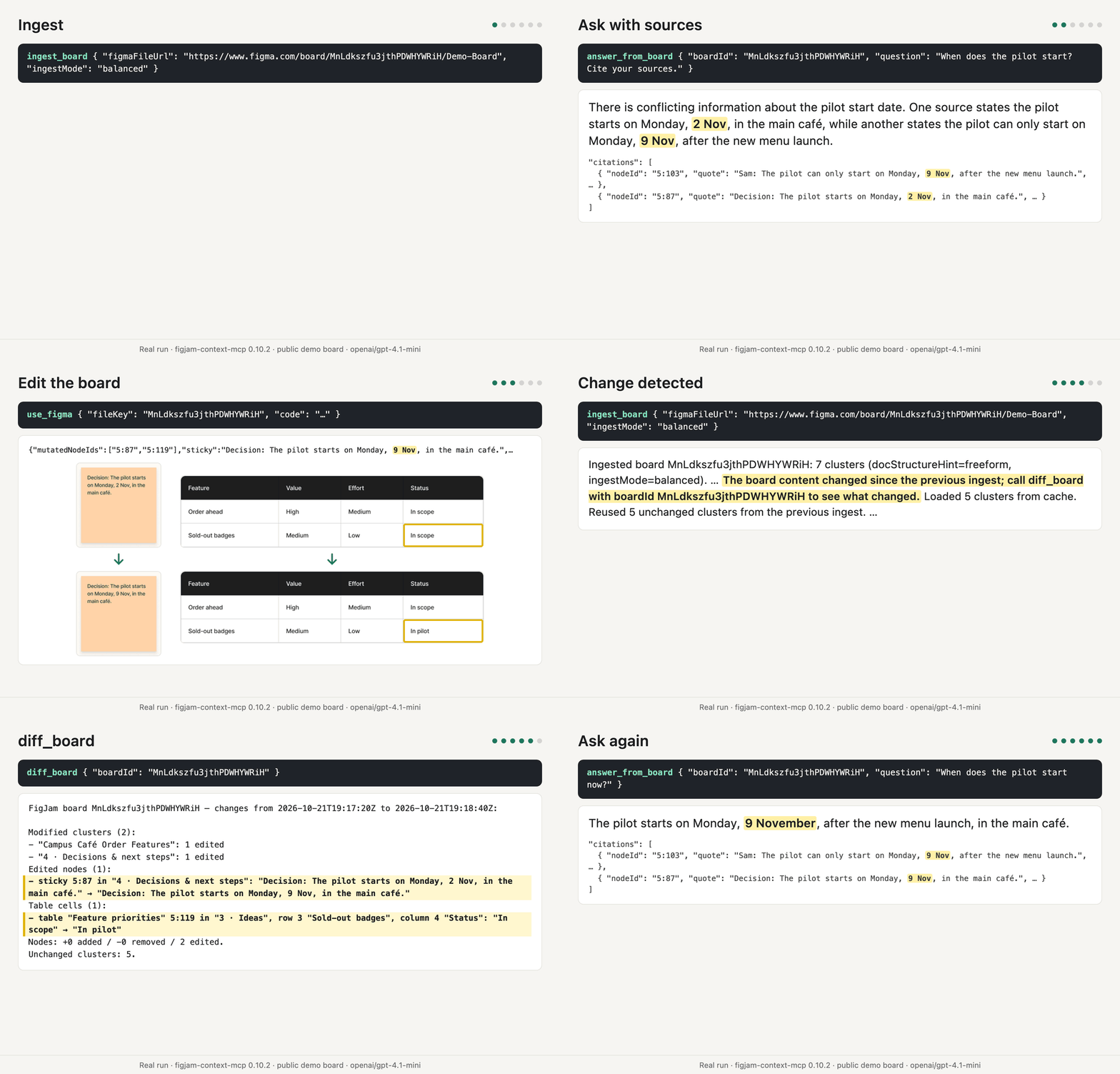
Rendered from the tool calls and outputs of a real run against the public
[demo board](https://www.figma.com/board/MnLdkszfu3jthPDWHYWRiH/Demo-Board) with
figjam-context-mcp 0.10.2 and `openai/gpt-4.1-mini`. Figma's MCP server
(`use_figma`) made the edit.
## Why
Workshop boards hold research notes, decisions and open questions, but an LLM
cannot read a canvas. Screenshots and PDF exports lose tables, arrow direction
and the link to the source. This server keeps the board's structure and cites
every answer to the nodes it came from.
## Compared with Figma's MCP server
Figma's official MCP server reads a FigJam board or node with its images
(`get_figjam`) and edits boards (`use_figma`). This server turns a workshop
board into context an assistant can cite and track:
- large boards read section by section, with an overview, size-limited pages and search
- source IDs in compact overviews, with Figma links in full excerpts and answer citations
- tables read row by row
- local snapshots, and `diff_board` to see what changed
- explicit credentials redacted before they reach the cache, the output or a model
- image descriptions from a vision model you configure
The two work together: in the demo above, Figma's server edits the board and
this one reports the change.
## Tools
| Tool | What it does | LLM call |
| --- | --- | --- |
| `ingest_board` | Reads a board, clusters it and saves a local snapshot. Re-ingests reuse unchanged clusters; `focusNodeIds` chooses which sections' images are interpreted first. | In `balanced` (default) and `max_quality` mode |
| `get_board_context` | Reads saved context, automatically using compact source-ID lines for large section reads; `detail: "full"` returns complete excerpts and Figma links. Also supports topic search and pagination. | No |
| `answer_from_board` | Answers one specific question (a number, status or decision) from the most relevant excerpts, with node-level citations or an insufficient-evidence result. Not meant for whole-board summaries. | Yes |
| `diff_board` | Compares snapshots with bounded lists and full totals: clusters, nodes, table cells (0-based), arrows with source IDs, section/frame renames and layout counts. Notes unchanged re-ingests. | No |
| `diagnose_llm_config` | Tests the configured models with small text and image JSON checks. | Yes |
`ingest_board` also reads Figma design files (`/design/`, `/file/` and `/proto/`
URLs), but clustering and reading order are made for FigJam boards.
## Quick start
Five steps. Requires Node.js 22.12 or later. Step 4 sets the model provider that
`answer_from_board`, `diagnose_llm_config` and image interpretation need; it is optional.
1. **Node.js.** Check the installed version with `node --version`; install Node.js 22.12
or later if it is older.
2. **Figma token.** Create a personal access token under **Settings → Security →
Personal access tokens** with the scope `file_content:read`. The token's account
must be able to open the board. Every `ingest_board` call is one Figma file
download, a Tier 1 request. Figma allows View and Collab seats up to 20 Tier 1
requests a month on every plan, and says the actual limit may be lower
([rate limits](https://developers.figma.com/docs/rest-api/rate-limits/)).
3. **Add the server** with the example for your client below. The examples set only
`FIGMA_ACCESS_TOKEN`, so the server starts and `ingest_board` works in
`ingestMode: "max_speed"` without a model provider. `@latest` with `--prefer-online`
makes npx check the registry for the latest release on every start, even when
package metadata is cached ([npm configuration](https://docs.npmjs.com/cli/v11/using-npm/config#prefer-online)).
4. **Optional: model provider.** Add `LLM_BASE_URL` and `LLM_API_KEY` to the server's
`env` block, then restart the client. Both are needed together; without them,
`balanced` ingests run text-only and say that the model settings are missing.
Example with OpenRouter ([create a key](https://openrouter.ai/keys)):
```
LLM_BASE_URL=https://openrouter.ai/api/v1
LLM_API_KEY=your-openrouter-key
```
In Claude Code, remove the entry with `claude mcp remove figjam-context` (with the
same `--scope` as when you added it), then add it again with an `--env` flag for each
variable ([Claude Code](https://code.claude.com/docs/en/mcp)).
A local OpenAI-compatible server without sign-in still needs `LLM_API_KEY` set to
any non-empty value. Set `LLM_TEXT_MODELS`, `LLM_FAST_TEXT_MODELS` and
`LLM_VISION_MODELS` to its model names ([configuration](https://github.com/ecestnrkl/figjam-mcp/blob/main/docs/configuration.md#models)).
Then run `diagnose_llm_config` in step 5.
5. **Check the setup.** Ask your assistant to ingest one of your boards with
`ingestMode: "max_speed"`, for example *"Ingest https://www.figma.com/board/FILE_KEY/Name
with ingestMode max_speed."* That makes one Figma request and no model call. A
working setup answers with a line that starts `Ingested board FILE_KEY (snapshot …):`
and counts the `clusters`. Clients that show their tools, such as Claude Code with
`/mcp`, list the server there ([Claude Code](https://code.claude.com/docs/en/mcp)).
With a provider from step 4, also run `diagnose_llm_config`; it checks the configured
models with small synthetic inputs. For error messages, see
[common errors](https://github.com/ecestnrkl/figjam-mcp/blob/main/docs/troubleshooting.md#common-errors).
All settings: [configuration](https://github.com/ecestnrkl/figjam-mcp/blob/main/docs/configuration.md).
### Claude Code
```bash
claude mcp add --scope user --env FIGMA_ACCESS_TOKEN=your-figma-token --transport stdio figjam-context -- npx -y --prefer-online figjam-context-mcp@latest
```
`--scope user` makes the server available in all your projects. Without it, Claude
Code stores the server for the current project only ([scopes](https://code.claude.com/docs/en/mcp)).
For longer ingests, set `MCP_TOOL_TIMEOUT=300000` in the environment that launches
Claude Code and `INGEST_BOARD_VISION_BUDGET_MS=270000` in the server environment,
leaving about 30 seconds for the rest of the ingest ([Claude Code environment
variables](https://code.claude.com/docs/en/env-vars)).
### Claude Desktop
Open **Settings → Developer → Edit Config** in Claude Desktop. This opens
`claude_desktop_config.json`; the file is at:
- macOS: `~/Library/Application Support/Claude/claude_desktop_config.json`
- Windows: `%APPDATA%\Claude\claude_desktop_config.json`
Add the server under `mcpServers`, keeping any other entries in the file:
```json
{
"mcpServers": {
"figjam-context": {
"command": "npx",
"args": ["-y", "--prefer-online", "figjam-context-mcp@latest"],
"env": {
"FIGMA_ACCESS_TOKEN": "your-figma-token"
}
}
}
}
```
Then quit Claude Desktop completely and start it again; the server starts with the app
([MCP quickstart](https://modelcontextprotocol.io/docs/develop/connect-local-servers)).
The MCP documentation names no tool timeout setting for Claude Desktop, so keep the
default image budget.
### Codex CLI and ChatGPT desktop app
Add this to `~/.codex/config.toml`; the app, CLI and IDE extension share this
configuration ([OpenAI MCP setup](https://learn.chatgpt.com/docs/extend/mcp#configure-with-configtoml)):
```toml
[mcp_servers.figjam-context-mcp]
enabled = true
command = "npx"
args = ["-y", "--prefer-online", "figjam-context-mcp@latest"]
startup_timeout_sec = 30
default_tools_approval_mode = "approve"
[mcp_servers.figjam-context-mcp.env]
FIGMA_ACCESS_TOKEN = "your-figma-token"
```
Without `default_tools_approval_mode = "approve"`, ChatGPT may ask for approval
or abort tools with external effects; with it, the client never asks before board
content goes to the model provider, so use `max_speed` and avoid `answer_from_board`
for confidential boards.
For longer ingests, set `tool_timeout_sec = 300` under
`[mcp_servers.figjam-context-mcp]` and `INGEST_BOARD_VISION_BUDGET_MS = "270000"` in its
`env` table, leaving about 30 seconds for the rest of the ingest ([OpenAI timeout
options](https://learn.chatgpt.com/docs/extend/mcp#other-configuration-options)).
### GitHub Copilot CLI
Add this to `~/.copilot/mcp-config.json`
([Copilot CLI MCP setup](https://docs.github.com/en/copilot/how-tos/copilot-cli/customize-copilot/add-mcp-servers)):
```json
{
"mcpServers": {
"figjam-context": {
"type": "local",
"command": "npx",
"args": ["-y", "--prefer-online", "figjam-context-mcp@latest"],
"env": {
"FIGMA_ACCESS_TOKEN": "your-figma-token"
},
"tools": ["*"]
}
}
}
```
For longer ingests, set `"timeout": 300000` on the server in
`~/.copilot/mcp-config.json` and `"INGEST_BOARD_VISION_BUDGET_MS": "270000"` in its
`env`, leaving about 30 seconds for the rest of the ingest ([tested with a 600000 ms
timeout](https://github.com/microsoft/vscode/issues/343135)).
### VS Code
In the Copilot harness, add the server under **Global → Copilot Global** in
Chat: Open Customizations (Command Palette), then **MCP Servers**. VS Code writes it to
`~/.copilot/mcp-config.json`, the same file as in the Copilot CLI section, in the portable
`mcpServers` format ([VS Code MCP servers](https://code.visualstudio.com/docs/copilot/chat/mcp-servers),
[configuration reference](https://code.visualstudio.com/docs/agents/reference/mcp-configuration)):
```json
{
"mcpServers": {
"figjam-context": {
"type": "local",
"command": "npx",
"args": ["-y", "--prefer-online", "figjam-context-mcp@latest"],
"env": {
"FIGMA_ACCESS_TOKEN": "your-figma-token"
},
"tools": ["*"]
}
}
}
```
The portable format has no input variables, so the token is stored in this file. Keep
that file in your user directory and out of any repository.
Local harness only: to keep the token out of the file, open **MCP: Open User
Configuration** and use an input marked `"password": true`. VS Code does not forward
servers that need inputs to Copilot harness sessions, so this works only in the Local
harness ([VS Code MCP configuration](https://code.visualstudio.com/docs/agents/reference/mcp-configuration)):
```json
{
"inputs": [
{
"type": "promptString",
"id": "figma-token",
"description": "Figma personal access token (file_content:read)",
"password": true
}
],
"servers": {
"figjam-context": {
"type": "stdio",
"command": "npx",
"args": ["-y", "--prefer-online", "figjam-context-mcp@latest"],
"env": {
"FIGMA_ACCESS_TOKEN": "${input:figma-token}"
}
}
}
}
```
Do not put tokens in a `.vscode/mcp.json` in a repository; VS Code's documentation
says not to commit tokens or passwords.
In the Local harness, `"envFile": "${workspaceFolder}/.env"` on the server in `mcp.json`
loads an environment file; the portable format does not support `envFile`, and the
server does not load a working-directory `.env` itself.
For longer ingests, use the Local harness with a per-server `"timeout": 300000` in
`mcp.json` and `"INGEST_BOARD_VISION_BUDGET_MS": "270000"` in its `env` (about 30
seconds below the timeout); [#343135](https://github.com/microsoft/vscode/issues/343135)
reports that remote HTTP tool calls in the Copilot harness, the default in 1.142, ignore
that timeout and stop after about 180 seconds, while the Local harness honors it.
### Other MCP clients
For clients that accept `mcpServers`, add this to their MCP configuration:
```json
{
"mcpServers": {
"figjam-context": {
"command": "npx",
"args": ["-y", "--prefer-online", "figjam-context-mcp@latest"],
"env": {
"FIGMA_ACCESS_TOKEN": "your-figma-token"
}
}
}
}
```
Where the client supports a configurable tool timeout, raise it to about 300 seconds
using its documented setting and set `INGEST_BOARD_VISION_BUDGET_MS=270000` in the
server environment, about 30 seconds below it.
Cursor has no configurable timeout: its IDE allows about 60 minutes, while ACP/CLI calls
stop at 60 seconds even with progress, so keep the default image budget on that path
([Cursor
support](https://forum.cursor.com/t/agent-acp-mcp-tools-call-times-out-at-60s-with-no-way-to-configure-it/163925/5)).
## Using the tools
Then ask your assistant to ingest a board URL, for example *"Ingest
https://www.figma.com/board/FILE_KEY/Name and list the open questions."*
The `boardId` of every later call is the file key from that URL, or the URL
itself; a URL with a `node-id` and without `nodeIds`, `topic` and
`outsideSections` makes `get_board_context` read that node. To summarize
a board, the assistant calls `ingest_board`, then `get_board_context` without
parameters, whose first page names the largest sections and includes a section
overview with IDs within the page's size limit, and then reads the largest sections
by passing their IDs as `nodeIds`. Several IDs in one call take turns in request
order, up to 50 per call. For a whole-board summary, pass all top-level section IDs
with `maxChars: 24000`, follow the cursor in the text with the same arguments, then
read `outsideSections: true`.
Large `nodeIds` reads automatically use short source-ID lines, grouped by section,
when the first full page would leave unread excerpts. `limit` applies only with
the full view; an overview ignores it even when supplied. Read complete text and
its Figma link with the same `boardId` and `snapshotId`, the line's ID in
`nodeIds`, and `detail: "full"`. For a table row, use its table ID.
Everything that lies in no section, such as loose notes and tables, comes with
`outsideSections: true`.
Compact overviews show the Figma link pattern for their node IDs (URL-encode the ID)
and shorten each text to a shared 50–120-character prefix with `…`; the host writes
the summary. Topic searches, `outsideSections`, single leaf, table or cell IDs and
small containers always return the full view.
Inputs are read as hosts and users send them. A node ID in link form (`5-87`,
`5%3A87`, `I5-87%3B1-2`) or a Figma link of the same board with a `node-id` is
read as the ID it stands for (`5:87`) in `nodeIds` and `focusNodeIds`, and the
text says so once; an ID that exists in the snapshot is never changed, and a
link of another board is an error. A key that differs from a parameter only in
case, `_` or `-` (`ingest_mode`, `node_ids`) ends the call with
"did you mean …" before anything is done; any other unknown key is ignored and
named, without its value, in the text and in `ignoredArguments` of
`structuredContent`. File keys are case-sensitive: an unknown `boardId` lists
the stored boards (at most 10, most recent first) and names a key that differs
only in case.
## How it works
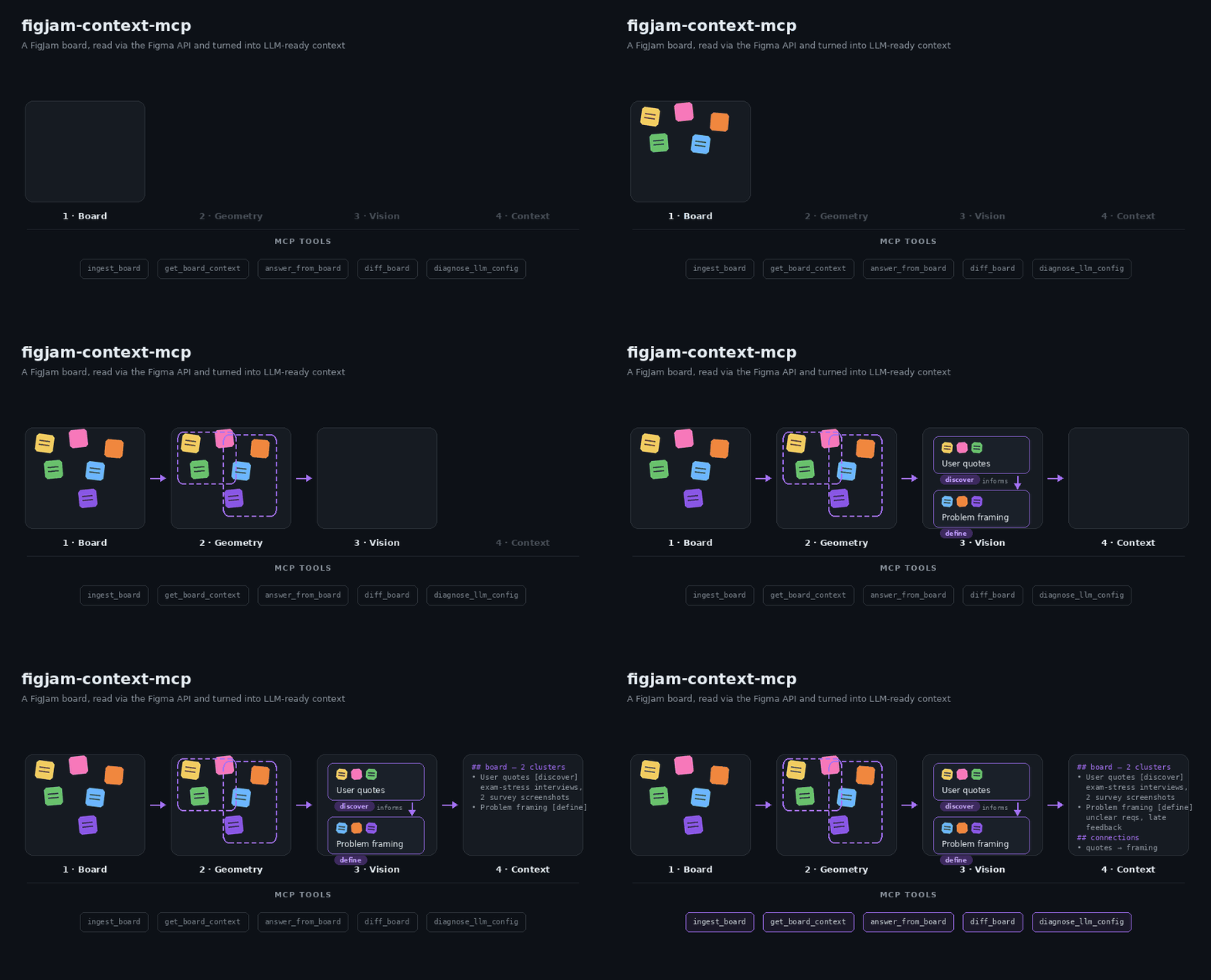
1. **Read.** `ingest_board` downloads the board through the Figma REST API on
every call. `get_board_context` and `answer_from_board` read the saved
snapshot without a new request.
2. **Normalize.** Nodes become text, table cells, images and connectors, with
their pages, sections and named enclosing frames and groups. Tables are read row by row: row and column come
from the cell IDs, and each row becomes one excerpt.
3. **Cluster.** Nearby nodes are grouped by rotation-aware distance. Arrows
between groups become directed relations. Clusters without a model label
are named after their section, and an arrow appears in the context once one
of its ends, or a section, frame or group around one, is on the page.
4. **Interpret.** In `balanced` mode, clusters with an image, or drawings without
any text, get a vision-model summary within a 40-second budget; text clusters,
however short, keep their extracted text. A cluster starts only when the time
left fits it; unfinished clusters continue on the next ingest. With
`focusNodeIds`, the images of the given sections, frames or nodes come first.
In `max_quality`, one ingest interprets only a few dozen clusters within the
40-second image budget (20–35 on a board with about 300 clusters, measured
with 3 parallel requests); the next ingest continues, each costs a Tier 1 file
download, and `focusNodeIds` sets the order.
5. **Serve.** The snapshot is saved to a private local cache. Search favors
excerpts containing more of the question’s words.
`get_board_context` searches it (BM25 over original text, table rows and
names, arrow labels and table headings), `answer_from_board` answers with
citations and `diff_board` compares snapshots. Topic and question searches
match whole words ignoring case and accents (words of five or more letters
also match compounds that begin with them), but not other word forms,
synonyms or translations. Use the board's words and language; an empty search
does not prove the board lacks the topic. Paging, overviews and the `detail`
setting are described in [Using the tools](#using-the-tools). Full-view excerpt
text is quoted with `> ` on every line, and model-generated cluster labels are
marked as model labels.
Text `content` is the readable page; `structuredContent` holds each excerpt
once, in `overview.text` (with empty `evidence` and `clusters`) or in `evidence`
for the full view. Full excerpts inherit `snapshotId` from the response;
absent `chunkIndex` means 0 and absent `truncated` or `modelDerived` means
false, with no inheritance of these flags from a cluster. Named frames and
groups appear in `frameNames` on clusters and on excerpts whose location
differs; their names also participate in search.
## Models and cost
The default preset `student-free` uses free OpenRouter models: text and images go
to `openrouter/free`, which picks a free model that supports structured outputs
(and images, for images). The free default is best effort: free models change, hit rate limits
and time out. A request to `openrouter/free` or `openrouter/auto` that fails with
a provider error is sent once more, since the router may pick another model. Images go to the model with at most 1,024 px on the longest side;
larger ones are scaled down locally.
- OpenRouter allows free models 20 requests per minute and 50 requests per day,
or 1,000 per day once you have bought at least 10 credits
([limits](https://openrouter.ai/docs/api-reference/limits)).
- Figma limits requests by seat and plan
([rate limits](https://developers.figma.com/docs/rest-api/rate-limits/)). File
downloads and image renders are Tier 1: Dev and Full seats on paid plans get
10–20 requests per minute, View and Collab seats and files in Starter plans at
most 20 per month. Every `ingest_board` call is one file download, so a View or
Collab seat allows about 20 ingests a month. Images come from the image fills instead, Tier 2 with at
least 5 requests per minute, in one request per ingest. Renders are left for
drawings without an image and as a fallback for images without a usable original;
renders of several clusters share requests of up to 18 nodes, so 30 image clusters
without image fills need 2 render requests. `max_speed` needs neither.
- `LLM_BASE_URL` takes any OpenAI-compatible endpoint; for paid models, set
`LLM_TEXT_MODELS`, `LLM_FAST_TEXT_MODELS` and `LLM_VISION_MODELS`, for example
all three to `openai/gpt-4.1-mini` (provider charges apply).
- Run `diagnose_llm_config` after every model change. It checks JSON replies
and image understanding with synthetic inputs.
## Privacy
- The server reads from Figma and never changes a board.
- Hidden elements and their descendants are skipped before extraction, image loading and provider requests.
- `balanced` and `max_quality` ingests send board text and images (originals or
renders) to the configured LLM provider. `answer_from_board` sends the question and selected
excerpts. `max_speed` with `get_board_context` and `diff_board` sends nothing
to an LLM provider.
- Snapshots stay in a private per-user cache on your machine. Delete the cache
directory to remove them.
- Explicit credentials such as `Passwort: …` or API keys are redacted before they
reach the cache, tool output or an LLM provider
([`FIGJAM_MCP_REDACT_CREDENTIALS`](docs/configuration.md#privacy)). This is a
safety net, not a guarantee: images are not redacted, so keep credentials
off the board.
- Keep tokens in the client's environment. A token passed as a tool argument can
appear in client logs.
## Limitations
- Image interpretation gets 40 seconds per ingest by default; large boards need
several ingests to interpret every image cluster.
- A client that cancels an ingest, for example after a 60-second timeout, gets
no partial result.
- Free models are best effort. Citations show where an answer comes from, not
that its conclusion is right.
- Search is lexical; synonyms without shared words do not match.
- Local stdio only; no hosted or multi-user mode.
Measured results: [evaluation](https://github.com/ecestnrkl/figjam-mcp/blob/main/docs/evaluation.md).
## Development
```bash
git clone https://github.com/ecestnrkl/figjam-mcp.git
cd figjam-mcp
npm ci
cp .env.example .env # optional: add tokens for local development
npm run check # typecheck, tests, build, package validation
npm run package:smoke # install the packed package and exercise all tools
npm run eval:retrieval # offline retrieval and diff evaluation
npx --prefer-online @modelcontextprotocol/inspector --config inspector.config.json
```
`npm run dev` and `inspector.config.json` explicitly load the repository's `.env`
with Node's `--env-file-if-exists=.env`; existing environment values win. For other
launch commands, configure the MCP client's `env` or set `FIGJAM_MCP_ENV_FILE` to
the absolute path of the file.
See [CONTRIBUTING.md](https://github.com/ecestnrkl/figjam-mcp/blob/main/CONTRIBUTING.md)
and the [changelog](https://github.com/ecestnrkl/figjam-mcp/blob/main/CHANGELOG.md).
## License
[MIT](https://github.com/ecestnrkl/figjam-mcp/blob/main/LICENSE) © 2026 ecestnrkl
TDQS
Scored across 5 tools
Each tool maps to a distinct role: ingest (fetch snapshot), read/summarize (get_board_context), specific Q&A (answer_from_board), compare snapshots (diff_board), and config self-test (diagnose_llm_config). The main risk area is get_board_context vs answer_from_board, which both read from the same snapshot; the descriptions spend a lot of text partitioning them (summaries vs single factual questions), which mostly resolves the overlap but shows the boundary is not self-evident.
All names are snake_case and verb-first (ingest_board, get_board_context, answer_from_board, diff_board, diagnose_llm_config). The verbs vary in form (plain verb, verb_prepositional, verb_object_object), but the pattern remains readable and predictable.
Five tools is well-scoped for a board-snapshot context server: one write path, two read paths, one comparison, one diagnostics. No tool appears redundant or bolted on.
The lifecycle is covered: ingest, summarized/structured reading with cursors and search, targeted Q&A, snapshot diffing, and model diagnostics. Minor gaps exist around snapshot management (no explicit list/delete/prune of the bounded local history or snapshot inventory), but compareTo and re-ingest let agents work around these.