
agent-reader
The Agent Reader server is a document beautification engine that transforms Markdown and images into polished, shareable formats — designed for AI Agents to deliver styled output in one call.
Render Markdown (
render_markdown): Convert Markdown into styled HTML with table of contents navigation, code highlighting, and table formatting; supports themes and inline HTML return.Export Document (
export_document): Export Markdown to PDF or DOCX (Word), with intelligent table formatting and optional base64 file return.Create Slideshow (
create_slideshow): Generate a full-screen interactive HTML slideshow from an image directory, with keyboard navigation, thumbnails, and optional autoplay.Export Slideshow (
export_slideshow): Export an image directory as a slideshow in HTML or PDF format (one image per page), with optional autoplay.Open File (
open_file): Intelligently open a local file or image directory using user preferences or an explicit mode (web,word,pdf,ppt), with optional theme and autoplay settings.Configure User Preferences (
configure_user_preferences): Set default behaviors such as default open mode and web theme.Get User Preferences (
get_user_preferences): Read the current user preference settings for open behavior and theme.
Enables the conversion of Markdown content into professionally formatted outputs including interactive web pages with navigation, Microsoft Word documents (DOCX) with intelligent table layouts, and high-quality PDF files.
English | 中文
Agent Reader — AI Agent 的文档美化引擎
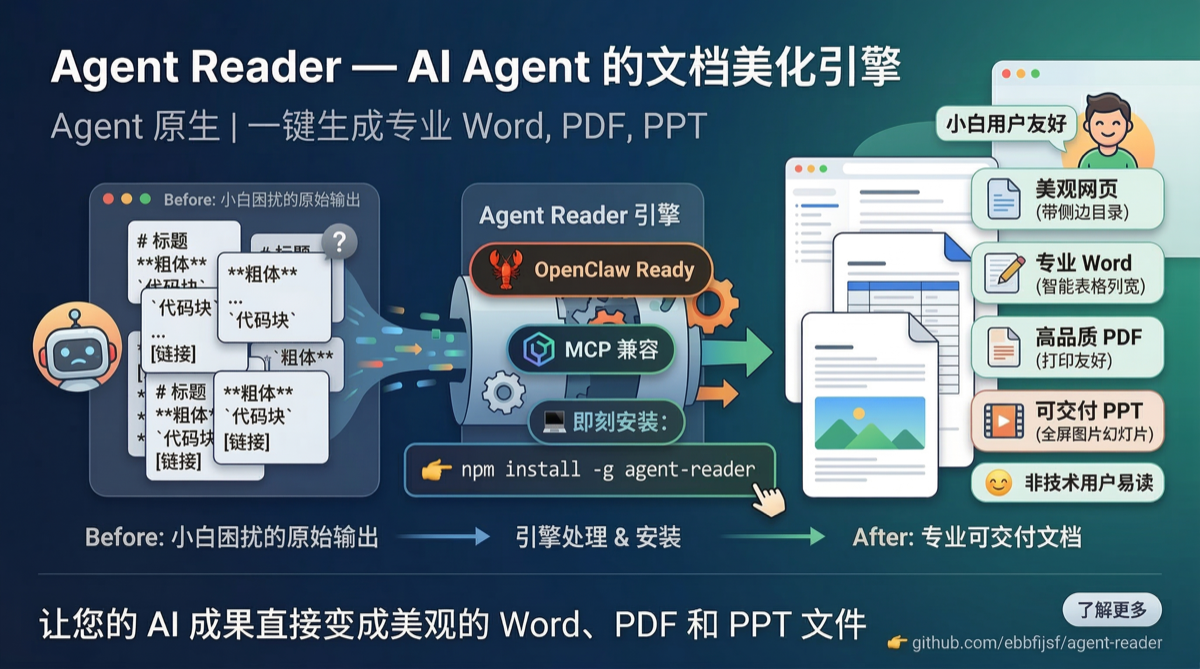
AI Agent 擅长生成内容,但输出的 Markdown 对普通人不友好。Agent Reader 一键把 Markdown 变成漂亮网页、Word、PDF,还能把图片做成全屏幻灯片。
专为 AI Agent 时代打造的格式化引擎 — Agent 调用一次,输出即交付。
核心能力
能力 | 说明 |
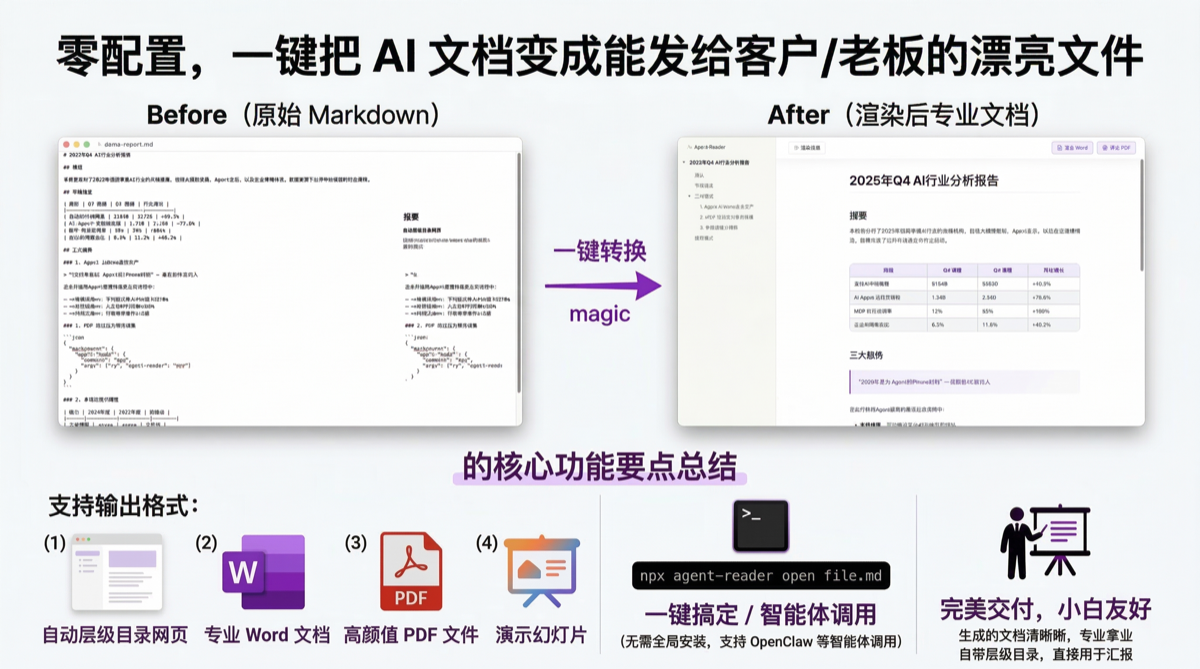
📄 Markdown → 网页 | 带侧边目录导航、代码高亮、表格美化,可一键导出 Word/PDF |
📝 Markdown → Word | 智能表格列宽、标题层级、引用块样式,打印友好 |
📑 Markdown → PDF | 浏览器引擎打印,和网页视觉一致 |
🎞️ 图片 → 幻灯片 | 全屏播放、键盘翻页、自动轮播、缩略图导航 |
📦 幻灯片 → PDF | 每张图片一页,适合存档分享 |
💡 适用场景
🏢 AI Agent 生成报告/方案 → 一键变成可以直接发给客户的 PDF 或 Word
📄 Claude / GPT 输出的长文档 → 不用手动复制到 Word 调格式,自动排版
🎨 AI 生图工具批量出图 → 一键做成全屏幻灯片,现场演示或存档分享
⚙️ 团队内部 AI 工作流 → MCP 接入后 Agent 自动输出专业文档,零人工干预
📦 安装
需要 Node.js 18+,终端输入 node -v 检查,没有去 https://nodejs.org 下载。
AI Agent(如 Claude Code)帮你安装时,请优先使用方式一,避免权限和 PATH 问题。
方式一:npx 免安装(推荐,零配置)
npx agent-reader doctor              # 验证环境
npx agent-reader open README.md      # 立刻看到漂亮网页
不需要全局安装,不会遇到权限和 PATH 问题,拿来就用。
方式二:全局安装
npm install -g agent-reader安装后验证:agent-reader doctor,全是 ✓ 就装好了。
开发模式:clone 仓库后
npm install && npm link
遇到问题?以下是两个最常见的坑:
权限错误(EACCES)
# 方法 1:加 sudo(简单粗暴)
sudo npm install -g agent-reader

# 方法 2:改 npm 全局目录(推荐,一劳永逸)
mkdir -p ~/.npm-global
npm config set prefix '~/.npm-global'
echo 'export PATH=~/.npm-global/bin:$PATH' >> ~/.zshrc
source ~/.zshrc
npm install -g agent-reader
安装成功但 command not found
npm 全局 bin 目录不在 PATH 中。先查路径,再加到 shell 配置:
npm bin -g                            # 查看 npm 全局 bin 路径
# 把输出的路径加到 ~/.zshrc 或 ~/.bashrc,例如:
echo 'export PATH=$(npm bin -g):$PATH' >> ~/.zshrc
source ~/.zshrc
🦞 OpenClaw 快速接入
OpenClaw 用户?30 秒接入,立刻获得文档美化能力。
一步接入(MCP 直连)
在你的 MCP 配置中添加:
{
  "mcpServers": {
    "agent-reader": {
      "command": "npx",
      "args": ["-y", "agent-reader", "mcp"]
    }
  }
}
接入后你可以直接对 OpenClaw 说:
你说 | OpenClaw 调用 | 结果 |
"帮我把这个 Markdown 做成 PDF" |
| 生成 PDF 文件 |
"整理成 Word 发给客户" |
| 生成 DOCX 文件 |
"做成网页给我看看" |
| 生成带目录的网页 |
"把这些图片做成幻灯片" |
| 生成全屏幻灯片 |
"幻灯片导出 PDF" |
| 每张图一页 PDF |
"打开这个文件" |
| 按偏好自动处理 |
完整工具参数、输入输出示例、错误处理说明见 SKILL.md,OpenClaw 专用 schema 见 openclaw-skill/。
🤖 给其他 AI Agent 用
MCP Server
兼容 Claude Desktop、Cline 等所有支持 MCP 协议的 AI Agent 框架。
Claude Desktop 配置(claude_desktop_config.json):
{
  "mcpServers": {
    "agent-reader": {
      "command": "node",
      "args": ["/path/to/agent-reader/src/mcp/server.js"]
    }
  }
}
提供 7 个 MCP 工具:
工具 | 功能 |
| Markdown → 网页预览 |
| Markdown → PDF / Word |
| 图片目录 → 幻灯片 |
| 图片目录 → 幻灯片 HTML / PDF |
| 智能打开(按偏好自动选格式) |
| 设置默认偏好 |
| 读取当前偏好 |
所有工具支持 return_content 参数,可直接返回文件内容(适合沙箱/Docker 环境)。render_markdown 额外支持 pre_export,在 MCP 文件输出路径下会在运行时默认预生成 PDF。
CLI Agent 模式
加 --profile agent,输出纯 JSON:
agent-reader render report.md --profile agent
# {"path":"...","format":"html","size":12345,"warnings":[]}

agent-reader export report.md --format docx --profile agent
# {"path":"...","format":"docx","size":8765,"warnings":[]}
🛠️ 手动使用(可选)
以下是人工操作 CLI 的方式。大多数情况下 Agent 会自动调用,你不需要手动敲命令。
🐣 小白模式
只需记住一个命令:agent-reader open 文件路径
agent-reader setup --default-open web    # 设置默认网页打开
agent-reader open 报告.md               # 按偏好自动处理
agent-reader open 报告.md --as word     # 临时指定 Word
agent-reader open ./图片文件夹/ --as ppt --auto 5
常用命令
agent-reader render 你的文件.md              # 预览网页
agent-reader render 你的文件.md --theme dark # 暗色主题
agent-reader render 你的文件.md --pre-export pdf,docx # 网页 + 预生成 PDF/Word
agent-reader export 你的文件.md --format docx # 导出 Word
agent-reader export 你的文件.md --format pdf  # 导出 PDF
agent-reader slides ./图片文件夹/             # 幻灯片
agent-reader slides ./图片文件夹/ --auto 5    # 自动轮播
agent-reader slides ./图片文件夹/ --format pdf # 幻灯片导出 PDF
agent-reader clean                            # 清理临时文件
agent-reader doctor                           # 检查环境
render 时预生成导出文件
render 默认只生成 HTML。需要让双击打开的 file:// 页面直接提供 PDF / Word 时,可以加 --pre-export:
agent-reader render report.md --pre-export pdf
agent-reader render report.md --pre-export pdf,docx
MCP 的 render_markdown 在返回文件路径时,会在运行时默认预生成 PDF;如果传了 return_content: true,则保持原来的内联 HTML 返回,除非你显式传 pre_export。
✨ 技术亮点
🎯 统一视觉源:HTML 是 PDF 的视觉基线(Puppeteer 打印),DOCX 保证结构一致
📊 智能表格列宽:根据内容长度自动计算比例,中文不会被挤压断行
🔒 安全默认:HTML sanitize 防 XSS、CSP 策略、SSRF 防护(禁止内网 IP)
🚀 零配置可用:Pandoc 缺失自动降级、端口冲突自动递增、临时文件自动隔离
🔄 双模式输出:human 模式自动打开 + 本地服务;agent 模式纯 JSON 输出
📋 依赖说明
依赖 | 必需? | 用途 |
Node.js 18+ | 是 | 运行环境 |
Puppeteer | 否(按需) | PDF 导出(可选依赖;未安装时仅影响 PDF) |
Pandoc | 否 | Word 导出更好看(没有会自动降级为纯 JS 方案) |
☁️ 云环境部署
在 Docker/CI 中,Agent Reader 会自动检测环境并在需要时为 Puppeteer 关闭沙盒参数。auto 模式首次失败时也会自动重试 no-sandbox。
# 手动覆盖:auto | on | off
AGENT_READER_SANDBOX=off agent-reader export report.md --format pdf
❓ FAQ
没有 Pandoc 怎么办?
不装也能导出 DOCX,只是排版简单一些。装了效果更好:
brew install pandoc        # macOS
apt-get install pandoc     # Linux
winget install pandoc      # Windows
Puppeteer 太重?
可以跳过 Chromium 下载,用系统浏览器:
PUPPETEER_SKIP_CHROMIUM_DOWNLOAD=true npm install -g agent-reader
PUPPETEER_EXECUTABLE_PATH=/path/to/chrome agent-reader export report.md --format pdf
Available Tools
7 toolsconfigure_user_preferencesC
Set default open behavior for novice users
| Name | Required | Description | Default |
|---|---|---|---|
| default_open_mode | No | web|word|pdf|ppt | |
| default_theme | No | default web theme |
TDQS
Does the description disclose side effects, auth requirements, rate limits, or destructive behavior?
With no annotations provided, the description carries full burden for behavioral disclosure. While 'Set' implies a write/mutation operation, the description doesn't disclose whether this requires authentication, what permissions are needed, whether changes are permanent or reversible, or what happens if invalid values are provided. It mentions 'novice users' but doesn't explain how this differs from configuring preferences for other user types.
Agents need to know what a tool does to the world before calling it. Descriptions should go beyond structured annotations to explain consequences.
Is the description appropriately sized, front-loaded, and free of redundancy?
The description is extremely concise at just 7 words, front-loaded with the core purpose, and contains zero wasted words or redundant information. Every word serves a distinct purpose in communicating the tool's function.
Shorter descriptions cost fewer tokens and are easier for agents to parse. Every sentence should earn its place.
Given the tool's complexity, does the description cover enough for an agent to succeed on first attempt?
For a mutation tool with no annotations and no output schema, the description is insufficient. It doesn't explain what happens after configuration (success/failure indicators), doesn't mention authentication requirements, and provides minimal context about the relationship between the two parameters. The mention of 'novice users' creates ambiguity without clarification about how this affects the configuration.
Complex tools with many parameters or behaviors need more documentation. Simple tools need less. This dimension scales expectations accordingly.
Does the description clarify parameter syntax, constraints, interactions, or defaults beyond what the schema provides?
Schema description coverage is 100%, so the schema already documents both parameters with basic descriptions. The description adds marginal value by implying these parameters relate to 'default open behavior' and 'novice users,' but doesn't provide additional semantic context about how these parameters interact or what 'default open mode' specifically controls beyond what's in the schema.
Input schemas describe structure but not intent. Descriptions should explain non-obvious parameter relationships and valid value ranges.
Does the description clearly state what the tool does and how it differs from similar tools?
The description clearly states the action ('Set default open behavior') and target audience ('for novice users'), providing a specific verb+resource combination. However, it doesn't distinguish this tool from its sibling 'get_user_preferences' beyond the obvious set vs get difference, nor does it explain what 'open behavior' specifically refers to in context of the available parameters.
Agents choose between tools based on descriptions. A clear purpose with a specific verb and resource helps agents select the right tool.
Does the description explain when to use this tool, when not to, or what alternatives exist?
The description provides no guidance on when to use this tool versus alternatives. It doesn't mention the sibling 'get_user_preferences' tool for retrieving preferences, nor does it specify prerequisites, permissions needed, or appropriate contexts for setting user preferences versus other configuration tools.
Agents often have multiple tools that could apply. Explicit usage guidance like "use X instead of Y when Z" prevents misuse.
create_slideshowC
Create slideshow HTML from an image directory
| Name | Required | Description | Default |
|---|---|---|---|
| image_dir | Yes | Absolute or relative image directory path | |
| auto_play | No | Autoplay interval in seconds | |
| auto_open | No | Open output automatically (ignored in MCP) | |
| return_content | No | Return inline HTML content directly |
TDQS
Does the description disclose side effects, auth requirements, rate limits, or destructive behavior?
With no annotations provided, the description carries the full burden of behavioral disclosure. It states the tool creates HTML but lacks details on permissions, side effects (e.g., file generation), error handling, or output format. This is insufficient for a tool with potential file system interactions and no output schema.
Agents need to know what a tool does to the world before calling it. Descriptions should go beyond structured annotations to explain consequences.
Is the description appropriately sized, front-loaded, and free of redundancy?
The description is a single, efficient sentence that directly states the tool's purpose without unnecessary words. It is front-loaded and wastes no space, making it easy for an agent to parse quickly.
Shorter descriptions cost fewer tokens and are easier for agents to parse. Every sentence should earn its place.
Given the tool's complexity, does the description cover enough for an agent to succeed on first attempt?
Given the complexity of creating HTML from images and the lack of annotations and output schema, the description is incomplete. It doesn't explain what the tool returns (e.g., file path, HTML string), error conditions, or dependencies, leaving significant gaps for agent usage.
Complex tools with many parameters or behaviors need more documentation. Simple tools need less. This dimension scales expectations accordingly.
Does the description clarify parameter syntax, constraints, interactions, or defaults beyond what the schema provides?
Schema description coverage is 100%, so the schema already documents all parameters thoroughly. The description adds no additional meaning beyond implying the tool processes images from a directory, which is covered by the 'image_dir' parameter. This meets the baseline for high schema coverage.
Input schemas describe structure but not intent. Descriptions should explain non-obvious parameter relationships and valid value ranges.
Does the description clearly state what the tool does and how it differs from similar tools?
The description clearly states the tool's purpose with a specific verb ('Create') and resource ('slideshow HTML from an image directory'), making it immediately understandable. However, it doesn't differentiate from sibling tools like 'export_slideshow' or 'render_markdown', which might have overlapping functionality, preventing a perfect score.
Agents choose between tools based on descriptions. A clear purpose with a specific verb and resource helps agents select the right tool.
Does the description explain when to use this tool, when not to, or what alternatives exist?
The description provides no guidance on when to use this tool versus alternatives. It doesn't mention sibling tools like 'export_slideshow' or 'render_markdown', nor does it specify prerequisites or contexts for usage, leaving the agent without clear selection criteria.
Agents often have multiple tools that could apply. Explicit usage guidance like "use X instead of Y when Z" prevents misuse.
export_documentC
Export markdown text into PDF or DOCX
| Name | Required | Description | Default |
|---|---|---|---|
| content | Yes | Markdown source content | |
| source_path | No | Source markdown path for relative images | |
| format | Yes | Export format | |
| return_content | No | Return file bytes as base64 |
TDQS
Does the description disclose side effects, auth requirements, rate limits, or destructive behavior?
No annotations are provided, so the description carries the full burden of behavioral disclosure. It states the tool exports markdown to PDF/DOCX but doesn't describe what 'export' entails (e.g., file creation, byte return, permissions needed, rate limits, or side effects). For a tool with 4 parameters and no annotations, this leaves significant gaps in understanding its behavior.
Agents need to know what a tool does to the world before calling it. Descriptions should go beyond structured annotations to explain consequences.
Is the description appropriately sized, front-loaded, and free of redundancy?
The description is a single, efficient sentence with zero waste. It's front-loaded with the core purpose and appropriately sized for the tool's complexity.
Shorter descriptions cost fewer tokens and are easier for agents to parse. Every sentence should earn its place.
Given the tool's complexity, does the description cover enough for an agent to succeed on first attempt?
Given no annotations, no output schema, and 4 parameters, the description is incomplete. It doesn't explain what the tool returns (e.g., file path, bytes, success status), behavioral details like error handling, or how parameters interact (e.g., 'source_path' for images). For a tool with this complexity, more context is needed.
Complex tools with many parameters or behaviors need more documentation. Simple tools need less. This dimension scales expectations accordingly.
Does the description clarify parameter syntax, constraints, interactions, or defaults beyond what the schema provides?
Schema description coverage is 100%, so the schema already documents all parameters. The description adds no additional meaning beyond implying that 'content' is markdown and 'format' is PDF/DOCX, which the schema's enum and descriptions already cover. Baseline 3 is appropriate when the schema does the heavy lifting.
Input schemas describe structure but not intent. Descriptions should explain non-obvious parameter relationships and valid value ranges.
Does the description clearly state what the tool does and how it differs from similar tools?
The description clearly states the action ('Export') and target resource ('markdown text'), specifying the output formats ('PDF or DOCX'). It distinguishes from siblings like 'render_markdown' (which renders but doesn't export) and 'export_slideshow' (which exports slideshows, not markdown documents). However, it doesn't explicitly mention what 'export' entails (e.g., file generation vs. content transformation).
Agents choose between tools based on descriptions. A clear purpose with a specific verb and resource helps agents select the right tool.
Does the description explain when to use this tool, when not to, or what alternatives exist?
No guidance is provided on when to use this tool versus alternatives. It doesn't mention prerequisites (e.g., needing markdown content), exclusions (e.g., not for HTML export), or comparisons to siblings like 'render_markdown' (for preview) or 'export_slideshow' (for slides). Usage is implied from the description but not explicitly stated.
Agents often have multiple tools that could apply. Explicit usage guidance like "use X instead of Y when Z" prevents misuse.
export_slideshowC
Export slideshow from an image directory into HTML or PDF
| Name | Required | Description | Default |
|---|---|---|---|
| image_dir | Yes | Absolute or relative image directory path | |
| format | No | Export format, default pdf | |
| auto_play | No | Autoplay interval in seconds | |
| return_content | No | Return file content directly |
TDQS
Does the description disclose side effects, auth requirements, rate limits, or destructive behavior?
With no annotations provided, the description carries the full burden of behavioral disclosure. It mentions the export action but fails to describe key traits like file output handling, permissions needed, error conditions, or performance aspects. This leaves significant gaps for a tool that likely generates files.
Agents need to know what a tool does to the world before calling it. Descriptions should go beyond structured annotations to explain consequences.
Is the description appropriately sized, front-loaded, and free of redundancy?
The description is a single, efficient sentence with zero waste—it directly states the tool's purpose without redundancy. It's appropriately sized and front-loaded, making it easy to parse quickly.
Shorter descriptions cost fewer tokens and are easier for agents to parse. Every sentence should earn its place.
Given the tool's complexity, does the description cover enough for an agent to succeed on first attempt?
Given no annotations and no output schema, the description is incomplete for a tool with 4 parameters that performs an export operation. It lacks details on return values, error handling, side effects, and usage context, which are crucial for effective tool invocation.
Complex tools with many parameters or behaviors need more documentation. Simple tools need less. This dimension scales expectations accordingly.
Does the description clarify parameter syntax, constraints, interactions, or defaults beyond what the schema provides?
Schema description coverage is 100%, so the schema fully documents all 4 parameters. The description adds no additional parameter semantics beyond implying 'image_dir' is for input and 'format' for output type, which is already clear from the schema. Baseline 3 is appropriate as the schema does the heavy lifting.
Input schemas describe structure but not intent. Descriptions should explain non-obvious parameter relationships and valid value ranges.
Does the description clearly state what the tool does and how it differs from similar tools?
The description clearly states the action ('Export slideshow') and the target resource ('from an image directory'), with specific output formats ('HTML or PDF'). It distinguishes from siblings like 'create_slideshow' (creation vs. export) and 'export_document' (slideshow vs. document), but doesn't explicitly contrast them, keeping it at 4 rather than 5.
Agents choose between tools based on descriptions. A clear purpose with a specific verb and resource helps agents select the right tool.
Does the description explain when to use this tool, when not to, or what alternatives exist?
No guidance is provided on when to use this tool versus alternatives like 'export_document' or 'create_slideshow'. The description implies usage for exporting slideshows from images, but lacks explicit context, prerequisites, or exclusions, resulting in minimal guidance.
Agents often have multiple tools that could apply. Explicit usage guidance like "use X instead of Y when Z" prevents misuse.
get_user_preferencesB
Read current user preferences for open behavior
| Name | Required | Description | Default |
|---|---|---|---|
No parameters | |||
TDQS
Does the description disclose side effects, auth requirements, rate limits, or destructive behavior?
With no annotations provided, the description carries the full burden of behavioral disclosure. It states this is a read operation, which is helpful, but lacks details about what 'open behavior' entails, whether it requires authentication, potential rate limits, or the format of returned data. The description is minimal and doesn't provide rich behavioral context.
Agents need to know what a tool does to the world before calling it. Descriptions should go beyond structured annotations to explain consequences.
Is the description appropriately sized, front-loaded, and free of redundancy?
The description is a single, efficient sentence that directly states the tool's purpose without any wasted words. It's appropriately sized and front-loaded, making it easy to understand at a glance.
Shorter descriptions cost fewer tokens and are easier for agents to parse. Every sentence should earn its place.
Given the tool's complexity, does the description cover enough for an agent to succeed on first attempt?
Given the lack of annotations and output schema, the description is incomplete for a tool that presumably returns user preference data. It doesn't explain what 'open behavior' preferences include, the structure of the returned data, or any error conditions. For a read operation with no structured output documentation, this leaves significant gaps.
Complex tools with many parameters or behaviors need more documentation. Simple tools need less. This dimension scales expectations accordingly.
Does the description clarify parameter syntax, constraints, interactions, or defaults beyond what the schema provides?
The tool has 0 parameters, and the schema description coverage is 100% (though trivial since there are no parameters). The description doesn't need to explain parameters, and it appropriately focuses on the tool's purpose without redundant parameter information. A baseline of 4 is suitable for a zero-parameter tool.
Input schemas describe structure but not intent. Descriptions should explain non-obvious parameter relationships and valid value ranges.
Does the description clearly state what the tool does and how it differs from similar tools?
The description clearly states the action ('Read') and target resource ('current user preferences for open behavior'), making the purpose understandable. However, it doesn't explicitly differentiate from its sibling 'configure_user_preferences' beyond the read vs. configure distinction, which is implied but not stated.
Agents choose between tools based on descriptions. A clear purpose with a specific verb and resource helps agents select the right tool.
Does the description explain when to use this tool, when not to, or what alternatives exist?
No explicit guidance is provided on when to use this tool versus alternatives. The description implies it's for reading preferences, but there's no mention of prerequisites, when not to use it, or how it relates to the sibling 'configure_user_preferences' beyond the basic read/write distinction.
Agents often have multiple tools that could apply. Explicit usage guidance like "use X instead of Y when Z" prevents misuse.
open_fileC
Open a local file/path using user preference or explicit mode: web/word/pdf/ppt
| Name | Required | Description | Default |
|---|---|---|---|
| file_path | Yes | File path or image directory path | |
| open_as | No | auto|web|word|pdf|ppt | |
| theme | No | theme for web rendering | |
| auto_play | No | auto play seconds for ppt mode | |
| return_content | No | return generated content directly |
TDQS
Does the description disclose side effects, auth requirements, rate limits, or destructive behavior?
No annotations are provided, so the description carries full burden. It mentions modes (web/word/pdf/ppt) but does not disclose critical behavioral traits such as permissions needed, whether it modifies files, error handling, or rate limits. For a tool that interacts with local files, this is a significant gap in safety and operational context.
Agents need to know what a tool does to the world before calling it. Descriptions should go beyond structured annotations to explain consequences.
Is the description appropriately sized, front-loaded, and free of redundancy?
The description is a single, efficient sentence that front-loads the core purpose ('Open a local file/path') and adds necessary detail about modes. Every word earns its place with no redundancy or fluff.
Shorter descriptions cost fewer tokens and are easier for agents to parse. Every sentence should earn its place.
Given the tool's complexity, does the description cover enough for an agent to succeed on first attempt?
Given the tool's complexity (5 parameters, no annotations, no output schema), the description is insufficient. It does not explain return values, error conditions, or how modes affect behavior (e.g., what 'web' rendering entails). For a file operation tool, more context is needed to ensure safe and correct usage.
Complex tools with many parameters or behaviors need more documentation. Simple tools need less. This dimension scales expectations accordingly.
Does the description clarify parameter syntax, constraints, interactions, or defaults beyond what the schema provides?
Schema description coverage is 100%, so the schema already documents all parameters well. The description adds minimal value by hinting at 'user preference or explicit mode' for 'open_as', but does not provide additional meaning beyond what the schema specifies for parameters like 'theme' or 'auto_play'.
Input schemas describe structure but not intent. Descriptions should explain non-obvious parameter relationships and valid value ranges.
Does the description clearly state what the tool does and how it differs from similar tools?
The description clearly states the action ('Open') and target ('a local file/path'), specifying it uses user preference or explicit modes. However, it does not explicitly differentiate from siblings like 'render_markdown' or 'create_slideshow', which might handle similar file types but with different purposes.
Agents choose between tools based on descriptions. A clear purpose with a specific verb and resource helps agents select the right tool.
Does the description explain when to use this tool, when not to, or what alternatives exist?
The description mentions using 'user preference or explicit mode' but provides no guidance on when to choose this tool over alternatives like 'render_markdown' for markdown files or 'export_document' for exporting. It lacks explicit when/when-not scenarios or named alternatives.
Agents often have multiple tools that could apply. Explicit usage guidance like "use X instead of Y when Z" prevents misuse.
render_markdownC
Render markdown text into styled HTML
| Name | Required | Description | Default |
|---|---|---|---|
| content | Yes | Markdown source content | |
| source_path | No | Source markdown path for relative images | |
| theme | No | Theme name | |
| auto_open | No | Open output automatically (ignored in MCP) | |
| return_content | No | Return inline HTML content directly |
TDQS
Does the description disclose side effects, auth requirements, rate limits, or destructive behavior?
With no annotations provided, the description carries full burden but only states the basic transformation function. It doesn't disclose important behavioral aspects like whether this is a read-only operation, what happens with invalid markdown, if there are rate limits, or how errors are handled. The description is minimal and lacks operational context.
Agents need to know what a tool does to the world before calling it. Descriptions should go beyond structured annotations to explain consequences.
Is the description appropriately sized, front-loaded, and free of redundancy?
The description is a single, efficient sentence that states the core function without any wasted words. It's appropriately sized for a straightforward transformation tool and gets directly to the point.
Shorter descriptions cost fewer tokens and are easier for agents to parse. Every sentence should earn its place.
Given the tool's complexity, does the description cover enough for an agent to succeed on first attempt?
For a tool with 5 parameters, no annotations, and no output schema, the description is insufficient. It doesn't explain what the tool returns (HTML string? file path?), doesn't mention the 'auto_open' parameter's limitation ('ignored in MCP'), and provides no context about error handling or performance characteristics.
Complex tools with many parameters or behaviors need more documentation. Simple tools need less. This dimension scales expectations accordingly.
Does the description clarify parameter syntax, constraints, interactions, or defaults beyond what the schema provides?
Schema description coverage is 100%, so the schema already documents all 5 parameters thoroughly. The description doesn't add any parameter-specific information beyond what's in the schema, such as explaining parameter interactions or providing usage examples. This meets the baseline for high schema coverage.
Input schemas describe structure but not intent. Descriptions should explain non-obvious parameter relationships and valid value ranges.
Does the description clearly state what the tool does and how it differs from similar tools?
The description clearly states the verb ('render') and resource ('markdown text') with the output format ('styled HTML'), making the purpose immediately understandable. However, it doesn't differentiate this tool from potential siblings like 'export_document' or 'create_slideshow' that might also involve document processing.
Agents choose between tools based on descriptions. A clear purpose with a specific verb and resource helps agents select the right tool.
Does the description explain when to use this tool, when not to, or what alternatives exist?
The description provides no guidance on when to use this tool versus alternatives like 'export_document' or 'create_slideshow' from the sibling list. It doesn't mention prerequisites, constraints, or typical use cases beyond the basic function.
Agents often have multiple tools that could apply. Explicit usage guidance like "use X instead of Y when Z" prevents misuse.
Tool Schema Changelog
Recent tool additions, removals, and schema changes observed during successful MCP inspections.
7 tool updates
v1.1.0- First observed
configure_user_preferences - First observed
create_slideshow - First observed
export_document - First observed
export_slideshow - First observed
get_user_preferences - First observed
open_file - First observed
render_markdown
TDQS
Scored across 7 tools
Each tool has a clearly distinct purpose with no overlap: configure_user_preferences and get_user_preferences handle user settings, create_slideshow and export_slideshow manage slideshow creation and export, export_document and render_markdown handle document processing, and open_file is a standalone file opener. The descriptions clearly differentiate their functions, eliminating any ambiguity.
All tool names follow a consistent verb_noun pattern (e.g., configure_user_preferences, create_slideshow, export_document), using snake_case uniformly throughout. This predictability makes it easy for agents to understand and select the appropriate tool without confusion.
With 7 tools, this server is well-scoped for its purpose of document and slideshow management, covering key operations like creation, export, rendering, and user preferences. Each tool earns its place, providing a balanced set without being too sparse or overwhelming.
The tool set covers core workflows for document and slideshow handling, including creation, export, rendering, and user preferences. However, there is a minor gap in update or delete operations for slideshows or documents, which agents might need to work around, though the existing tools support most common tasks effectively.
Related MCP Connectors
Document-to-Markdown MCP server — convert PDF, Office and HTML into LLM-ready Markdown.
Generate PDF, Word (.docx) and PowerPoint (.pptx) documents from Markdown over MCP.
Use your own Word templates to convert Markdown → DOCX/PDF/HTML from any MCP-compatible AI.
Document conversion MCP server: PDF to Markdown, image OCR, spreadsheet parsing.