Playwright MCP Server
The Playwright MCP Server provides browser automation capabilities using Playwright, allowing LLMs to interact with web pages and perform various tasks:
Navigation: Browse websites, move through browser history, and set custom User Agents
Interactions: Click elements, fill forms, select dropdowns, hover, drag-drop, press keys, and work with iframes
Content Extraction: Get visible text or full HTML content from pages
JavaScript Execution: Run custom code in the browser console and retrieve logs
Media Capture: Take screenshots and save pages as PDFs
Network Management: Perform HTTP requests (GET, POST, PUT, PATCH, DELETE) and monitor responses
Tab Management: Handle and switch between browser tabs
Code Generation: Record browser interactions to generate Playwright test code
Customization: Configure viewport dimensions, headless mode, browser type, and timeouts
Provides browser automation capabilities for GitHub Copilot agents in VS Code, allowing interaction with web pages and automated web testing functions.
Mentioned as a sponsor, with integration capabilities for terminal-based browser automation across MacOS, Linux, and Windows.
Click on "Deploy Server".
Wait a few minutes for the server to deploy. Once ready, it will show a "Started" state.
In the chat, type
@followed by the MCP server name and your instructions, e.g., "@Playwright MCP Server take a screenshot of the GitHub homepage and save it"
That's it! The server will respond to your query, and you can continue using it as needed.
Here is a step-by-step guide with screenshots.
Warp, the AI terminal for developers
Available for MacOS, Linux, & Windows
Playwright MCP Server ðŸŽ
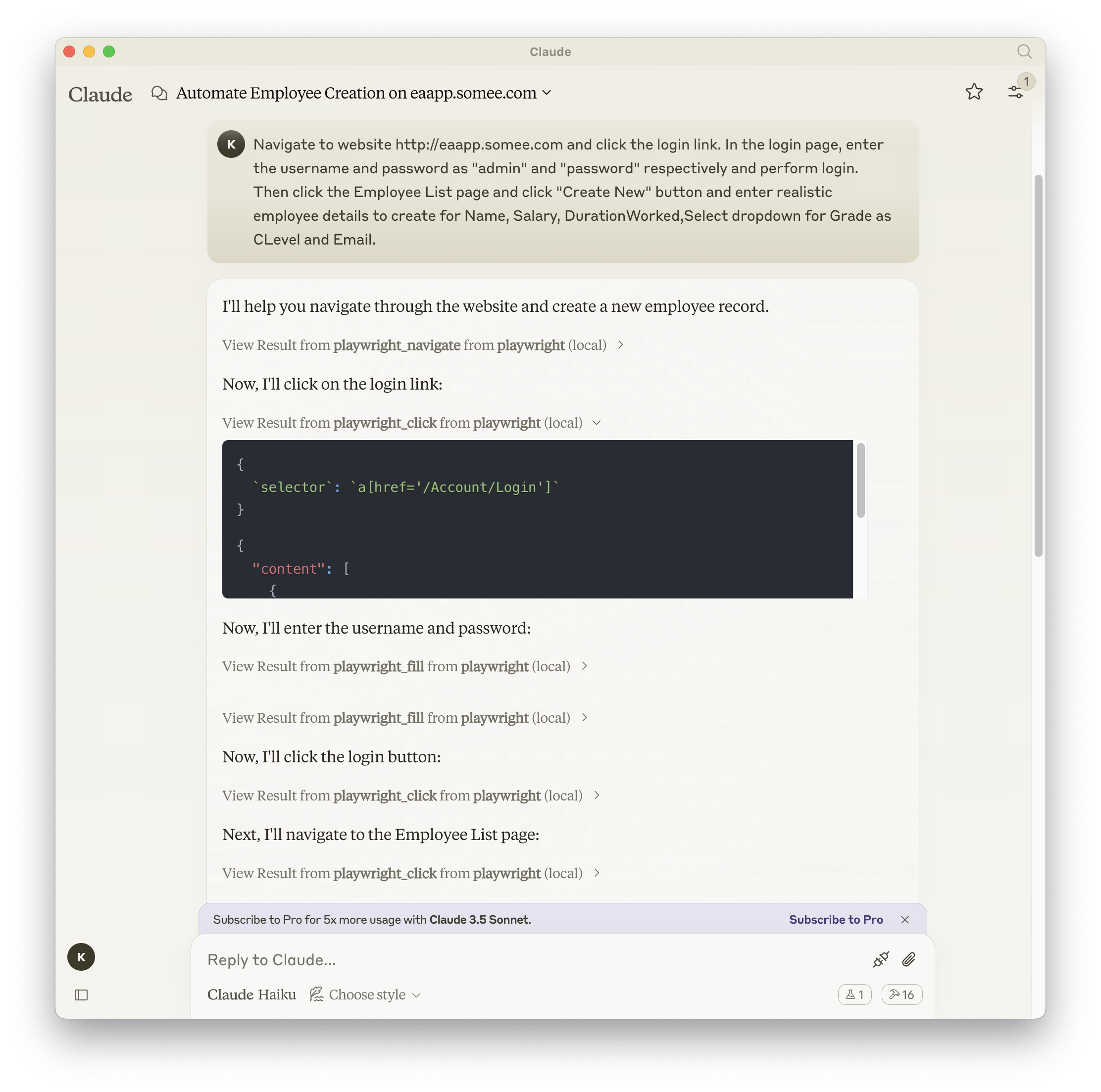
A Model Context Protocol server that provides browser automation capabilities using Playwright. This server enables LLMs to interact with web pages, take screenshots, generate test code, web scraps the page and execute JavaScript in a real browser environment.
Screenshot
Related MCP server: Puppeteer MCP Server
Documentation | API reference
Installation
You can install the package using either npm, mcp-get, or Smithery:
Using npm:
npm install -g @executeautomation/playwright-mcp-serverUsing mcp-get:
npx @michaellatman/mcp-get@latest install @executeautomation/playwright-mcp-serverUsing Smithery
To install Playwright MCP for Claude Desktop automatically via Smithery:
npx @smithery/cli install @executeautomation/playwright-mcp-server --client claudeInstallation in VS Code
Install the Playwright MCP server in VS Code using one of these buttons:
Alternatively, you can install the Playwright MCP server using the VS Code CLI:
# For VS Code
code --add-mcp '{"name":"playwright","command":"npx","args":["@executeautomation/playwright-mcp-server"]}'# For VS Code Insiders
code-insiders --add-mcp '{"name":"playwright","command":"npx","args":["@executeautomation/playwright-mcp-server"]}'After installation, the ExecuteAutomation Playwright MCP server will be available for use with your GitHub Copilot agent in VS Code.
Configuration to use Playwright Server
Here's the Claude Desktop configuration to use the Playwright server:
{
"mcpServers": {
"playwright": {
"command": "npx",
"args": ["-y", "@executeautomation/playwright-mcp-server"]
}
}
}Testing
This project uses Jest for testing. The tests are located in the src/__tests__ directory.
Running Tests
You can run the tests using one of the following commands:
# Run tests using the custom script (with coverage)
node run-tests.cjs
# Run tests using npm scripts
npm test # Run tests without coverage
npm run test:coverage # Run tests with coverage
npm run test:custom # Run tests with custom script (same as node run-tests.cjs)The test coverage report will be generated in the coverage directory.
Running evals
The evals package loads an mcp client that then runs the index.ts file, so there is no need to rebuild between tests. You can load environment variables by prefixing the npx command. Full documentation can be found here.
OPENAI_API_KEY=your-key npx mcp-eval src/evals/evals.ts src/tools/codegen/index.tsStar History
Available Tools
31 toolsclear_codegen_sessionC
Clear a code generation session without generating a test
Inputs: sessionId (required).
end_codegen_sessionC
End a code generation session and generate the test file
Inputs: sessionId (required).
get_codegen_sessionC
Get information about a code generation session
Inputs: sessionId (required).
playwright_assert_responseB
Wait for and validate a previously initiated HTTP response wait operation.
Inputs: id (required), value.
playwright_clickC
Click an element on the page
Inputs: selector (required).
playwright_click_and_switch_tabA
Click a link and switch to the newly opened tab
Inputs: selector (required).
playwright_closeB
Close the browser and release all resources
Inputs: no named parameters.
playwright_console_logsC
Retrieve console logs from the browser with filtering options
Inputs: clear, limit, search, type.
playwright_custom_user_agentC
Set a custom User Agent for the browser
Inputs: userAgent (required).
playwright_deleteC
Perform an HTTP DELETE request
Inputs: url (required).
playwright_dragC
Drag an element to a target location
Inputs: sourceSelector (required), targetSelector (required).
playwright_evaluateC
Execute JavaScript in the browser console
Inputs: script (required).
playwright_expect_responseB
Ask Playwright to start waiting for a HTTP response. This tool initiates the wait operation but does not wait for its completion.
Inputs: id (required), url (required).
playwright_fillC
fill out an input field
Inputs: selector (required), value (required).
playwright_getC
Perform an HTTP GET request
Inputs: url (required).
playwright_get_visible_htmlB
Get the HTML content of the current page
Inputs: no named parameters.
playwright_get_visible_textB
Get the visible text content of the current page
Inputs: no named parameters.
playwright_go_backB
Navigate back in browser history
Inputs: no named parameters.
playwright_go_forwardA
Navigate forward in browser history
Inputs: no named parameters.
playwright_hoverC
Hover an element on the page
Inputs: selector (required).
playwright_iframe_clickC
Click an element in an iframe on the page
Inputs: iframeSelector (required), selector (required).
playwright_iframe_fillC
Fill an element in an iframe on the page
Inputs: iframeSelector (required), selector (required), value (required).
playwright_patchC
Perform an HTTP PATCH request
Inputs: url (required), value (required).
playwright_postC
Perform an HTTP POST request
Inputs: url (required), value (required), headers, token.
playwright_press_keyC
Press a keyboard key
Inputs: key (required), selector.
playwright_putC
Perform an HTTP PUT request
Inputs: url (required), value (required).
playwright_save_as_pdfC
Save the current page as a PDF file
Inputs: outputPath (required), filename, format, margin, +1 more.
playwright_screenshotC
Take a screenshot of the current page or a specific element
Inputs: name (required), downloadsDir, fullPage, height, +4 more.
playwright_selectC
Select an element on the page with Select tag
Inputs: selector (required), value (required).
start_codegen_sessionC
Start a new code generation session to record Playwright actions
Inputs: options (required).
Tool Schema Changelog
Recent tool additions, removals, and schema changes observed during successful MCP inspections.
Loading tool schema changelog…
TDQS
Scored across 31 tools
Most tools have distinct purposes, with clear separation between browser actions (e.g., click, fill, navigate), HTTP methods (get, post, put), and code generation sessions. However, some overlap exists between playwright_click and playwright_iframe_click, where the iframe variant is a specialized case rather than a fundamentally different operation, which could cause minor confusion.
Tool names follow a highly consistent snake_case pattern with clear verb_noun structures. Code generation tools use consistent 'codegen_session' terminology, while Playwright actions consistently start with 'playwright_' followed by descriptive verbs (e.g., playwright_click, playwright_navigate). This predictability makes the set easy to navigate and understand.
With 31 tools, the count feels heavy for a Playwright automation server, suggesting potential over-fragmentation. While Playwright is feature-rich, many tools could be consolidated (e.g., separate HTTP methods might be unified into a single playwright_request tool). The number is borderline excessive for typical agent workflows.
The toolset provides comprehensive coverage for Playwright automation, including navigation, interaction (click, fill, hover), HTTP requests, iframe handling, debugging (logs, screenshots), and code generation. It supports full CRUD-like operations for web testing without obvious gaps, enabling agents to handle complex browser automation tasks end-to-end.
Maintenance
Related MCP Connectors
Official Browserless MCP server: browser automation, scraping, screenshots and PDFs for AI agents.
Web scraping, browser automation, screenshots and AI data extraction for AI agents via MCP.
A comprehensive Model Context Protocol (MCP) server that enables AI assistants to interact with yo…
Cloud browser, web extraction, screenshots, and remote CDP tools for AI agents.
Related MCP Servers
- AlicenseBqualityDmaintenanceA Model Context Protocol server that provides browser automation capabilities using Playwright. This server enables LLMs to interact with web pages, take screenshots, and execute JavaScript in a real browser environment.3215,256 npm5,681MIT
- AlicenseNot gradedqualityDmaintenanceA Model Context Protocol server that provides browser automation capabilities using Playwright, enabling LLMs to interact with web pages, take screenshots, and execute JavaScript in a real browser environment.19Apache 2.0
- AlicenseBqualityDmaintenanceA Model Context Protocol server that provides browser automation capabilities using Puppeteer, enabling LLMs to interact with web pages, take screenshots, and execute JavaScript in a real browser environment.71MIT
- AlicenseBqualityDmaintenanceA Model Context Protocol server that enables LLMs to interact with web pages, take screenshots, generate test code, scrape web pages, and execute JavaScript in a real browser environment.2922MIT