
A
licenseA
qualityF
maintenanceA Model Context Protocol server that enables running AppleScript code to interact with Mac applications and system features including Notes, Calendar, Contacts, Messages, file management, and more.
1
142 npm
465
MIT

Este servidor MCP proporciona acceso a la función de atajos de Siri mediante el Protocolo de Contexto de Modelo (MCP). Permite listar, abrir y ejecutar atajos desde la app Atajos de macOS.
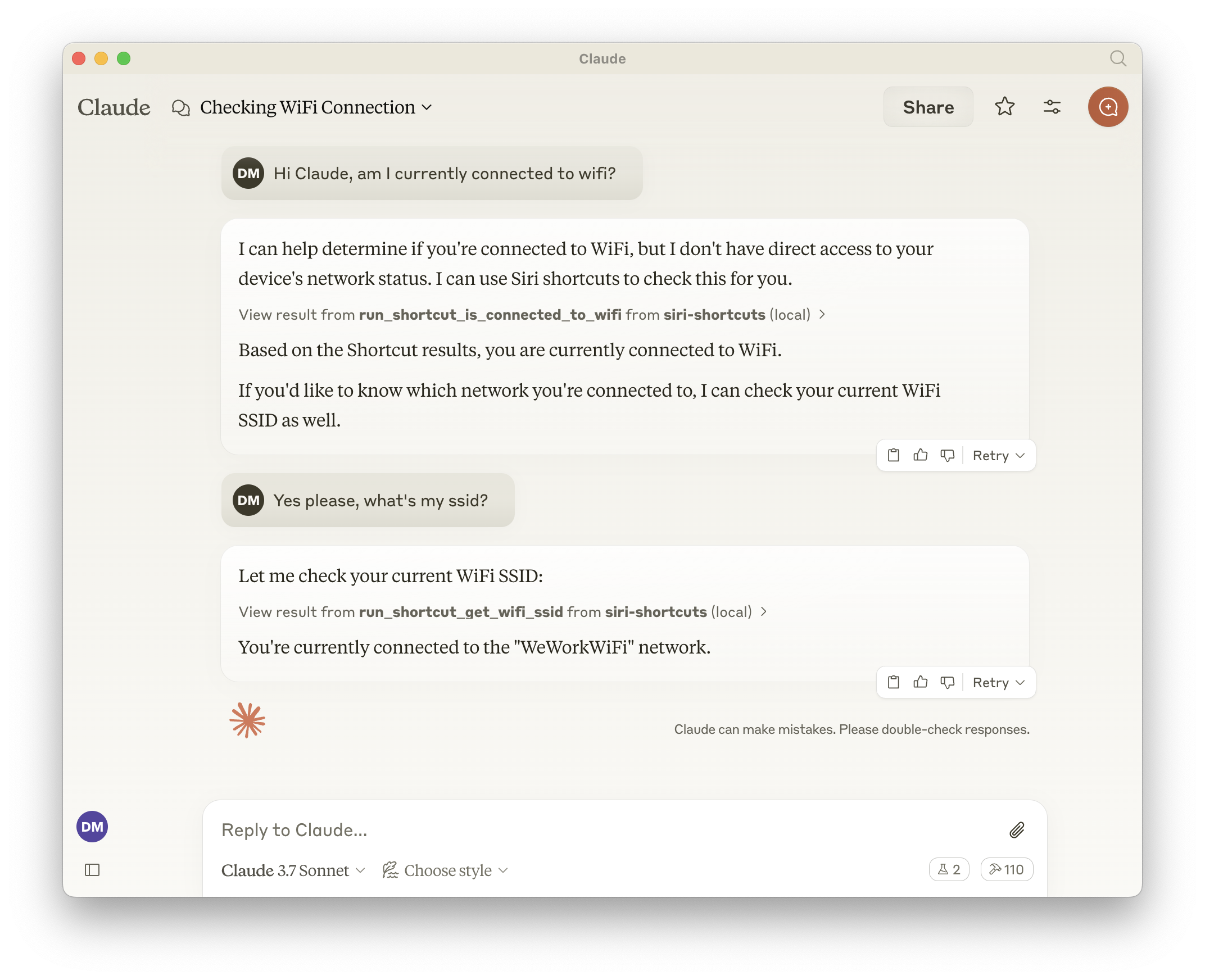
Expone todos los accesos directos, lo que significa que LLM puede llamar a cualquier cosa que esté disponible en la aplicación Accesos directos.
Listar todos los accesos directos disponibles
Abrir accesos directos en la aplicación Accesos directos
Ejecutar accesos directos con parámetros de entrada opcionales
Herramientas generadas dinámicamente para cada acceso directo disponible
Related MCP server: macOS Automator MCP Server
list_shortcuts
Enumera todos los atajos de Siri disponibles en el sistema
No se requiere entrada
Devuelve: Matriz de nombres de accesos directos
{
  "shortcuts": [{ "name": "My Shortcut 1" }, { "name": "My Shortcut 2" }]
}
open_shortcut
Abre un acceso directo en la aplicación Accesos directos
Aporte:
name (cadena): Nombre del acceso directo para abrir
run_shortcut
Ejecuta un acceso directo con entrada opcional
Aporte:
name (cadena): Nombre del acceso directo a ejecutar
input (cadena, opcional): entrada de texto o ruta de archivo para pasar al acceso directo
El servidor genera automáticamente herramientas adicionales para cada acceso directo disponible en el formato:
Nombre de la herramienta: run_shortcut_[sanitized_shortcut_name]
Descripción: Ejecuta el acceso directo específico
Aporte:
input (cadena, opcional): entrada de texto o ruta de archivo para pasar al acceso directo
Añade a tu configuración de Claude:
{
  "mcpServers": {
    "siri-shortcuts": {
      "command": "npx",
      "args": ["mcp-server-siri-shortcuts"]
    }
  }
}Utiliza el comando CLI shortcuts de macOS bajo el capó
Sanitiza los nombres de acceso directo para la compatibilidad de nombres de herramientas
Admite tanto la entrada de texto directa como la entrada basada en archivos
Devuelve la salida del acceso directo cuando está disponible
Implementa el manejo de errores MCP estándar
List all available Siri shortcuts
| Name | Required | Description | Default |
|---|---|---|---|
No parameters | |||
Does the description disclose side effects, auth requirements, rate limits, or destructive behavior?
With no annotations provided, the description carries full burden for behavioral disclosure. It states the action 'List all available Siri shortcuts' but doesn't describe what 'available' means, whether it requires permissions, how results are returned, or any rate limits. For a tool with zero annotation coverage, this leaves significant behavioral gaps.
Agents need to know what a tool does to the world before calling it. Descriptions should go beyond structured annotations to explain consequences.
Is the description appropriately sized, front-loaded, and free of redundancy?
The description is a single, efficient sentence with zero waste: 'List all available Siri shortcuts.' It's front-loaded with the core action and resource, making it immediately understandable. No extraneous information or structural issues are present.
Shorter descriptions cost fewer tokens and are easier for agents to parse. Every sentence should earn its place.
Given the tool's complexity, does the description cover enough for an agent to succeed on first attempt?
Given the tool's simplicity (0 parameters, no output schema, no annotations), the description is incomplete. It doesn't explain what 'available' means, how results are structured, or any behavioral constraints. For a listing tool with no structured support, more context about output format or scope would be needed for adequate completeness.
Complex tools with many parameters or behaviors need more documentation. Simple tools need less. This dimension scales expectations accordingly.
Does the description clarify parameter syntax, constraints, interactions, or defaults beyond what the schema provides?
The tool has 0 parameters with 100% schema description coverage, so the schema fully documents the absence of inputs. The description doesn't need to compensate for parameter documentation, and it appropriately doesn't mention parameters. Baseline for 0 parameters is 4, as it avoids unnecessary parameter discussion.
Input schemas describe structure but not intent. Descriptions should explain non-obvious parameter relationships and valid value ranges.
Does the description clearly state what the tool does and how it differs from similar tools?
The description clearly states the verb 'List' and the resource 'Siri shortcuts' with the qualifier 'all available', making the purpose unambiguous. It distinguishes from siblings open_shortcut and run_shortcut by focusing on listing rather than execution. However, it doesn't specify output format or scope beyond 'available', leaving minor room for improvement.
Agents choose between tools based on descriptions. A clear purpose with a specific verb and resource helps agents select the right tool.
Does the description explain when to use this tool, when not to, or what alternatives exist?
No explicit guidance is provided on when to use this tool versus alternatives like open_shortcut or run_shortcut. The description implies it's for listing shortcuts, but doesn't clarify prerequisites, context, or exclusions. Usage is implied rather than explicitly stated, which could lead to confusion in tool selection.
Agents often have multiple tools that could apply. Explicit usage guidance like "use X instead of Y when Z" prevents misuse.
Open a shortcut in the Shortcuts app
| Name | Required | Description | Default |
|---|---|---|---|
| name | Yes | The name of the shortcut to open |
Does the description disclose side effects, auth requirements, rate limits, or destructive behavior?
With no annotations provided, the description carries full burden for behavioral disclosure but offers minimal information. It states the action but doesn't explain what 'opening' entails (does it launch the app? display details? require specific permissions?), whether it's read-only or has side effects, or what happens if the shortcut doesn't exist.
Agents need to know what a tool does to the world before calling it. Descriptions should go beyond structured annotations to explain consequences.
Is the description appropriately sized, front-loaded, and free of redundancy?
The description is extremely concise - a single sentence that directly states the tool's purpose with zero wasted words. It's front-loaded and efficiently communicates the core functionality without unnecessary elaboration.
Shorter descriptions cost fewer tokens and are easier for agents to parse. Every sentence should earn its place.
Given the tool's complexity, does the description cover enough for an agent to succeed on first attempt?
For a tool with no annotations, no output schema, and sibling tools that perform related but distinct operations, the description is insufficiently complete. It doesn't explain what 'opening' means operationally, how it differs from 'running', what the expected outcome is, or address potential error conditions.
Complex tools with many parameters or behaviors need more documentation. Simple tools need less. This dimension scales expectations accordingly.
Does the description clarify parameter syntax, constraints, interactions, or defaults beyond what the schema provides?
The schema description coverage is 100%, with the single parameter 'name' clearly documented in the schema. The description doesn't add any parameter-specific information beyond what's already in the structured data, so it meets the baseline for high schema coverage without compensating value.
Input schemas describe structure but not intent. Descriptions should explain non-obvious parameter relationships and valid value ranges.
Does the description clearly state what the tool does and how it differs from similar tools?
The description clearly states the action ('Open') and target resource ('a shortcut in the Shortcuts app'), making the purpose immediately understandable. However, it doesn't explicitly differentiate from sibling tools like 'run_shortcut' - both involve interacting with shortcuts but serve different purposes.
Agents choose between tools based on descriptions. A clear purpose with a specific verb and resource helps agents select the right tool.
Does the description explain when to use this tool, when not to, or what alternatives exist?
The description provides no guidance on when to use this tool versus alternatives like 'run_shortcut' or 'list_shortcuts'. There's no mention of prerequisites, appropriate contexts, or what distinguishes 'opening' from 'running' a shortcut, leaving the agent with insufficient usage context.
Agents often have multiple tools that could apply. Explicit usage guidance like "use X instead of Y when Z" prevents misuse.
Run a shortcut by name or identifier (UUID) with optional input and output parameters
| Name | Required | Description | Default |
|---|---|---|---|
| input | No | The input to pass to the shortcut. Can be text, or a filepath | |
| name | Yes | The name or identifier (UUID) of the shortcut to run |
Does the description disclose side effects, auth requirements, rate limits, or destructive behavior?
With no annotations provided, the description carries full burden but offers minimal behavioral insight. It mentions 'optional input and output parameters' but doesn't clarify execution effects (e.g., whether it's read-only, requires permissions, has side effects, or handles errors). This is inadequate for a tool that likely performs actions.
Agents need to know what a tool does to the world before calling it. Descriptions should go beyond structured annotations to explain consequences.
Is the description appropriately sized, front-loaded, and free of redundancy?
The description is a single, efficient sentence that front-loads the core action and key details. Every word earns its place with no redundancy, making it highly concise and well-structured for quick understanding.
Shorter descriptions cost fewer tokens and are easier for agents to parse. Every sentence should earn its place.
Given the tool's complexity, does the description cover enough for an agent to succeed on first attempt?
Given no annotations, no output schema, and a tool that performs an action ('run'), the description is incomplete. It lacks details on execution behavior, return values, error handling, or security implications, which are critical for an agent to use it correctly in context.
Complex tools with many parameters or behaviors need more documentation. Simple tools need less. This dimension scales expectations accordingly.
Does the description clarify parameter syntax, constraints, interactions, or defaults beyond what the schema provides?
Schema description coverage is 100%, so the schema fully documents both parameters. The description adds no additional meaning beyond implying 'name' can be an identifier and 'input' is optional, which is already covered in the schema. Baseline 3 is appropriate as the schema does the heavy lifting.
Input schemas describe structure but not intent. Descriptions should explain non-obvious parameter relationships and valid value ranges.
Does the description clearly state what the tool does and how it differs from similar tools?
The description clearly states the action ('run') and resource ('shortcut'), specifying it can be executed by name or UUID. It distinguishes from siblings like 'list_shortcuts' (listing) and 'open_shortcut' (opening), though it doesn't explicitly contrast them. The purpose is specific but lacks explicit sibling differentiation.
Agents choose between tools based on descriptions. A clear purpose with a specific verb and resource helps agents select the right tool.
Does the description explain when to use this tool, when not to, or what alternatives exist?
No guidance is provided on when to use this tool versus alternatives like 'list_shortcuts' or 'open_shortcut'. The description mentions optional input and output parameters but doesn't explain contexts or prerequisites for usage, leaving the agent to infer from tool names alone.
Agents often have multiple tools that could apply. Explicit usage guidance like "use X instead of Y when Z" prevents misuse.
Recent tool additions, removals, and schema changes observed during successful MCP inspections.
v1.0.0list_shortcutsopen_shortcutrun_shortcutScored across 3 tools
Each tool has a clearly distinct purpose: listing shortcuts, opening them in the app, and running them with parameters. There is no overlap in functionality, making it easy for an agent to select the correct tool.
All tool names follow a consistent verb_noun pattern (list_shortcuts, open_shortcut, run_shortcut) with no deviations in style or convention, providing predictable and readable naming.
With only 3 tools, the set feels thin for a Siri Shortcuts server, as it lacks operations like creating, editing, or deleting shortcuts, which are core to managing shortcuts. However, the tools cover basic viewing and execution.
The tool surface is significantly incomplete for a Siri Shortcuts domain, missing essential CRUD operations (e.g., create_shortcut, update_shortcut, delete_shortcut) and other management features, which will limit agent capabilities in handling shortcuts comprehensively.
MCP connector that lets ChatGPT list, search, and run your Apple Shortcuts via a local Mac agent
Search, read, and write your Apple Notes from ChatGPT/Claude via a local Mac agent + MCP relay.
Enable secure connectivity between Sentry issues and debugging data, and LLM clients, using a Model Context Protocol (MCP) server.
A comprehensive Model Context Protocol (MCP) server that enables AI assistants to interact with yo…