Heroku Code MCP
A compact MCP server for the Heroku Platform API using a Code Mode pattern: search + execute + auth_status.
Heroku Code MCP gives agent clients a small, token-efficient control surface for Heroku operations. Pair it with Heroku Skills when you want workflow guidance, safety checks, and Heroku product context alongside live API tools.
Design references:
Quick Start
Default MCP URL: http://127.0.0.1:3000/mcp
git clone https://github.com/dsouzaAnush/heroku-code-mcp.git
cd heroku-code-mcp
npm install
npm run build
npm test
Seed auth from the Heroku CLI:
heroku auth:whoami
npm run seed:token
Start the server:
TOKEN_STORE_PATH=./data/tokens.integration.json \
TOKEN_ENCRYPTION_KEY_BASE64="<seed-output-key>" \
PORT=3000 HOST=127.0.0.1 npm run dev
Smoke test:
curl -sS http://127.0.0.1:3000/healthz
MCP_URL=http://127.0.0.1:3000/mcp USER_ID=default npm run smoke:mcp
Before npm publication, the package can also run from GitHub:
HOST=127.0.0.1 PORT=3333 \
TOKEN_STORE_PATH="$HOME/.heroku-code-mcp/tokens.json" \
TOKEN_ENCRYPTION_KEY_BASE64="<base64-32-byte-key>" \
WRITE_CONFIRMATION_SECRET="<random-secret>" \
npx -y github:dsouzaAnush/heroku-code-mcp
Related MCP server: MCP of MCPs
Install in Agent Clients
Claude Code
Install the companion plugin for skills plus MCP wiring:
claude plugin marketplace add dsouzaAnush/heroku-plugin
claude plugin install heroku@heroku-plugin
claude plugin enable heroku@heroku-plugin
Or add the running MCP server directly:
claude mcp add \
  --transport http \
  --scope local \
  heroku-code-mcp \
  http://127.0.0.1:3000/mcp \
  --header "x-user-id: default"
Claude Desktop
Use the HTTP endpoint directly when supported:
{
  "mcpServers": {
    "heroku-code-mcp": {
      "type": "http",
      "url": "http://127.0.0.1:3000/mcp",
      "headers": {
        "x-user-id": "default"
      }
    }
  }
}
For Desktop builds that expect stdio servers, bridge through mcp-remote:
{
  "mcpServers": {
    "heroku-code-mcp": {
      "command": "npx",
      "args": ["-y", "mcp-remote", "http://127.0.0.1:3000/mcp", "--allow-http", "--header", "x-user-id:default"]
    }
  }
}
Build a .mcpb bundle with:
Codex
Codex uses Heroku Plugin for skills and optional MCP wiring:
codex plugin marketplace add dsouzaAnush/heroku-plugin --ref main
Enable heroku-plugin@heroku-plugin in the Codex Plugins tab, or add:
[plugins."heroku-plugin@heroku-plugin"]
enabled = true
Run this MCP server on http://127.0.0.1:3333/mcp when you want live Heroku API tools through the plugin.
Cursor
git clone https://github.com/dsouzaAnush/heroku-plugin.git
cursor agent --plugin-dir heroku-plugin
Add the MCP server to ~/.cursor/mcp.json or project-local .cursor/mcp.json:
{
  "mcpServers": {
    "heroku-code-mcp": {
      "type": "streamable-http",
      "url": "http://127.0.0.1:3333/mcp",
      "headers": {
        "x-user-id": "default"
      }
    }
  }
}
Other MCP Clients
Use streamable HTTP:
{
  "mcpServers": {
    "heroku-code-mcp": {
      "transport": "streamable_http",
      "url": "http://127.0.0.1:3000/mcp",
      "headers": {
        "x-user-id": "default"
      }
    }
  }
}
Or bridge to stdio:
{
  "mcpServers": {
    "heroku-code-mcp": {
      "command": "npx",
      "args": ["-y", "mcp-remote", "http://127.0.0.1:3000/mcp", "--allow-http", "--header", "x-user-id:default"]
    }
  }
}
How It Works
Tool | What it does | Why it exists |
auth_status
| Reports whether the caller is authenticated with Heroku | Lets agents branch cleanly before API work |
search
| Ranks Heroku operations from schema and docs context | Avoids exposing dozens of endpoint-shaped tools up front |
execute
| Validates params/body and calls the selected Heroku operation | Gives one deterministic execution path |
Typical flow:
Call auth_status.
Call search with natural language intent.
Choose one operation_id.
Call execute with path_params, query_params, and body.
For writes, run dry_run=true, then replay with confirm_write_token and ALLOW_WRITES=true.
Examples:
{
  "query": "list apps",
  "limit": 5
}
{
  "operation_id": "GET /apps"
}
{
  "operation_id": "PATCH /apps/{app_identity}",
  "path_params": {
    "app_identity": "my-app"
  },
  "body": {
    "maintenance": true
  },
  "dry_run": true
}
Safety and Configuration
Mutations (POST, PATCH, PUT, DELETE) are blocked by default. To allow a write, set ALLOW_WRITES=true, request a dry run, and replay with the returned confirm_write_token. Sensitive headers and body fields are redacted.
Key env vars:
Full example: .env.example
Benchmarks
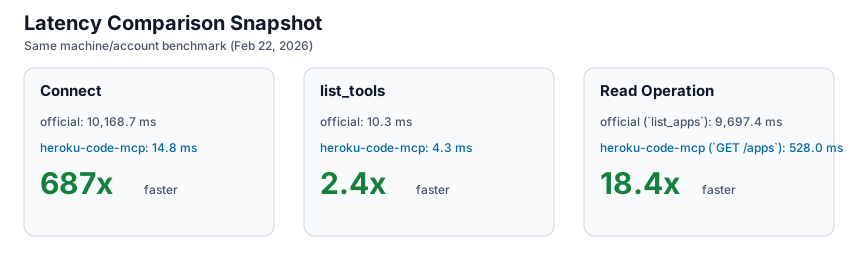
Benchmarks were captured on February 22, 2026 on the same machine and account for both implementations.
Metric | heroku-code-mcp
| official Heroku MCP | Delta |
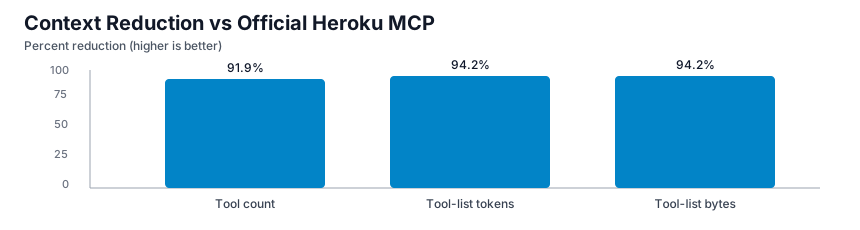
Tool count | 3 | 37 | 91.9% lower |
Tool-list payload bytes | 1,469 | 25,500 | 94.2% lower |
Tool-list approx tokens | 368 | 6,375 | 94.2% lower |
Connect avg | 14.8 ms | 10,168.7 ms | 687x faster |
list_tools avg
| 4.3 ms | 10.3 ms | 2.4x faster |
Read op avg | 528.0 ms (execute GET /apps) | 9,697.4 ms (list_apps) | 18.4x faster |
Charts:
Full methodology and artifacts live in BENCHMARKS.md and benchmarks/results/.
Development and Release
Validate locally:
npm run build
npm test
npm run validate:server
npm run publish:dry-run
This repo uses free GitHub Actions:
validate.yml runs build, tests, server.json validation, and npm pack dry-run on PRs and pushes to main.
release.yml runs on v* tags, builds the .mcpb, updates release server.json, creates or updates the GitHub Release, and publishes to the MCP Registry through GitHub OIDC.
Dependabot checks npm and GitHub Actions dependencies weekly.
Publish manually when needed:
npm publish --access public
mcp-publisher login github
mcp-publisher publish server.json
For CI-based npm publishing, configure npm trusted publishing for repo dsouzaAnush/heroku-code-mcp and workflow release.yml, then run the release workflow with publish_npm=true.
Repository Layout
src/schema/*: ingestion, operation normalization, and cache
src/search/*: search index and ranking
src/execute/*: validation and Heroku API execution
src/auth/*: OAuth and encrypted token storage
tests/*: catalog, search, and execute tests
benchmarks/results/*: benchmark artifacts
server.json: MCP Registry metadata
Brand and Troubleshooting
This repo includes the official Heroku wordmark and mark under assets. Use them according to the Heroku Brand Guidelines.
Common fixes:
MCP Inspector connection error: confirm URL http://127.0.0.1:3000/mcp and server health.
AUTH_REQUIRED: seed a token or complete OAuth.
Write blocked: confirm ALLOW_WRITES=true and send the dry-run confirmation token.
Large response body: narrow query scope or lower output caps.