
Playwright MCP Server
<div align="center" markdown="1">
<table>
<tr>
<td align="center" valign="middle">
<a href="https://mseep.ai/app/executeautomation-mcp-playwright">
<img src="https://mseep.net/pr/executeautomation-mcp-playwright-badge.png" alt="MseeP.ai Security Assessment Badge" height="80"/>
</a>
</td>
<td align="center" valign="middle">
<a href="https://www.warp.dev/?utm_source=github&utm_medium=referral&utm_campaign=mcp-playwright">
<img alt="Warp sponsorship" width="200" src="https://github.com/user-attachments/assets/ab8dd143-b0fd-4904-bdc5-dd7ecac94eae"/>
</a>
</td>
</tr>
<tr>
<td align="center"><sub>MseeP.ai Security Assessment</sub></td>
<td align="center"><sub>Special thanks to <a href="https://www.warp.dev/?utm_source=github&utm_medium=referral&utm_campaign=mcp-playwright">Warp, the AI terminal for developers</a></sub></td>
</tr>
</table>
</div>
<hr>
# Playwright MCP Server 🎭
[](https://smithery.ai/server/@executeautomation/playwright-mcp-server)
A Model Context Protocol server that provides browser automation capabilities using Playwright. This server enables LLMs to interact with web pages, take screenshots, generate test code, web scraps the page and execute JavaScript in a real browser environment.
<a href="https://glama.ai/mcp/servers/yh4lgtwgbe"><img width="380" height="200" src="https://glama.ai/mcp/servers/yh4lgtwgbe/badge" alt="mcp-playwright MCP server" /></a>
## Screenshot

## [Documentation](https://executeautomation.github.io/mcp-playwright/) | [API reference](https://executeautomation.github.io/mcp-playwright/docs/playwright-web/Supported-Tools)
## Installation
You can install the package using either npm, mcp-get, or Smithery:
Using npm:
```bash
npm install -g @executeautomation/playwright-mcp-server
```
Using mcp-get:
```bash
npx @michaellatman/mcp-get@latest install @executeautomation/playwright-mcp-server
```
Using Smithery
To install Playwright MCP for Claude Desktop automatically via [Smithery](https://smithery.ai/server/@executeautomation/playwright-mcp-server):
```bash
npx @smithery/cli install @executeautomation/playwright-mcp-server --client claude
```
#### Installation in VS Code
Install the Playwright MCP server in VS Code using one of these buttons:
<!--
// Generate using?:
const config = JSON.stringify({ name: 'playwright', command: 'npx', args: ["-y", "@executeautomation/playwright-mcp-server"] });
const urlForWebsites = `vscode:mcp/install?${encodeURIComponent(config)}`;
// Github markdown does not allow linking to `vscode:` directly, so you can use our redirect:
const urlForGithub = `https://insiders.vscode.dev/redirect?url=${encodeURIComponent(urlForWebsites)}`;
-->
[<img src="https://img.shields.io/badge/VS_Code-VS_Code?style=flat-square&label=Install%20Server&color=0098FF" alt="Install in VS Code">](https://insiders.vscode.dev/redirect?url=vscode%3Amcp%2Finstall%3F%257B%2522name%2522%253A%2522playwright%2522%252C%2522command%2522%253A%2522npx%2522%252C%2522args%2522%253A%255B%2522-y%2522%252C%2522%2540executeautomation%252Fplaywright-mcp-server%2522%255D%257D)
[<img alt="Install in VS Code Insiders" src="https://img.shields.io/badge/VS_Code_Insiders-VS_Code_Insiders?style=flat-square&label=Install%20Server&color=24bfa5">](https://insiders.vscode.dev/redirect?url=vscode-insiders%3Amcp%2Finstall%3F%257B%2522name%2522%253A%2522playwright%2522%252C%2522command%2522%253A%2522npx%2522%252C%2522args%2522%253A%255B%2522-y%2522%252C%2522%2540executeautomation%252Fplaywright-mcp-server%2522%255D%257D)
Alternatively, you can install the Playwright MCP server using the VS Code CLI:
```bash
# For VS Code
code --add-mcp '{"name":"playwright","command":"npx","args":["@executeautomation/playwright-mcp-server"]}'
```
```bash
# For VS Code Insiders
code-insiders --add-mcp '{"name":"playwright","command":"npx","args":["@executeautomation/playwright-mcp-server"]}'
```
After installation, the ExecuteAutomation Playwright MCP server will be available for use with your GitHub Copilot agent in VS Code.
## Configuration to use Playwright Server
Here's the Claude Desktop configuration to use the Playwright server:
```json
{
"mcpServers": {
"playwright": {
"command": "npx",
"args": ["-y", "@executeautomation/playwright-mcp-server"]
}
}
}
```
## Testing
This project uses Jest for testing. The tests are located in the `src/__tests__` directory.
### Running Tests
You can run the tests using one of the following commands:
```bash
# Run tests using the custom script (with coverage)
node run-tests.cjs
# Run tests using npm scripts
npm test # Run tests without coverage
npm run test:coverage # Run tests with coverage
npm run test:custom # Run tests with custom script (same as node run-tests.cjs)
```
The test coverage report will be generated in the `coverage` directory.
### Running evals
The evals package loads an mcp client that then runs the index.ts file, so there is no need to rebuild between tests. You can load environment variables by prefixing the npx command. Full documentation can be found [here](https://www.mcpevals.io/docs).
```bash
OPENAI_API_KEY=your-key npx mcp-eval src/evals/evals.ts src/tools/codegen/index.ts
```
## Contributing
When adding new tools, please be mindful of the tool name length. Some clients, like Cursor, have a 60-character limit for the combined server and tool name (`server_name:tool_name`).
Our server name is `playwright-mcp`. Please ensure your tool names are short enough to not exceed this limit.
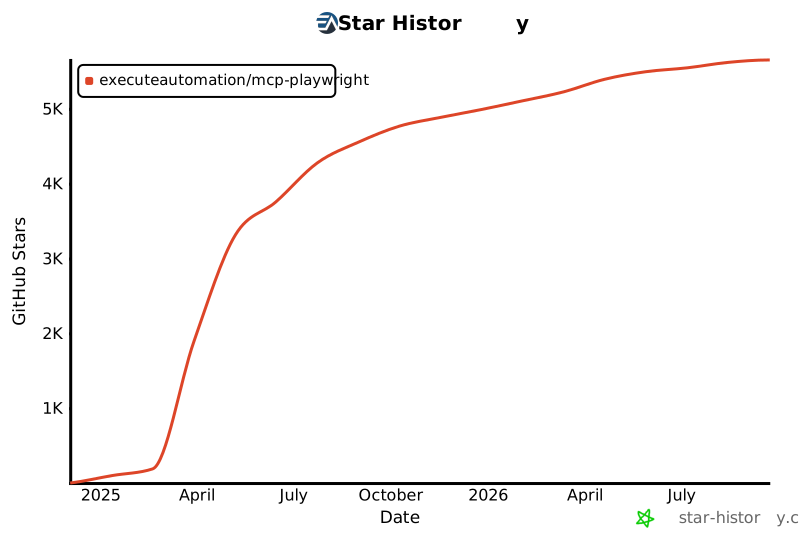
## Star History
[](https://star-history.com/#executeautomation/mcp-playwright&Date)
TDQS
Scored across 32 tools
Most tools have distinct purposes, with clear separation between browser actions (click, fill, navigate), HTTP methods (get, post, put), and code generation operations. However, some overlap exists between playwright_click and playwright_iframe_click, and between playwright_fill and playwright_iframe_fill, which could cause confusion about when to use the iframe variants.
Excellent naming consistency throughout. All tools follow a clear snake_case pattern with descriptive verb_noun combinations. The three code generation tools use consistent 'codegen_session' terminology, while all Playwright tools use the 'playwright_' prefix followed by specific actions.
32 tools is borderline heavy for a Playwright automation server. While Playwright has many capabilities, this feels like it could be consolidated (e.g., HTTP methods could be a single tool with a method parameter). The count suggests potential for tool bloat rather than focused, essential operations.
The tool surface provides comprehensive coverage for browser automation and testing. It includes navigation, interaction (click, fill, hover), HTTP operations, iframe handling, debugging (logs, screenshots), PDF generation, and code generation sessions. No obvious gaps exist for typical Playwright workflows.