
gmail-mcp-server
README.md
# Gmail MCP Server
[](https://github.com/devdattatalele/gmail-mcp-server/stargazers)
[](https://opensource.org/licenses/MIT)
[](https://www.typescriptlang.org/)
[](https://nodejs.org/)
> **The Gmail MCP server that actually works** - No OpenAI API required, rock-solid authentication, zero configuration hassles
Transform your Gmail into an AI-powered inbox with natural language commands through Claude Desktop. Send emails, manage labels, automate organization, download attachments - all without leaving your conversation.
**✨ Key Highlights:**
- 🔐 **Bulletproof Authentication** - Intelligent token management with auto-refresh
- 🚀 **Production Ready** - TypeScript, comprehensive error handling, battle-tested
- 💰 **100% Free** - No OpenAI API costs, no hidden fees
- 🔒 **Privacy First** - Direct Gmail API, no third-party AI dependencies
- 📦 **Feature Complete** - Attachments, labels, filters, batch operations, and more
**[Why choose this over alternatives?](docs/COMPARISON.md)** | **[See it in action](docs/SHOWCASE.md)** | **[Start in 5 minutes](#quick-start)**
---
## 📚 Documentation
- **[Complete API Reference](docs/API.md)** - Detailed documentation for all tools
- **[Troubleshooting Guide](docs/TROUBLESHOOTING.md)** - Solutions for common issues
- **[Example Use Cases](examples/README.md)** - Practical examples and workflows
- **[Comparison with Alternatives](docs/COMPARISON.md)** - Why choose this server
- **[Showcase](docs/SHOWCASE.md)** - See what you can build
- **[Contributing Guide](CONTRIBUTING.md)** - How to contribute
- **[Code of Conduct](CODE_OF_CONDUCT.md)** - Community guidelines
- **[Security Policy](SECURITY.md)** - Security best practices
- **[Changelog](CHANGELOG.md)** - Version history and updates
---
## Why This Project?
Traditional Gmail integrations struggle with authentication complexity and token management. This server solves those problems with:
- **Intelligent Token Management**: Automatic validation and refresh - no more expired credential errors
- **User-Friendly Error Handling**: Clear, actionable error messages with step-by-step solutions
- **Comprehensive Email Operations**: Send, read, search, organize, and automate your inbox
- **Production-Ready**: Built with TypeScript, proper error handling, and extensive testing
---
## Quick Start
### Prerequisites
- Node.js 16 or higher
- A Google Cloud Platform account
- Claude Desktop application
### Installation
**Option 1: Run Directly (Recommended for Testing)**
```bash
git clone https://github.com/devdattatalele/gmail-mcp-server.git
cd gmail-mcp-server
npm install
npm run build
```
**Option 2: Install as Package**
```bash
npm install -g @devdattatalele/gmail-mcp-server
```
### Google Cloud Setup
Before using this server, you need to set up OAuth credentials:
#### 1. Create a Google Cloud Project
Navigate to [Google Cloud Console](https://console.cloud.google.com/) and:
- Create a new project (or select existing)
- Enable the **Gmail API** for your project
- Note your project ID for later
#### 2. Configure OAuth Consent Screen
This is the **most critical step** - skip it and you'll get authentication errors:
1. Go to **APIs & Services** → **OAuth consent screen**
2. Select **External** user type
3. Fill in required fields:
- **App name**: Gmail MCP Server
- **User support email**: Your email
- **Developer contact email**: Your email
4. Add these **authorized scopes**:
- `https://www.googleapis.com/auth/gmail.modify`
- `https://www.googleapis.com/auth/gmail.settings.basic`
5. **Add yourself as a test user**:
- Scroll to "Test users" section
- Click "ADD USERS"
- Enter your Gmail address
- Click "Save"
> **Critical**: Without adding yourself as a test user, you'll encounter "Error 403: Access blocked" during authentication.
#### 3. Create OAuth Credentials
1. Go to **APIs & Services** → **Credentials**
2. Click **Create Credentials** → **OAuth client ID**
3. Choose application type:
- **Web application** (recommended)
4. Configure authorized redirect URIs:
- Add: `http://localhost:3000/oauth2callback`
5. Download the JSON credentials file
6. Rename it to `gcp-oauth.keys.json`
7. Place it in your project directory or `~/.gmail-mcp/`
### Authentication
#### First-Time Setup
```bash
# Navigate to project directory
cd gmail-mcp-server
# Run authentication
node dist/index.js auth
```
The server will:
1. Display a helpful pre-flight checklist
2. Open your browser for Google authentication
3. Save credentials to `~/.gmail-mcp/credentials.json`
4. Automatically validate and refresh tokens as needed
#### Re-authentication
If you need to switch accounts or fix authentication issues:
```bash
node dist/index.js auth --force
```
The `--force` flag removes existing credentials and starts fresh.
### Configure Claude Desktop
Add this to your Claude Desktop configuration file:
**macOS**: `~/Library/Application Support/Claude/claude_desktop_config.json`
**Windows**: `%APPDATA%/Claude/claude_desktop_config.json`
**Linux**: `~/.config/Claude/claude_desktop_config.json`
```json
{
"mcpServers": {
"gmail": {
"command": "node",
"args": ["/absolute/path/to/gmail-mcp-server/dist/index.js"]
}
}
}
```
Replace `/absolute/path/to/gmail-mcp-server` with your actual project path.
---
## Features
### Email Operations
#### Sending & Drafting
- **Send emails** with attachments, CC, BCC
- **Draft emails** for later editing
- **HTML and plain text** support
- **Reply to threads** with threading support
- **Attachment handling** up to 25MB per email
#### Reading & Searching
- **Read emails** with full MIME structure parsing
- **Search** using Gmail's powerful query syntax
- **Download attachments** to local filesystem
- **View attachment metadata** (filename, size, type, ID)
#### Organization
- **Label management**: Create, update, delete, list
- **Batch operations**: Process multiple emails efficiently
- **Email filters**: Automate inbox organization
- **Archive, delete, mark as read/unread**
### Advanced Features
#### Smart Authentication
```typescript
// Automatic token validation on server start
// Auto-refresh expired tokens
// Clear error messages for common issues
// Force re-authentication option
```
#### Batch Processing
```typescript
// Process up to 50 emails at once
// Automatic retry on individual failures
// Detailed success/failure reporting
```
#### Filter Templates
Pre-built templates for common scenarios:
- Auto-organize by sender
- Filter by subject keywords
- Handle large attachments
- Manage mailing lists
- Content-based filtering
---
## API Reference
### Available Tools
#### `send_email`
Send an email immediately.
**Parameters:**
- `to` (string[]): Recipient email addresses
- `subject` (string): Email subject
- `body` (string): Email body (plain text)
- `htmlBody` (string, optional): HTML version of body
- `cc` (string[], optional): CC recipients
- `bcc` (string[], optional): BCC recipients
- `attachments` (string[], optional): File paths to attach
- `threadId` (string, optional): Reply to thread
**Example:**
```typescript
{
"to": ["colleague@example.com"],
"subject": "Project Update",
"body": "Here's the latest on the project...",
"attachments": ["/path/to/report.pdf"]
}
```
#### `draft_email`
Create a draft email without sending.
Same parameters as `send_email`.
#### `read_email`
Retrieve email content by ID.
**Parameters:**
- `messageId` (string): Gmail message ID
**Returns:** Full email content with headers, body, and attachment info.
#### `search_emails`
Search for emails using Gmail query syntax.
**Parameters:**
- `query` (string): Gmail search query
- `maxResults` (number, optional): Maximum results (default: 10)
**Example Queries:**
```
from:boss@company.com after:2024/01/01
has:attachment subject:invoice
is:unread label:important
```
#### `modify_email`
Change email labels (move, archive, etc.).
**Parameters:**
- `messageId` (string): Gmail message ID
- `addLabelIds` (string[], optional): Labels to add
- `removeLabelIds` (string[], optional): Labels to remove
#### `delete_email`
Permanently delete an email.
**Parameters:**
- `messageId` (string): Gmail message ID
#### `list_email_labels`
Get all available Gmail labels (system and user-created).
No parameters required.
#### `create_label`
Create a new Gmail label.
**Parameters:**
- `name` (string): Label name
- `messageListVisibility` ('show' | 'hide', optional)
- `labelListVisibility` ('labelShow' | 'labelShowIfUnread' | 'labelHide', optional)
#### `batch_modify_emails`
Modify labels for multiple emails at once.
**Parameters:**
- `messageIds` (string[]): Array of message IDs
- `addLabelIds` (string[], optional)
- `removeLabelIds` (string[], optional)
- `batchSize` (number, optional): Batch size (default: 50)
#### `batch_delete_emails`
Delete multiple emails at once.
**Parameters:**
- `messageIds` (string[]): Array of message IDs
- `batchSize` (number, optional): Batch size (default: 50)
#### `create_filter`
Create a Gmail filter with custom criteria.
**Parameters:**
- `criteria`: Match conditions (from, to, subject, query, hasAttachment, size, etc.)
- `action`: Actions to perform (addLabelIds, removeLabelIds, forward)
#### `download_attachment`
Download an email attachment to local filesystem.
**Parameters:**
- `messageId` (string): Gmail message ID
- `attachmentId` (string): Attachment ID (from read_email)
- `savePath` (string, optional): Download directory
- `filename` (string, optional): Custom filename
---
## Troubleshooting
### Authentication Issues
#### Error: "403: Access blocked"
**Cause:** Your app is in "Testing" mode and you're not added as a test user.
**Solution:**
1. Visit [OAuth Consent Screen](https://console.cloud.google.com/apis/credentials/consent)
2. Scroll to "Test users"
3. Click "ADD USERS"
4. Enter your Gmail address
5. Save and retry authentication
#### Error: "400: invalid_request" or "doesn't comply with OAuth 2.0 policy"
**Cause:** OAuth consent screen is missing required fields (usually privacy policy).
**Solution:**
1. Go to OAuth consent screen configuration
2. Add **Privacy Policy URL** (can use `https://policies.google.com/privacy` as placeholder)
3. Ensure **Developer contact email** is filled
4. Save and retry
#### Error: "Credentials are invalid or expired"
**Solution:**
```bash
node dist/index.js auth --force
```
This removes old credentials and starts fresh authentication.
#### Error: "Port 3000 already in use"
**Solution:**
```bash
# macOS/Linux
lsof -ti:3000 | xargs kill
# Windows
netstat -ano | findstr :3000
taskkill /PID <PID> /F
```
### Operation Issues
#### Attachment Won't Send
**Possible causes:**
- File path is incorrect or inaccessible
- File exceeds 25MB Gmail limit
- Permission issues reading the file
**Solution:**
- Verify file path is absolute
- Check file permissions
- Ensure file size is under 25MB
#### Token Refresh Failed
The server automatically refreshes expired tokens. If this fails:
1. Check your internet connection
2. Verify OAuth credentials are still valid in Google Cloud Console
3. Run `node dist/index.js auth --force` to re-authenticate
---
## Development
### Project Structure
```
gmail-mcp-server/
├── src/
│ ├── index.ts # Main server implementation
│ ├── utl.ts # Email utilities
│ ├── label-manager.ts # Label operations
│ ├── filter-manager.ts # Filter operations
│ └── evals/ # Evaluation tests
├── dist/ # Compiled JavaScript
├── gcp-oauth.keys.json # Your OAuth credentials (gitignored)
├── package.json
├── tsconfig.json
└── README.md
```
### Building from Source
```bash
git clone https://github.com/devdattatalele/gmail-mcp-server.git
cd gmail-mcp-server
npm install
npm run build
```
### Running in Development
```bash
npm run dev # Watch mode - rebuilds on changes
```
### Testing Authentication
```bash
npm run auth # Equivalent to: node dist/index.js auth
```
---
## Security Considerations
- **OAuth credentials** are stored in `~/.gmail-mcp/` with user-only permissions
- **Never commit** `gcp-oauth.keys.json` or `credentials.json` to version control
- **Tokens are auto-refreshed** - no need to manually handle expiration
- **Attachments** are processed locally and never stored by the server
- **Review access** regularly in [Google Account Settings](https://myaccount.google.com/permissions)
---
## Contributing
Contributions are welcome! Here's how to get started:
1. Fork the repository
2. Create a feature branch: `git checkout -b feature/amazing-feature`
3. Make your changes
4. Build and test: `npm run build`
5. Commit: `git commit -m 'Add amazing feature'`
6. Push: `git push origin feature/amazing-feature`
7. Open a Pull Request
### Reporting Issues
Found a bug or have a suggestion? [Open an issue](https://github.com/devdattatalele/gmail-mcp-server/issues) with:
- Clear description of the problem
- Steps to reproduce
- Expected vs actual behavior
- Your environment (OS, Node version, etc.)
---
## License
MIT License - see [LICENSE](LICENSE) file for details.
---
## Acknowledgments
Built using:
- [Model Context Protocol SDK](https://github.com/anthropics/mcp)
- [Google APIs Node.js Client](https://github.com/googleapis/google-api-nodejs-client)
- [Google Auth Library](https://github.com/googleapis/google-auth-library-nodejs)
---
## Support
- **Documentation**: [Full API Reference](docs/API.md)
- **Troubleshooting**: [Common Issues & Solutions](docs/TROUBLESHOOTING.md)
- **Examples**: [Practical Use Cases](examples/README.md)
- **Issues**: [GitHub Issues](https://github.com/devdattatalele/gmail-mcp-server/issues)
- **Discussions**: [GitHub Discussions](https://github.com/devdattatalele/gmail-mcp-server/discussions)
- **Security**: [Report Vulnerabilities](SECURITY.md)
- **Email**: taleledevdatta@gmail.com
---
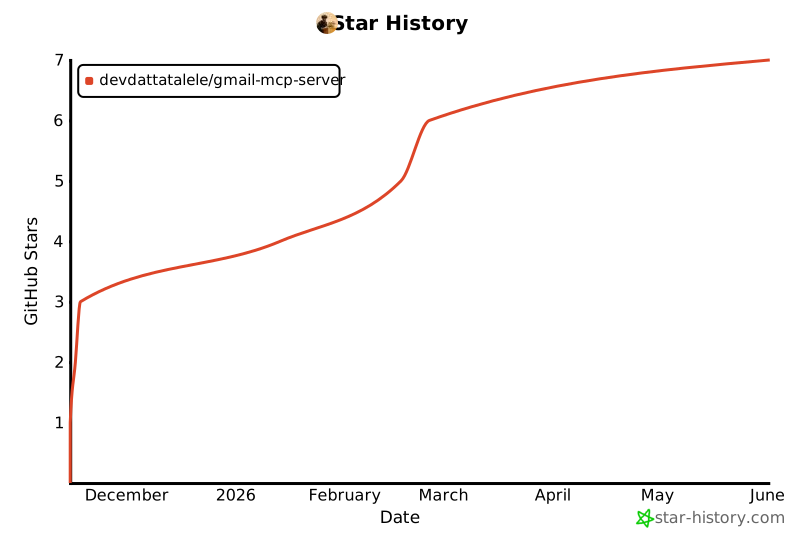
## Star History
If this project helped you, please consider giving it a ⭐!
[](https://star-history.com/#devdattatalele/gmail-mcp-server&Date)
---
**Made with ❤️ by Devdatta Talele**
Special thanks to all [contributors](https://github.com/devdattatalele/gmail-mcp-server/graphs/contributors) who make this project better!
This server cannot be deployed
Maintenance
ActivityInactive
ResponsivenessNo issues