
NetMap — Network Diagram MCP


# @den.dance/network-diagram-mcp
[](https://www.npmjs.com/package/@den.dance/network-diagram-mcp)
[](https://smithery.ai/servers/den-indance/network-diagram-mcp)
> Visual network topology editor with AI agent integration via the Model Context Protocol.
> Open-source successor to **netViz** (netViz Inc., 1990 → CA Technologies → discontinued 2012).
>
> **Try it live → https://map.den.dance/**
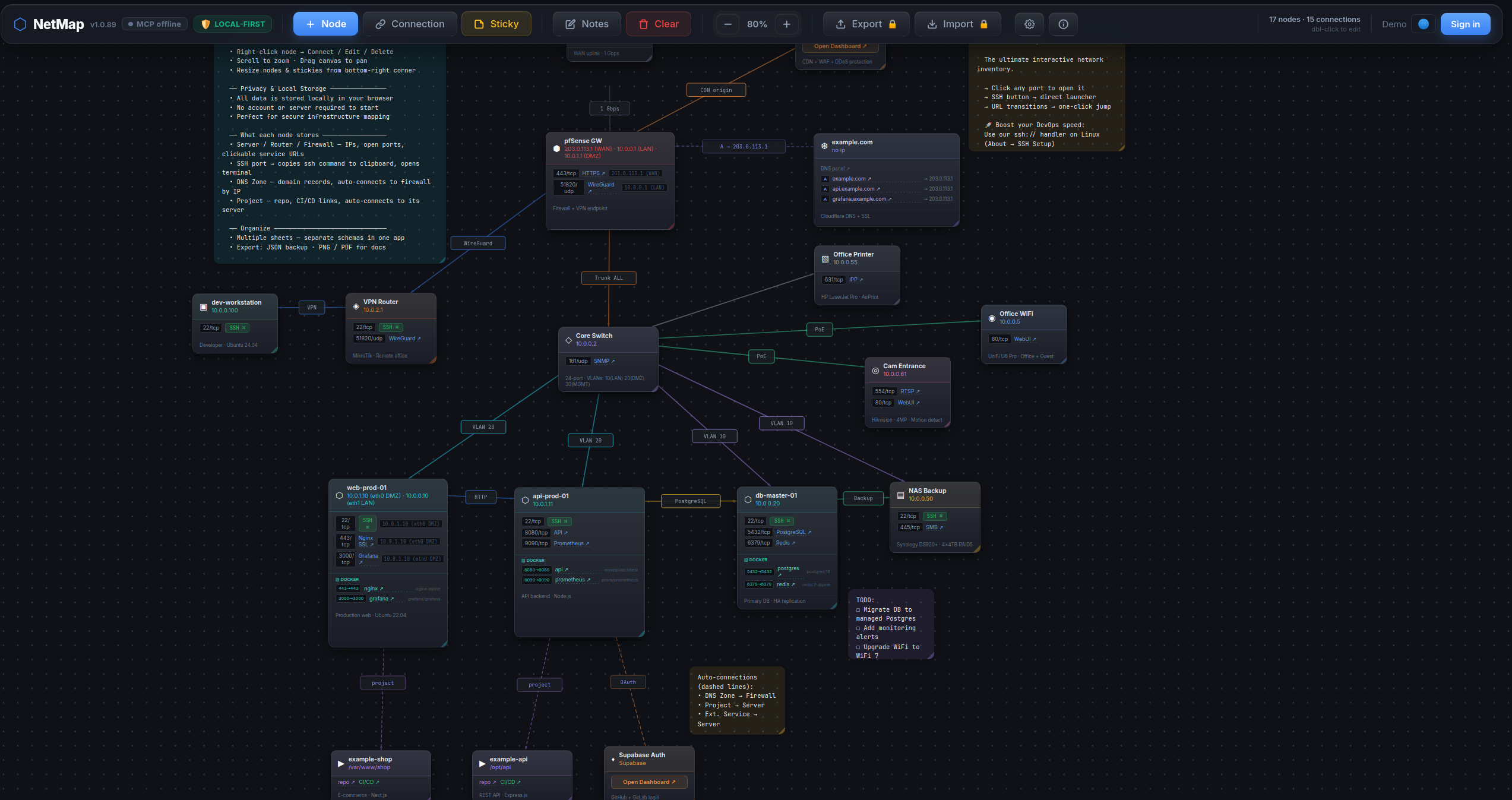
## What makes it different
- **One-click ops dashboard.** Click any web port (80 / 443 / 8080 / …) on a node card to open the
service in a new tab. Click an SSH / Postgres / Redis port → in-app picker offers your installed
clients (iTerm / Windows Terminal / psql / DBeaver / redis-cli / RDM / …) and launches the one you
choose. The picker re-detects every click — newly installed clients show up immediately, never a
silent locked-in default.
- **AI agents edit the map.** 44 MCP tools — your Claude / Cursor / Claude Desktop session can build
a diagram for you, search across nodes / ports / notes, run smart auto-layouts, export PNG / PDF —
all by talking to the open browser tab.
- **`nmap -oX` import.** Run a network scan, hand the XML to the agent, get a map with nodes
auto-typed from OS fingerprint + port profile (router / switch / firewall / server / printer / …).
- **CSV inventory import.** Drop in your asset spreadsheet — auto-detects columns
(name / ip / type / ports / notes; aliases like `hostname` / `description` accepted).
- **Operator-grade node cards.** Per-node: open ports with service names, Docker services, DNS domains,
free-form notes. All searchable cross-entity via the agent.
- **Smart auto-layout.** Force-directed (deterministic via seed), cluster-by-type, cluster-by-connection.
- **Multi-sheet, local-first.** Multiple maps in one workspace, everything in `localStorage`. No login,
no cloud. Export JSON / PNG / PDF.
## How it works
This package is a **stdio → WebSocket bridge**. It runs locally as an MCP server; the live NetMap
browser tab connects to it over WebSocket. The agent talks to the bridge over MCP; the bridge forwards
calls to the browser, which updates React state in real time.
```
LLM agent (Claude Code / Claude Desktop / Cursor)
│ MCP protocol (stdio)
▼
@den.dance/network-diagram-mcp ← this package, runs locally
│ WebSocket ws://localhost:47821
▼
NetMap in browser (https://map.den.dance/) ← React state updates live
```
> ⚠️ **Requires an open NetMap browser tab.** Open https://map.den.dance/ — the MCP bridge is
> enabled by default (v1.2+), so the connection comes up as soon as the tab is open. Without an
> open tab the bridge has no peer and every tool call will time out. (To opt out:
> `Settings → ⚙ → Integrations → AI Agent (MCP) → Enable WebSocket connection`.)
## Install
### Claude Desktop
Add to `claude_desktop_config.json`:
```json
{
"mcpServers": {
"netmap": {
"command": "npx",
"args": ["@den.dance/network-diagram-mcp"]
}
}
}
```
### Claude Code
```bash
claude mcp add netmap -- npx @den.dance/network-diagram-mcp
```
With a custom port:
```bash
claude mcp add netmap -e NETMAP_MCP_PORT=12345 -- npx @den.dance/network-diagram-mcp
```
Then open https://map.den.dance/ — the bridge is enabled by default (v1.2+). Settings → **Integrations → AI Agent (MCP)** if you need to inspect or toggle the connection.
The toolbar will show a 🟢 **MCP online** badge when the browser and server are connected.
Verify the agent side:
```bash
claude mcp list
```
You should see `netmap` in the list.
### Environment variables
| Var | Default | Description |
|-----|---------|-------------|
| `NETMAP_MCP_PORT` | `47821` | Local WebSocket port the bridge listens on. Must match the URL configured in NetMap's Settings → Integrations → AI Agent (MCP). |
## URL Protocol Handlers + in-app client picker (v1.1+, picker since v1.2)
This package also ships an OS-level agent that registers handlers for `ssh://`,
`postgres://`, and `redis://` URLs. Click any such link in a browser or terminal
and the agent spawns your installed client (psql / redis-cli / iTerm /
Windows Terminal / kitty / DBeaver / TablePlus / RedisInsight / …).
**Inside NetMap (v1.2+):** when the `serve` daemon is running, clicking an
SSH / Postgres / Redis port button on a node card opens an in-app picker of
installed clients on your machine and launches the one you pick — every click
re-detects, so newly installed clients show up immediately. Without the daemon,
port-clicks fall back to the OS default URL handler.
Install once per machine:
```bash
# Linux: ~/.local/share/applications/netmap-<scheme>-handler.desktop + xdg-mime
# macOS: ~/Library/Application Support/NetMap/handlers/NetMap<Scheme>Handler.app + lsregister
# Windows: HKCU\Software\Classes\<scheme> (per-user, no admin)
npx @den.dance/network-diagram-mcp install --all
```
Other CLI subcommands:
```bash
npx @den.dance/network-diagram-mcp install ssh # single scheme
npx @den.dance/network-diagram-mcp uninstall postgres # remove registration
npx @den.dance/network-diagram-mcp list # what's registered (JSON)
npx @den.dance/network-diagram-mcp detect ssh # which clients are available
npx @den.dance/network-diagram-mcp serve # daemon: WS + HTTP on :47821
```
Click handling is **daemon-less** — OS routes the link to a short-lived
`bin/handler.js` process which parses the URL, picks the first installed
client (priority order: CLI → popular GUI → cross-platform power), and spawns
it. The optional `serve` daemon adds HTTP endpoints (`/status`, `/detect`,
`/exec`) for browser-side integration with a Bearer-token-gated `/exec`.
`npx @den.dance/network-diagram-mcp` with no args still runs the original
stdio MCP server (back-compat — Smithery / Claude Desktop probes are
unaffected).
Top-5 clients per scheme (priority order, first-installed wins):
| Scheme | Clients |
|--------|---------|
| `ssh` | iTerm2 → Windows Terminal → GNOME Terminal → Terminal.app → kitty |
| `postgres` | psql → TablePlus → DBeaver → Beekeeper Studio → pgAdmin 4 |
| `redis` | redis-cli → RedisInsight → Another Redis DM → Medis → RDM (legacy) |
`postgresql://` aliases to `postgres`; `rediss://` is preserved and triggers
`redis-cli --tls`.
## Available tools
### State & layout
| Tool | Description |
|------|-------------|
| `map_get_state` | Return all nodes, connections, stickies, notes |
| `map_clear` | Clear the entire map (requires `confirm: true`) |
| `map_arrange` | Naive auto-arrange (`grid` or `circle` layout — ignores connections) |
| `map_suggest_layout` | Smart auto-layout: `force` (force-directed, deterministic via `seed`), `cluster-by-type` (lanes per type), or `cluster-by-connection` (BFS components into zones) |
### Nodes
| Tool | Description |
|------|-------------|
| `map_add_node` | Add a node (`type`, `name`, `ip`, `x`, `y`) |
| `map_update_node` | Update node fields by id |
| `map_delete_node` | Delete a node and its connections |
| `map_move_node` | Move node to new coordinates |
### Connections
| Tool | Description |
|------|-------------|
| `map_add_connection` | Add connection (`from_id`, `to_id`, `label?`, `color?`) |
| `map_update_connection` | Update `label` or `color` of a connection |
| `map_delete_connection` | Delete a connection by id |
### Sticky notes
| Tool | Description |
|------|-------------|
| `map_add_sticky` | Add a sticky note (`text`, `x?`, `y?`, `color?`) |
| `map_update_sticky` | Update `text`, `color`, `x`, `y`, `w`, `h` |
| `map_delete_sticky` | Delete a sticky note by id |
| `map_move_sticky` | Move sticky to new coordinates |
### Sheets (multi-sheet)
| Tool | Description |
|------|-------------|
| `map_list_sheets` | List all sheets with metadata and active sheet id |
| `map_get_sheet_data` | Get nodes / connections / stickies for a sheet (default: active) |
| `map_create_sheet` | Create a new empty sheet and switch to it |
| `map_switch_sheet` | Switch active sheet by id |
| `map_rename_sheet` | Rename a sheet |
| `map_delete_sheet` | Delete a sheet (requires `confirm: true`, can't delete last) |
### View / canvas
| Tool | Description |
|------|-------------|
| `map_set_zoom` | Set zoom level (0.1–3.0) |
| `map_set_canvas_offset` | Pan canvas to absolute pixel position |
| `map_zoom_to_fit` | Auto-fit all nodes into viewport |
### Lock / protection
| Tool | Description |
|------|-------------|
| `map_lock_sheet` | Lock (`locked: true`) or unlock (`locked: false`) a sheet. Locked sheets reject all MCP mutations and disable manual editing in the UI. |
### Notes & settings
| Tool | Description |
|------|-------------|
| `map_get_notes` | Get sheet-level notes text |
| `map_set_notes` | Set sheet-level notes text |
| `map_get_settings` | Get app settings (sshMode, showGrid, etc.) |
| `map_update_settings` | Update app settings |
### Search
| Tool | Description |
|------|-------------|
| `map_find_node` | Structured node-only filter by `name` / `ip` / `type` / `text`. Returns stripped `{id, name, type, ip, x, y}`. |
| `map_search` | Full-text cross-entity search. Looks across **nodes** (name / ip / notes), **stickies** (text), **connection labels**, and **ports** (port number + service name). Optional `types: ["nodes","stickies","connections","ports"]` narrows the scope. |
| `map_get_nodes_by_type` | Return every node of a single type with **FULL** field data (ports, dockerServices, domains, ips, notes, parentServer, …). Use this when you need the complete objects, not the stripped projection from `map_find_node`. |
Example — find everything matching `postgres` anywhere in the map:
```jsonc
// → call
{ "q": "postgres" }
// → result
{
"nodes": [{ "id": "n1", "name": "db-primary", "type": "server", "ip": "10.0.0.5" }],
"stickies": [{ "id": "s2", "text": "TODO: upgrade postgres 15 → 16" }],
"connections": [{ "id": "c4", "label": "postgres replication", "from": "n1", "to": "n2" }],
"ports": [{ "nodeId": "n1", "nodeName": "db-primary", "port": 5432, "protocol": "tcp", "service": "postgresql" }],
"total": 4
}
```
`map_search` and `map_get_nodes_by_type` are read-only — they work on locked sheets.
### Import
| Tool | Description |
|------|-------------|
| `map_import_sheet` | Replace active-sheet content with a provided `{nodes, connections, stickies?, notes?}` JSON. |
| `map_import_nmap` | Parse `nmap -oX` output (or a pre-parsed `hosts[]` array) and create nodes with their open ports. Auto-infers node type from OS fingerprint + port profile (router / switch / firewall / server / printer / …). Nodes auto-arranged in a square-root grid. |
| `map_import_csv` | Import nodes from CSV. Auto-detects columns from the header row (`name` / `ip` / `type` / `ports` / `notes` — aliases like `hostname` / `description` accepted). Ports field accepts `22/tcp,80/tcp` or bare numbers. Nodes laid out in a 6-column grid. |
Example — turn a 2-host nmap scan into a map in one call:
```jsonc
// → call
{
"xml": "<?xml version=\"1.0\"?>\n<nmaprun>\n <host>\n <address addr=\"10.0.0.1\" addrtype=\"ipv4\"/>\n <hostnames><hostname name=\"web.local\" type=\"user\"/></hostnames>\n <ports>\n <port protocol=\"tcp\" portid=\"22\"><state state=\"open\"/><service name=\"ssh\"/></port>\n <port protocol=\"tcp\" portid=\"80\"><state state=\"open\"/><service name=\"http\"/></port>\n </ports>\n </host>\n <host>\n <address addr=\"10.0.0.2\" addrtype=\"ipv4\"/>\n <os><osmatch name=\"Cisco IOS router\" accuracy=\"98\"/></os>\n </host>\n</nmaprun>"
}
// → result
{ "count": 2, "ids": ["…", "…"] }
```
Provide `{"hosts": [...]}` instead of `xml` when you already have parsed host data — `hosts` takes priority when both are given.
Example — turn a CSV inventory snippet into a map:
```jsonc
// → call
{
"csv": "name,ip,type,ports,notes\ndb-primary,10.0.0.5,server,\"22/tcp,5432/tcp\",Postgres 15\nrouter-main,10.0.0.1,router,22/tcp,Edge router"
}
// → result
{ "count": 2, "ids": ["…", "…"] }
```
For non-standard headers, pass an explicit `columns` mapping (`-1` means "absent"):
```jsonc
{
"csv": "Host,Address\nfoo,10.0.0.99",
"columns": { "name": 0, "ip": 1, "type": -1, "ports": -1, "notes": -1 }
}
```
`map_import_nmap` and `map_import_csv` are **mutations** — blocked on locked sheets.
### Layout
`map_suggest_layout` repositions every node according to a chosen algorithm; result shape:
`{ ok: true, algorithm, changed: <node count> }`.
```jsonc
// Force-directed (organic; reproducible with seed)
{ "algorithm": "force", "iterations": 200, "seed": 42 }
// Group nodes into horizontal lanes by type
{ "algorithm": "cluster-by-type" }
// Place each connected component in its own x-zone
{ "algorithm": "cluster-by-connection" }
```
Force-directed is `O(n²)` per iteration — fine up to a few hundred nodes; bring `iterations` down
for larger scenes. `map_suggest_layout` is a **mutation** — blocked on locked sheets.
### Export (JSON / PNG / PDF)
| Tool | Description |
|------|-------------|
| `map_export_sheet` | Export a single sheet as a JSON object (auto-connections included). Legacy entry — still works. |
| `map_export` | Multi-format export: `json` (object), `png` and `pdf` (base64-encoded blob + `mimeType`). |
```jsonc
// JSON
{ "format": "json" }
// → { format: "json", data: { nodes, connections, stickies, notes, auto_connections } }
// PNG (max 30 s; agent must persist the base64 to a file)
{ "format": "png" }
// → { format: "png", filename: "netmap-<sheetId>.png",
// base64: "iVBORw0KGgoAAAANSUhEUg…",
// mimeType: "image/png" }
// PDF
{ "format": "pdf" }
// → { format: "pdf", filename: "netmap-<sheetId>.pdf",
// base64: "JVBERi0xLjQK…",
// mimeType: "application/pdf" }
```
PNG / PDF capture renders the live workspace via `html-to-image` + `jsPDF`, so the MCP server raises
the per-command timeout to 30 s for this tool. `map_export` is **read-only** — works on locked sheets.
## Connection status indicator
A badge appears next to the NetMap version in the toolbar (click it to open Settings):
| Badge | Meaning |
|-------|---------|
| 🟢 **MCP online** | Connected — agent can edit the map |
| 🟡 **MCP** | Connecting to server |
| 🟠 **MCP retry N/10** | Retrying, up to 10 attempts × 30 sec |
| 🔴 **MCP error** | Gave up — start the server, then toggle off / on to retry |
| _(no badge)_ | Disabled in settings |
Detailed status (with URL and hints) is shown inside **Settings → Integrations → AI Agent (MCP)**.
## Running from source (for contributors)
```bash
git clone https://github.com/den-indance/network-diagram-mcp.git
cd network-diagram-mcp
npm install
node index.js
```
Override port: `NETMAP_MCP_PORT=12345 node index.js`.
Register the local build in Claude Code instead of npm:
```bash
claude mcp add netmap-dev -- node /absolute/path/to/network-diagram-mcp/index.js
```
## License
MIT — see [LICENSE](./LICENSE).
TDQS
Scored across 44 tools
While descriptions are detailed, several tools overlap in purpose: map_get_state, map_get_sheet_data, map_export_sheet, and map_export all return map data; map_arrange and map_suggest_layout both auto-layout; map_find_node, map_search, and map_get_nodes_by_type all query nodes. Explicit notes clarify some boundaries, but an agent could easily choose the wrong tool without careful reading.
All tools share the 'map_' prefix and use snake_case throughout, with most following a verb_noun pattern (map_add_node, map_delete_connection). Minor deviations include bare verbs like map_clear, map_arrange, map_search, and map_export, but these are limited and the overall pattern is predictable.
At 44 tools, the server is significantly over the typical range for an MCP server. While the domain is broad, many tools could be consolidated (e.g., map_get_state vs map_get_sheet_data, map_arrange vs map_suggest_layout) to reduce cognitive load. The high count feels heavy even with the expansive feature set.
The tool surface is remarkably comprehensive, covering full CRUD for nodes, connections, stickies, and sheets, plus view management, settings, search, import (CSV, nmap, JSON), export (JSON/PNG/PDF), layout algorithms, selection, and bulk operations. The domain of network diagram management is well-served with no major dead ends.