
F
licenseNot graded
qualityD
maintenanceEnables AI assistants to manage Gmail and Outlook inboxes through natural language, supporting email search, reading, and reply operations.
-

Enables email management through natural language, including filtering, searching, reading, sending, drafting, batch archiving, triaging, and folder management for Gmail accounts via the Nylas v3 API.
Enables email management through natural language, including filtering, searching, reading, sending, drafting, batch archiving, triaging, and folder management for iCloud Mail accounts via the Nylas v3 API.
This server does not currently have a deployable release on Glama. Follow the repository's setup instructions to install and configure it for your MCP client, including any required credentials and local dependencies.
Transform your inbox into an intelligent, LLM-powered assistant—instantly.
Easily manage, organize, and streamline your email using conversational language, powered by robust, batch-friendly tools built on Nylas v3. Compatible out-of-the-box with Gmail, Outlook, iCloud, Yahoo, and virtually any IMAP service (even your work email!).
Tools are carefully crafted with clear descriptions and consistent parameters optimized for seamless integration with various LLMs. Responses are provided as easily parsable XML blocks, allowing the LLM to effortlessly handle your requests.
Tested extensively in real-life workflows, Inbox MCP significantly reduces cognitive load, efficiently handling tasks you’d rather automate.
Nylas includes 5 free connected accounts, so you can get started immediately—without spending a dime.
You casually say… | Inbox MCP effortlessly handles it by… |
“take a look at my inbox and LMK what's important and what i have to act on” | Reviewing your messages, quickly identifying actionable emails, and summarizing what needs attention. |
“Find the unimportant emails from my last 100 and move them to the Unimportant folder.” | Intelligently filtering out low-priority emails and neatly organizing them out of sight. |
“Archive everything older than two weeks, except starred emails.” | Batch-archiving older emails while safely preserving your starred messages. |
“Summarize and forward the latest AWS alerts to my team.” | Compiling recent AWS alerts into a concise summary and sending it off immediately. |
Related MCP server: EmailMCP
Inbox Zero, Simplified: Quickly automate email management using natural language instructions.
Efficient Triage: Instantly categorize, prioritize, and batch-process emails effortlessly.
Easy Setup: Hassle-free onboarding with direct account connections. No OAuth tokens, proxies, or complex setups.
Sign up at: Nylas Dashboard.
Grab your API key from the sidebar (API KEY).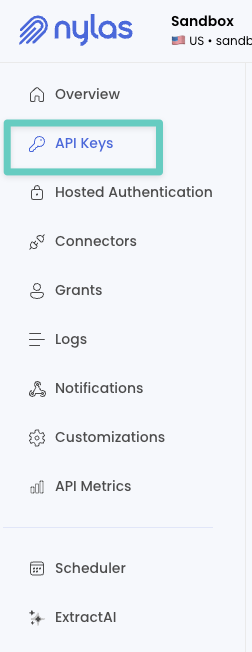
Navigate to Grants, click Add Test Grant (top-right), and connect your email account.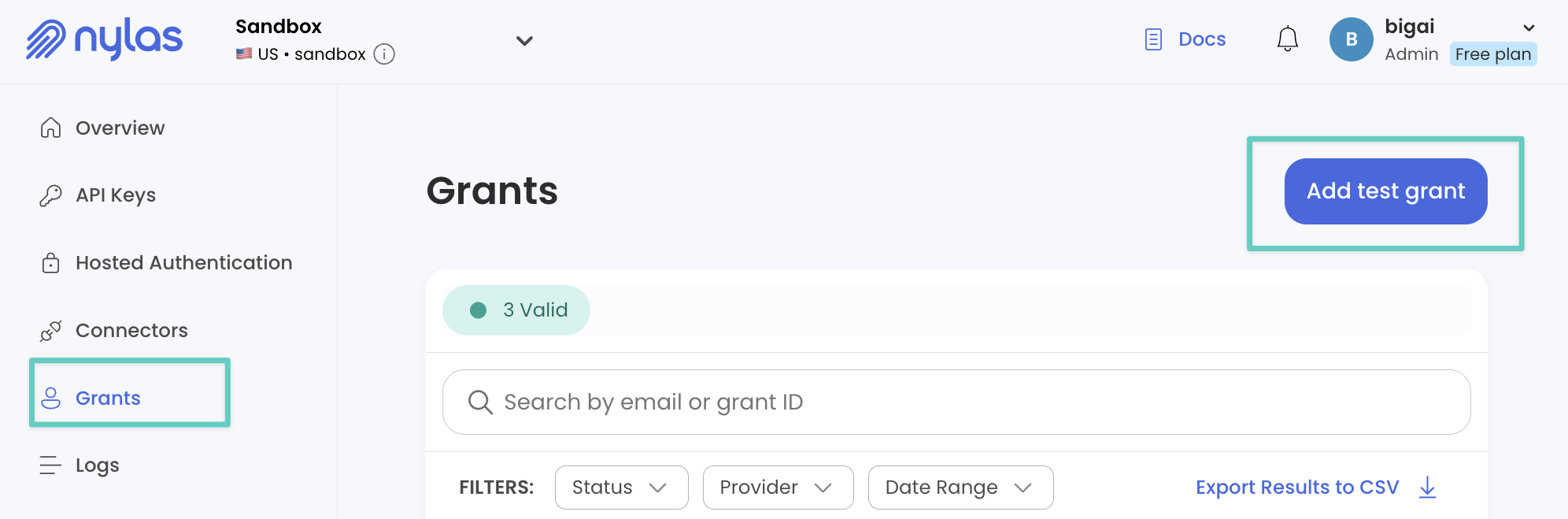
Note your API key and Grant ID (shown in the grants table).
Inbox MCP integrates seamlessly with MCP clients like Claude Desktop, Cursor, Windsurf, and more.
Interactive one-liner installation (recommended):
npx -y @smithery/cli@latest install "@darinkishore/inbox-mcp" --client claudeThis will prompt you for your Nylas credentials (nylasAccessToken and nylasGrantId). For other supported MCP clients, replace claude with your preferred client:
npx -y @smithery/cli@latest install "@darinkishore/inbox-mcp" --client cursor # or windsurf, vscode, etc.If you prefer manual control for local development:
git clone https://github.com/darinkishore/Inbox-MCP.git
cd Inbox-MCP
npm install && npm run build
Then in your MCP client's mcp-config.json:
{
  "mcpServers": {
    "nylas-email": {
      "command": "node dist/index.js",
      "workingDirectory": "/absolute/path/to/Inbox-MCP",
      "env": {
        "NYLAS_ACCESS_TOKEN": "...",
        "NYLAS_GRANT_ID": "..."
      }
    }
  }
}Tool | What it does (in plain English) |
| Find emails quickly by folder, unread status, dates, or flags. |
| Batch-update emails as read/unread, starred/unstarred, or move folders. |
| Archive groups of emails safely and quickly. |
| Search emails rapidly with simple keyword queries. |
| Fetch complete emails formatted neatly in Markdown, ideal for summaries. |
| Easily compose and send (or draft) new emails. |
Folder management tools | ( |
Enhanced provider-native search (advanced queries, multi-term searches)
Calendar and contacts integration
Expanded toolset and automation capabilities
Clean TypeScript (v5.2), minimal dependencies
Robust built-in retries (exponential back-off + jitter)
Contributions warmly welcomed—let's make email management better together!
Licensed under MIT.
If Inbox MCP makes your day easier, please ⭐️—your star helps others discover it too!
Recent tool additions, removals, and schema changes observed during successful MCP inspections.
Loading tool schema changelog…
This server cannot be deployed
Email for AI agents: read, search and send from your Gmail, Outlook, Yahoo, iCloud or IMAP inbox.
Connect any mailbox to Claude, ChatGPT & AI: read, send, reply, schedule & search emails.
Your mailboxes in ChatGPT and Claude: Gmail, iCloud, Fastmail, any IMAP. Passwords stay yours.
Email, calendar and contacts for AI agents: Gmail, Microsoft 365 and IMAP accounts behind one API.