The repository is hosted on GitHub and can be cloned from there for installation.
Used for dependency management and running the application.
Click on "Install Server".
Wait a few minutes for the server to deploy. Once ready, it will show a "Started" state.
In the chat, type
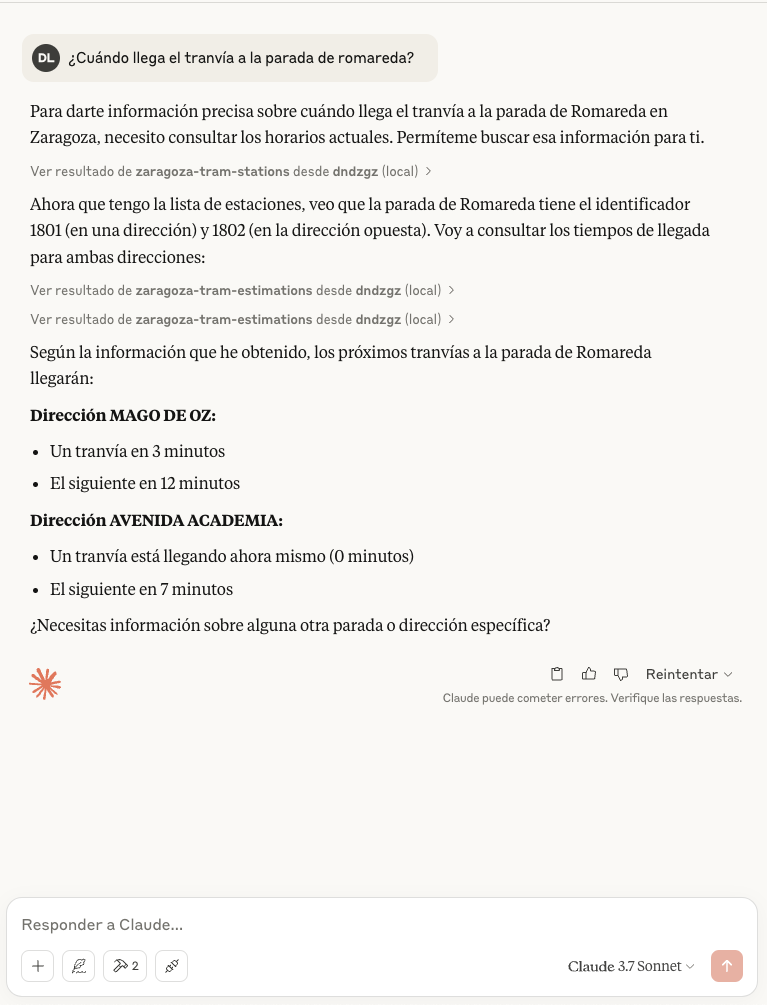
@followed by the MCP server name and your instructions, e.g., "@DNDzgz MCP Serverwhen is the next tram arriving at Romareda station?"
That's it! The server will respond to your query, and you can continue using it as needed.
Here is a step-by-step guide with screenshots.
DNDzgz MCP Server
This is an MCP (Model Context Protocol) server that provides information about the Zaragoza tram system, including real-time tram arrival estimations and station information using the DNDzgz API.
Installation
Clone the repository:
git clone https://github.com/danilat/mcp-dndzgz.git
cd mcp-dndzgz
Install dependencies:
npm installRelated MCP server: Time Server
Running the Application
Add a the environment variable with a valid google maps api key and run it with the http transport
GOOGLE_MAPS_API_KEY=your-api-key npm start:httpThe server will start you should configure yout MCP client to connect.
Or start the server using stdio trasport:
Configure in your MCP client using npx, for example:
{
    "mcpServers": {
      "dndzgz": {
        "command": "npx @dndzgz/mcp",
        "env": {
          "GOOGLE_MAPS_API_KEY": "your-api-key"
        }
      }
    }
}
The server will start and connect to the MCP server.
Available Tools
The server provides the following tools:
zaragoza-tram-estimations: Get real-time arrival estimations for a specific tram stationParameters:
station(number): ID of the tram station
Returns: JSON with estimated arrival times for both directions
zaragoza-tram-stations: Get a list of all tram stations in ZaragozaParameters:
latitude(number): Latitude to sort stations by proximitylongitude(number): Longitude to sort stations by proximity
Returns: JSON with station information including location, name, and ID
zaragoza-bus-stops: Get all bus stops in ZaragozaParameters:
latitude(number): Latitude to sort stops by proximitylongitude(number): Longitude to sort stops by proximity
Returns: JSON with bus stop locations, names, IDs, and lines
zaragoza-bus-estimations: Get real-time arrival estimations for a specific bus stopParameters:
stop(number): ID of the bus stop
Returns: JSON with estimated arrival times for each line serving that stop
zaragoza-bizi-stations: Get all Bizi stations in Zaragoza (public bicycle rental service)Parameters:
latitude(number): Latitude to sort stations by proximitylongitude(number): Longitude to sort stations by proximity
Returns: JSON with Bizi station locations, names, and IDs
zaragoza-bizi-estimations: Get real-time availability of bikes and free slots in a Bizi stationParameters:
station(number): ID of the Bizi station
Returns: JSON with bikes and parking slot availability
google-maps-link: Get a Google Maps link for a specific locationParameters:
latitude(number): Latitude of the locationlongitude(number): Longitude of the location
Returns: Google Maps URL showing the specified location
geolocation-from-address: Get the geolocation (latitude and longitude) from an address and the formatted address that was foundParameters:
address(string): The address to geolocate (e.g., "Plaza de San Francisco, Zaragoza, Spain")
Returns: JSON with latitude, longitude, confidence level, and formatted address
Dependencies
@modelcontextprotocol/sdk: ^1.9.0
Example
There is an screenshot with example using Claude Desktop