F
licenseNot graded
qualityD
maintenanceEnables users to get current weather, forecasts, rain predictions, compare weather between cities, and get activity recommendations using natural language prompts.
2
-

Click on "Deploy Server".
Wait a few minutes for the server to deploy. Once ready, it will show a "Started" state.
In the chat, type @ followed by the MCP server name and your instructions, e.g., "@Weather MCP Server what's the forecast for Tokyo this weekend?"
That's it! The server will respond to your query, and you can continue using it as needed.
Here is a step-by-step guide with screenshots.
A complete Model Context Protocol (MCP) server that provides weather information through tools, resources, and prompts, designed for integration with Cursor IDE.
MCP is a protocol that enables AI assistants (like Cursor) to connect to external data sources and tools. It allows AI models to:
Call Tools: Execute functions to perform actions (e.g., fetch weather data, query databases)
Read Resources: Access structured data from external sources (e.g., files, APIs, databases)
Use Prompts: Leverage reusable prompt templates for consistent interactions
┌─────────────┐         MCP Protocol         ┌──────────────┐
│   Cursor    │ ◄──────────────────────────► │  MCP Server  │
│     IDE     │     (stdin/stdout or HTTP)    │  (Python)    │
└─────────────┘                               └──────────────┘
      │                                              │
      │  Calls tools, reads resources,              │
      │  uses prompts                               │
      │                                              │
      └──────────────────────────────────────────────┘
                    External APIs/Data
The MCP server acts as a bridge between the AI assistant and external services, providing a standardized interface for accessing data and functionality.
Related MCP server: Weather Prediction MCP Server
This Weather MCP Server provides:
get_current_weather(location: str) - Fetch current weather conditions for a location
get_weather_forecast(location: str, days: int) - Get multi-day weather forecast
search_locations(query: str) - Search for location names
weather://current/{location} - Current weather data as a readable resource
weather://forecast/{location} - Forecast data as a readable resource
analyze_weather - Template for analyzing weather patterns and conditions
compare_locations - Template for comparing weather between different locations
Python 3.12 or higher
uv package manager (or pip)
Install dependencies:
uv sync
# or
pip install -r requirements.txt
Set up environment variables (optional, for real API):
Create a .env file in the project root:
# .env
WEATHER_API_KEY=your_api_key_here
Get a free API key from OpenWeatherMap
Note: If no API key is provided, the server will use mock data for demonstration purposes.
python main.pyThe server will start and communicate via stdio (standard input/output), which is the standard transport for MCP servers in Cursor IDE.
To use this MCP server in Cursor IDE:
Open Cursor IDE settings (Cmd/Ctrl + ,)
Navigate to Features → MCP Servers (or search for "MCP" in settings)
Click Add Server or edit the MCP servers configuration
Add the following configuration (update the path to match your project location):
{
  "mcpServers": {
    "weather": {
      "command": "uv",
      "args": [
        "run",
        "python",
        "/Users/pratik/weather/main.py"
      ],
      "env": {}
    }
  }
} Important: Replace /Users/pratik/weather/main.py with the absolute path to your main.py file.
Save the configuration
Restart Cursor IDE
The AI assistant can now use the weather tools, resources, and prompts!
Alternative: You can also copy the configuration from cursor_mcp_config.json and merge it into your Cursor settings.
Once integrated with Cursor IDE, you can ask the AI assistant:
"What's the weather in New York?"
"Get a 5-day forecast for London"
"Compare the weather in San Francisco and Seattle"
"Search for locations matching 'Paris'"
The AI will automatically use the appropriate MCP tools, resources, or prompts to fulfill your request.
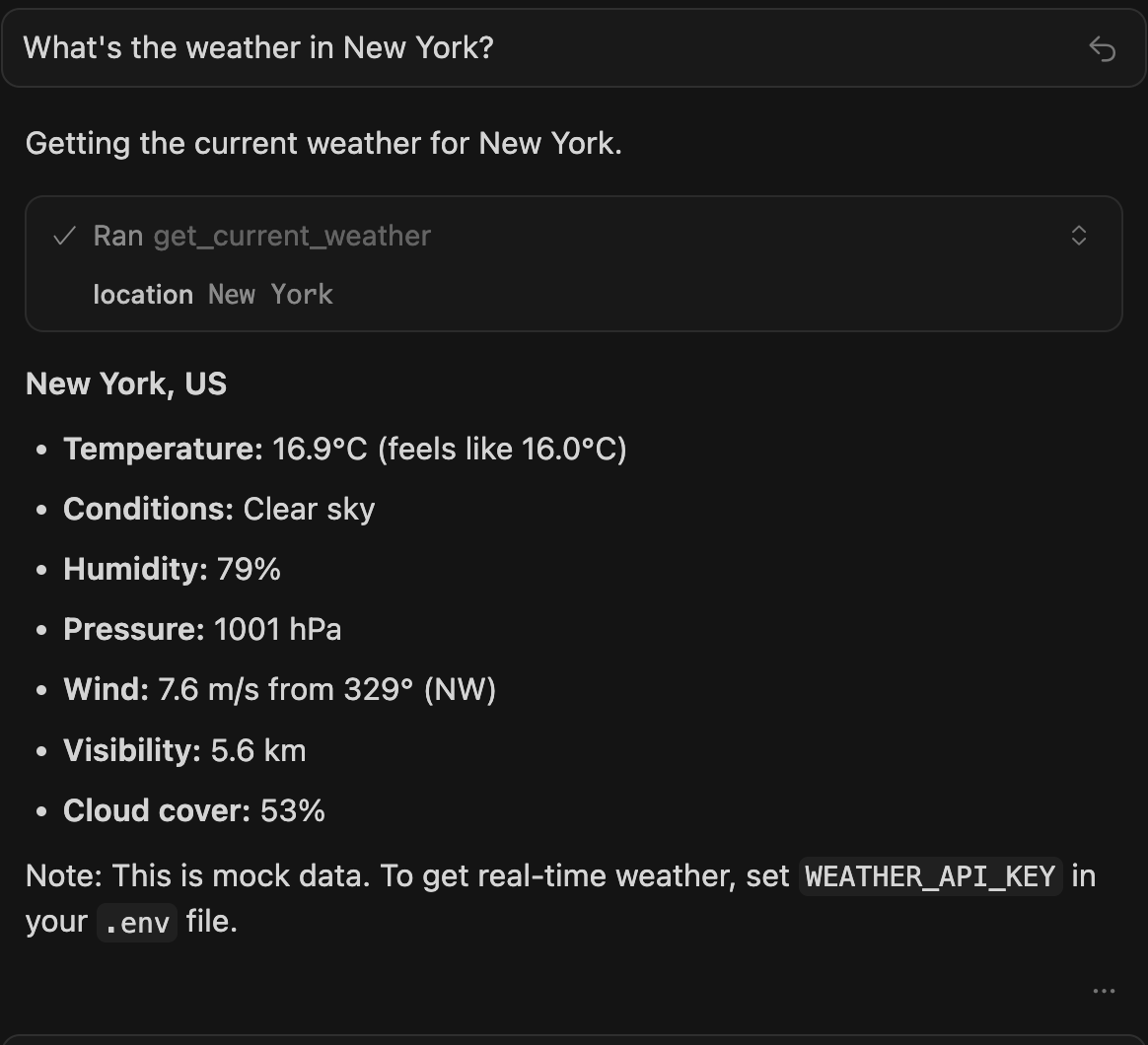
Example: Asking "What's the weather in New York?" in Cursor IDE with the Weather MCP Server
┌─────────────┐
│   Cursor    │
│     IDE     │
└──────┬──────┘
       │ MCP Protocol
       │
┌──────▼──────────────────┐
│   MCP Weather Server    │
│  (main.py)              │
├─────────────────────────┤
│ • Tools                 │
│ • Resources             │
│ • Prompts               │
└──────┬──────────────────┘
       │
┌──────▼──────────┐
│ Weather API     │
│ (weather_api.py)│
└─────────────────┘weather/
├── main.py # MCP server implementation
├── weather_api.py # Weather API client
├── pyproject.toml # Dependencies
├── cursor_mcp_config.json # Cursor IDE configuration
├── .env.example # Environment template
└── README.md # This fileNew Tools: Add functions to the tools list in main.py
New Resources: Add URI patterns to the resources list in main.py
New Prompts: Add prompt templates to the prompts list in main.py
MIT
Get current weather conditions for a specific location
Inputs: location (required).
Get weather forecast for a specific location for multiple days
Inputs: location (required), days.
Search for location names matching a query string
Inputs: query (required).
Recent tool additions, removals, and schema changes observed during successful MCP inspections.
Loading tool schema changelog…
Scored across 3 tools
Each tool has a clearly distinct purpose with no overlap: get_current_weather retrieves current conditions, get_weather_forecast provides future predictions, and search_locations handles location queries. An agent can easily differentiate between these three functions.
All tools follow a consistent verb_noun naming pattern (get_current_weather, get_weather_forecast, search_locations) with clear, descriptive names. There are no deviations in style or convention across the toolset.
Three tools is reasonable for a weather server, covering core functions like current conditions, forecasts, and location search. However, it feels slightly thin as it lacks tools for historical weather data or alerts, which are common in weather APIs.
The toolset covers essential weather operations: retrieving current data, forecasts, and location lookup. A minor gap exists in not including historical weather data or severe weather alerts, but agents can still perform most common weather-related tasks effectively.
Provide real-time and forecast weather information for locations in the United States using natura…
Current weather and forecast lookup as an agent tool.
Global weather via Open-Meteo: forecast, historical, marine, air quality, geocoding, elevation.
Get current weather for any city and create images from your prompts. Streamline planning, reports…