

A
licenseNot graded
qualityD
maintenanceProvides generic Open Database Connectivity (ODBC) to any Database Management System (DBMS) that's accessible via an ODBC Connector (Driver).
13
MIT

The mcp-sqlalchemy server is a lightweight MCP server for ODBC connectivity that enables database management and query execution via SQLAlchemy. With this server, you can:
Fetch Schemas: List all available database schemas
Fetch Tables: Retrieve table information from specific or all schemas
Search Tables: Filter tables based on name substrings
Describe Table: Generate detailed descriptions of table structures (columns, data types, keys)
Execute Queries:
SQL queries with results in JSONL, Markdown, or JSON formats
SPARQL queries (Virtuoso specific)
SPASQL queries (SQL/SPARQL hybrid, Virtuoso specific)
Execute Stored Procedures: Run Virtuoso stored procedures
Virtuoso AI Support: Access Virtuoso-specific AI Assistant for database queries
Built with FastAPI to provide a lightweight MCP server for ODBC database connections.
Provides capability to format query results as Markdown tables for better readability and visualization.
Connects to MySQL databases through PyMySQL, supporting schema exploration, table information retrieval, and query execution.
Connects to PostgreSQL databases, allowing for schema exploration, table descriptions, and SQL query execution.
Uses SQLAlchemy to provide database abstraction and connection to various database backends.
Supports connections to SQLite databases, enabling schema queries, table exploration, and SQL execution.
Click on "Deploy Server".
Wait a few minutes for the server to deploy. Once ready, it will show a "Started" state.
In the chat, type @ followed by the MCP server name and your instructions, e.g., "@mcp-sqlalchemy show me all tables in the sales schema"
That's it! The server will respond to your query, and you can continue using it as needed.
Here is a step-by-step guide with screenshots.
A lightweight MCP (Model Context Protocol) server for ODBC built with FastAPI, pyodbc, and SQLAlchemy. This server is compatible with Virtuoso DBMS and other DBMS backends that implement a SQLAlchemy provider.
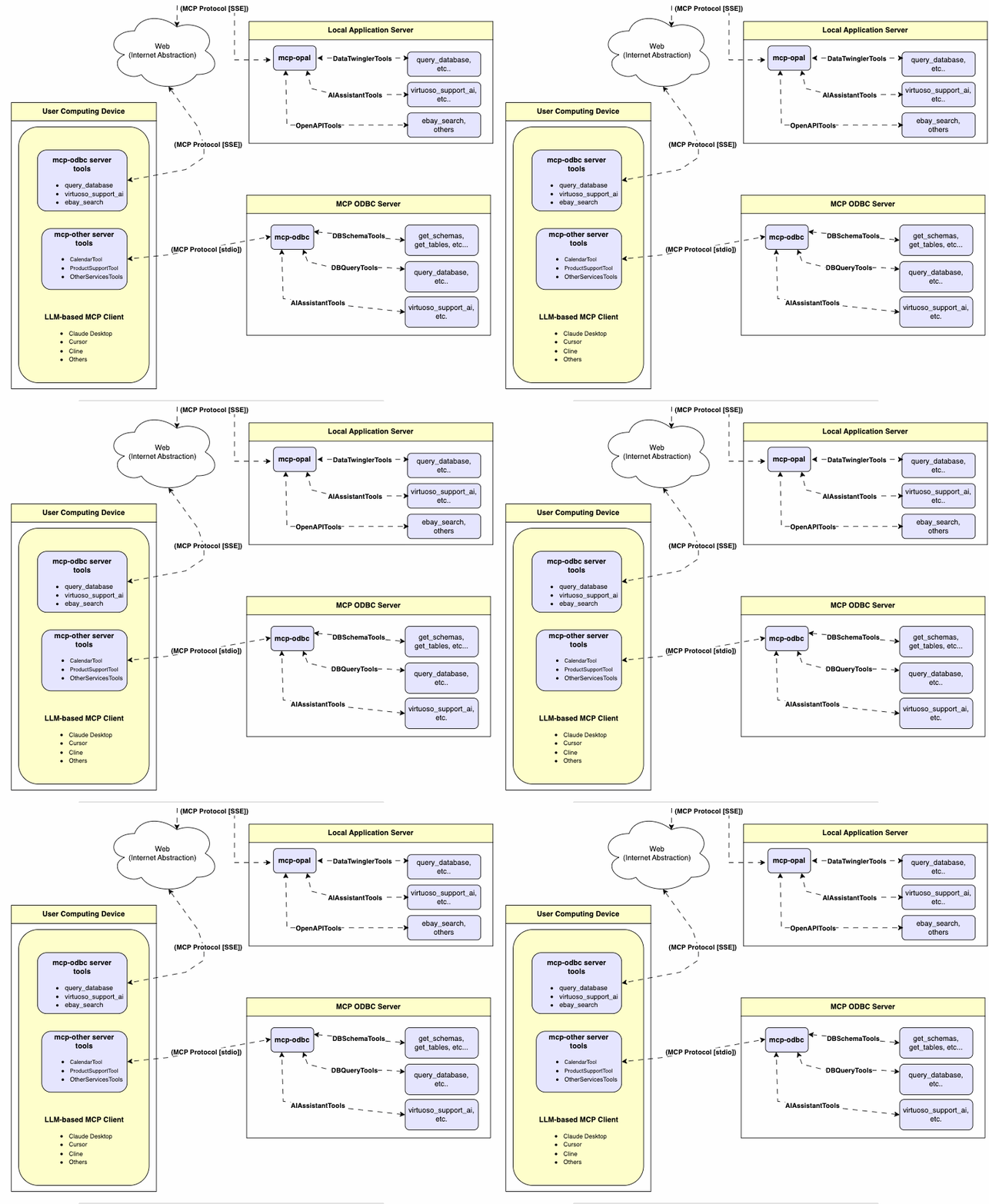
Get Schemas: Fetch and list all schema names from the connected database.
Get Tables: Retrieve table information for specific schemas or all schemas.
Describe Table: Generate a detailed description of table structures, including:
Column names and data types
Nullable attributes
Primary and foreign keys
Search Tables: Filter and retrieve tables based on name substrings.
Execute Stored Procedures: In the case of Virtuoso, execute stored procedures and retrieve results.
Execute Queries:
JSONL result format: Optimized for structured responses.
Markdown table format: Ideal for reporting and visualization.
Related MCP server: MCP SQL Server
Install uv:
pip install uvOr use Homebrew:
brew install uvunixODBC Runtime Environment Checks:
Check installation configuration (i.e., location of key INI files) by running: odbcinst -j
List available data source names by running: odbcinst -q -s
ODBC DSN Setup: Configure your ODBC Data Source Name (~/.odbc.ini) for the target database. Example for Virtuoso DBMS:
[VOS]
Description = OpenLink Virtuoso
Driver = /path/to/virtodbcu_r.so
Database = Demo
Address = localhost:1111
WideAsUTF16 = Yes
SQLAlchemy URL Binding: Use the format:
virtuoso+pyodbc://user:password@VOSClone this repository:
git clone https://github.com/OpenLinkSoftware/mcp-sqlalchemy-server.git
cd mcp-sqlalchemy-serverUpdate your .envby overriding the defaults to match your preferences
ODBC_DSN=VOS
ODBC_USER=dba
ODBC_PASSWORD=dba
API_KEY=xxxFor Claude Desktop users:
Add the following to claude_desktop_config.json:
{
  "mcpServers": {
    "my_database": {
      "command": "uv",
      "args": ["--directory", "/path/to/mcp-sqlalchemy-server", "run", "mcp-sqlalchemy-server"],
      "env": {
        "ODBC_DSN": "dsn_name",
        "ODBC_USER": "username",
        "ODBC_PASSWORD": "password",
        "API_KEY": "sk-xxx"
      }
    }
  }
}Here are the pyodbc URL examples for connecting to DBMS systems that have been tested using this mcp-server.
Database | URL Format |
Virtuoso DBMS |
|
PostgreSQL |
|
MySQL |
|
SQLite |
|
Once connected, you can interact with your WhatsApp contacts through Claude, leveraging Claude's AI capabilities in your WhatsApp conversations. |
name | description |
podbc_get_schemas | List database schemas accessible to connected database management system (DBMS). |
podbc_get_tables | List tables associated with a selected database schema. |
podbc_describe_table | Provide the description of a table associated with a designated database schema. This includes information about column names, data types, nulls handling, autoincrement, primary key, and foreign keys |
podbc_filter_table_names | List tables, based on a substring pattern from the |
podbc_query_database | Execute a SQL query and return results in JSONL format. |
podbc_execute_query | Execute a SQL query and return results in JSONL format. |
podbc_execute_query_md | Execute a SQL query and return results in Markdown table format. |
podbc_spasql_query | Execute a SPASQL query and return results. |
podbc_sparql_query | Execute a SPARQL query and return results. |
podbc_virtuoso_support_ai | Interact with the Virtuoso Support Assistant/Agent -- a Virtuoso-specific feature for interacting with LLMs |
podbc_get_schemas
Retrieve and return a list of all schema names from the connected database.
Input parameters:
user (string, optional): Database username. Defaults to "demo".
password (string, optional): Database password. Defaults to "demo".
dsn (string, optional): ODBC data source name. Defaults to "Local Virtuoso".
Returns a JSON string array of schema names.
podbc_get_tables
Retrieve and return a list containing information about tables in a specified schema. If no schema is provided, uses the connection's default schema.
Input parameters:
schema (string, optional): Database schema to filter tables. Defaults to connection default.
user (string, optional): Database username. Defaults to "demo".
password (string, optional): Database password. Defaults to "demo".
dsn (string, optional): ODBC data source name. Defaults to "Local Virtuoso".
Returns a JSON string containing table information (e.g., TABLE_CAT, TABLE_SCHEM, TABLE_NAME, TABLE_TYPE).
podbc_filter_table_names
Filters and returns information about tables whose names contain a specific substring.
Input parameters:
q (string, required): The substring to search for within table names.
schema (string, optional): Database schema to filter tables. Defaults to connection default.
user (string, optional): Database username. Defaults to "demo".
password (string, optional): Database password. Defaults to "demo".
dsn (string, optional): ODBC data source name. Defaults to "Local Virtuoso".
Returns a JSON string containing information for matching tables.
podbc_describe_table
Retrieve and return detailed information about the columns of a specific table.
Input parameters:
schema (string, required): The database schema name containing the table.
table (string, required): The name of the table to describe.
user (string, optional): Database username. Defaults to "demo".
password (string, optional): Database password. Defaults to "demo".
dsn (string, optional): ODBC data source name. Defaults to "Local Virtuoso".
Returns a JSON string describing the table's columns (e.g., COLUMN_NAME, TYPE_NAME, COLUMN_SIZE, IS_NULLABLE).
podbc_query_database
Execute a standard SQL query and return the results in JSON format.
Input parameters:
query (string, required): The SQL query string to execute.
user (string, optional): Database username. Defaults to "demo".
password (string, optional): Database password. Defaults to "demo".
dsn (string, optional): ODBC data source name. Defaults to "Local Virtuoso".
Returns query results as a JSON string.
podbc_query_database_md
Execute a standard SQL query and return the results formatted as a Markdown table.
Input parameters:
query (string, required): The SQL query string to execute.
user (string, optional): Database username. Defaults to "demo".
password (string, optional): Database password. Defaults to "demo".
dsn (string, optional): ODBC data source name. Defaults to "Local Virtuoso".
Returns query results as a Markdown table string.
podbc_query_database_jsonl
Execute a standard SQL query and return the results in JSON Lines (JSONL) format (one JSON object per line).
Input parameters:
query (string, required): The SQL query string to execute.
user (string, optional): Database username. Defaults to "demo".
password (string, optional): Database password. Defaults to "demo".
dsn (string, optional): ODBC data source name. Defaults to "Local Virtuoso".
Returns query results as a JSONL string.
podbc_spasql_query
Execute a SPASQL (SQL/SPARQL hybrid) query return results. This is a Virtuoso-specific feature.
Input parameters:
query (string, required): The SPASQL query string.
max_rows (number, optional): Maximum number of rows to return. Defaults to 20.
timeout (number, optional): Query timeout in milliseconds. Defaults to 30000.
user (string, optional): Database username. Defaults to "demo".
password (string, optional): Database password. Defaults to "demo".
dsn (string, optional): ODBC data source name. Defaults to "Local Virtuoso".
Returns the result from the underlying stored procedure call (e.g., Demo.demo.execute_spasql_query).
podbc_sparql_query
Execute a SPARQL query and return results. This is a Virtuoso-specific feature.
Input parameters:
query (string, required): The SPARQL query string.
format (string, optional): Desired result format. Defaults to 'json'.
timeout (number, optional): Query timeout in milliseconds. Defaults to 30000.
user (string, optional): Database username. Defaults to "demo".
password (string, optional): Database password. Defaults to "demo".
dsn (string, optional): ODBC data source name. Defaults to "Local Virtuoso".
Returns the result from the underlying function call (e.g., "UB".dba."sparqlQuery").
podbc_virtuoso_support_ai
Utilizes a Virtuoso-specific AI Assistant function, passing a prompt and optional API key. This is a Virtuoso-specific feature.
Input parameters:
prompt (string, required): The prompt text for the AI function.
api_key (string, optional): API key for the AI service. Defaults to "none".
user (string, optional): Database username. Defaults to "demo".
password (string, optional): Database password. Defaults to "demo".
dsn (string, optional): ODBC data source name. Defaults to "Local Virtuoso".
Returns the result from the AI Support Assistant function call (e.g., DEMO.DBA.OAI_VIRTUOSO_SUPPORT_AI).
For easier troubleshooting:
Install the MCP Inspector:
npm install -g @modelcontextprotocol/inspectorStart the inspector:
npx @modelcontextprotocol/inspector uv --directory /path/to/mcp-sqlalchemy-server run mcp-sqlalchemy-serverAccess the provided URL to troubleshoot server interactions.
Retrieve and return a dictionary containing the definition of a table, including column names, data types, nullable, autoincrement, primary key, and foreign keys.
Inputs: Schema (required), table (required), url.
Execute a SQL query and return results in JSONL format.
Inputs: query (required), max_rows, params, url.
Execute a SQL query and return results in Markdown table format.
Inputs: query (required), max_rows, params, url.
Retrieve and return a list containing information about tables whose names contain the substring 'q' in the format [{'schema': 'schema_name', 'table': 'table_name'}, {'schema': 'schema_name', 'table': 'table_name'}].
Inputs: q (required), url.
Retrieve and return a list of all schema names from the connected database.
Inputs: url.
Retrieve and return a list containing information about tables in specified schema, if empty uses connection default
Inputs: Schema, url.
Execute a SQL query and return results in JSONL format.
Inputs: query (required), url.
Call ???.
Inputs: prompt (required), api_key, url.
Execute a SPARQL query and return results.
Inputs: query (required), format, timeout, url.
Execute a SPASQL query and return results.
Inputs: query (required), max_rows, timeout, url.
Tool to use the Virtuoso AI support function
Inputs: prompt (required), api_key, url.
Recent tool additions, removals, and schema changes observed during successful MCP inspections.
Loading tool schema changelog…
Scored across 11 tools
Multiple tools have overlapping or unclear purposes, causing confusion. For example, podbc_execute_query and podbc_query_database both execute SQL queries and return results in JSONL format, making them nearly indistinguishable. Additionally, podbc_sparql_func and podbc_virtuoso_support_ai have vague descriptions that don't clearly differentiate their functions from other query tools.
The naming follows a consistent prefix pattern (podbc_) and uses snake_case throughout, which is predictable. However, there are minor deviations like podbc_spasql_query (likely a typo for SPARQL) and inconsistent verb usage (e.g., get_schemas vs. filter_table_names), but overall the structure is readable and mostly uniform.
With 11 tools, the count is reasonable for a database interaction server, covering schema exploration, table queries, and specialized functions. It's slightly on the higher side but still manageable, as each tool appears to serve a distinct technical purpose, though some redundancy exists.
The toolset covers core database operations like querying, schema retrieval, and table description, but there are notable gaps. For instance, there are no tools for data manipulation (e.g., insert, update, delete) or transaction management, which are essential for a complete SQLAlchemy-like interface. The inclusion of SPARQL and specialized functions adds niche coverage but doesn't fill these basic CRUD gaps.
Query Postgres, MySQL, SQL Server, Oracle, BigQuery, ClickHouse and Redshift from your AI client.
Draxlr's remote MCP server connects AI assistants to your SQL databases and dashboards. Explore schemas, run read-only queries, manage saved queries and dashboards, and export results, all with row-level security so each user sees only their own data.
PostgreSQL, MySQL, OpenAPI/Swagger, and shared Agent Memory with scoped access.
SQL validation, formatting, parsing, metadata extraction, linting, and security analysis.