
mcp-sqlalchemy
---
# MCP Server ODBC via SQLAlchemy
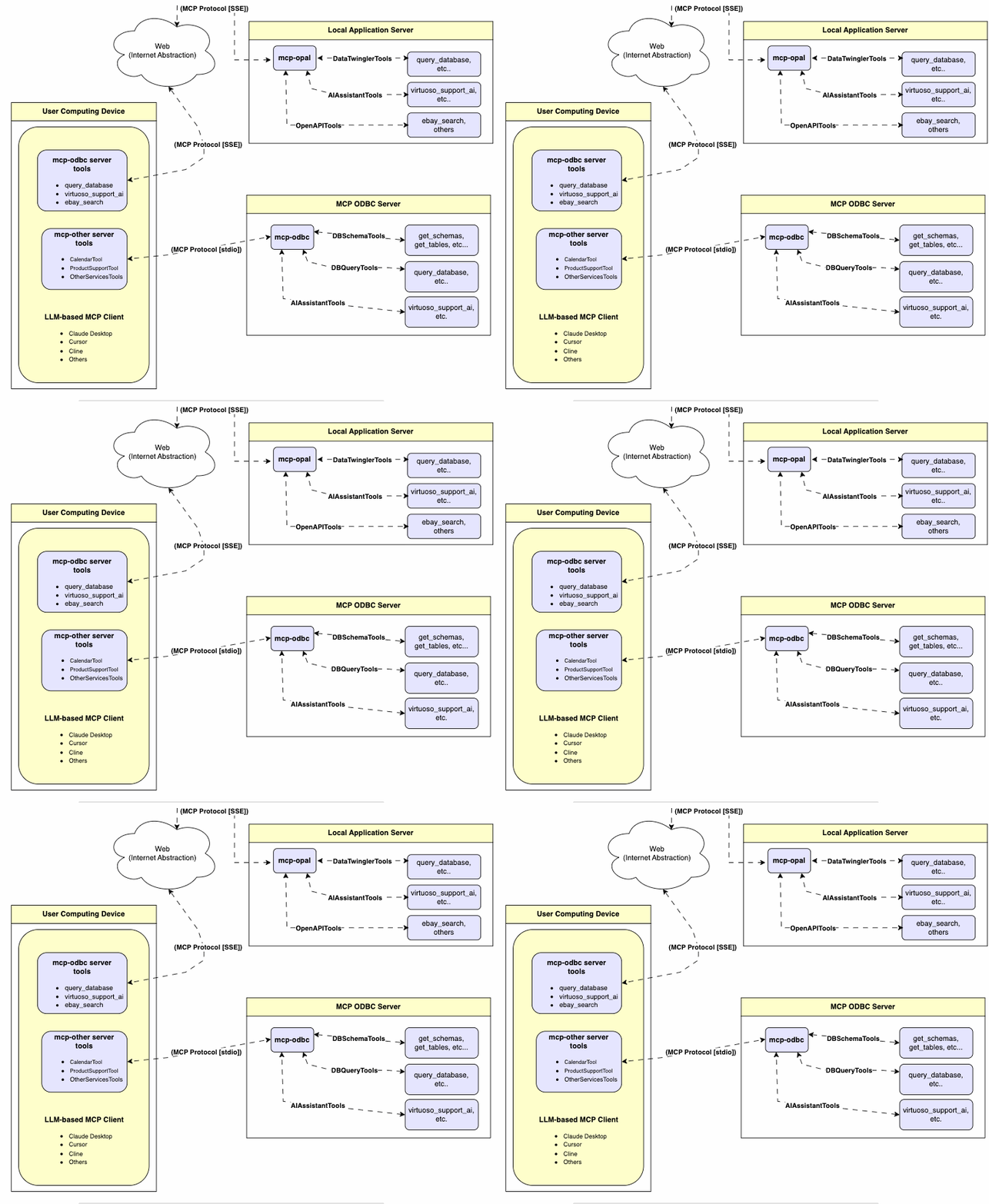
A lightweight MCP (Model Context Protocol) server for ODBC built with **FastAPI**, **pyodbc**, and **SQLAlchemy**. This server is compatible with Virtuoso DBMS and other DBMS backends that implement a SQLAlchemy provider.
---
## Features
- **Get Schemas**: Fetch and list all schema names from the connected database.
- **Get Tables**: Retrieve table information for specific schemas or all schemas.
- **Describe Table**: Generate a detailed description of table structures, including:
- Column names and data types
- Nullable attributes
- Primary and foreign keys
- **Search Tables**: Filter and retrieve tables based on name substrings.
- **Execute Stored Procedures**: In the case of Virtuoso, execute stored procedures and retrieve results.
- **Execute Queries**:
- JSONL result format: Optimized for structured responses.
- Markdown table format: Ideal for reporting and visualization.
---
## Prerequisites
1. **Install uv**:
```bash
pip install uv
```
Or use Homebrew:
```bash
brew install uv
```
2. **unixODBC Runtime Environment Checks**:
1. Check installation configuration (i.e., location of key INI files) by running: `odbcinst -j`
2. List available data source names by running: `odbcinst -q -s`
3. **ODBC DSN Setup**: Configure your ODBC Data Source Name (`~/.odbc.ini`) for the target database. Example for Virtuoso DBMS:
```
[VOS]
Description = OpenLink Virtuoso
Driver = /path/to/virtodbcu_r.so
Database = Demo
Address = localhost:1111
WideAsUTF16 = Yes
```
3. **SQLAlchemy URL Binding**: Use the format:
```
virtuoso+pyodbc://user:password@VOS
```
---
## Installation
Clone this repository:
```bash
git clone https://github.com/OpenLinkSoftware/mcp-sqlalchemy-server.git
cd mcp-sqlalchemy-server
```
## Environment Variables
Update your `.env`by overriding the defaults to match your preferences
```
ODBC_DSN=VOS
ODBC_USER=dba
ODBC_PASSWORD=dba
API_KEY=xxx
```
---
## Configuration
For **Claude Desktop** users:
Add the following to `claude_desktop_config.json`:
```json
{
"mcpServers": {
"my_database": {
"command": "uv",
"args": ["--directory", "/path/to/mcp-sqlalchemy-server", "run", "mcp-sqlalchemy-server"],
"env": {
"ODBC_DSN": "dsn_name",
"ODBC_USER": "username",
"ODBC_PASSWORD": "password",
"API_KEY": "sk-xxx"
}
}
}
}
```
---
# Usage
## Database Management System (DBMS) Connection URLs
Here are the pyodbc URL examples for connecting to DBMS systems that have been tested using this mcp-server.
| Database | URL Format |
|---------------|-----------------------------------------------|
| Virtuoso DBMS | `virtuoso+pyodbc://user:password@ODBC_DSN` |
| PostgreSQL | `postgresql://user:password@localhost/dbname` |
| MySQL | `mysql+pymysql://user:password@localhost/dbname` |
| SQLite | `sqlite:///path/to/database.db` |
Once connected, you can interact with your WhatsApp contacts through Claude, leveraging Claude's AI capabilities in your WhatsApp conversations.
## Tools Provided
### Overview
|name|description|
|---|---|
|podbc_get_schemas|List database schemas accessible to connected database management system (DBMS).|
|podbc_get_tables|List tables associated with a selected database schema.|
|podbc_describe_table|Provide the description of a table associated with a designated database schema. This includes information about column names, data types, nulls handling, autoincrement, primary key, and foreign keys|
|podbc_filter_table_names|List tables, based on a substring pattern from the `q` input field, associated with a selected database schema.|
|podbc_query_database|Execute a SQL query and return results in JSONL format.|
|podbc_execute_query|Execute a SQL query and return results in JSONL format.|
|podbc_execute_query_md|Execute a SQL query and return results in Markdown table format.|
|podbc_spasql_query|Execute a SPASQL query and return results.|
|podbc_sparql_query|Execute a SPARQL query and return results.|
|podbc_virtuoso_support_ai|Interact with the Virtuoso Support Assistant/Agent -- a Virtuoso-specific feature for interacting with LLMs|
### Detailed Description
- **podbc_get_schemas**
- Retrieve and return a list of all schema names from the connected database.
- Input parameters:
- `user` (string, optional): Database username. Defaults to "demo".
- `password` (string, optional): Database password. Defaults to "demo".
- `dsn` (string, optional): ODBC data source name. Defaults to "Local Virtuoso".
- Returns a JSON string array of schema names.
- **podbc_get_tables**
- Retrieve and return a list containing information about tables in a specified schema. If no schema is provided, uses the connection's default schema.
- Input parameters:
- `schema` (string, optional): Database schema to filter tables. Defaults to connection default.
- `user` (string, optional): Database username. Defaults to "demo".
- `password` (string, optional): Database password. Defaults to "demo".
- `dsn` (string, optional): ODBC data source name. Defaults to "Local Virtuoso".
- Returns a JSON string containing table information (e.g., TABLE_CAT, TABLE_SCHEM, TABLE_NAME, TABLE_TYPE).
- **podbc_filter_table_names**
- Filters and returns information about tables whose names contain a specific substring.
- Input parameters:
- `q` (string, required): The substring to search for within table names.
- `schema` (string, optional): Database schema to filter tables. Defaults to connection default.
- `user` (string, optional): Database username. Defaults to "demo".
- `password` (string, optional): Database password. Defaults to "demo".
- `dsn` (string, optional): ODBC data source name. Defaults to "Local Virtuoso".
- Returns a JSON string containing information for matching tables.
- **podbc_describe_table**
- Retrieve and return detailed information about the columns of a specific table.
- Input parameters:
- `schema` (string, required): The database schema name containing the table.
- `table` (string, required): The name of the table to describe.
- `user` (string, optional): Database username. Defaults to "demo".
- `password` (string, optional): Database password. Defaults to "demo".
- `dsn` (string, optional): ODBC data source name. Defaults to "Local Virtuoso".
- Returns a JSON string describing the table's columns (e.g., COLUMN_NAME, TYPE_NAME, COLUMN_SIZE, IS_NULLABLE).
- **podbc_query_database**
- Execute a standard SQL query and return the results in JSON format.
- Input parameters:
- `query` (string, required): The SQL query string to execute.
- `user` (string, optional): Database username. Defaults to "demo".
- `password` (string, optional): Database password. Defaults to "demo".
- `dsn` (string, optional): ODBC data source name. Defaults to "Local Virtuoso".
- Returns query results as a JSON string.
- **podbc_query_database_md**
- Execute a standard SQL query and return the results formatted as a Markdown table.
- Input parameters:
- `query` (string, required): The SQL query string to execute.
- `user` (string, optional): Database username. Defaults to "demo".
- `password` (string, optional): Database password. Defaults to "demo".
- `dsn` (string, optional): ODBC data source name. Defaults to "Local Virtuoso".
- Returns query results as a Markdown table string.
- **podbc_query_database_jsonl**
- Execute a standard SQL query and return the results in JSON Lines (JSONL) format (one JSON object per line).
- Input parameters:
- `query` (string, required): The SQL query string to execute.
- `user` (string, optional): Database username. Defaults to "demo".
- `password` (string, optional): Database password. Defaults to "demo".
- `dsn` (string, optional): ODBC data source name. Defaults to "Local Virtuoso".
- Returns query results as a JSONL string.
- **podbc_spasql_query**
- Execute a SPASQL (SQL/SPARQL hybrid) query return results. This is a Virtuoso-specific feature.
- Input parameters:
- `query` (string, required): The SPASQL query string.
- `max_rows` (number, optional): Maximum number of rows to return. Defaults to 20.
- `timeout` (number, optional): Query timeout in milliseconds. Defaults to 30000.
- `user` (string, optional): Database username. Defaults to "demo".
- `password` (string, optional): Database password. Defaults to "demo".
- `dsn` (string, optional): ODBC data source name. Defaults to "Local Virtuoso".
- Returns the result from the underlying stored procedure call (e.g., `Demo.demo.execute_spasql_query`).
- **podbc_sparql_query**
- Execute a SPARQL query and return results. This is a Virtuoso-specific feature.
- Input parameters:
- `query` (string, required): The SPARQL query string.
- `format` (string, optional): Desired result format. Defaults to 'json'.
- `timeout` (number, optional): Query timeout in milliseconds. Defaults to 30000.
- `user` (string, optional): Database username. Defaults to "demo".
- `password` (string, optional): Database password. Defaults to "demo".
- `dsn` (string, optional): ODBC data source name. Defaults to "Local Virtuoso".
- Returns the result from the underlying function call (e.g., `"UB".dba."sparqlQuery"`).
- **podbc_virtuoso_support_ai**
- Utilizes a Virtuoso-specific AI Assistant function, passing a prompt and optional API key. This is a Virtuoso-specific feature.
- Input parameters:
- `prompt` (string, required): The prompt text for the AI function.
- `api_key` (string, optional): API key for the AI service. Defaults to "none".
- `user` (string, optional): Database username. Defaults to "demo".
- `password` (string, optional): Database password. Defaults to "demo".
- `dsn` (string, optional): ODBC data source name. Defaults to "Local Virtuoso".
- Returns the result from the AI Support Assistant function call (e.g., `DEMO.DBA.OAI_VIRTUOSO_SUPPORT_AI`).
---
## Troubleshooting
For easier troubleshooting:
1. Install the MCP Inspector:
```bash
npm install -g @modelcontextprotocol/inspector
```
2. Start the inspector:
```bash
npx @modelcontextprotocol/inspector uv --directory /path/to/mcp-sqlalchemy-server run mcp-sqlalchemy-server
```
Access the provided URL to troubleshoot server interactions.
TDQS
Scored across 11 tools
Multiple tools have overlapping or unclear purposes, causing confusion. For example, podbc_execute_query and podbc_query_database both execute SQL queries and return results in JSONL format, making them nearly indistinguishable. Additionally, podbc_sparql_func and podbc_virtuoso_support_ai have vague descriptions that don't clearly differentiate their functions from other query tools.
The naming follows a consistent prefix pattern (podbc_) and uses snake_case throughout, which is predictable. However, there are minor deviations like podbc_spasql_query (likely a typo for SPARQL) and inconsistent verb usage (e.g., get_schemas vs. filter_table_names), but overall the structure is readable and mostly uniform.
With 11 tools, the count is reasonable for a database interaction server, covering schema exploration, table queries, and specialized functions. It's slightly on the higher side but still manageable, as each tool appears to serve a distinct technical purpose, though some redundancy exists.
The toolset covers core database operations like querying, schema retrieval, and table description, but there are notable gaps. For instance, there are no tools for data manipulation (e.g., insert, update, delete) or transaction management, which are essential for a complete SQLAlchemy-like interface. The inclusion of SPARQL and specialized functions adds niche coverage but doesn't fill these basic CRUD gaps.