


A
licenseC
qualityA
maintenanceA comprehensive Message Control Protocol (MCP) server for Kafka Schema Registry.
28
32
Python
MIT

一个 MCP 服务器实现,使 AI 助手能够与 Confluent Cloud REST API 交互。该服务器允许 Claude Desktop 和 Goose CLI 等 AI 工具通过自然语言交互来管理 Kafka 主题、连接器和 Flink SQL 语句。
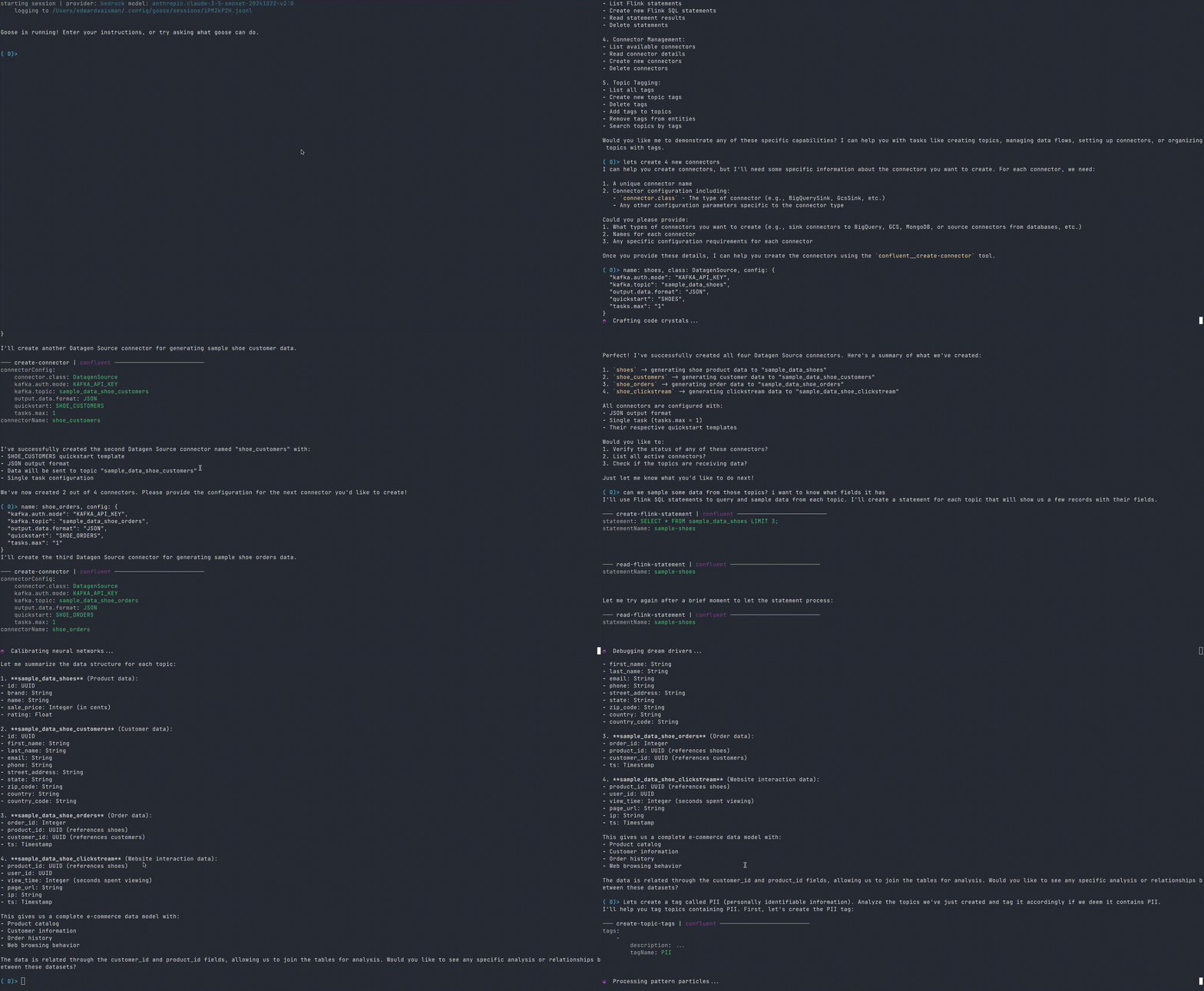
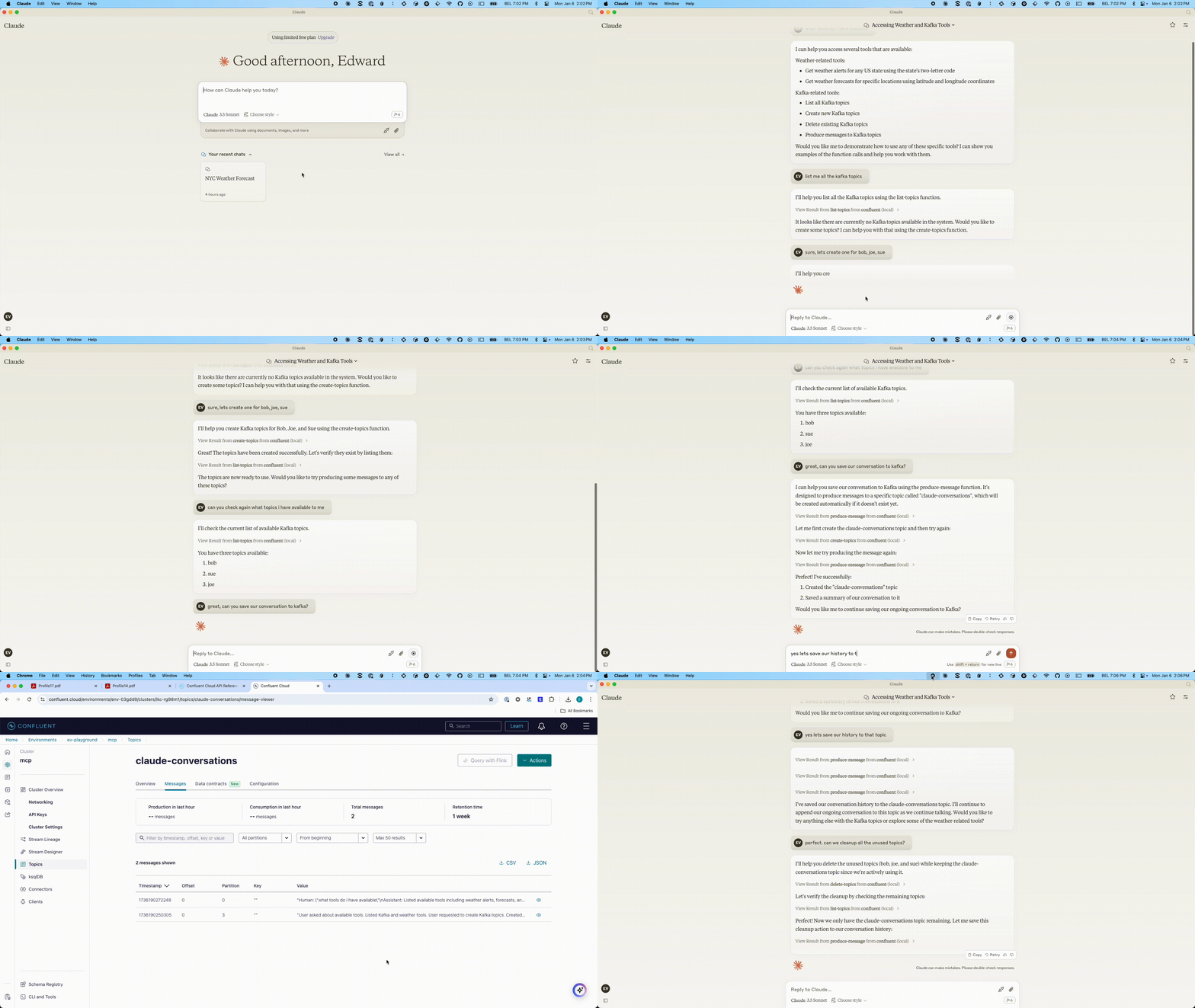
Related MCP server: Kafka MCP Server
**创建.env文件:**将示例.env文件结构(如下所示)复制到项目根目录中名为.env的新文件中。
**填充.env文件:**填写 Confluent Cloud 环境所需的值。有关每个变量的详细信息,请参阅配置部分。
安装 Node.js (如果尚未安装)
我们建议使用NVM (Node 版本管理器)来管理 Node.js 版本
安装并使用 Node.js:
nvm install 22
nvm use 22在项目的根目录中创建一个.env文件,其配置如下:
# .env file
BOOTSTRAP_SERVERS="pkc-v12gj.us-east4.gcp.confluent.cloud:9092"
KAFKA_API_KEY="..."
KAFKA_API_SECRET="..."
KAFKA_REST_ENDPOINT="https://pkc-v12gj.us-east4.gcp.confluent.cloud:443"
KAFKA_CLUSTER_ID=""
KAFKA_ENV_ID="env-..."
FLINK_ENV_ID="env-..."
FLINK_ORG_ID=""
FLINK_REST_ENDPOINT="https://flink.us-east4.gcp.confluent.cloud"
FLINK_ENV_NAME=""
FLINK_DATABASE_NAME=""
FLINK_API_KEY=""
FLINK_API_SECRET=""
FLINK_COMPUTE_POOL_ID="lfcp-..."
CONFLUENT_CLOUD_API_KEY=""
CONFLUENT_CLOUD_API_SECRET=""
CONFLUENT_CLOUD_REST_ENDPOINT="https://api.confluent.cloud"
SCHEMA_REGISTRY_API_KEY="..."
SCHEMA_REGISTRY_API_SECRET="..."
SCHEMA_REGISTRY_ENDPOINT="https://psrc-zv01y.northamerica-northeast2.gcp.confluent.cloud"多变的 | 描述 | 默认值 | 必需的 |
HTTP_HOST | 绑定 HTTP 传输的主机(字符串) | “本地主机” | 是的 |
HTTP_PORT | 用于 HTTP 传输的端口(数字(最小值:0)) | 3000 | 是的 |
引导服务器 | 用于建立与 Kafka 集群的初始连接的 Kafka 代理地址列表,格式为 host1:port1,host2:port2(字符串) | 不 | |
CONFLUENT_CLOUD_API_KEY | Confluent Cloud 平台管理的主 API 密钥,用于管理整个组织的资源(字符串(最小值:1)) | 不 | |
CONFLUENT_CLOUD_API_SECRET | 主 API 密钥与 CONFLUENT_CLOUD_API_KEY 配对,用于全面的 Confluent Cloud 平台管理(字符串(最小值:1)) | 不 | |
CONFLUENT_CLOUD_REST_ENDPOINT | Confluent Cloud REST API 服务的基本 URL(默认) | 不 | |
FLINK_API_KEY | 用于访问 Confluent Cloud 的 Flink 服务的身份验证密钥,包括计算池和 SQL 语句管理(字符串(最小值:1)) | 不 | |
FLINK_API_SECRET | 与 FLINK_API_KEY 配对的秘密令牌,用于对 Confluent Cloud 的 Flink 服务进行身份验证访问(字符串(最小值:1)) | 不 | |
FLINK_COMPUTE_POOL_ID | Flink 计算池的唯一标识符,必须以“lfcp-”前缀开头(字符串) | 不 | |
FLINK_DATABASE_NAME | 在 Flink SQL 操作中用作数据库引用的关联 Kafka 集群的名称(字符串(最小值:1)) | 不 | |
FLINK_ENV_ID | Flink 环境的唯一标识符,必须以“env-”前缀开头(字符串) | 不 | |
FLINK_ENV_NAME | 用于识别和显示目的的 Flink 环境的人类可读名称(字符串(最小值:1)) | 不 | |
FLINK_ORG_ID | Confluent Cloud 中用于 Flink 资源管理的组织标识符(字符串(最小值:1)) | 不 | |
FLINK_REST_ENDPOINT | 用于 SQL 语句和计算池管理的 Confluent Cloud Flink REST API 端点的基本 URL(字符串) | 不 | |
KAFKA_API_密钥 | 与 Kafka 集群建立安全连接所需的身份验证凭证(用户名)(字符串(最小值:1)) | 不 | |
KAFKA_API_SECRET | 与 KAFKA_API_KEY 配对的身份验证凭证(密码),用于安全的 Kafka 集群访问(字符串(最小值:1)) | 不 | |
KAFKA_CLUSTER_ID | Confluent Cloud 生态系统中 Kafka 集群的唯一标识符(字符串(最小值:1)) | 不 | |
KAFKA_ENV_ID | Kafka 集群的环境标识符,必须以“env-”前缀开头(字符串) | 不 | |
KAFKA_REST_ENDPOINT | Kafka 集群管理的 REST API 端点(字符串) | 不 | |
SCHEMA_REGISTRY_API_KEY | 用于访问 Schema Registry 服务以管理和验证数据模式的身份验证密钥(字符串(最小值:1)) | 不 | |
SCHEMA_REGISTRY_API_SECRET | 与 SCHEMA_REGISTRY_API_KEY 配对的身份验证密钥,用于安全 Schema Registry 访问(字符串(最小值:1)) | 不 | |
SCHEMA_REGISTRY_ENDPOINT | 用于访问 Schema Registry 服务以管理数据模式的 URL 端点(字符串) | 不 |
此 MCP 服务器设计用于与各种 MCP 客户端配合使用,例如 Claude Desktop 或 Goose CLI/Desktop。具体配置和交互方式取决于您使用的客户端。但一般步骤如下:
**启动服务器:**您可以通过以下两种方式之一运行 MCP 服务器:
**从源代码构建:**按照开发者指南中的说明从源代码构建并运行服务器。这通常涉及:
安装依赖项( npm install )
构建项目( npm run build或npm run dev )
**使用 npx:**您可以直接使用 npx 启动服务器(无需构建):
npx -y @confluentinc/mcp-confluent -e /path/to/confluent-mcp-server/.env**配置您的 MCP 客户端:**每个客户端都有其自身的方式来指定 MCP 服务器的地址和所需的凭据。您需要配置您的客户端(例如 Claude、Goose)以连接到该服务器运行的地址(可能是带有特定端口的localhost )。服务器运行的端口可以通过环境变量进行配置。
**启动 MCP 客户端:**将客户端配置为连接到 MCP 服务器后,即可启动 MCP 客户端。启动时,它会在本地创建一个 MCP 服务器实例。该实例将负责管理数据模式并代表您与 Confluent Cloud 进行交互。
**通过客户端与 Confluent 交互:**客户端连接后,您可以使用客户端界面与 Confluent Cloud 资源进行交互。客户端会向 MCP 服务器发送请求,然后 MCP 服务器会代表您与 Confluent Cloud 进行交互。
有关安装 Claude Desktop 和 MCP 服务器的更多详细信息,请参阅此处。
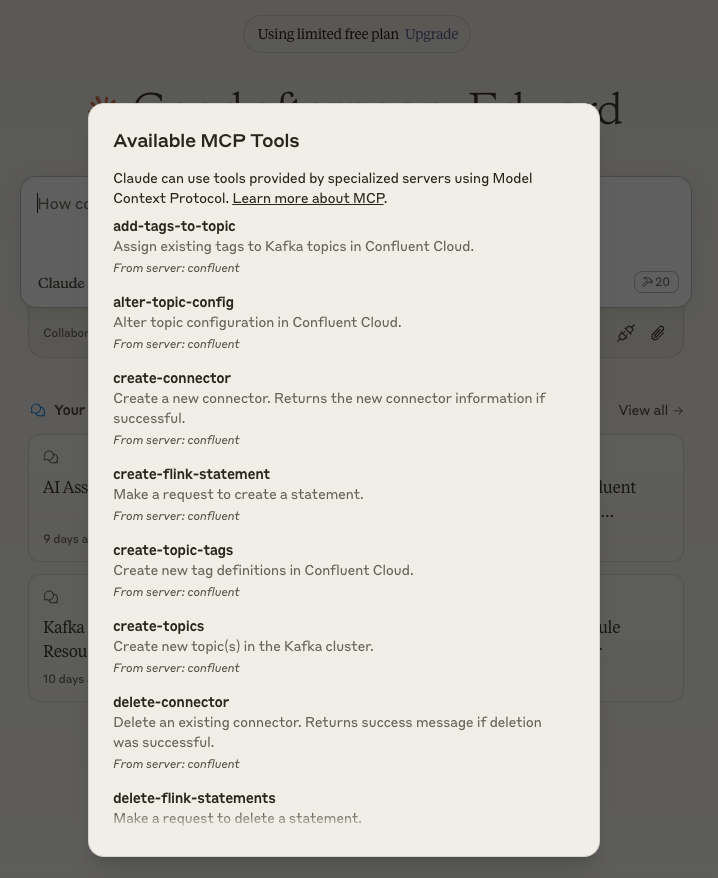
要配置 Claude Desktop 以使用此 MCP 服务器:
打开 Claude 桌面配置
在 Mac 上: ~/Library/Application Support/Claude/claude_desktop_config.json
在 Windows 上: %APPDATA%\Claude\claude_desktop_config.json
编辑配置文件
在您喜欢的文本编辑器中打开配置文件
使用以下方法之一添加或修改配置:
{
  "mcpServers": {
    "confluent": {
      "command": "node",
      "args": [
        "/path/to/confluent-mcp-server/dist/index.js",
         "--env-file",
        "/path/to/confluent-mcp-server/.env",
      ]
    }
  }
}
{
"mcpServers": {
"confluent": {
"command": "npx",
"args": [
"-y"
"@confluentinc/mcp-confluent",
"-e",
"/path/to/confluent-mcp-server/.env"
]
}
}
}将/path/to/confluent-mcp-server/替换为您安装此 MCP 服务器的实际路径。
重启Claude桌面
关闭并重新打开 Claude Desktop 以使更改生效
Claude Desktop 启动时,MCP 服务器将自动启动
现在,Claude Desktop 将配置为使用您的本地 MCP 服务器进行 Confluent 交互。
有关如何安装 Goose CLI 的详细说明,请参阅此处。
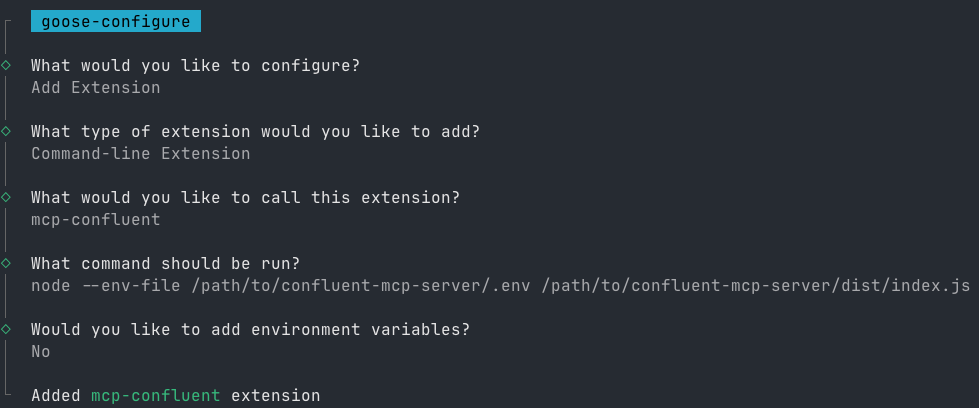
安装后,请按照以下步骤操作:
运行配置命令:
goose configure按照交互式提示进行操作:
选择Add extension
选择Command-line Extension
输入mcp-confluent作为扩展名称
选择以下配置方法之一:
node /path/to/confluent-mcp-server/dist/index.js --env-file /path/to/confluent-mcp-server/.envnpx -y @confluentinc/mcp-confluent -e /path/to/confluent-mcp-server/.env将/path/to/confluent-mcp-server/替换为您安装此 MCP 服务器的实际路径。
MCP 服务器提供灵活的命令行界面 (CLI),用于高级配置和控制。CLI 允许您指定环境文件、传输方式,并微调启用或阻止哪些工具。
您可以查看所有 CLI 选项并获取以下帮助:
npx @confluentinc/mcp-confluent --help Usage: mcp-confluent [options]
Confluent MCP Server - Model Context Protocol implementation for Confluent Cloud
Options:
-V, --version output the version number
-e, --env-file <path> Load environment variables from file
-k, --kafka-config-file <file> Path to a properties file for configuring kafka clients
-t, --transport <types> Transport types (comma-separated list) (choices: "http", "sse", "stdio", default: "stdio")
--allow-tools <tools> Comma-separated list of tool names to allow. If provided, takes precedence over --allow-tools-file. Allow-list is applied before block-list.
--block-tools <tools> Comma-separated list of tool names to block. If provided, takes precedence over --block-tools-file. Block-list is applied after allow-list.
--allow-tools-file <file> File with tool names to allow (one per line). Used only if --allow-tools is not provided. Allow-list is applied before block-list.
--block-tools-file <file> File with tool names to block (one per line). Used only if --block-tools is not provided. Block-list is applied after allow-list.
--list-tools Print the final set of enabled tool names (with descriptions) after allow/block filtering and exit. Does not start the server.
--disable-confluent-cloud-tools Disable all tools that require Confluent Cloud REST APIs (cloud-only tools).
-h, --help display help for commandnpx @confluentinc/mcp-confluent -e .env --transport http,sse,stdio...
{"level":"info","time":"2025-05-14T17:03:02.883Z","pid":47959,"hostname":"G9PW1FJH64","name":"mcp-confluent","msg":"Starting transports: http, sse, stdio"}
{"level":"info","time":"2025-05-14T17:03:02.971Z","pid":47959,"hostname":"G9PW1FJH64","name":"mcp-confluent","msg":"HTTP transport routes registered"}
{"level":"info","time":"2025-05-14T17:03:02.972Z","pid":47959,"hostname":"G9PW1FJH64","name":"mcp-confluent","msg":"SSE transport routes registered"}
{"level":"info","time":"2025-05-14T17:03:02.972Z","pid":47959,"hostname":"G9PW1FJH64","name":"mcp-confluent","msg":"STDIO transport connected"}
{"level":"info","time":"2025-05-14T17:03:03.012Z","pid":47959,"hostname":"G9PW1FJH64","name":"mcp-confluent","msg":"Server listening at http://[::1]:3000"}
{"level":"info","time":"2025-05-14T17:03:03.013Z","pid":47959,"hostname":"G9PW1FJH64","name":"mcp-confluent","msg":"Server listening at http://127.0.0.1:3000"}
{"level":"info","time":"2025-05-14T17:03:03.013Z","pid":47959,"hostname":"G9PW1FJH64","name":"mcp-confluent","msg":"All transports started successfully"}npx @confluentinc/mcp-confluent -e .env --allow-tools produce-message,consume-messages{"level":"warn","time":"2025-05-14T16:52:34.923Z","pid":46818,"hostname":"G9PW1FJH64","name":"mcp-confluent","msg":"Tool list-topics disabled due to allow/block list rules"}
{"level":"warn","time":"2025-05-14T16:52:34.923Z","pid":46818,"hostname":"G9PW1FJH64","name":"mcp-confluent","msg":"Tool create-topics disabled due to allow/block list rules"}
{"level":"warn","time":"2025-05-14T16:52:34.923Z","pid":46818,"hostname":"G9PW1FJH64","name":"mcp-confluent","msg":"Tool delete-topics disabled due to allow/block list rules"}
{"level":"info","time":"2025-05-14T16:52:34.923Z","pid":46818,"hostname":"G9PW1FJH64","name":"mcp-confluent","msg":"Tool produce-message enabled"}
{"level":"info","time":"2025-05-14T16:52:34.923Z","pid":46818,"hostname":"G9PW1FJH64","name":"mcp-confluent","msg":"Tool consume-messages enabled"}
{"level":"warn","time":"2025-05-14T16:52:34.923Z","pid":46818,"hostname":"G9PW1FJH64","name":"mcp-confluent","msg":"Tool list-flink-statements disabled due to allow/block list rules"}
{"level":"warn","time":"2025-05-14T16:52:34.923Z","pid":46818,"hostname":"G9PW1FJH64","name":"mcp-confluent","msg":"Tool create-flink-statement disabled due to allow/block list rules"}
{"level":"warn","time":"2025-05-14T16:52:34.923Z","pid":46818,"hostname":"G9PW1FJH64","name":"mcp-confluent","msg":"Tool read-flink-statement disabled due to allow/block list rules"}
{"level":"warn","time":"2025-05-14T16:52:34.923Z","pid":46818,"hostname":"G9PW1FJH64","name":"mcp-confluent","msg":"Tool delete-flink-statements disabled due to allow/block list rules"}
{"level":"warn","time":"2025-05-14T16:52:34.923Z","pid":46818,"hostname":"G9PW1FJH64","name":"mcp-confluent","msg":"Tool list-connectors disabled due to allow/block list rules"}
{"level":"warn","time":"2025-05-14T16:52:34.923Z","pid":46818,"hostname":"G9PW1FJH64","name":"mcp-confluent","msg":"Tool read-connector disabled due to allow/block list rules"}
{"level":"warn","time":"2025-05-14T16:52:34.923Z","pid":46818,"hostname":"G9PW1FJH64","name":"mcp-confluent","msg":"Tool create-connector disabled due to allow/block list rules"}
{"level":"warn","time":"2025-05-14T16:52:34.923Z","pid":46818,"hostname":"G9PW1FJH64","name":"mcp-confluent","msg":"Tool delete-connector disabled due to allow/block list rules"}
{"level":"warn","time":"2025-05-14T16:52:34.923Z","pid":46818,"hostname":"G9PW1FJH64","name":"mcp-confluent","msg":"Tool search-topics-by-tag disabled due to allow/block list rules"}
{"level":"warn","time":"2025-05-14T16:52:34.923Z","pid":46818,"hostname":"G9PW1FJH64","name":"mcp-confluent","msg":"Tool search-topics-by-name disabled due to allow/block list rules"}
{"level":"warn","time":"2025-05-14T16:52:34.923Z","pid":46818,"hostname":"G9PW1FJH64","name":"mcp-confluent","msg":"Tool create-topic-tags disabled due to allow/block list rules"}
{"level":"warn","time":"2025-05-14T16:52:34.923Z","pid":46818,"hostname":"G9PW1FJH64","name":"mcp-confluent","msg":"Tool delete-tag disabled due to allow/block list rules"}
{"level":"warn","time":"2025-05-14T16:52:34.923Z","pid":46818,"hostname":"G9PW1FJH64","name":"mcp-confluent","msg":"Tool remove-tag-from-entity disabled due to allow/block list rules"}
{"level":"warn","time":"2025-05-14T16:52:34.923Z","pid":46818,"hostname":"G9PW1FJH64","name":"mcp-confluent","msg":"Tool add-tags-to-topic disabled due to allow/block list rules"}
{"level":"warn","time":"2025-05-14T16:52:34.923Z","pid":46818,"hostname":"G9PW1FJH64","name":"mcp-confluent","msg":"Tool list-tags disabled due to allow/block list rules"}
{"level":"warn","time":"2025-05-14T16:52:34.923Z","pid":46818,"hostname":"G9PW1FJH64","name":"mcp-confluent","msg":"Tool alter-topic-config disabled due to allow/block list rules"}
{"level":"warn","time":"2025-05-14T16:52:34.923Z","pid":46818,"hostname":"G9PW1FJH64","name":"mcp-confluent","msg":"Tool list-clusters disabled due to allow/block list rules"}
{"level":"warn","time":"2025-05-14T16:52:34.923Z","pid":46818,"hostname":"G9PW1FJH64","name":"mcp-confluent","msg":"Tool list-environments disabled due to allow/block list rules"}
{"level":"warn","time":"2025-05-14T16:52:34.923Z","pid":46818,"hostname":"G9PW1FJH64","name":"mcp-confluent","msg":"Tool read-environment disabled due to allow/block list rules"}
{"level":"warn","time":"2025-05-14T16:52:34.923Z","pid":46818,"hostname":"G9PW1FJH64","name":"mcp-confluent","msg":"Tool list-schemas disabled due to allow/block list rules"}
{"level":"warn","time":"2025-05-14T16:52:34.923Z","pid":46818,"hostname":"G9PW1FJH64","name":"mcp-confluent","msg":"Tool get-topic-config disabled due to allow/block list rules"}
{"level":"info","time":"2025-05-14T16:52:34.924Z","pid":46818,"hostname":"G9PW1FJH64","name":"mcp-confluent","msg":"Starting transports: stdio on localhost:3000"}
{"level":"info","time":"2025-05-14T16:52:34.924Z","pid":46818,"hostname":"G9PW1FJH64","name":"mcp-confluent","msg":"STDIO transport connected"}
{"level":"info","time":"2025-05-14T16:52:34.924Z","pid":46818,"hostname":"G9PW1FJH64","name":"mcp-confluent","msg":"All transports started successfully"}npx @confluentinc/mcp-confluent -e .env --block-tools produce-message,consume-messages{"level":"info","time":"2025-05-14T16:55:45.910Z","pid":47344,"hostname":"G9PW1FJH64","name":"mcp-confluent","msg":"Tool list-topics enabled"}
{"level":"info","time":"2025-05-14T16:55:45.910Z","pid":47344,"hostname":"G9PW1FJH64","name":"mcp-confluent","msg":"Tool create-topics enabled"}
{"level":"info","time":"2025-05-14T16:55:45.910Z","pid":47344,"hostname":"G9PW1FJH64","name":"mcp-confluent","msg":"Tool delete-topics enabled"}
{"level":"warn","time":"2025-05-14T16:55:45.910Z","pid":47344,"hostname":"G9PW1FJH64","name":"mcp-confluent","msg":"Tool produce-message disabled due to allow/block list rules"}
{"level":"warn","time":"2025-05-14T16:55:45.910Z","pid":47344,"hostname":"G9PW1FJH64","name":"mcp-confluent","msg":"Tool consume-messages disabled due to allow/block list rules"}
{"level":"info","time":"2025-05-14T16:55:45.910Z","pid":47344,"hostname":"G9PW1FJH64","name":"mcp-confluent","msg":"Tool list-flink-statements enabled"}
{"level":"info","time":"2025-05-14T16:55:45.910Z","pid":47344,"hostname":"G9PW1FJH64","name":"mcp-confluent","msg":"Tool create-flink-statement enabled"}
{"level":"info","time":"2025-05-14T16:55:45.910Z","pid":47344,"hostname":"G9PW1FJH64","name":"mcp-confluent","msg":"Tool read-flink-statement enabled"}
{"level":"info","time":"2025-05-14T16:55:45.910Z","pid":47344,"hostname":"G9PW1FJH64","name":"mcp-confluent","msg":"Tool delete-flink-statements enabled"}
{"level":"info","time":"2025-05-14T16:55:45.910Z","pid":47344,"hostname":"G9PW1FJH64","name":"mcp-confluent","msg":"Tool list-connectors enabled"}
{"level":"info","time":"2025-05-14T16:55:45.910Z","pid":47344,"hostname":"G9PW1FJH64","name":"mcp-confluent","msg":"Tool read-connector enabled"}
{"level":"info","time":"2025-05-14T16:55:45.910Z","pid":47344,"hostname":"G9PW1FJH64","name":"mcp-confluent","msg":"Tool create-connector enabled"}
{"level":"info","time":"2025-05-14T16:55:45.910Z","pid":47344,"hostname":"G9PW1FJH64","name":"mcp-confluent","msg":"Tool delete-connector enabled"}
{"level":"info","time":"2025-05-14T16:55:45.910Z","pid":47344,"hostname":"G9PW1FJH64","name":"mcp-confluent","msg":"Tool search-topics-by-tag enabled"}
{"level":"info","time":"2025-05-14T16:55:45.910Z","pid":47344,"hostname":"G9PW1FJH64","name":"mcp-confluent","msg":"Tool search-topics-by-name enabled"}
{"level":"info","time":"2025-05-14T16:55:45.911Z","pid":47344,"hostname":"G9PW1FJH64","name":"mcp-confluent","msg":"Tool create-topic-tags enabled"}
{"level":"info","time":"2025-05-14T16:55:45.911Z","pid":47344,"hostname":"G9PW1FJH64","name":"mcp-confluent","msg":"Tool delete-tag enabled"}
{"level":"info","time":"2025-05-14T16:55:45.911Z","pid":47344,"hostname":"G9PW1FJH64","name":"mcp-confluent","msg":"Tool remove-tag-from-entity enabled"}
{"level":"info","time":"2025-05-14T16:55:45.911Z","pid":47344,"hostname":"G9PW1FJH64","name":"mcp-confluent","msg":"Tool add-tags-to-topic enabled"}
{"level":"info","time":"2025-05-14T16:55:45.911Z","pid":47344,"hostname":"G9PW1FJH64","name":"mcp-confluent","msg":"Tool list-tags enabled"}
{"level":"info","time":"2025-05-14T16:55:45.911Z","pid":47344,"hostname":"G9PW1FJH64","name":"mcp-confluent","msg":"Tool alter-topic-config enabled"}
{"level":"info","time":"2025-05-14T16:55:45.911Z","pid":47344,"hostname":"G9PW1FJH64","name":"mcp-confluent","msg":"Tool list-clusters enabled"}
{"level":"info","time":"2025-05-14T16:55:45.911Z","pid":47344,"hostname":"G9PW1FJH64","name":"mcp-confluent","msg":"Tool list-environments enabled"}
{"level":"info","time":"2025-05-14T16:55:45.911Z","pid":47344,"hostname":"G9PW1FJH64","name":"mcp-confluent","msg":"Tool read-environment enabled"}
{"level":"info","time":"2025-05-14T16:55:45.911Z","pid":47344,"hostname":"G9PW1FJH64","name":"mcp-confluent","msg":"Tool list-schemas enabled"}
{"level":"info","time":"2025-05-14T16:55:45.911Z","pid":47344,"hostname":"G9PW1FJH64","name":"mcp-confluent","msg":"Tool get-topic-config enabled"}
{"level":"info","time":"2025-05-14T16:55:45.911Z","pid":47344,"hostname":"G9PW1FJH64","name":"mcp-confluent","msg":"Starting transports: stdio"}
{"level":"info","time":"2025-05-14T16:55:45.911Z","pid":47344,"hostname":"G9PW1FJH64","name":"mcp-confluent","msg":"STDIO transport connected"}
{"level":"info","time":"2025-05-14T16:55:45.911Z","pid":47344,"hostname":"G9PW1FJH64","name":"mcp-confluent","msg":"All transports started successfully"}npx -y @confluentinc/mcp-confluent -e .env --allow-tools-file allow.txt --block-tools-file block.txt{"level":"info","time":"2025-05-14T16:55:45.910Z","pid":47344,"hostname":"G9PW1FJH64","name":"mcp-confluent","msg":"Tool list-topics enabled"}
{"level":"info","time":"2025-05-14T16:55:45.910Z","pid":47344,"hostname":"G9PW1FJH64","name":"mcp-confluent","msg":"Tool create-topics enabled"}
{"level":"info","time":"2025-05-14T16:55:45.910Z","pid":47344,"hostname":"G9PW1FJH64","name":"mcp-confluent","msg":"Tool delete-topics enabled"}
{"level":"warn","time":"2025-05-14T16:55:45.910Z","pid":47344,"hostname":"G9PW1FJH64","name":"mcp-confluent","msg":"Tool produce-message disabled due to allow/block list rules"}
{"level":"warn","time":"2025-05-14T16:55:45.910Z","pid":47344,"hostname":"G9PW1FJH64","name":"mcp-confluent","msg":"Tool consume-messages disabled due to allow/block list rules"}
{"level":"info","time":"2025-05-14T16:55:45.910Z","pid":47344,"hostname":"G9PW1FJH64","name":"mcp-confluent","msg":"Tool list-flink-statements enabled"}
{"level":"info","time":"2025-05-14T16:55:45.910Z","pid":47344,"hostname":"G9PW1FJH64","name":"mcp-confluent","msg":"Tool create-flink-statement enabled"}
{"level":"info","time":"2025-05-14T16:55:45.910Z","pid":47344,"hostname":"G9PW1FJH64","name":"mcp-confluent","msg":"Tool read-flink-statement enabled"}
{"level":"info","time":"2025-05-14T16:55:45.910Z","pid":47344,"hostname":"G9PW1FJH64","name":"mcp-confluent","msg":"Tool delete-flink-statements enabled"}
{"level":"info","time":"2025-05-14T16:55:45.910Z","pid":47344,"hostname":"G9PW1FJH64","name":"mcp-confluent","msg":"Tool list-connectors enabled"}
{"level":"info","time":"2025-05-14T16:55:45.910Z","pid":47344,"hostname":"G9PW1FJH64","name":"mcp-confluent","msg":"Tool read-connector enabled"}
{"level":"info","time":"2025-05-14T16:55:45.910Z","pid":47344,"hostname":"G9PW1FJH64","name":"mcp-confluent","msg":"Tool create-connector enabled"}
{"level":"info","time":"2025-05-14T16:55:45.910Z","pid":47344,"hostname":"G9PW1FJH64","name":"mcp-confluent","msg":"Tool delete-connector enabled"}
{"level":"info","time":"2025-05-14T16:55:45.910Z","pid":47344,"hostname":"G9PW1FJH64","name":"mcp-confluent","msg":"Tool search-topics-by-tag enabled"}
{"level":"info","time":"2025-05-14T16:55:45.910Z","pid":47344,"hostname":"G9PW1FJH64","name":"mcp-confluent","msg":"Tool search-topics-by-name enabled"}
{"level":"info","time":"2025-05-14T16:55:45.911Z","pid":47344,"hostname":"G9PW1FJH64","name":"mcp-confluent","msg":"Tool create-topic-tags enabled"}
{"level":"info","time":"2025-05-14T16:55:45.911Z","pid":47344,"hostname":"G9PW1FJH64","name":"mcp-confluent","msg":"Tool delete-tag enabled"}
{"level":"info","time":"2025-05-14T16:55:45.911Z","pid":47344,"hostname":"G9PW1FJH64","name":"mcp-confluent","msg":"Tool remove-tag-from-entity enabled"}
{"level":"info","time":"2025-05-14T16:55:45.911Z","pid":47344,"hostname":"G9PW1FJH64","name":"mcp-confluent","msg":"Tool add-tags-to-topic enabled"}
{"level":"info","time":"2025-05-14T16:55:45.911Z","pid":47344,"hostname":"G9PW1FJH64","name":"mcp-confluent","msg":"Tool list-tags enabled"}
{"level":"info","time":"2025-05-14T16:55:45.911Z","pid":47344,"hostname":"G9PW1FJH64","name":"mcp-confluent","msg":"Tool alter-topic-config enabled"}
{"level":"info","time":"2025-05-14T16:55:45.911Z","pid":47344,"hostname":"G9PW1FJH64","name":"mcp-confluent","msg":"Tool list-clusters enabled"}
{"level":"info","time":"2025-05-14T16:55:45.911Z","pid":47344,"hostname":"G9PW1FJH64","name":"mcp-confluent","msg":"Tool list-environments enabled"}
{"level":"info","time":"2025-05-14T16:55:45.911Z","pid":47344,"hostname":"G9PW1FJH64","name":"mcp-confluent","msg":"Tool read-environment enabled"}
{"level":"info","time":"2025-05-14T16:55:45.911Z","pid":47344,"hostname":"G9PW1FJH64","name":"mcp-confluent","msg":"Tool list-schemas enabled"}
{"level":"info","time":"2025-05-14T16:55:45.911Z","pid":47344,"hostname":"G9PW1FJH64","name":"mcp-confluent","msg":"Tool get-topic-config enabled"}
{"level":"info","time":"2025-05-14T16:55:45.911Z","pid":47344,"hostname":"G9PW1FJH64","name":"mcp-confluent","msg":"Starting transports: stdio"}
{"level":"info","time":"2025-05-14T16:55:45.911Z","pid":47344,"hostname":"G9PW1FJH64","name":"mcp-confluent","msg":"STDIO transport connected"}
{"level":"info","time":"2025-05-14T16:55:45.911Z","pid":47344,"hostname":"G9PW1FJH64","name":"mcp-confluent","msg":"All transports started successfully"}npx -y @confluentinc/mcp-confluent --list-toolsadd-tags-to-topic: Assign existing tags to Kafka topics in Confluent Cloud.
alter-topic-config: Alter topic configuration in Confluent Cloud.
consume-messages: Consumes messages from one or more Kafka topics. Supports automatic deserialization of Schema Registry encoded messag...
create-connector: Create a new connector. Returns the new connector information if successful.
create-flink-statement: Make a request to create a statement.
create-topic-tags: Create new tag definitions in Confluent Cloud.
create-topics: Create one or more Kafka topics.
delete-connector: Delete an existing connector. Returns success message if deletion was successful.
delete-flink-statements: Make a request to delete a statement.
delete-tag: Delete a tag definition from Confluent Cloud.
delete-topics: Delete the topic with the given names.
get-topic-config: Retrieve configuration details for a specific Kafka topic.
list-clusters: Get all clusters in the Confluent Cloud environment
list-connectors: Retrieve a list of "names" of the active connectors. You can then make a read request for a specific connector by name.
list-environments: Get all environments in Confluent Cloud with pagination support
list-flink-statements: Retrieve a sorted, filtered, paginated list of all statements.
list-schemas: List all schemas in the Schema Registry.
list-tags: Retrieve all tags with definitions from Confluent Cloud Schema Registry.
list-topics: List all topics in the Kafka cluster.
produce-message: Produce records to a Kafka topic. Supports Confluent Schema Registry serialization (AVRO, JSON, PROTOBUF) for both ke...
read-connector: Get information about the connector.
read-environment: Get details of a specific environment by ID
read-flink-statement: Make a request to read a statement and its results
remove-tag-from-entity: Remove tag from an entity in Confluent Cloud.
search-topics-by-name: List all topics in the Kafka cluster matching the specified name.
search-topics-by-tag: List all topics in the Kafka cluster with the specified tag.**提示:**允许列表优先于阻止列表应用。如果两者都未提供,则默认启用所有工具。
/
├── src/                 # Source code
│   ├── confluent/       # Confluent integration (API clients, etc.)
│   │   └── tools/           # Tool implementations
│   ├── mcp/             # MCP protocol and transport logic
│   │   └── transports/
│   └── ...              # Other server logic, utilities, etc.
├── dist/                # Compiled output
├── openapi.json         # OpenAPI specification for Confluent Cloud
├── .env                 # Environment variables (example - should be copied and filled)
├── README.md            # This file
└── package.json # Node.js project metadata and dependencies安装依赖项:
npm install开发模式(注意变化):
npm run dev此命令将 TypeScript 代码编译为 JavaScript,并在src/目录中检测到更改时自动重建。
生产构建(一次性编译):
npm run build启动服务器:
npm run start要测试 MCP 服务器,您可以使用MCP Inspector ,这是一个用于测试和调试 MCP 服务器的交互式开发工具。
# make sure you've already built the project either in dev mode or by running npm run build
npx @modelcontextprotocol/inspector node $PATH_TO_PROJECT/dist/index.js --env-file $PATH_TO_PROJECT/.env向枚举类ToolName添加一个新枚举。
将您的新工具添加到ToolFactory类中的处理程序映射中。
创建一个新文件,导出扩展BaseToolHandler类。
实现基类的handle方法。
实现基类的getToolConfig方法。
一旦满意,就将其添加到index.ts中的enabledTools集合中。
# as of v7.5.2 there is a bug when using allOf w/ required https://github.com/openapi-ts/openapi-typescript/issues/1474. need --empty-objects-unknown flag to avoid it
npx openapi-typescript ./openapi.json -o ./src/confluent/openapi-schema.d.ts --empty-objects-unknown欢迎通过 Github Issues 提交 Bug 报告和反馈。贡献指南请参阅CONTRIBUTING.md
Assign existing tags to Kafka topics in Confluent Cloud.
| Name | Required | Description | Default |
|---|---|---|---|
| baseUrl | No | The base URL of the Schema Registry REST API. | |
| tagAssignments | Yes | Array of tag assignments to create |
Does the description disclose side effects, auth requirements, rate limits, or destructive behavior?
With no annotations provided, the description carries full burden for behavioral disclosure. It states 'Assign existing tags', implying a mutation operation, but doesn't mention permissions required, whether tags must pre-exist, error handling, or what happens on conflicts. For a mutation tool with zero annotation coverage, this leaves significant gaps in understanding behavior.
Agents need to know what a tool does to the world before calling it. Descriptions should go beyond structured annotations to explain consequences.
Is the description appropriately sized, front-loaded, and free of redundancy?
The description is a single, efficient sentence that directly states the tool's purpose without any wasted words. It's appropriately sized and front-loaded, making it easy to understand at a glance.
Shorter descriptions cost fewer tokens and are easier for agents to parse. Every sentence should earn its place.
Given the tool's complexity, does the description cover enough for an agent to succeed on first attempt?
For a mutation tool with no annotations and no output schema, the description is incomplete. It doesn't cover behavioral aspects like permissions, error conditions, or what the tool returns. Given the complexity of tag assignment operations and lack of structured data, more context is needed for effective use.
Complex tools with many parameters or behaviors need more documentation. Simple tools need less. This dimension scales expectations accordingly.
Does the description clarify parameter syntax, constraints, interactions, or defaults beyond what the schema provides?
Schema description coverage is 100%, so the schema already documents both parameters thoroughly. The description adds no additional parameter semantics beyond what's in the schema (e.g., it doesn't explain tag assignment constraints or format details). Baseline 3 is appropriate when schema does the heavy lifting.
Input schemas describe structure but not intent. Descriptions should explain non-obvious parameter relationships and valid value ranges.
Does the description clearly state what the tool does and how it differs from similar tools?
The description clearly states the action ('Assign existing tags') and target resource ('Kafka topics in Confluent Cloud'), providing a specific verb+resource combination. However, it doesn't explicitly differentiate from sibling tools like 'create-topic-tags' or 'remove-tag-from-entity', which would require more specific context about when to use each.
Agents choose between tools based on descriptions. A clear purpose with a specific verb and resource helps agents select the right tool.
Does the description explain when to use this tool, when not to, or what alternatives exist?
The description provides no guidance on when to use this tool versus alternatives like 'create-topic-tags' or 'remove-tag-from-entity'. It mentions obtaining entity names from 'search-topics-by-name' in the schema, but this isn't part of the description itself, so it offers no explicit usage context or exclusions.
Agents often have multiple tools that could apply. Explicit usage guidance like "use X instead of Y when Z" prevents misuse.
Alter topic configuration in Confluent Cloud.
| Name | Required | Description | Default |
|---|---|---|---|
| baseUrl | No | The base URL of the Confluent Cloud Kafka REST API. | |
| clusterId | No | The unique identifier for the Kafka cluster. | |
| topicConfigs | Yes | ||
| topicName | Yes | Name of the topic to alter | |
| validateOnly | No |
Does the description disclose side effects, auth requirements, rate limits, or destructive behavior?
With no annotations provided, the description carries the full burden of behavioral disclosure. It states 'Alter' implying a mutation, but doesn't mention permissions required, whether changes are reversible, potential side effects, or rate limits. This leaves significant gaps for a tool that modifies configurations, making it inadequate for safe usage.
Agents need to know what a tool does to the world before calling it. Descriptions should go beyond structured annotations to explain consequences.
Is the description appropriately sized, front-loaded, and free of redundancy?
The description is a single, direct sentence with zero waste—it states the tool's purpose without unnecessary words. It's appropriately sized and front-loaded, making it easy to parse quickly.
Shorter descriptions cost fewer tokens and are easier for agents to parse. Every sentence should earn its place.
Given the tool's complexity, does the description cover enough for an agent to succeed on first attempt?
Given the tool's complexity (5 parameters, mutation operation, no output schema), the description is insufficient. It lacks details on behavior, error handling, or output expectations, and with no annotations to fill gaps, it doesn't provide enough context for reliable use in a system like Confluent Cloud.
Complex tools with many parameters or behaviors need more documentation. Simple tools need less. This dimension scales expectations accordingly.
Does the description clarify parameter syntax, constraints, interactions, or defaults beyond what the schema provides?
The description adds no parameter-specific information beyond what's in the schema. With 60% schema description coverage, the schema documents most parameters well (e.g., 'topicName', 'topicConfigs'), but the description doesn't compensate for gaps or provide additional context like examples or constraints. This meets the baseline for moderate schema coverage.
Input schemas describe structure but not intent. Descriptions should explain non-obvious parameter relationships and valid value ranges.
Does the description clearly state what the tool does and how it differs from similar tools?
The description clearly states the action ('Alter') and resource ('topic configuration in Confluent Cloud'), making the purpose immediately understandable. However, it doesn't distinguish this tool from similar siblings like 'create-topics' or 'delete-topics' that also modify topics, missing explicit differentiation.
Agents choose between tools based on descriptions. A clear purpose with a specific verb and resource helps agents select the right tool.
Does the description explain when to use this tool, when not to, or what alternatives exist?
No guidance is provided on when to use this tool versus alternatives. For example, it doesn't specify if this is for updating existing topics versus creating new ones (contrasted with 'create-topics'), or how it relates to other configuration tools. The description offers only a basic statement without context or exclusions.
Agents often have multiple tools that could apply. Explicit usage guidance like "use X instead of Y when Z" prevents misuse.
Create a new connector. Returns the new connector information if successful.
| Name | Required | Description | Default |
|---|---|---|---|
| baseUrl | No | The base URL of the Kafka Connect REST API. | |
| clusterId | No | The unique identifier for the Kafka cluster. | |
| connectorConfig | Yes | ||
| connectorName | Yes | The name of the connector to create. | |
| environmentId | No | The unique identifier for the environment this resource belongs to. |
Does the description disclose side effects, auth requirements, rate limits, or destructive behavior?
With no annotations provided, the description carries the full burden of behavioral disclosure. It states the tool creates something and returns information if successful, which implies mutation but doesn't specify permissions required, whether creation is idempotent, error conditions, or what 'successful' entails. For a creation tool with complex parameters, this leaves significant behavioral gaps.
Agents need to know what a tool does to the world before calling it. Descriptions should go beyond structured annotations to explain consequences.
Is the description appropriately sized, front-loaded, and free of redundancy?
The description is perfectly concise at two sentences that each earn their place. The first sentence states the core action, and the second adds important behavioral context about the return value. There's zero wasted language or redundancy.
Shorter descriptions cost fewer tokens and are easier for agents to parse. Every sentence should earn its place.
Given the tool's complexity, does the description cover enough for an agent to succeed on first attempt?
Given the tool's complexity (5 parameters, nested objects, no output schema, no annotations), the description is minimally adequate. It states what the tool does and the success condition but lacks crucial context about authentication, error handling, connector types (managed vs. custom), or how the creation affects the system. The agent must rely heavily on the schema for operational details.
Complex tools with many parameters or behaviors need more documentation. Simple tools need less. This dimension scales expectations accordingly.
Does the description clarify parameter syntax, constraints, interactions, or defaults beyond what the schema provides?
The schema description coverage is 80%, providing good documentation for most parameters. The description adds no parameter-specific information beyond what's in the schema. It doesn't explain relationships between parameters (e.g., how connectorConfig interacts with clusterId) or provide usage examples. With high schema coverage, the baseline 3 is appropriate as the schema does most of the work.
Input schemas describe structure but not intent. Descriptions should explain non-obvious parameter relationships and valid value ranges.
Does the description clearly state what the tool does and how it differs from similar tools?
The description clearly states the action ('Create a new connector') and resource ('connector'), making the purpose immediately understandable. It distinguishes from siblings like 'delete-connector' and 'list-connectors' by specifying creation rather than deletion or listing. However, it doesn't differentiate from other creation tools like 'create-topics' or 'create-flink-statement' beyond the resource type.
Agents choose between tools based on descriptions. A clear purpose with a specific verb and resource helps agents select the right tool.
Does the description explain when to use this tool, when not to, or what alternatives exist?
The description provides no guidance on when to use this tool versus alternatives. It doesn't mention prerequisites (like needing cluster or environment IDs), when creation is appropriate versus using existing connectors, or how it differs from other creation tools like 'create-topics'. The agent must infer usage from the tool name alone.
Agents often have multiple tools that could apply. Explicit usage guidance like "use X instead of Y when Z" prevents misuse.
Make a request to create a statement.
| Name | Required | Description | Default |
|---|---|---|---|
| baseUrl | No | The base URL of the Flink REST API. | |
| catalogName | Yes | The catalog name to be used for the statement. Typically the confluent environment name. | |
| computePoolId | No | The id associated with the compute pool in context. | |
| databaseName | Yes | The database name to be used for the statement. Typically the Kafka cluster name. | |
| environmentId | No | The unique identifier for the environment. | |
| organizationId | No | The unique identifier for the organization. | |
| statement | Yes | The raw Flink SQL text statement. Create table statements may not be necessary as topics in confluent cloud will be detected as created schemas. Make sure to show and describe tables before creating new ones. | |
| statementName | Yes | The user provided name of the resource, unique within this environment. |
Does the description disclose side effects, auth requirements, rate limits, or destructive behavior?
With no annotations provided, the description carries the full burden of behavioral disclosure. It states 'Make a request to create a statement', implying a write/mutation operation, but doesn't disclose any behavioral traits such as permissions required, side effects, error handling, or what happens upon success. This leaves significant gaps in understanding how the tool behaves beyond the basic action.
Agents need to know what a tool does to the world before calling it. Descriptions should go beyond structured annotations to explain consequences.
Is the description appropriately sized, front-loaded, and free of redundancy?
The description is extremely concise with a single sentence: 'Make a request to create a statement.' It's front-loaded and wastes no words, making it easy to parse quickly. However, this conciseness comes at the cost of completeness, as noted in other dimensions.
Shorter descriptions cost fewer tokens and are easier for agents to parse. Every sentence should earn its place.
Given the tool's complexity, does the description cover enough for an agent to succeed on first attempt?
Given the complexity (8 parameters, 4 required, no annotations, no output schema), the description is incomplete. It doesn't explain what a 'statement' is in this context (Flink SQL), what the tool returns, or any behavioral aspects. For a creation tool with multiple parameters and no structured safety hints, this minimal description is inadequate.
Complex tools with many parameters or behaviors need more documentation. Simple tools need less. This dimension scales expectations accordingly.
Does the description clarify parameter syntax, constraints, interactions, or defaults beyond what the schema provides?
The description adds no parameter-specific information beyond what the input schema provides. Since schema description coverage is 100%, the baseline score is 3. The description doesn't explain parameter interactions, dependencies, or provide additional context about the 8 parameters, so it doesn't add value over the well-documented schema.
Input schemas describe structure but not intent. Descriptions should explain non-obvious parameter relationships and valid value ranges.
Does the description clearly state what the tool does and how it differs from similar tools?
The description 'Make a request to create a statement' states a generic action but lacks specificity about what kind of statement (Flink SQL statement) and what resource it creates. It doesn't distinguish from siblings like 'create-connector' or 'create-topics', which also create resources in the same domain. The purpose is vague rather than clearly defined.
Agents choose between tools based on descriptions. A clear purpose with a specific verb and resource helps agents select the right tool.
Does the description explain when to use this tool, when not to, or what alternatives exist?
No guidance is provided on when to use this tool versus alternatives. The description doesn't mention prerequisites, context, or comparisons to sibling tools like 'list-flink-statements' or 'delete-flink-statements'. There's no indication of when this creation is appropriate or what alternatives might exist for similar operations.
Agents often have multiple tools that could apply. Explicit usage guidance like "use X instead of Y when Z" prevents misuse.
Create new topic(s) in the Kafka cluster.
| Name | Required | Description | Default |
|---|---|---|---|
| topicNames | Yes |
Does the description disclose side effects, auth requirements, rate limits, or destructive behavior?
With no annotations provided, the description carries the full burden of behavioral disclosure. It states the tool creates topics but doesn't mention critical behaviors like required permissions (e.g., admin rights), potential side effects (e.g., topic creation might affect cluster performance), error handling, or what happens if topics already exist. This is inadequate for a mutation tool with zero annotation coverage.
Agents need to know what a tool does to the world before calling it. Descriptions should go beyond structured annotations to explain consequences.
Is the description appropriately sized, front-loaded, and free of redundancy?
The description is a single, efficient sentence that directly states the tool's purpose without unnecessary words. It's appropriately sized and front-loaded, making it easy for an agent to parse quickly. Every part of the sentence earns its place by conveying essential information.
Shorter descriptions cost fewer tokens and are easier for agents to parse. Every sentence should earn its place.
Given the tool's complexity, does the description cover enough for an agent to succeed on first attempt?
Given the complexity of creating Kafka topics (a mutation operation), the lack of annotations, no output schema, and minimal parameter guidance, the description is incomplete. It doesn't cover behavioral aspects, usage context, or result expectations, leaving significant gaps for an agent to operate effectively in this domain.
Complex tools with many parameters or behaviors need more documentation. Simple tools need less. This dimension scales expectations accordingly.
Does the description clarify parameter syntax, constraints, interactions, or defaults beyond what the schema provides?
The description adds no parameter semantics beyond what the schema provides. The schema has 0% description coverage, but the description doesn't compensate by explaining the 'topicNames' parameter (e.g., naming conventions, constraints, or examples). Since there's only one parameter, the baseline is 4, but the lack of any additional context reduces this to 3.
Input schemas describe structure but not intent. Descriptions should explain non-obvious parameter relationships and valid value ranges.
Does the description clearly state what the tool does and how it differs from similar tools?
The description clearly states the action ('Create') and resource ('new topic(s) in the Kafka cluster'), making the purpose immediately understandable. However, it doesn't distinguish this tool from potential alternatives like 'create-topic-tags' (which creates tags for topics rather than topics themselves) or 'alter-topic-config' (which modifies existing topics), so it misses full sibling differentiation.
Agents choose between tools based on descriptions. A clear purpose with a specific verb and resource helps agents select the right tool.
Does the description explain when to use this tool, when not to, or what alternatives exist?
The description provides no guidance on when to use this tool versus alternatives. It doesn't mention prerequisites (e.g., needing an existing cluster), exclusions (e.g., not for updating topics), or direct comparisons to siblings like 'create-topic-tags' or 'alter-topic-config'. This leaves the agent with minimal context for tool selection.
Agents often have multiple tools that could apply. Explicit usage guidance like "use X instead of Y when Z" prevents misuse.
Create new tag definitions in Confluent Cloud.
| Name | Required | Description | Default |
|---|---|---|---|
| baseUrl | No | The base URL of the Schema Registry REST API. | |
| tags | Yes | Array of tag definitions to create |
Does the description disclose side effects, auth requirements, rate limits, or destructive behavior?
With no annotations provided, the description carries full burden for behavioral disclosure. It states this is a creation operation but doesn't mention authentication requirements, rate limits, whether tags are globally unique, what happens on duplicate tag names, or the response format. For a mutation tool with zero annotation coverage, this leaves significant behavioral gaps.
Agents need to know what a tool does to the world before calling it. Descriptions should go beyond structured annotations to explain consequences.
Is the description appropriately sized, front-loaded, and free of redundancy?
The description is a single, efficient sentence that directly states the tool's purpose without unnecessary words. It's appropriately sized and front-loaded, with every word earning its place in conveying the core functionality.
Shorter descriptions cost fewer tokens and are easier for agents to parse. Every sentence should earn its place.
Given the tool's complexity, does the description cover enough for an agent to succeed on first attempt?
For a mutation tool with no annotations and no output schema, the description is insufficiently complete. It doesn't address behavioral aspects like permissions, error conditions, or response format, nor does it provide usage context relative to sibling tools. The 100% schema coverage helps but doesn't compensate for the missing operational context.
Complex tools with many parameters or behaviors need more documentation. Simple tools need less. This dimension scales expectations accordingly.
Does the description clarify parameter syntax, constraints, interactions, or defaults beyond what the schema provides?
Schema description coverage is 100%, so the schema fully documents both parameters (baseUrl and tags array). The description adds no additional parameter semantics beyond what's in the schema, such as explaining tag naming conventions or baseUrl construction. The baseline score of 3 reflects adequate but minimal value addition.
Input schemas describe structure but not intent. Descriptions should explain non-obvious parameter relationships and valid value ranges.
Does the description clearly state what the tool does and how it differs from similar tools?
The description clearly states the action ('Create new tag definitions') and resource ('in Confluent Cloud'), providing a specific verb+resource combination. However, it doesn't explicitly differentiate from sibling tools like 'add-tags-to-topic' or 'delete-tag', which would require mentioning this creates tag definitions rather than applying or removing them.
Agents choose between tools based on descriptions. A clear purpose with a specific verb and resource helps agents select the right tool.
Does the description explain when to use this tool, when not to, or what alternatives exist?
The description provides no guidance on when to use this tool versus alternatives. It doesn't mention prerequisites (e.g., needing existing topics or clusters), contrast with 'add-tags-to-topic' (which applies tags to entities) or 'delete-tag', or specify appropriate contexts for tag creation versus other operations.
Agents often have multiple tools that could apply. Explicit usage guidance like "use X instead of Y when Z" prevents misuse.
Delete an existing connector. Returns success message if deletion was successful.
| Name | Required | Description | Default |
|---|---|---|---|
| baseUrl | No | The base URL of the Kafka Connect REST API. | |
| clusterId | No | The unique identifier for the Kafka cluster. | |
| connectorName | Yes | The name of the connector to delete. | |
| environmentId | No | The unique identifier for the environment this resource belongs to. |
Does the description disclose side effects, auth requirements, rate limits, or destructive behavior?
No annotations are provided, so the description carries the full burden. It mentions that deletion returns a success message, which is helpful, but lacks critical behavioral details: it doesn't specify if deletion is permanent/reversible, what permissions are required, whether it affects related resources, or any rate limits/error conditions. For a destructive operation with zero annotation coverage, this is insufficient.
Agents need to know what a tool does to the world before calling it. Descriptions should go beyond structured annotations to explain consequences.
Is the description appropriately sized, front-loaded, and free of redundancy?
The description is two concise sentences with zero waste: the first states the purpose, and the second adds behavioral context about the return value. It's front-loaded and efficiently structured.
Shorter descriptions cost fewer tokens and are easier for agents to parse. Every sentence should earn its place.
Given the tool's complexity, does the description cover enough for an agent to succeed on first attempt?
Given this is a destructive operation with no annotations and no output schema, the description is incomplete. It should explain more about the deletion's impact (e.g., permanence, side effects) and error handling, especially since siblings include similar tools like 'delete-topics' that might have different behaviors.
Complex tools with many parameters or behaviors need more documentation. Simple tools need less. This dimension scales expectations accordingly.
Does the description clarify parameter syntax, constraints, interactions, or defaults beyond what the schema provides?
Schema description coverage is 100%, so the schema fully documents all 4 parameters. The description adds no additional meaning about parameters beyond implying 'connectorName' is required (which is already in the schema). Baseline 3 is appropriate when the schema does all the work.
Input schemas describe structure but not intent. Descriptions should explain non-obvious parameter relationships and valid value ranges.
Does the description clearly state what the tool does and how it differs from similar tools?
The description clearly states the action ('Delete') and resource ('an existing connector'), which is specific and unambiguous. It distinguishes from siblings like 'create-connector' and 'read-connector' by focusing on deletion, though it doesn't explicitly mention these alternatives in the description itself.
Agents choose between tools based on descriptions. A clear purpose with a specific verb and resource helps agents select the right tool.
Does the description explain when to use this tool, when not to, or what alternatives exist?
The description provides no guidance on when to use this tool versus alternatives. It doesn't mention prerequisites (e.g., the connector must exist), when not to use it, or how it differs from other deletion tools like 'delete-topics' or 'delete-flink-statements' in the sibling list.
Agents often have multiple tools that could apply. Explicit usage guidance like "use X instead of Y when Z" prevents misuse.
Make a request to delete a statement.
| Name | Required | Description | Default |
|---|---|---|---|
| baseUrl | No | The base URL of the Flink REST API. | |
| environmentId | No | The unique identifier for the environment. | |
| organizationId | No | The unique identifier for the organization. | |
| statementName | Yes | The user provided name of the resource, unique within this environment. |
Does the description disclose side effects, auth requirements, rate limits, or destructive behavior?
No annotations are provided, so the description carries the full burden of behavioral disclosure. It states 'delete a statement,' implying a destructive mutation, but fails to disclose critical traits such as whether deletion is permanent, requires specific permissions, has side effects (e.g., stopping associated jobs), or what happens on success/failure. This is inadequate for a mutation tool with zero annotation coverage.
Agents need to know what a tool does to the world before calling it. Descriptions should go beyond structured annotations to explain consequences.
Is the description appropriately sized, front-loaded, and free of redundancy?
The description is a single, efficient sentence with zero waste, making it appropriately sized and front-loaded. It directly states the action without unnecessary elaboration, though this conciseness comes at the cost of completeness in other dimensions.
Shorter descriptions cost fewer tokens and are easier for agents to parse. Every sentence should earn its place.
Given the tool's complexity, does the description cover enough for an agent to succeed on first attempt?
Given the tool's complexity (a destructive operation with 4 parameters) and lack of annotations and output schema, the description is incomplete. It does not cover behavioral aspects, usage context, or return values, leaving significant gaps for an AI agent to understand and invoke the tool correctly in a real-world scenario.
Complex tools with many parameters or behaviors need more documentation. Simple tools need less. This dimension scales expectations accordingly.
Does the description clarify parameter syntax, constraints, interactions, or defaults beyond what the schema provides?
Schema description coverage is 100%, with all parameters documented in the input schema (baseUrl, environmentId, organizationId, statementName). The description adds no meaning beyond the schema, as it does not explain parameter relationships, dependencies, or usage examples. Baseline 3 is appropriate when the schema does the heavy lifting, but no extra value is added.
Input schemas describe structure but not intent. Descriptions should explain non-obvious parameter relationships and valid value ranges.
Does the description clearly state what the tool does and how it differs from similar tools?
The description 'Make a request to delete a statement' is a tautology that restates the tool name 'delete-flink-statements' without adding specificity. It mentions the verb 'delete' and resource 'statement' but lacks details about what type of statement (Flink SQL statement) or what system it operates on, making it vague compared to more specific sibling tools like 'delete-connector' or 'delete-topics'.
Agents choose between tools based on descriptions. A clear purpose with a specific verb and resource helps agents select the right tool.
Does the description explain when to use this tool, when not to, or what alternatives exist?
The description provides no guidance on when to use this tool versus alternatives. It does not mention prerequisites (e.g., needing an existing statement to delete), exclusions, or related tools like 'list-flink-statements' for selection or 'create-flink-statement' for creation, leaving the agent without context for appropriate usage.
Agents often have multiple tools that could apply. Explicit usage guidance like "use X instead of Y when Z" prevents misuse.
Delete a tag definition from Confluent Cloud.
| Name | Required | Description | Default |
|---|---|---|---|
| baseUrl | No | The base URL of the Schema Registry REST API. | |
| tagName | Yes | Name of the tag to delete |
Does the description disclose side effects, auth requirements, rate limits, or destructive behavior?
With no annotations provided, the description carries the full burden of behavioral disclosure. It states the tool deletes a tag definition, implying a destructive, irreversible mutation, but doesn't elaborate on permissions required, side effects (e.g., if tag removal from entities occurs automatically), or error conditions. This leaves significant gaps for a mutation tool.
Agents need to know what a tool does to the world before calling it. Descriptions should go beyond structured annotations to explain consequences.
Is the description appropriately sized, front-loaded, and free of redundancy?
The description is a single, efficient sentence that directly states the tool's purpose without unnecessary words. It's front-loaded with the core action and resource, making it easy to parse quickly.
Shorter descriptions cost fewer tokens and are easier for agents to parse. Every sentence should earn its place.
Given the tool's complexity, does the description cover enough for an agent to succeed on first attempt?
For a destructive mutation tool with no annotations and no output schema, the description is incomplete. It lacks critical context such as what 'delete' entails (e.g., permanent removal, cascading effects), expected return values, or error handling, leaving the agent with insufficient information for reliable use.
Complex tools with many parameters or behaviors need more documentation. Simple tools need less. This dimension scales expectations accordingly.
Does the description clarify parameter syntax, constraints, interactions, or defaults beyond what the schema provides?
Schema description coverage is 100%, with both parameters ('baseUrl' and 'tagName') clearly documented in the schema. The description adds no additional parameter semantics beyond what's in the schema, such as format examples or constraints, so it meets the baseline for high schema coverage without compensating value.
Input schemas describe structure but not intent. Descriptions should explain non-obvious parameter relationships and valid value ranges.
Does the description clearly state what the tool does and how it differs from similar tools?
The description clearly states the action ('Delete') and resource ('a tag definition from Confluent Cloud'), making the purpose immediately understandable. However, it doesn't differentiate from sibling tools like 'remove-tag-from-entity' or 'delete-topics', which would require explicit comparison to achieve a perfect score.
Agents choose between tools based on descriptions. A clear purpose with a specific verb and resource helps agents select the right tool.
Does the description explain when to use this tool, when not to, or what alternatives exist?
The description provides no guidance on when to use this tool versus alternatives like 'remove-tag-from-entity' (which removes a tag from an entity rather than deleting the tag definition itself) or 'delete-topics' (which deletes different resources). There's also no mention of prerequisites, such as whether the tag must be unused or if deletion is irreversible.
Agents often have multiple tools that could apply. Explicit usage guidance like "use X instead of Y when Z" prevents misuse.
Delete the topic with the given names.
| Name | Required | Description | Default |
|---|---|---|---|
| topicNames | Yes |
Does the description disclose side effects, auth requirements, rate limits, or destructive behavior?
With no annotations provided, the description carries the full burden of behavioral disclosure. It states the action is 'Delete', implying a destructive mutation, but lacks details on permissions needed, whether deletion is reversible, effects on associated data, or error handling. This is inadequate for a destructive operation without annotation support.
Agents need to know what a tool does to the world before calling it. Descriptions should go beyond structured annotations to explain consequences.
Is the description appropriately sized, front-loaded, and free of redundancy?
The description is a single, direct sentence with no wasted words, efficiently conveying the core action and parameter. It's appropriately sized and front-loaded, making it easy to parse quickly.
Shorter descriptions cost fewer tokens and are easier for agents to parse. Every sentence should earn its place.
Given the tool's complexity, does the description cover enough for an agent to succeed on first attempt?
Given the tool's destructive nature, no annotations, no output schema, and minimal parameter documentation, the description is insufficient. It doesn't cover behavioral aspects like safety warnings, return values, or error conditions, leaving critical gaps for an AI agent to use it correctly.
Complex tools with many parameters or behaviors need more documentation. Simple tools need less. This dimension scales expectations accordingly.
Does the description clarify parameter syntax, constraints, interactions, or defaults beyond what the schema provides?
The description adds meaningful context by specifying that 'topicNames' refers to 'the given names', clarifying the parameter's role beyond the schema's basic type definition. With 0% schema description coverage and only 1 parameter, this compensates well, though it could detail format or constraints.
Input schemas describe structure but not intent. Descriptions should explain non-obvious parameter relationships and valid value ranges.
Does the description clearly state what the tool does and how it differs from similar tools?
The description clearly states the action ('Delete') and the resource ('topic with the given names'), making the purpose understandable. However, it doesn't differentiate from sibling tools like 'delete-connector' or 'delete-flink-statements' beyond specifying the resource type, which slightly limits its distinctiveness.
Agents choose between tools based on descriptions. A clear purpose with a specific verb and resource helps agents select the right tool.
Does the description explain when to use this tool, when not to, or what alternatives exist?
The description provides no guidance on when to use this tool versus alternatives. It doesn't mention prerequisites (e.g., topic existence), exclusions, or compare it to related tools like 'remove-tag-from-entity' or 'delete-tag', leaving usage context unclear.
Agents often have multiple tools that could apply. Explicit usage guidance like "use X instead of Y when Z" prevents misuse.
Get all clusters in the Confluent Cloud environment
| Name | Required | Description | Default |
|---|---|---|---|
| baseUrl | No | The base URL of the Confluent Cloud REST API. | |
| environmentId | No | The environment ID to filter clusters by |
Does the description disclose side effects, auth requirements, rate limits, or destructive behavior?
No annotations are provided, so the description carries full burden. It states 'Get all clusters' but doesn't disclose behavioral traits like pagination, rate limits, authentication requirements, error handling, or what 'all' entails (e.g., scope, limits). This leaves significant gaps for a tool with no annotation coverage.
Agents need to know what a tool does to the world before calling it. Descriptions should go beyond structured annotations to explain consequences.
Is the description appropriately sized, front-loaded, and free of redundancy?
The description is a single, efficient sentence with zero waste. It is appropriately sized and front-loaded, clearly stating the tool's purpose without unnecessary elaboration, earning its place fully.
Shorter descriptions cost fewer tokens and are easier for agents to parse. Every sentence should earn its place.
Given the tool's complexity, does the description cover enough for an agent to succeed on first attempt?
Given no annotations, no output schema, and 2 parameters, the description is incomplete. It lacks details on behavioral aspects (e.g., response format, pagination), usage context, and doesn't compensate for the absence of structured data, making it inadequate for a listing tool in this environment.
Complex tools with many parameters or behaviors need more documentation. Simple tools need less. This dimension scales expectations accordingly.
Does the description clarify parameter syntax, constraints, interactions, or defaults beyond what the schema provides?
Schema description coverage is 100%, so the schema fully documents both parameters. The description adds no additional meaning beyond implying environment filtering with 'in the Confluent Cloud environment', but this is already covered by the schema's 'environmentId' parameter. Baseline 3 is appropriate as the schema does the heavy lifting.
Input schemas describe structure but not intent. Descriptions should explain non-obvious parameter relationships and valid value ranges.
Does the description clearly state what the tool does and how it differs from similar tools?
The description clearly states the action ('Get all clusters') and resource ('in the Confluent Cloud environment'), providing a specific verb+resource combination. However, it doesn't differentiate from sibling tools like 'list-environments' or 'list-topics' beyond the resource name, missing explicit sibling distinction.
Agents choose between tools based on descriptions. A clear purpose with a specific verb and resource helps agents select the right tool.
Does the description explain when to use this tool, when not to, or what alternatives exist?
The description provides no guidance on when to use this tool versus alternatives. There are no explicit when/when-not instructions, no mention of prerequisites like authentication, and no comparison to sibling tools such as 'list-environments' for filtering or other listing operations.
Agents often have multiple tools that could apply. Explicit usage guidance like "use X instead of Y when Z" prevents misuse.
Retrieve a list of "names" of the active connectors. You can then make a read request for a specific connector by name.
| Name | Required | Description | Default |
|---|---|---|---|
| baseUrl | No | The base URL of the Kafka Connect REST API. | |
| clusterId | No | The unique identifier for the Kafka cluster. | |
| environmentId | No | The unique identifier for the environment this resource belongs to. |
Does the description disclose side effects, auth requirements, rate limits, or destructive behavior?
With no annotations provided, the description carries full burden for behavioral disclosure. It states this retrieves a list of 'active' connectors, which implies a filter, but doesn't explain what 'active' means, whether there are pagination limits, authentication requirements, rate limits, or error conditions. The description is minimal and lacks important operational context.
Agents need to know what a tool does to the world before calling it. Descriptions should go beyond structured annotations to explain consequences.
Is the description appropriately sized, front-loaded, and free of redundancy?
The description is extremely concise with just two sentences that both earn their place. The first sentence states the core purpose, and the second provides valuable usage guidance about the sibling tool. There is zero wasted text or redundancy.
Shorter descriptions cost fewer tokens and are easier for agents to parse. Every sentence should earn its place.
Given the tool's complexity, does the description cover enough for an agent to succeed on first attempt?
For a tool with 3 parameters, 100% schema coverage, no output schema, and no annotations, the description is adequate but minimal. It covers the basic purpose and points to the next logical tool, but lacks details about the return format, what 'active' means, or any behavioral constraints that would be important for an agent to use this tool effectively.
Complex tools with many parameters or behaviors need more documentation. Simple tools need less. This dimension scales expectations accordingly.
Does the description clarify parameter syntax, constraints, interactions, or defaults beyond what the schema provides?
Schema description coverage is 100%, so the schema already documents all three parameters (baseUrl, clusterId, environmentId) with their descriptions. The tool description adds no additional parameter information beyond what's in the schema, meeting the baseline expectation when schema coverage is complete.
Input schemas describe structure but not intent. Descriptions should explain non-obvious parameter relationships and valid value ranges.
Does the description clearly state what the tool does and how it differs from similar tools?
The description clearly states the verb 'retrieve' and the resource 'list of names of active connectors', making the purpose understandable. It distinguishes from the sibling 'read-connector' by mentioning that tool for specific connector details, but doesn't explicitly differentiate from other list tools like 'list-clusters' or 'list-topics' beyond the connector focus.
Agents choose between tools based on descriptions. A clear purpose with a specific verb and resource helps agents select the right tool.
Does the description explain when to use this tool, when not to, or what alternatives exist?
The description provides clear context for when to use this tool ('retrieve a list of names') and explicitly mentions the alternative 'read-connector' for getting details about a specific connector. However, it doesn't specify when NOT to use this tool or compare it to other list tools like 'list-clusters' or 'list-topics'.
Agents often have multiple tools that could apply. Explicit usage guidance like "use X instead of Y when Z" prevents misuse.
Get all environments in Confluent Cloud with pagination support
| Name | Required | Description | Default |
|---|---|---|---|
| baseUrl | No | The base URL of the Confluent Cloud REST API. | |
| pageToken | No | Token for the next page of environments |
Does the description disclose side effects, auth requirements, rate limits, or destructive behavior?
With no annotations provided, the description carries the full burden. It discloses pagination support, which is a key behavioral trait beyond basic functionality. However, it lacks details on permissions, rate limits, or error handling, leaving gaps for a tool that likely interacts with a cloud API.
Agents need to know what a tool does to the world before calling it. Descriptions should go beyond structured annotations to explain consequences.
Is the description appropriately sized, front-loaded, and free of redundancy?
The description is a single, efficient sentence that front-loads the core action ('Get all environments') and includes essential context ('with pagination support'). There is no wasted verbiage, making it highly concise and well-structured.
Shorter descriptions cost fewer tokens and are easier for agents to parse. Every sentence should earn its place.
Given the tool's complexity, does the description cover enough for an agent to succeed on first attempt?
Given no annotations and no output schema, the description is moderately complete. It covers the main action and pagination but omits details like response format, error cases, or authentication needs. For a list operation in a cloud API context, this leaves room for improvement.
Complex tools with many parameters or behaviors need more documentation. Simple tools need less. This dimension scales expectations accordingly.
Does the description clarify parameter syntax, constraints, interactions, or defaults beyond what the schema provides?
Schema description coverage is 100%, so the schema fully documents both parameters. The description adds no additional meaning about parameters beyond implying pagination via 'pageToken', which is already clear in the schema. This meets the baseline for high schema coverage.
Input schemas describe structure but not intent. Descriptions should explain non-obvious parameter relationships and valid value ranges.
Does the description clearly state what the tool does and how it differs from similar tools?
The description clearly states the verb ('Get') and resource ('all environments in Confluent Cloud'), making the purpose evident. However, it doesn't explicitly differentiate from sibling tools like 'read-environment' (which likely retrieves a single environment), missing an opportunity for full distinction.
Agents choose between tools based on descriptions. A clear purpose with a specific verb and resource helps agents select the right tool.
Does the description explain when to use this tool, when not to, or what alternatives exist?
The description provides no guidance on when to use this tool versus alternatives. It doesn't mention sibling tools like 'read-environment' for single environments or 'list-clusters' for related resources, leaving the agent without context for selection.
Agents often have multiple tools that could apply. Explicit usage guidance like "use X instead of Y when Z" prevents misuse.
Retrieve a sorted, filtered, paginated list of all statements.
| Name | Required | Description | Default |
|---|---|---|---|
| baseUrl | No | The base URL of the Flink REST API. | |
| computePoolId | No | Filter the results by exact match for compute_pool. | |
| environmentId | No | The unique identifier for the environment. | |
| labelSelector | No | A comma-separated label selector to filter the statements. | |
| organizationId | No | The unique identifier for the organization. | |
| pageSize | No | A pagination size for collection requests. | |
| pageToken | No | An opaque pagination token for collection requests. |
Does the description disclose side effects, auth requirements, rate limits, or destructive behavior?
With no annotations provided, the description carries full burden for behavioral disclosure. It mentions sorting, filtering, and pagination traits, but lacks critical details: it doesn't specify default sort order, what happens when no filters are applied, whether results are cached, rate limits, authentication requirements, or error conditions. For a list operation with 7 parameters, this leaves significant behavioral gaps.
Agents need to know what a tool does to the world before calling it. Descriptions should go beyond structured annotations to explain consequences.
Is the description appropriately sized, front-loaded, and free of redundancy?
The description is a single, efficient sentence that front-loads the core functionality ('retrieve...list of all statements') followed by key operational characteristics. Every word earns its place with zero redundancy or unnecessary elaboration.
Shorter descriptions cost fewer tokens and are easier for agents to parse. Every sentence should earn its place.
Given the tool's complexity, does the description cover enough for an agent to succeed on first attempt?
For a list tool with 7 parameters and no output schema, the description is minimally adequate. It covers the basic operation but lacks details about return format, error handling, and behavioral constraints that would be helpful given the parameter complexity. Without annotations or output schema, more context about what the tool returns would improve completeness.
Complex tools with many parameters or behaviors need more documentation. Simple tools need less. This dimension scales expectations accordingly.
Does the description clarify parameter syntax, constraints, interactions, or defaults beyond what the schema provides?
Schema description coverage is 100%, so the schema already documents all 7 parameters thoroughly. The description adds minimal value beyond the schema by implying that parameters enable filtering and pagination, but doesn't provide additional semantic context about parameter interactions or usage patterns. Baseline 3 is appropriate when schema does the heavy lifting.
Input schemas describe structure but not intent. Descriptions should explain non-obvious parameter relationships and valid value ranges.
Does the description clearly state what the tool does and how it differs from similar tools?
The description clearly states the verb ('retrieve') and resource ('list of all statements') with specific operational characteristics ('sorted, filtered, paginated'). It distinguishes from siblings like 'read-flink-statement' (singular read) and 'create-flink-statement' (creation), but doesn't explicitly differentiate from other list tools like 'list-clusters' or 'list-connectors' beyond the resource type.
Agents choose between tools based on descriptions. A clear purpose with a specific verb and resource helps agents select the right tool.
Does the description explain when to use this tool, when not to, or what alternatives exist?
No explicit guidance on when to use this tool versus alternatives is provided. The description mentions filtering capabilities but doesn't specify when filtering is appropriate or when other tools (like 'search-topics-by-name' for different resources) should be used instead. Usage context is implied but not articulated.
Agents often have multiple tools that could apply. Explicit usage guidance like "use X instead of Y when Z" prevents misuse.
List all schemas in the Schema Registry.
| Name | Required | Description | Default |
|---|---|---|---|
| baseUrl | No | The base URL of the Schema Registry REST API. | |
| deleted | No | List deleted schemas. | |
| latestOnly | No | If true, only return the latest version of each schema. | |
| subjectPrefix | No | The prefix of the subject to list schemas for. |
Does the description disclose side effects, auth requirements, rate limits, or destructive behavior?
No annotations are provided, so the description carries the full burden of behavioral disclosure. It states it's a list operation, implying read-only behavior, but doesn't cover aspects like pagination, rate limits, authentication needs, or what 'all schemas' entails (e.g., scope, format). For a tool with zero annotation coverage, this is a significant gap in transparency.
Agents need to know what a tool does to the world before calling it. Descriptions should go beyond structured annotations to explain consequences.
Is the description appropriately sized, front-loaded, and free of redundancy?
The description is a single, clear sentence with zero waste—it directly states the tool's purpose without unnecessary words. It's front-loaded and appropriately sized for a simple list operation, earning a top score for efficiency.
Shorter descriptions cost fewer tokens and are easier for agents to parse. Every sentence should earn its place.
Given the tool's complexity, does the description cover enough for an agent to succeed on first attempt?
Given the tool has no annotations and no output schema, the description is incomplete. It doesn't explain what 'list' returns (e.g., schema details, IDs, versions) or behavioral traits like error handling. For a 4-parameter tool in a registry context, more context is needed to guide effective use.
Complex tools with many parameters or behaviors need more documentation. Simple tools need less. This dimension scales expectations accordingly.
Does the description clarify parameter syntax, constraints, interactions, or defaults beyond what the schema provides?
The description adds no parameter-specific information beyond the schema, which has 100% coverage with detailed descriptions for all 4 parameters. This meets the baseline of 3, as the schema adequately documents parameters like 'deleted' and 'latestOnly', but the description doesn't enhance understanding with examples or contextual usage.
Input schemas describe structure but not intent. Descriptions should explain non-obvious parameter relationships and valid value ranges.
Does the description clearly state what the tool does and how it differs from similar tools?
The description clearly states the action ('List') and resource ('all schemas in the Schema Registry'), making the purpose immediately understandable. It distinguishes itself from siblings like 'list-topics' or 'list-connectors' by specifying schemas. However, it doesn't explicitly differentiate from potential schema-related siblings not present in the list, keeping it at 4 rather than 5.
Agents choose between tools based on descriptions. A clear purpose with a specific verb and resource helps agents select the right tool.
Does the description explain when to use this tool, when not to, or what alternatives exist?
The description provides no guidance on when to use this tool versus alternatives. It doesn't mention prerequisites, context, or exclusions, such as whether it's for administrative tasks or general discovery. With no usage hints, it leaves the agent to infer based on tool name alone.
Agents often have multiple tools that could apply. Explicit usage guidance like "use X instead of Y when Z" prevents misuse.
Retrieve all tags with definitions from Confluent Cloud Schema Registry.
| Name | Required | Description | Default |
|---|---|---|---|
| baseUrl | No | The base URL of the Schema Registry REST API. |
Does the description disclose side effects, auth requirements, rate limits, or destructive behavior?
No annotations are provided, so the description carries the full burden of behavioral disclosure. It mentions retrieving tags but does not specify if this is a read-only operation, how results are returned (e.g., pagination, format), or any constraints like rate limits or authentication needs. This leaves significant gaps for a tool that likely interacts with a cloud service.
Agents need to know what a tool does to the world before calling it. Descriptions should go beyond structured annotations to explain consequences.
Is the description appropriately sized, front-loaded, and free of redundancy?
The description is a single, efficient sentence that directly states the tool's purpose without unnecessary words. It is front-loaded and wastes no space, making it highly concise and well-structured.
Shorter descriptions cost fewer tokens and are easier for agents to parse. Every sentence should earn its place.
Given the tool's complexity, does the description cover enough for an agent to succeed on first attempt?
Given the complexity of interacting with Confluent Cloud Schema Registry, the lack of annotations and output schema, and incomplete behavioral details, the description is insufficient. It does not cover return values, error handling, or operational context, leaving the agent with inadequate information for proper use.
Complex tools with many parameters or behaviors need more documentation. Simple tools need less. This dimension scales expectations accordingly.
Does the description clarify parameter syntax, constraints, interactions, or defaults beyond what the schema provides?
The input schema has 100% description coverage, with the single parameter 'baseUrl' well-documented in the schema. The description does not add any additional meaning beyond the schema, such as explaining default behavior or usage context, but the schema adequately covers the parameter, meeting the baseline for high coverage.
Input schemas describe structure but not intent. Descriptions should explain non-obvious parameter relationships and valid value ranges.
Does the description clearly state what the tool does and how it differs from similar tools?
The description clearly states the action ('Retrieve all tags') and the resource ('tags with definitions from Confluent Cloud Schema Registry'), making the purpose specific and understandable. However, it does not explicitly differentiate from sibling tools like 'list-topics' or 'list-schemas', which would require mentioning it's specifically for tags rather than other entities.
Agents choose between tools based on descriptions. A clear purpose with a specific verb and resource helps agents select the right tool.
Does the description explain when to use this tool, when not to, or what alternatives exist?
The description provides no guidance on when to use this tool versus alternatives, such as 'search-topics-by-tag' or 'list-topics', nor does it mention prerequisites or exclusions. It simply states what the tool does without contextual usage information.
Agents often have multiple tools that could apply. Explicit usage guidance like "use X instead of Y when Z" prevents misuse.
List all topics in the Kafka cluster.
| Name | Required | Description | Default |
|---|---|---|---|
No parameters | |||
Does the description disclose side effects, auth requirements, rate limits, or destructive behavior?
With no annotations provided, the description carries full burden for behavioral disclosure. While 'List all topics' implies a read-only operation, it doesn't disclose important behavioral traits like whether this returns all topics at once (vs paginated), what format the output takes, or any rate limits or permissions required.
Agents need to know what a tool does to the world before calling it. Descriptions should go beyond structured annotations to explain consequences.
Is the description appropriately sized, front-loaded, and free of redundancy?
The description is a single, efficient sentence that states exactly what the tool does with zero wasted words. It's appropriately sized for a simple list operation with no parameters.
Shorter descriptions cost fewer tokens and are easier for agents to parse. Every sentence should earn its place.
Given the tool's complexity, does the description cover enough for an agent to succeed on first attempt?
For a tool with no annotations and no output schema, the description is insufficient. It doesn't explain what the output looks like (list format, topic details included), whether it's paginated, or any constraints on usage. Given the lack of structured information, the description should provide more context about the operation's behavior.
Complex tools with many parameters or behaviors need more documentation. Simple tools need less. This dimension scales expectations accordingly.
Does the description clarify parameter syntax, constraints, interactions, or defaults beyond what the schema provides?
The tool has 0 parameters with 100% schema description coverage, so the schema fully documents the parameter situation. The description appropriately doesn't mention parameters since none exist, earning a baseline 4 for not adding unnecessary information.
Input schemas describe structure but not intent. Descriptions should explain non-obvious parameter relationships and valid value ranges.
Does the description clearly state what the tool does and how it differs from similar tools?
The description clearly states the action ('List all topics') and the resource ('in the Kafka cluster'), providing a specific verb+resource combination. However, it doesn't differentiate from sibling tools like 'search-topics-by-name' or 'search-topics-by-tag' which also list topics with filtering.
Agents choose between tools based on descriptions. A clear purpose with a specific verb and resource helps agents select the right tool.
Does the description explain when to use this tool, when not to, or what alternatives exist?
The description provides no guidance on when to use this tool versus alternatives like 'search-topics-by-name' or 'search-topics-by-tag'. It doesn't mention that this returns ALL topics without filtering, which would be important context for tool selection.
Agents often have multiple tools that could apply. Explicit usage guidance like "use X instead of Y when Z" prevents misuse.
Produce records to a Kafka topic. For saving user messages/history they should be saved to a kafka topic named claude-conversations unless otherwise specified. If the topic does not exist, it will be created via the create-topics tool.
| Name | Required | Description | Default |
|---|---|---|---|
| message | Yes | The content of the message to produce | |
| topicName | Yes | Name of the kafka topic to produce the message to |
Does the description disclose side effects, auth requirements, rate limits, or destructive behavior?
No annotations are provided, so the description carries the full burden. It discloses that topics are created automatically if they don't exist, which is a key behavioral trait. However, it lacks details on permissions, error handling, or rate limits. The description adds some context but doesn't fully cover all behavioral aspects expected for a mutation tool without annotations.
Agents need to know what a tool does to the world before calling it. Descriptions should go beyond structured annotations to explain consequences.
Is the description appropriately sized, front-loaded, and free of redundancy?
The description is appropriately sized and front-loaded: the first sentence states the core purpose, followed by specific guidelines. Every sentence adds value without redundancy, making it efficient and well-structured for quick understanding.
Shorter descriptions cost fewer tokens and are easier for agents to parse. Every sentence should earn its place.
Given the tool's complexity, does the description cover enough for an agent to succeed on first attempt?
Given no annotations and no output schema, the description provides basic context but is incomplete. It covers the main action and a behavioral trait (topic creation), but lacks details on permissions, response format, or error scenarios. For a mutation tool with 2 parameters and no structured support, this is adequate but has clear gaps.
Complex tools with many parameters or behaviors need more documentation. Simple tools need less. This dimension scales expectations accordingly.
Does the description clarify parameter syntax, constraints, interactions, or defaults beyond what the schema provides?
Schema description coverage is 100%, so the schema already documents both parameters ('message' and 'topicName') with descriptions. The description doesn't add any meaning beyond what the schema provides, such as format examples or constraints. With high schema coverage, the baseline score is 3, as the description doesn't compensate with extra parameter insights.
Input schemas describe structure but not intent. Descriptions should explain non-obvious parameter relationships and valid value ranges.
Does the description clearly state what the tool does and how it differs from similar tools?
The description clearly states the tool's purpose: 'Produce records to a Kafka topic.' It specifies the verb ('produce') and resource ('Kafka topic'), making the action explicit. However, it doesn't distinguish this tool from its siblings (e.g., create-topics, list-topics) beyond the core function, which prevents a perfect score.
Agents choose between tools based on descriptions. A clear purpose with a specific verb and resource helps agents select the right tool.
Does the description explain when to use this tool, when not to, or what alternatives exist?
The description provides clear usage guidance: 'For saving user messages/history they should be saved to a kafka topic named claude-conversations unless otherwise specified.' This gives a specific context and default behavior. It also mentions an alternative tool ('create-topics') for topic creation if needed, but it doesn't explicitly state when not to use this tool or compare it to all siblings, keeping it from a score of 5.
Agents often have multiple tools that could apply. Explicit usage guidance like "use X instead of Y when Z" prevents misuse.
Get information about the connector.
| Name | Required | Description | Default |
|---|---|---|---|
| baseUrl | No | The base URL of the Kafka Connect REST API. | |
| clusterId | No | The unique identifier for the Kafka cluster. | |
| connectorName | Yes | The unique name of the connector. | |
| environmentId | No | The unique identifier for the environment this resource belongs to. |
Does the description disclose side effects, auth requirements, rate limits, or destructive behavior?
With no annotations provided, the description carries the full burden of behavioral disclosure but only states the basic action. It doesn't cover critical aspects like whether this is a read-only operation, if it requires specific permissions, potential rate limits, or what the output format might be, making it insufficient for a tool with multiple parameters.
Agents need to know what a tool does to the world before calling it. Descriptions should go beyond structured annotations to explain consequences.
Is the description appropriately sized, front-loaded, and free of redundancy?
The description is a single, straightforward sentence with no wasted words. It's appropriately sized for a simple tool, though its brevity contributes to gaps in other dimensions, but purely in terms of conciseness, it's efficient.
Shorter descriptions cost fewer tokens and are easier for agents to parse. Every sentence should earn its place.
Given the tool's complexity, does the description cover enough for an agent to succeed on first attempt?
Given the tool has 4 parameters, no annotations, and no output schema, the description is incomplete. It doesn't explain the return values, error conditions, or how parameters interact, leaving significant gaps for the agent to understand the tool's full context and behavior.
Complex tools with many parameters or behaviors need more documentation. Simple tools need less. This dimension scales expectations accordingly.
Does the description clarify parameter syntax, constraints, interactions, or defaults beyond what the schema provides?
The schema description coverage is 100%, meaning all parameters are documented in the schema itself. The description adds no additional meaning beyond what the schema provides, such as explaining relationships between parameters or usage examples, so it meets the baseline score of 3.
Input schemas describe structure but not intent. Descriptions should explain non-obvious parameter relationships and valid value ranges.
Does the description clearly state what the tool does and how it differs from similar tools?
The description 'Get information about the connector' restates the tool name 'read-connector' in slightly different words, making it tautological. It doesn't specify what type of information is retrieved or how this differs from sibling tools like 'list-connectors' or 'create-connector', leaving the purpose vague beyond the obvious.
Agents choose between tools based on descriptions. A clear purpose with a specific verb and resource helps agents select the right tool.
Does the description explain when to use this tool, when not to, or what alternatives exist?
The description provides no guidance on when to use this tool versus alternatives. It doesn't mention prerequisites like needing a connector name, nor does it differentiate from sibling tools such as 'list-connectors' for broader queries or 'create-connector' for setup, leaving the agent with no usage context.
Agents often have multiple tools that could apply. Explicit usage guidance like "use X instead of Y when Z" prevents misuse.
Get details of a specific environment by ID
| Name | Required | Description | Default |
|---|---|---|---|
| baseUrl | No | The base URL of the Confluent Cloud REST API. | |
| environmentId | Yes | The ID of the environment to retrieve |
Does the description disclose side effects, auth requirements, rate limits, or destructive behavior?
With no annotations provided, the description carries full burden but only states it retrieves details without disclosing behavioral traits. It doesn't mention if this is a read-only operation (implied but not explicit), authentication needs, rate limits, error handling, or what happens if the ID is invalid. For a tool with zero annotation coverage, this is a significant gap in transparency.
Agents need to know what a tool does to the world before calling it. Descriptions should go beyond structured annotations to explain consequences.
Is the description appropriately sized, front-loaded, and free of redundancy?
The description is a single, efficient sentence that front-loads the core purpose ('Get details of a specific environment by ID') with zero wasted words. It's appropriately sized for a simple retrieval tool, making it easy to parse quickly.
Shorter descriptions cost fewer tokens and are easier for agents to parse. Every sentence should earn its place.
Given the tool's complexity, does the description cover enough for an agent to succeed on first attempt?
Given the tool's low complexity (simple read operation), 100% schema coverage, and no output schema, the description is minimally adequate. However, it lacks context on what 'details' include, which could be critical for an agent to understand the return value. With no annotations and no output schema, more completeness would be beneficial for a read tool.
Complex tools with many parameters or behaviors need more documentation. Simple tools need less. This dimension scales expectations accordingly.
Does the description clarify parameter syntax, constraints, interactions, or defaults beyond what the schema provides?
Schema description coverage is 100%, with both parameters ('baseUrl' and 'environmentId') fully documented in the schema. The description adds no additional meaning beyond implying 'environmentId' is used to identify the target, which is already clear from the schema. Baseline 3 is appropriate as the schema does the heavy lifting.
Input schemas describe structure but not intent. Descriptions should explain non-obvious parameter relationships and valid value ranges.
Does the description clearly state what the tool does and how it differs from similar tools?
The description clearly states the action ('Get details') and resource ('a specific environment by ID'), making the purpose unambiguous. It distinguishes from the sibling 'list-environments' by focusing on a single environment rather than listing multiple. However, it doesn't specify what 'details' include (e.g., configuration, status, metadata), which prevents a perfect score.
Agents choose between tools based on descriptions. A clear purpose with a specific verb and resource helps agents select the right tool.
Does the description explain when to use this tool, when not to, or what alternatives exist?
The description implies usage when you need details of a known environment ID, contrasting with 'list-environments' for browsing. However, it lacks explicit guidance on when to use this versus alternatives like 'search-topics-by-tag' for related resources, or prerequisites such as needing the environment ID first. No exclusions or clear alternatives are stated.
Agents often have multiple tools that could apply. Explicit usage guidance like "use X instead of Y when Z" prevents misuse.
Make a request to read a statement and its results
| Name | Required | Description | Default |
|---|---|---|---|
| baseUrl | No | The base URL of the Flink REST API. | |
| environmentId | No | The unique identifier for the environment. | |
| organizationId | No | The unique identifier for the organization. | |
| statementName | Yes | The user provided name of the resource, unique within this environment. | |
| timeoutInMilliseconds | No | The function implements pagination. It will continue to fetch results using the next page token until either there are no more results or the timeout is reached. Tables backed by kafka topics can be thought of as never-ending streams as data could be continuously produced in near real-time. Therefore, if you wish to sample values from a stream, you may want to set a timeout. If you are reading a statement after creating it, you may need to retry a couple times to ensure that the statement is ready and receiving data. |
Does the description disclose side effects, auth requirements, rate limits, or destructive behavior?
With no annotations, the description carries full burden but only states the basic action. It fails to disclose critical behavioral traits such as whether this is a read-only operation, potential side effects, authentication needs, rate limits, or error handling. The timeout parameter description hints at pagination and retries, but this is in the schema, not the tool description itself.
Agents need to know what a tool does to the world before calling it. Descriptions should go beyond structured annotations to explain consequences.
Is the description appropriately sized, front-loaded, and free of redundancy?
The description is a single, clear sentence with no wasted words, making it highly concise and front-loaded. It efficiently communicates the core action without unnecessary elaboration.
Shorter descriptions cost fewer tokens and are easier for agents to parse. Every sentence should earn its place.
Given the tool's complexity, does the description cover enough for an agent to succeed on first attempt?
Given the complexity (5 parameters, no annotations, no output schema), the description is incomplete. It lacks information on return values, error conditions, or operational context (e.g., how it relates to Flink statements). Without annotations or output schema, the description should provide more behavioral and result details to be fully helpful.
Complex tools with many parameters or behaviors need more documentation. Simple tools need less. This dimension scales expectations accordingly.
Does the description clarify parameter syntax, constraints, interactions, or defaults beyond what the schema provides?
Schema description coverage is 100%, providing detailed parameter documentation. The tool description adds no additional meaning beyond the schema, such as explaining parameter interactions or usage examples. With high schema coverage, the baseline score of 3 is appropriate as the description doesn't compensate but also doesn't detract.
Input schemas describe structure but not intent. Descriptions should explain non-obvious parameter relationships and valid value ranges.
Does the description clearly state what the tool does and how it differs from similar tools?
The description states the action ('Make a request to read') and resource ('a statement and its results'), which clarifies the tool's purpose. However, it lacks specificity about what type of statement (e.g., Flink SQL statement) and doesn't differentiate from siblings like 'list-flink-statements' or 'read-connector', making it vague in context.
Agents choose between tools based on descriptions. A clear purpose with a specific verb and resource helps agents select the right tool.
Does the description explain when to use this tool, when not to, or what alternatives exist?
No explicit guidance is provided on when to use this tool versus alternatives. The description does not mention prerequisites (e.g., after creating a statement with 'create-flink-statement') or exclusions, leaving the agent without context for tool selection among siblings.
Agents often have multiple tools that could apply. Explicit usage guidance like "use X instead of Y when Z" prevents misuse.
Remove tag from an entity in Confluent Cloud.
| Name | Required | Description | Default |
|---|---|---|---|
| baseUrl | No | The base URL of the Schema Registry REST API. | |
| qualifiedName | Yes | Qualified name of the entity. If not provided, you can obtain it from using the search-topics-by-tag tool. example: "lsrc-g2p81:lkc-xq8k7g:my-flights" | |
| tagName | Yes | Name of the tag to remove from the entity. | |
| typeName | No | Type of the entity | kafka_topic |
Does the description disclose side effects, auth requirements, rate limits, or destructive behavior?
No annotations are provided, so the description carries the full burden of behavioral disclosure. It states the tool removes a tag from an entity, implying a mutation operation, but doesn't disclose critical behavioral traits such as required permissions, whether the operation is reversible, potential side effects, error conditions, or rate limits. This leaves significant gaps for an AI agent to understand the tool's behavior beyond the basic action.
Agents need to know what a tool does to the world before calling it. Descriptions should go beyond structured annotations to explain consequences.
Is the description appropriately sized, front-loaded, and free of redundancy?
The description is a single, clear sentence with zero wasted words—it directly states the tool's purpose without unnecessary elaboration. It's appropriately sized and front-loaded, making it easy for an AI agent to parse quickly.
Shorter descriptions cost fewer tokens and are easier for agents to parse. Every sentence should earn its place.
Given the tool's complexity, does the description cover enough for an agent to succeed on first attempt?
Given the complexity of a mutation tool with no annotations and no output schema, the description is incomplete. It lacks information on behavioral aspects (e.g., permissions, reversibility), output format, error handling, and how it relates to sibling tools. While the input schema is well-documented, the description doesn't compensate for the missing context needed for safe and effective tool invocation.
Complex tools with many parameters or behaviors need more documentation. Simple tools need less. This dimension scales expectations accordingly.
Does the description clarify parameter syntax, constraints, interactions, or defaults beyond what the schema provides?
The description adds no parameter-specific information beyond what's already in the input schema, which has 100% coverage with detailed descriptions for all four parameters. The baseline score of 3 reflects that the schema adequately documents parameters, so the description doesn't need to compensate, but it also doesn't provide additional context like examples or usage notes beyond the schema.
Input schemas describe structure but not intent. Descriptions should explain non-obvious parameter relationships and valid value ranges.
Does the description clearly state what the tool does and how it differs from similar tools?
The description clearly states the action ('Remove tag') and target ('from an entity in Confluent Cloud'), providing a specific verb+resource combination. However, it doesn't explicitly distinguish this tool from sibling tools like 'delete-tag' or 'create-topic-tags', which handle related tag operations but with different scopes or actions.
Agents choose between tools based on descriptions. A clear purpose with a specific verb and resource helps agents select the right tool.
Does the description explain when to use this tool, when not to, or what alternatives exist?
The description provides no guidance on when to use this tool versus alternatives. While it mentions obtaining 'qualifiedName' from 'search-topics-by-tag' in the input schema, this is not part of the description text itself. There's no explicit context, prerequisites, or comparison to sibling tools like 'delete-tag' (which might delete tags entirely rather than remove them from entities).
Agents often have multiple tools that could apply. Explicit usage guidance like "use X instead of Y when Z" prevents misuse.
List all topics in the Kafka cluster matching the specified name.
| Name | Required | Description | Default |
|---|---|---|---|
| baseUrl | No | The base URL of the Schema Registry REST API. | |
| topicName | Yes | The topic name to search for |
Does the description disclose side effects, auth requirements, rate limits, or destructive behavior?
With no annotations provided, the description carries the full burden of behavioral disclosure. It implies a read-only operation ('List') but doesn't specify whether it requires authentication, rate limits, pagination behavior, or error conditions. For a search tool with zero annotation coverage, this leaves significant gaps in understanding how the tool behaves.
Agents need to know what a tool does to the world before calling it. Descriptions should go beyond structured annotations to explain consequences.
Is the description appropriately sized, front-loaded, and free of redundancy?
The description is a single, efficient sentence that directly states the tool's purpose without unnecessary words. It is appropriately sized and front-loaded, with every word contributing to understanding the core functionality.
Shorter descriptions cost fewer tokens and are easier for agents to parse. Every sentence should earn its place.
Given the tool's complexity, does the description cover enough for an agent to succeed on first attempt?
For a search tool with no annotations and no output schema, the description is insufficient. It doesn't explain what the output looks like (e.g., list format, fields returned), error handling, or behavioral constraints. The description alone leaves too many operational questions unanswered.
Complex tools with many parameters or behaviors need more documentation. Simple tools need less. This dimension scales expectations accordingly.
Does the description clarify parameter syntax, constraints, interactions, or defaults beyond what the schema provides?
Schema description coverage is 100%, so the schema already fully documents both parameters (baseUrl and topicName). The description mentions 'the specified name' which aligns with topicName but adds no additional semantic context beyond what the schema provides. This meets the baseline for high schema coverage.
Input schemas describe structure but not intent. Descriptions should explain non-obvious parameter relationships and valid value ranges.
Does the description clearly state what the tool does and how it differs from similar tools?
The description clearly states the action ('List all topics') and resource ('in the Kafka cluster') with a specific filter ('matching the specified name'). It distinguishes from general listing tools like 'list-topics' by specifying search functionality, though it doesn't explicitly differentiate from 'search-topics-by-tag' which searches by a different attribute.
Agents choose between tools based on descriptions. A clear purpose with a specific verb and resource helps agents select the right tool.
Does the description explain when to use this tool, when not to, or what alternatives exist?
The description provides no guidance on when to use this tool versus alternatives like 'list-topics' (for unfiltered listing) or 'search-topics-by-tag' (for tag-based search). It states what the tool does but offers no context about use cases, prerequisites, or exclusions.
Agents often have multiple tools that could apply. Explicit usage guidance like "use X instead of Y when Z" prevents misuse.
List all topics in the Kafka cluster with the specified tag.
| Name | Required | Description | Default |
|---|---|---|---|
| baseUrl | No | The base URL of the Schema Registry REST API. | |
| limit | No | The maximum number of topics to return. | |
| offset | No | The offset to start the search from. Used for pagination. | |
| topicTag | No | The tag we wish to search for |
Does the description disclose side effects, auth requirements, rate limits, or destructive behavior?
With no annotations provided, the description carries full burden but only states it's a listing operation. It doesn't disclose behavioral traits like whether it's read-only, pagination behavior beyond schema hints, rate limits, authentication needs, or what happens if no topics match the tag. The description is minimal and lacks operational context.
Agents need to know what a tool does to the world before calling it. Descriptions should go beyond structured annotations to explain consequences.
Is the description appropriately sized, front-loaded, and free of redundancy?
The description is a single, clear sentence with zero wasted words. It's front-loaded with the core purpose and efficiently conveys the essential action and filter. Every word earns its place.
Shorter descriptions cost fewer tokens and are easier for agents to parse. Every sentence should earn its place.
Given the tool's complexity, does the description cover enough for an agent to succeed on first attempt?
For a search tool with 4 parameters, no annotations, and no output schema, the description is insufficient. It doesn't explain the return format, error conditions, or how results are structured. While schema covers parameters well, the description lacks context about the operation's behavior and results, leaving significant gaps for an agent.
Complex tools with many parameters or behaviors need more documentation. Simple tools need less. This dimension scales expectations accordingly.
Does the description clarify parameter syntax, constraints, interactions, or defaults beyond what the schema provides?
Schema description coverage is 100%, so parameters are well-documented in the schema. The description adds minimal value by mentioning 'tag' which aligns with 'topicTag' parameter, but doesn't provide additional semantics like tag format examples or search behavior details. Baseline 3 is appropriate given high schema coverage.
Input schemas describe structure but not intent. Descriptions should explain non-obvious parameter relationships and valid value ranges.
Does the description clearly state what the tool does and how it differs from similar tools?
The description clearly states the action ('List all topics') and resource ('in the Kafka cluster') with a specific filter ('with the specified tag'). It distinguishes from generic 'list-topics' by adding tag-based filtering, though it doesn't explicitly differentiate from 'search-topics-by-name' which uses a different filter.
Agents choose between tools based on descriptions. A clear purpose with a specific verb and resource helps agents select the right tool.
Does the description explain when to use this tool, when not to, or what alternatives exist?
The description provides no guidance on when to use this tool versus alternatives like 'list-topics' or 'search-topics-by-name'. It mentions the tag filter but doesn't explain when tag-based searching is appropriate or what prerequisites might be needed.
Agents often have multiple tools that could apply. Explicit usage guidance like "use X instead of Y when Z" prevents misuse.
Recent tool additions, removals, and schema changes observed during successful MCP inspections.
v1.0.0add-tags-to-topicalter-topic-configcreate-connectorcreate-flink-statementcreate-topic-tagscreate-topicsdelete-connectordelete-flink-statementsdelete-tagdelete-topicslist-clusterslist-connectorslist-environmentslist-flink-statementslist-schemaslist-tagslist-topicsproduce-messageread-connectorread-environmentread-flink-statementremove-tag-from-entitysearch-topics-by-namesearch-topics-by-tagScored across 24 tools
Most tools have distinct purposes targeting specific resources (e.g., topics, connectors, tags, Flink statements), but there is some overlap between list-topics, search-topics-by-name, and search-topics-by-tag which could cause confusion in selection. The descriptions help clarify the differences, but the boundaries between listing and searching topics are not perfectly clear.
The naming follows a consistent verb_noun pattern (e.g., create-topics, delete-connector, list-clusters) with minor deviations like add-tags-to-topic (which uses 'add' instead of 'create' or 'assign') and remove-tag-from-entity (using 'remove' instead of 'delete'). Overall, the pattern is predictable and readable, with only a few tools slightly deviating from the standard convention.
With 24 tools, the count is on the higher side for a single server, bordering on heavy, but it covers multiple domains within Confluent Cloud (Kafka, connectors, tags, Flink, schemas). While comprehensive, it might feel overwhelming or overly complex for agents, suggesting a slight mismatch in scope versus tool density.
The tool set provides complete CRUD/lifecycle coverage for the domains it addresses, including topics (create, alter, list, search, delete), connectors (create, list, read, delete), tags (create, list, add, remove, delete), and Flink statements (create, list, read, delete). There are no obvious gaps, and agents can perform full operations without dead ends in these areas.
An MCP server that provides an API to LLMs to manage their JumpCloud resources.
An MCP server that let you interact with Cycloid.io Internal Development Portal and Platform
The official MCP Server from Mia-Platform to interact with Mia-Platform Console
The official MCP Server for the Mux API