
F
licenseD
qualityD
maintenanceA Model Context Protocol server that enables integration with JIRA, allowing users to interact with JIRA tasks and issues through Claude AI assistant.
3
3
-

Enables interaction with JIRA instances through the JIRA REST API v3, allowing for the creation and management of JIRA issues with rich markdown formatting, automatic conversion to Atlassian Document Format (ADF), and flexible field management including support for both standard and custom fields.
Converts markdown descriptions to properly formatted Atlassian Document Format (ADF), supporting headers, text formatting, code blocks with syntax highlighting, bullet and numbered lists, tables, and other complex formatting elements.
Click on "Deploy Server".
Wait a few minutes for the server to deploy. Once ready, it will show a "Started" state.
In the chat, type @ followed by the MCP server name and your instructions, e.g., "@MCP JIRA Server create a bug report for the login page issue with markdown formatting"
That's it! The server will respond to your query, and you can continue using it as needed.
Here is a step-by-step guide with screenshots.
A Model Context Protocol (MCP) server that provides seamless JIRA integration for AI tools. Create and manage JIRA issues with rich markdown formatting, automatic conversion to Atlassian Document Format (ADF), and flexible field management.
Copy and paste one of these prompts to your AI coding assistant:
For Setup Help:
Please help me set up the MCP JIRA Server for Claude Code.
Read the setup guide at: SETUP_ASSISTANT_PROMPT.md
For Usage Examples:
Show me how to use MCP JIRA Server effectively.
Read the usage guide at: USAGE_ASSISTANT_PROMPT.md# Install UV if not already installed:
curl -LsSf https://astral.sh/uv/install.sh | sh
# Configure JIRA settings via web UI:
uvx --from ctf-mcp-jira ctf-mcp-jira-server --ui
# Add to Claude Code:
claude mcp add -t stdio mcp_jira "uvx" -- "--from" "ctf-mcp-jira" "ctf-mcp-jira-server"Then restart Claude Code. See full instructions below.
Related MCP server: Jira MCP Server
This MCP server enables AI assistants to interact directly with JIRA instances through the JIRA REST API v3. It handles the complexity of markdown-to-ADF conversion, field mapping, and multi-site configuration, allowing AI tools to create well-formatted JIRA issues with minimal setup.
Key architectural components:
MCP Server: FastMCP-based server with stdio/SSE transport support
JIRA Client: Direct REST API integration with authentication handling
Markdown Converter: Converts markdown to Atlassian Document Format (ADF)
Configuration System: Multi-site JIRA configuration with flexible site selection
Field Management: Support for both standard and custom JIRA fields
Rich Markdown Support: Convert markdown descriptions to properly formatted ADF with support for:
Headers, paragraphs, and text formatting (bold, italic, inline code)
Fenced code blocks with syntax highlighting
Bullet and numbered lists
Tables and complex formatting elements
Flexible Field Management:
Create and update JIRA issues with standard fields: project, summary, description, issue type.
Robust assignee handling: Provide an email address, and the server resolves it to the correct JIRA accountId for reliable assignment.
additional_fields parameter supports labels, priority, due dates, and other custom fields.
Graceful degradation for unavailable fields across different JIRA configurations.
Multi-Site Configuration: Support for multiple JIRA instances with site aliases, configurable in config.yaml.
Comprehensive Error Handling: Detailed error messages and logging.
Transport Flexibility: Support for both stdio and SSE transport modes.
Use uvx to run MCP JIRA Server without persistent installation:
# Install UV if not already installed
# macOS/Linux:
curl -LsSf https://astral.sh/uv/install.sh | sh

# Windows (PowerShell):
powershell -c "irm https://astral.sh/uv/install.ps1 | iex"

# Configure JIRA settings via web UI:
uvx --from ctf-mcp-jira ctf-mcp-jira-server --ui

# This launches a web interface at http://localhost:8501 for configuration
Benefits of uvx:
No persistent installation to manage
Always runs in a fresh, isolated environment
Automatically downloads updates when available
No "uninstall and reinstall" issues
Note: uvx downloads the package on first use and caches it. Subsequent runs are faster but still use a fresh environment.
# Clone the repository
git clone https://github.com/codingthefuturewithai/mcp_jira.git
cd mcp_jira

# Create and activate a virtual environment using UV
uv venv
source .venv/bin/activate  # On Windows: .venv\Scripts\activate

# Install in development mode
uv pip install -e .Common Issues:
"Command not found": Ensure UV is installed and in your PATH
Port already in use: Use --ui-port 8502 (or another port) when launching the UI
Connection errors: Check your internet connection as uvx downloads packages on demand
For development, always use a virtual environment
Platform-Specific Issues:
Windows: Run PowerShell as Administrator if you encounter permission errors
macOS: If you get SSL errors, ensure certificates are updated: brew install ca-certificates
Linux: May need to install additional system packages: sudo apt-get install python3-dev
For detailed troubleshooting, see the Confluence documentation.
The server requires a config.yaml file to connect to your JIRA instance(s). The server will attempt to load this file from the following locations, in order of precedence:
The path specified by the --config command-line argument.
The path specified by the MCP_JIRA_CONFIG_PATH environment variable.
The default OS-specific user configuration directory:
Linux: ~/.config/mcp_jira/config.yaml
macOS: ~/Library/Application Support/mcp_jira/config.yaml
Windows: %APPDATA%\MCPJira\mcp_jira\config.yaml (Note: %APPDATA% usually resolves to C:\Users\<username>\AppData\Roaming)
If the configuration file is not found at any of these locations, the server will automatically create the necessary directory (if it doesn't exist) and a template config.yaml file at the default OS-specific path. You will then need to edit this template with your actual JIRA site details.
Example of a filled-in config.yaml:
name: "My Company JIRA Integration"
log_level: "INFO" # Supported levels: DEBUG, INFO, WARNING, ERROR, CRITICAL

default_site_alias: "prod_jira"

sites:
  prod_jira:
    url: "https://mycompany.atlassian.net"
    email: "automation-user@mycompany.com"
    api_token: "abc123xyz789efg_your_token_here_jkl"
    cloud: true

  dev_jira:
    url: "https://dev-mycompany.atlassian.net"
    email: "dev-automation@mycompany.com"
    api_token: "another_token_for_dev_environment"
    cloud: true

# Optional: Advanced logging configuration (defaults are usually sufficient)
# log_file_path: "/var/log/custom_mcp_jira/activity.log" # Overrides default log file paths
# log_max_bytes: 20971520  # Max log file size in bytes (e.g., 20MB)
# log_backup_count: 10 # Number of backup log files to keepLog into your JIRA instance.
Go to Account Settings (usually by clicking your avatar/profile picture).
Navigate to Security > API token (the exact path might vary slightly depending on your JIRA version).
Click Create API token.
Give your token a descriptive label (e.g., mcp_jira_server_token).
Copy the generated token immediately. You will not be able to see it again.
Add the copied token to your config.yaml file.
This project includes a web-based configuration editor built with Streamlit to easily manage your config.yaml file.
View and edit all general settings (Server Name, Log Level, Default Site Alias).
View, edit, add, and delete JIRA site configurations (Alias, URL, Email, API Token, Cloud status).
Changes are saved directly to the config.yaml file used by the MCP server.
The editor automatically uses the same configuration file path logic as the server itself (CLI override, environment variable, or OS-specific default).
Use the --ui flag with the MCP server command to launch the configuration interface:
# Using uvx (recommended - no installation required)
uvx --from ctf-mcp-jira ctf-mcp-jira-server --ui

# Or specify a custom port
uvx --from ctf-mcp-jira ctf-mcp-jira-server --ui --ui-port 8502
This will open your browser with the Streamlit configuration UI at http://localhost:8501 (or your specified port).
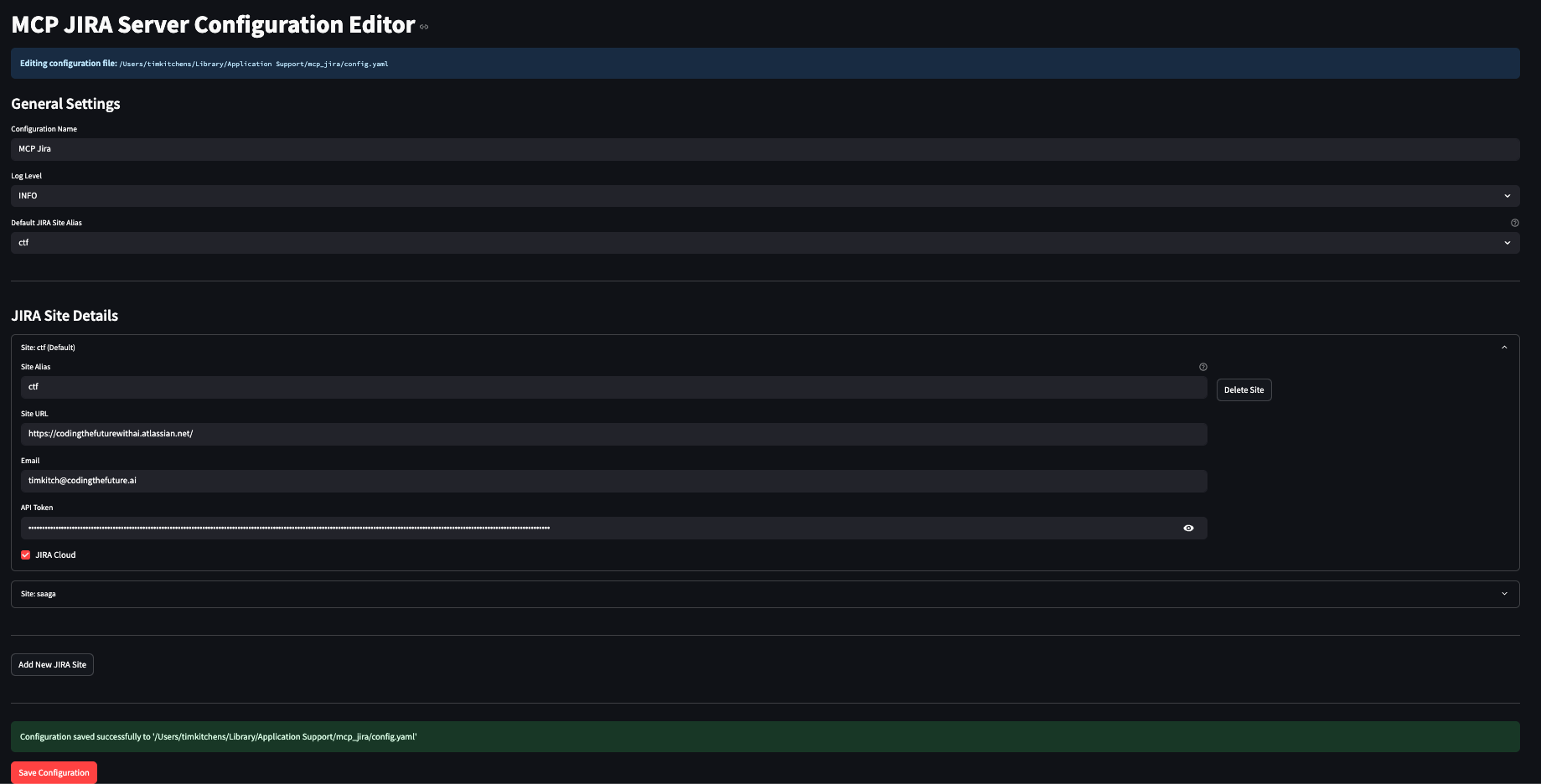
When using with Claude Code, the server is automatically started via the claude mcp add command shown in the quick setup. For manual testing or other uses:
# Run with stdio transport (default) using uvx
uvx --from ctf-mcp-jira ctf-mcp-jira-server

# Run with SSE transport
uvx --from ctf-mcp-jira ctf-mcp-jira-server --transport sse --port 3001

# Use custom configuration file
uvx --from ctf-mcp-jira ctf-mcp-jira-server --config /path/to/config.yaml

# Launch configuration UI
uvx --from ctf-mcp-jira ctf-mcp-jira-server --ui
Note: Using uvx ensures the server runs in a fresh, isolated environment each time, avoiding potential dependency conflicts.
This server exposes the following tools for interacting with JIRA:
Creates a new JIRA issue. You can specify the project, summary, a detailed description in markdown (which will be converted to JIRA's rich text format), issue type, assignee, and other custom fields.
Updates an existing JIRA issue. You can modify fields such as the summary, description (markdown supported), assignee, issue type, or other custom fields. Only the fields you provide will be changed.
Search for JIRA issues using JQL (JIRA Query Language) syntax. Specify a JQL query to find issues matching your criteria.
Parameters:
query (required): JQL query string to search for issues
site_alias (optional): Site alias for multi-site configurations
basic_only (optional, default: False): Controls the level of detail returned
When False (default): Returns comprehensive issue data including all standard fields, issue links, remote links, comments, and worklogs
When True: Returns only key, summary, and description for better performance
Returns:
In basic mode: Issue key, summary, and description
In full mode: Complete issue details including:
Standard fields (project, type, status, priority, assignee, dates)
Issue links (relationships to other JIRA issues like blocks, is blocked by, relates to, etc.)
Remote links (web links, Confluence pages, etc.)
Comments with author and timestamp
Worklogs with time tracking information
Example queries:
project = MYPROJECT
project = MYPROJECT AND status = 'In Progress'
assignee = currentUser() AND created >= -7d
Example usage:
# Get basic issue information (faster)
search_jira_issues(query="project = ABC", basic_only=True)

# Get comprehensive issue details (default)
search_jira_issues(query="project = ABC AND updated >= -7d")The server logs activity to both stderr and a rotating log file.
Log File Locations: Log files are stored in OS-specific locations by default:
macOS: ~/Library/Logs/mcp_jira/mcp_jira.log
Linux:
If running as root: /var/log/mcp_jira/mcp_jira.log
If running as non-root: ~/.local/state/mcp_jira/mcp_jira.log
Windows: %LOCALAPPDATA%\MCPJira\mcp_jira\Logs\mcp_jira.log (Note: %LOCALAPPDATA% usually resolves to C:\Users\<username>\AppData\Local)
Configuration:
Logging behavior (level, file path, rotation settings) is configured via the config.yaml file. See the example config.yaml in the "Configuration" section for details on log_level, log_file_path, log_max_bytes, and log_backup_count.
The log level can also be overridden using the MCP_JIRA_LOG_LEVEL environment variable. If set, this environment variable takes precedence over the log_level in config.yaml.
# Example: Set log level to DEBUG for detailed API communication
MCP_JIRA_LOG_LEVEL=DEBUG mcp_jira-server
Valid log levels: DEBUG, INFO (default if not specified), WARNING, ERROR, CRITICAL.
Python 3.11 or later (< 3.13)
Operating Systems: Linux, macOS, Windows
Network access to JIRA instance(s)
Valid JIRA API token(s)
See DEVELOPMENT.md for detailed development instructions, including:
Setting up the development environment
Testing with MCP Inspector
Running tests
Contributing guidelines
Architecture overview
Authentication Errors
Verify API token is correct and hasn't expired
Ensure email address matches JIRA account
Check JIRA instance URL is accessible
Field Errors
Use additional_fields for custom or optional fields
Check field availability in your JIRA configuration
Server gracefully ignores unavailable fields
Markdown Conversion Issues
Ensure fenced code blocks use proper syntax
Complex tables may need manual formatting
Check logs for conversion warnings
Connection Issues
Verify network connectivity to JIRA instance
Check firewall/proxy settings
Ensure JIRA REST API v3 is accessible
This project is licensed under the MIT License. See the LICENSE file for details.
Coding the Future with AI
GitHub: codingthefuturewithai
Creates a new JIRA issue from Markdown description.
| Name | Required | Description | Default |
|---|---|---|---|
| project | Yes | ||
| summary | Yes | ||
| description | Yes | ||
| issue_type | No | Task | |
| site_alias | No | ||
| assignee | No | ||
| additional_fields | No |
Does the description disclose side effects, auth requirements, rate limits, or destructive behavior?
With no annotations provided, the description carries full burden but only states it creates an issue from Markdown. It doesn't disclose behavioral traits like authentication needs, rate limits, error handling, or what happens on success/failure. For a mutation tool with zero annotation coverage, this is a significant gap.
Agents need to know what a tool does to the world before calling it. Descriptions should go beyond structured annotations to explain consequences.
Is the description appropriately sized, front-loaded, and free of redundancy?
The description is a single, efficient sentence with zero waste. It's appropriately sized and front-loaded, directly stating the tool's core function without unnecessary elaboration.
Shorter descriptions cost fewer tokens and are easier for agents to parse. Every sentence should earn its place.
Given the tool's complexity, does the description cover enough for an agent to succeed on first attempt?
For a 7-parameter mutation tool with no annotations and no output schema, the description is incomplete. It lacks details on behavior, parameter meanings, and expected outcomes, making it inadequate for an AI agent to use the tool effectively without additional context.
Complex tools with many parameters or behaviors need more documentation. Simple tools need less. This dimension scales expectations accordingly.
Does the description clarify parameter syntax, constraints, interactions, or defaults beyond what the schema provides?
Schema description coverage is 0%, so the description must compensate but only mentions 'Markdown description' for the 'description' parameter. It doesn't explain the meaning of other 6 parameters (e.g., 'project', 'summary', 'issue_type'), leaving most semantics undocumented.
Input schemas describe structure but not intent. Descriptions should explain non-obvious parameter relationships and valid value ranges.
Does the description clearly state what the tool does and how it differs from similar tools?
The description clearly states the action ('Creates') and resource ('new JIRA issue'), specifying it's from Markdown description. It distinguishes from sibling 'update_jira_issue' by focusing on creation rather than modification, though it doesn't explicitly contrast with 'search_jira_issues' or 'echo'.
Agents choose between tools based on descriptions. A clear purpose with a specific verb and resource helps agents select the right tool.
Does the description explain when to use this tool, when not to, or what alternatives exist?
No guidance on when to use this tool versus alternatives like 'search_jira_issues' or 'update_jira_issue'. The description implies usage for creating issues from Markdown, but lacks explicit context, prerequisites, or exclusions for tool selection.
Agents often have multiple tools that could apply. Explicit usage guidance like "use X instead of Y when Z" prevents misuse.
Echo back the input text with optional case transformation
| Name | Required | Description | Default |
|---|---|---|---|
| text | Yes | ||
| transform | No |
Does the description disclose side effects, auth requirements, rate limits, or destructive behavior?
No annotations are provided, so the description carries full burden. It states the tool echoes input text with optional transformation, but doesn't disclose behavioral traits like whether it's read-only, has side effects, rate limits, or error handling. The description is minimal and lacks necessary operational context.
Agents need to know what a tool does to the world before calling it. Descriptions should go beyond structured annotations to explain consequences.
Is the description appropriately sized, front-loaded, and free of redundancy?
The description is extremely concise (one sentence) and front-loaded with the core purpose. Every word earns its place, with no wasted text. It efficiently communicates the essential functionality without unnecessary elaboration.
Shorter descriptions cost fewer tokens and are easier for agents to parse. Every sentence should earn its place.
Given the tool's complexity, does the description cover enough for an agent to succeed on first attempt?
Given no annotations, 0% schema coverage, and no output schema, the description is incomplete. It doesn't explain what the tool returns, how transformations work, or any behavioral aspects. For a tool with two parameters and no structured documentation, this minimal description leaves significant gaps.
Complex tools with many parameters or behaviors need more documentation. Simple tools need less. This dimension scales expectations accordingly.
Does the description clarify parameter syntax, constraints, interactions, or defaults beyond what the schema provides?
Schema description coverage is 0%, so the description must compensate. It mentions 'input text' and 'optional case transformation,' which map to the two parameters (text and transform), but doesn't explain what 'transform' accepts (e.g., uppercase, lowercase) or provide examples. It adds some meaning but doesn't fully compensate for the coverage gap.
Input schemas describe structure but not intent. Descriptions should explain non-obvious parameter relationships and valid value ranges.
Does the description clearly state what the tool does and how it differs from similar tools?
The description clearly states the tool's purpose: 'Echo back the input text' specifies the verb (echo) and resource (input text), and 'with optional case transformation' adds detail about functionality. However, it doesn't distinguish from sibling tools (Jira-related tools), which is expected since this is a simple utility tool in a different domain.
Agents choose between tools based on descriptions. A clear purpose with a specific verb and resource helps agents select the right tool.
Does the description explain when to use this tool, when not to, or what alternatives exist?
The description provides no guidance on when to use this tool versus alternatives. It mentions 'optional case transformation' but doesn't specify what transformations are available or when to apply them. There's no context about prerequisites, limitations, or relationship to sibling tools.
Agents often have multiple tools that could apply. Explicit usage guidance like "use X instead of Y when Z" prevents misuse.
Search for Jira issues using JQL (Jira Query Language) syntax
| Name | Required | Description | Default |
|---|---|---|---|
| query | Yes | ||
| site_alias | No | ||
| basic_only | No |
Does the description disclose side effects, auth requirements, rate limits, or destructive behavior?
With no annotations provided, the description carries the full burden of behavioral disclosure. It mentions JQL syntax but doesn't cover critical aspects like authentication needs, rate limits, pagination behavior, or error handling. For a search tool with zero annotation coverage, this is a significant gap in transparency.
Agents need to know what a tool does to the world before calling it. Descriptions should go beyond structured annotations to explain consequences.
Is the description appropriately sized, front-loaded, and free of redundancy?
The description is a single, efficient sentence with zero waste. It's appropriately sized and front-loaded, directly stating the tool's purpose without unnecessary elaboration. Every word earns its place, making it highly concise.
Shorter descriptions cost fewer tokens and are easier for agents to parse. Every sentence should earn its place.
Given the tool's complexity, does the description cover enough for an agent to succeed on first attempt?
Given the complexity of a Jira search tool with 3 parameters, 0% schema coverage, no annotations, and no output schema, the description is incomplete. It lacks details on parameter meanings, behavioral traits, and return values, making it inadequate for the agent to use the tool effectively without additional context.
Complex tools with many parameters or behaviors need more documentation. Simple tools need less. This dimension scales expectations accordingly.
Does the description clarify parameter syntax, constraints, interactions, or defaults beyond what the schema provides?
Schema description coverage is 0%, so the description must compensate for undocumented parameters. It only mentions the 'query' parameter indirectly via JQL, leaving 'site_alias' and 'basic_only' completely unexplained. The description adds minimal value beyond the schema, failing to adequately address the coverage gap.
Input schemas describe structure but not intent. Descriptions should explain non-obvious parameter relationships and valid value ranges.
Does the description clearly state what the tool does and how it differs from similar tools?
The description clearly states the verb ('Search for') and resource ('Jira issues'), specifying the method ('using JQL syntax'). It distinguishes from siblings like create_jira_issue and update_jira_issue by focusing on retrieval rather than modification. However, it doesn't explicitly differentiate from potential other search tools, keeping it at 4 instead of 5.
Agents choose between tools based on descriptions. A clear purpose with a specific verb and resource helps agents select the right tool.
Does the description explain when to use this tool, when not to, or what alternatives exist?
The description provides no guidance on when to use this tool versus alternatives. It doesn't mention prerequisites, context for JQL usage, or comparisons to other tools like echo. This leaves the agent without explicit usage instructions, scoring a 2 for minimal guidance.
Agents often have multiple tools that could apply. Explicit usage guidance like "use X instead of Y when Z" prevents misuse.
Updates an existing JIRA issue. Only provided fields will be updated.
| Name | Required | Description | Default |
|---|---|---|---|
| issue_key | Yes | ||
| summary | No | ||
| description | No | ||
| issue_type | No | ||
| site_alias | No | ||
| assignee | No | ||
| additional_fields | No |
Does the description disclose side effects, auth requirements, rate limits, or destructive behavior?
With no annotations provided, the description carries full burden for behavioral disclosure. It mentions 'Only provided fields will be updated,' which adds useful context about partial updates. However, it lacks critical behavioral details: it doesn't specify if this is a mutation requiring permissions, what happens on success/failure, rate limits, or authentication needs. For a mutation tool with 7 parameters, this is a significant gap.
Agents need to know what a tool does to the world before calling it. Descriptions should go beyond structured annotations to explain consequences.
Is the description appropriately sized, front-loaded, and free of redundancy?
The description is extremely concise with two sentences that are front-loaded and waste-free. Every word earns its place by stating the core action and a key behavioral constraint. No unnecessary details or redundancy are present.
Shorter descriptions cost fewer tokens and are easier for agents to parse. Every sentence should earn its place.
Given the tool's complexity, does the description cover enough for an agent to succeed on first attempt?
Given high complexity (7 parameters, nested objects, no output schema, and no annotations), the description is incomplete. It lacks details on return values, error handling, permissions, and parameter meanings. For a mutation tool with significant schema complexity, this minimal description leaves too many gaps for effective agent use.
Complex tools with many parameters or behaviors need more documentation. Simple tools need less. This dimension scales expectations accordingly.
Does the description clarify parameter syntax, constraints, interactions, or defaults beyond what the schema provides?
Schema description coverage is 0%, so the description must compensate for undocumented parameters. It only vaguely references 'fields' without explaining what fields are updatable or their semantics (e.g., 'issue_key' as identifier, 'additional_fields' for custom fields). This adds minimal value beyond the schema's property names, failing to adequately address the coverage gap.
Input schemas describe structure but not intent. Descriptions should explain non-obvious parameter relationships and valid value ranges.
Does the description clearly state what the tool does and how it differs from similar tools?
The description clearly states the verb ('Updates') and resource ('an existing JIRA issue'), making the purpose immediately understandable. It distinguishes from 'create_jira_issue' by specifying 'existing' issue. However, it doesn't explicitly differentiate from potential sibling tools like 'search_jira_issues' in terms of update vs. read operations.
Agents choose between tools based on descriptions. A clear purpose with a specific verb and resource helps agents select the right tool.
Does the description explain when to use this tool, when not to, or what alternatives exist?
The description provides no guidance on when to use this tool versus alternatives like 'create_jira_issue' or 'search_jira_issues'. There's no mention of prerequisites (e.g., needing an existing issue key), appropriate contexts, or when not to use it. The only implied usage is updating fields, but no explicit alternatives or exclusions are stated.
Agents often have multiple tools that could apply. Explicit usage guidance like "use X instead of Y when Z" prevents misuse.
Recent tool additions, removals, and schema changes observed during successful MCP inspections.
create_jira_issueechosearch_jira_issuesupdate_jira_issueScored across 4 tools
Three JIRA-related tools have clear distinct purposes: create, search, and update issues. However, the 'echo' tool is completely unrelated to the JIRA domain, which creates a minor but noticeable ambiguity in the toolset's overall purpose. The JIRA tools themselves are well-differentiated.
The three JIRA tools follow a consistent verb_noun pattern with underscores (create_jira_issue, search_jira_issues, update_jira_issue). However, the 'echo' tool breaks this pattern by using a single word without the JIRA prefix, creating mixed conventions within the set. The naming is readable but not fully consistent.
With only 4 tools, the count feels thin for a JIRA server, especially given that one tool ('echo') is unrelated to JIRA. For a domain as rich as JIRA issue management, having just three core tools (create, search, update) is borderline minimal, lacking expected operations like delete, get details, or comment management.
The toolset has significant gaps for JIRA issue management. While it covers create, search, and update, it lacks essential operations like deleting issues, retrieving specific issue details, adding comments, or managing attachments. The inclusion of an unrelated 'echo' tool further dilutes the domain coverage, making the surface incomplete for typical JIRA workflows.
A comprehensive Model Context Protocol (MCP) server that enables AI assistants to interact with yo…
A Model Context Protocol server for Wix AI tools
Enable secure connectivity between Sentry issues and debugging data, and LLM clients, using a Model Context Protocol (MCP) server.
A Model Context Protocol (MCP) application for automated GitHub PR analysis and issue management.…