
image-to-base64
by code-tinker
README.md
# MCP Tools - Image to Base64 Server
A Model Context Protocol (MCP) based image to Base64 server designed for Cursor to actually "see" and process images.
## 🌟 Features
- 🖼️ **Image to Base64**: Convert local images or remote image URLs to Base64 format
- 🌐 **Remote URL Support**: Automatically download and process web images
- 📋 **Multi-format Support**: Support PNG, JPEG, GIF, WebP, SVG and other image formats
- ⚡ **High Performance**: Use Sharp library for efficient image processing and optimization
- 🔗 **MCP Protocol**: Standardized AI tool interface for seamless integration with AI assistants
- 🎯 **Auto Optimization**: Intelligently convert to JPEG format to reduce file size
- 📦 **NPX Support**: Support running directly through npx without installation
## 📦 Installation and Usage
### Using with Cursor
Add to your Cursor MCP configuration file:
```json
{
"mcpServers": {
"image-to-base64": {
"command": "npx",
"args": ["@code-tinker/mcp-image-to-base64"]
}
}
}
```
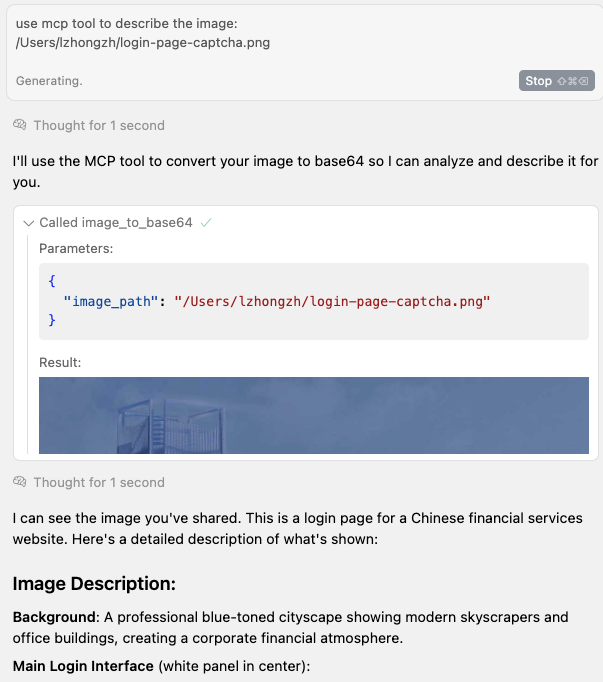
### use case
TDQS
A4.4/5.0
Scored across 1 tool
Disambiguation5/5
Only one tool exists, so there is no possible confusion with other tools. The tool's purpose is clear and unambiguous.
Naming Consistency5/5
The single tool uses a descriptive snake_case name that aligns with the server's purpose, and there are no inconsistent naming patterns to compare.
Tool Count5/5
For a single-purpose utility server, one tool is well-scoped and appropriate. Additional tools would be unnecessary or out of scope.
Completeness5/5
The tool fully covers the server's stated purpose: converting images to base64 from both local paths and remote URLs. There are no missing operations within this narrow domain.
Maintenance
ActivityInactive
ResponsivenessNo issues