
mcp-gitlab-workflow
# mcp-gitlab-workflow
[English](./README.md) | [简体中文](./README.zh-CN.md)
`mcp-gitlab-workflow` is an MCP server for issue-driven GitLab development.
It can take a requirement or an existing GitLab issue and drive a standardized delivery flow: requirement analysis, issue creation, branching, coding, merge request creation, and issue updates. It also provides a set of atomic GitLab API tools for custom orchestration and fine-grained control.
## 1. Core Capabilities
- `workflow_*`: higher-level tools that package common requirement-to-delivery flows into a single tool call
- `gitlab_*`: atomic GitLab API tools for custom orchestration and fine-grained control
Target projects for issues and code delivery are configured with `WORKFLOW_ISSUE_PROJECT_ID` and `WORKFLOW_CODE_PROJECT_ID`. See the environment variable section below for the full configuration matrix.
### Workflow Tools
- `workflow_requirement_to_issue`: analyze a requirement and create a GitLab issue
- `workflow_review_mr_post_comment`: review a target merge request and post a review comment
- `workflow_issue_to_delivery`: start from an existing issue and complete branch -> code change -> MR -> issue comment -> issue log
- `workflow_requirement_to_delivery`: run the full end-to-end flow from a requirement
### Atomic GitLab Tools
Issue tools fall back to `WORKFLOW_ISSUE_PROJECT_ID` by default, while code and merge request tools fall back to `WORKFLOW_CODE_PROJECT_ID`.
- Users and labels: `gitlab_get_current_user`, `gitlab_list_labels`, `gitlab_create_label`, `gitlab_update_label`, `gitlab_delete_label`
- Issues: `gitlab_create_issue`, `gitlab_get_issue`, `gitlab_get_issue_notes`, `gitlab_add_issue_comment`, `gitlab_get_issue_images`
- Repository: `gitlab_create_branch`, `gitlab_get_file`, `gitlab_commit_files`, `gitlab_upload_project_file`
- Merge requests: `gitlab_get_merge_request`, `gitlab_get_mr_notes`, `gitlab_create_merge_request`, `gitlab_create_mr_note`, `gitlab_get_mr_changes`, `gitlab_approve_mr`, `gitlab_unapprove_mr`
## 2. Example
Using `workflow_requirement_to_delivery` as an example, it is best to explicitly name the tool in your prompt or wrap it in a higher-level custom instruction / skill so the LLM can reliably choose the intended workflow.
### Input
`Use workflow_requirement_to_delivery to add a forum interaction feature`
### Result
The workflow can automatically complete the flow below:
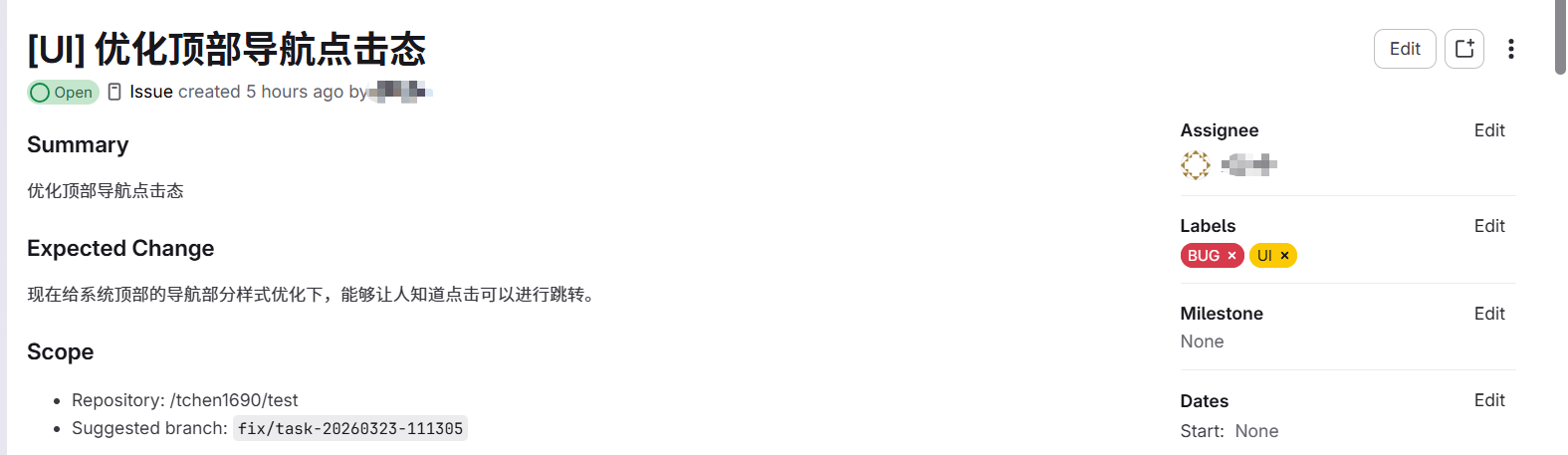
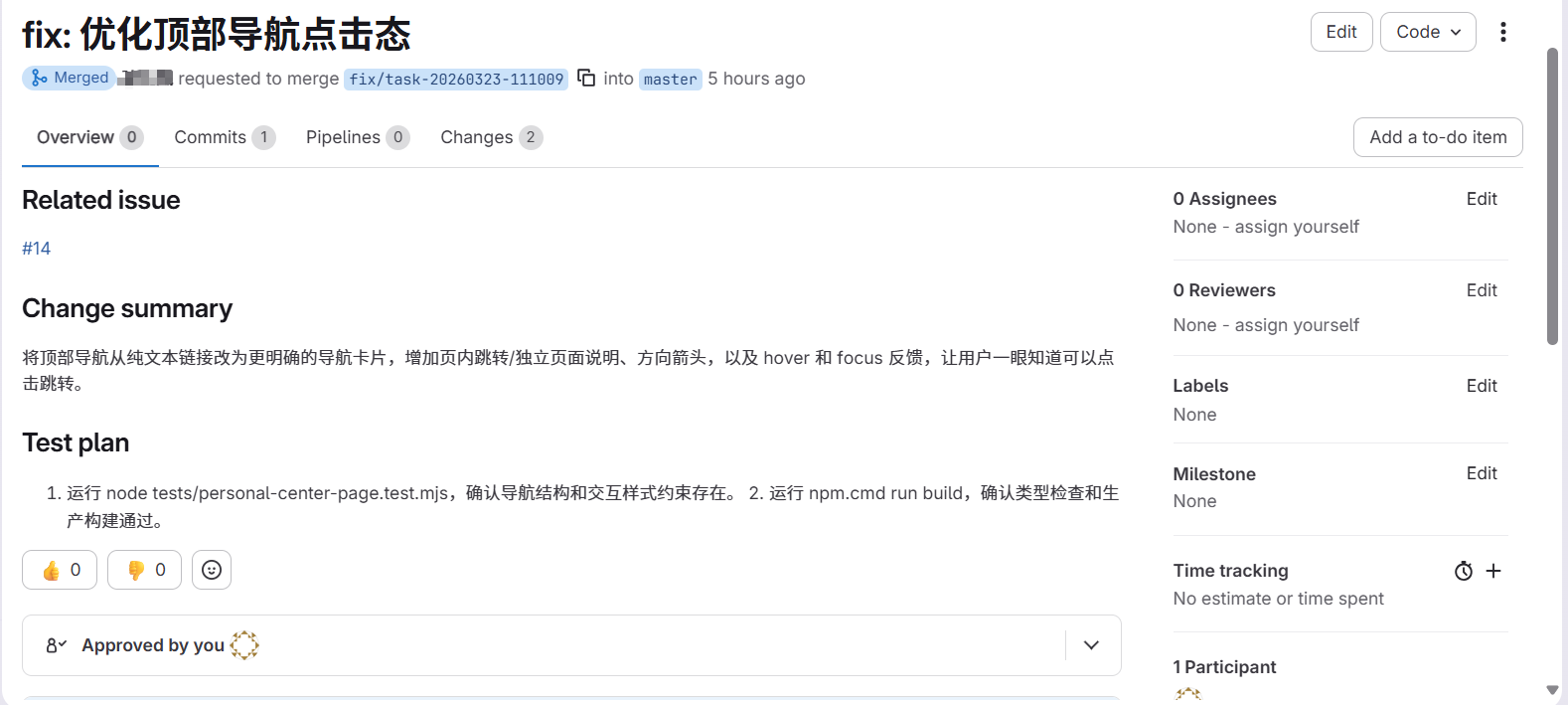
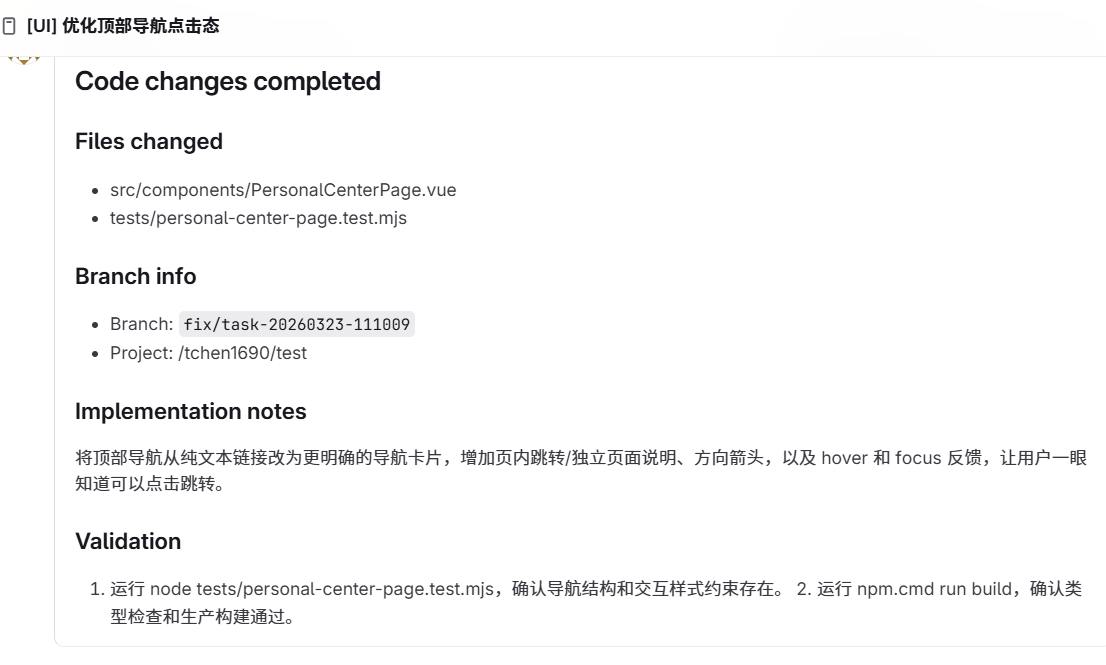
`requirement analysis -> issue creation -> branch -> code change -> MR -> issue update`
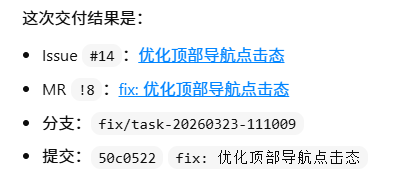
#### (1) Issue creation
#### (2) Code changes and MR submission based on the issue
#### (3) Issue comment
#### (4) Local `issue-log.md`
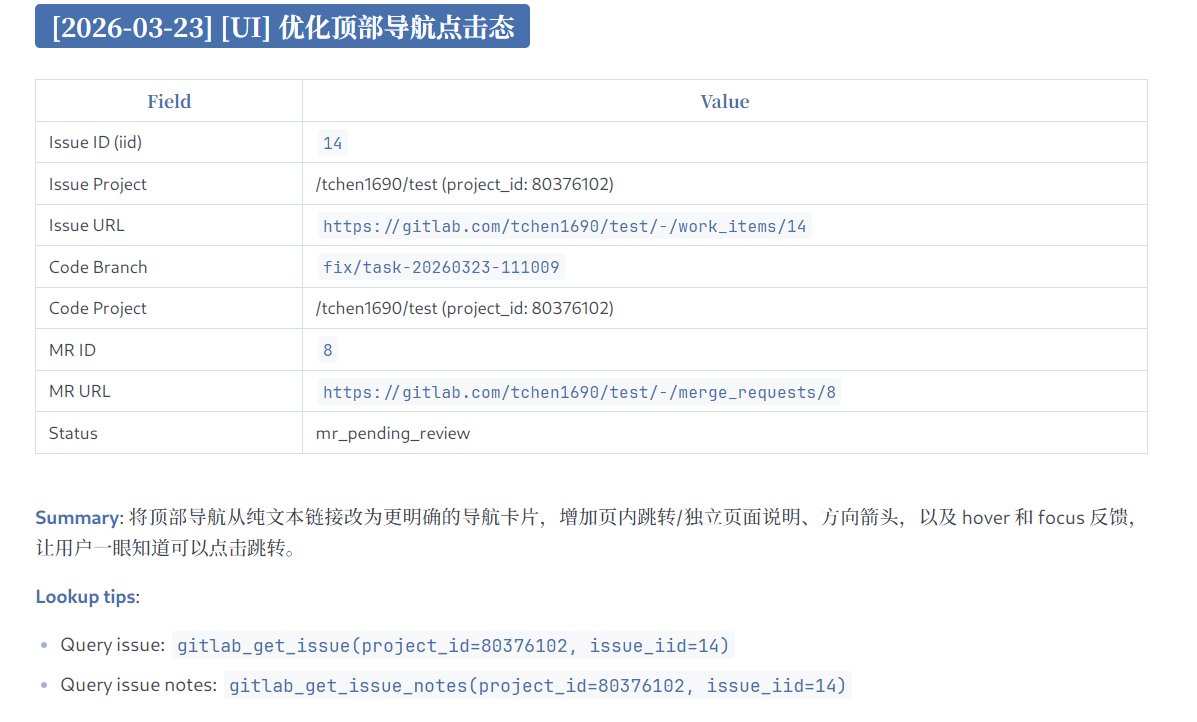
With this workflow, a developer can hand a requirement or an assigned issue directly to an agent and let it complete the full development flow in an issue-driven way.
## 3. Configuration
### 3.1 NPX
```json
{
"mcpServers": {
"gitlab-workflow": {
"command": "npx",
"args": ["-y", "@chntif/mcp-gitlab-workflow"],
"env": {
"GITLAB_TOKEN": "YOUR_TOKEN",
"GITLAB_API_BASE_URL": "https://gitlab.com/api/v4",
"WORKFLOW_ISSUE_PROJECT_ID": "82346102",
"WORKFLOW_ISSUE_PROJECT_PATH": "tchen1690/test",
"WORKFLOW_CODE_PROJECT_ID": "82346102",
"WORKFLOW_CODE_PROJECT_PATH": "tchen1690/test",
"WORKFLOW_BASE_BRANCH": "develop",
"WORKFLOW_TARGET_BRANCH": "develop",
"WORKFLOW_LOCAL_REMOTE_NAME": "origin"
}
}
}
}
```
### 3.2 Codex
#### (1) Add from the terminal
```bash
codex mcp add gitlab-workflow \
--env GITLAB_TOKEN=YOUR_TOKEN \
--env GITLAB_API_BASE_URL=https://gitlab.com/api/v4 \
--env WORKFLOW_ISSUE_PROJECT_ID=80376102 \
--env WORKFLOW_ISSUE_PROJECT_PATH=tchen1690/test \
--env WORKFLOW_CODE_PROJECT_ID=80376102 \
--env WORKFLOW_CODE_PROJECT_PATH=tchen1690/test \
--env WORKFLOW_BASE_BRANCH=develop \
--env WORKFLOW_TARGET_BRANCH=develop \
--env WORKFLOW_LOCAL_REMOTE_NAME=origin \
-- npx -y @chntif/mcp-gitlab-workflow
```
#### (2) Or add it to `config.toml`
```toml
[mcp_servers.gitlab-workflow]
command = "npx"
args = ["-y", "@chntif/mcp-gitlab-workflow"]
[mcp_servers.gitlab-workflow.env]
GITLAB_TOKEN = "YOUR_TOKEN"
GITLAB_API_BASE_URL = "https://gitlab.com/api/v4"
WORKFLOW_ISSUE_PROJECT_ID = "80376102"
WORKFLOW_ISSUE_PROJECT_PATH = "tchen1690/test"
WORKFLOW_CODE_PROJECT_ID = "80376102"
WORKFLOW_CODE_PROJECT_PATH = "tchen1690/test"
WORKFLOW_BASE_BRANCH = "develop"
WORKFLOW_TARGET_BRANCH = "develop"
WORKFLOW_LOCAL_REMOTE_NAME = "origin"
```
### 3.3 Claude Code
```bash
claude mcp add gitlab-workflow \
-e GITLAB_TOKEN=YOUR_TOKEN \
-e GITLAB_API_BASE_URL=https://gitlab.com/api/v4 \
-e WORKFLOW_ISSUE_PROJECT_ID=80376102 \
-e WORKFLOW_ISSUE_PROJECT_PATH=tchen1690/test \
-e WORKFLOW_CODE_PROJECT_ID=80376102 \
-e WORKFLOW_CODE_PROJECT_PATH=tchen1690/test \
-e WORKFLOW_BASE_BRANCH=develop \
-e WORKFLOW_TARGET_BRANCH=develop \
-e WORKFLOW_LOCAL_REMOTE_NAME=origin \
-- npx -y @chntif/mcp-gitlab-workflow
```
You can also directly write the configuration in 3.1 into Claude Code's configuration file.
### 3.4 Local startup
```json
{
"mcpServers": {
"gitlab-workflow": {
"command": "node",
"args": ["/gitlab-workflow-server/dist/src/server.js"],
"env": {
"GITLAB_TOKEN": "YOUR_TOKEN",
"GITLAB_API_BASE_URL": "https://gitlab.com/api/v4",
"WORKFLOW_ISSUE_PROJECT_ID": "82346102",
"WORKFLOW_ISSUE_PROJECT_PATH": "tchen1690/test",
"WORKFLOW_CODE_PROJECT_ID": "82346102",
"WORKFLOW_CODE_PROJECT_PATH": "tchen1690/test",
"WORKFLOW_BASE_BRANCH": "develop",
"WORKFLOW_TARGET_BRANCH": "develop",
"WORKFLOW_LOCAL_REMOTE_NAME": "origin"
}
}
}
}
```
### 3.5 About `uv/uvx`
This project is a Node.js package. `npx` is the recommended way to run it.
## 4. Environment Variables
Parameter resolution order:
`tool args -> user-provided env -> built-in defaults`
If the user does not explicitly pass a parameter such as `project_id`, the tool can use runtime configuration from environment variables. Some variables also have built-in defaults.
| Environment Variable | Purpose | Default | Required |
| -------------------------------- | --------------------------------------------------------------------------------- | --------------------------- | -------- |
| `GITLAB_TOKEN` | GitLab API access token used by the server and all GitLab operations | None | Yes |
| `GITLAB_API_BASE_URL` | Base URL for the GitLab API | `https://gitlab.com/api/v4` | No |
| `WORKFLOW_ISSUE_PROJECT_ID` | Default target project ID for issue-related tools | None | No |
| `WORKFLOW_ISSUE_PROJECT_PATH` | Default issue project path used in templates and references | None | No |
| `WORKFLOW_CODE_PROJECT_ID` | Default target project ID for repository, branch, commit, and MR tools | None | No |
| `WORKFLOW_CODE_PROJECT_PATH` | Default code project path used in templates, logs, and output | None | No |
| `WORKFLOW_BASE_BRANCH` | Default base branch used before creating a new delivery branch | `develop` | No |
| `WORKFLOW_TARGET_BRANCH` | Default merge request target branch | `develop` | No |
| `WORKFLOW_LOCAL_REMOTE_NAME` | Default git remote used by local git workflows | `origin` | No |
| `WORKFLOW_LABEL` | Default issue title prefix and fallback label | None | No |
| `WORKFLOW_ASSIGNEE_USERNAME` | Default assignee username for issues and merge requests | None | No |
| `WORKFLOW_ISSUE_LOG_PATH` | Path of the local issue log file | `issue-log.md` | No |
| `WORKFLOW_UPDATE_ISSUE_LOG` | Whether delivery workflows update the local issue log by default | `true` | No |
| `WORKFLOW_DELIVERY_METHOD` | Default delivery mode, supports `local_git` and `remote_api` | `local_git` | No |
| `WORKFLOW_CHECKOUT_LOCAL_BRANCH` | Whether `remote_api` delivery should sync and checkout the created branch locally | `false` | No |
| `WORKFLOW_LOCK_ISSUE_PROJECT_ID` | Restrict issue operations to a fixed issue project ID | None | No |
| `WORKFLOW_LOCK_CODE_PROJECT_ID` | Restrict code and MR operations to a fixed code project ID | None | No |
### Recommended configuration
- `GITLAB_TOKEN`, `GITLAB_API_BASE_URL`: required to connect to GitLab
- `WORKFLOW_ISSUE_PROJECT_ID`, `WORKFLOW_CODE_PROJECT_ID`: define the issue project and code project, and can point to the same project
- `WORKFLOW_ISSUE_PROJECT_PATH`, `WORKFLOW_CODE_PROJECT_PATH`: improve rendered references and display output, but are optional
- `WORKFLOW_BASE_BRANCH`, `WORKFLOW_TARGET_BRANCH`: should follow your team branching strategy
- `WORKFLOW_LOCAL_REMOTE_NAME`: usually `origin`
If a specific operation should target values different from your default environment configuration, passing explicit tool arguments will override the configured values.
## 5. License
MIT
TDQS
Scored across 28 tools
Most tools have distinct purposes targeting specific GitLab resources (issues, MRs, labels, files). A few potential overlaps exist (e.g., gitlab_add_issue_comment vs gitlab_create_mr_note) but they apply to different resources, and descriptions clarify the difference.
Tools use two prefixes ('gitlab_' and 'workflow_'), creating a split. Within each prefix, naming follows verb_noun pattern, but verbs are inconsistent (e.g., 'add' vs 'create', 'get' vs 'list'). Overall pattern is present but not uniform.
28 tools cover both low-level GitLab API actions and high-level workflow orchestrations, which is appropriate for a full-featured workflow server. While on the higher side, each tool serves a distinct role.
Core operations for issues, MRs, labels, and files are covered, but notable gaps exist: no tool to list issues, no update issue tool, and no delete for issues/MRs. The high-level workflows partially compensate but leave some CRUD incomplete.