Gmail MCP Server
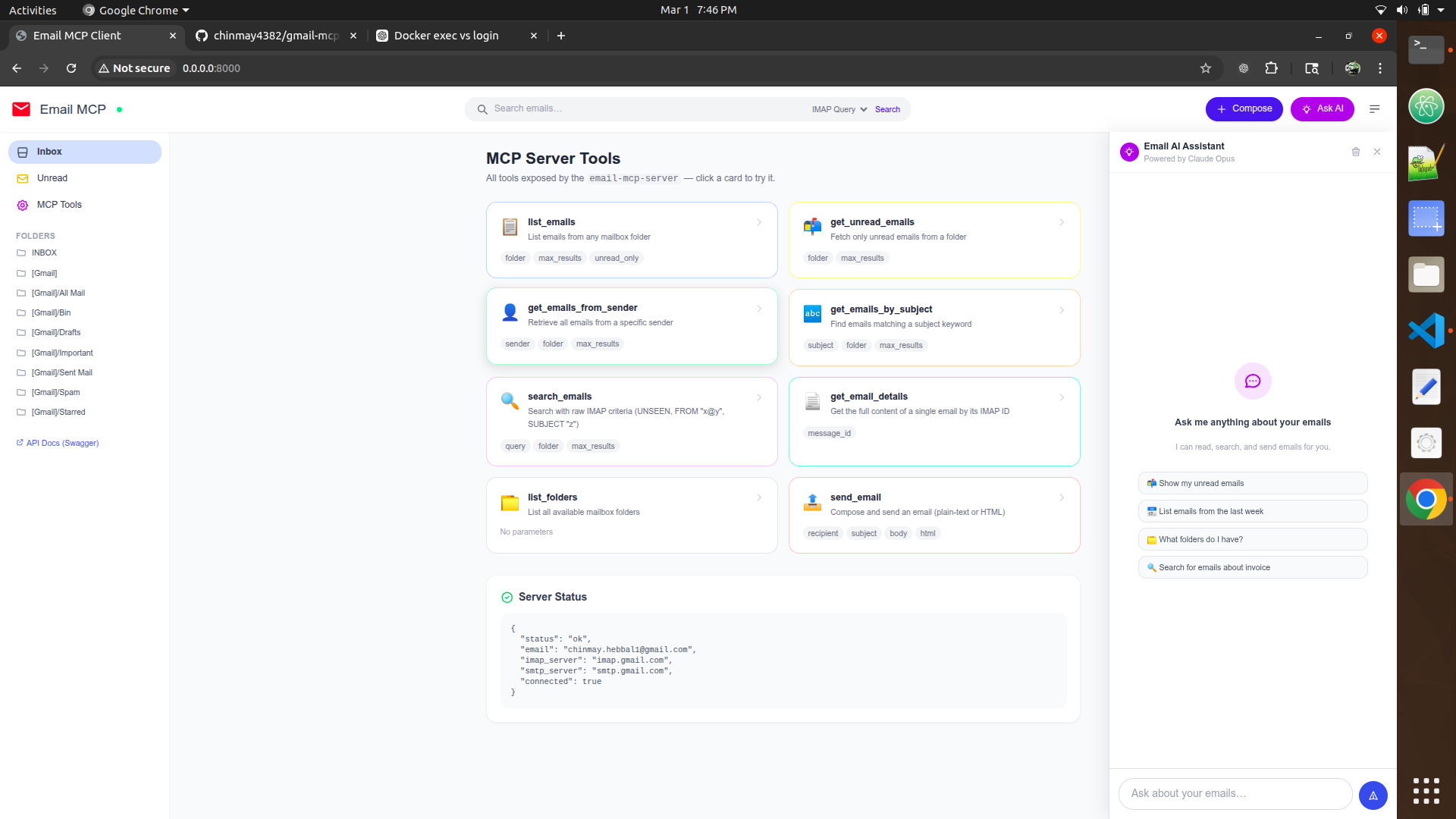
An MCP (Model Context Protocol) server for reading and sending Gmail via IMAP/SMTP. Exposes Gmail operations as MCP tools usable by Claude and other AI models, and includes a web UI for managing your inbox directly in the browser.
Features
List Emails: Retrieve emails from any Gmail folder
Get Unread Emails: Fetch only unread messages
Search Emails: Search with IMAP search criteria (by sender, date, subject, etc.)
Get Emails from Sender: Retrieve all emails from a specific sender
Get Emails by Subject: Search by subject text
Send Emails: Compose and send emails via SMTP
List Folders: View all available Gmail folders
Get Email Details: Fetch complete details of a specific email
Related MCP server: Email MCP Server
Prerequisites
Quick Start
1. Enable Gmail IMAP and generate an App Password
Enable 2-Factor Authentication: https://myaccount.google.com/security
Generate an App Password for Mail: https://myaccount.google.com/apppasswords
Note your Gmail address and the generated app password — you'll need them below
2. Clone and configure
git clone https://github.com/chinmay4382/gmail-mcp-server.git
cd gmail-mcp-server
cp .env.example .env
Edit .env with your credentials:
EMAIL_ADDRESS=your_email@gmail.com
EMAIL_PASSWORD=your_app_password
IMAP_SERVER=imap.gmail.com
SMTP_SERVER=smtp.gmail.com
ANTHROPIC_API_KEY=your_anthropic_api_key
3. Run with Docker
Option A — Web UI (browser app):
docker compose up email-ui
Then open http://localhost:8000 in your browser.
Option B — MCP server (for Claude Desktop / MCP clients):
docker compose up email-mcp-server
Available MCP Tools
list_emails
List emails from a folder.
Parameters:
max_results (int, default: 10): Number of emails to retrieve
unread_only (bool, default: false): Only return unread emails
folder (string, default: "INBOX"): Gmail folder name
get_unread_emails
Get unread emails from a folder.
Parameters:
max_results (int, default: 10): Number of unread emails to retrieve
folder (string, default: "INBOX"): Gmail folder name
get_emails_from_sender
Get emails from a specific sender.
Parameters:
sender (string): Email address of the sender
max_results (int, default: 10): Number of emails to retrieve
folder (string, default: "INBOX"): Gmail folder name
search_emails
Search emails using IMAP search criteria.
Parameters:
query (string): IMAP search query
max_results (int, default: 10): Maximum results to return
folder (string, default: "INBOX"): Gmail folder to search
Query examples:
UNSEEN — Unread messages
FROM "user@example.com" — Emails from a specific sender
SUBJECT "invoice" — Emails with "invoice" in subject
FLAGGED — Starred emails
SINCE "1-Jan-2024" — Emails since a date
UNSEEN FROM "user@example.com" — Combine criteria
get_emails_by_subject
Get emails by subject text.
Parameters:
subject (string): Subject text to search for
max_results (int, default: 10): Maximum emails to retrieve
folder (string, default: "INBOX"): Gmail folder to search
send_email
Send an email.
Parameters:
recipient (string): Recipient email address
subject (string): Email subject
body (string): Email body text
html (bool, default: false): If true, body is treated as HTML
get_email_details
Get full details of a specific email.
Parameters:
list_folders
List all available Gmail folders.
Configuration
Variable | Required | Default | Description |
EMAIL_ADDRESS
| Yes | — | Your Gmail address |
EMAIL_PASSWORD
| Yes | — | Gmail App Password |
IMAP_SERVER
| No | imap.gmail.com
| IMAP server |
SMTP_SERVER
| No | smtp.gmail.com
| SMTP server |
ANTHROPIC_API_KEY
| Yes (Web UI) | — | API key for AI chat |
Troubleshooting
"Authentication failed"
Make sure you're using a Gmail App Password, not your regular Gmail password
Confirm IMAP is enabled in Gmail Settings → See all settings → Forwarding and POP/IMAP
"Connection refused"
"No module named 'mcp'"
File Structure
gmail-mcp-server/
├── gmail_mcp_server.py   # MCP server entry point
├── gmail_client.py       # IMAP/SMTP client wrapper
├── api_server.py         # FastAPI REST server for the web UI
├── ui/
│   ├── index.html        # Web UI markup
│   ├── app.js            # Web UI JavaScript
│   └── styles.css        # Web UI styles
├── Dockerfile            # Docker build configuration
├── docker-compose.yml    # Docker Compose services
├── requirements.txt      # Python dependencies
├── .env.example          # Example environment variables
└── mcp-config.json       # MCP configuration example
Security Notes
Never commit your .env file — it contains live credentials
Always use a Gmail App Password, not your account password
The App Password grants access only to IMAP/SMTP, not your full Google account
License
MIT License


