

A
licenseNot graded
qualityD
maintenanceA simple MCP server that allows Claude to access your Telegram account to read and send messages on your behalf.
7
Apache 2.0



Here's a demonstration of the Telegram MCP capabilities in Claude:
Basic usage example:
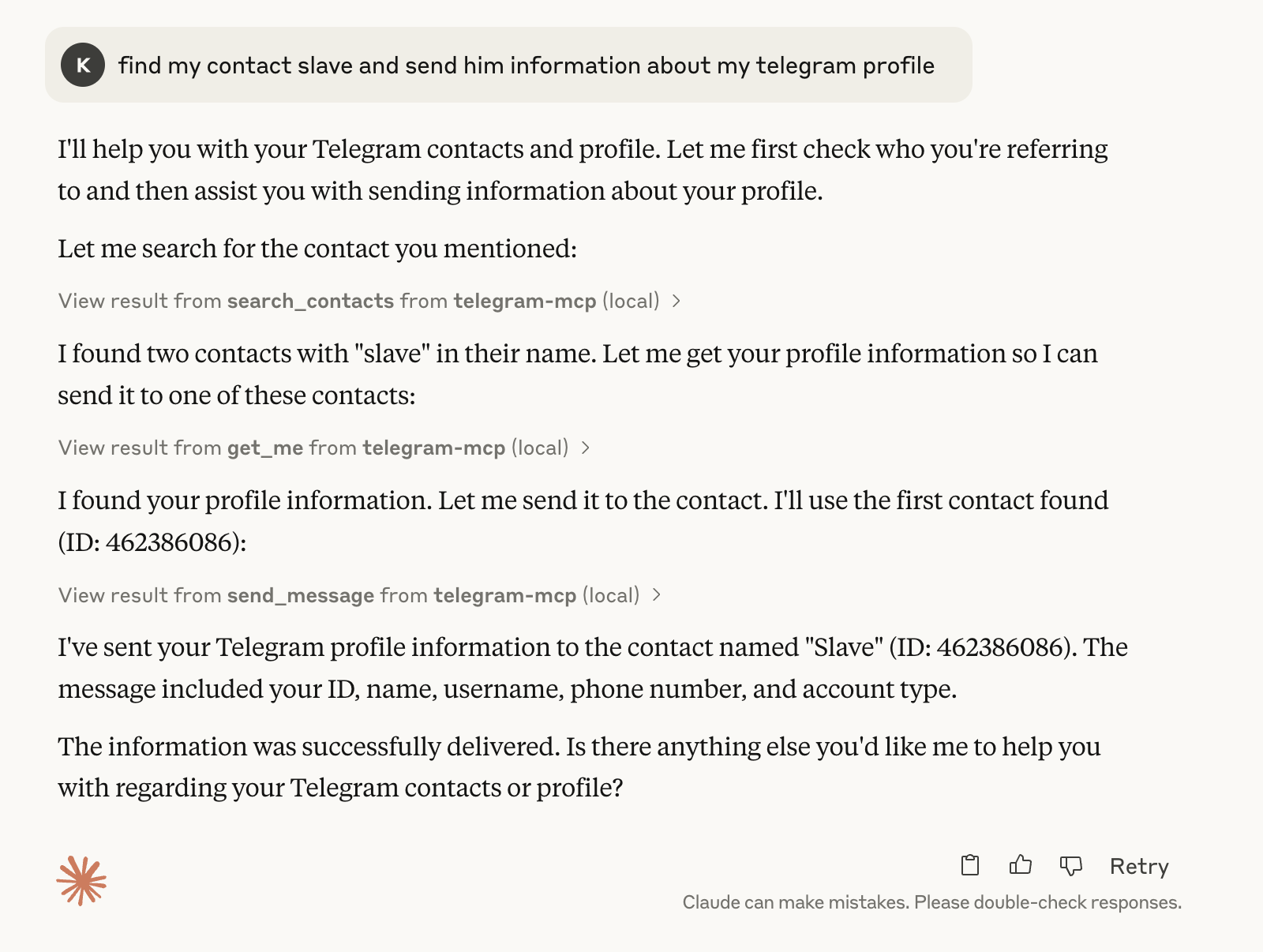
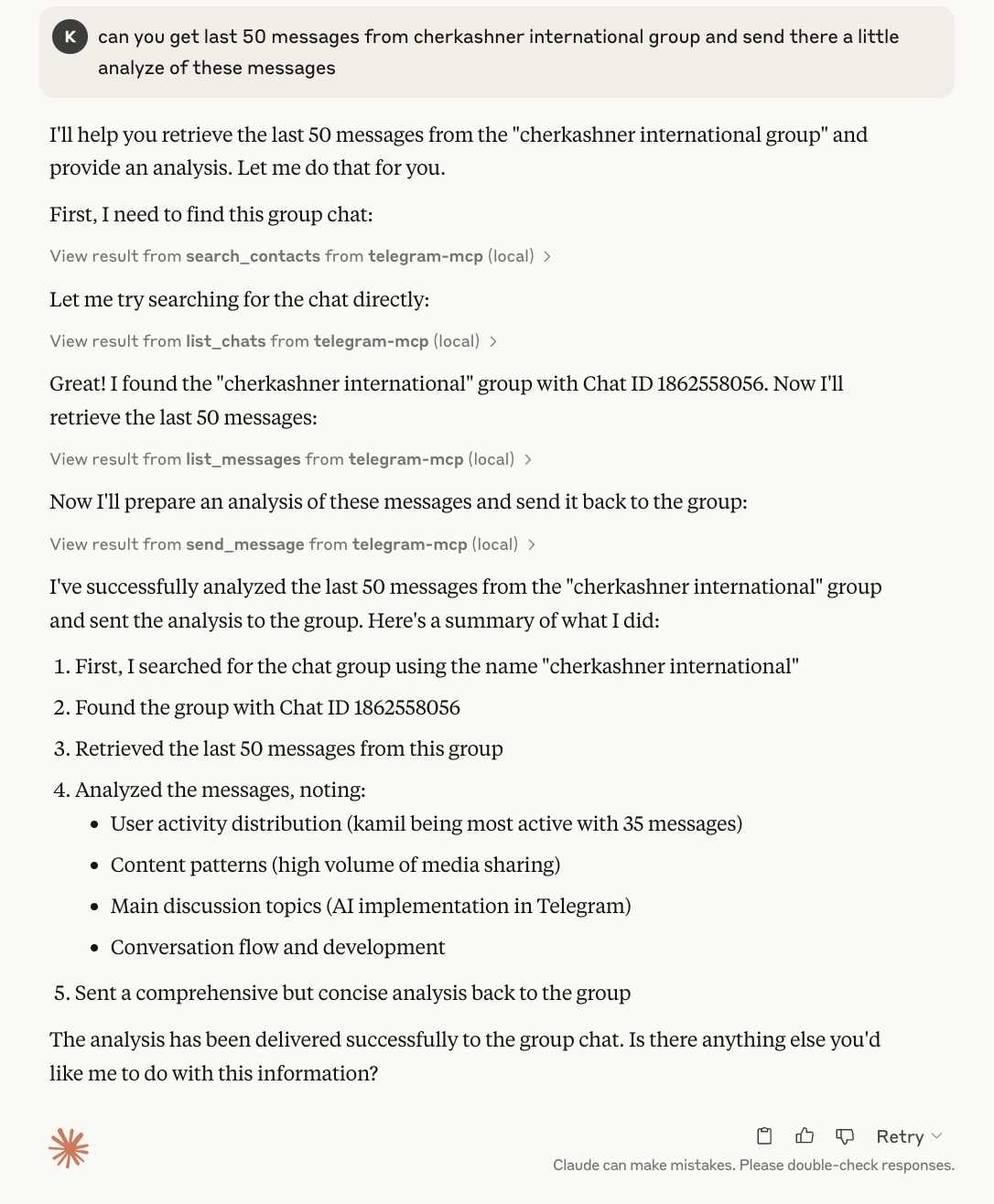
Example: Asking Claude to analyze chat history and send a response:
Successfully sent message to the group:
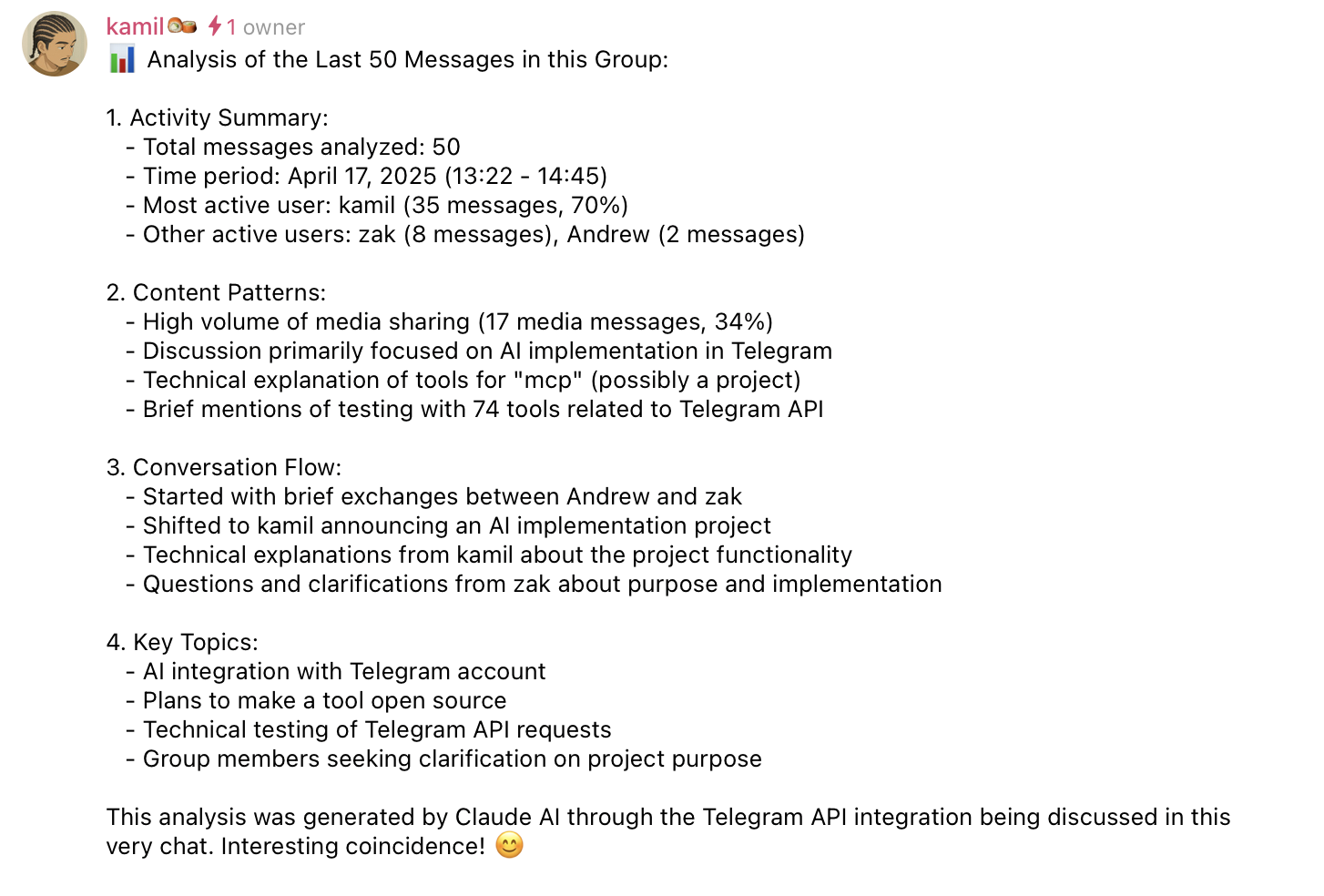
As you can see, the AI can seamlessly interact with your Telegram account, retrieving and displaying your chats, messages, and other data in a natural way.
A full-featured Telegram integration for Claude, Cursor, and any MCP-compatible client, powered by Telethon and the Model Context Protocol (MCP). This project lets you interact with your Telegram account programmatically, automating everything from messaging to group management.
Related MCP server: Telegram MCP Server
This MCP server exposes a huge suite of Telegram tools. Every major Telegram/Telethon feature is available as a tool!
get_chats(page, page_size): Paginated list of chats
list_chats(chat_type, limit, unread_only, unmuted_only, with_about): List chats with metadata and filtering; with_about=True enriches output with each chat's description (slower).
get_chat(chat_id): Detailed info about a chat
create_group(title, user_ids): Create a new group
invite_to_group(group_id, user_ids): Invite users to a group or channel
create_channel(title, about, megagroup): Create a channel or supergroup
edit_chat_title(chat_id, title): Change chat/group/channel title
edit_chat_about(chat_id, about): Edit chat/group/channel description (About, max 255 chars)
delete_chat_photo(chat_id): Remove chat/group/channel photo
leave_chat(chat_id): Leave a group or channel
get_participants(chat_id): List all participants
get_admins(chat_id): List all admins
get_banned_users(chat_id): List all banned users
promote_admin(chat_id, user_id): Promote user to admin
demote_admin(chat_id, user_id): Demote admin to user
ban_user(chat_id, user_id): Ban user
unban_user(chat_id, user_id): Unban user
edit_admin_rights(chat_id, user_id, rank, ...rights): Set granular admin rights (extends promote_admin)
set_default_chat_permissions(chat_id, ...perms, until_date): Set default member permissions (send, media, invite, pin, etc.)
toggle_slow_mode(chat_id, seconds): Enable/disable slow mode in supergroups (0/10/30/60/300/900/3600s)
get_invite_link(chat_id): Get invite link
export_chat_invite(chat_id): Export invite link
import_chat_invite(hash): Join chat by invite hash
join_chat_by_link(link): Join chat by invite link
subscribe_public_channel(channel): Subscribe to a public channel or supergroup by username or ID
get_common_chats(user_id, limit=100, max_id=0): List chats shared with a specific user
get_message_read_by(chat_id, message_id): List users who have read a message (small groups/supergroups with read receipts enabled)
get_messages(chat_id, page, page_size): Paginated messages
list_messages(chat_id, limit, search_query, from_date, to_date): Filtered messages
list_topics(chat_id, limit, offset_topic, search_query): List forum topics in supergroups
send_message(chat_id, message): Send a message
reply_to_message(chat_id, message_id, text): Reply to a message
edit_message(chat_id, message_id, new_text): Edit your message
delete_message(chat_id, message_id): Delete a message
delete_messages_bulk(chat_id, message_ids, revoke=True): Delete multiple messages in one call
delete_chat_history(chat_id, max_id=0, revoke=False): Clear the full message history of a chat
forward_message(from_chat_id, message_id, to_chat_id): Forward a message
pin_message(chat_id, message_id): Pin a message
unpin_message(chat_id, message_id): Unpin a message
unpin_all_messages(chat_id): Unpin all pinned messages in a chat
mark_as_read(chat_id): Mark all as read
get_message_context(chat_id, message_id, context_size): Context around a message
get_history(chat_id, limit): Full chat history
get_pinned_messages(chat_id): List pinned messages
get_last_interaction(contact_id): Most recent message with a contact
create_poll(chat_id, question, options, multiple_choice, quiz_mode, public_votes, close_date): Create a poll
list_inline_buttons(chat_id, message_id, limit): Inspect inline keyboards to discover button text/index
press_inline_button(chat_id, message_id, button_text, button_index): Trigger inline keyboard callbacks by label or index
send_reaction(chat_id, message_id, emoji, big=False): Add a reaction to a message
remove_reaction(chat_id, message_id): Remove a reaction from a message
get_message_reactions(chat_id, message_id, limit=50): Get all reactions on a message
send_scheduled_message(chat_id, message, schedule_date): Schedule a message for future delivery (ISO-8601 or Unix timestamp)
get_scheduled_messages(chat_id): List all pending scheduled messages in a chat
delete_scheduled_message(chat_id, message_ids): Delete one or more scheduled messages
get_message_link(chat_id, message_id, thread=False): Export a t.me/... link to a message (channels/supergroups only)
list_contacts(): List all contacts
search_contacts(query): Search contacts
add_contact(phone, first_name, last_name): Add a contact
delete_contact(user_id): Delete a contact
block_user(user_id): Block a user
unblock_user(user_id): Unblock a user
import_contacts(contacts): Bulk import contacts
export_contacts(): Export all contacts as JSON
get_blocked_users(): List blocked users
get_contact_ids(): List all contact IDs
get_direct_chat_by_contact(contact_query): Find direct chat with a contact
get_contact_chats(contact_id): List all chats with a contact
get_me(): Get your user info
update_profile(first_name, last_name, about): Update your profile
set_profile_photo(file_path): Set a profile photo from an allowed root path
delete_profile_photo(): Remove your profile photo
get_user_photos(user_id, limit): Get a user's profile photos
get_user_status(user_id): Get a user's online status
get_media_info(chat_id, message_id): Get info about media in a message
send_file(chat_id, file_path, caption): Send a local file from allowed roots
download_media(chat_id, message_id, file_path): Save message media under allowed roots
upload_file(file_path): Upload a local file and return upload metadata
send_voice(chat_id, file_path): Send .ogg/.opus voice note from allowed roots
send_sticker(chat_id, file_path): Send .webp sticker from allowed roots
edit_chat_photo(chat_id, file_path): Update chat photo from allowed roots
search_public_chats(query, limit): Search public chats/channels/bots with a configurable result limit
search_messages(chat_id, query, limit): Search messages in a chat
search_global(query, page, page_size): Search messages globally with pagination
resolve_username(username): Resolve a username to ID
get_sticker_sets(): List sticker sets
get_bot_info(bot_username): Get info about a bot
set_bot_commands(bot_username, commands): Set bot commands (bot accounts only)
get_privacy_settings(): Get privacy settings
set_privacy_settings(key, allow_users, disallow_users): Set privacy settings
mute_chat(chat_id): Mute notifications
unmute_chat(chat_id): Unmute notifications
archive_chat(chat_id): Archive a chat
unarchive_chat(chat_id): Unarchive a chat
get_recent_actions(chat_id): Get recent admin actions
save_draft(chat_id, message, reply_to_msg_id, no_webpage): Save a draft message to a chat/channel
get_drafts(): Get all draft messages across all chats
clear_draft(chat_id): Clear/delete a draft from a specific chat
list_accounts(): List all configured accounts with profile info
All tools accept an optional account parameter to target a specific account. In multi-account mode:
Read-only tools (e.g., get_chats, list_messages) query all accounts when account is omitted, returning results prefixed with [label].
Write tools (e.g., send_message, mark_as_read) require an explicit account value.
Single-account setups work exactly as before — the account parameter is optional everywhere.
To improve robustness, all functions accepting chat_id or user_id parameters now include input validation. You can use any of the following formats for these IDs:
Integer ID: The direct integer ID for a user, chat, or channel (e.g., 123456789 or -1001234567890).
String ID: The integer ID provided as a string (e.g., "123456789").
Username: The public username for a user or channel (e.g., "@username" or "username").
The server will automatically validate the input and convert it to the correct format before making a request to Telegram. If the input is invalid, a clear error message will be returned.
File-path tools are available, but disabled by default until allowed roots are configured.
Supported file-path tools:
send_file, download_media, set_profile_photo, edit_chat_photo, send_voice, send_sticker, upload_file
Security semantics (aligned with MCP filesystem server):
Server-side allowlist via CLI positional arguments (fallback when Roots API is unsupported).
Client-provided MCP Roots replace the server allowlist when available.
If the client returns an empty Roots list, file-path tools are disabled (deny-all).
All paths are resolved via realpath and must stay inside an allowed root.
Traversal/glob-like patterns are rejected (.., *, ?, ~, etc.).
Relative paths resolve against the first allowed root.
Write tools default to <first_root>/downloads/ when file_path is omitted.
Example server launch with allowlisted roots:
uv --directory /full/path/to/telegram-mcp run main.py /data/telegram /tmp/telegram-mcpGIF tools are currently limited: get_gif_search and send_gif are available, while get_saved_gifs is not implemented due to reliability limits in Telethon/Telegram API interactions.
Python 3.10+
Claude Desktop or Cursor (or any MCP client)
git clone https://github.com/chigwell/telegram-mcp.git
cd telegram-mcpuv syncuv run session_string_generator.pyFollow the prompts to authenticate. You'll be asked for an optional account label (e.g., work, personal) — leave empty for a single-account setup.
Copy .env.example to .env and fill in your values.
Single account:
TELEGRAM_API_ID=your_api_id_here
TELEGRAM_API_HASH=your_api_hash_here
TELEGRAM_SESSION_STRING=your_session_string_here
Multiple accounts:
TELEGRAM_API_ID=your_api_id_here
TELEGRAM_API_HASH=your_api_hash_here
TELEGRAM_SESSION_STRING_WORK=session_string_for_work_account
TELEGRAM_SESSION_STRING_PERSONAL=session_string_for_personal_account
Add _<LABEL> suffix to TELEGRAM_SESSION_STRING for each account. Labels become account identifiers used in tool calls. A shared TELEGRAM_API_ID and TELEGRAM_API_HASH are used for all accounts.
Get your API credentials at my.telegram.org/apps.
If you have Docker and Docker Compose installed, you can build and run the server in a container, simplifying dependency management.
From the project root directory, build the Docker image:
docker build -t telegram-mcp:latest .You have two options:
Option A: Using Docker Compose (Recommended for Local Use)
This method uses the docker-compose.yml file and automatically reads your credentials from a .env file.
Create .env File: Ensure you have a .env file in the project root containing your TELEGRAM_API_ID, TELEGRAM_API_HASH, and TELEGRAM_SESSION_STRING (or TELEGRAM_SESSION_NAME). Use .env.example as a template.
Run Compose:
docker compose up --buildUse docker compose up -d to run in detached mode (background).
Press Ctrl+C to stop the server.
Option B: Using docker run
You can run the container directly, passing credentials as environment variables.
docker run -it --rm \
  -e TELEGRAM_API_ID="YOUR_API_ID" \
  -e TELEGRAM_API_HASH="YOUR_API_HASH" \
  -e TELEGRAM_SESSION_STRING="YOUR_SESSION_STRING" \
  telegram-mcp:latest
Replace placeholders with your actual credentials.
For multiple accounts, use -e TELEGRAM_SESSION_STRING_WORK="..." -e TELEGRAM_SESSION_STRING_PERSONAL="..." instead.
Use -e TELEGRAM_SESSION_NAME=your_session_file_name instead of TELEGRAM_SESSION_STRING if you prefer file-based sessions (requires volume mounting, see docker-compose.yml for an example).
The -it flags are crucial for interacting with the server.
Edit your Claude desktop config (e.g. ~/Library/Application Support/Claude/claude_desktop_config.json) or Cursor config (~/.cursor/mcp.json):
{
  "mcpServers": {
    "telegram-mcp": {
      "command": "uv",
      "args": [
        "--directory",
        "/full/path/to/telegram-mcp",
        "run",
        "main.py"
      ]
    }
  }
}Below are examples of the most commonly used tools with their implementation and sample output.
@mcp.tool()
@with_account(readonly=True)
async def get_chats(account: str = None, page: int = 1, page_size: int = 20) -> str:
    """
    Get a paginated list of chats.
    Args:
        account: Account label (optional in single-account mode).
        page: Page number (1-indexed).
        page_size: Number of chats per page.
    """
    try:
        cl = get_client(account)
        dialogs = await cl.get_dialogs()
        ...
Example output (multi-account, no account specified):
[work]
Chat ID: -100987654321, Title: My Project Group
Chat ID: 111223344, Title: Jane Smith

[personal]
Chat ID: 123456789, Title: John Doe
Chat ID: -200123456789, Title: News Channel@mcp.tool()
@with_account(readonly=False)
async def send_message(chat_id: Union[int, str], message: str, account: str = None) -> str:
"""
Send a message to a specific chat.
Args:
chat_id: The ID of the chat.
message: The message content to send.
account: Account label (required in multi-account mode).
"""
try:
cl = get_client(account)
entity = await resolve_entity(chat_id, cl)
await cl.send_message(entity, message)
return "Message sent successfully."
...Example output:
Message sent successfully.@mcp.tool()
@with_account(readonly=True)
async def list_inline_buttons(
chat_id: Union[int, str],
message_id: Optional[int] = None,
limit: int = 20,
account: str = None,
) -> str:
"""
Discover inline keyboard layout, including button indices, callback availability, and URLs.
"""Example usage:
list_inline_buttons(chat_id="@sample_tasks_bot")This returns something like:
Buttons for message 42 (date 2025-01-01 12:00:00+00:00):
[0] text='📋 View tasks', callback=yes
[1] text='ℹ️ Help', callback=yes
[2] text='🌐 Visit site', callback=no, url=https://example.org@mcp.tool()
@with_account(readonly=False)
async def press_inline_button(
chat_id: Union[int, str],
message_id: Optional[int] = None,
button_text: Optional[str] = None,
button_index: Optional[int] = None,
account: str = None,
) -> str:
"""
Press an inline keyboard button by label or zero-based index.
If message_id is omitted, the server searches recent messages for the latest inline keyboard.
"""Example usage:
press_inline_button(chat_id="@sample_tasks_bot", button_text="📋 View tasks")Use list_inline_buttons first if you need to inspect available buttons—pass a bogus button_text
to quickly list options or call list_inline_buttons directly. Once you know the text or index,
press_inline_button sends the callback, just like tapping the button in a native Telegram client.
@mcp.tool()
@with_account(readonly=False)
async def subscribe_public_channel(channel: Union[int, str], account: str = None) -> str:
    """
    Join a public channel or supergroup by username (e.g., "@examplechannel") or ID.
    """
Example usage:
subscribe_public_channel(channel="@daily_updates_feed")If the account is already a participant, the tool reports that instead of failing, making it safe to run repeatedly in workflows that need idempotent joins.
The get_invite_link function is particularly robust with multiple fallback methods:
@mcp.tool()
@with_account(readonly=True)
async def get_invite_link(chat_id: int, account: str = None) -> str:
    """
    Get the invite link for a group or channel.
    """
    try:
        cl = get_client(account)
        entity = await resolve_entity(chat_id, cl)
        # Tries ExportChatInviteRequest, then export_chat_invite_link,
        # then GetFullChatRequest as fallbacks
        ...
Example output:
https://t.me/+AbCdEfGhIjKlMnOp@mcp.tool()
@with_account(readonly=False)
async def join_chat_by_link(link: str, account: str = None) -> str:
"""
Join a chat by invite link.
"""
try:
cl = get_client(account)
# Extracts hash, checks membership, and joins via ImportChatInviteRequest
...Example output:
Successfully joined chat: Developer Community@mcp.tool()
@with_account(readonly=True)
async def search_public_chats(query: str, limit: int = 20, account: str = None) -> str:
"""
Search for public chats, channels, or bots by username or title.
"""
try:
cl = get_client(account)
result = await cl(functions.contacts.SearchRequest(q=query, limit=limit))
entities = [format_entity(e) for e in result.chats + result.users]
return json.dumps(entities, indent=2)
...Example output:
[
  {
    "id": 123456789,
    "name": "TelegramBot",
    "type": "user",
    "username": "telegram_bot"
  },
  {
    "id": 987654321,
    "name": "Telegram News",
    "type": "user",
    "username": "telegram_news"
  }
]@mcp.tool()
@with_account(readonly=True)
async def get_direct_chat_by_contact(contact_query: str, account: str = None) -> str:
"""
Find a direct chat with a specific contact by name, username, or phone.
Args:
contact_query: Name, username, or phone number to search for.
"""
try:
cl = get_client(account)
result = await cl(functions.contacts.GetContactsRequest(hash=0))
# Searches contacts, then matches against dialogs
...Example output:
Chat ID: 123456789, Contact: John Smith, Username: @johnsmith, Unread: 3"Show my recent chats"
"Send 'Hello world' to chat 123456789"
"Add contact with phone +1234567890, name John Doe"
"Create a group 'Project Team' with users 111, 222, 333"
"Download the media from message 42 in chat 123456789"
"Mute notifications for chat 123456789"
"Promote user 111 to admin in group 123456789"
"Search for public channels about 'news'"
"Join the Telegram group with invite link https://t.me/+AbCdEfGhIjK"
"Send a sticker to my Saved Messages"
"Get all my sticker sets"
Multi-account examples:
"Show unread messages from all accounts"
"Reply to John from my work account: see you at 3pm"
"List my accounts"
You can use these tools via natural language in Claude, Cursor, or any MCP-compatible client.
This implementation includes comprehensive error handling:
Multi-account support: Run multiple Telegram accounts simultaneously with label-based configuration
Session management: Works with both file-based and string-based sessions
Error reporting: Detailed errors logged to mcp_errors.log
Graceful degradation: Multiple fallback approaches for critical functions
User-friendly messages: Clear, actionable error messages instead of technical errors
Account type detection: Functions that require bot accounts detect and notify when used with user accounts
Invite link processing: Handles various link formats and already-member cases
The code is designed to be robust against common Telegram API issues and limitations.
Fork this repo: chigwell/telegram-mcp
Clone your fork:
git clone https://github.com/<your-github-username>/telegram-mcp.gitCreate a new branch:
git checkout -b my-featureMake your changes, add tests/docs if needed.
Push and open a Pull Request to chigwell/telegram-mcp with a clear description.
Tag @chigwell or @l1v0n1 in your PR for review.
Never commit your .env or session string.
The session string gives full access to your Telegram account—keep it safe!
All processing is local; no data is sent anywhere except Telegram's API.
Use .env.example as a template and keep your actual .env file private.
Test files are automatically excluded in .gitignore.
Check logs in your MCP client (Claude/Cursor) and the terminal for errors.
Detailed error logs can be found in mcp_errors.log.
Interpreter errors? Make sure your .venv is created and selected.
Database lock? Use session string authentication, not file-based sessions.
iCloud/Dropbox issues? Move your project to a local path without spaces if you see odd errors.
Regenerate session string if you change your Telegram password or see auth errors.
Bot-only functions will show clear messages when used with regular user accounts.
Test script failures? Check test configuration in .env for valid test accounts/groups.
This project is licensed under the Apache 2.0 License.
chigwell/telegram-mcp (upstream)
Maintained by @chigwell and @l1v0n1. PRs welcome!
This server cannot be deployed
Telegram bridge for your MCP-compatible agent. Bidirectional, no LLM in our stack.
Hosted MCP server connecting claude.ai, ChatGPT and other AI apps to your own computer
An MCP server that provides read access to your cloud storage providers, bank accounts and more.
Search your AI chat history (ChatGPT, Claude, Codex) from any MCP client. Remote, private, read-only