
A
licenseB
qualityF
maintenanceEnables AI agents to break down complex tasks into manageable pieces using a structured JSON format with task tracking, context preservation, and progress monitoring capabilities.
15
31 npm
7
MIT

The Aidderall MCP Server is a hierarchical task management tool that gives AI assistants a structured way to organize, track, and navigate complex multi-step work with persistent context.
Task Creation
create_new_task – Create an independent top-level task for unrelated work or parallel workstreams
extend_current_task – Add a subtask under the current task to decompose complex work hierarchically
Navigation & Context
get_current_task – Retrieve the currently active/focused task
switch_focus – Jump to any task by ID, enabling free navigation across the workspace
peek_context – Inspect the parent task and previous sibling without changing focus
list_siblings – List all sibling tasks to understand position in a sequence
get_big_picture – View the entire task hierarchy (including completed tasks) as a living document
get_stack_overview – Get a full JSON structure of all tasks and their relationships
Task Management
complete_current_task – Mark the current task as completed; it remains visible and focus shifts automatically
update_current_task – Modify the notes/body content of the currently focused task
remove_task – Remove any task (and its subtasks) from the active workspace
get_completed_tasks – View a chronological archive of all completed tasks
Session Management
list_sessions – List all persisted sessions with metadata
resume_session – Resume a previous session's full task state
delete_session – Delete a stale session
All task state is automatically saved to SQLite on every change, surviving server restarts and crashes.
Click on "Deploy Server".
Wait a few minutes for the server to deploy. Once ready, it will show a "Started" state.
In the chat, type @ followed by the MCP server name and your instructions, e.g., "@Aidderall MCP Server create a main task for implementing user authentication with subtasks for database, API, and UI"
That's it! The server will respond to your query, and you can continue using it as needed.
Here is a step-by-step guide with screenshots.
Aidderal is a Model Context Protocol (MCP) server implementation for hierarchical task management, providing AI assistants with a cognitive prosthetic for maintaining focus and context across complex problem-solving sessions.
AI assistants have a hard time dealing with long running tasks, in part due to limitations in the amount of information they can handle at any one point in time (context window).
Aidderall solves this issue by giving the AI assistant:
Focus
A map of the current cognitive landscape with context
Think of aidderall as many small context windows which help the AI focus and remember!
Aidderall implements a flexible hierarchical task management system where:
Tasks can be organized in nested structures for complex work decomposition
Create independent tasks for parallel work streams
Navigate freely between any tasks using switch_focus
Complete tasks in any order that makes sense for your workflow
All tasks remain visible as a living document of your work
Related MCP server: Codebuddy MCP Server
Aidderall Visual Representation
================================

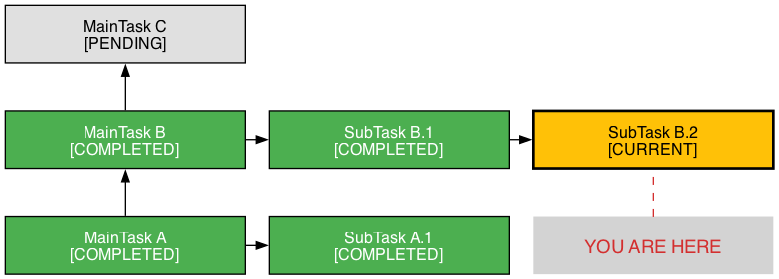
1. Basic Structure - Tasks grow vertically, subtasks grow horizontally:

    ┌─────────────────┐
    │   MainTask C    │ ← Latest main task
    │   [PENDING]     │
    └─────────────────┘
            ↑
    ┌─────────────────┐     ┌─────────────────┐     ┌─────────────────┐
    │   MainTask B    │ ──→ │   SubTask B.1   │ ──→ │   SubTask B.2   │
    │   [COMPLETED]   │     │   [COMPLETED]   │     │   [CURRENT] ←   │ ← YOU ARE HERE
    └─────────────────┘     └─────────────────┘     └─────────────────┘
            ↑
    ┌─────────────────┐     ┌─────────────────┐
    │   MainTask A    │ ─→  │   SubTask A.1   │
    │   [COMPLETED]   │     │   [COMPLETED]   │
    └─────────────────┘     └─────────────────┘


2. Living Document - Completed tasks remain visible:

    Before (traditional todo):          After (Aidderall):
    ┌─────────────────┐                ┌─────────────────┐
    │ ☐ Task A        │                │ ✓ Task A        │ ← Still visible!
    │ ☐ Task B        │                │ ✓ Task B        │ ← Context preserved
    │ ☐ Task C        │                │ ☐ Task C        │
    └─────────────────┘                └─────────────────┘

    Traditional: Completed = Gone      Aidderall: Completed = History


3. Flexible Navigation with switch_focus:

    ┌─────────────────┐
    │   Task D        │
    │   [PENDING]     │ ←────────────┐
    └─────────────────┘              │
            ↑                        │ Can jump to any task!
    ┌─────────────────┐              │
    │   Task C        │              │
    │   [CURRENT] ←   │ ←──────┐     │
    └─────────────────┘        │     │
            ↑                  │     │
    ┌─────────────────┐        │     │
    │   Task B        │ ←──────┘     │
    │   [COMPLETED]   │              │
    └─────────────────┘              │
            ↑                        │
    ┌─────────────────┐              │
    │   Task A        │ ←────────────┘
    │   [COMPLETED]   │
    └─────────────────┘


4. Real-world Example - Implementing a Feature:

    ┌─────────────────────┐
    │ Add User Auth       │
    │ [COMPLETED]         │
    └─────────────────────┘
              ↑
              │     ┌──────────────────┐     ┌──────────────────┐     ┌──────────────────┐
              └───→ │ Design DB Schema │ ──→ │ Create API       │ ──→ │ Add UI Forms     │
                    │ [COMPLETED]      │     │ [COMPLETED]      │     │ [CURRENT] ←      │
                    └──────────────────┘     └──────────────────┘     └──────────────────┘
                                                      ↑
                                                      │     ┌──────────────────┐
                                                      └───→ │ Add JWT logic    │
                                                            │ [COMPLETED]      │
                                                            └──────────────────┘


5. Value Propositions Visualized:

   Traditional Linear Todo:              Aidderall Hierarchical:
   ========================              =========================

   ☐ Research auth libraries             Research Phase
   ☐ Design database schema              │
   ☐ Create user table                   ├─→ Auth libraries
   ☐ Create session table                │   └─→ JWT vs Sessions
   ☐ Implement JWT                       │
   ☐ Create login endpoint               Design Phase
   ☐ Create register endpoint            │
   ☐ Add password hashing                ├─→ Database Schema
   ☐ Create login form                   │   ├─→ User table
   ☐ Create register form                │   └─→ Session table
   ☐ Add form validation                 │
                                         Implementation Phase
   Problems:                             │
   - No hierarchy                        ├─→ Backend API
   - No context                          │   ├─→ Login endpoint
   - Hard to see relationships           │   ├─→ Register endpoint
   - Completed = disappeared             │   └─→ Password hashing
                                         │
                                         └─→ Frontend UI
                                             ├─→ Login form
                                             ├─→ Register form
                                             └─→ Validation

                                         Benefits:
                                         ✓ Clear hierarchy
                                         ✓ Preserved context
                                         ✓ Visible relationships
                                         ✓ Complete history


6. Zen State - Two Paths:

   Path 1: No tasks                    Path 2: All completed
   ┌─────────────────┐                 ┌─────────────────┐
   │                 │                 │ ✓ Task A        │
   │   Empty Stack   │                 │ ✓ Task B        │
   │   (Zen State)   │                 │ ✓ Task C        │
   │                 │                 │   (Zen State)   │
└─────────────────┘ └─────────────────┘Hierarchical Task Management: Create main tasks and extend them with subtasks
Focus Enforcement: Only one task can be active at a time
Context Preservation: Maintain breadcrumb trails and sibling awareness
Task Completion: Archive completed tasks with timestamps
Session Persistence: Task state is automatically persisted to SQLite on every mutation — survives server restarts, crashes, and context compaction
Session Management: Each server instance gets a unique session. List, resume, or clean up previous sessions
Thanks to Alberto “KewlPops” Fernandez for coming up with the name... the project name was not so exciting before! 😀
Clone the repository:
git clone https://github.com/user/aidderall_mcp.git
cd aidderall_mcp
Create and activate a virtual environment:
python -m venv venv
source venv/bin/activate  # On Windows: venv\Scripts\activate
Install dependencies:
pip install -r requirements.txtFor development, install with dev dependencies:
pip install -e ".[dev]"Start the MCP server:
python -m src.serverThe server runs via the Python module directly.
If you have Claude Code installed, you can add Aidderall directly:
claude mcp add aidderall-mcp /path/to/aidderall_mcp/run_mcp.shAlternatively, add the server to your MCP configuration:
{
  "mcpServers": {
    "aidderall": {
      "command": "python",
      "args": ["-m", "src.server"]
    }
  }
}create_new_task(title, body) - Create a new independent task for unrelated work or new topics
extend_current_task(title, body) - Add a subtask to organize and break down the current task
get_current_task() - Returns current task with context
get_big_picture(format='text') - Shows entire task hierarchy (format: 'text' or 'json')
get_stack_overview() - Returns JSON structure of system
peek_context(include_body=False) - View parent and sibling context
list_siblings(include_body=False) - List tasks at current level
complete_current_task() - Mark current task as complete (stays visible)
update_current_task(body) - Update current task body
switch_focus(task_id) - Switch focus to any task by ID
remove_task(task_id) - Remove task from structure (preserves in history)
get_completed_tasks(order) - View completed task archive
list_sessions() - List all persisted sessions with metadata (task count, current task, last modified)
resume_session(session_id) - Resume a previous session's task state (empty sessions are auto-cleaned on resume)
delete_session(session_id) - Delete a stale session (cannot delete the active session)
# Start with a root task
create_new_task("Design new feature", "Research and design specs")

# Break it down into subtasks for organization
extend_current_task("Research requirements", "User research needed")
extend_current_task("Interview users", "Conduct user interviews")
extend_current_task("Analyze competitors", "Research competitor solutions")

# Work on tasks in any order using switch_focus
get_big_picture()  # See all tasks with their IDs
switch_focus("task-id-for-research")  # Jump to research task
complete_current_task()  # Complete it when done

# Jump to any other task
switch_focus("task-id-for-interviews")  # Work on interviews
# ... do some work ...
switch_focus("task-id-for-competitors")  # Switch to competitor analysis

# Create parallel work streams
create_new_task("Write documentation", "Document the new feature")
extend_current_task("API docs", "Write API documentation")
extend_current_task("User guide", "Write user guide")

# Jump between different work streams freely
switch_focus("task-id-for-design")  # Back to design work
switch_focus("task-id-for-api-docs")  # Jump to documentation

# Complete tasks as they're finished, in any order
complete_current_task()  # Completes whatever you're currently focused on

# View all tasks - completed ones remain visible
get_big_picture()
# Output shows:
# Design new feature (pending)
#   Research requirements (completed)
#   Interview users (pending)
#   Analyze competitors (completed)
# Write documentation (pending)
#   API docs (completed)
#   User guide (pending)

# Clean up workspace by removing completed tasks
remove_task("task-id-for-research") # Removes from view but keeps in historypytest -vpytest --cov=src tests/black src tests
isort src testsmypy srcTask state is automatically persisted to SQLite at ~/.aidderall/sessions/<session_id>/state.db. Each server instance generates a unique session ID, so concurrent sessions never interfere with each other.
Auto-save: Every mutation (create, extend, complete, update, switch, remove) writes to disk immediately
Auto-restore: Resuming a session loads the full task hierarchy, completed archive, and focus state
Auto-cleanup: Empty sessions are deleted when you resume a different session
models.py - Core data structures (Task, MainTask, SubTask) with serialization
task_manager.py - Task management logic and state handling
handlers.py - MCP command implementations
persistence.py - SQLite-backed session persistence
server.py - MCP server entry point
Usage Guide - Comprehensive guide for getting AI assistants to use Aidderall effectively
Technical Specification - Detailed technical specification of the hybrid stack-list model
AI Assistant Evolution - Vision for transforming AI from stateless oracle to focused worker
Work Log - Development history and architectural decisions
Fork the repository
Create a feature branch
Add tests for new functionality
Ensure all tests pass
Submit a pull request
This project is licensed under the GNU General Public License v3.0 or later - see the LICENSE file for details.
Copyright (C) 2024 Briam R. briamr@gmail.com
Mark current task as COMPLETED. Task remains visible in structure (living document approach). Focus automatically moves to a nearby incomplete task. Creates permanent record in history. You can use switch_focus to work on any specific task instead. Use remove_task to clean up workspace later.
| Name | Required | Description | Default |
|---|---|---|---|
No parameters | |||
Does the description disclose side effects, auth requirements, rate limits, or destructive behavior?
With no annotations provided, the description carries the full burden of behavioral disclosure. It effectively describes key behaviors: the task remains visible (living document approach), focus moves automatically, and a permanent history record is created. However, it doesn't address potential side effects like error conditions or what happens if no incomplete tasks are nearby.
Agents need to know what a tool does to the world before calling it. Descriptions should go beyond structured annotations to explain consequences.
Is the description appropriately sized, front-loaded, and free of redundancy?
The description is efficiently structured with four concise sentences, each adding distinct value: the core action, visibility behavior, focus movement, history recording, and explicit alternative tools. There is no wasted text, and information is front-loaded with the primary purpose.
Shorter descriptions cost fewer tokens and are easier for agents to parse. Every sentence should earn its place.
Given the tool's complexity, does the description cover enough for an agent to succeed on first attempt?
Given the tool's complexity (a mutation with behavioral nuances), no annotations, and no output schema, the description does well by covering the core action, persistence model, focus behavior, and alternatives. However, it lacks details on error handling or the exact criteria for 'nearby incomplete task,' leaving minor gaps in completeness.
Complex tools with many parameters or behaviors need more documentation. Simple tools need less. This dimension scales expectations accordingly.
Does the description clarify parameter syntax, constraints, interactions, or defaults beyond what the schema provides?
The input schema has 0 parameters with 100% coverage, so the baseline is 4. The description appropriately adds no parameter information since none are needed, focusing instead on behavioral aspects. No compensation is required for missing parameter details.
Input schemas describe structure but not intent. Descriptions should explain non-obvious parameter relationships and valid value ranges.
Does the description clearly state what the tool does and how it differs from similar tools?
The description clearly states the specific action ('Mark current task as COMPLETED') and resource ('current task'), distinguishing it from siblings like 'remove_task' (which deletes) and 'update_current_task' (which modifies). It explicitly mentions the 'living document approach' where tasks remain visible, providing clear differentiation.
Agents choose between tools based on descriptions. A clear purpose with a specific verb and resource helps agents select the right tool.
Does the description explain when to use this tool, when not to, or what alternatives exist?
The description provides explicit guidance on when to use alternatives: 'Use switch_focus to work on any specific task instead' and 'Use remove_task to clean up workspace later.' It also implies usage context by noting that focus automatically moves to a nearby incomplete task after completion.
Agents often have multiple tools that could apply. Explicit usage guidance like "use X instead of Y when Z" prevents misuse.
Create an INDEPENDENT task for unrelated work. Use for: new topics, context switches, or parallel workstreams. Adds a new top-level task to your workspace. Previous task keeps its status. Example: working on Feature A, need to research Topic B → create_new_task for Topic B. For breaking down current work, use extend_current_task.
| Name | Required | Description | Default |
|---|---|---|---|
| title | Yes | Brief task description (max 256 chars) | |
| body | Yes | Full task context, notes, and details |
Does the description disclose side effects, auth requirements, rate limits, or destructive behavior?
With no annotations provided, the description carries the full burden of behavioral disclosure. It explains that the new task is independent and top-level, and that the previous task retains its status, which adds useful context. However, it lacks details on permissions, error handling, or what happens if creation fails, leaving some behavioral aspects unclear.
Agents need to know what a tool does to the world before calling it. Descriptions should go beyond structured annotations to explain consequences.
Is the description appropriately sized, front-loaded, and free of redundancy?
The description is front-loaded with the core purpose, followed by usage guidelines and an example. Every sentence adds value—none are redundant or vague—and it efficiently conveys necessary information in a compact form.
Shorter descriptions cost fewer tokens and are easier for agents to parse. Every sentence should earn its place.
Given the tool's complexity, does the description cover enough for an agent to succeed on first attempt?
Given the tool's moderate complexity (creation operation with 2 parameters) and no annotations or output schema, the description does a good job of explaining the tool's purpose, usage, and behavioral context. However, it could be more complete by addressing potential errors or the absence of an output schema, which might leave the agent uncertain about the return value.
Complex tools with many parameters or behaviors need more documentation. Simple tools need less. This dimension scales expectations accordingly.
Does the description clarify parameter syntax, constraints, interactions, or defaults beyond what the schema provides?
The input schema has 100% description coverage, so the schema already documents both parameters (title and body) adequately. The description does not add any parameter-specific semantics beyond what the schema provides, such as formatting examples or constraints beyond the schema's max 256 chars for title.
Input schemas describe structure but not intent. Descriptions should explain non-obvious parameter relationships and valid value ranges.
Does the description clearly state what the tool does and how it differs from similar tools?
The description clearly states the tool's purpose: 'Create an INDEPENDENT task for unrelated work' and 'Adds a new top-level task to your workspace.' It specifies the verb (create), resource (task), and scope (independent/top-level), and distinguishes it from sibling tools like extend_current_task.
Agents choose between tools based on descriptions. A clear purpose with a specific verb and resource helps agents select the right tool.
Does the description explain when to use this tool, when not to, or what alternatives exist?
The description provides explicit guidance on when to use this tool ('for: new topics, context switches, or parallel workstreams') and when not to use it ('For breaking down current work, use extend_current_task'). It includes a concrete example and names the alternative tool, making it highly actionable.
Agents often have multiple tools that could apply. Explicit usage guidance like "use X instead of Y when Z" prevents misuse.
Add a subtask to organize and decompose work. Creates hierarchical structure for complex tasks. Subtasks help break down work into manageable pieces. You can work on tasks in any order using switch_focus. Example: Task A → Task B → Task C creates a nested structure, but you can jump between them freely. For unrelated work, use create_new_task.
| Name | Required | Description | Default |
|---|---|---|---|
| title | Yes | Brief task description (max 256 chars) | |
| body | Yes | Full task context, notes, and details |
Does the description disclose side effects, auth requirements, rate limits, or destructive behavior?
With no annotations provided, the description carries full burden for behavioral disclosure. It describes the tool's function (creating hierarchical subtask structure) and mentions freedom to work on tasks in any order, but doesn't cover important behavioral aspects like whether this operation is reversible, what permissions are needed, or how it affects existing task structures beyond the basic creation.
Agents need to know what a tool does to the world before calling it. Descriptions should go beyond structured annotations to explain consequences.
Is the description appropriately sized, front-loaded, and free of redundancy?
The description is well-structured and appropriately sized. It starts with the core purpose, explains the hierarchical structure concept, provides usage guidance, and gives an example. Every sentence adds value, though the example could be slightly more concise.
Shorter descriptions cost fewer tokens and are easier for agents to parse. Every sentence should earn its place.
Given the tool's complexity, does the description cover enough for an agent to succeed on first attempt?
For a tool with 2 parameters, 100% schema coverage, and no output schema, the description provides good context. It explains the tool's purpose, distinguishes it from alternatives, and gives usage examples. The main gap is lack of information about return values or error conditions, but given the tool's relative simplicity, the description is reasonably complete.
Complex tools with many parameters or behaviors need more documentation. Simple tools need less. This dimension scales expectations accordingly.
Does the description clarify parameter syntax, constraints, interactions, or defaults beyond what the schema provides?
Schema description coverage is 100%, so the schema already fully documents both parameters. The description doesn't add any parameter-specific information beyond what's in the schema. It focuses on the tool's purpose and usage rather than parameter details, which is appropriate given the complete schema coverage.
Input schemas describe structure but not intent. Descriptions should explain non-obvious parameter relationships and valid value ranges.
Does the description clearly state what the tool does and how it differs from similar tools?
The description clearly states the tool's purpose with specific verbs ('Add a subtask', 'Creates hierarchical structure') and resources ('organize and decompose work', 'complex tasks'). It distinguishes from sibling tools by explicitly mentioning 'create_new_task' for unrelated work, showing clear differentiation.
Agents choose between tools based on descriptions. A clear purpose with a specific verb and resource helps agents select the right tool.
Does the description explain when to use this tool, when not to, or what alternatives exist?
The description provides explicit guidance on when to use this tool vs alternatives: 'For unrelated work, use create_new_task.' It also mentions 'switch_focus' for working on tasks in any order, giving clear context for usage decisions among sibling tools.
Agents often have multiple tools that could apply. Explicit usage guidance like "use X instead of Y when Z" prevents misuse.
See ALL tasks in your task stack (including completed ones). Shows full work context as a living document. Marks current task with 'YOU ARE HERE'. Indicates zen state when no tasks exist OR all tasks are completed.
| Name | Required | Description | Default |
|---|---|---|---|
| format | No | Output format | text |
Does the description disclose side effects, auth requirements, rate limits, or destructive behavior?
With no annotations provided, the description carries full burden. It discloses behavioral traits: output includes 'current task with 'YOU ARE HERE'' marking and 'zen state when no tasks exist OR all tasks are completed', which are useful context. However, it doesn't mention permissions, rate limits, or what 'zen state' entails (e.g., empty response vs message), leaving some gaps for a tool with no annotation coverage.
Agents need to know what a tool does to the world before calling it. Descriptions should go beyond structured annotations to explain consequences.
Is the description appropriately sized, front-loaded, and free of redundancy?
The description is appropriately sized and front-loaded: the first sentence states the core purpose, followed by clarifying details. Each sentence adds value (e.g., 'living document', 'YOU ARE HERE', 'zen state') without redundancy, making it efficient and well-structured.
Shorter descriptions cost fewer tokens and are easier for agents to parse. Every sentence should earn its place.
Given the tool's complexity, does the description cover enough for an agent to succeed on first attempt?
Given no annotations and no output schema, the description does well by explaining key behavioral aspects (marking current task, zen state) and scope (ALL tasks, full context). However, for a tool with 1 parameter and no output schema, it could more fully describe the output format or examples, though the parameter covers format options. It's largely complete but has minor gaps in output details.
Complex tools with many parameters or behaviors need more documentation. Simple tools need less. This dimension scales expectations accordingly.
Does the description clarify parameter syntax, constraints, interactions, or defaults beyond what the schema provides?
Schema description coverage is 100%, with the single parameter 'format' fully documented in the schema (enum: text/json, default: text). The description adds no parameter-specific information beyond what the schema provides, so it meets the baseline of 3 where the schema does the heavy lifting.
Input schemas describe structure but not intent. Descriptions should explain non-obvious parameter relationships and valid value ranges.
Does the description clearly state what the tool does and how it differs from similar tools?
The description clearly states the verb 'see' and resource 'ALL tasks in your task stack (including completed ones)', specifying scope comprehensively. It distinguishes from siblings like get_current_task (single task), get_completed_tasks (only completed), and get_stack_overview (likely summary vs full context) by emphasizing 'ALL tasks' and 'full work context as a living document'.
Agents choose between tools based on descriptions. A clear purpose with a specific verb and resource helps agents select the right tool.
Does the description explain when to use this tool, when not to, or what alternatives exist?
The description implies usage context: 'See ALL tasks... Shows full work context' suggests it's for comprehensive review, and 'Marks current task with 'YOU ARE HERE'' indicates it helps orient within the stack. However, it doesn't explicitly state when to use this vs alternatives like get_stack_overview or peek_context, nor does it provide exclusions or prerequisites.
Agents often have multiple tools that could apply. Explicit usage guidance like "use X instead of Y when Z" prevents misuse.
View chronological history of ALL completed tasks. This is a permanent archive separate from the visible structure. Tasks remain here even after being removed from the workspace. Useful for reviewing what you've accomplished over time.
| Name | Required | Description | Default |
|---|---|---|---|
| order | No | Order of completed tasks | chronological |
Does the description disclose side effects, auth requirements, rate limits, or destructive behavior?
With no annotations provided, the description carries the full burden and does well by disclosing key behavioral traits: it's a read-only operation ('view'), the data is permanent/archival ('permanent archive'), tasks persist even after workspace removal, and it provides chronological history. It doesn't mention rate limits or authentication needs, but covers the core behavior adequately.
Agents need to know what a tool does to the world before calling it. Descriptions should go beyond structured annotations to explain consequences.
Is the description appropriately sized, front-loaded, and free of redundancy?
The description is appropriately sized with three sentences that each add value: first states the core function, second explains archival nature, third gives usage context. It's front-loaded with the main purpose and has zero wasted words.
Shorter descriptions cost fewer tokens and are easier for agents to parse. Every sentence should earn its place.
Given the tool's complexity, does the description cover enough for an agent to succeed on first attempt?
For a simple read tool with one parameter (fully documented in schema) and no output schema, the description provides good context about the archival nature and persistence of data. It could mention the return format or pagination, but given the low complexity, it's reasonably complete.
Complex tools with many parameters or behaviors need more documentation. Simple tools need less. This dimension scales expectations accordingly.
Does the description clarify parameter syntax, constraints, interactions, or defaults beyond what the schema provides?
Schema description coverage is 100%, so the schema already fully documents the single parameter 'order' with its enum values and default. The description doesn't add any parameter-specific information beyond what the schema provides, meeting the baseline expectation.
Input schemas describe structure but not intent. Descriptions should explain non-obvious parameter relationships and valid value ranges.
Does the description clearly state what the tool does and how it differs from similar tools?
The description clearly states the tool's purpose with specific verbs ('view chronological history') and resource ('ALL completed tasks'), and distinguishes it from siblings by emphasizing it's a 'permanent archive separate from the visible structure' and that tasks remain even after removal from the workspace.
Agents choose between tools based on descriptions. A clear purpose with a specific verb and resource helps agents select the right tool.
Does the description explain when to use this tool, when not to, or what alternatives exist?
The description provides clear context for when to use this tool ('useful for reviewing what you've accomplished over time'), but doesn't explicitly mention when not to use it or name specific alternatives among the sibling tools (like get_current_task or get_stack_overview).
Agents often have multiple tools that could apply. Explicit usage guidance like "use X instead of Y when Z" prevents misuse.
Get the task with CURRENT status (your active focus). May be manually set via switch_focus, or automatically determined. In zen state (no tasks OR all tasks completed), returns appropriate message.
| Name | Required | Description | Default |
|---|---|---|---|
No parameters | |||
Does the description disclose side effects, auth requirements, rate limits, or destructive behavior?
With no annotations provided, the description carries the full burden of behavioral disclosure. It effectively describes key behaviors: it retrieves the current task (implying a read operation), explains how the current status is determined (manually via 'switch_focus' or automatically), and specifies the response in 'zen state' (returns an appropriate message). This covers the core functionality and edge cases without contradictions.
Agents need to know what a tool does to the world before calling it. Descriptions should go beyond structured annotations to explain consequences.
Is the description appropriately sized, front-loaded, and free of redundancy?
The description is concise and well-structured, consisting of two sentences that efficiently convey the tool's purpose, how the current task is determined, and the behavior in 'zen state'. Every sentence adds value without redundancy, making it easy for an agent to parse and understand.
Shorter descriptions cost fewer tokens and are easier for agents to parse. Every sentence should earn its place.
Given the tool's complexity, does the description cover enough for an agent to succeed on first attempt?
Given the tool's complexity (simple retrieval with no parameters) and the absence of annotations and output schema, the description is moderately complete. It explains what the tool does and edge cases ('zen state'), but lacks details on the return format (e.g., structure of the task object or message) and does not fully integrate with sibling tools, leaving some gaps for an agent to infer.
Complex tools with many parameters or behaviors need more documentation. Simple tools need less. This dimension scales expectations accordingly.
Does the description clarify parameter syntax, constraints, interactions, or defaults beyond what the schema provides?
The tool has 0 parameters, and the input schema has 100% description coverage (though empty). The description does not need to add parameter semantics, as there are no parameters to document. It appropriately focuses on the tool's behavior and context, earning a high baseline score for this dimension.
Input schemas describe structure but not intent. Descriptions should explain non-obvious parameter relationships and valid value ranges.
Does the description clearly state what the tool does and how it differs from similar tools?
The description clearly states the tool's purpose: to retrieve the task with CURRENT status, which is defined as the active focus. It specifies that this status can be set manually via 'switch_focus' or automatically determined, and describes behavior in 'zen state'. However, it doesn't explicitly differentiate from sibling tools like 'get_completed_tasks' or 'get_stack_overview', which would require a more direct comparison.
Agents choose between tools based on descriptions. A clear purpose with a specific verb and resource helps agents select the right tool.
Does the description explain when to use this tool, when not to, or what alternatives exist?
The description implies usage by mentioning that the current task may be set via 'switch_focus' or automatically determined, and references 'zen state' scenarios. However, it lacks explicit guidance on when to use this tool versus alternatives like 'get_big_picture' or 'peek_context', and does not specify prerequisites or exclusions, leaving some ambiguity for the agent.
Agents often have multiple tools that could apply. Explicit usage guidance like "use X instead of Y when Z" prevents misuse.
Get structured data of your entire task stack (JSON format with all task details and relationships)
| Name | Required | Description | Default |
|---|---|---|---|
No parameters | |||
Does the description disclose side effects, auth requirements, rate limits, or destructive behavior?
With no annotations, the description carries full burden. It states the output format (JSON) and scope (all task details and relationships), but lacks behavioral details such as performance characteristics, rate limits, authentication needs, or whether it's read-only (implied by 'Get' but not explicit).
Agents need to know what a tool does to the world before calling it. Descriptions should go beyond structured annotations to explain consequences.
Is the description appropriately sized, front-loaded, and free of redundancy?
The description is a single, efficient sentence that front-loads the core purpose ('Get structured data of your entire task stack') and adds essential format details. Every word earns its place with no redundancy.
Shorter descriptions cost fewer tokens and are easier for agents to parse. Every sentence should earn its place.
Given the tool's complexity, does the description cover enough for an agent to succeed on first attempt?
Given the tool's complexity (read-only overview with no parameters) and lack of annotations/output schema, the description is minimally adequate. It covers the purpose and output format but misses behavioral context and usage guidelines, leaving gaps for an agent to infer.
Complex tools with many parameters or behaviors need more documentation. Simple tools need less. This dimension scales expectations accordingly.
Does the description clarify parameter syntax, constraints, interactions, or defaults beyond what the schema provides?
The tool has 0 parameters with 100% schema description coverage, so no parameter documentation is needed. The description doesn't add param info, but this is appropriate given the empty schema, meeting the baseline for zero parameters.
Input schemas describe structure but not intent. Descriptions should explain non-obvious parameter relationships and valid value ranges.
Does the description clearly state what the tool does and how it differs from similar tools?
The description clearly states the verb ('Get') and resource ('structured data of your entire task stack'), specifying the format ('JSON format with all task details and relationships'). It distinguishes from siblings like 'get_current_task' or 'get_completed_tasks' by emphasizing 'entire' scope, but doesn't explicitly contrast them.
Agents choose between tools based on descriptions. A clear purpose with a specific verb and resource helps agents select the right tool.
Does the description explain when to use this tool, when not to, or what alternatives exist?
No guidance is provided on when to use this tool versus alternatives like 'get_big_picture' or 'get_current_task'. The description implies a comprehensive overview, but doesn't specify use cases, prerequisites, or exclusions.
Agents often have multiple tools that could apply. Explicit usage guidance like "use X instead of Y when Z" prevents misuse.
See all sibling tasks to the left of current focus. May include both pending and completed tasks. Helpful for understanding your position in the current task sequence.
| Name | Required | Description | Default |
|---|---|---|---|
| include_body | No | Include task body content |
Does the description disclose side effects, auth requirements, rate limits, or destructive behavior?
No annotations are provided, so the description carries full burden. It mentions behavioral aspects like including 'both pending and completed tasks' and being 'left of current focus', but lacks details on permissions, rate limits, or response format. For a tool with no annotations, this leaves significant gaps in understanding its operation.
Agents need to know what a tool does to the world before calling it. Descriptions should go beyond structured annotations to explain consequences.
Is the description appropriately sized, front-loaded, and free of redundancy?
The description is two sentences, front-loaded with the core purpose and followed by additional context. It's efficient with no wasted words, though it could be slightly more structured by separating usage guidance into a distinct part.
Shorter descriptions cost fewer tokens and are easier for agents to parse. Every sentence should earn its place.
Given the tool's complexity, does the description cover enough for an agent to succeed on first attempt?
Given no annotations, no output schema, and a simple input schema, the description provides basic purpose and context but lacks details on return values, error handling, or deeper behavioral traits. It's minimally adequate for a read-only tool but doesn't fully compensate for the missing structured data.
Complex tools with many parameters or behaviors need more documentation. Simple tools need less. This dimension scales expectations accordingly.
Does the description clarify parameter syntax, constraints, interactions, or defaults beyond what the schema provides?
The input schema has 100% description coverage, with one parameter 'include_body' fully documented. The description doesn't add any parameter-specific information beyond the schema, such as examples or implications of setting 'include_body' to true. Baseline 3 is appropriate since the schema handles the parameter documentation.
Input schemas describe structure but not intent. Descriptions should explain non-obvious parameter relationships and valid value ranges.
Does the description clearly state what the tool does and how it differs from similar tools?
The description clearly states the tool's purpose: 'See all sibling tasks to the left of current focus' with the verb 'see' and resource 'sibling tasks'. It distinguishes from siblings like 'get_current_task' (single task) and 'get_completed_tasks' (all completed tasks) by focusing on leftward siblings. However, it doesn't explicitly contrast with 'get_stack_overview' which might show a broader view.
Agents choose between tools based on descriptions. A clear purpose with a specific verb and resource helps agents select the right tool.
Does the description explain when to use this tool, when not to, or what alternatives exist?
The description implies usage context: 'Helpful for understanding your position in the current task sequence' suggests using it when orientation is needed. It doesn't provide explicit when-not-to-use guidance or name alternatives like 'get_stack_overview' for different perspectives, leaving some ambiguity.
Agents often have multiple tools that could apply. Explicit usage guidance like "use X instead of Y when Z" prevents misuse.
Look at parent task and previous sibling without changing focus (understand WHY you're doing current task)
| Name | Required | Description | Default |
|---|---|---|---|
| include_body | No | Include task body content |
Does the description disclose side effects, auth requirements, rate limits, or destructive behavior?
With no annotations provided, the description carries the full burden of behavioral disclosure. It effectively communicates the non-destructive nature ('without changing focus') and the tool's purpose for understanding context. However, it doesn't address potential limitations like what happens if there's no parent/previous sibling, performance characteristics, or error conditions.
Agents need to know what a tool does to the world before calling it. Descriptions should go beyond structured annotations to explain consequences.
Is the description appropriately sized, front-loaded, and free of redundancy?
The description is perfectly concise with zero wasted words - a single sentence that front-loads the core functionality ('Look at parent task and previous sibling') followed by clarifying context. Every element earns its place, making it highly efficient for agent comprehension.
Shorter descriptions cost fewer tokens and are easier for agents to parse. Every sentence should earn its place.
Given the tool's complexity, does the description cover enough for an agent to succeed on first attempt?
Given the tool's moderate complexity (context inspection without mutation), no annotations, and no output schema, the description provides good contextual coverage. It clearly explains what the tool does and its purpose, though it could benefit from mentioning what information is returned or how results are structured since there's no output schema.
Complex tools with many parameters or behaviors need more documentation. Simple tools need less. This dimension scales expectations accordingly.
Does the description clarify parameter syntax, constraints, interactions, or defaults beyond what the schema provides?
With 100% schema description coverage for the single parameter, the description adds no additional parameter information beyond what's already documented in the schema. The baseline score of 3 reflects adequate but minimal value addition, as the schema already fully describes the 'include_body' parameter with its type, description, and default value.
Input schemas describe structure but not intent. Descriptions should explain non-obvious parameter relationships and valid value ranges.
Does the description clearly state what the tool does and how it differs from similar tools?
The description clearly states the tool's purpose with specific verbs ('Look at') and resources ('parent task and previous sibling'), while distinguishing it from siblings by emphasizing it doesn't change focus. The 'understand WHY you're doing current task' clause adds valuable context about the tool's intent beyond basic functionality.
Agents choose between tools based on descriptions. A clear purpose with a specific verb and resource helps agents select the right tool.
Does the description explain when to use this tool, when not to, or what alternatives exist?
The description provides clear context for when to use this tool ('understand WHY you're doing current task'), which implicitly suggests it's for contextual understanding rather than task manipulation. However, it doesn't explicitly state when NOT to use it or name specific alternative tools from the sibling list that might serve similar purposes.
Agents often have multiple tools that could apply. Explicit usage guidance like "use X instead of Y when Z" prevents misuse.
Remove a task from the structure (cleanup your workspace). The task remains in completed_tasks history if it was completed. Can remove any task (completed or not). Removing a parent task removes all its subtasks. Use get_big_picture or get_stack_overview to see task IDs.
| Name | Required | Description | Default |
|---|---|---|---|
| task_id | Yes | The ID of the task to remove from the structure |
Does the description disclose side effects, auth requirements, rate limits, or destructive behavior?
With no annotations, the description carries full burden and discloses key behavioral traits: it explains that removed tasks go to 'completed_tasks history if it was completed', clarifies it 'can remove any task (completed or not)', and warns that 'removing a parent task removes all its subtasks'. This covers mutation effects and side effects, though it doesn't mention permissions or error handling.
Agents need to know what a tool does to the world before calling it. Descriptions should go beyond structured annotations to explain consequences.
Is the description appropriately sized, front-loaded, and free of redundancy?
The description is appropriately sized with three sentences that are front-loaded: the first states the core action, the second adds behavioral details, and the third provides usage guidance. Every sentence adds value, though it could be slightly more streamlined by integrating the ID reference into the first sentence.
Shorter descriptions cost fewer tokens and are easier for agents to parse. Every sentence should earn its place.
Given the tool's complexity, does the description cover enough for an agent to succeed on first attempt?
Given the tool's complexity (a destructive operation with cascading effects), no annotations, and no output schema, the description does well by explaining the mutation behavior and history implications. However, it lacks details on return values or error cases, which would enhance completeness for such a critical tool.
Complex tools with many parameters or behaviors need more documentation. Simple tools need less. This dimension scales expectations accordingly.
Does the description clarify parameter syntax, constraints, interactions, or defaults beyond what the schema provides?
Schema description coverage is 100%, so the schema already documents the 'task_id' parameter. The description adds no additional meaning about the parameter beyond implying its purpose through context (e.g., referencing 'task IDs' from other tools), which meets the baseline for high schema coverage.
Input schemas describe structure but not intent. Descriptions should explain non-obvious parameter relationships and valid value ranges.
Does the description clearly state what the tool does and how it differs from similar tools?
The description clearly states the specific action ('remove a task from the structure') and resource ('task'), distinguishing it from siblings like 'complete_current_task' or 'update_current_task' that modify tasks rather than removing them. The phrase 'cleanup your workspace' reinforces the purpose without being tautological.
Agents choose between tools based on descriptions. A clear purpose with a specific verb and resource helps agents select the right tool.
Does the description explain when to use this tool, when not to, or what alternatives exist?
It explicitly provides when to use this tool ('to see task IDs, use get_big_picture or get_stack_overview'), which helps differentiate from sibling tools for viewing tasks. The description also implies usage for cleanup, though it doesn't specify when not to use it or name direct alternatives beyond the ID lookup tools.
Agents often have multiple tools that could apply. Explicit usage guidance like "use X instead of Y when Z" prevents misuse.
Switch focus to ANY task by ID. The primary way to navigate your task workspace - jump between tasks in any order, revisit completed work, or change priorities on the fly. Current task retains its status, target task becomes current. Use get_big_picture or get_stack_overview to see task IDs.
| Name | Required | Description | Default |
|---|---|---|---|
| task_id | Yes | The ID of the task to switch focus to |
Does the description disclose side effects, auth requirements, rate limits, or destructive behavior?
With no annotations provided, the description carries the full burden of behavioral disclosure. It explains key behaviors: 'Current task retains its status, target task becomes current' and that it works with 'ANY task by ID' including completed ones. However, it doesn't address potential side effects, error conditions, or what happens if an invalid ID is provided, leaving some behavioral aspects unclear.
Agents need to know what a tool does to the world before calling it. Descriptions should go beyond structured annotations to explain consequences.
Is the description appropriately sized, front-loaded, and free of redundancy?
The description is appropriately sized with three sentences that each serve a distinct purpose: stating the core function, explaining its role in navigation, and providing usage guidance. It's front-loaded with the primary action. There's minimal redundancy, though the second sentence could be slightly more concise.
Shorter descriptions cost fewer tokens and are easier for agents to parse. Every sentence should earn its place.
Given the tool's complexity, does the description cover enough for an agent to succeed on first attempt?
Given the tool's moderate complexity (single parameter, no output schema, no annotations), the description provides good contextual coverage. It explains the tool's purpose, usage context, and behavioral effects. The main gap is the lack of output information, but for a focus-switching tool, the behavioral description ('target task becomes current') provides adequate context about the expected outcome.
Complex tools with many parameters or behaviors need more documentation. Simple tools need less. This dimension scales expectations accordingly.
Does the description clarify parameter syntax, constraints, interactions, or defaults beyond what the schema provides?
The schema description coverage is 100%, with the single parameter 'task_id' well-documented in the schema. The description adds minimal value beyond the schema by mentioning 'ANY task by ID' and referring to sibling tools for finding IDs, but doesn't provide additional semantic context about the parameter format or constraints. This meets the baseline for high schema coverage.
Input schemas describe structure but not intent. Descriptions should explain non-obvious parameter relationships and valid value ranges.
Does the description clearly state what the tool does and how it differs from similar tools?
The description clearly states the verb ('switch focus') and resource ('ANY task by ID'), specifying it's the primary navigation method for the task workspace. It distinguishes from siblings by mentioning specific alternatives (get_big_picture, get_stack_overview) for finding IDs, rather than overlapping with task manipulation tools like update_current_task or complete_current_task.
Agents choose between tools based on descriptions. A clear purpose with a specific verb and resource helps agents select the right tool.
Does the description explain when to use this tool, when not to, or what alternatives exist?
It provides explicit guidance on when to use this tool ('primary way to navigate your task workspace') and when to use alternatives ('Use get_big_picture or get_stack_overview to see task IDs'). The description also clarifies the tool's role in the workflow by mentioning it can be used to 'jump between tasks in any order, revisit completed work, or change priorities on the fly'.
Agents often have multiple tools that could apply. Explicit usage guidance like "use X instead of Y when Z" prevents misuse.
Update notes/content of the task you're currently focused on (current task only)
| Name | Required | Description | Default |
|---|---|---|---|
| body | Yes | New body content for the task |
Does the description disclose side effects, auth requirements, rate limits, or destructive behavior?
With no annotations provided, the description carries the full burden of behavioral disclosure. It states this is an update operation, implying mutation, but doesn't cover critical aspects like whether this requires specific permissions, if changes are reversible, what happens to existing content not mentioned, or any rate limits. The description adds minimal behavioral context beyond the basic action.
Agents need to know what a tool does to the world before calling it. Descriptions should go beyond structured annotations to explain consequences.
Is the description appropriately sized, front-loaded, and free of redundancy?
The description is a single, efficient sentence that front-loads the key information ('Update notes/content of the task') and includes a clarifying parenthetical ('current task only'). There is no wasted verbiage, and every word serves a clear purpose in conveying the tool's function and scope.
Shorter descriptions cost fewer tokens and are easier for agents to parse. Every sentence should earn its place.
Given the tool's complexity, does the description cover enough for an agent to succeed on first attempt?
For a mutation tool with no annotations and no output schema, the description is incomplete. It lacks details on behavioral traits (e.g., permissions, reversibility), doesn't explain the return value or potential errors, and offers minimal guidance on usage compared to siblings. The high schema coverage helps with parameters, but overall context is insufficient for safe and effective use.
Complex tools with many parameters or behaviors need more documentation. Simple tools need less. This dimension scales expectations accordingly.
Does the description clarify parameter syntax, constraints, interactions, or defaults beyond what the schema provides?
The input schema has 100% description coverage, with the 'body' parameter clearly documented as 'New body content for the task.' The description doesn't add any meaningful semantics beyond this, such as formatting examples or constraints. Given the high schema coverage, a baseline score of 3 is appropriate as the schema handles the parameter documentation adequately.
Input schemas describe structure but not intent. Descriptions should explain non-obvious parameter relationships and valid value ranges.
Does the description clearly state what the tool does and how it differs from similar tools?
The description clearly states the action ('Update notes/content') and target resource ('the task you're currently focused on'), making the purpose immediately understandable. However, it doesn't explicitly differentiate this from sibling tools like 'extend_current_task' or 'complete_current_task', which likely also modify the current task in different ways.
Agents choose between tools based on descriptions. A clear purpose with a specific verb and resource helps agents select the right tool.
Does the description explain when to use this tool, when not to, or what alternatives exist?
The description implies usage context by specifying 'current task only,' which suggests this tool is for modifying an existing focused task rather than creating new ones. However, it doesn't provide explicit guidance on when to use this versus alternatives like 'extend_current_task' or 'complete_current_task,' leaving some ambiguity about the specific scenarios for each tool.
Agents often have multiple tools that could apply. Explicit usage guidance like "use X instead of Y when Z" prevents misuse.
Recent tool additions, removals, and schema changes observed during successful MCP inspections.
complete_current_taskcreate_new_taskextend_current_taskget_big_pictureget_completed_tasksget_current_taskget_stack_overviewlist_siblingspeek_contextremove_taskswitch_focusupdate_current_taskScored across 12 tools
Each tool has a clearly distinct purpose with no ambiguity. For example, 'complete_current_task' marks a task as completed, 'create_new_task' adds an independent task, and 'extend_current_task' adds a subtask—these are well-differentiated. Tools like 'get_big_picture' and 'get_stack_overview' serve different informational needs (overview vs. structured data), and navigation tools like 'switch_focus' and 'peek_context' have unique roles.
All tool names follow a consistent verb_noun pattern using snake_case, such as 'complete_current_task', 'create_new_task', and 'get_big_picture'. There are no deviations in naming conventions, making the set predictable and easy to understand. This consistency aids in agent comprehension and tool selection.
With 12 tools, the count is well-scoped for a task management server, covering creation, navigation, status updates, and information retrieval without being overwhelming. Each tool serves a specific function in managing tasks, such as 'remove_task' for cleanup and 'list_siblings' for context, ensuring a comprehensive yet manageable toolset.
The toolset provides complete coverage for task management, including CRUD operations (create, update, remove), status changes (complete), navigation (switch_focus, peek_context), and information retrieval (get_current_task, get_big_picture). There are no obvious gaps; agents can handle all aspects of task lifecycle and workspace management without dead ends.
AI-native task management: list, create, update and archive tasks with rich context for AI agents
Shared task layer for AI agents: tasks, handoffs and decisions that persist across tools.
Task manager for AI agents. Orchestrate agents to achieve large goals in unified control plane.
Task management your AI agents can actually run. One line becomes a context-ready task over MCP.