

F
licenseC
qualityD
maintenanceMCP server that enables reading and writing macOS system preferences and application settings through the defaults system.
4
11
-

Der Android-Preference-Editor MCP-Server ist eine natürlichsprachliche Schnittstelle für agentenbasierte Anwendungen zur Bearbeitung von Android-Benutzereinstellungen während der App-Entwicklung. Die Implementierung basiert auf der Android Preference Editor- Bibliothek. Dieser Server integriert sich nahtlos in MCP-Clients (Model Context Protocol) und ermöglicht KI-gesteuerte Workflows während der Android-App-Entwicklung. Mit diesem MCP können Sie Anweisungen wie diese geben:
„Schalten Sie die Benutzereinstellung „ isVisited “ um.“
"Liste der verbundenen Geräte auf"
„Welche Apps sind auf dem Gerät installiert?“
„Zeige mir alle Benutzereinstellungen in der App“
„Fügen Sie eine lastTimeStamp- Benutzereinstellung mit dem Wert der aktuellen Millisekunden seit Epoche hinzu.“
Related MCP server: android-mcp
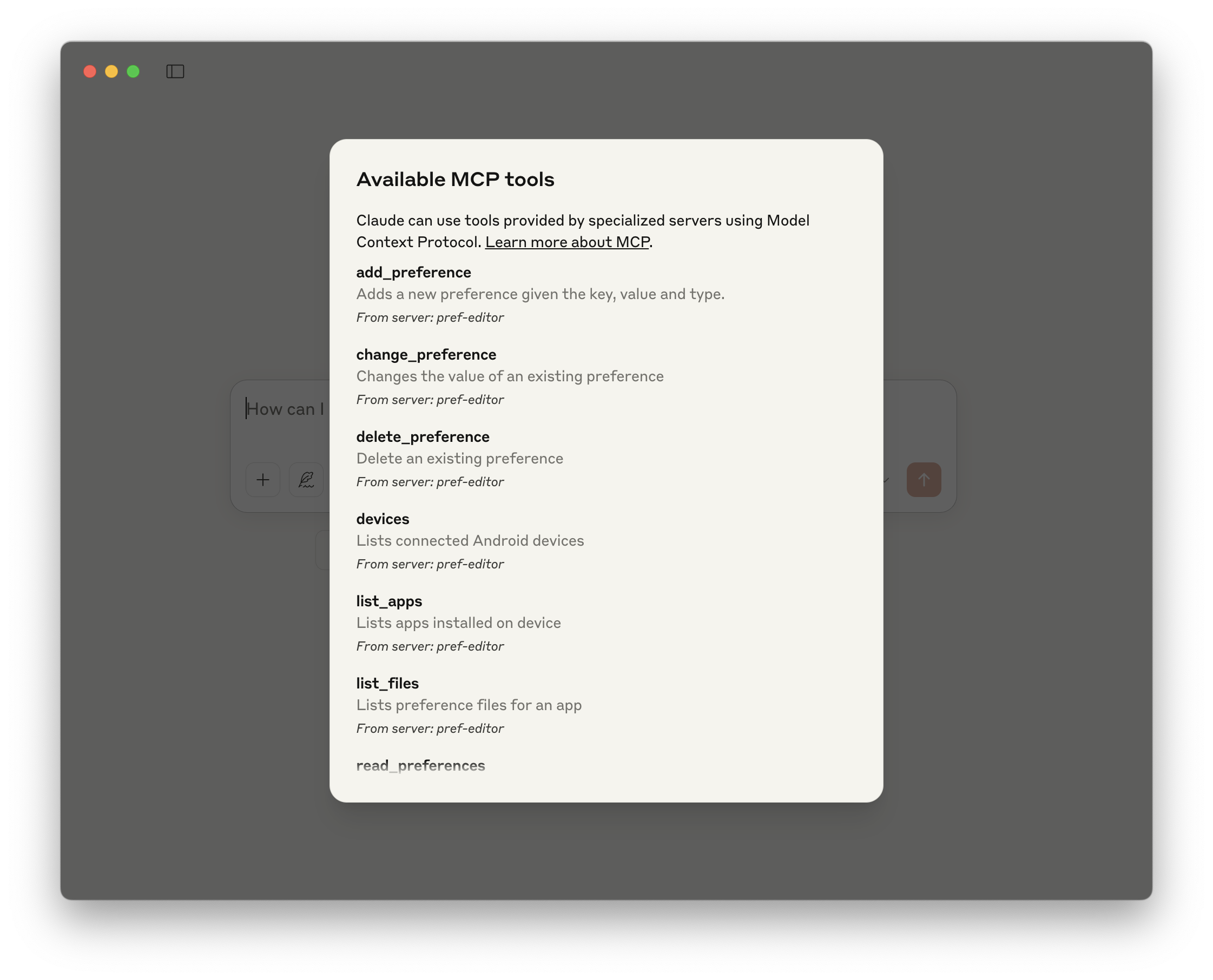
Name | Beschreibung |
Präferenz ändern | Ändert den Wert einer bestehenden Präferenz |
Präferenz löschen | Löschen einer vorhandenen Voreinstellung |
Präferenz hinzufügen | Fügt eine neue Präferenz mit Name, Wert und Typ hinzu. |
Geräte | Listet verbundene Android-Geräte auf |
list_apps | Listet die auf dem Gerät installierten Apps auf |
Dateiliste | Listet Einstellungsdateien für eine App auf |
Leseeinstellungen | Liest alle Benutzereinstellungen in einer Datei |
Umschalten einer Benutzereinstellung | Verfügbare Werkzeuge |
|
|
Weitere Demo-Screenshots finden Sie hier
Android ADB auf dem Hostsystem installiert.
Sie können Claude Desktop für die Verwendung dieses MCP-Servers konfigurieren, indem Sie Folgendes in die Konfigurationsdatei claude_desktop_config.json einfügen.
{
  "mcpServers": {
    "pref-editor": {
      "command": "npx",
      "args": ["@charlesmuchene/pref-editor-mcp-server"]
    }
  }
}Sie können Probleme beheben, indem Sie die Protokolldatei durchgehen:
tail -f ~/Library/Logs/Claude/mcp-server-pref-editor.logUm den Server mit VS Code zu verwenden, müssen Sie:
Aktivieren Sie die Agentenmodus -Tools. Fügen Sie Ihrer settings.json Folgendes hinzu:
{
  "chat.agent.enabled": true
}
Fügen Sie die MCP-Serverkonfiguration zu Ihrer mcp.json oder settings.json hinzu:
// .vscode/mcp.json
{
  "servers": {
    "pref-editor": {
      "type": "stdio",
      "command": "npx",
      "args": ["@charlesmuchene/pref-editor-mcp-server"]
    }
  }
}
// settings.json
{
"mcp": {
"pref-editor": {
"type": "stdio",
"command": "npx",
"args": ["@charlesmuchene/pref-editor-mcp-server"]
}
}
}Weitere Informationen finden Sie in der VS Code-Dokumentation .
# Clone the repository
git clone https://github.com/charlesmuchene/pref-editor-mcp-server.git
cd pref-editor-mcp-server

# Install dependencies and build
npm installSie können den MCP Inspector zum visuellen Debuggen dieses MCP-Servers verwenden.
npx @modelcontextprotocol/inspector npm run devSiehe LIZENZ
Bei Fragen oder für Support wenden Sie sich bitte über GitHub Issues an uns .
Adds a new preference given the name, value and type.
| Name | Required | Description | Default |
|---|---|---|---|
| name | Yes | The name/key of the user preference | |
| value | Yes | The value of user preference | |
| type | Yes | The type of the preference value: integer, boolean, float, double, long or string | |
| deviceId | Yes | The device's serial number. | |
| appId | Yes | The application's package name. | |
| filename | Yes | The filename with or without the extension. |
Does the description disclose side effects, auth requirements, rate limits, or destructive behavior?
With no annotations, the description carries the full burden of behavioral disclosure. It states the tool 'adds' a preference, implying a write operation, but doesn't cover permissions, side effects, error handling, or response format. This is inadequate for a mutation tool with zero annotation coverage.
Agents need to know what a tool does to the world before calling it. Descriptions should go beyond structured annotations to explain consequences.
Is the description appropriately sized, front-loaded, and free of redundancy?
The description is a single, efficient sentence with zero waste. It's front-loaded with the core action and parameters, making it easy to parse quickly.
Shorter descriptions cost fewer tokens and are easier for agents to parse. Every sentence should earn its place.
Given the tool's complexity, does the description cover enough for an agent to succeed on first attempt?
For a mutation tool with 6 required parameters, no annotations, and no output schema, the description is insufficient. It lacks details on behavior, usage context, and return values, leaving significant gaps for an AI agent to operate effectively.
Complex tools with many parameters or behaviors need more documentation. Simple tools need less. This dimension scales expectations accordingly.
Does the description clarify parameter syntax, constraints, interactions, or defaults beyond what the schema provides?
Schema description coverage is 100%, so the schema fully documents all 6 parameters. The description mentions 'name, value and type', which aligns with the schema but adds no extra meaning beyond it. Baseline 3 is appropriate as the schema handles the heavy lifting.
Input schemas describe structure but not intent. Descriptions should explain non-obvious parameter relationships and valid value ranges.
Does the description clearly state what the tool does and how it differs from similar tools?
The description clearly states the action ('adds') and resource ('preference'), specifying it creates a new preference. However, it doesn't differentiate from sibling tools like 'change_preference' or 'delete_preference' beyond the basic verb, missing explicit scope or uniqueness details.
Agents choose between tools based on descriptions. A clear purpose with a specific verb and resource helps agents select the right tool.
Does the description explain when to use this tool, when not to, or what alternatives exist?
No guidance is provided on when to use this tool versus alternatives such as 'change_preference' or 'delete_preference'. The description lacks context about prerequisites, scenarios, or exclusions, leaving usage ambiguous.
Agents often have multiple tools that could apply. Explicit usage guidance like "use X instead of Y when Z" prevents misuse.
Changes the value of an existing preference
| Name | Required | Description | Default |
|---|---|---|---|
| name | Yes | The name/key of the user preference | |
| value | Yes | The value of user preference | |
| deviceId | Yes | The device's serial number. | |
| appId | Yes | The application's package name. | |
| filename | Yes | The filename with or without the extension. |
Does the description disclose side effects, auth requirements, rate limits, or destructive behavior?
With no annotations provided, the description carries full burden for behavioral disclosure. While 'Changes' implies a mutation operation, it doesn't describe what happens on success/failure, whether changes are persistent, if authentication is required, or any side effects. The description is minimal and lacks important behavioral context for a mutation tool.
Agents need to know what a tool does to the world before calling it. Descriptions should go beyond structured annotations to explain consequences.
Is the description appropriately sized, front-loaded, and free of redundancy?
The description is a single, efficient sentence that states the core purpose without unnecessary words. It's appropriately sized for a straightforward tool and front-loads the essential information.
Shorter descriptions cost fewer tokens and are easier for agents to parse. Every sentence should earn its place.
Given the tool's complexity, does the description cover enough for an agent to succeed on first attempt?
For a mutation tool with 5 required parameters, no annotations, and no output schema, the description is insufficient. It doesn't explain what happens after the change, what format the value should be in, how to verify success, or any constraints on the parameters beyond what's minimally implied by 'existing preference'.
Complex tools with many parameters or behaviors need more documentation. Simple tools need less. This dimension scales expectations accordingly.
Does the description clarify parameter syntax, constraints, interactions, or defaults beyond what the schema provides?
With 100% schema description coverage, all 5 parameters are documented in the schema. The description adds no additional parameter information beyond what's in the schema descriptions. The baseline is 3 when schema coverage is high and description doesn't add parameter semantics.
Input schemas describe structure but not intent. Descriptions should explain non-obvious parameter relationships and valid value ranges.
Does the description clearly state what the tool does and how it differs from similar tools?
The description clearly states the action ('Changes') and target resource ('value of an existing preference'), making the purpose immediately understandable. It distinguishes from 'add_preference' by specifying 'existing preference' rather than creating new, but doesn't explicitly differentiate from 'delete_preference' or other siblings beyond the verb choice.
Agents choose between tools based on descriptions. A clear purpose with a specific verb and resource helps agents select the right tool.
Does the description explain when to use this tool, when not to, or what alternatives exist?
The description provides no guidance on when to use this tool versus alternatives like 'add_preference' or 'delete_preference'. It mentions 'existing preference' which implies the preference must already exist, but doesn't clarify prerequisites, error conditions, or when other tools might be more appropriate.
Agents often have multiple tools that could apply. Explicit usage guidance like "use X instead of Y when Z" prevents misuse.
Delete an existing preference
| Name | Required | Description | Default |
|---|---|---|---|
| name | Yes | The name/key of the user preference | |
| deviceId | Yes | The device's serial number. | |
| appId | Yes | The application's package name. | |
| filename | Yes | The filename with or without the extension. |
Does the description disclose side effects, auth requirements, rate limits, or destructive behavior?
With no annotations provided, the description carries full burden for behavioral disclosure. While 'Delete' implies a destructive mutation, it doesn't specify whether this operation is reversible, what permissions are required, or what happens on success/failure. For a destructive tool with zero annotation coverage, this is a significant gap in transparency.
Agents need to know what a tool does to the world before calling it. Descriptions should go beyond structured annotations to explain consequences.
Is the description appropriately sized, front-loaded, and free of redundancy?
The description is a single, efficient sentence with zero wasted words. It's appropriately sized for a simple tool and front-loads the core action ('Delete'), making it easy to scan and understand quickly.
Shorter descriptions cost fewer tokens and are easier for agents to parse. Every sentence should earn its place.
Given the tool's complexity, does the description cover enough for an agent to succeed on first attempt?
For a destructive mutation tool with no annotations and no output schema, the description is incomplete. It doesn't address critical context like what happens after deletion (e.g., confirmation, error handling), whether the operation is idempotent, or how it relates to sibling tools. The 100% schema coverage helps with parameters but doesn't compensate for the lack of behavioral and contextual information.
Complex tools with many parameters or behaviors need more documentation. Simple tools need less. This dimension scales expectations accordingly.
Does the description clarify parameter syntax, constraints, interactions, or defaults beyond what the schema provides?
Schema description coverage is 100%, so all parameters are documented in the schema. The description adds no additional meaning about the parameters beyond what's already in the schema (e.g., it doesn't explain how 'name', 'deviceId', 'appId', and 'filename' together identify a specific preference). Baseline 3 is appropriate when the schema does the heavy lifting.
Input schemas describe structure but not intent. Descriptions should explain non-obvious parameter relationships and valid value ranges.
Does the description clearly state what the tool does and how it differs from similar tools?
The description clearly states the action ('Delete') and the resource ('an existing preference'), making the purpose immediately understandable. However, it doesn't differentiate this tool from its sibling 'change_preference' or 'add_preference' in terms of what specific type of preference operation it performs, which prevents a perfect score.
Agents choose between tools based on descriptions. A clear purpose with a specific verb and resource helps agents select the right tool.
Does the description explain when to use this tool, when not to, or what alternatives exist?
The description provides no guidance on when to use this tool versus alternatives like 'change_preference' or 'add_preference'. It doesn't mention prerequisites (e.g., that a preference must exist first) or contextual constraints, leaving the agent with minimal usage direction.
Agents often have multiple tools that could apply. Explicit usage guidance like "use X instead of Y when Z" prevents misuse.
Lists connected Android devices
| Name | Required | Description | Default |
|---|---|---|---|
No parameters | |||
Does the description disclose side effects, auth requirements, rate limits, or destructive behavior?
With no annotations provided, the description carries the full burden of behavioral disclosure. It only states the listing function without mentioning whether this requires permissions, how results are returned (e.g., format, pagination), or any limitations (e.g., only shows currently active devices). This leaves significant gaps in understanding the tool's behavior.
Agents need to know what a tool does to the world before calling it. Descriptions should go beyond structured annotations to explain consequences.
Is the description appropriately sized, front-loaded, and free of redundancy?
The description is a single, efficient sentence that directly states the tool's purpose with no wasted words. It is front-loaded and appropriately sized for a simple listing tool, making it easy to parse quickly.
Shorter descriptions cost fewer tokens and are easier for agents to parse. Every sentence should earn its place.
Given the tool's complexity, does the description cover enough for an agent to succeed on first attempt?
Given the tool's simplicity (0 parameters, no output schema, no annotations), the description is minimally adequate but incomplete. It lacks details on behavioral aspects like return format or usage context, which are important even for simple tools. However, it meets the basic requirement of stating what the tool does.
Complex tools with many parameters or behaviors need more documentation. Simple tools need less. This dimension scales expectations accordingly.
Does the description clarify parameter syntax, constraints, interactions, or defaults beyond what the schema provides?
The tool has 0 parameters, and the input schema has 100% description coverage (though empty). The description doesn't need to explain parameters, so it appropriately avoids this. A baseline of 4 is applied for zero-parameter tools, as there's nothing to compensate for.
Input schemas describe structure but not intent. Descriptions should explain non-obvious parameter relationships and valid value ranges.
Does the description clearly state what the tool does and how it differs from similar tools?
The description clearly states the action ('Lists') and the resource ('connected Android devices'), making the purpose immediately understandable. However, it doesn't differentiate from sibling tools like 'list_apps' or 'list_files' beyond the resource type, which prevents a perfect score.
Agents choose between tools based on descriptions. A clear purpose with a specific verb and resource helps agents select the right tool.
Does the description explain when to use this tool, when not to, or what alternatives exist?
The description provides no guidance on when to use this tool versus alternatives like 'list_apps' or 'list_files', nor does it mention any prerequisites or context for usage. It merely states what the tool does without indicating appropriate scenarios.
Agents often have multiple tools that could apply. Explicit usage guidance like "use X instead of Y when Z" prevents misuse.
Lists apps installed on device
| Name | Required | Description | Default |
|---|---|---|---|
| deviceId | Yes | The device's serial number. |
Does the description disclose side effects, auth requirements, rate limits, or destructive behavior?
With no annotations provided, the description carries the full burden of behavioral disclosure. It states it 'lists' apps, implying a read-only operation, but doesn't clarify permissions, rate limits, output format, or whether it's a complete list or filtered. This leaves significant behavioral gaps for a tool with no annotation coverage.
Agents need to know what a tool does to the world before calling it. Descriptions should go beyond structured annotations to explain consequences.
Is the description appropriately sized, front-loaded, and free of redundancy?
The description is a single, clear sentence with zero wasted words. It's front-loaded and efficiently communicates the core purpose without unnecessary elaboration, earning full marks for conciseness.
Shorter descriptions cost fewer tokens and are easier for agents to parse. Every sentence should earn its place.
Given the tool's complexity, does the description cover enough for an agent to succeed on first attempt?
Given no annotations and no output schema, the description is incomplete for a tool that lists resources. It doesn't explain what the output looks like (e.g., list format, fields included), potential limitations, or error conditions, making it inadequate for full contextual understanding.
Complex tools with many parameters or behaviors need more documentation. Simple tools need less. This dimension scales expectations accordingly.
Does the description clarify parameter syntax, constraints, interactions, or defaults beyond what the schema provides?
The schema description coverage is 100%, with the single parameter 'deviceId' documented as 'The device's serial number.' The description adds no additional parameter semantics beyond this, so it meets the baseline score for high schema coverage without extra value.
Input schemas describe structure but not intent. Descriptions should explain non-obvious parameter relationships and valid value ranges.
Does the description clearly state what the tool does and how it differs from similar tools?
The description clearly states the action ('Lists') and the resource ('apps installed on device'), providing a specific purpose. However, it doesn't differentiate from sibling tools like 'list_files' or 'devices' which might also list device-related information, so it misses the top score.
Agents choose between tools based on descriptions. A clear purpose with a specific verb and resource helps agents select the right tool.
Does the description explain when to use this tool, when not to, or what alternatives exist?
The description provides no guidance on when to use this tool versus alternatives like 'devices' or 'list_files'. There's no mention of prerequisites, context, or exclusions, leaving the agent with minimal usage direction.
Agents often have multiple tools that could apply. Explicit usage guidance like "use X instead of Y when Z" prevents misuse.
Lists preference files for an app
| Name | Required | Description | Default |
|---|---|---|---|
| deviceId | Yes | The device's serial number. | |
| appId | Yes | The application's package name. |
Does the description disclose side effects, auth requirements, rate limits, or destructive behavior?
With no annotations, the description carries the full burden but only states what the tool does without disclosing behavioral traits like whether it's read-only, if it requires specific permissions, rate limits, or what the output format looks like. This leaves significant gaps for a tool with two required parameters.
Agents need to know what a tool does to the world before calling it. Descriptions should go beyond structured annotations to explain consequences.
Is the description appropriately sized, front-loaded, and free of redundancy?
The description is a single, efficient sentence with no wasted words, making it front-loaded and easy to parse. Every part of the sentence contributes directly to understanding the tool's purpose.
Shorter descriptions cost fewer tokens and are easier for agents to parse. Every sentence should earn its place.
Given the tool's complexity, does the description cover enough for an agent to succeed on first attempt?
Given the complexity of a tool with two required parameters, no annotations, and no output schema, the description is incomplete. It lacks information on behavioral aspects, output format, and usage context, which are essential for effective tool invocation by an AI agent.
Complex tools with many parameters or behaviors need more documentation. Simple tools need less. This dimension scales expectations accordingly.
Does the description clarify parameter syntax, constraints, interactions, or defaults beyond what the schema provides?
The input schema has 100% description coverage, providing clear details for both parameters (deviceId and appId). The description adds no additional meaning beyond the schema, so it meets the baseline for high schema coverage without compensating or adding value.
Input schemas describe structure but not intent. Descriptions should explain non-obvious parameter relationships and valid value ranges.
Does the description clearly state what the tool does and how it differs from similar tools?
The description clearly states the action ('Lists') and resource ('preference files for an app'), making the purpose understandable. It doesn't explicitly differentiate from sibling tools like 'list_apps' or 'read_preferences', which prevents a perfect score.
Agents choose between tools based on descriptions. A clear purpose with a specific verb and resource helps agents select the right tool.
Does the description explain when to use this tool, when not to, or what alternatives exist?
No guidance is provided on when to use this tool versus alternatives such as 'list_apps' (which might list apps instead of files) or 'read_preferences' (which might read preference content). The description implies usage for listing files but lacks explicit context or exclusions.
Agents often have multiple tools that could apply. Explicit usage guidance like "use X instead of Y when Z" prevents misuse.
Reads all user preferences in a file
| Name | Required | Description | Default |
|---|---|---|---|
| deviceId | Yes | The device's serial number. | |
| appId | Yes | The application's package name. | |
| filename | Yes | The filename with or without the extension. |
Does the description disclose side effects, auth requirements, rate limits, or destructive behavior?
With no annotations provided, the description carries the full burden of behavioral disclosure. It states it's a read operation, implying safety, but doesn't cover aspects like permissions needed, error handling, rate limits, or what 'all user preferences' entails (e.g., format, scope). This leaves significant gaps for a tool with three required parameters.
Agents need to know what a tool does to the world before calling it. Descriptions should go beyond structured annotations to explain consequences.
Is the description appropriately sized, front-loaded, and free of redundancy?
The description is a single, efficient sentence with zero wasted words. It's front-loaded with the core action and resource, making it highly concise and well-structured for quick understanding.
Shorter descriptions cost fewer tokens and are easier for agents to parse. Every sentence should earn its place.
Given the tool's complexity, does the description cover enough for an agent to succeed on first attempt?
Given the complexity (3 required parameters, no annotations, no output schema), the description is incomplete. It lacks details on behavioral traits, output format, error cases, and how it differs from siblings. For a read operation with multiple inputs, more context is needed to ensure proper agent usage.
Complex tools with many parameters or behaviors need more documentation. Simple tools need less. This dimension scales expectations accordingly.
Does the description clarify parameter syntax, constraints, interactions, or defaults beyond what the schema provides?
The schema description coverage is 100%, so the schema already documents all three parameters (deviceId, appId, filename) with clear descriptions. The description adds no additional parameter semantics beyond implying a file-based context, which is minimal value. This meets the baseline for high schema coverage.
Input schemas describe structure but not intent. Descriptions should explain non-obvious parameter relationships and valid value ranges.
Does the description clearly state what the tool does and how it differs from similar tools?
The description clearly states the verb ('Reads') and resource ('all user preferences in a file'), making the purpose unambiguous. However, it doesn't explicitly differentiate from sibling tools like 'list_files' or 'devices', which might also involve reading operations, so it doesn't reach the highest score.
Agents choose between tools based on descriptions. A clear purpose with a specific verb and resource helps agents select the right tool.
Does the description explain when to use this tool, when not to, or what alternatives exist?
The description provides no guidance on when to use this tool versus alternatives like 'list_files' or 'devices', nor does it mention prerequisites or exclusions. It's a basic statement of function without contextual usage advice.
Agents often have multiple tools that could apply. Explicit usage guidance like "use X instead of Y when Z" prevents misuse.
Recent tool additions, removals, and schema changes observed during successful MCP inspections.
v1.0.0add_preference1 field changedInput schema / additionalPropertiesRemoved value: -falsechange_preference1 field changedInput schema / additionalPropertiesRemoved value: -falsedelete_preference1 field changedInput schema / additionalPropertiesRemoved value: -falselist_apps1 field changedInput schema / additionalPropertiesRemoved value: -falselist_files1 field changedInput schema / additionalPropertiesRemoved value: -falseread_preferences1 field changedInput schema / additionalPropertiesRemoved value: -falseadd_preferencechange_preferencedelete_preferencedeviceslist_appslist_filesread_preferencesScored across 7 tools
Each tool has a clearly distinct purpose with no ambiguity. Preference management tools (add, change, delete, read) target specific operations, while device/app/file listing tools serve separate discovery functions. The descriptions make it easy to differentiate between actions on preferences versus actions on devices/apps/files.
All tools follow a consistent verb_noun naming pattern throughout. The verbs (add, change, delete, list, read) are consistently applied to their respective nouns (preference, devices, apps, files, preferences). There are no deviations in style or convention across the tool set.
With 7 tools, this server is well-scoped for editing Android preferences. It covers core operations (CRUD for preferences) plus necessary discovery tools (devices, apps, files) without being overly sparse or bloated. Each tool earns its place in the workflow.
The tool surface provides complete coverage for the Android preference editing domain. It offers full CRUD operations for preferences (add, change, delete, read) plus the necessary discovery chain (devices → apps → files → preferences). There are no obvious gaps that would prevent an agent from performing the intended workflows.
MCP server for static security analysis of Android source code
MCP server to assist with JxBrowser development.
MCP Server for JFrog, providing tools for development and artifact management.