

A
licenseNot graded
qualityA
maintenanceUniversal database MCP server connecting to MySQL, PostgreSQL, SQLite, DuckDB and etc.
15 npm
3,596
MIT


🚀 交互式演示可在此处获取: https://centralmind.ai
通过 MCP 或 OpenAPI 3.1 协议向 AI-Agent 公开数据库的简单方法。
docker run --platform linux/amd64 -p 9090:9090 \
  ghcr.io/centralmind/gateway:v0.2.14 start \
  --connection-string "postgres://db-user:db-password@db-host/db-name?sslmode=require"
这将为您运行一个 API:
INFO Gateway server started successfully!
INFO MCP SSE server for AI agents is running at: http://localhost:9090/sse
INFO REST API with Swagger UI is available at: http://localhost:9090/
您可以在 AI 代理中使用它:
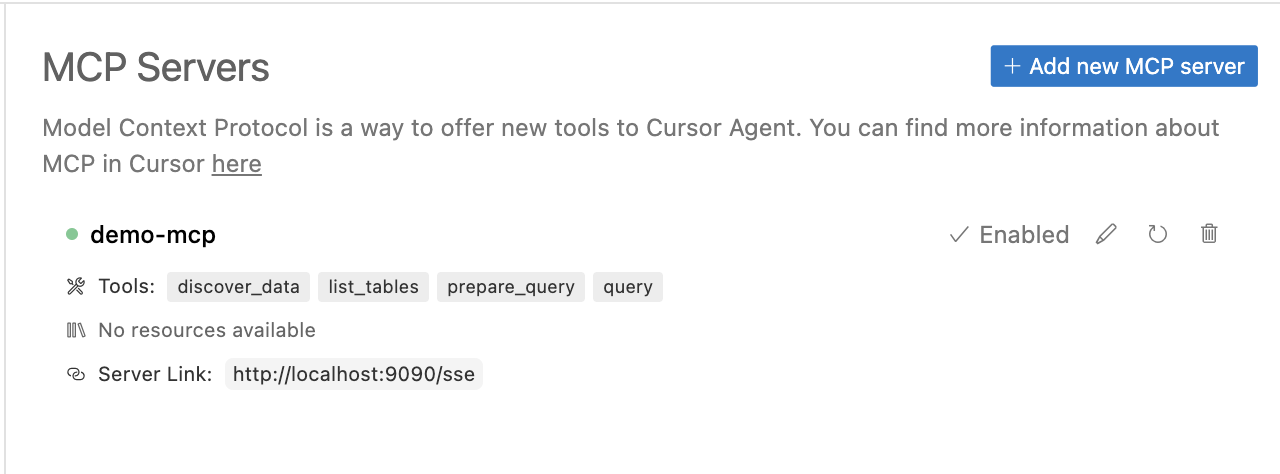
网关将生成 AI 优化的 API。
Related MCP server: mcpolyglot
AI 代理和 LLM 驱动的应用程序需要快速、安全地访问数据。我们正在构建一个 API 层,可自动为您的结构化数据生成安全且经过 LLM 优化的 API。
快速启动 MCP 或 OpenAPI,或使用 Direct/Raw SQL API
过滤掉 PII 和敏感数据,以确保符合 GDPR、CPRA、SOC 2 和其他法规
增加可追溯性和审计功能,确保人工智能应用程序不是黑匣子,并允许安全团队保持控制
针对 AI 工作负载进行了优化:支持模型上下文协议 (MCP),并增强元数据以帮助 AI 代理理解 API,同时还具有内置缓存和安全功能
在开发过程中,当 LLM 需要创建、调整或查询数据库中的数据时,它会非常有用。在分析场景中,它使您能够与数据库或数据仓库进行交互。使用远程函数/工具调用,利用数据库中的数据丰富您的 AI 代理。

⚡自动 API 生成– 使用基于表架构和采样数据的 LLM 自动创建 API
🗄️结构化数据库支持- 支持 PostgreSQL、MySQL、ClickHouse、Snowflake、MSSQL、BigQuery、Oracle Database、SQLite、ElasticSearch
🌍多协议支持– 提供 REST 或 MCP 服务器 API,包括 SSE 模式
📜 API 文档– 自动生成的 Swagger 文档和 OpenAPI 3.1.0 规范
🔒 PII 保护– 实现正则表达式插件或 Microsoft Presidio 插件,用于 PII 和敏感数据编辑
⚡灵活的配置– 通过 YAML 配置和插件系统轻松扩展
🐳部署选项– 作为二进制文件或 Docker 容器运行,并附带可立即使用的 Helm 图表
🤖支持多家 AI 提供商- 支持OpenAI 、 Anthropic 、 Amazon Bedrock 、 Google Gemini和Google VertexAI
📦本地和内部部署– 通过可配置的 AI 端点和模型支持自托管 LLM
🔑行级安全性(RLS) ——使用 Lua 脚本进行细粒度的数据访问控制
🔐身份验证选项– 内置对 API 密钥和 OAuth 的支持
👀全面监控——与 OpenTelemetry(OTel)集成,用于请求跟踪和审计跟踪
🏎️性能优化——实现基于时间和 LRU 缓存策略

Gateway 连接到您的结构化数据库(例如 PostgreSQL),并自动分析架构和数据样本,根据您的提示生成优化的 API 结构。LLM 仅在发现阶段用于生成 API 配置。该工具使用AI 提供程序生成 API 配置,同时通过 PII 检测确保安全性。
Gateway 支持多种部署选项,包括独立二进制文件、Docker 或 Kubernetes。查看我们的启动指南,了解详细说明。该系统使用 YAML 配置和插件,方便用户轻松定制。
通过内置安全功能的 REST API 或模型上下文协议 (MCP) 访问您的数据。网关通过 MCP 使用函数调用或 Cursor 与 LangChain、OpenAI 和 Claude Desktop 等 AI 模型和应用程序无缝集成。您还可以以 Otel 格式设置遥测到本地或远程目标。
快速入门指南
安装说明
API 生成指南
API 启动指南
ChatGPT 集成指南
数据库连接器文档
插件文档
# Clone the repository
git clone https://github.com/centralmind/gateway.git

# Navigate to project directory
cd gateway

# Install dependencies
go mod download

# Build the project
go build .Gateway 使用 LLM 模型生成您的 API 配置。请按以下步骤操作:
选择我们支持的 AI 提供商之一:
OpenAI和所有与 OpenAI 兼容的提供商
Google Gemini提供了慷慨的免费套餐。您可以通过访问 Google AI Studio 获取 API 密钥:
登录后,您可以在 AI Studio 的 API 部分创建 API 密钥。免费套餐包含丰厚的每月令牌分配,可用于开发和测试目的。
配置 AI 提供商授权。对于 Google Gemini,请设置 API 密钥。
export GEMINI_API_KEY='yourkey'运行发现命令:
./gateway discover \
  --ai-provider gemini \
  --connection-string "postgresql://neondb_owner:MY_PASSWORD@MY_HOST.neon.tech/neondb?sslmode=require" \
  --prompt "Generate for me awesome readonly API"
享受生成过程:
INFO 🚀 API Discovery Process
INFO Step 1: Read configs
INFO ✅ Step 1 completed. Done.

INFO Step 2: Discover data
INFO Discovered Tables:
INFO   - payment_dim: 3 columns, 39 rows
INFO   - fact_table: 9 columns, 1000000 rows
INFO ✅ Step 2 completed. Done.

# Additional steps and output...

INFO ✅ All steps completed. Done.

INFO --- Execution Statistics ---
INFO Total time taken: 1m10s
INFO Tokens used: 16543 (Estimated cost: $0.0616)
INFO Tables processed: 6
INFO API methods created: 18
INFO Total number of columns with PII data: 2查看gateway.yaml中生成的配置:
api:
  name: Awesome Readonly API
  description: ''
  version: '1.0'
database:
  type: postgres
  connection: YOUR_CONNECTION_INFO
  tables:
    - name: payment_dim
      columns: # Table columns
      endpoints:
        - http_method: GET
          http_path: /some_path
          mcp_method: some_method
          summary: Some readable summary
          description: 'Some description'
          query: SQL Query with params
params: # Query parameters./gateway start --config gateway.yamldocker compose -f ./example/simple/docker-compose.yml upGateway 实现了 MCP 协议,可与 Claude 及其他工具无缝集成。有关详细的设置说明,请参阅我们的 Claude 集成指南。
要将 MCP 工具添加到 Claude 桌面,只需调整 Claude 的配置:
{
  "mcpServers": {
    "gateway": {
      "command": "PATH_TO_GATEWAY_BINARY",
      "args": ["start", "--config", "PATH_TO_GATEWAY_YAML_CONFIG", "mcp-stdio"]
    }
  }
}路线图随时可能更改,并且高度依赖于用户反馈。目前,我们正在规划以下功能:
🗄️扩展数据库集成- Redshift、S3(Iceberg 和 Parquet)、Oracle DB、Microsoft SQL Server、Elasticsearch
🔑 SSH 隧道- 能够使用 jumphost 或 ssh 堡垒来建立隧道连接
🔍高级查询功能- 复杂的过滤语法和聚合函数作为参数
🔐增强的 MCP 安全性- API 密钥和 OAuth 身份验证
📦 Schema 管理- 自动进行 Schema 演变和 API 版本控制
🚦高级流量管理- 智能速率限制、请求节流
✍️写操作支持- 插入、更新操作
This server cannot be deployed
MCP server for AI dialogue using various LLM models via AceDataCloud
MCP server for OpenAI API (chat completions, image generation, embeddings) via AceDataCloud
Hosted MCP server connecting claude.ai, ChatGPT and other AI apps to your own computer