Wenyan MCP Server





Introduction
Wenyan is a multi-platform Markdown formatting and publishing tool that supports one-click conversion and publishing to:
Wenyan's goal is: Let writers focus on content, not formatting and platform adaptation.
Related MCP server: WeChat Article MCP Server
Different Versions of Wenyan
Wenyan currently offers various forms to cover different usage scenarios:
What is Wenyan MCP Server?
Simply put, it bridges the gap between "AI writing" and "WeChat Official Account publishing."
Based on the MCP protocol, AI clients like Claude Desktop can now directly call Wenyan's formatting engine. After finishing an article, there is no need to copy and paste back and forth in third-party editors; just let the AI format it for you and push it into your WeChat draft box.
Core Features:
Bypass Formatting Tools: AI-generated Markdown is directly converted to WeChat rich text and uploaded, eliminating intermediate steps.
Conversational Formatting: Simply type to tell the AI "switch to an orange style theme," and the style is applied automatically.
Complete Closed-loop Without Leaving the Window: Handle everything from "brainstorming topics -> writing articles -> adjusting formatting -> saving drafts" in the same chat window.
Practical Demonstrations:
Features
One-click publishing of Markdown to WeChat Official Account draft box
Automatic upload of local images and covers
Support for remote Server publishing (bypassing IP whitelist restrictions)
Built-in multiple exquisite formatting themes
Support for custom themes
Provides standard MCP Tool interface
Supports automatic AI invocation:
Render Markdown
Theme management
Publish drafts
Quick Start
Installation
npm install -g @wenyan-md/mcp
Claude Desktop Configuration (claude_desktop_config.json)::
{
  "mcpServers": {
    "wenyan-mcp": {
      "command": "wenyan-mcp",
      "env": {
        "WECHAT_APP_ID": "your_app_id",
        "WECHAT_APP_SECRET": "your_app_secret"
      }
    }
  }
}
Basic Usage
List Themes
Tell the AI:
What WeChat Official Account themes can you currently use?
AI response:
目前我支持的公众号主题包括以下这些,每个主题都有独特的风格和配色,适用于不同的内容调性:

1. **Default(默认)**
   简洁经典的排版,适合长文阅读,通用性强。

2. **OrangeHeart(橙心)**
   暖橙色调,优雅而富有活力,适合情感、生活类内容。
...
Register Theme
Tell the AI:
Help me register this css (https://wenyan.yuzhi.tech/manhua.css) as a new WeChat Official Account theme, named: xiuluochang
AI response:
好的,已成功将 CSS 样式表注册为新的公众号主题,主题名称为:**xiuluochang**。

您现在可以在公众号后台选择该主题进行应用,样式将按照 `https://wenyan.yuzhi.tech/manhua.css` 的定义进行渲染。

如有需要进一步自定义或更换主题,随时告诉我!
Delete Theme
Tell the AI:
Delete the WeChat Official Account theme named "xiuluochang"
AI response:
公众号主题 “xiuluochang” 已成功删除。
Publish Article
Tell the AI:
Use the phycat theme to publish this article to the WeChat Official Account: ./tests/publish.md
AI response:
文章已成功发布至微信公众号草稿箱!🎉

- **主题**:phycat
- **媒体ID**:xxx

您可登录微信公众号后台,在「草稿箱」中查看并编辑文章,确认无误后即可一键发布。如需进一步排版优化、添加封面或设置摘要,我也可以协助您完成!

是否需要我帮您生成一篇发布文案或封面建议? 😊
Concepts
Environment Variable Configuration
[!IMPORTANT]
Please ensure the following environment variables are configured when starting MCP, otherwise the upload interface will fail.
WECHAT_APP_ID
WECHAT_APP_SECRET
WeChat Official Account IP Whitelist
[!IMPORTANT]
Please ensure the IP of the machine running Wenyan has been added to the IP whitelist in the WeChat Official Account backend, otherwise the upload interface will fail.
Configuration documentation: https://yuzhi.tech/docs/wenyan/upload
Article Format
To upload articles correctly, each Markdown file needs to contain a frontmatter section at the top:
---
title: 在本地跑一个大语言模型(2) - 给模型提供外部知识库
cover: /Users/xxx/image.jpg
author: xxx
source_url: http://
---
Field Description:
Field | Required | Description |
title | ✅ | Article title |
cover | ❌ | Cover image (local path or web URL) |
author | ❌ | Author |
source_url | ❌ | Original link |
type | ❌ | Article type, set to image for image messages (Little Green Book) |
image_list | ❌ | List of image paths (for Little Green Book, max 20) |
need_open_comment | ❌ | Whether to open comments |
only_fans_can_comment | ❌ | Whether only fans can comment |
Notes:
If no cover is specified, the first image in the body will be automatically used as the cover
Cover supports local paths and web URLs
type and image_list are used for image message publishing
Example Article
In-article Images and Article Cover
Before publishing an article to the Official Account, Wenyan will automatically process all images in the article according to WeChat's requirements and upload them to the Official Account material library. Currently, Wenyan supports the following images well:
Local hard drive absolute path (e.g., /Users/xxx/image.jpg)
Network path (e.g., https://example.com/image.jpg)
Relative path of the current article (e.g., ./assets/image.png)
Publishing Image Messages (Little Green Book)
The difference between publishing image messages and article messages is that you need to specify an image list in the frontmatter. Two methods are supported:
Method 1: Use type: image (Recommended)
Set type: image in the frontmatter, and the CLI will automatically extract all images from the body:
---
title: 人勤春来早,读书正当时
type: image
---


Method 2: Manually specify image_list
List image paths directly in the frontmatter:
---
title: 人勤春来早,读书正当时
image_list:
  - ./1.jpeg
  - ./2.jpeg
  - ./3.jpeg
  - ./4.jpeg
  - ./5.jpeg
---
image_list supports up to 20 images, with the first one being the cover.
Server Mode
Compared to the purely local Stdio Mode, wenyan-mcp also provides Client–Server Mode. Both modes have identical operating effects, and you can choose the most suitable method based on your operating environment and network conditions.
In local mode, MCP directly calls the WeChat Official Account API to complete image uploads and draft publishing.
flowchart LR
    MCP[Wenyan MCP] --> Wechat[公众号 API]
In remote client mode, MCP acts as a client, sending publishing requests to the Wenyan Server deployed on a cloud server, and the Server completes the WeChat Official Account API calls.
flowchart LR
    MCP[Wenyan MCP] --> Server[Wenyan Server] --> Wechat[公众号 API]
Suitable for:
Users without a fixed local IP who need to frequently add IP whitelists
Users who need team collaboration
Supporting CI/CD automated publishing
Supporting AI Agent automated publishing
Server Mode Deployment
Claude Desktop Configuration::
{
  "mcpServers": {
    "wenyan-mcp": {
      "command": "wenyan-mcp",
      "args": ["--server", "https://api.example.com", "--api-key", "your-api-key"]
    }
  }
}
Multi-Account Publishing (Advanced)
[!IMPORTANT]
You must use server mode to use the multi-account publishing feature.
Steps:
First, deploy the server
Configure multiple WeChat credentials on the server side, refer to the documentation
Let the MCP client connect to the server
Tell the AI:
Use the phycat theme to publish this article to the WeChat Official Account (your_app_id): ./tests/publish.md
Docker Deployment
Suitable for users who do not want to install a Node.js environment.
docker pull caol64/wenyan-mcp:latest
{
  "mcpServers": {
    "wenyan-mcp": {
      "command": "docker",
      "args": [
        "run",
        "--rm",
        "-i",
        "-v", "/your/host/file/path:/mnt/host-downloads",
        "-e", "WECHAT_APP_ID=your_app_id",
        "-e", "WECHAT_APP_SECRET=your_app_secret",
        "-e", "HOST_FILE_PATH=/your/host/file/path",
        "caol64/wenyan-mcp"
      ]
    }
  }
}
Special Notes for Docker Configuration:
Mount Directory (-v): You must mount the host's file/image directory to /mnt/host-downloads inside the container.
Environment Variable (HOST_FILE_PATH): Must be consistent with the file/image directory path mounted on the host.
Principle: The local images referenced in your Markdown file/article should be placed in this directory, and Docker will automatically map them so the container can read and upload them.
How to Debug
It is recommended to use the official Inspector for debugging:
npx @modelcontextprotocol/inspector <command>
Successful startup will show a prompt similar to:
🔗 Open inspector with token pre-filled:
   http://localhost:6274/?MCP_PROXY_AUTH_TOKEN=761c05058aa4f84ad02280e62d7a7e52ec0430d00c4c7a61492cca59f9eac299
   (Auto-open is disabled when authentication is enabled)
Visit the link above to open the debugging page.
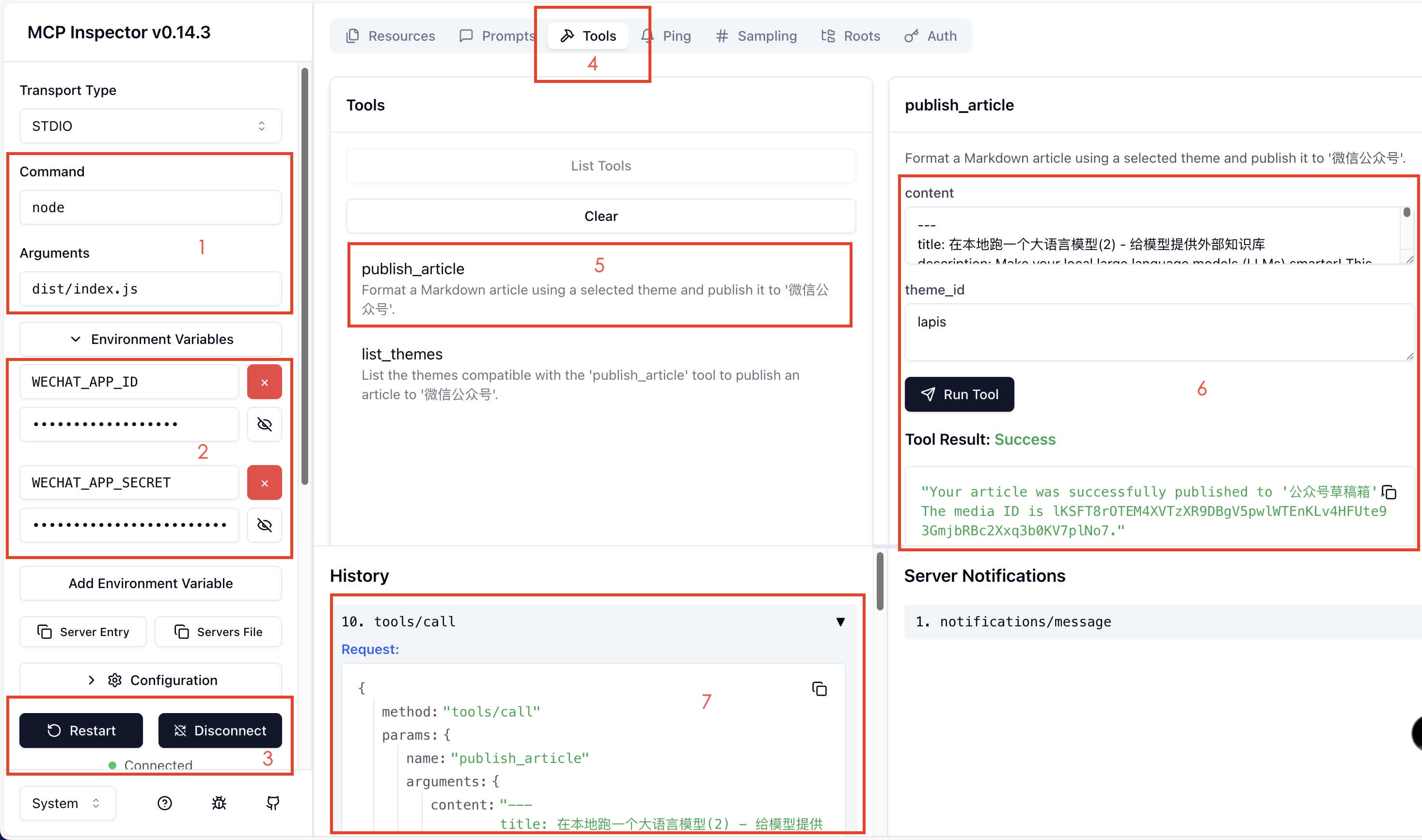
Fill in the startup command correctly
Add environment variables
Click Connect
Select Tools -> List Tools
Select the interface to debug
Fill in the parameters and click Run Tool
View full parameters
If you find Wenyan helpful, you can buy my cat some canned food ❤️
https://yuzhi.tech/sponsor
License
Apache License Version 2.0

