
axross-headless-mcp
by c0decave
README.md
<!-- mcp-name: io.github.c0decave/axross-headless-mcp -->
# axross-headless-mcp
**axross's headless MCP server: file tools on the local disk and on SFTP, SMB, WebDAV, S3 and more for any MCP client, over stdio or HTTP - without Qt.**
- **Your files for any MCP client** - Claude Desktop, Claude Code, Cursor, VS Code: list, read, search and hash files.
- **Local disk and remote connections** - SFTP built in; SMB, WebDAV, S3, Azure, cloud drives, Git, databases as extras.
- **Read-only by default** - the write tools only with `--mcp-write` and an explicit `--mcp-root`.
- **Confined to one folder** - every path stays under `--mcp-root`; SSH and GnuPG keys and tokens are refused.
- **50+ tools in groups** - metadata, duplicates, archives, crypto, file types, transfers, remote profiles and more.
- **stdio or HTTP** - streamable HTTP with a bearer token, mTLS for anything but loopback.
- **No GUI, no Qt** - runs on a server, in a container or in CI: `pipx`, `uvx` or Docker.
- **Current MCP** - 2025-11-25: tool annotations, structured results, progress, cancellation, resources.
- **An audit trail** - what each tool did or refused, on stderr and in the log.
- **The same code as axross** - axross's settings and saved connection profiles, credentials from the keyring.
## Contents
- **[Everything in detail: the extended README](https://github.com/c0decave/axross-headless-mcp/blob/main/docs/README-extended.md)**
- [What changed: the CHANGELOG](https://github.com/c0decave/axross-headless-mcp/blob/main/CHANGELOG.md)
- [Screenshots](#screenshots)
- [Install](#install)
- [Connect a client](#connect-a-client)
- [Documentation](#documentation)
- [Tests](#tests)
- [Licence](#licence)
## Screenshots
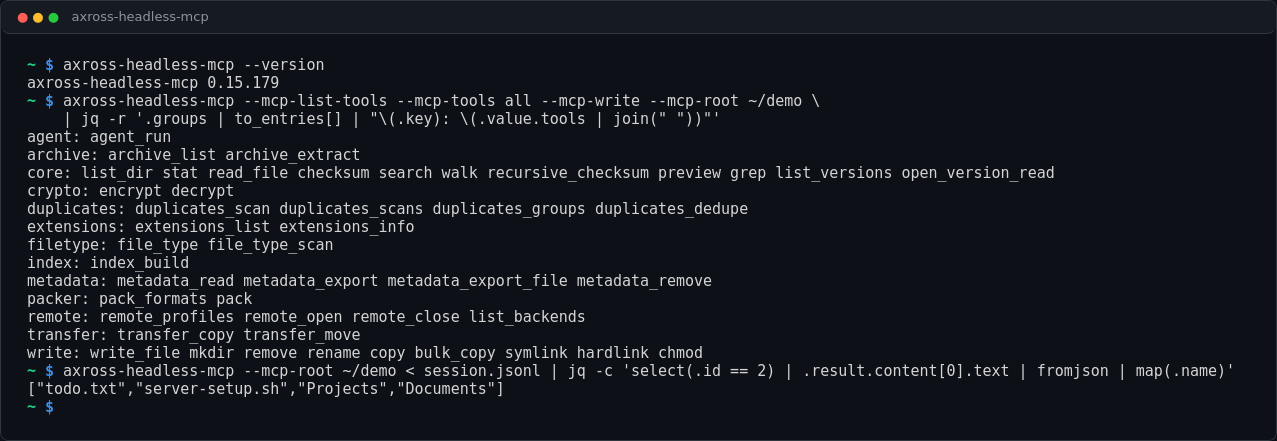
*The tools of every group, and a client's tools/call over stdio.*
## Install
```sh
pipx install axross-headless-mcp # or: pip install axross-headless-mcp
pipx install 'axross-headless-mcp[all]' # with every remote protocol and format
axross-headless-mcp --mcp-list-tools --mcp-tools all # what it would serve, as JSON
```
## Connect a client
```sh
claude mcp add axross -- axross-headless-mcp --mcp-root ~/projects --mcp-tools all
```
Claude Desktop, Cursor, VS Code and other clients: [the JSON
configuration](https://github.com/c0decave/axross-headless-mcp/blob/main/docs/README-extended.md#connect-a-client-stdio). Over HTTP (a bearer token, mTLS off
loopback): [Over HTTP](https://github.com/c0decave/axross-headless-mcp/blob/main/docs/README-extended.md#over-http). In a container:
```sh
docker run -i --rm -v "$PWD:/data" ghcr.io/c0decave/axross-headless-mcp:latest \
--mcp-server --mcp-root /data --mcp-tools all
```
## Documentation
| Page | What it covers |
|---|---|
| [Extended README](https://github.com/c0decave/axross-headless-mcp/blob/main/docs/README-extended.md) | every tool group, the protocol, HTTP, Docker, settings |
| [docs/MCP.md](https://github.com/c0decave/axross/blob/main/docs/MCP.md) | the full reference of axross's MCP server |
| [docs/mcp-tools.json](https://github.com/c0decave/axross/blob/main/docs/mcp-tools.json) | the tool catalogue, generated from the manifest |
| [llms-install.md](https://github.com/c0decave/axross-headless-mcp/blob/main/llms-install.md) | setup steps for AI agents (Cline and others) |
## Tests
```sh
python -m pytest tests
```
## Licence
Apache-2.0, as [axross](https://github.com/c0decave/axross): the same code, written out by axross's
`scripts/export_standalone.py`. Everything in detail: the [extended README](https://github.com/c0decave/axross-headless-mcp/blob/main/docs/README-extended.md).
This server cannot be deployed
Maintenance
ActivityMaintained
ResponsivenessNo recent community issues