
jev-ra
<p align="center">
<img src="https://raw.githubusercontent.com/brnyxx/jev-ra/main/assets/logo.svg" alt="jev-ra" width="360">
</p>
<p align="center">
<a href="https://github.com/brnyxx/jev-ra/actions/workflows/ci.yml"><img alt="CI" src="https://img.shields.io/github/actions/workflow/status/brnyxx/jev-ra/ci.yml?branch=main&label=ci"></a>
<a href="https://pypi.org/project/jev-ra/"><img alt="PyPI" src="https://img.shields.io/pypi/v/jev-ra"></a>
<img alt="Python" src="https://img.shields.io/badge/python-3.12%20%7C%203.13%20%7C%203.14-blue">
<img alt="MCP" src="https://img.shields.io/badge/MCP-stdio-111">
<img alt="Chrome" src="https://img.shields.io/badge/Chrome-CDP-111">
<a href="https://github.com/brnyxx/jev-ra/blob/main/LICENSE"><img alt="License" src="https://img.shields.io/badge/license-MIT-green"></a>
<a href="https://m8ven.ai/mcp/brnyxx/jev-ra"><img alt="M8ven Score" src="https://m8ven.ai/badge/mcp/brnyxx/jev-ra"></a>
</p>
[](https://github.com/brnyxx/jev-ra/blob/main/docs/BENCHMARKS.md)
**English** · [한국어](https://github.com/brnyxx/jev-ra/blob/main/docs/i18n/README.ko.md) · [日本語](https://github.com/brnyxx/jev-ra/blob/main/docs/i18n/README.ja.md) · [简体中文](https://github.com/brnyxx/jev-ra/blob/main/docs/i18n/README.zh-CN.md)
**Site:** [brnyxx.github.io/jev-ra](https://brnyxx.github.io/jev-ra/) replays a real recorded run and explains the pipeline.
# jev-ra
**A fast browser-use layer for CLI coding agents.** Claude Code, Codex, or any MCP client hands
jev-ra a goal. TypeSafe Jev, a System One decision model, picks the operation *and* the target
element for every step in one round trip. Your agent plans, supplies the text values, reads what the
page says, and takes over when jev-ra escalates. No second LLM runs inside the loop.

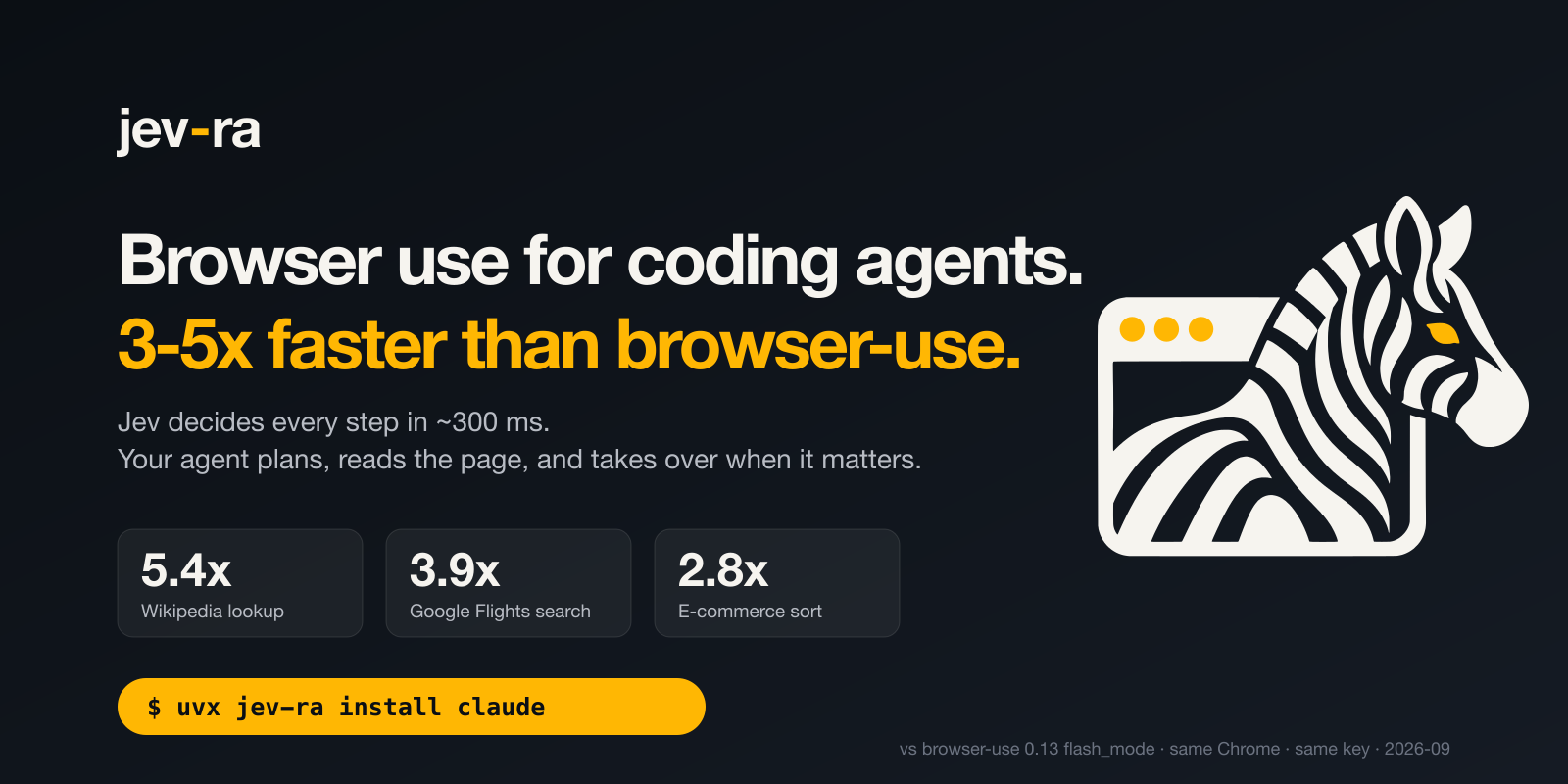
| task | browser-use 0.13.10 + gemini-3-flash `flash_mode` | jev-ra | |
|---|---|---|---|
| Wikipedia: open the Gödel incompleteness article | 23,058 ms | **2,714 ms** | **8.50×** |
| Google Flights ZRH→LON one-way, results on screen | 66,414 ms | **8,888 ms** | **7.47×** |
| Olive Young category: sort by 신상품순 | 15,071 ms | **3,806 ms** | **3.96×** |
Measured 2026-09-18 on one machine and one dedicated Chrome, both tools through OpenRouter. jev-ra is
the median of 5 runs; browser-use is its single recorded run, which was faster than its own 5-run
median on every task. Each jev-ra run was verified against the final page; 25 of 25 passed with no
text-model calls. [Method, p90, cost and raw rows](https://github.com/brnyxx/jev-ra/blob/main/docs/BENCHMARKS.md).
## Quick start
**Claude Code**
```sh
export OPENROUTER_API_KEY=sk-or-...
uvx jev-ra install claude
# then, in Claude Code: "open wikipedia.org and find the Gödel incompleteness article"
```
**Codex**
```sh
export OPENROUTER_API_KEY=sk-or-...
uvx jev-ra install codex
# then, in Codex: "use jev-ra to open wikipedia.org and find the Gödel incompleteness article"
```
**Shell**
```sh
export OPENROUTER_API_KEY=sk-or-...
uvx jev-ra doctor
uvx jev-ra run https://en.wikipedia.org/wiki/Main_Page "Open the Godel incompleteness article." \
--value "search_query=Godel incompleteness theorems"
```
No Python setup? `npx -y jev-ra install claude` does the same thing through the npm launcher. The
npm package is a launcher only: it finds `uv`, offers to install it, and runs the PyPI package pinned
to its own version.
There is no install step either way: `uvx` runs jev-ra straight from PyPI and registers `uvx jev-ra
mcp` as the server command. For a permanent copy, `uv tool install jev-ra`. The key is forwarded
from the variable you already exported and is never printed.
No Chrome on the machine either? The repository's `Dockerfile` builds an image with a Chromium in
it: `docker build -t jev-ra .` then `docker run --rm -e OPENROUTER_API_KEY jev-ra doctor`. Chrome's
own sandbox needs a user namespace a container's seccomp profile usually refuses, so jev-ra
launches it once, reads what it said, and starts it again without the sandbox when that is why it
would not run.
## How it works
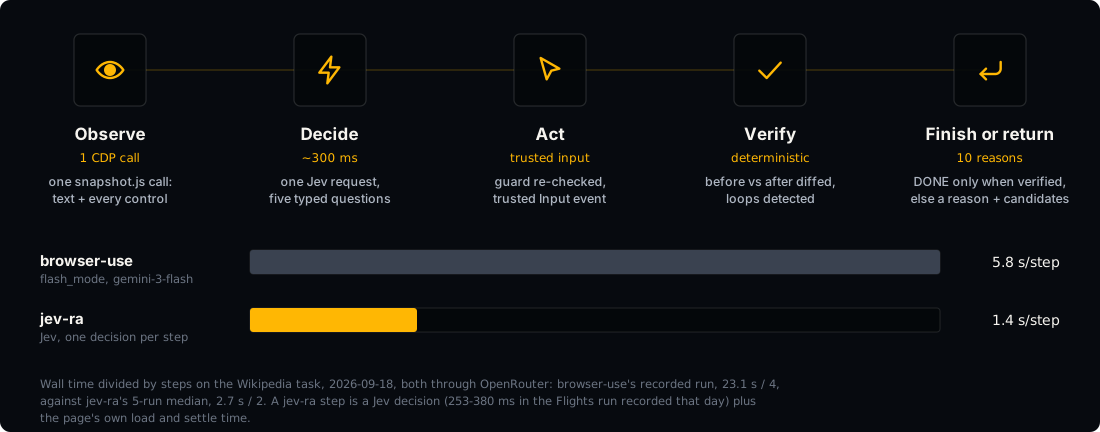
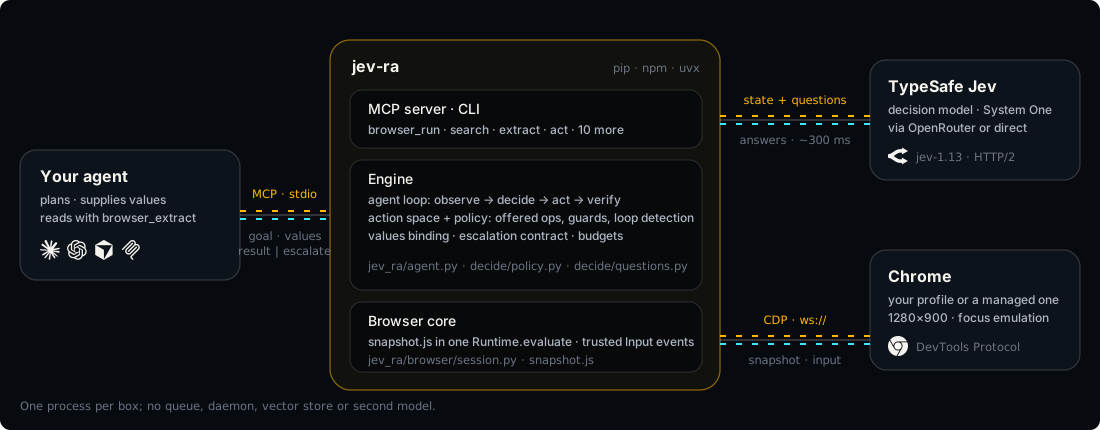
One decision per step. The only text typed into the page is text you supplied.
## MCP tools
| tool | arguments | what it does |
|---|---|---|
| `browser_open` | url | Open a URL in the shared session and summarise the page. |
| `browser_run` | goal, values?, max_steps?, resume? | Pursue a whole goal. Supply values for anything that must be typed. `resume` carries on a run that stopped with `needs_human`. |
| `browser_search` | query, goal?, max_pages? | Search, read the best results in parallel tabs, rank them against the goal. |
| `browser_act` | instruction, values? | Take one decided step towards an instruction. |
| `browser_observe` | max_elements? | List the observed controls and the visible text. |
| `browser_extract` | mode? | Structured page data: `text`, `elements`, `links`, `tables`, `main`. |
| `browser_click` | ref, page_key? | Click one observed element by its ref. |
| `browser_type` | ref, text, page_key? | Type into one observed field. |
| `browser_select` | ref, option, page_key? | Select an observed dropdown option. |
| `browser_scroll` | direction? | Scroll one viewport step up or down. |
| `browser_press` | key | Press Enter, Escape or Tab. |
| `browser_wait` | - | Wait a moment and observe again. |
| `browser_screenshot` | - | JPEG of the current viewport. |
| `browser_close` | - | Close the session held by the server. |
Every response carries `elapsed_ms`, and `decisions` plus `cost` whenever Jev was called.
`browser_observe` returns a `page_key`; pass it back to `browser_click`, `browser_type` or
`browser_select` and a ref from a page that has changed since is refused as `stale` instead.
## CLI
| command | what it does |
|---|---|
| `run URL "goal" [--value name=text ...] [--max-steps N] [--profile NAME]`, `run --resume RUN_ID` | pursue a goal from a URL until it is done or escalates |
| `search "query" ["what the page must answer"] [--max-pages 3] [--profile NAME]` | search the web and read the best results |
| `open URL [--profile NAME]` | open a URL and keep the session for later commands |
| `observe` | list the controls and text of the open page |
| `extract [--mode text\|elements\|links\|tables\|main]` | pull structured data out of the open page |
| `act "instruction" [--value name=text ...]` | take one decided step on the open page |
| `click REF` | click one observed element |
| `type REF TEXT` | type into one observed field |
| `select REF OPTION` | select an observed dropdown option |
| `scroll down\|up` | scroll the open page |
| `press Enter\|Escape\|Tab` | press Enter, Escape or Tab |
| `wait` | wait a moment and observe again |
| `screenshot [PATH]` | save a JPEG of the viewport |
| `close` | close the session kept by `open` |
| `clean [--dry-run] [--keep-profile] [--daemons]` | stop what jev-ra started and empty its profile |
| `profile RUN_ID` | print where a stored run's time went, step by step |
| `trace RUN_ID [--html PATH]` | render a stored run by its run id |
| `mcp` | run the MCP stdio server |
| `serve [--host ADDR] [--port N] [--quota N]` | run the same tools over HTTP and SSE |
| `skill` | print the agent guide, for saving as a skill file |
| `install claude\|codex [--scope user\|project\|local]` | register jev-ra as an MCP server with a coding agent |
| `doctor [--profile NAME]` | check the key, the endpoint, Chrome and one live decision |
| `bench [--live]` | time the offline fixtures, and the live tasks with --live |
| `corpus run` | run the real-site corpus |
`open` … `close` share one browser across invocations through a target id in
`$XDG_STATE_HOME/jev-ra/session.json`. Add `--json` to any command for the raw payload.
Every run is stored under its own id in `$XDG_STATE_HOME/jev-ra/runs/`, newest 200 kept.
`jev-ra trace RUN_ID` prints its step table; `--html` writes a single-file page - the run's own
JSON inline, nothing to fetch - to send to whoever asked what the run did.
`--profile NAME` gives a run a Chrome user-data-dir of its own under
`$XDG_STATE_HOME/jev-ra/chrome-profiles/NAME`, so a login done once on that profile is still
there on the next run; `open` records the profile and the stateful commands reattach to it. The
MCP tool takes the same thing as `browser_open(url, profile)`. One process drives one browser, so
a server already on a profile refuses a second one instead of answering from the wrong cookies.
`serve` is the same tool set over MCP's streamable HTTP transport, at `/mcp`, answering with
server-sent events; `/healthz` answers without a key. Every request carries a key from
`JEV_RA_SERVE_KEYS` as `Authorization: Bearer <key>`, is charged the decisions it spends against
that key's daily quota, and leaves one JSON line on stderr with the run id it also returns in the
`x-jev-ra-run-id` header. A key is never logged: the line names it by a digest.
## Python
```python
from jev_ra import Agent
with Agent() as agent:
result = agent.run(
"Place the order with express shipping.",
values={"name": "Ada Lovelace", "email": "ada@example.com"},
url="https://example.com/checkout",
)
print(result.status, result.elapsed_ms, [step["target_label"] for step in result.steps])
```
## Values
TYPE_TEXT needs a string, and jev-ra will not invent one. Jev picks which of *your* values belongs in
the field it is about to fill, in the same round trip that picks the field. If nothing fits and no
text helper is configured, the run stops with `needs_value` and reports the field's label, role and
current value. You supply the value and call again. The default install has no text model.
## When it hands control back
`Result.status` is `done`, `blocked`, `escalate` or `budget`. When a run stops short, `reason` is one
of `needs_value`, `stuck_loop`, `unverified_done`, `stale`, `invalid_decision`, `too_many_controls`,
`provider_error`, `blocked`, `blocked_by_site` or `needs_human`. A run that ends on `budget` names the budget it hit (steps, decisions
or time) in `reason` instead; `provider_error` is the provider refusing to answer at all, so check
the key and the route rather than retrying the goal. An escalation
also carries the top eight operation/target candidates with their probabilities, and up to 3,000
characters of page text — enough to decide what to do without observing again.
A goal that reads as a question — it ends in a question mark, or opens with what, which, how many,
when, who or find the — also gets `Result.final_answer`: one sentence the configured text helper
takes from the page the run finished on, whatever the run ended as. With no text helper it stays
`null` and `detail` says so, and a goal that is an instruction never asks for one.
Verification is deterministic: after every action jev-ra compares url, title, text and field state,
and `page_changed` comes from a semantic page marker, not from the model.
While the page settles after an action, jev-ra asks Jev the next question already, against the page
as it should read with that input applied and nothing else changed. If the settled page offers
anything the guess did not, the answer is thrown away and the question asked again.
`Result.speculations` and `Result.prefetched` count how often that paid off.
A site that answers with an error page (HTTP 5xx or 429, or a short page that says so) is waited out
for two seconds and reloaded once before anything is decided on it; if it still answers with an
error, the run stops with `blocked_by_site` and `detail.wall` names the status (`"http 502"`), so a
site's bad minute is never mistaken for a page to act on.
A site that asks for a person - a CAPTCHA widget, Cloudflare's "Just a moment...", a press-and-hold
check - is handed to one. jev-ra backs off and asks for the page once more, as it does for an error
page; if the check is still there, it brings the Chrome window to the front, raises a desktop
notification naming the site (`JEV_RA_NOTIFY=0` turns it off), and waits up to 120 s
(`JEV_RA_HUMAN_WAIT_S`) for the page to stop being a check. Then the same run carries on, with the
same goal, history and values and the steps it has left. The wait is reported apart as
`Result.human_wait_ms` and spends no step and no time budget. If nobody clears it in time, the run
stops with `needs_human`: `detail` names the site and the check and carries `resume`, the run id.
Once the person has cleared it, `browser_run(resume=...)` or `jev-ra run --resume ID` carries the run
on from that page instead of starting over. A headless browser, or one at a remote CDP address, has
nobody to show the check to, so the run stops with `needs_human` at once and `detail.next_step` says
how to rerun where a person can see it. A site that refuses outright - "Access denied", a 403 with no
check, a geo block - is still `blocked_by_site`, with `detail.kind` set to `refusal`. jev-ra never
solves a check, never hides that it is automated, and never borrows cookies from another profile.
The navigations a run starts - its first open and the one reload it may spend - are paced per host:
at least 1 s apart (`JEV_RA_PACE_S`), and a host that answered 429 or put up a check makes the next
one wait twice as long each time in a row. A run opens its address once, so an ordinary run is never
held, and the machine the run is on is never paced.
## Benchmarks
Five tasks, five runs each, every run verified against the page it left behind. Measured 2026-09-18
through OpenRouter, on the same machine and Chrome as the browser-use rows:
| task | median | p90 | success | decisions | cost | ratio |
|---|---|---|---|---|---|---|
| Wikipedia article | 2,714 ms | 3,179 ms | 5/5 | 3 | $0.00075 | 8.50× |
| Google Flights search | 8,888 ms | 10,573 ms | 5/5 | 14 | $0.00317 | 7.47× |
| Olive Young sort | 3,806 ms | 4,858 ms | 5/5 | 4 | $0.00204 | 3.96× |
| Search with a citation | 2,416 ms | 2,571 ms | 5/5 | 4 | $0.00035 | no baseline |
| Local checkout form | 2,191 ms | 2,338 ms | 5/5 | 5 | $0.00049 | no baseline |
Ratios are against browser-use 0.13.10 + gemini-3-flash `flash_mode`, its single recorded run of each
task on the same day, machine and Chrome, also through OpenRouter: 23,058 ms, 66,414 ms and
15,071 ms respectively. Text-model calls across all 25 runs: 0. A same-harness re-run of
browser-use, five runs per task that day, was slower still: 9.07×, 8.31× and 7.26×. Against the
fastest of browser-use's six runs of each task (15,759 ms, 49,914 ms and 15,071 ms), our median is
5.8×, 5.6× and 3.96×; no ratio measured that day is below 3.96×.
`jev-ra bench --live --runs 5` reproduces this table and prints PASS/FAIL against the v0.1 bar of
≥ 3× on every task with a baseline. On 0.2.5 through the TypeSafe direct route (2026-09-23) the
first three tasks took 4,681 ms, 11,603 ms and 5,675 ms; browser-use was not re-run that day, so
those times are not a like-for-like ratio. [Method, the browser-use rows, and how to reproduce
them](https://github.com/brnyxx/jev-ra/blob/main/docs/BENCHMARKS.md).
jev-ra on the left, browser-use `flash_mode` on the right, same task, same Chrome, real time:
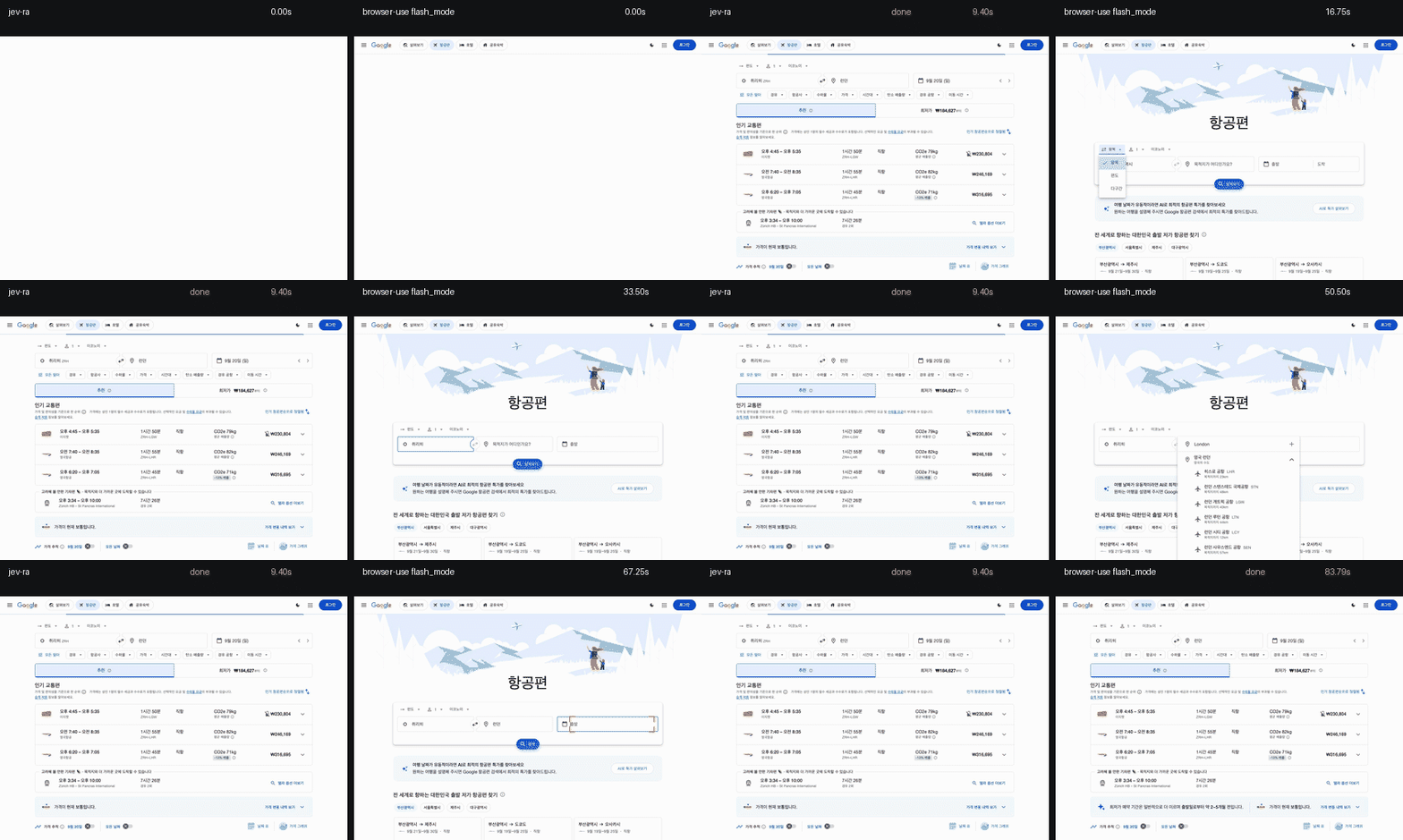
A run that finishes without doing the task counts as a failure, not as a time.
### Accuracy on real sites
The corpus is 83 tasks on real sites in ten families (search, e-commerce, booking, forms, docs,
news, portals, auth walls, Japanese and Chinese sites), each with a spec that checks the page the
run left behind. On 0.2.4, three runs each through the TypeSafe direct route on 2026-09-23:
**213 / 249 = 85.5 %**. On the forty tasks both tools were given, browser-use 0.13.10 `flash_mode`
passed **29 / 40 = 72 %** in one run on 2026-09-22, with a median of **19.4 s** on the runs that
passed; jev-ra 0.1 passed **102 / 120 = 85 %** in three runs on 2026-09-18, median **3.1 s**. Those
two rows differ in day, run count and jev-ra version, so they are not a like-for-like comparison.
A single three-run pass moves by about five tasks on site weather alone, so a change counts only
when a per-task rerun agrees.
[Per-task rows and the noise measurement](https://github.com/brnyxx/jev-ra/blob/main/docs/BENCHMARKS.md).
## What it will not do
| limit | what happens |
|---|---|
| Canvas drawing, games, anything painted rather than marked up | `blocked`: no observed control can advance the goal |
| File upload | `blocked`: a file input is never offered, and never typed into |
| CAPTCHA and other checks a person can clear | handed to the person at the window; `needs_human` with a `resume` token when nobody clears it |
| Bot walls that refuse outright, stealth | `blocked_by_site` with `detail.kind` `refusal`; jev-ra never disguises itself |
| Auth flows | `needs_value` with the field named; jev-ra never guesses a credential |
| Pop-up windows, multi-tab workflows | the run stays on its own target |
| Cross-origin iframes | reported as one opaque element; open shadow roots and same-origin iframes **are** traversed |
| More than 250 visible controls | `omitted` is reported, and a stuck run escalates `too_many_controls` rather than guessing |
Each returns an escalation with the page text and the ranked candidates.
## FAQ
**OpenRouter or a TypeSafe key?** Either. jev-ra resolves `JEV_RA_API_KEY`, then `TYPESAFE_API_KEY`,
then `OPENROUTER_API_KEY`. A key starting `sk-or-` selects the OpenRouter route
(`typesafe/jev-1.13`); anything else goes direct (`jev-latest`). `JEV_RA_ENDPOINT` and
`JEV_RA_MODEL` override both. OpenRouter is easier to get. Which route decides faster has not been
measured under the same conditions: the [upstream jev-ultrafast
recording](https://github.com/browser-use/jev-ultrafast/blob/main/docs/performance.md) has a 178 ms
median decision on the direct route, and jev-ra's recorded Flights run a 296 ms median through
OpenRouter (2026-09-18), on different machines and days.
**What does a task cost?** Through OpenRouter on 2026-09-18, between **$0.00035** (a search, 4
decisions) and **$0.00317** (the whole Google Flights flow, 14 decisions). Cost scales with
decisions, not with page size, because the state sent is the element table and the visible text,
never the HTML.
**Does it need its own Chrome?** It will find or launch one on its own profile
(`$XDG_STATE_HOME/jev-ra/chrome-profile`) and reuse it; when the Chrome it launched dies, the next
command starts another. Point `BU_CDP_URL` at a different Chrome to override - if nothing answers
there, jev-ra says so rather than launching one behind your back. Do not point it at a browser
signed into anything you would not let an agent operate.
**Why no text model?** The host agent already has the context. A second model costs one call per
field (675-938 ms per mercury-2.5 call through OpenRouter, five calls measured on 2026-09-18 for
[the design](https://github.com/brnyxx/jev-ra/blob/main/docs/DESIGN.md)) and writes values nobody
supplied. You can still configure one with `JEV_RA_TEXT_MODEL`.
## Configuration
| variable | effect |
|---|---|
| `JEV_RA_API_KEY`, `TYPESAFE_API_KEY`, `OPENROUTER_API_KEY` | key, in that order of precedence |
| `JEV_RA_ENDPOINT`, `JEV_RA_MODEL` | override the route |
| `JEV_RA_CHROME` | path to the browser binary to launch |
| `BU_CDP_URL` | an existing Chrome to drive instead of launching one |
| `JEV_RA_VIEWPORT` | e.g. `1280x900` (the default) |
| `JEV_RA_LOCALE` | the language the browser asks sites for; default `en-US`, blank for the machine's |
| `JEV_RA_MAX_STEPS`, `JEV_RA_MAX_DECISIONS`, `JEV_RA_TIMEOUT_S` | budgets (40 / 80 / 120) |
| `JEV_RA_BLOCK_RESOURCES` | `0` to stop blocking fonts and media |
| `JEV_RA_PROXY` | egress for a Chrome jev-ra launches, e.g. `http://host:8080` |
| `JEV_RA_PACE_S` | least seconds between two navigations a run starts on one host; default `1`, `0` for none, this machine exempt |
| `JEV_RA_NOTIFY` | `0` to stop the desktop notification a human check raises |
| `JEV_RA_HUMAN_WAIT_S` | how long a run waits for a person to clear a human check; default `120`, `0` hands it back at once |
| `JEV_RA_ALLOW_FILE_URLS` | `1` to let a session open `file:` URLs |
| `JEV_RA_SEARCH_URL` | search endpoint template, `{query}` substituted |
| `JEV_RA_TEXT_MODEL`, `JEV_RA_TEXT_BASE_URL`, `JEV_RA_TEXT_API_KEY` | optional text helper, off by default |
| `JEV_RA_SERVE_KEYS` | comma list of API keys `jev-ra serve` accepts; it will not start without one |
| `JEV_RA_SERVE_QUOTA` | decisions per key per day for `jev-ra serve`; unlimited when unset |
| `JEV_RA_LOG_LEVEL` | log level for stderr, e.g. `DEBUG`; default `WARNING` |
| `JEV_RA_REQUIRE_BROWSER` | `1` makes `doctor` check Chrome even without a key |
`$XDG_CONFIG_HOME/jev-ra/config.json` sets the same keys; the environment wins.
## Credits
`jev_ra/browser/snapshot.js` and the `NEXT_ACTION` / `TARGET` instruction texts are adapted from
[browser-use/jev-ultrafast](https://github.com/browser-use/jev-ultrafast) (MIT), where they were
measured. Chrome is driven through
[browser-harness](https://github.com/browser-use/browser-harness) (MIT).
See [THIRD_PARTY_NOTICES.md](THIRD_PARTY_NOTICES.md).
MIT licensed. [Contributing](https://github.com/brnyxx/jev-ra/blob/main/CONTRIBUTING.md) · [Security](https://github.com/brnyxx/jev-ra/blob/main/SECURITY.md) · [Agent guide](https://github.com/brnyxx/jev-ra/blob/main/AGENTS.md) ·
[Usage reference](https://github.com/brnyxx/jev-ra/blob/main/docs/USAGE.md) · [한국어](https://github.com/brnyxx/jev-ra/blob/main/docs/i18n/README.ko.md)
[Changelog](https://github.com/brnyxx/jev-ra/blob/main/CHANGELOG.md) · [Releases](https://github.com/brnyxx/jev-ra/releases)
TDQS
Scored across 14 tools
Most tools have clear boundaries: open/search/observe/extract/click/type/select/scroll/press/wait/screenshot/close are distinct actions. The only mild overlap is between browser_observe and browser_extract, but their descriptions separate visible/control inspection from structured data extraction.
Every tool follows the same browser_<verb> pattern with lowercase snake_case throughout. The naming is predictable and makes the action type immediately clear.
14 tools is well within the ideal range for a browser automation server. Each tool covers a meaningful interaction or observation primitive without unnecessary bloat.
The set covers the full core workflow: open, search, observe, interact, extract, screenshot, and close. Minor gaps like explicit back/forward/refresh or tab management exist but are workable through the provided tools.