A
licenseNot graded
qualityD
maintenanceEnables AI assistants to analyze, rename, categorize, and organize local documents using OCR, metadata extraction, and batch processing, with preview mode and undo support.
1
MIT

This server does not currently have a deployable release on Glama. Follow the repository's setup instructions to install and configure it for your MCP client, including any required credentials and local dependencies.
Windows용 로컬 MCP 서버로, LLM이 파일 시스템을 정리할 수 있도록 도구를 제공합니다.
디렉토리 분석: 파일/폴더 목록 조회, 날짜 정보 추출
파일 내용 확인: 텍스트/코드 파일 스니펫 읽기 (cp949/euc-kr 인코딩 지원)
이미지 메타데이터: EXIF 정보에서 촬영 날짜 추출
지능형 파일 분석: 텍스트 분석 및 이미지 분석을 통한 파일명 제안 (LLM 연동)
파일 그룹핑: 관련 파일 분석 및 자동 그룹핑 제안
파일 작업: 이동, 이름 변경, 폴더 생성, 의미를 알 수 없는 파일명 정리
일괄 처리: 날짜 접두사 일괄 추가, 다중 파일 그룹 폴더 이동
안전 기능: Dry Run 모드, 샌드박스 제한, 시스템 폴더 보호
Related MCP server: Smart File Organizer MCP Server
5단계 규칙: 디렉토리 깊이는 최대 5단계까지
번호 체계: 폴더는 00~99 접두사 사용 (예: 01_Project), 99는 Archive용
폴더: NN_이름 형식 (예: 01_Business, 02_Project)
파일: YYMMDD_파일명 형식 (예: 251202_회의록.docx)
버전: _v1.0 형식 (Final, 최최최종 금지!)
Windows 10/11
Python 3.13+
uv
uv pip install -r requirements.txtclaude_desktop_config.json)Windows: %APPDATA%\Claude\claude_desktop_config.json
{
  "mcpServers": {
    "file-organization-agent": {
      "command": "uv",
      "args": [
        "--directory",
        "{your_path}/FileManageMCP",
        "run",
        "python",
        "server.py"
      ]
    }
  }
}도구 | 설명 |
| Dry Run 모드 설정 (기본: 활성화) |
| 현재 설정 상태 확인 |
| 작업 영역(샌드박스) 설정 |
도구 | 설명 |
| 디렉토리 내용 조회 (날짜 정보 포함) |
| 파일 내용 미리보기 |
| 이미지 EXIF 정보 추출 |
| 디렉토리 구조 분석 및 문제점 파악 |
도구 | 설명 |
| 의미를 알 수 없는 파일명을 가진 파일 찾기 (정리 대상 발굴) |
| 파일 내용(텍스트/문서) 분석용 요약 정보 반환 |
| 이미지 파일 분석용 데이터 반환 (LLM Vision 연동) |
| 파일 관계 분석 및 그룹핑 제안 |
도구 | 설명 |
| 파일 이동 |
| 파일/폴더 이름 변경 |
| LLM 제안 이름으로 변경 (고급) |
| 새 폴더 생성 |
| 관련 파일들을 새 폴더로 일괄 이동 (고급) |
| 날짜 접두사 일괄 추가 |
모든 파일 수정 작업은 기본적으로 시뮬레이션만 수행
실제 변경 전 예상 결과 확인 가능
tool_set_dry_run(false) 호출로 실제 모드 전환
tool_configure_workspace로 작업 영역 설정
설정된 영역 외부 접근 차단
접근 차단되는 경로:
C:\Windows
C:\Program Files
C:\Program Files (x86)
.git, node_modules 등
User: D:\Downloads 폴더를 정리해줘

AI:
1. 먼저 작업 영역을 설정합니다.
   → tool_configure_workspace("D:\\Downloads")

2. 현재 상태를 확인합니다.
   → tool_get_status()  # Dry Run 활성화 확인

3. 디렉토리 구조를 분석합니다.
   → tool_analyze_directory_structure("D:\\Downloads")

4. 의미를 알 수 없는 파일명 파일들을 찾아 정리합니다.
   → tool_find_files_needing_rename("D:\\Downloads")
   → tool_suggest_filename_from_content(...) 또는 tool_get_image_for_analysis(...)
   → tool_rename_with_suggestion(...)

5. 남은 파일들을 주제별로 그룹핑합니다.
   → tool_analyze_file_relationships("D:\\Downloads")
   → tool_group_files_into_folder("D:\\Downloads", "01_References", ["file1.txt", "file2.pdf"])

6. 결과 확인 후 실제 실행합니다.
   → tool_set_dry_run(false)
→ (위 작업 실제 수행)FileManageMCP/
├── server.py # MCP 서버 진입점 (FastMCP)
├── tools.py # MCP 도구 함수 구현
├── utils.py # 유틸리티 (경로 검증, 인코딩 처리)
├── requirements.txt # Python 의존성
└── README.md # 이 문서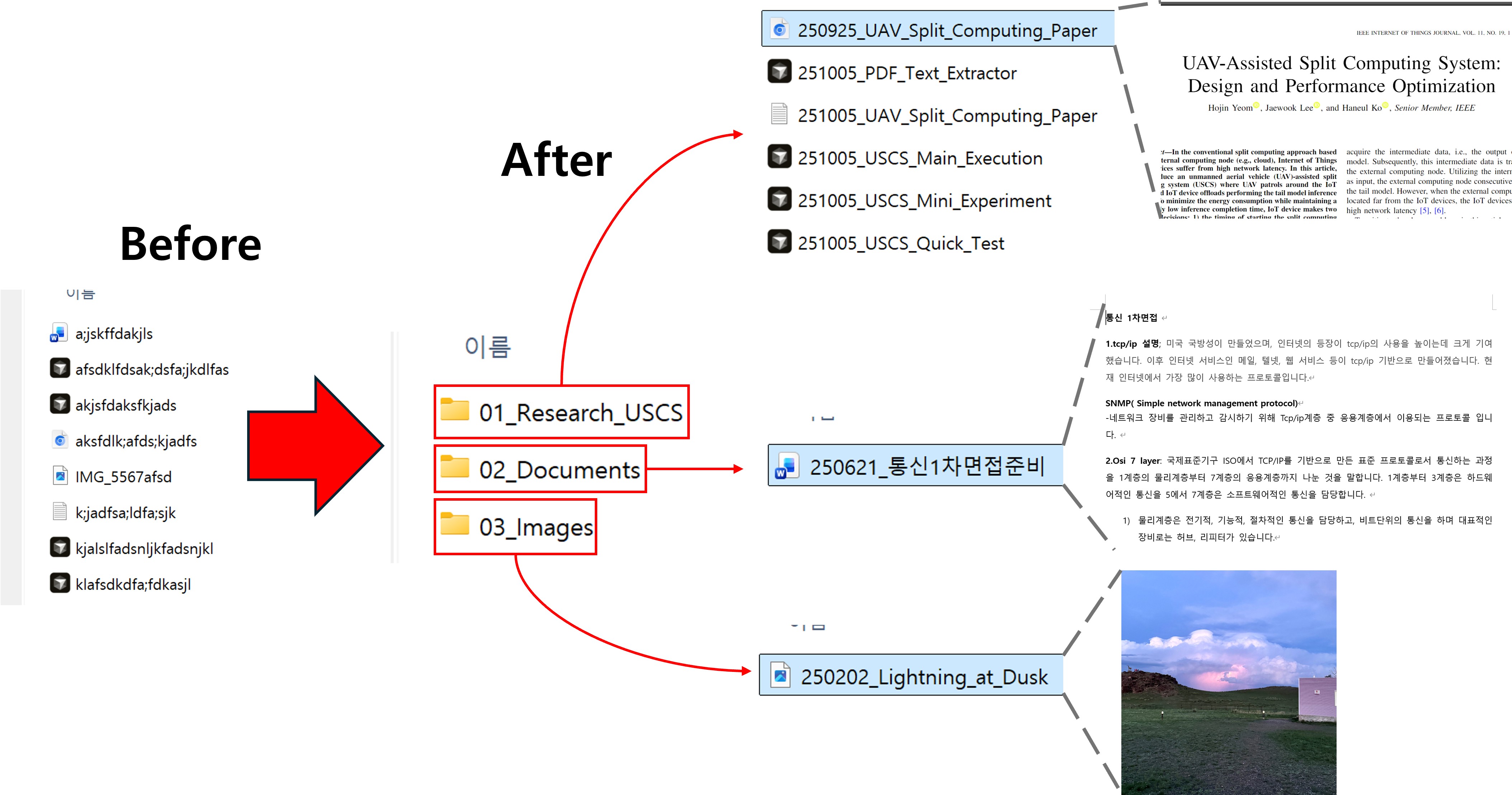
This project is licensed under the MIT License - see the LICENSE file for details.
This server cannot be deployed
Safe folder access for ChatGPT and Claude: read, write and search files, risky tools opt-in.
Your own computer's files from ChatGPT or Claude: folder rules, confirmations and undo.
Connect ChatGPT, Claude, Cursor or VS Code to your Windows PC: files, terminal, browser, apps.
Use your Mac, Windows or Linux computer from ChatGPT, Claude or Codex: files, commands, documents.