
Teradata MCP Server
<p align="center">
<!-- Optional: replace with a logo if you have one -->
<!-- <img src="docs/media/logo.svg" alt="Teradata MCP Server" width="120"> -->
</p>
<h1 align="center">Teradata MCP Server</h1>
<p align="center">
<a href="https://github.com/Teradata/teradata-mcp-server/blob/main/docs/README.md">
<img alt="docs" src="https://img.shields.io/badge/docs-readme-555?logo=readthedocs">
</a>
<a href="https://github.com/Teradata/teradata-mcp-server/releases">
<img alt="release" src="https://img.shields.io/github/v/release/Teradata/teradata-mcp-server?display_name=tag&sort=semver">
</a>
<a href="https://pypi.org/project/teradata-mcp-server/">
<img alt="PyPI" src="https://img.shields.io/pypi/v/teradata-mcp-server">
</a>
<a href="https://pypi.org/project/teradata-mcp-server/">
<img alt="downloads" src="https://img.shields.io/pypi/dm/teradata-mcp-server?label=downloads&color=2ea44f">
</a>
<a href="./examples/app-flowise/flowise_teradata_agents/README.md">
<img alt="docs" src="https://img.shields.io/badge/Teradata--Agents-Setup-green">
</a>
</p>
<p align="center">
Model Context Protocol (MCP) server for Teradata
</p>
<p align="center">
✨ <a href="https://github.com/Teradata/teradata-mcp-server?tab=readme-ov-file#quick-start-with-claude-desktop-no-installation">Quickstart with Claude Desktop </a> or <a href="https://github.com/Teradata/teradata-mcp-server/blob/main/docs/README.md#-quick-start"> your favorite tool</a> in <5 minute ✨
</p>
## Overview
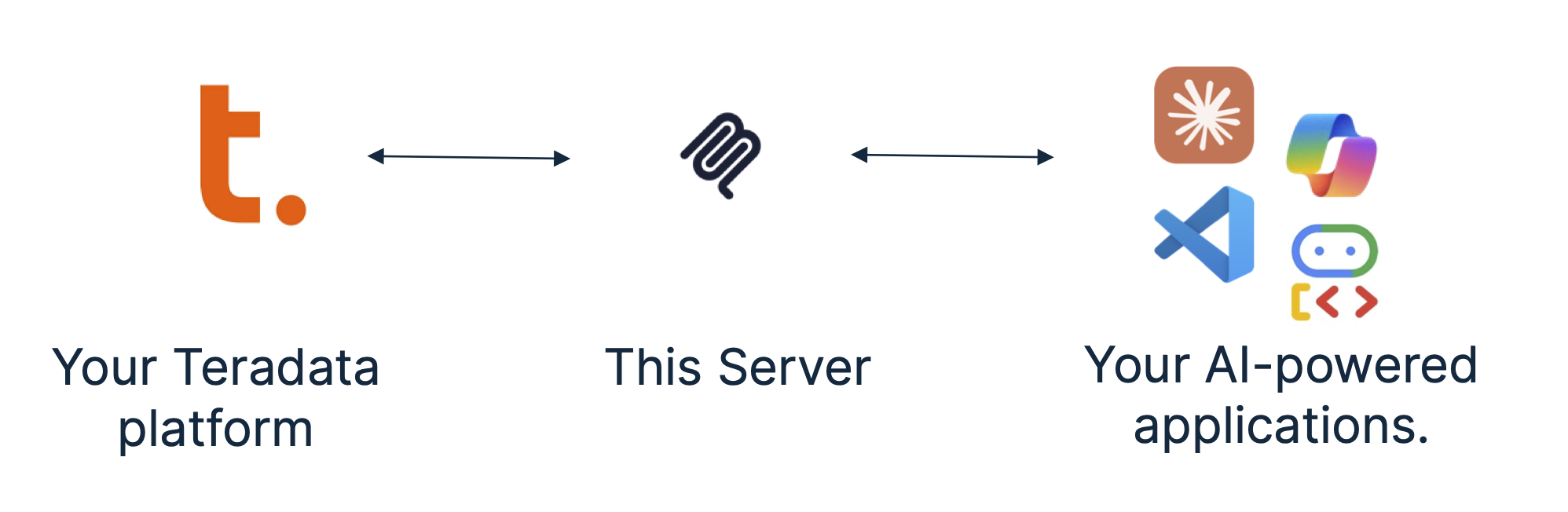
The Teradata MCP server provides sets of tools and prompts, grouped as modules for interacting with Teradata databases. Enabling AI agents and users to query, analyze, and manage their data efficiently.
## Key features
### Available tools and prompts
We are providing groupings of tools and associated helpful prompts to support all type of agentic applications on the data platform.
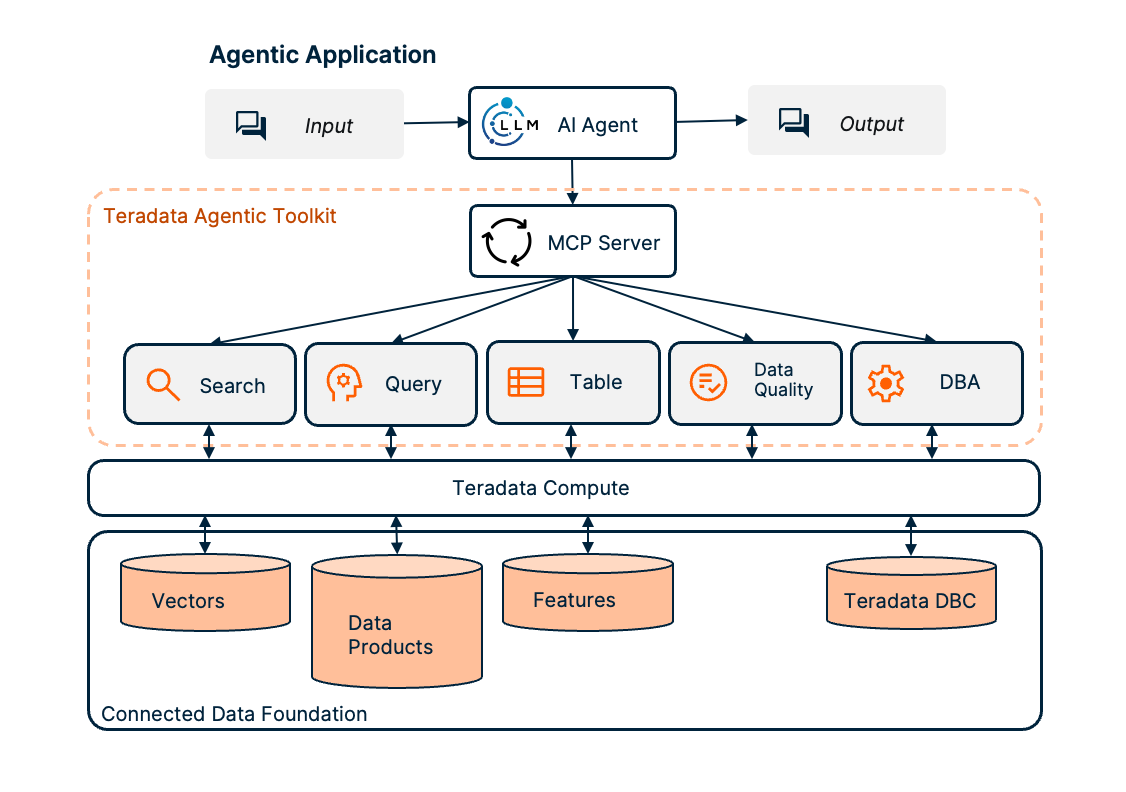
- **Search** tools, prompts and resources to search and manage vector stores.
- [RAG Tools](https://github.com/Teradata/teradata-mcp-server/blob/main/src/teradata_mcp_server/tools/rag/README.md) rapidly build RAG applications.
- **Query** tools, prompts and resources to query and navigate your Teradata platform:
- [Base Tools](https://github.com/Teradata/teradata-mcp-server/blob/main/src/teradata_mcp_server/tools/base/README.md)
- **Table** tools, to efficiently and predictably access structured data models:
- [Feature Store Tools](https://github.com/Teradata/teradata-mcp-server/blob/main/src/teradata_mcp_server/tools/fs/README.md) to access and manage the Teradata Enterprise Feature Store.
- [Semantic layer definitions](https://github.com/Teradata/teradata-mcp-server/blob/main/docs/server_guide/CUSTOMIZING.md) to easily implement domain-specific tools, prompts and resources for your own business data models.
- **Data Quality** tools, prompts and resources accelerate exploratory data analysis:
- [Data Quality Tools](https://github.com/Teradata/teradata-mcp-server/blob/main/src/teradata_mcp_server/tools/qlty/README.md)
- **DBA** tools, prompts and resources to facilitate your platform administration tasks:
- [DBA Tools](https://github.com/Teradata/teradata-mcp-server/blob/main/src/teradata_mcp_server/tools/dba/README.md)
- [Security Tools](https://github.com/Teradata/teradata-mcp-server/blob/main/src/teradata_mcp_server/tools/sec/README.md)
- **Data Scientist** tools, prompts, and resources to build powerful [AI agents and workflows](./examples/app-flowise/flowise_teradata_agents/README.md) for data-driven applications.
- [Teradata Vector Store Tools](./src/teradata_mcp_server/tools/tdvs/README.md)
- [Teradataml Functions Tools](./src/teradata_mcp_server/tools/constants.py)
- [Plot Tools](./src/teradata_mcp_server/tools/plot/README.md)
## Quick start with Claude Desktop (no installation)
> Prefer to use other tools? Check out our Quick Starts for [VS Code/Copilot](https://github.com/Teradata/teradata-mcp-server/blob/main/docs/server_guide/QUICK_START_VSCODE.md), [Open WebUI](https://github.com/Teradata/teradata-mcp-server/blob/main/docs/server_guide/QUICK_START_OPEN_WEBUI.md), or dive into [simple code examples](https://github.com/Teradata/teradata-mcp-server/blob/main/examples/README.md#client-applications)!
You can use Claude Desktop to give the Teradata MCP server a quick try, Claude can manage the server in the background using `uv`. No permanent installation needed.
**Pre-requisites**
1. Get your Teradata database credentials or create a free sandbox at [Teradata Clearscape Experience](https://www.teradata.com/getting-started/demos/clearscape-analytics).
2. Install [Claude Desktop](https://claude.ai/download).
3. Install [uv](https://docs.astral.sh/uv/getting-started/installation/). If you are on MacOS, Use Homebrew: `brew install uv`, on Windows you may use `pip install uv` as an alternative to the installer.
Configure the claude_desktop_config.json (Settings>Developer>Edit Config) by adding the configuration below, updating the database username, password and URL:
```json
{
"mcpServers": {
"teradata": {
"command": "uvx",
"args": ["teradata-mcp-server"],
"env": {
"DATABASE_URI": "teradata://<USERNAME>:<PASSWORD>@<HOST_URL>:1025/<USERNAME>"
}
}
}
}
```
## Installation Instructions
Follow this process to install your server, connect it to your Teradata platform and integrated your tools.
**Step 1.** - Identify the running Teradata System, you need username, password and host details. If you do not have a Teradata system to connect to, then leverage [Teradata Clearscape Experience](https://www.teradata.com/getting-started/demos/clearscape-analytics)
**Step 2.** - To install, configure and run the MCP server, refer to the [Teradata MCP Server Documentation](https://github.com/Teradata/teradata-mcp-server/blob/main/docs/README.md).
**Step 3.** - There are many client options available, the [Client Guide](https://github.com/Teradata/teradata-mcp-server/blob/main/docs/README.md#-client-guide) explains how to configure and run a sample of different clients.
<br>
Check out our libraries of [curated examples](https://github.com/Teradata/teradata-mcp-server/blob/main/examples/) or [video guides](https://github.com/Teradata/teradata-mcp-server/blob/main/docs/server_guide/VIDEO_LIBRARY.md).
<br>
## Contributing
Please refer to the [Contributing](https://github.com/Teradata/teradata-mcp-server/blob/main/docs/developer_guide/CONTRIBUTING.md) guide and the [Developer Guide](https://github.com/Teradata/teradata-mcp-server/blob/main/docs/developer_guide/DEVELOPER_GUIDE.md).
---------------------------------------------------------------------
## Certification
<a href="https://glama.ai/mcp/servers/@Teradata/teradata-mcp-server">
<img width="380" height="200" src="https://glama.ai/mcp/servers/@Teradata/teradata-mcp-server/badge" alt="Teradata Server MCP server" />
</a>
TDQS
Scored across 39 tools
There is significant overlap and ambiguity among tools, particularly within categories like base_* (e.g., base_tableAffinity and base_tableUsage both analyze table usage but with unclear distinctions) and dba_* (e.g., dba_tableUsageImpact and dba_tableSqlList both relate to table usage analysis). The plot_* tools are clearly distinct for chart types, but many others have overlapping purposes that could confuse an agent about which to select for a given task.
The naming follows a prefix-based pattern (base_, dba_, qlty_, sec_, sql_, plot_, rag_) which provides some consistency, but within these prefixes, conventions vary (e.g., snake_case is used, but names like sql_Execute_Full_Pipeline mix verb styles). The prefixes help group tools by domain, but the naming is not fully predictable or uniform across all tools.
With 39 tools, the count is excessive for a single server, making it heavy and potentially overwhelming for an agent to navigate. While the server covers multiple domains (e.g., database operations, DBA tasks, quality checks, SQL analysis, plotting, RAG), the high number suggests poor scoping, as many tools could be consolidated or split into more focused servers.
The tool set covers a broad range of Teradata database operations, including metadata exploration, performance monitoring, data quality, security, SQL analysis, and visualization. There are no obvious major gaps for the inferred domain of database management and analysis, though some minor overlaps might indicate redundancy rather than incompleteness.