A
licenseA
qualityD
maintenanceAn MCP server that powers AI agents with indexed blockchain data from The Graph.
3
MIT

Click on "Deploy Server".
Wait a few minutes for the server to deploy. Once ready, it will show a "Started" state.
In the chat, type @ followed by the MCP server name and your instructions, e.g., "@Cyb MCP Server search for recent AI research papers on decentralized knowledge graphs"
That's it! The server will respond to your query, and you can continue using it as needed.
Here is a step-by-step guide with screenshots.
A Model Context Protocol (MCP) server for integrating with the Cyber. This server enables AI agents to interact with the decentralized knowledge graph, create cyberlinks, and retrieve content from IPFS through the Cyber network.
This project is a contribution to the Great Web Foundation, supporting the development of a decentralized, censorship-resistant web.
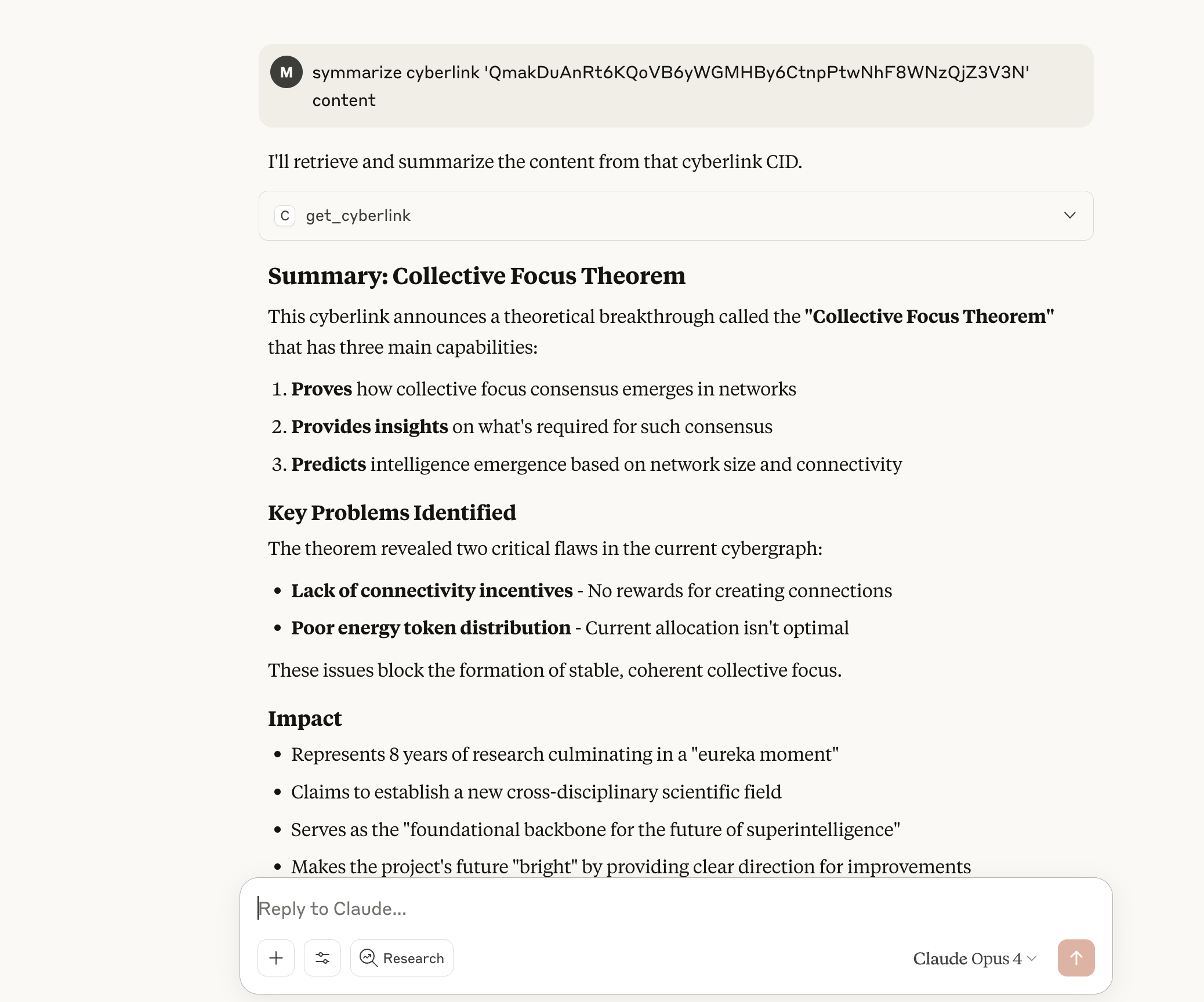
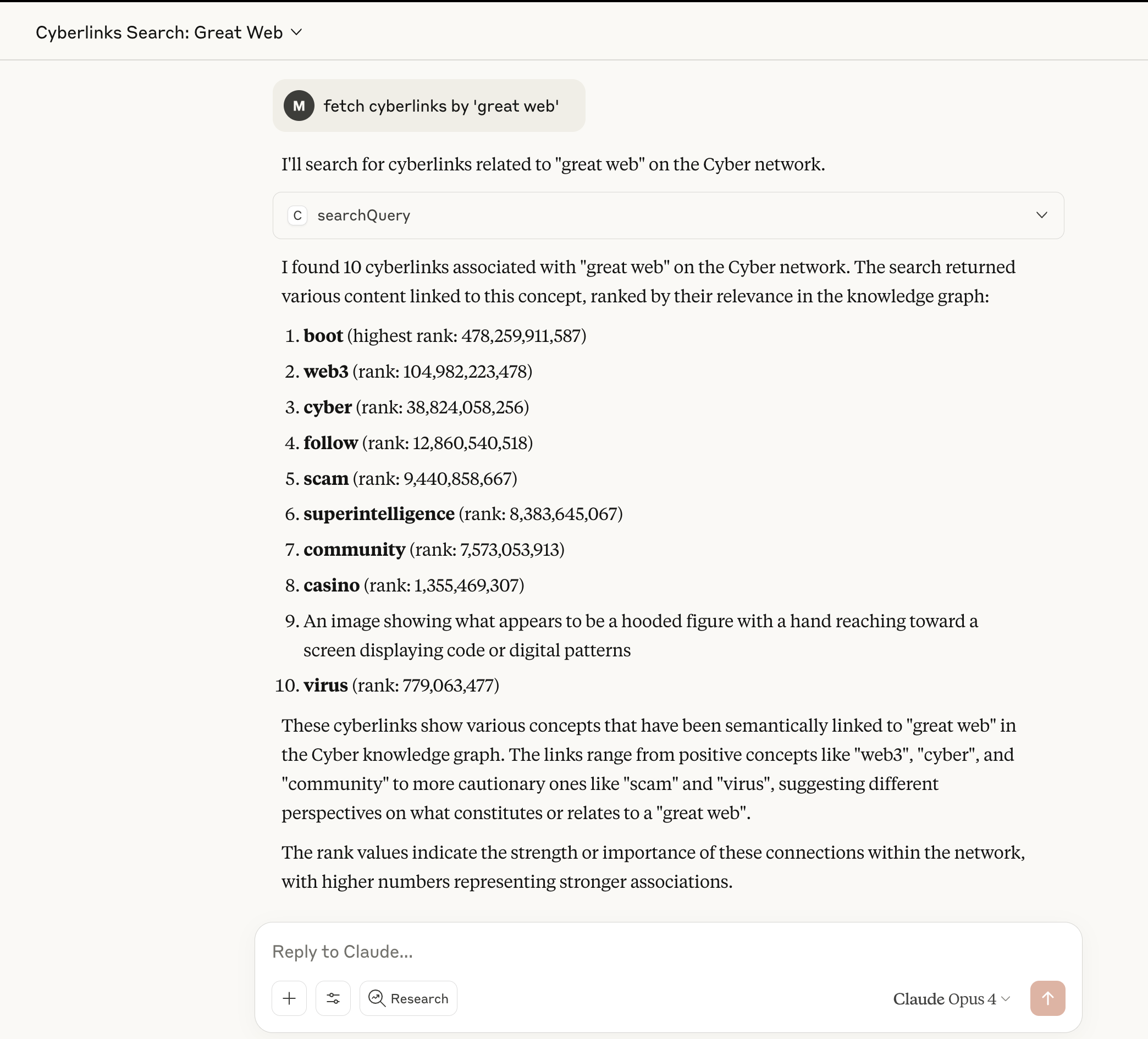
sendCyberlink: Create cyberlinks between IPFS CIDs on the Cyber network using CIDs or plain texts
searchQuery: Search the Cyber knowledge graph and retrieve content from IPFS
getCyberlink: Retrieve content from IPFS by CID
Related MCP server: knowledgeplane
Install dependencies:
npm installBuild the project:
npm run buildConfigure environment variables:
# Required for all operations
export CYBER_RPC_URL="https://rpc.bostrom.cybernode.ai"
export CYBER_GATEWAY="https://gateway.ipfs.cybernode.ai"

# Optional - only needed for sendCyberlink tool
export CYBER_MNEMONIC="your twelve word mnemonic phrase here"
Run the server:
npm startAdd to your Claude Desktop configuration:
{
  "mcpServers": {
    "cyb": {
      "command": "node",
      "args": ["/path/to/cyb-mcp/dist/index.js"],
      "env": {
        "CYBER_RPC_URL": "https://rpc.bostrom.cybernode.ai",
        "CYBER_GATEWAY": "https://gateway.ipfs.cybernode.ai"
      }
    }
  }
}
For sendCyberlink functionality, add mnemonic:
{
  "mcpServers": {
    "cyb": {
      "command": "node",
      "args": ["/path/to/cyb-mcp/dist/index.js"],
      "env": {
        "CYBER_MNEMONIC": "your twelve word mnemonic phrase here",
        "CYBER_RPC_URL": "https://rpc.bostrom.cybernode.ai",
        "CYBER_GATEWAY": "https://gateway.ipfs.cybernode.ai"
      }
    }
  }
}Creates a cyberlink between two pieces of content. Requires mnemonic to be configured.
Parameters:
from: Source CID or text content
to: Target CID or text content
fee: Optional transaction fee object
Note: This tool will return an error if no mnemonic is provided in the configuration.
Searches the Cyber knowledge graph. No mnemonic required.
Parameters:
query: Search query (CID or text)
page: Page number for pagination (default: 0)
retrieveContent: Whether to fetch content from IPFS (default: false)
limit: Max results to retrieve content for (default: 5)
Returns:
Array of content items in the response
Each search result as a separate item
Supports both text and image content when retrieveContent is true
Images are automatically detected and returned as base64-encoded data
Retrieves content from IPFS by CID through the Cyber gateway. No mnemonic required.
Parameters:
cid: IPFS CID to retrieve content for
Features:
Automatic image detection based on MIME type and content headers
Returns images as base64-encoded data with proper MCP image content type
Returns text content as formatted text
Supports PNG, JPEG, GIF, WebP, and SVG images
The MCP server supports two usage modes:
Available tools: searchQuery, getCyberlink
Perfect for exploring and retrieving content from the Cyber network
No wallet or signing capabilities
Available tools: sendCyberlink, searchQuery, getCyberlink
Includes wallet for creating cyberlinks and signing transactions
Requires mnemonic phrase for wallet access
The mnemonic is stored in environment variables. Keep your mnemonic secure and never commit it to version control.
Main Project: cyb.ai - The superintelligence for the decentralized web
Documentation: cyber.page - Philosophy of Great Web
Retrieve content from IPFS by CID through the Cyber gateway
| Name | Required | Description | Default |
|---|---|---|---|
| cid | Yes | IPFS CID to retrieve content for |
Does the description disclose side effects, auth requirements, rate limits, or destructive behavior?
With no annotations provided, the description carries the full burden of behavioral disclosure. It states the tool retrieves content but doesn't describe what 'retrieve' entails (e.g., read-only operation, potential rate limits, authentication needs, or what happens if the CID is invalid). This leaves significant gaps in understanding the tool's behavior.
Agents need to know what a tool does to the world before calling it. Descriptions should go beyond structured annotations to explain consequences.
Is the description appropriately sized, front-loaded, and free of redundancy?
The description is a single, efficient sentence that directly states the tool's purpose without unnecessary words. It's appropriately sized and front-loaded, with zero waste, making it easy for an agent to parse quickly.
Shorter descriptions cost fewer tokens and are easier for agents to parse. Every sentence should earn its place.
Given the tool's complexity, does the description cover enough for an agent to succeed on first attempt?
Given the complexity of retrieving content from IPFS (which may involve network calls, error handling, or data formats), the description is incomplete. With no annotations, no output schema, and minimal behavioral context, it doesn't provide enough information for an agent to use the tool effectively beyond the basic parameter requirement.
Complex tools with many parameters or behaviors need more documentation. Simple tools need less. This dimension scales expectations accordingly.
Does the description clarify parameter syntax, constraints, interactions, or defaults beyond what the schema provides?
Schema description coverage is 100%, with the single parameter 'cid' documented as 'IPFS CID to retrieve content for'. The description adds no additional parameter semantics beyond what the schema provides, such as CID format examples or constraints. Baseline 3 is appropriate when the schema does the heavy lifting.
Input schemas describe structure but not intent. Descriptions should explain non-obvious parameter relationships and valid value ranges.
Does the description clearly state what the tool does and how it differs from similar tools?
The description clearly states the action ('Retrieve content') and target resource ('from IPFS by CID through the Cyber gateway'), providing a specific verb+resource combination. However, it doesn't explicitly differentiate from sibling tools like 'searchQuery' or 'sendCyberlink', which likely have different purposes (searching vs. sending content).
Agents choose between tools based on descriptions. A clear purpose with a specific verb and resource helps agents select the right tool.
Does the description explain when to use this tool, when not to, or what alternatives exist?
The description provides no guidance on when to use this tool versus alternatives like 'searchQuery' or 'sendCyberlink'. It doesn't mention prerequisites, exclusions, or contextual factors that would help an agent choose between these tools, leaving usage decisions ambiguous.
Agents often have multiple tools that could apply. Explicit usage guidance like "use X instead of Y when Z" prevents misuse.
Search the Cyber knowledge graph and optionally retrieve content from IPFS
| Name | Required | Description | Default |
|---|---|---|---|
| query | Yes | Search query (CID or text) | |
| page | No | Page number for pagination (default: 0) | |
| retrieveContent | No | Whether to retrieve actual content from IPFS gateway (default: false) | |
| limit | No | Maximum number of results to retrieve content for (default: 5) |
Does the description disclose side effects, auth requirements, rate limits, or destructive behavior?
With no annotations provided, the description carries the full burden of behavioral disclosure. It mentions searching and optional content retrieval but lacks details on permissions, rate limits, error handling, or what the search results entail (e.g., format, scope). For a tool with potential complexity in graph searching and IPFS integration, this is insufficient.
Agents need to know what a tool does to the world before calling it. Descriptions should go beyond structured annotations to explain consequences.
Is the description appropriately sized, front-loaded, and free of redundancy?
The description is a single, efficient sentence that front-loads the core purpose and optional feature. It wastes no words and is appropriately sized for the tool's functionality, earning full marks for conciseness.
Shorter descriptions cost fewer tokens and are easier for agents to parse. Every sentence should earn its place.
Given the tool's complexity, does the description cover enough for an agent to succeed on first attempt?
Given no annotations and no output schema, the description is minimal but covers the basic action. It doesn't explain return values or handle the complexity of graph searching and IPFS retrieval adequately. However, it's complete enough for a simple search tool, though gaps in behavioral details keep it at an average score.
Complex tools with many parameters or behaviors need more documentation. Simple tools need less. This dimension scales expectations accordingly.
Does the description clarify parameter syntax, constraints, interactions, or defaults beyond what the schema provides?
Schema description coverage is 100%, so the input schema already documents all parameters thoroughly. The description adds no additional meaning beyond implying that 'query' can be a CID or text (hinted in schema) and that content retrieval is optional. This meets the baseline for high schema coverage without extra value.
Input schemas describe structure but not intent. Descriptions should explain non-obvious parameter relationships and valid value ranges.
Does the description clearly state what the tool does and how it differs from similar tools?
The description clearly states the tool's purpose: 'Search the Cyber knowledge graph and optionally retrieve content from IPFS.' It specifies the verb ('Search') and resource ('Cyber knowledge graph'), with an additional capability ('retrieve content from IPFS'). However, it doesn't explicitly differentiate from sibling tools like 'getCyberlink' or 'sendCyberlink', which might involve similar graph operations, so it falls short of a perfect score.
Agents choose between tools based on descriptions. A clear purpose with a specific verb and resource helps agents select the right tool.
Does the description explain when to use this tool, when not to, or what alternatives exist?
The description provides no guidance on when to use this tool versus alternatives like 'getCyberlink' or 'sendCyberlink'. It mentions an optional action ('retrieve content from IPFS') but doesn't clarify scenarios where this is preferred or when other tools might be more appropriate, leaving the agent without usage context.
Agents often have multiple tools that could apply. Explicit usage guidance like "use X instead of Y when Z" prevents misuse.
Create a cyberlink between two IPFS CIDs on the Cyber network
| Name | Required | Description | Default |
|---|---|---|---|
| from | Yes | Source CID or text (will be converted to CID if not a valid CID) | |
| to | Yes | Target CID or text (will be converted to CID if not a valid CID) | |
| fee | No | Transaction fee (optional) |
Does the description disclose side effects, auth requirements, rate limits, or destructive behavior?
No annotations are provided, so the description carries the full burden of behavioral disclosure. While it indicates this is a creation operation (implying a write/mutation), it doesn't specify whether this requires authentication, has rate limits, is reversible, or what happens on success/failure. For a tool that likely modifies network state, this lack of detail is a significant gap.
Agents need to know what a tool does to the world before calling it. Descriptions should go beyond structured annotations to explain consequences.
Is the description appropriately sized, front-loaded, and free of redundancy?
The description is a single, clear sentence that efficiently conveys the core purpose without unnecessary words. It's front-loaded with the key action ('Create a cyberlink') and avoids redundancy, making it easy to parse quickly.
Shorter descriptions cost fewer tokens and are easier for agents to parse. Every sentence should earn its place.
Given the tool's complexity, does the description cover enough for an agent to succeed on first attempt?
Given the complexity (a network write operation with 3 parameters, nested objects, and no output schema), the description is insufficient. It lacks details on behavioral aspects like authentication, error handling, or return values, and doesn't leverage context from siblings. For a tool that likely has significant side effects, more completeness is needed.
Complex tools with many parameters or behaviors need more documentation. Simple tools need less. This dimension scales expectations accordingly.
Does the description clarify parameter syntax, constraints, interactions, or defaults beyond what the schema provides?
Schema description coverage is 100%, so the schema already documents all parameters ('from', 'to', 'fee') thoroughly. The description adds no additional parameter semantics beyond implying that inputs can be CIDs or text, which is already covered in the schema descriptions. This meets the baseline for high schema coverage.
Input schemas describe structure but not intent. Descriptions should explain non-obvious parameter relationships and valid value ranges.
Does the description clearly state what the tool does and how it differs from similar tools?
The description clearly states the action ('Create a cyberlink') and the resources involved ('between two IPFS CIDs on the Cyber network'), making the purpose immediately understandable. However, it doesn't explicitly differentiate from sibling tools like 'getCyberlink' (which presumably retrieves cyberlinks) or 'searchQuery' (which likely searches for content), leaving some ambiguity about when to choose this tool over alternatives.
Agents choose between tools based on descriptions. A clear purpose with a specific verb and resource helps agents select the right tool.
Does the description explain when to use this tool, when not to, or what alternatives exist?
The description provides no guidance on when to use this tool versus its siblings ('getCyberlink' and 'searchQuery'). It doesn't mention prerequisites, such as needing valid CIDs or network access, or any context-specific recommendations. Without this, users must infer usage from the tool name alone.
Agents often have multiple tools that could apply. Explicit usage guidance like "use X instead of Y when Z" prevents misuse.
Recent tool additions, removals, and schema changes observed during successful MCP inspections.
getCyberlinksearchQuerysendCyberlinkScored across 3 tools
Each tool has a clearly distinct purpose: getCyberlink retrieves content from IPFS, searchQuery searches the knowledge graph and optionally retrieves content, and sendCyberlink creates links between CIDs. There is no overlap in functionality, making tool selection straightforward for an agent.
The tools follow a consistent verb_noun pattern (getCyberlink, searchQuery, sendCyberlink) with camelCase naming throughout. However, 'searchQuery' uses 'Query' as the noun, which is slightly less descriptive than the others, but overall the naming is highly consistent and predictable.
With 3 tools, this server is well-scoped for its purpose of interacting with the Cyber network and IPFS. Each tool serves a distinct and essential function (retrieval, search, and linking), and there are no extraneous tools, making the count appropriate and efficient.
The toolset covers core operations for the Cyber/IPFS domain: retrieving content, searching the knowledge graph, and creating cyberlinks. Minor gaps might include operations like deleting or updating cyberlinks, but the provided tools enable key workflows without significant dead ends.
MCP server connecting AI agents to non-custodial staking data across 130+ networks.
Persistent memory, knowledge graph, task management and more for AI agents via MCP.
MCP server giving AI agents one-connection access to crypto & DeFi data: DeFi protocol TVL, stableco
MCP server for AI agents to plan, verify, and deploy Cloudflare-native apps.